Page 24 of 325
23
Quick Reference Guide
What to Do If
The ignition switch does
not turn from
(0 to (q.
Why?
● The steering wheel may be locked.
● Move the steering wheel left and right
while turning the ignition key.
The ignition switch does
not turn from
(q to (0 and
I cannot remove the key.
Why?
The shift lever should be moved to (P on
the automatic transmission (CVT) model.
Why does the brake pedal
pulsate slightly when
applying the brakes?This can occur when the ABS activates, and does not indicate a
problem. Apply firm, steady pressu re on the brake pedal. Never
pump the brake pedal.
Why do the doors lock
after I unlocked the doors using a remote
transmitter?If you do not open the doors within 30 seconds, the doors are
relocked automatically for security.
Main Menu
Page 25 of 325
24
Quick Reference Guide
Why does the beeper
sound when I open the driver's door?The beeper sounds when: ●The key is left in the ignition switch.
● The exterior lights are left on.
● The Auto Idle Stop is in operation.
Why does the beeper
sound when I start driving?The beeper sounds when: ●Driver and/or passenger are not wearing their seat belts.
● The parking brake lever is not fully released.
Why do I hear a screeching
sound when I apply the
brake pedal?The brake pads may need to be replaced. Have your vehicle
inspected by a dealer.
Main Menu
Page 26 of 325
25
Quick Reference Guide
California Proposition 65 Warning Event Data Recorders
This vehicle is equipped with an event data recorder (EDR).
The main purpose of an EDR is to record, in certain crash or near
crash-like situations, such as an air bag deployment or hitting a
road obstacle, data that will assist in understanding how a vehicle’s
systems performed. The EDR is designed to record data related
to vehicle dynamics and safety systems for a short period of
time, typically 30 seconds or less. The EDR in this vehicle is
designed to record such data as: • How various systems in your vehicle were operating;
• Whether or not the driver and passenger safety belts were buckled/fastened;
• How far (if at all) the driver was depressing the accelerator
and/or brake pedal; and,
• How fast the vehicle was traveling.
These data can help provide a better understanding of the
circumstances in which crashes and injuries occur. NOTE: EDR data
are recorded by your vehicle only if a non-trivial crash situation
occurs; no data are recorded by the EDR under normal driving
conditions and no personal data (e.g., name, gender, age, and
crash location) are recorded. However, other parties, such as law
enforcement, could combine the EDR data with the type of
personally identifying data routinely acquired during a crash investigation.
WARNING: This product contains or emits
chemicals known to the st ate of California to cause
cancer and birth defects or other reproductive
harm.
To read data recorded by an EDR, special equipment is required,
and access to the vehicle or the EDR is needed. In addition to the
vehicle manufacturer, other parties, such as law enforcement, that
have the special equipment, can read the information if they have
access to the vehicle or the EDR.
The data belongs to the vehicle owner and may not be accessed by
anyone else except as legally required or with the permission of the
vehicle owner.
Service Diagnostic Recorders
This vehicle is equipped with service-related devices that record information ab out powertrain performance. The data can be used
to verify emissions law requirements and/or help technicians
diagnose and solve service problems. It may also be combined with
data from other sources for research purposes, but it remains
confidential.
California Perchlorate C ontamination Prevention Act
The airbags, seat belt tensioners, and CR type batteries in this vehicle may contain perchlor ate materials - special handling may
apply. See www.dtsc.ca.gov/hazardouswaste/p erchlorate/
As you read this manual, you will find information that is preceded
by a symbol. This information is intended to help you avoid
damage to your vehicle, oth er property, or the environment.
NOTICE
Main Menu
Page 67 of 325

66
Instrument Panel
Indicators
IndicatorNameOn/BlinkingExplanationMessage
Parking Brake and
Brake System Indicator
(Red)
●Comes on for a few seconds
when you turn the ignition switch to ON
(w , then goes off.
● Comes on when the parking
brake is applied, and goes off when it is released.
● Comes on when the brake fluid
level is low.
● Comes on if there is a problem
with the brake system.
● The beeper sounds and the
indicator comes on if you drive
with the parking brake not fully released.
●Comes on while driving - Make sure
the parking brake is released. Check the
brake fluid level. 2What to do when the indicator
comes on while driving P. 295
● Comes on along with the ABS indicator - Have the vehicle checked by
a dealer. 2If the Brake System Indicator (Red)
Comes On P. 295
Low Oil
Pressure
Indicator
●
Comes on when you turn the
ignition switch to ON
(w , and
goes off when the engine starts.
● Comes on when the engine oil
pressure is low.
●Comes on while driving - Immediately
stop in a safe place. 2If the Low Oil Pressure Indicator
Comes On P. 292
U.S.
Canada
(Red)
U.S.Canada
Main MenuTable of Contents
Page 70 of 325
69
uuIndicatorsu
Continued
Instrument Panel
IndicatorNameOn/BlinkingExplanationMessage
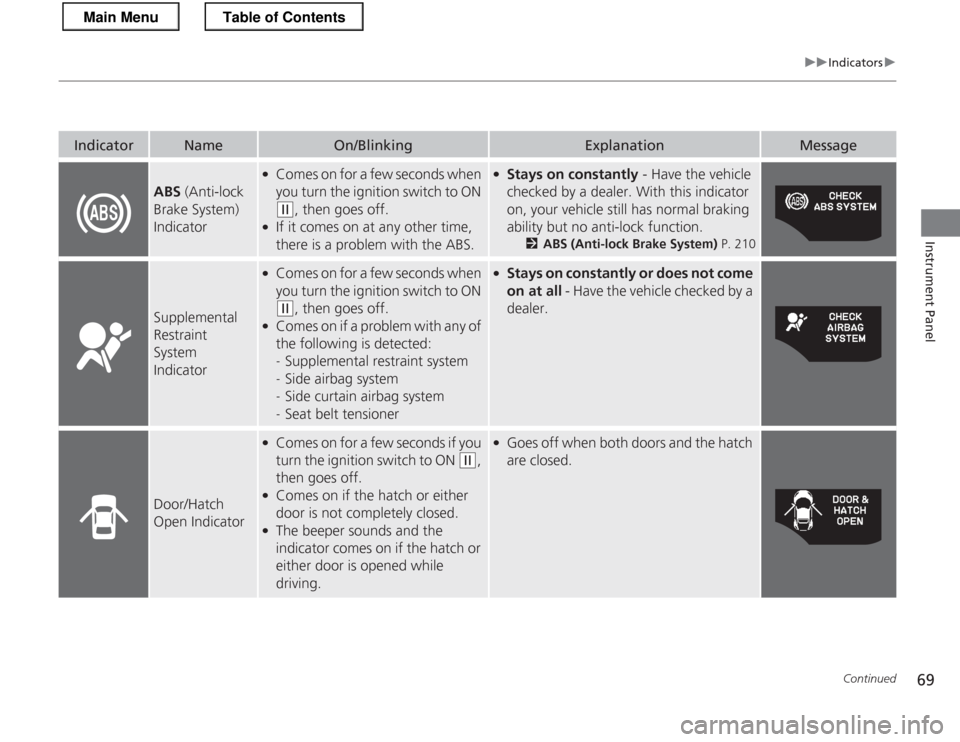
ABS (Anti-lock
Brake System)
Indicator
● Comes on for a few seconds when
you turn the ignition switch to ON
(w , then goes off.
● If it comes on at any other time,
there is a problem with the ABS.
●Stays on constantly - Have the vehicle
checked by a dealer. With this indicator
on, your vehicle still has normal braking
ability but no anti-lock function. 2ABS (Anti-lock Brake System) P. 210
Supplemental
Restraint System
Indicator
●
Comes on for a few seconds when
you turn the ignition switch to ON
(w , then goes off.
● Comes on if a problem with any of
the following is detected: -Supplemental restraint system
- Side airbag system
- Side curtain airbag system
- Seat belt tensioner
●
Stays on constantly or does not come on at all - Have the vehicle checked by a
dealer.
Door/Hatch
Open Indicator
● Comes on for a few seconds if you
turn the ignition switch to ON
(w ,
then goes off.
● Comes on if the hatch or either
door is not completely closed.
● The beeper sounds and the
indicator comes on if the hatch or
either door is opened while
driving.
●Goes off when both doors and the hatch are closed.
Main MenuTable of Contents
Page 71 of 325
70
uuIndicatorsu
Instrument Panel
IndicatorNameOn/BlinkingExplanationMessage
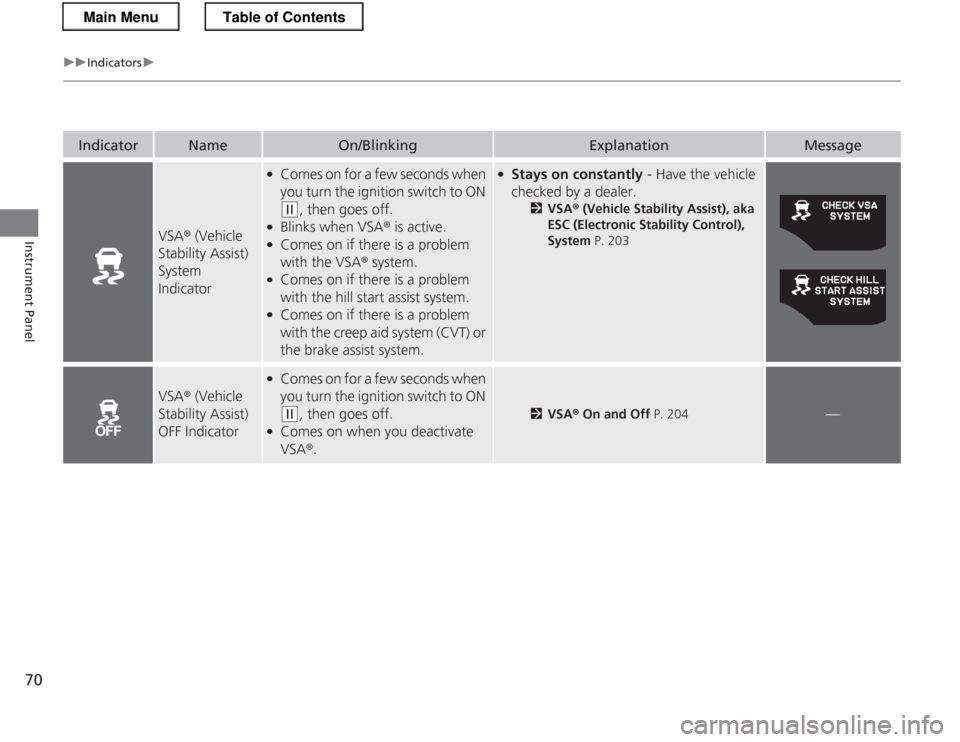
VSA® (Vehicle
Stability Assist) System
Indicator
● Comes on for a few seconds when
you turn the ignition switch to ON
(w , then goes off.
● Blinks when VSA ® is active.
● Comes on if there is a problem with the VSA ® system.
● Comes on if there is a problem
with the hill start assist system.
● Comes on if there is a problem
with the creep aid system (CVT) or
the brake assist system.
● Stays on constantly - Have the vehicle
checked by a dealer. 2VSA ® (Vehicle Stability Assist), aka
ESC (Electronic Stability Control),
System P. 203
VSA® (Vehicle
Stability Assist)
OFF Indicator
● Comes on for a few seconds when
you turn the ignition switch to ON
(w , then goes off.
● Comes on when you deactivate VSA ®.2 VSA ® On and Off P. 204—
Main MenuTable of Contents
Page 80 of 325
79
uuIndicatorsuMulti-Information Display Warning and Information Messages
Continued
Instrument Panel
MessageConditionExplanation
●Appears when the ignition key is turned to
ACCESSORY
(q from ON (w. (The driver’s door is
closed.)—
● Appears when you open the driver’s door while the
ignition key is in LOCK
(0 .
●
Remove the key from the ignition switch.
●
Appears when the IMA battery is significantly low.●Drive continuously or, if necessary, allow the vehicle to
idle in an open area until the message disappears.
●Appears while you are customizing the settings for the
following reasons:
The shift lever is moved out of
(P .
The parking brake is released.2 How to customize P. 90
Automatic transmiss ion (CVT) models
Manual transmission models
Main MenuTable of Contents
Page 87 of 325

uuGauges and Multi-Information DisplayuMulti-Information Display
86
Instrument Panel
■ Real-Time score
The Eco assist scoring system is a point system
you can use to monitor your driving style and
its impact on fuel economy. Points are
represented by leaf icons on the multi-
information display. Leaves are:• Accumulated when your driving style is fuel
efficient.
• Deducted when your style is not fuel efficient.
■ Reset the system
To clear all leaves and lifetime points, complete the following steps within 30
seconds, and do not run the engine. 1. The shift lever must be in
(P .
The parking brake must be set.
2. Turn the ignition switch to ON
(w .
3. Make sure the NORMAL mode is selected.
4. Depress the brake pedal twice.
uThe ambient meter color changes from blue to green.
uWhen the METER COLOR CHANGE setting on the multi-information display is
off, the color stays in blue.
5. Press the ECON mode button.
6. Press the NORMAL mode button.
uThe ambient meter color turns off.
7. Turn the ignition switch to LOCK
(0 .
■Ecological Drive Display
Leaf
ICON 1st Stage 2nd Stage 3rd Stage
1Reset the system
If the ECON mode is on in step 2, press the
NORMAL
mode button. Turn the ignition switch to LOCK
(0 ,
then go to step 1.
Automatic transmiss ion (CVT) models
Manual transmission models
Main MenuTable of Contents