uuMaintenance Minder
TMuTo Use Maintenance Minder
TM
258Maintenance
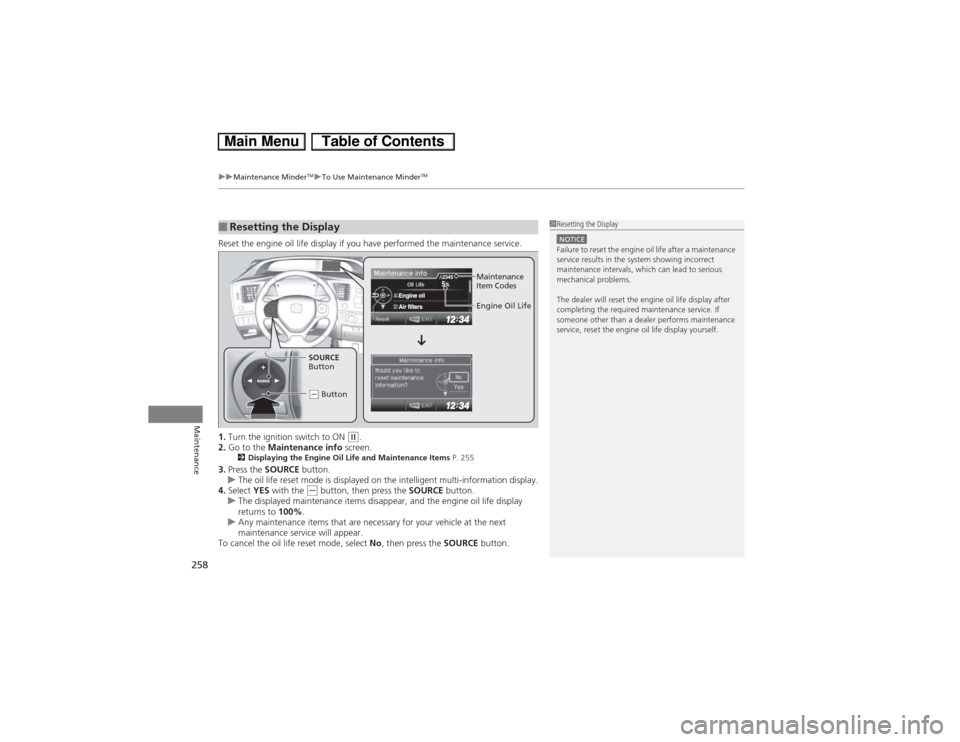
Reset the engine oil life display if you have performed the maintenance service.
1.Turn the ignition switch to ON
(w.
2.Go to the Maintenance info screen.
2Displaying the Engine Oil Life and Maintenance Items P. 255
3.Press the SOURCE button.
uThe oil life reset mode is displayed on the intelligent multi-information display.
4.Select YES with the
(- button, then press the SOURCE button.
uThe displayed maintenance items disappear, and the engine oil life display
returns to 100%.
uAny maintenance items that are necessary for your vehicle at the next
maintenance service will appear.
To cancel the oil life reset mode, select No, then press the SOURCE button.
■Resetting the Display
1Resetting the DisplayNOTICEFailure to reset the engine oil life after a maintenance
service results in the system showing incorrect
maintenance intervals, which can lead to serious
mechanical problems.
The dealer will reset the engine oil life display after
completing the required maintenance service. If
someone other than a dealer performs maintenance
service, reset the engine oil life display yourself.
Engine Oil Life
SOURCE
Button
(- Button
Maintenance
Item Codes