Page 176 of 346
175
Continued
Features
Bluetooth® HandsFreeLink®See the Navigation System Manual for how to operate the Bluetooth®
HandsFreeLink®.
Bluetooth® HandsFreeLink® (HFL) allows you to place and receive phone calls using
your vehicle’s audio system, without handling your cell phone.Using HFL
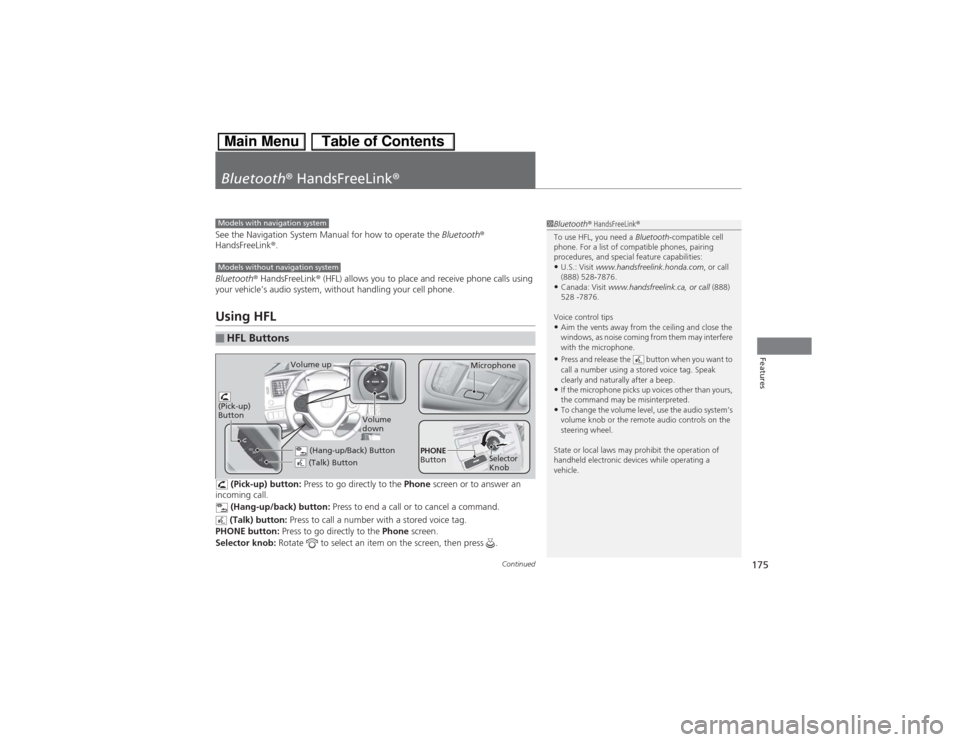
(Pick-up) button: Press to go directly to the Phone screen or to answer an
incoming call.
(Hang-up/back) button: Press to end a call or to cancel a command.
(Talk) button: Press to call a number with a stored voice tag.
PHONE button: Press to go directly to the Phone screen.
Selector knob: Rotate to select an item on the screen, then press .
■HFL Buttons
1Bluetooth® HandsFreeLink®
To use HFL, you need a Bluetooth-compatible cell
phone. For a list of compatible phones, pairing
procedures, and special feature capabilities:•U.S.: Visit www.handsfreelink.honda.com, or call
(888) 528-7876.•Canada: Visit www.handsfreelink.ca, or call (888)
528 -7876.
Voice control tips•Aim the vents away from the ceiling and close the
windows, as noise coming from them may interfere
with the microphone.•Press and release the button when you want to
call a number using a stored voice tag. Speak
clearly and naturally after a beep.•If the microphone picks up voices other than yours,
the command may be misinterpreted.•To change the volume level, use the audio system’s
volume knob or the remote audio controls on the
steering wheel.
State or local laws may prohibit the operation of
handheld electronic devices while operating a
vehicle.
Models with navigation systemModels without navigation system
(Talk) Button
Volume up
Microphone
(Hang-up/Back) Button
(Pick-up)
Button
Volume
down
Selector
Knob PHONE
Button
Page 180 of 346
179
uuBluetooth® HandsFreeLink®uHFL Menus
Continued
Features
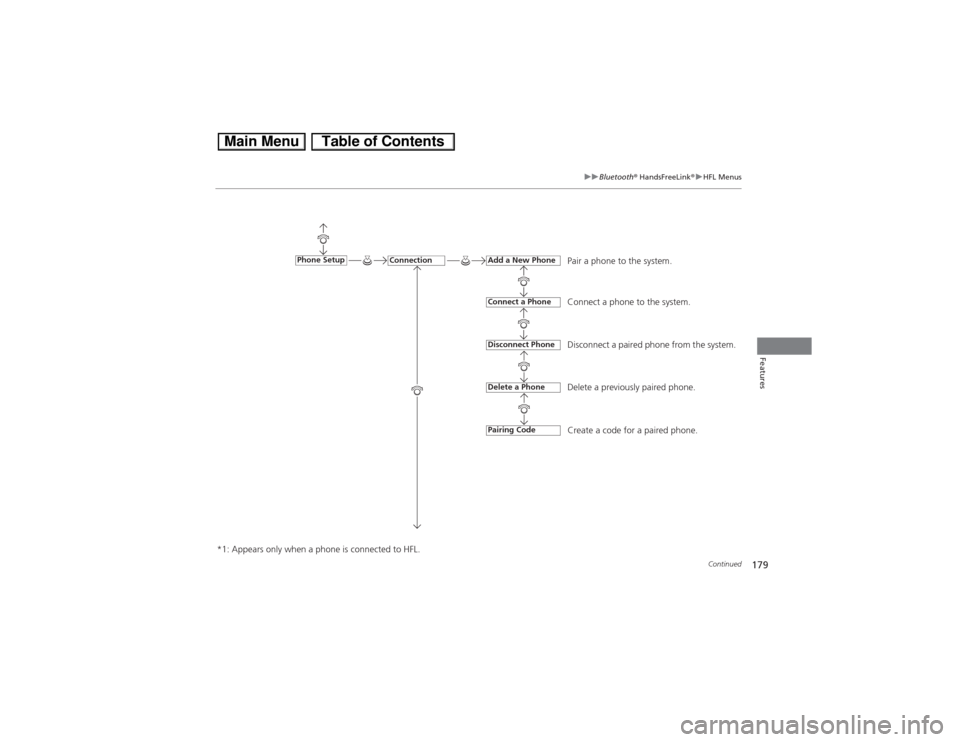
Pair a phone to the system.
Connect a phone to the system.
Disconnect a paired phone from the system.
Delete a previously paired phone.
Create a code for a paired phone.
Connection
Phone Setup
Add a New PhoneConnect a PhoneDisconnect PhoneDelete a PhonePairing Code
*1: Appears only when a phone is connected to HFL.
Page 183 of 346
uuBluetooth® HandsFreeLink®uHFL Menus
182Features
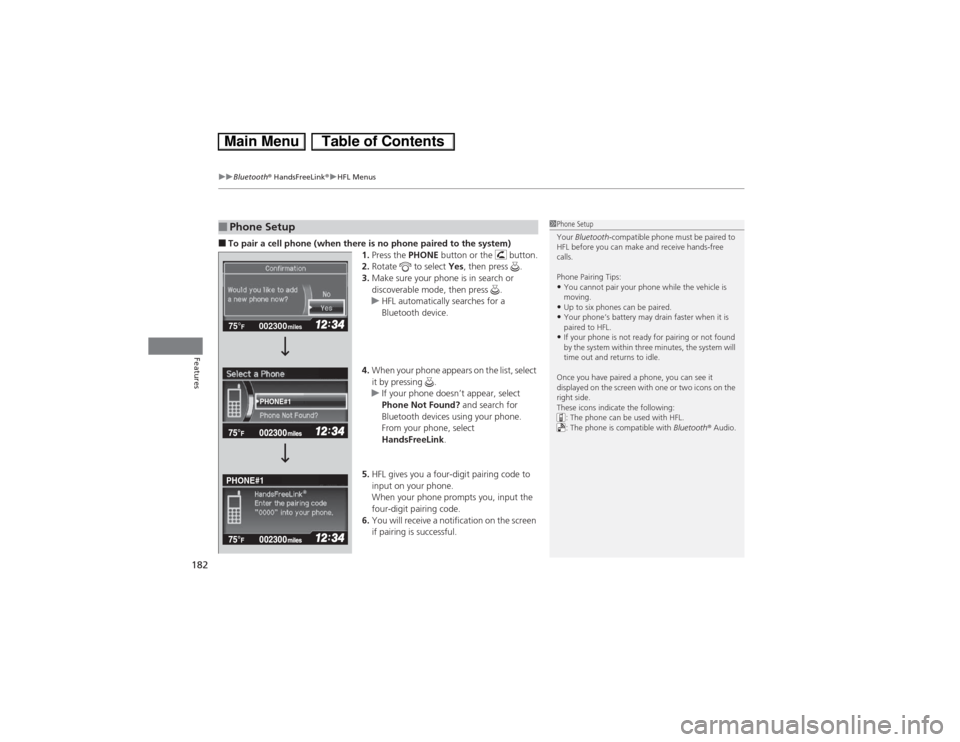
■To pair a cell phone (when there is no phone paired to the system)
1.Press the PHONE button or the button.
2.Rotate to select Yes, then press .
3.Make sure your phone is in search or
discoverable mode, then press .
uHFL automatically searches for a
Bluetooth device.
4.When your phone appears on the list, select
it by pressing .
uIf your phone doesn’t appear, select
Phone Not Found? and search for
Bluetooth devices using your phone.
From your phone, select
HandsFreeLink.
5.HFL gives you a four-digit pairing code to
input on your phone.
When your phone prompts you, input the
four-digit pairing code.
6.You will receive a notification on the screen
if pairing is successful.■Phone Setup
1Phone Setup
Your Bluetooth-compatible phone must be paired to
HFL before you can make and receive hands-free
calls.
Phone Pairing Tips:•You cannot pair your phone while the vehicle is
moving.•Up to six phones can be paired.•Your phone’s battery may drain faster when it is
paired to HFL.•If your phone is not ready for pairing or not found
by the system within three minutes, the system will
time out and returns to idle.
Once you have paired a phone, you can see it
displayed on the screen with one or two icons on the
right side.
These icons indicate the following:
: The phone can be used with HFL.
: The phone is compatible with Bluetooth® Audio.
002300 75°
F miles
PHONE#1
PHONE#1
Page 185 of 346
184
uuBluetooth® HandsFreeLink®uHFL Menus
Features
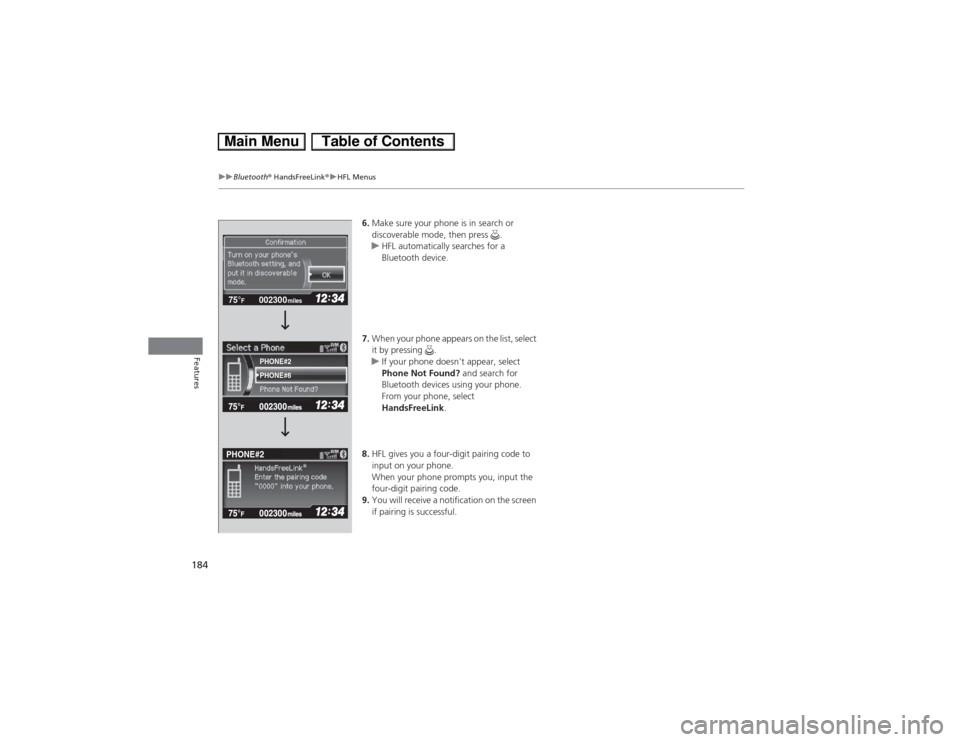
6.Make sure your phone is in search or
discoverable mode, then press .
uHFL automatically searches for a
Bluetooth device.
7.When your phone appears on the list, select
it by pressing .
uIf your phone doesn’t appear, select
Phone Not Found? and search for
Bluetooth devices using your phone.
From your phone, select
HandsFreeLink.
8.HFL gives you a four-digit pairing code to
input on your phone.
When your phone prompts you, input the
four-digit pairing code.
9.You will receive a notification on the screen
if pairing is successful.
002300 75°
F miles
PHONE#6
PHONE#2
PHONE#2
Page 186 of 346
Continued
185
uuBluetooth® HandsFreeLink®uHFL Menus
Features
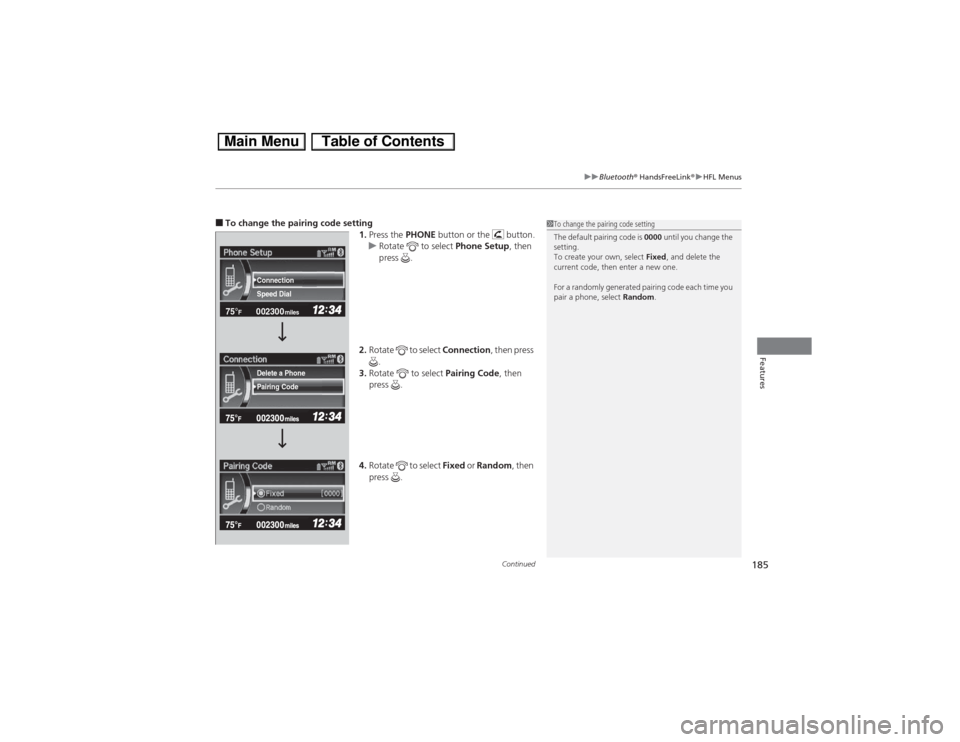
■To change the pairing code setting
1.Press the PHONE button or the button.
uRotate to select Phone Setup, then
press .
2.Rotate to select Connection, then press
.
3.Rotate to select Pairing Code, then
press .
4.Rotate to select Fixed or Random, then
press .
1To change the pairing code setting
The default pairing code is 0000 until you change the
setting.
To create your own, select Fixed, and delete the
current code, then enter a new one.
For a randomly generated pairing code each time you
pair a phone, select Random.
002300 75°
F miles
Speed Dial Connection
Pairing Code Delete a Phone
Page 187 of 346
186
uuBluetooth® HandsFreeLink®uHFL Menus
Features
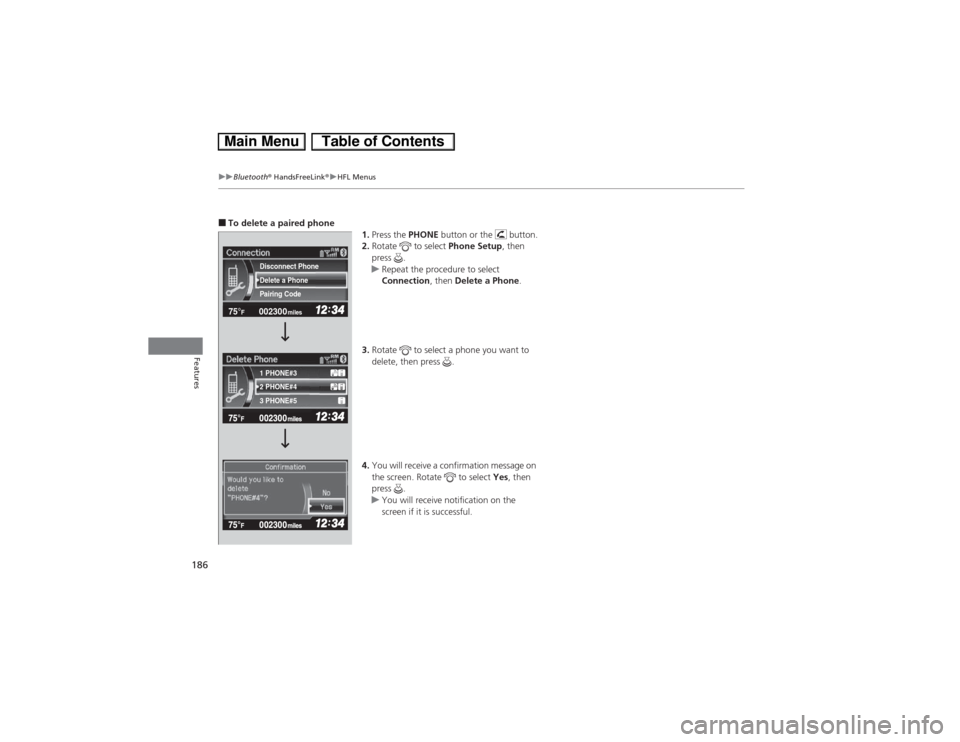
■To delete a paired phone
1.Press the PHONE button or the button.
2.Rotate to select Phone Setup, then
press .
uRepeat the procedure to select
Connection, then Delete a Phone.
3.Rotate to select a phone you want to
delete, then press .
4.You will receive a confirmation message on
the screen. Rotate to select Yes, then
press .
uYou will receive notification on the
screen if it is successful.
002300 75°
F miles
2 PHONE#4 1 PHONE#3
3 PHONE#5 Pairing Code Delete a Phone
Disconnect Phone
Page 296 of 346

295
Handling the Unexpected
This chapter explains how to handle unexpected troubles.
Tools
Types of Tools .................................. 296
If a Tire Goes Flat
Temporarily Repairing a Flat Tire....... 297
Changing a Flat Tire ......................... 305
Engine Does Not Start
Checking the Engine ........................ 311
Jump Starting.................................... 312
Shift Lever Does Not Move.............. 314
Overheating
How to Handle Overheating ............. 315Indicator, Coming On/Blinking
If the Low Oil Pressure Indicator Comes
On................................................ 317If the 12 Volt Battery Charging System
Indicator Comes On ....................... 317
If the Malfunction Indicator Lamp Comes
On or Blinks ..................................... 318
If the Brake System Indicator (Red) Comes
On...................................................... 319If the EPS System Indicator Comes On .. 319If the IMA Indicator Comes On......... 320If the Low Tire Pressure/TPMS Indicator
Comes On or Blinks ....................... 320
Fuses
Fuse Locations ................................. 321
Inspecting and Changing Fuses ........ 323
Emergency Towing........................... 324
Page 298 of 346

297
Continued
Handling the Unexpected
If a Tire Goes FlatTemporarily Repairing a Flat TireThis vehicle is not equipped with a spare tire. If the tire has a large cut or is otherwise
severely damaged, you will need to have the vehicle towed. If the tire only has a
small puncture, from a nail for instance, you can use the temporary tire repair kit so
that you can drive to the nearest service station for a more permanent repair.
If a tire goes flat while driving, grasp the steering wheel firmly, and brake gradually
to reduce speed. Then stop in a safe place.
1.Park the vehicle on firm, level, and non-slippery surface and apply the parking
brake.
2.Put the shift lever in
(P.
3.Turn on the hazard warning lights and turn the ignition switch to LOCK
(0.
■Getting Ready to Temporarily Repair the Flat Tire
1Temporarily Repairing a Flat Tire
The kit should not be used in the following situations.
Instead, contact a dealer or a roadside assistant to
have the vehicle towed.•The tire sealant has expired.•More than two tires are punctured.•The puncture or cut is larger than 3/16 inch (4 mm).•The tire side wall is damaged or the puncture is
outside the tire contact area.•Damage has been caused by driving with the tire
extremely under inflated.•The tire bead is no longer seated.•The rim is damaged.
Do not remove a nail or screw that punctured the
tire. If you remove it from the tire, you may not be
able to repair the puncture using the kit.NOTICEDo not use a puncture-repairing agent other than the
one provided in the kit that came with your vehicle. If
a different agent is used, you may permanently
damage the tire pressure sensor.
When the puncture is:
Kit Use
Smaller than 3/16 inch
(4mm)
Yes
Larger than 3/16 inch
(4mm)
No
Contact
Area
Pressure Gauge
Sealant/Air Hose (Clear)
Tire Sealant
Expiration Date
Pressure Relief
Button
Instruction
Manual
Air Only Hose (Black)
SEALANT/AIR sideAIR ONLY side
Inflator Switch
Repair Notification Label
Power Plug
Speed Restriction Label
Selector Switch