Page 70 of 346

69
uuIndicatorsu
Continued
Instrument Panel
Indicator
Name
On/Blinking
Explanation
Message
Malfunction
Indicator Lamp
●Comes on when you turn the
ignition switch to ON
(w, and goes
off either when the engine starts
or after several seconds if the
engine is not started. If “readiness
codes” have not been set, it blinks
five times before it goes off.
●Comes on if there is a problem
with the emissions control system.●Blinks when a misfire in the
engine’s cylinders is detected.
●Readiness codes are part of the on board
diagnostics for the emissions control
systems.
2Testing of Readiness Codes P. 331
●Comes on while driving - Have the
vehicle checked by a dealer.●Blinks while driving - Stop in a safe
place where there are no flammable
objects. Stop the engine for 10 minutes
or more, and wait for it to cool down.
Then, take the vehicle to a dealer.
2If the Malfunction Indicator Lamp
Comes On or Blinks P. 318
12 Volt Battery
Charging System
Indicator
●Comes on when you turn the
ignition switch to ON
(w, and goes
off when the engine starts.
●Comes on when the 12 volt
battery is not charging.
●Comes on while driving - Turn off the
climate control system and rear defogger
in order to reduce electricity
consumption.
2If the 12 Volt Battery Charging
System Indicator Comes On P. 317
Indicator
Shift Lever
Position
Indicator
●Indicates in which position your
shift lever is.
2Shifting P. 219
—
Page 73 of 346
72
uuIndicatorsu
Instrument Panel
Indicator
Name
On/Blinking
Explanation
Message
Vehicle Stability
Assist (VSA®)
OFF Indicator
●Comes on for a few seconds when
you turn the ignition switch to ON (w, then goes off.
●Comes on when you deactivate
VSA®.
2VSA® On and Off P. 236
—
Low Oil Pressure
Indicator
●Comes on when you turn the
ignition switch to ON
(w, and goes
off when the engine starts.
●Comes on when the engine oil
pressure is low.
●Comes on while driving - Immediately
stop in a safe place.
2If the Low Oil Pressure Indicator
Comes On P. 317
Door Open
Indicator
●Comes on for a few seconds if you
turn the ignition switch to ON
(w,
then goes off.
●Comes on if any door is not
completely closed.●The beeper sounds and the
indicator comes on if any door is
opened while driving.
●Goes off when all doors are closed.
Trunk Open
Indicator
●Comes on for a few seconds if you
turn the ignition switch to ON
(w,
then goes off.
●Comes on if the trunk is not
completely closed.
●Goes off when the trunk is closed.
Page 74 of 346

73
uuIndicatorsu
Continued
Instrument Panel
Indicator
Name
On/Blinking
Explanation
Message
Electric Power
Steering (EPS)
System Indicator
●Comes on when you turn the
ignition switch to ON
(w, and goes
off when the engine starts.
●Comes on if there is a problem
with the EPS system.
●Stays on constantly or does not come
on at all - Have the vehicle checked by a
dealer.
2If the EPS System Indicator Comes
On P. 319
Auto Idle Stop
Indicator
●Blinks when Auto Idle Stop is in
operation. The engine
automatically shuts off.
2Auto Idle Stop P. 222
—
Low Tire
Pressure/TPMS
Indicator
●Comes on for a few seconds when
you turn the ignition switch to ON (w.
●Comes on if the tire pressure of
any of the tires becomes
significantly low.●Blinks for about one minute, and
then stays on if there is a problem
with the TPMS, or when a compact
spare tire
* is temporarily installed.
●Comes on while driving - Stop in a safe
place, check tire pressures, and inflate the
tire(s) if necessary.●Blinks and remains on - Have the
vehicle checked by a dealer. If the vehicle
is fitted with a compact spare, get your
regular tire repaired or replaced and put
back on your vehicle as soon as you can.
U.S.
models
only* Not available on all models
Page 76 of 346

75
uuIndicatorsu
Continued
Instrument Panel
Indicator
Name
On/Blinking
Explanation
Message
High-Beam
Indicator
●Comes on when the high beam
headlights are on.
—
—
Lights On
Indicator
●Comes on whenever the light
switch is on, or in AUTO when the
exterior lights are on.
●If you remove the key from the ignition
switch while the lights are on, a chime
sounds when the driver’s door is opened.
—
Immobilizer
System Indicator
●Comes on briefly when you turn
the ignition switch to ON
(w, then
goes off.
●Comes on if the immobilizer
system cannot recognize the key
information.
●Blinks - You cannot start the engine.
Turn the ignition switch to LOCK
(0, pull
the key out, and then insert the key and
turn it to ON
(w again.
●Repeatedly blinks - The system may be
malfunctioning. Have the vehicle checked
by a dealer.●Do not attempt to alter this system or add
other devices to it. Electrical problems can
occur.
—
CRUISE MAIN
Indicator
●Comes on when you press the
CRUISE button.
2Cruise Control P. 225
—
CRUISE
CONTROL
Indicator
●Comes on if you have set a speed
for cruise control.
2Cruise Control P. 225
—
Page 77 of 346

76
uuIndicatorsu
Instrument Panel
Indicator
Name
On/Blinking
Explanation
Message
Security System
Alarm Indicator
●Blinks when the Security System
Alarm has been set.
2Security System Alarm P. 115
—
High
Temperature
Indicator
●Comes on for a few seconds when
you turn the ignition switch to ON (w then goes off.
●Blinks when the engine coolant
temperature goes up, and stays on
if the temperature continues to
rise.
●Blinks while driving - Drive slowly to
prevent overheating.●Stays on while driving - Immediately
stop in a safe place and allow the engine
to cool.
2Overheating P. 315
Low
Temperature
Indicator
●Comes on when the engine
coolant temperature is low.
●If the indicator stays on after the engine
has reached normal operating
temperature, there may be a problem
with the temperature sensors. Have the
vehicle inspected by a dealer.
—
ECON Mode
Indicator
●Comes on for a few seconds when
you turn the ignition switch to ON (w, then goes off.
●Comes on when the ECON mode is
on.
2ECON Button P. 221
Page 83 of 346
82Instrument Panel
Gauges and intelligent Multi-Information Display (i-MID)GaugesGauges include the speedometer, tachometer, fuel gauge, and related indicators.
They are displayed when the ignition switch is in ON
(w.
Displays your driving speed in mph or km/h.
Shows the number of engine revolutions per minute.
Displays the amount of fuel left in the fuel tank.
Shows the instant fuel economy as a bar graph in mpg or l/100km.
■Speedometer■Tachometer■Fuel Gauge■Instant Fuel Economy Gauge
1Gauges
Press and hold the km/mile change knob until you
hear a beep. The speedometer reading and the
displayed measurements switch between mph and
km/h.1Fuel GaugeNOTICEYou should refuel when the reading approaches .
Running out of fuel can cause the engine to misfire,
damaging the catalytic converter.
The actual amount of remaining fuel may differ from
the fuel gauge reading.
E
1Instant Fuel Economy Gauge
Press and hold the km/mile change knob to switch
the measurement.
Page 88 of 346
Continued
87
uuGauges and intelligent Multi-Information Display (i-MID)uintelligent Multi-Information Display (i-MID)
Instrument Panel
Shows the average speed in mph or km/h since the last time Trip A or Trip B was
reset.
Shows the remaining oil life and Maintenance Minder
TM.
2Maintenance Minder
TM P. 255
Shows the outside temperature in Fahrenheit (U.S.) or Celsius (Canada).■Adjusting the outside temperature display
Adjust the temperature reading up to ±5°F or ±3°C if the temperature reading
seems incorrect.
Shows the instant fuel economy as a bar graph in mpg or l/100 km.
Shows you turn-by-turn driving directions to your destination linked with the
navigation system.2Refer to the navigation system manual■Average Speed■Engine Oil Life■Outside Temperature■Instant Fuel Economy■Turn-by-Turn Direction
*
1Outside Temperature
The temperature sensor is in the front bumper.
Road heat and exhaust from another vehicle can
affect the temperature reading when your vehicle
speed is less than 19 mph (30 km/h).
It may take several minutes for the display to be
updated after the temperature reading has stabilized.
Use the i-MID’s customized features to correct the
temperature.
2Customized Features P. 911Turn-by-Turn Direction
*
You can select whether the turn-by-turn display
comes on or not during the route guidance.
2Customized Features P. 91
* Not available on all models
Page 89 of 346
88
uuGauges and intelligent Multi-Information Display (i-MID)uintelligent Multi-Information Display (i-MID)
Instrument Panel
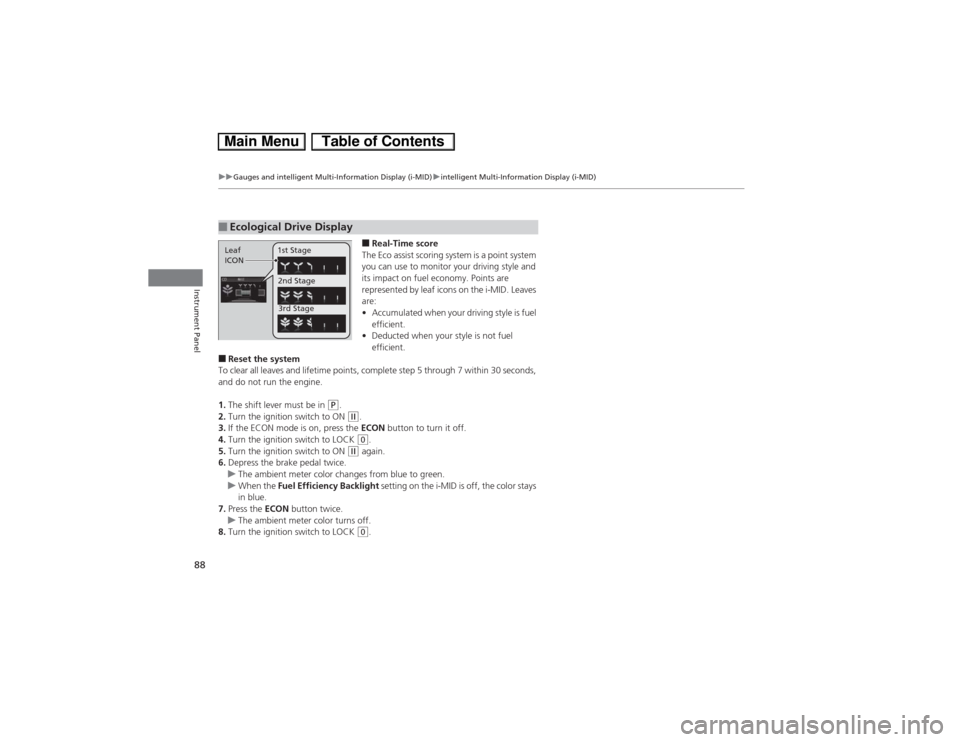
■Real-Time score
The Eco assist scoring system is a point system
you can use to monitor your driving style and
its impact on fuel economy. Points are
represented by leaf icons on the i-MID. Leaves
are:
•Accumulated when your driving style is fuel
efficient.
•Deducted when your style is not fuel
efficient.
■Reset the system
To clear all leaves and lifetime points, complete step 5 through 7 within 30 seconds,
and do not run the engine.
1.The shift lever must be in
(P.
2.Turn the ignition switch to ON (w.
3.If the ECON mode is on, press the ECON button to turn it off.
4.Turn the ignition switch to LOCK (0.
5.Turn the ignition switch to ON
(w again.
6.Depress the brake pedal twice.
uThe ambient meter color changes from blue to green.
uWhen the Fuel Efficiency Backlight setting on the i-MID is off, the color stays
in blue.
7.Press the ECON button twice.
uThe ambient meter color turns off.
8.Turn the ignition switch to LOCK (0.
■Ecological Drive DisplayLeaf
ICON1st Stage
2nd Stage
3rd Stage