2013 FORD TRANSIT CONNECT roof
[x] Cancel search: roofPage 32 of 321

3. Clip the tether strap to the
anchor as shown.
Second-row outboard seating positions
Note:Place the head restraint underneath the back of the front seat for
storage.
1. Remove the head restraint.
2. Locate the correct anchor for the selected seating position.
•On five-passenger vehicles,
anchors are located on the
passenger-side and driver-side
upper rear door frame area close
to the roof.
•On four-passenger vehicles,
the anchor is located on the
driver-side upper rear door frame
area close to the roof.
Child Safety31
2013 Transit Connect(tst)
Owners Guide gf, 2nd Printing, November 2012
USA(fus)
Page 33 of 321

3. Clip the tether strap to the
anchor as shown.
If the tether strap is clipped incorrectly, the child safety seat may not be
retained properly in the event of a collision.
4. Tighten the child safety seat tether strap according to the
manufacturer’s instructions.
If the safety seat is not anchored properly, the risk of a child being
injured in a collision greatly increases.
If your child restraint system is equipped with a tether strap, and the
child restraint manufacturer recommends its use, Ford also recommends
its use.
CHILD SAFETY LOCKS
When these locks are set, the rear doors cannot be opened from the
inside.
The childproof locks are located on
the rear edge of each rear door and
must be set separately for each
door.
•Driver side: turn
counterclockwise to lock
and clockwise to unlock.
•Passenger side: turn clockwise to
lock and counterclockwise to
unlock.
32Child Safety
2013 Transit Connect(tst)
Owners Guide gf, 2nd Printing, November 2012
USA(fus)
Page 129 of 321

PRINCIPLES OF OPERATION
WARNING:Vehicle modifications involving braking system,
aftermarket roof racks, suspension, steering system, tire
construction or wheel and tire size may change the handling
characteristics of the vehicle and may adversely affect the performance
of the AdvanceTrac® system. In addition, installing any stereo
loudspeakers may interfere with and adversely affect the AdvanceTrac®
system. Install any aftermarket stereo loudspeaker as far as possible
from the front center console, the tunnel, and the front seats in order
to minimize the risk of interfering with the AdvanceTrac® sensors.
Reducing the effectiveness of the AdvanceTrac® system could lead to
an increased risk of loss of vehicle control, vehicle rollover, personal
injury and death.
WARNING:Remember that even advanced technology cannot
defy the laws of physics. It’s always possible to lose control of a
vehicle due to inappropriate driver input for the conditions. Aggressive
driving on any road condition can cause you to lose control of your
vehicle increasing the risk of personal injury or property damage.
Activation of the AdvanceTrac® system is an indication that at least
some of the tires have exceeded their ability to grip the road; this could
reduce the operator’s ability to control the vehicle potentially resulting
in a loss of vehicle control, vehicle rollover, personal injury and death.
If your AdvanceTrac® system activates, SLOW DOWN.
The AdvanceTrac® with Roll Stability Control™ system helps you keep
control of your vehicle when on a slippery surface. The electronic stability
control portion of the system helps avoid skids and lateral slides and roll
stability control helps avoid a vehicle rollover. The traction control system
helps avoid drive wheel spin and loss of traction. See theTraction Control
chapter for details on traction control system operation.
128Stability Control
2013 Transit Connect(tst)
Owners Guide gf, 2nd Printing, November 2012
USA(fus)
Page 159 of 321

THE BETTER BUSINESS BUREAU (BBB) AUTO LINE PROGRAM
(U.S. ONLY)
Your satisfaction is important to Ford Motor Company and to your dealer.
If a warranty concern has not been resolved using the three-step
procedure outlined earlier in this chapter in theGetting the Services
You Needsection, you may be eligible to participate in the BBB AUTO
LINE program.
The BBB AUTO LINE program consists of two parts – mediation and
arbitration. During mediation, a representative of the BBB will contact
both you and Ford Motor Company to explore options for settlement of
the claim. If an agreement is not reached during mediation or you do not
want to participate in mediation, and if your claim is eligible, you may
participate in the arbitration process. An arbitration hearing will be
scheduled so that you can present your case in an informal setting
before an impartial person. The arbitrator will consider the testimony
provided and make a decision after the hearing.
Disputes submitted to the BBB AUTO LINE program are usually decided
within 40 days after you file your claim with the BBB. You are not bound
by the decision, and may reject the decision and proceed to court where
all findings of the BBB Auto Line dispute, and decision, are admissible
in the court action. Should you choose to accept the BBB AUTO LINE
decision, Ford is then bound by the decision, and must comply with the
decision within 30 days of receipt of your acceptance letter.
BBB AUTO LINE Application: Using the information provided below,
please call or write to request a program application. You will be asked
for your name and address, general information about your new vehicle,
information about your warranty concerns, and any steps you have
already taken to try to resolve them. A Customer Claim Form will be
mailed that will need to be completed, signed and returned to the BBB
along with proof of ownership. Upon receipt, the BBB will review the
claim for eligibility under the Program Summary Guidelines.
You can get more information by calling BBB AUTO LINE at
1-800-955-5100, or writing to:
BBB AUTO LINE
3033 Wilson Boulevard, Suite 600
Arlington, Virginia 22201
BBB AUTO LINE applications can also be requested by calling the Ford
Motor Company Customer Relationship Center at 1-800-392-3673.
Note:Ford Motor Company reserves the right to change eligibility
limitations, modify procedures, or to discontinue this process at any time
without notice and without obligation.
158Customer Assistance
2013 Transit Connect(tst)
Owners Guide gf, 2nd Printing, November 2012
USA(fus)
Page 170 of 321
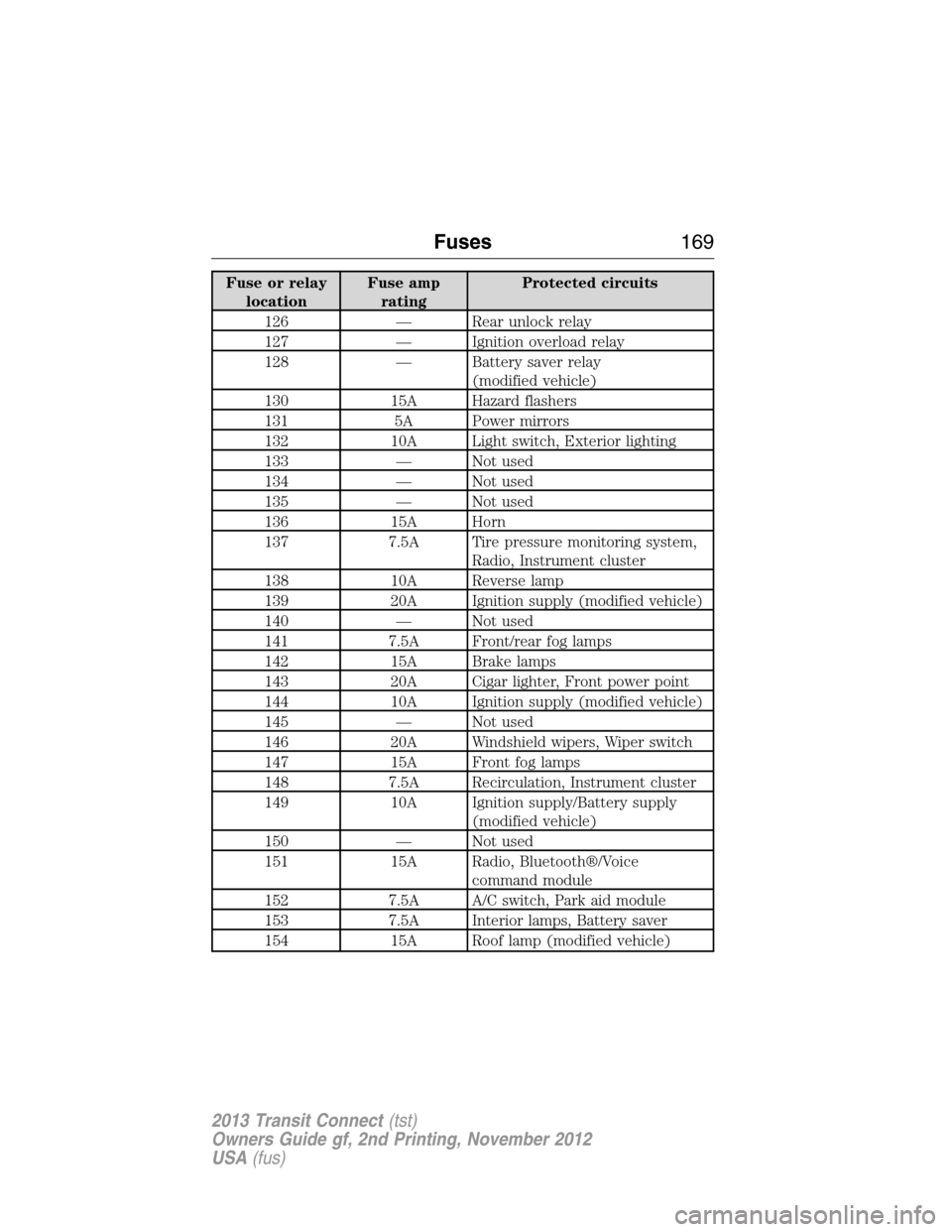
Fuse or relay
locationFuse amp
ratingProtected circuits
126 — Rear unlock relay
127 — Ignition overload relay
128 — Battery saver relay
(modified vehicle)
130 15A Hazard flashers
131 5A Power mirrors
132 10A Light switch, Exterior lighting
133 — Not used
134 — Not used
135 — Not used
136 15A Horn
137 7.5A Tire pressure monitoring system,
Radio, Instrument cluster
138 10A Reverse lamp
139 20A Ignition supply (modified vehicle)
140 — Not used
141 7.5A Front/rear fog lamps
142 15A Brake lamps
143 20A Cigar lighter, Front power point
144 10A Ignition supply (modified vehicle)
145 — Not used
146 20A Windshield wipers, Wiper switch
147 15A Front fog lamps
148 7.5A Recirculation, Instrument cluster
149 10A Ignition supply/Battery supply
(modified vehicle)
150 — Not used
151 15A Radio, Bluetooth®/Voice
command module
152 7.5A A/C switch, Park aid module
153 7.5A Interior lamps, Battery saver
154 15A Roof lamp (modified vehicle)
Fuses169
2013 Transit Connect(tst)
Owners Guide gf, 2nd Printing, November 2012
USA(fus)
Page 204 of 321

WAXING
•Wash the vehicle first.
•Use a quality wax that does not contain abrasives.
•Do not allow paint sealant to come in contact with any non-body
(low-gloss black) colored trim, such as grained door handles, roof
racks, bumpers, side moldings, mirror housings or the windshield cowl
area. The paint sealant will grey or stain the parts over time.
REPAIRING MINOR PAINT DAMAGE
Your authorized dealer has touch-up paint to match your vehicle’s color.
Take your color code (printed on a sticker in the driver’s door jamb) to
your authorized dealer to make sure you get the correct color.
•Remove particles, such as bird droppings, tree sap, insect deposits, tar
spots, road salt and industrial fallout, before repairing paint chips.
•Always read the instructions before using the products.
CLEANING THE ENGINE
Engines are more efficient when they are clean because grease and dirt
buildup keep the engine warmer than normal.
When washing:
•Take care when using a power washer to clean the engine. The
high-pressure fluid could penetrate the sealed parts and cause
damage.
•Do not spray a hot engine with cold water to avoid cracking the
engine block or other engine components.
•Spray Motorcraft® Engine Shampoo and Degreaser on all parts that
require cleaning and pressure rinse clean. In Canada, use Motorcraft®
Engine Shampoo.
•Never wash or rinse the engine while it is hot or running; water in the
running engine may cause internal damage.
•Never wash or rinse any ignition coil, spark plug wire or spark plug
well, or the area in and around these locations.
•Cover the battery, power distribution box, and air filter assembly to
prevent water damage when cleaning the engine.
Vehicle Care203
2013 Transit Connect(tst)
Owners Guide gf, 2nd Printing, November 2012
USA(fus)
Page 250 of 321

ACCESSORIES
For a complete listing of the accessories that are available for your
vehicle, please contact your dealer or visit our online store at:
Accessories.Ford.com(U.S. only).
Ford Custom Accessories are available for your vehicle through your
local Ford or Ford of Canada dealer. Ford Motor Company will repair or
replace any properly dealer-installed Ford Custom Accessories found to
be defective in factory-supplied materials or workmanship during the
warranty period, as well as any component damaged by the defective
accessories. The accessories will be warranted for whichever provides
you the greatest benefit:
•
12 months or 12000 miles (20000 kilometers) (whichever occurs first), or
•the remainder of your new vehicle limited warranty.
Contact your dealer for details and a copy of the warranty.
Exterior style
•Bug shields•Splash guards
•Side window deflectors•Graphics*
Interior style
•All-weather floor mats•Carpeted floor mats
•Rear window grille•Portable DVD Entertainment*
•Electrochromic compass/temperature interior mirrors
Lifestyle
•Roof racks and accessories•Racks and carriers*
•Cargo organization
Peace of mind
•Remote start•Back up alarm*
•Keyless entry keypad•Protective seat covers*
•Bumper mounted parking sensors*
*Ford Licensed Accessories (FLA) are warranted by the accessory
manufacturer’s warranty. Ford Licensed Accessories are fully designed
and developed by the accessory manufacturer and have not been
designed or tested to Ford Motor Company engineering requirements.
Contact your Ford dealer for details regarding the manufacturer’s limited
warranty and/or a copy of the FLA product limited warranty offered by
the accessory manufacturer.
Accessories249
2013 Transit Connect(tst)
Owners Guide gf, 2nd Printing, November 2012
USA(fus)
Page 319 of 321

Joining two calls
(multiparty/conference call) ....278
Jump-starting your vehicle ......151
K
Keys .............................................56
positions of the ignition .........109
L
Lamps ........................................191
autolamp system .....................198
bulb replacement
specifications chart ................200
daytime running light .............191
fog lamps .....................71–72, 191
headlamps .........................70, 191
headlamps, flash to pass ..........70
high beams ..............................191
interior lamps ...................73, 198
replacing bulbs .......191, 195, 198
LATCH anchors ...........................26
Liftgate ........................................59
Lights, warning and
indicator ......................................79
Loading instructions .................142
Load limits .................................137
Locks
childproof ..................................32
Lubricant specifications ...........244
Lug nuts ....................................242
M
Media Bluetooth menu options
(adding, connecting, deleting,
turning on/off) ..........................299Mirrors ...................................75–76
fold away ...................................75
side view mirrors (power) .......75
Motorcraft® parts .............201, 246
O
Octane rating ............................113
P
Pairing other phones ................276
Pairing your phone for the first
time ............................................275
Parking brake ............................126
Parts
(see Motorcraft®
parts) .........................................246
Phone Bluetooth menu options
(adding, connecting, deleting,
turning on/off) ..........................286
Phone redial ..............................280
Playing music (by artist,
album, genre, playlist, tracks,
similar) ......................................296
Power distribution box
(see Fuses) ...............................164
Power mirrors .............................75
Powerpoint ................................106
Power steering ..........................136
fluid, checking and adding ....184
fluid, refill capacity ................244
fluid, specifications .................244
Power Windows ...........................74
Privacy information ..................272
Putting a call on/off hold .........278
318Index
2013 Transit Connect(tst)
Owners Guide gf, 2nd Printing, November 2012
USA(fus)