Page 9 of 541
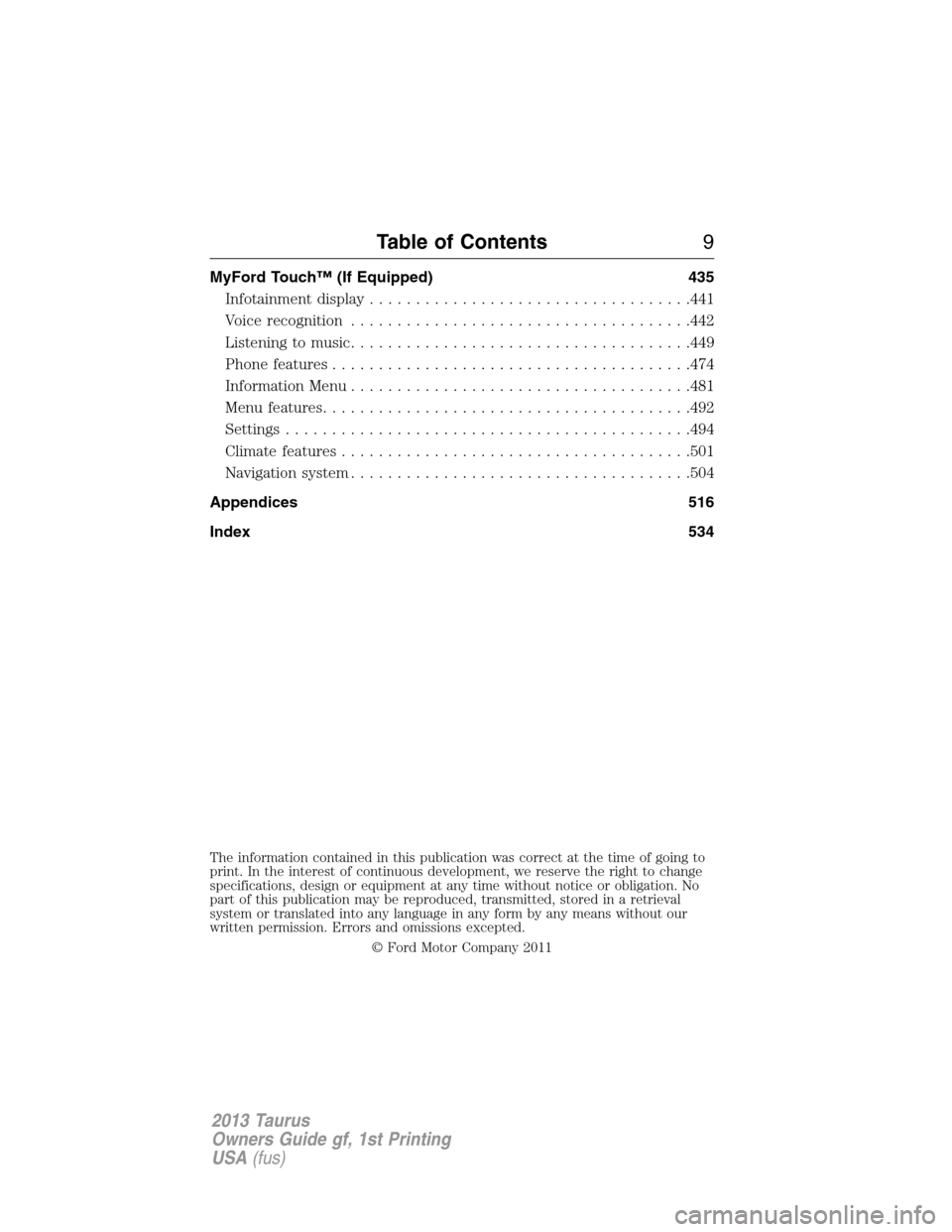
MyFord Touch™ (If Equipped) 435
Infotainment display...................................441
Voice recognition.....................................442
Listening to music.....................................449
Phone features.......................................474
Information Menu.....................................481
Menu features........................................492
Settings............................................494
Climate features......................................501
Navigation system.....................................504
Appendices 516
Index 534
The information contained in this publication was correct at the time of going to
print. In the interest of continuous development, we reserve the right to change
specifications, design or equipment at any time without notice or obligation. No
part of this publication may be reproduced, transmitted, stored in a retrieval
system or translated into any language in any form by any means without our
written permission. Errors and omissions excepted.
© Ford Motor Company 2011
Table of Contents9
2013 Taurus
Owners Guide gf, 1st Printing
USA(fus)
Page 111 of 541
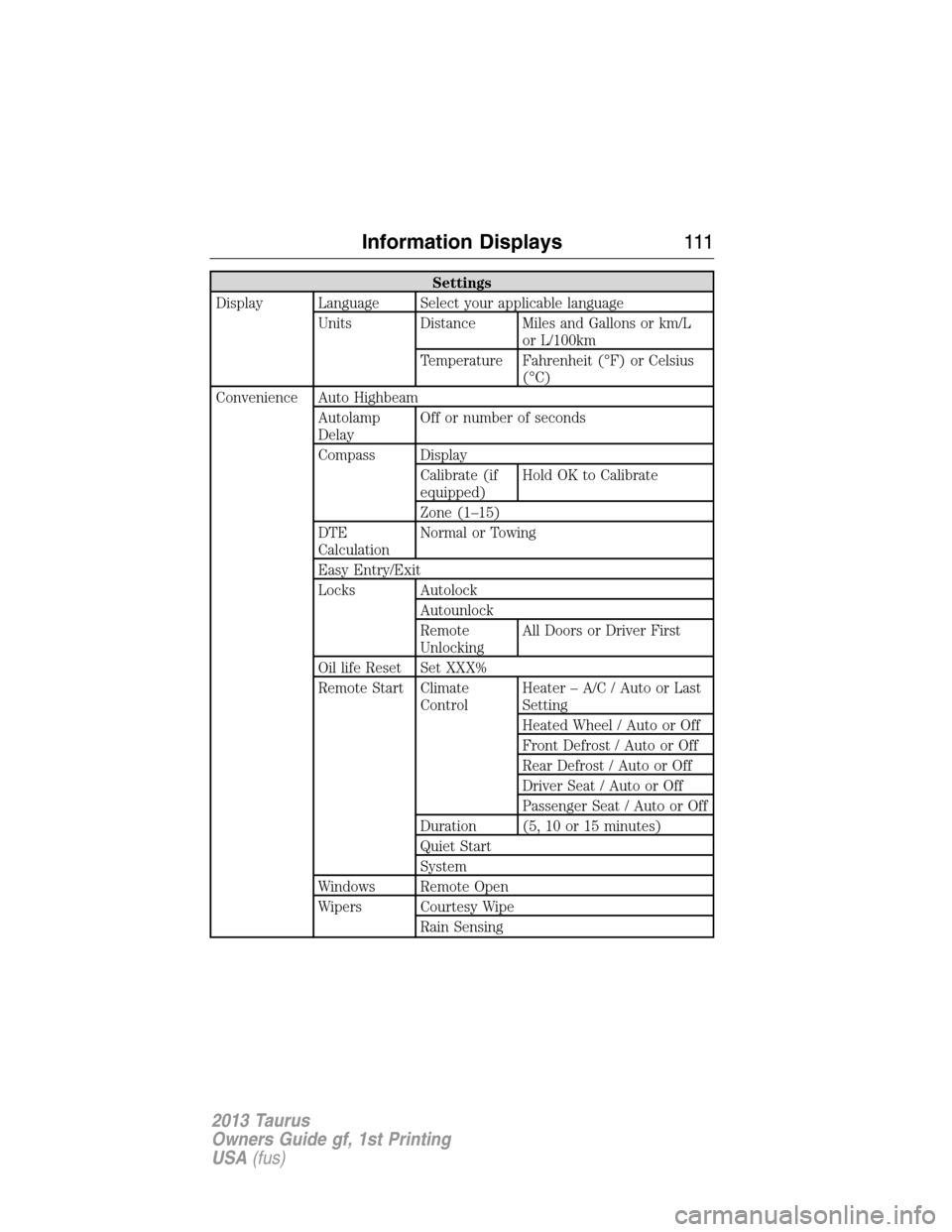
Settings
Display Language Select your applicable language
Units Distance Miles and Gallons or km/L
or L/100km
Temperature Fahrenheit (°F) or Celsius
(°C)
Convenience Auto Highbeam
Autolamp
DelayOff or number of seconds
Compass Display
Calibrate (if
equipped)Hold OK to Calibrate
Zone (1–15)
DTE
CalculationNormal or Towing
Easy Entry/Exit
Locks Autolock
Autounlock
Remote
UnlockingAll Doors or Driver First
Oil life Reset Set XXX%
Remote Start Climate
ControlHeater – A/C / Auto or Last
Setting
Heated Wheel / Auto or Off
Front Defrost / Auto or Off
Rear Defrost / Auto or Off
Driver Seat / Auto or Off
Passenger Seat / Auto or Off
Duration (5, 10 or 15 minutes)
Quiet Start
System
Windows Remote Open
Wipers Courtesy Wipe
Rain Sensing
Information Displays111
2013 Taurus
Owners Guide gf, 1st Printing
USA(fus)
Page 119 of 541
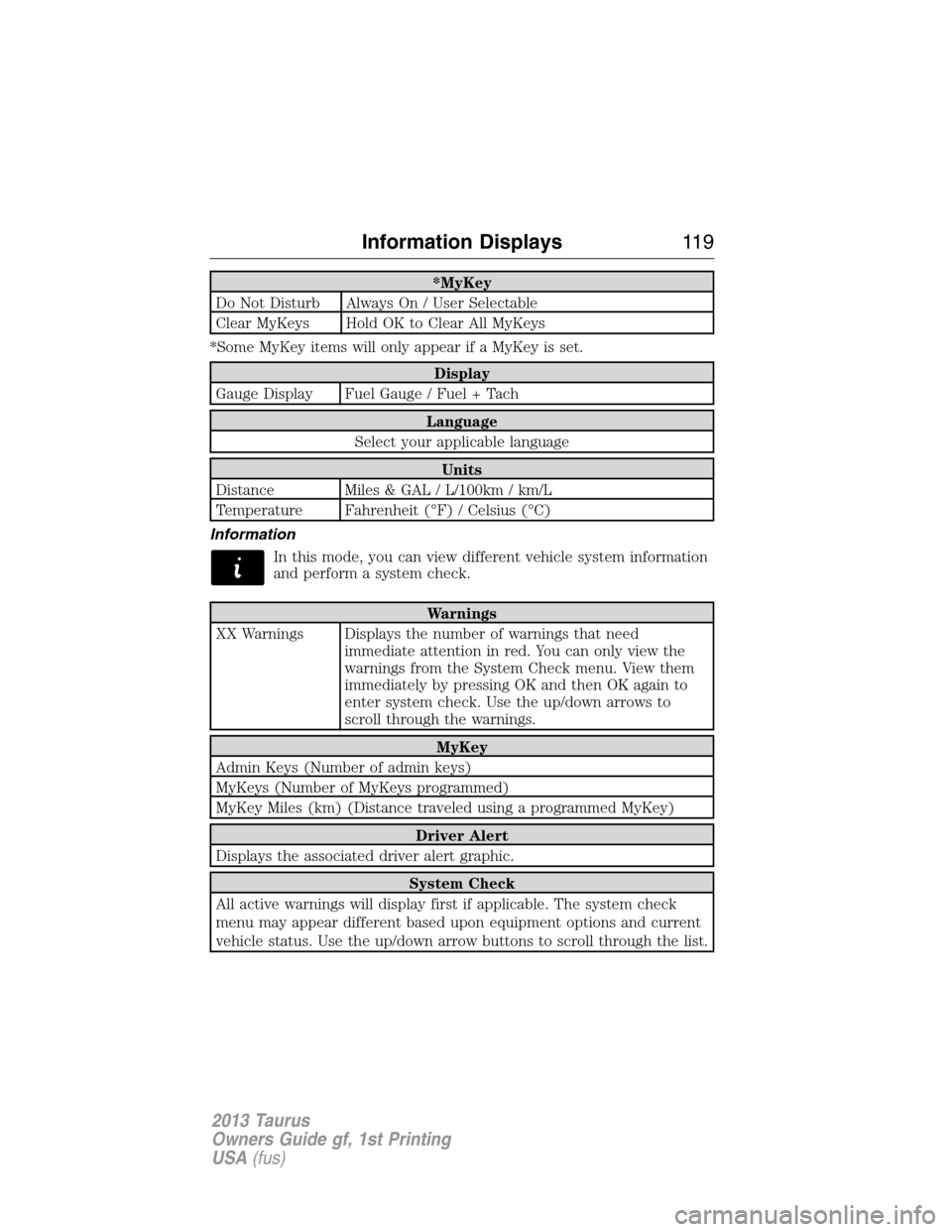
*MyKey
Do Not Disturb Always On / User Selectable
Clear MyKeys Hold OK to Clear All MyKeys
*Some MyKey items will only appear if a MyKey is set.
Display
Gauge Display Fuel Gauge / Fuel + Tach
Language
Select your applicable language
Units
Distance Miles & GAL / L/100km / km/L
Temperature Fahrenheit (°F) / Celsius (°C)
Information
In this mode, you can view different vehicle system information
and perform a system check.
Warnings
XX Warnings Displays the number of warnings that need
immediate attention in red. You can only view the
warnings from the System Check menu. View them
immediately by pressing OK and then OK again to
enter system check. Use the up/down arrows to
scroll through the warnings.
MyKey
Admin Keys (Number of admin keys)
MyKeys (Number of MyKeys programmed)
MyKey Miles (km) (Distance traveled using a programmed MyKey)
Driver Alert
Displays the associated driver alert graphic.
System Check
All active warnings will display first if applicable. The system check
menu may appear different based upon equipment options and current
vehicle status. Use the up/down arrow buttons to scroll through the list.
Information Displays11 9
2013 Taurus
Owners Guide gf, 1st Printing
USA(fus)
Page 133 of 541
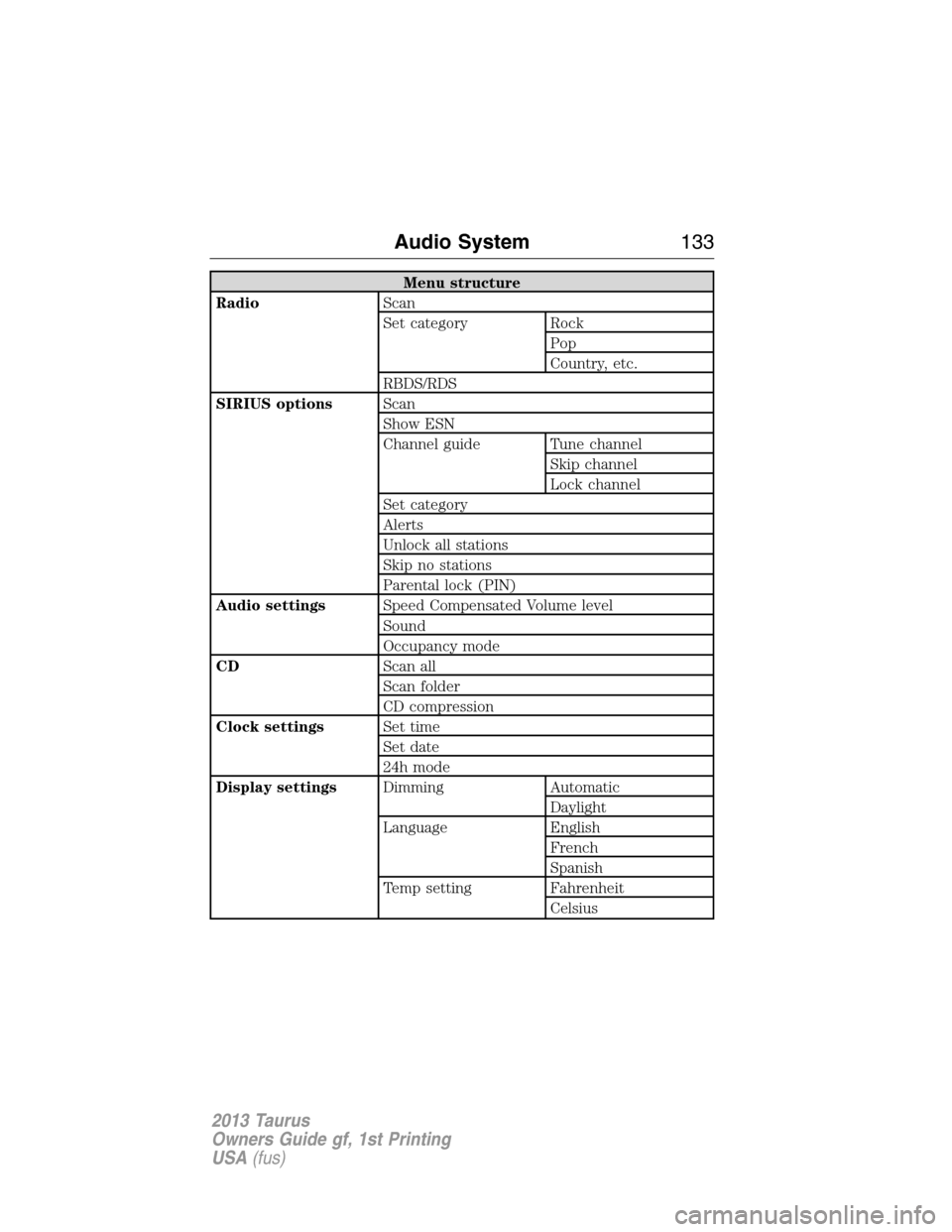
Menu structure
RadioScan
Set category Rock
Pop
Country, etc.
RBDS/RDS
SIRIUS optionsScan
Show ESN
Channel guide Tune channel
Skip channel
Lock channel
Set category
Alerts
Unlock all stations
Skip no stations
Parental lock (PIN)
Audio settingsSpeed Compensated Volume level
Sound
Occupancy mode
CDScan all
Scan folder
CD compression
Clock settingsSet time
Set date
24h mode
Display settingsDimming Automatic
Daylight
Language English
French
Spanish
Temp setting Fahrenheit
Celsius
Audio System133
2013 Taurus
Owners Guide gf, 1st Printing
USA(fus)
Page 400 of 541
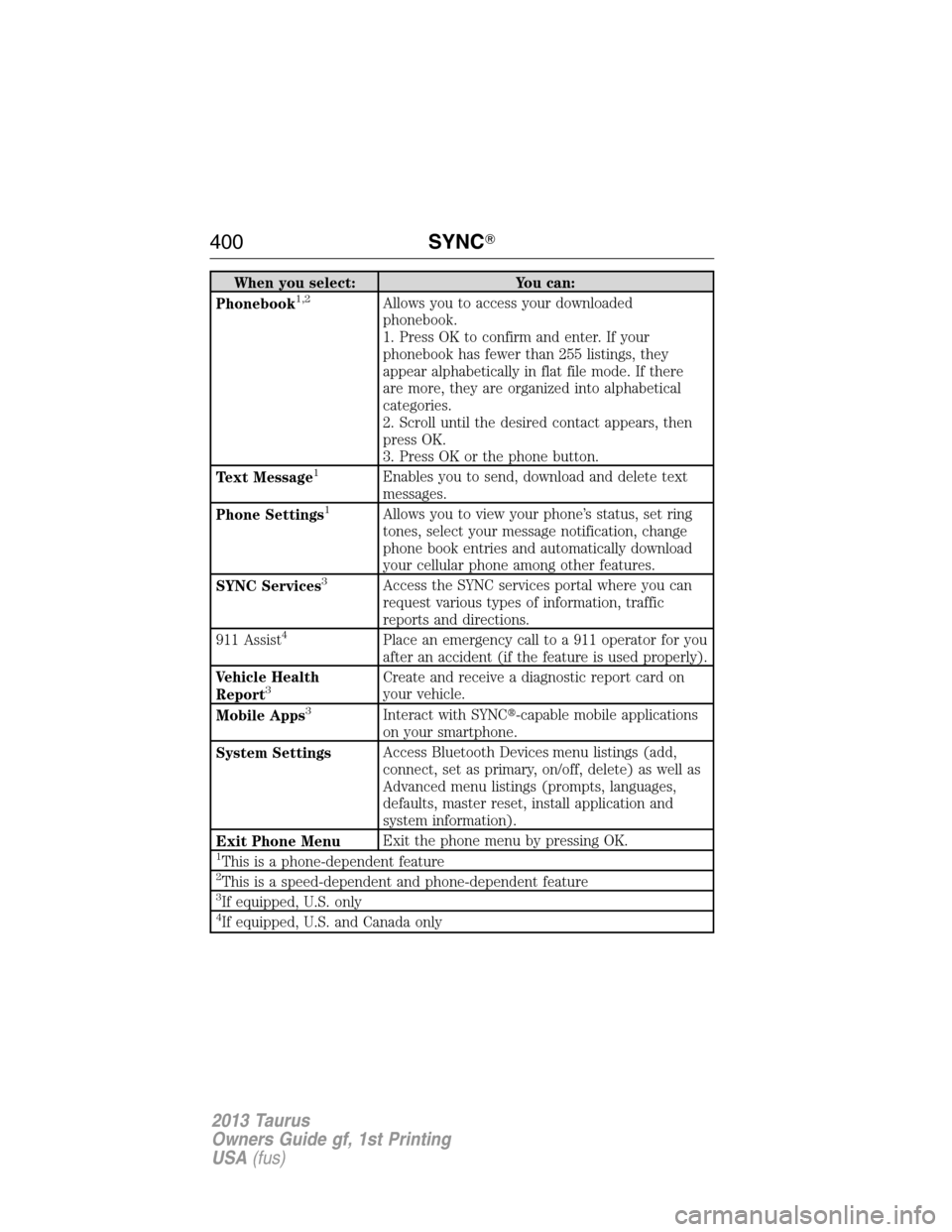
When you select: You can:
Phonebook1,2Allows you to access your downloaded
phonebook.
1. Press OK to confirm and enter. If your
phonebook has fewer than 255 listings, they
appear alphabetically in flat file mode. If there
are more, they are organized into alphabetical
categories.
2. Scroll until the desired contact appears, then
press OK.
3. Press OK or the phone button.
Text Message
1Enables you to send, download and delete text
messages.
Phone Settings
1Allows you to view your phone’s status, set ring
tones, select your message notification, change
phone book entries and automatically download
your cellular phone among other features.
SYNC Services
3Access the SYNC services portal where you can
request various types of information, traffic
reports and directions.
911 Assist
4Place an emergency call to a 911 operator for you
after an accident (if the feature is used properly).
Vehicle Health
Report
3Create and receive a diagnostic report card on
your vehicle.
Mobile Apps
3Interact with SYNC�-capable mobile applications
on your smartphone.
System SettingsAccess Bluetooth Devices menu listings (add,
connect, set as primary, on/off, delete) as well as
Advanced menu listings (prompts, languages,
defaults, master reset, install application and
system information).
Exit Phone MenuExit the phone menu by pressing OK.
1This is a phone-dependent feature2This is a speed-dependent and phone-dependent feature3If equipped, U.S. only4If equipped, U.S. and Canada only
400SYNC�
2013 Taurus
Owners Guide gf, 1st Printing
USA(fus)
Page 405 of 541
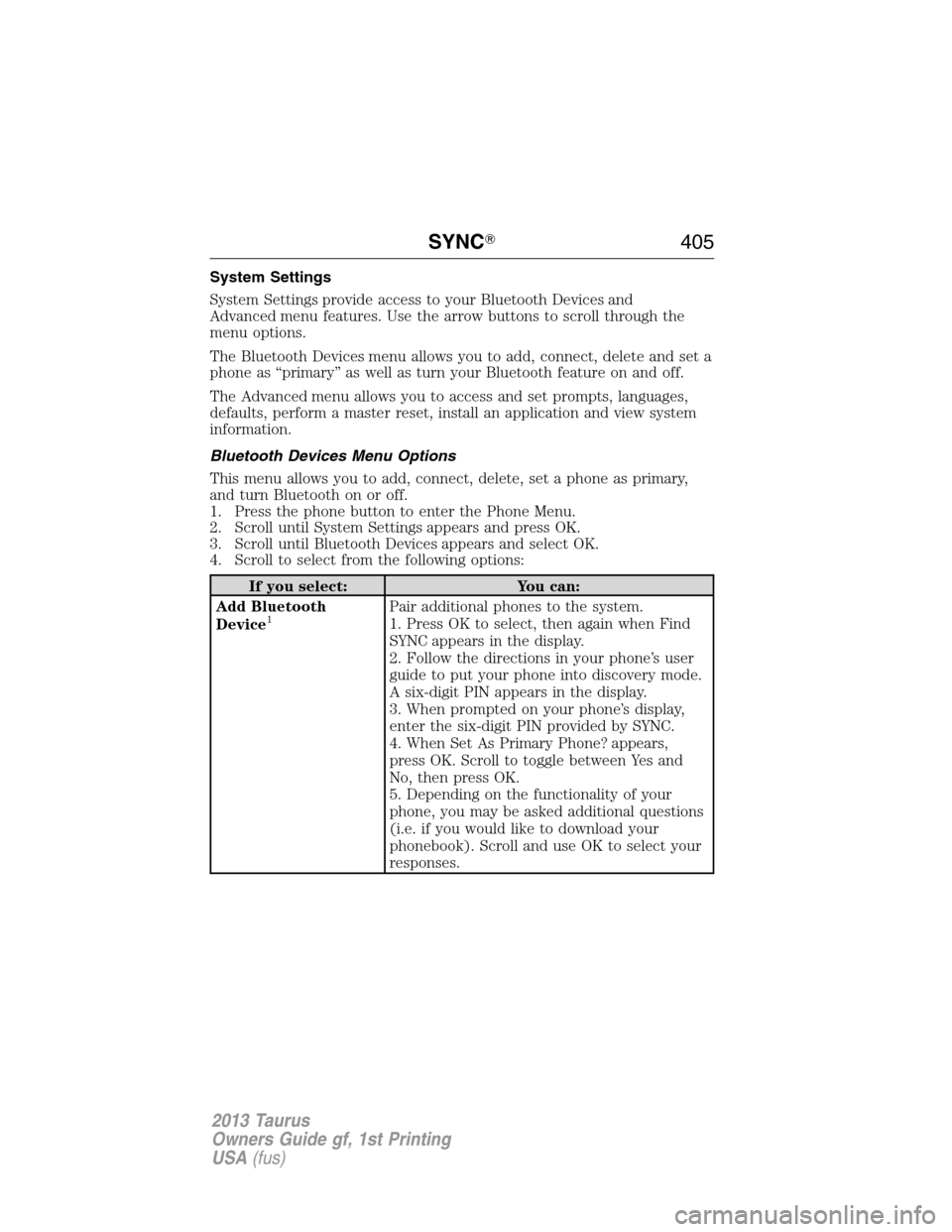
System Settings
System Settings provide access to your Bluetooth Devices and
Advanced menu features. Use the arrow buttons to scroll through the
menu options.
The Bluetooth Devices menu allows you to add, connect, delete and set a
phone as “primary” as well as turn your Bluetooth feature on and off.
The Advanced menu allows you to access and set prompts, languages,
defaults, perform a master reset, install an application and view system
information.
Bluetooth Devices Menu Options
This menu allows you to add, connect, delete, set a phone as primary,
and turn Bluetooth on or off.
1. Press the phone button to enter the Phone Menu.
2. Scroll until System Settings appears and press OK.
3. Scroll until Bluetooth Devices appears and select OK.
4. Scroll to select from the following options:
If you select: You can:
Add Bluetooth
Device
1Pair additional phones to the system.
1. Press OK to select, then again when Find
SYNC appears in the display.
2. Follow the directions in your phone’s user
guide to put your phone into discovery mode.
A six-digit PIN appears in the display.
3. When prompted on your phone’s display,
enter the six-digit PIN provided by SYNC.
4. When Set As Primary Phone? appears,
press OK. Scroll to toggle between Yes and
No, then press OK.
5. Depending on the functionality of your
phone, you may be asked additional questions
(i.e. if you would like to download your
phonebook). Scroll and use OK to select your
responses.
SYNC�405
2013 Taurus
Owners Guide gf, 1st Printing
USA(fus)
Page 407 of 541
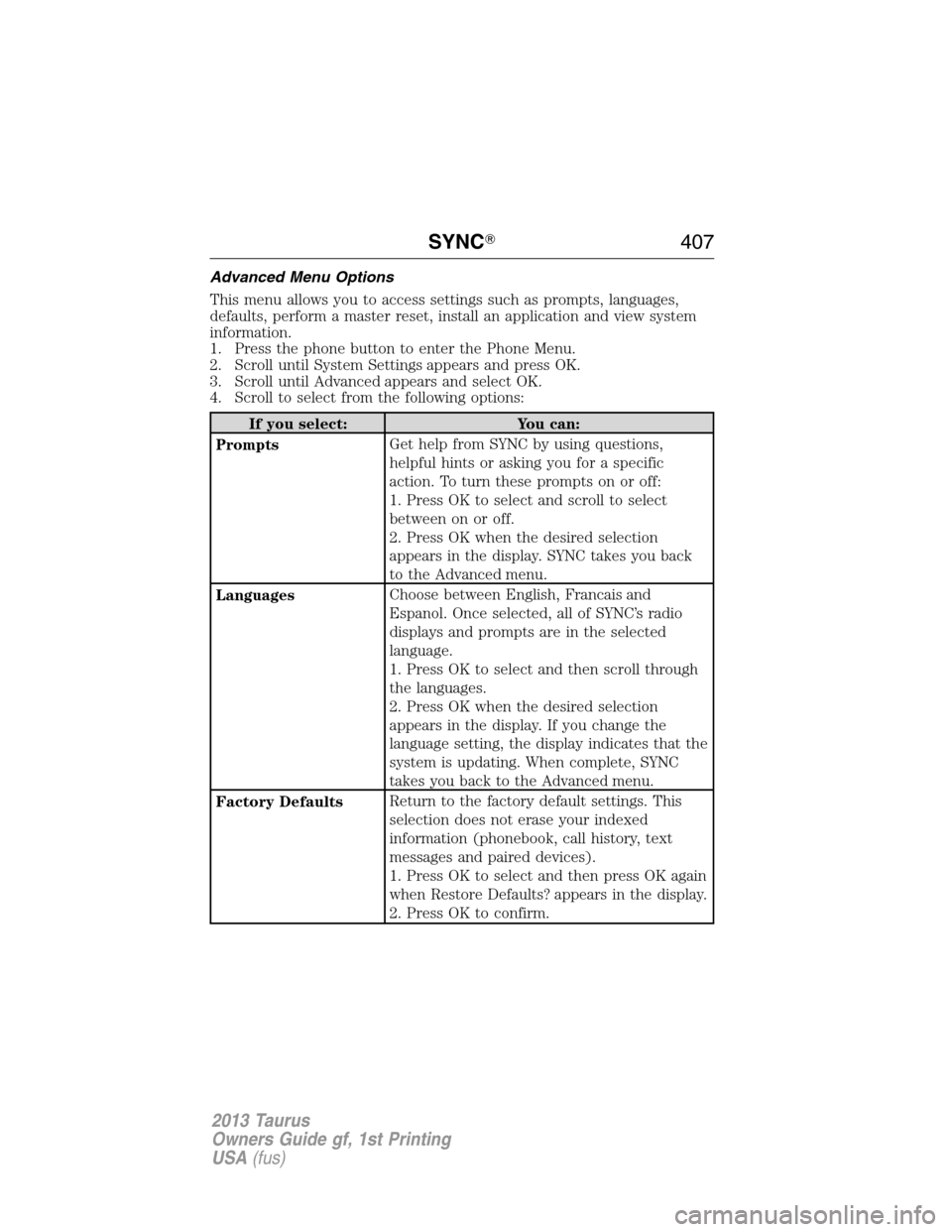
Advanced Menu Options
This menu allows you to access settings such as prompts, languages,
defaults, perform a master reset, install an application and view system
information.
1. Press the phone button to enter the Phone Menu.
2. Scroll until System Settings appears and press OK.
3. Scroll until Advanced appears and select OK.
4. Scroll to select from the following options:
If you select: You can:
PromptsGet help from SYNC by using questions,
helpful hints or asking you for a specific
action. To turn these prompts on or off:
1. Press OK to select and scroll to select
between on or off.
2. Press OK when the desired selection
appears in the display. SYNC takes you back
to the Advanced menu.
LanguagesChoose between English, Francais and
Espanol. Once selected, all of SYNC’s radio
displays and prompts are in the selected
language.
1. Press OK to select and then scroll through
the languages.
2. Press OK when the desired selection
appears in the display. If you change the
language setting, the display indicates that the
system is updating. When complete, SYNC
takes you back to the Advanced menu.
Factory DefaultsReturn to the factory default settings. This
selection does not erase your indexed
information (phonebook, call history, text
messages and paired devices).
1. Press OK to select and then press OK again
when Restore Defaults? appears in the display.
2. Press OK to confirm.
SYNC�407
2013 Taurus
Owners Guide gf, 1st Printing
USA(fus)
Page 422 of 541
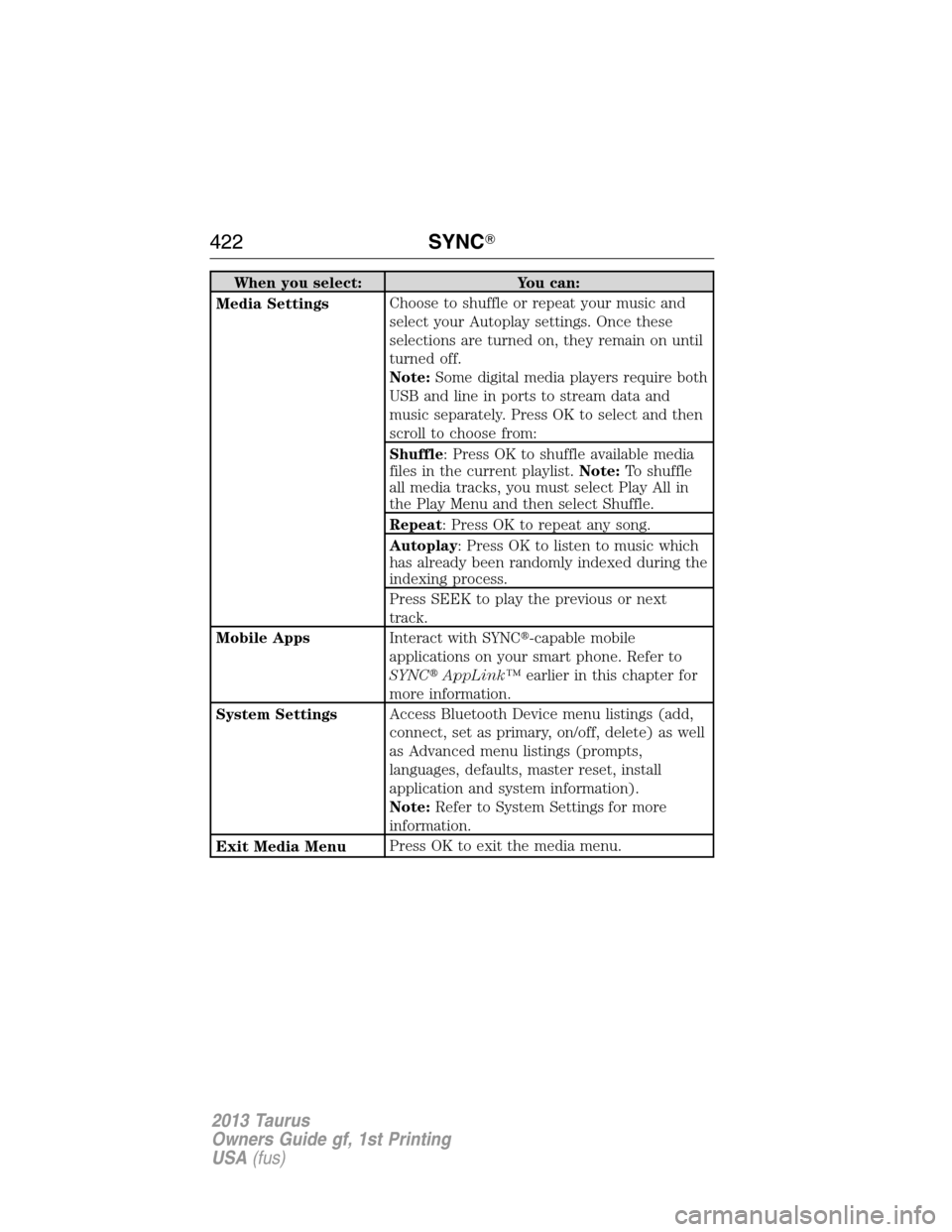
When you select: You can:
Media SettingsChoose to shuffle or repeat your music and
select your Autoplay settings. Once these
selections are turned on, they remain on until
turned off.
Note:Some digital media players require both
USB and line in ports to stream data and
music separately. Press OK to select and then
scroll to choose from:
Shuffle: Press OK to shuffle available media
files in the current playlist.Note:To shuffle
all media tracks, you must select Play All in
the Play Menu and then select Shuffle.
Repeat: Press OK to repeat any song.
Autoplay: Press OK to listen to music which
has already been randomly indexed during the
indexing process.
Press SEEK to play the previous or next
track.
Mobile AppsInteract with SYNC�-capable mobile
applications on your smart phone. Refer to
SYNC�AppLink™earlier in this chapter for
more information.
System SettingsAccess Bluetooth Device menu listings (add,
connect, set as primary, on/off, delete) as well
as Advanced menu listings (prompts,
languages, defaults, master reset, install
application and system information).
Note:Refer to System Settings for more
information.
Exit Media MenuPress OK to exit the media menu.
422SYNC�
2013 Taurus
Owners Guide gf, 1st Printing
USA(fus)