Page 127 of 541
Passenger Sensing
System MessageAction / Description
Remove Objects Near
Passenger SeatDisplayed when objects are by the passenger
seat. After the objects are moved away from
the seat, if the warning stays on or continues
to come on contact your authorized dealer as
soon as possible.
Reminder Messages Action / Description
Steering Lock Turn
Wheel to UnlockDisplays when you need to turn the steering
wheel in order to disengage the steering lock.
Shift to Park Displayed when the engine is turned off and
shift select lever is in any position other than
P (Park).
Tire Messages Action / Description
Low Tire Pressure Displays when one or more tires on your
vehicle have low tire pressure.
Tire Pressure Monitor
FaultDisplays when the tire pressure monitoring
system is malfunctioning. If the warning stays
on or continues to come on, contact your
authorized dealer.
Tire Pressure Sensor
FaultDisplayed when a tire pressure sensor is
malfunctioning, or your spare tire is in use.
For more information on how the system
operates under these conditions, refer toTi r e
Pressure Monitoring System (TPMS)in the
Wheels and tireschapter . If the warning
stays on or continues to come on, contact your
authorized dealer as soon as possible.
Service Tire Mobility
KitDisplayed when the tire mobility kit requires
service. See your authorized dealer for more
information.
Information Displays127
2013 Taurus
Owners Guide gf, 1st Printing
USA(fus)
Page 130 of 541
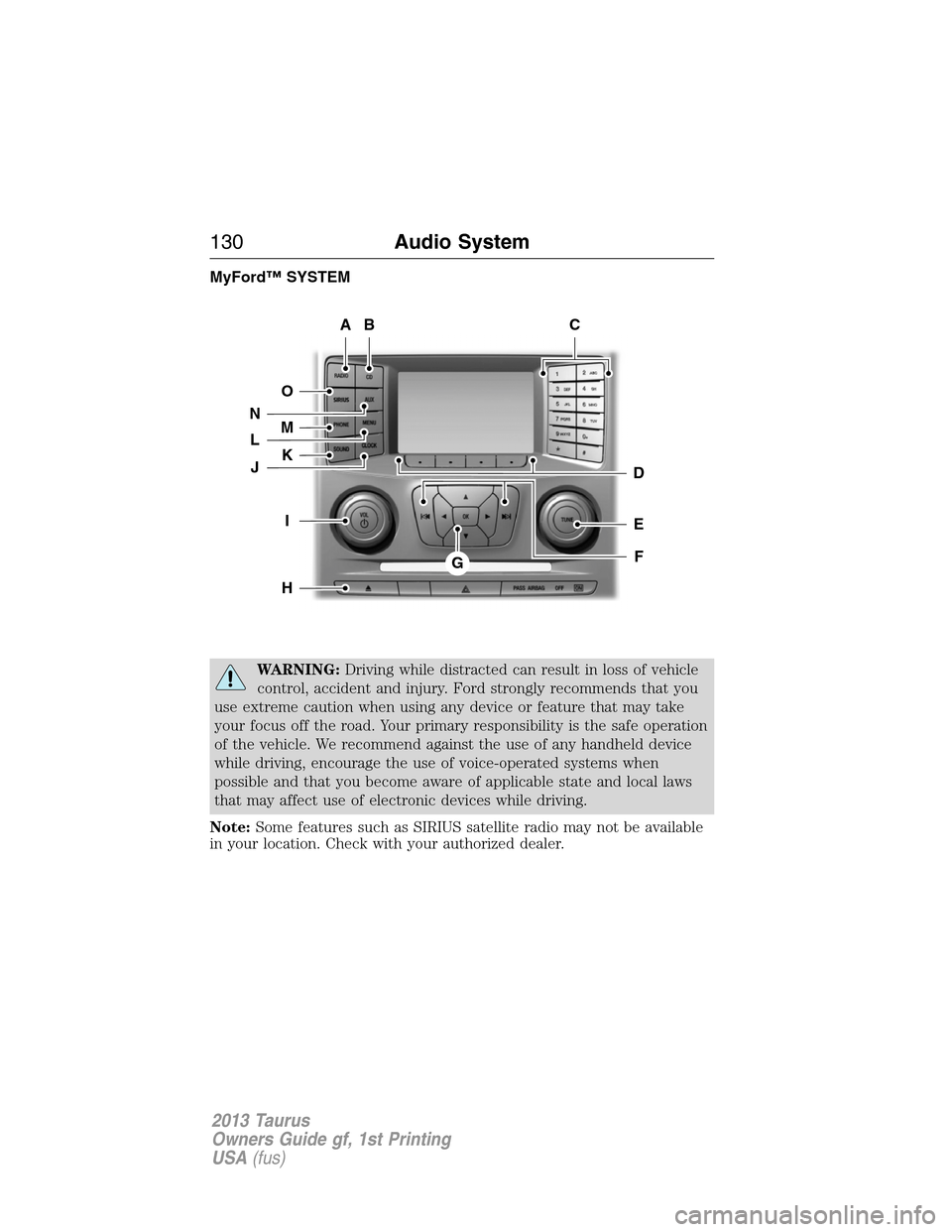
MyFord™ SYSTEM
WARNING:Driving while distracted can result in loss of vehicle
control, accident and injury. Ford strongly recommends that you
use extreme caution when using any device or feature that may take
your focus off the road. Your primary responsibility is the safe operation
of the vehicle. We recommend against the use of any handheld device
while driving, encourage the use of voice-operated systems when
possible and that you become aware of applicable state and local laws
that may affect use of electronic devices while driving.
Note:Some features such as SIRIUS satellite radio may not be available
in your location. Check with your authorized dealer.
AB
O
NMLKJ
EI
H
C
FG
D
130Audio System
2013 Taurus
Owners Guide gf, 1st Printing
USA(fus)
Page 134 of 541
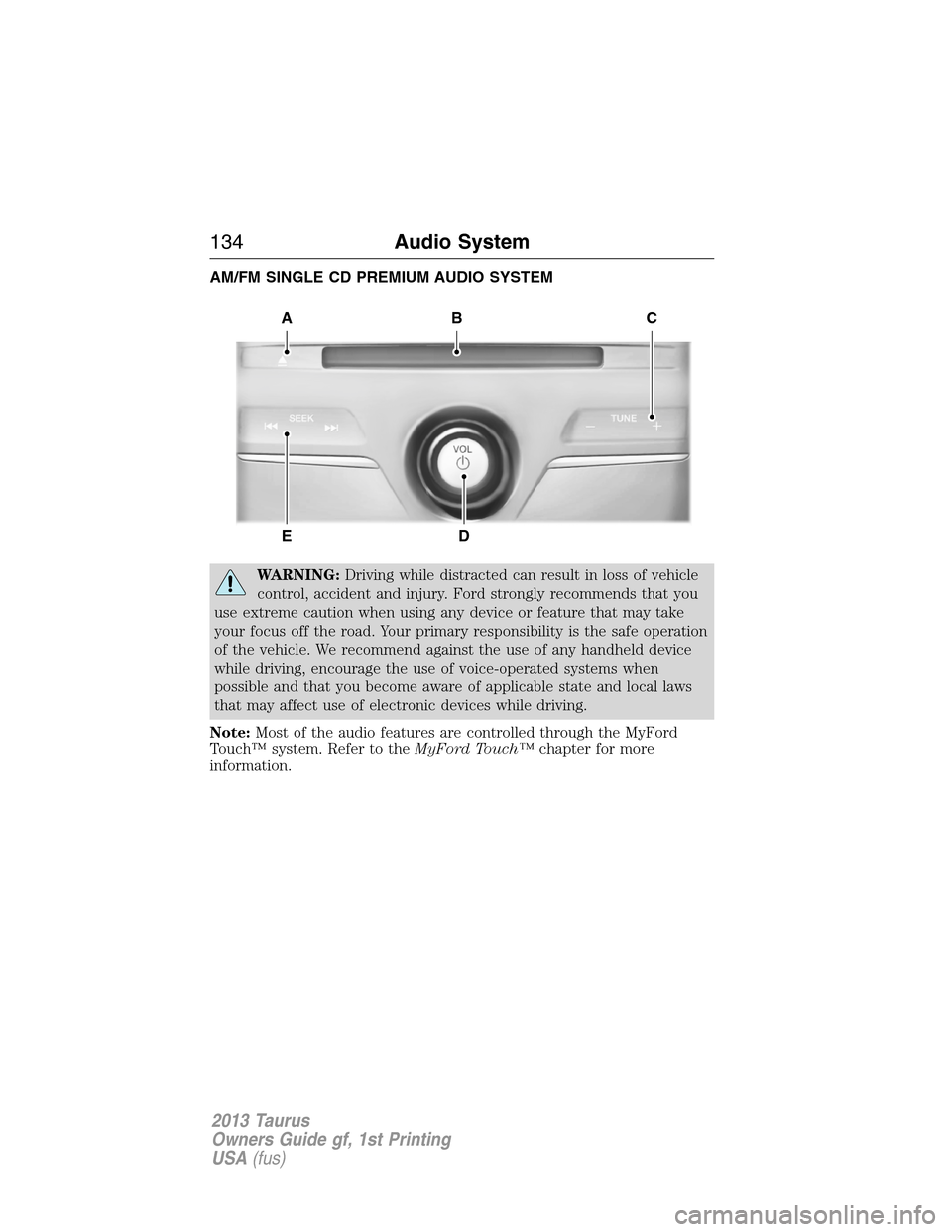
AM/FM SINGLE CD PREMIUM AUDIO SYSTEM
WARNING:Driving while distracted can result in loss of vehicle
control, accident and injury. Ford strongly recommends that you
use extreme caution when using any device or feature that may take
your focus off the road. Your primary responsibility is the safe operation
of the vehicle. We recommend against the use of any handheld device
while driving, encourage the use of voice-operated systems when
possible and that you become aware of applicable state and local laws
that may affect use of electronic devices while driving.
Note:Most of the audio features are controlled through the MyFord
Touch™ system. Refer to theMyFord Touch™chapter for more
information.
A
ED
BC
134Audio System
2013 Taurus
Owners Guide gf, 1st Printing
USA(fus)
Page 136 of 541
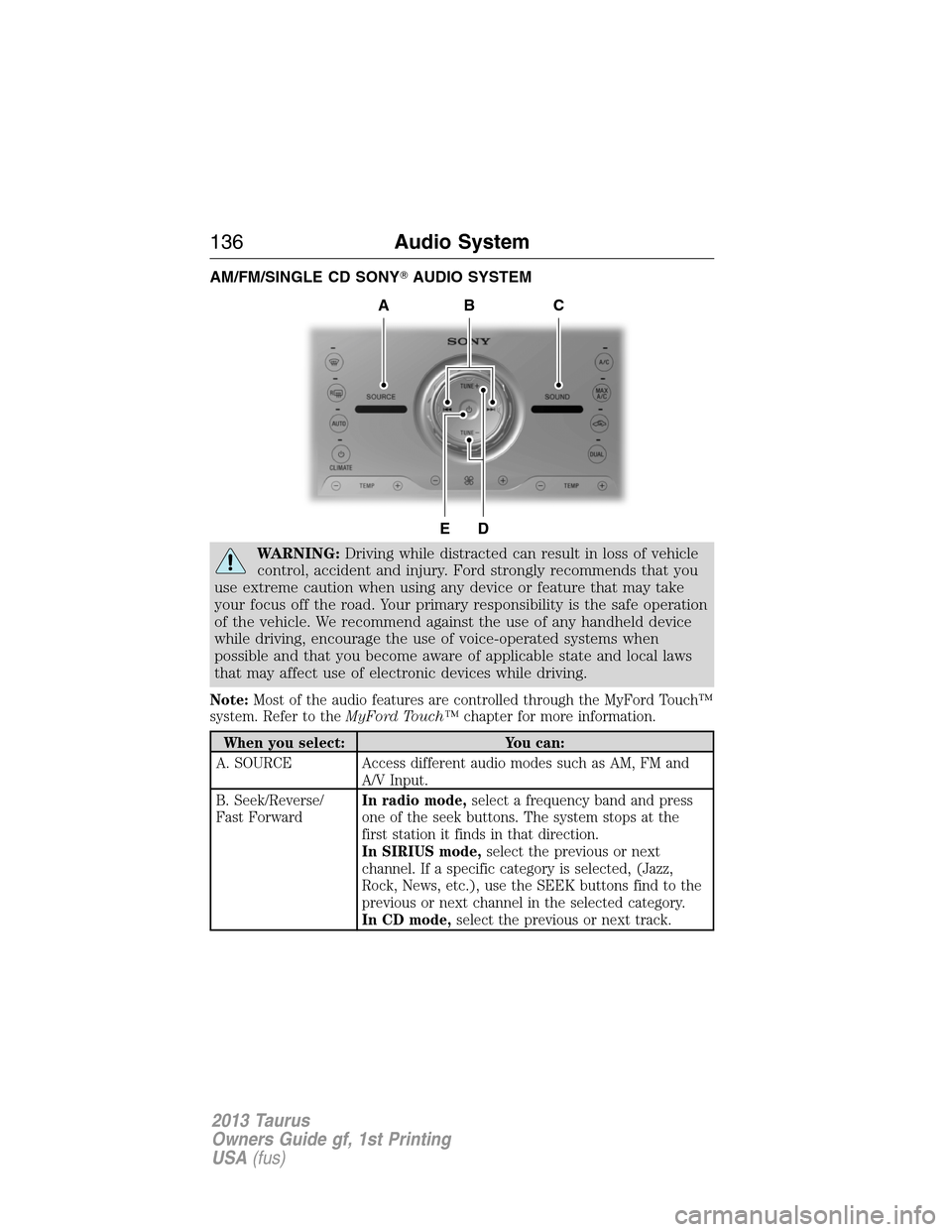
AM/FM/SINGLE CD SONY�AUDIO SYSTEM
WARNING:Driving while distracted can result in loss of vehicle
control, accident and injury. Ford strongly recommends that you
use extreme caution when using any device or feature that may take
your focus off the road. Your primary responsibility is the safe operation
of the vehicle. We recommend against the use of any handheld device
while driving, encourage the use of voice-operated systems when
possible and that you become aware of applicable state and local laws
that may affect use of electronic devices while driving.
Note:Most of the audio features are controlled through the MyFord Touch™
system. Refer to theMyFord Touch™chapter for more information.
When you select: You can:
A. SOURCE Access different audio modes such as AM, FM and
A/V Input.
B. Seek/Reverse/
Fast ForwardIn radio mode,select a frequency band and press
one of the seek buttons. The system stops at the
first station it finds in that direction.
In SIRIUS mode,select the previous or next
channel. If a specific category is selected, (Jazz,
Rock, News, etc.), use the SEEK buttons find to the
previous or next channel in the selected category.
In CD mode,select the previous or next track.
DE
ACB
136Audio System
2013 Taurus
Owners Guide gf, 1st Printing
USA(fus)
Page 137 of 541
When you select: You can:
C. SOUND Allows you to adjust the sound settings (Treble,
Bass, Midrange, Fade and Balance).
D. TUNE +/TUNE -In radio mode,you can search the frequency band
in individual increments.
In SIRIUS mode,you can find the next or previous
available SIRIUS satellite station.
E. Power and
VolumePress the power control to turn the system on and
off.
Turn to adjust the volume.
AUXILIARY INPUT JACK
WARNING:Driving while distracted can result in loss of vehicle
control, accident and injury. Ford strongly recommends that you
use extreme caution when using any device or feature that may take
your focus off the road. Your primary responsibility is the safe operation
of the vehicle. We recommend against the use of any handheld device
while driving, encourage the use of voice-operated systems when
possible and that you become aware of applicable state and local laws
that may affect use of electronic devices while driving.
WARNING:For safety reasons, do not connect or adjust the
settings on your portable music player while the vehicle is
moving.
WARNING:Store the portable music player in a secure location,
such as the center console or the glove box, when the vehicle is
in motion. Hard objects may become projectiles in a collision or sudden
stop, which may increase the risk of serious injury. The audio extension
cable must be long enough to allow the portable music player to be
safely stored while the vehicle is in motion.
Audio System137
2013 Taurus
Owners Guide gf, 1st Printing
USA(fus)
Page 138 of 541
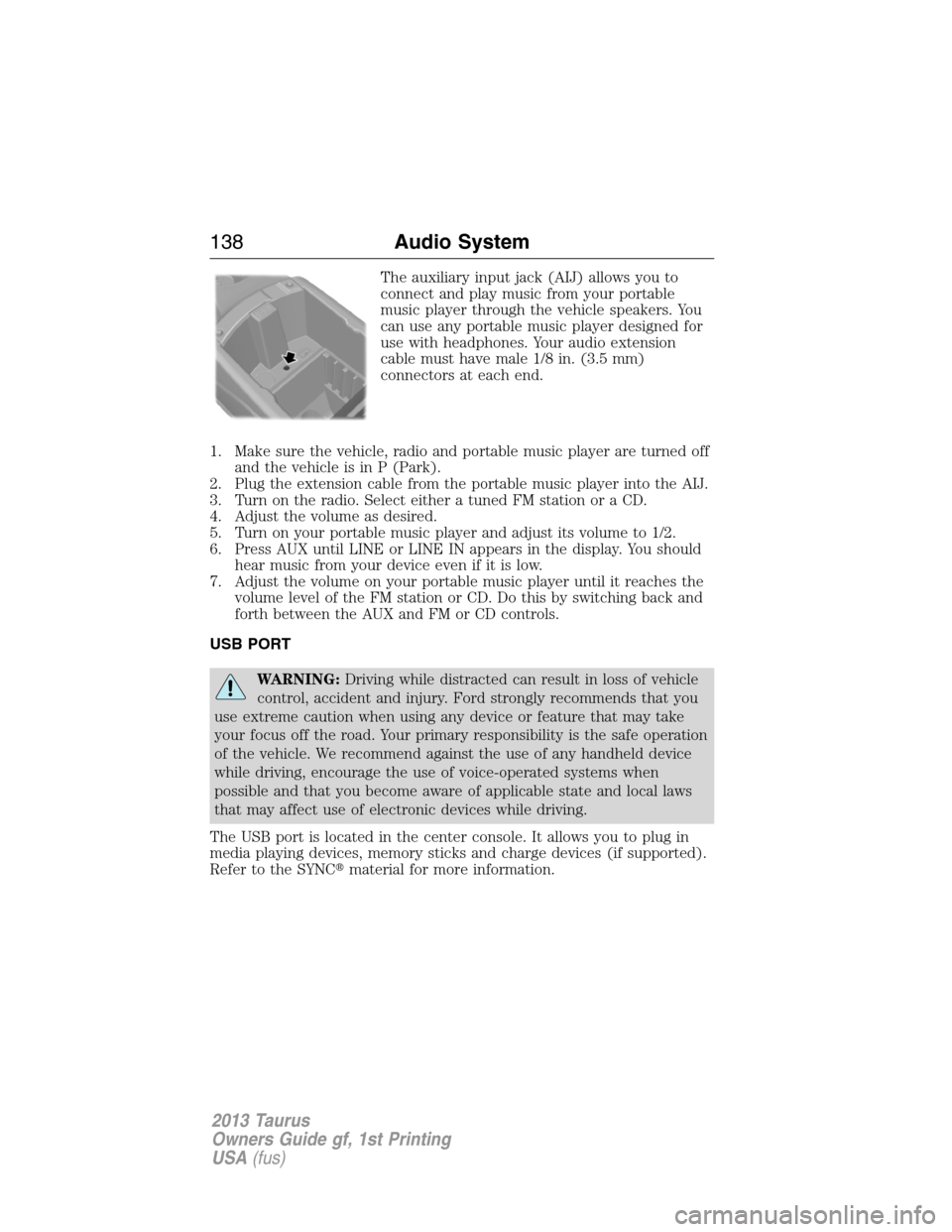
The auxiliary input jack (AIJ) allows you to
connect and play music from your portable
music player through the vehicle speakers. You
can use any portable music player designed for
use with headphones. Your audio extension
cable must have male 1/8 in. (3.5 mm)
connectors at each end.
1. Make sure the vehicle, radio and portable music player are turned off
and the vehicle is in P (Park).
2. Plug the extension cable from the portable music player into the AIJ.
3. Turn on the radio. Select either a tuned FM station or a CD.
4. Adjust the volume as desired.
5. Turn on your portable music player and adjust its volume to 1/2.
6. Press AUX until LINE or LINE IN appears in the display. You should
hear music from your device even if it is low.
7. Adjust the volume on your portable music player until it reaches the
volume level of the FM station or CD. Do this by switching back and
forth between the AUX and FM or CD controls.
USB PORT
WARNING:Driving while distracted can result in loss of vehicle
control, accident and injury. Ford strongly recommends that you
use extreme caution when using any device or feature that may take
your focus off the road. Your primary responsibility is the safe operation
of the vehicle. We recommend against the use of any handheld device
while driving, encourage the use of voice-operated systems when
possible and that you become aware of applicable state and local laws
that may affect use of electronic devices while driving.
The USB port is located in the center console. It allows you to plug in
media playing devices, memory sticks and charge devices (if supported).
Refer to the SYNC�material for more information.
138Audio System
2013 Taurus
Owners Guide gf, 1st Printing
USA(fus)
Page 154 of 541
SITTING IN THE CORRECT POSITION
WARNING:Sitting improperly out of position or with the
seatback reclined too far can take off weight from the seat
cushion and affect the decision of the passenger sensing system,
resulting in serious injury or death in a crash. Always sit upright against
your seatback, with your feet on the floor.
WARNING:Do not recline the seatback as this can cause the
occupant to slide under the seat’s safety belt, resulting in severe
personal injury in the event of a collision.
WARNING:Do not place objects higher than the seatbacks to
reduce the risk of injury in a collision or during heavy braking or
when stopping suddenly.
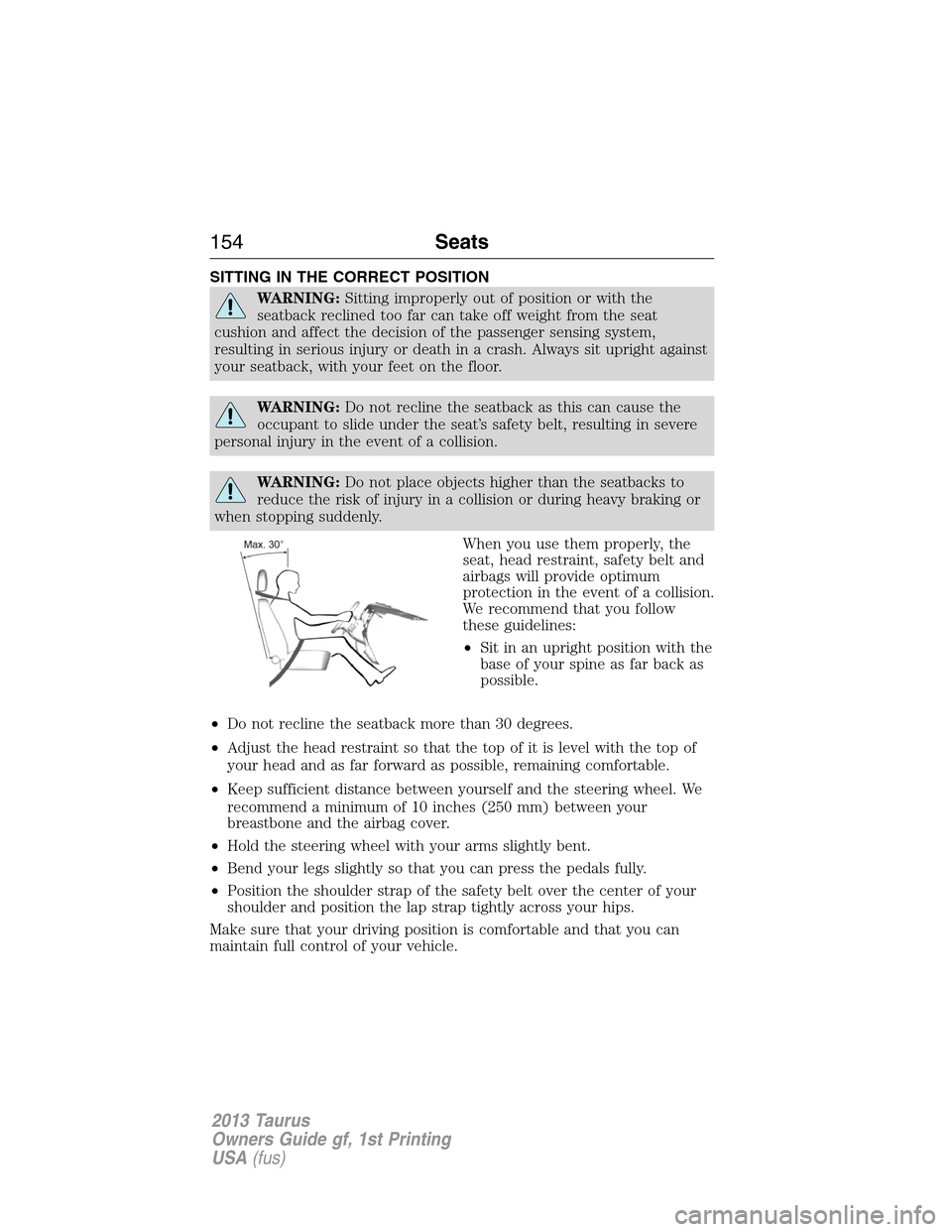
When you use them properly, the
seat, head restraint, safety belt and
airbags will provide optimum
protection in the event of a collision.
We recommend that you follow
these guidelines:
•Sit in an upright position with the
base of your spine as far back as
possible.
•Do not recline the seatback more than 30 degrees.
•Adjust the head restraint so that the top of it is level with the top of
your head and as far forward as possible, remaining comfortable.
•Keep sufficient distance between yourself and the steering wheel. We
recommend a minimum of 10 inches (250 mm) between your
breastbone and the airbag cover.
•Hold the steering wheel with your arms slightly bent.
•Bend your legs slightly so that you can press the pedals fully.
•Position the shoulder strap of the safety belt over the center of your
shoulder and position the lap strap tightly across your hips.
Make sure that your driving position is comfortable and that you can
maintain full control of your vehicle.
154Seats
2013 Taurus
Owners Guide gf, 1st Printing
USA(fus)
Page 155 of 541
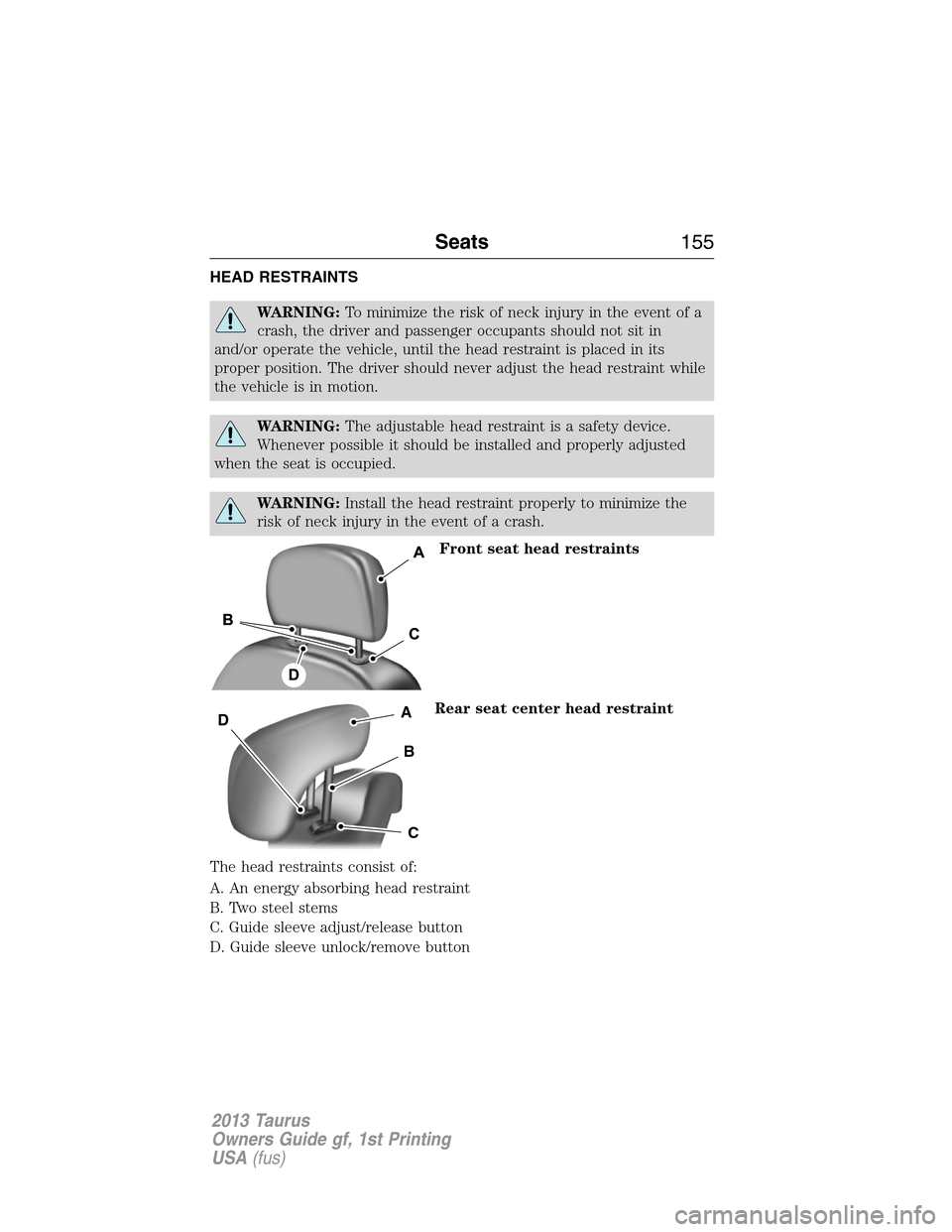
HEAD RESTRAINTS
WARNING:To minimize the risk of neck injury in the event of a
crash, the driver and passenger occupants should not sit in
and/or operate the vehicle, until the head restraint is placed in its
proper position. The driver should never adjust the head restraint while
the vehicle is in motion.
WARNING:The adjustable head restraint is a safety device.
Whenever possible it should be installed and properly adjusted
when the seat is occupied.
WARNING:Install the head restraint properly to minimize the
risk of neck injury in the event of a crash.
Front seat head restraints
Rear seat center head restraint
The head restraints consist of:
A. An energy absorbing head restraint
B. Two steel stems
C. Guide sleeve adjust/release button
D. Guide sleeve unlock/remove button
A
B
C
D
Seats155
2013 Taurus
Owners Guide gf, 1st Printing
USA(fus)