Page 426 of 541
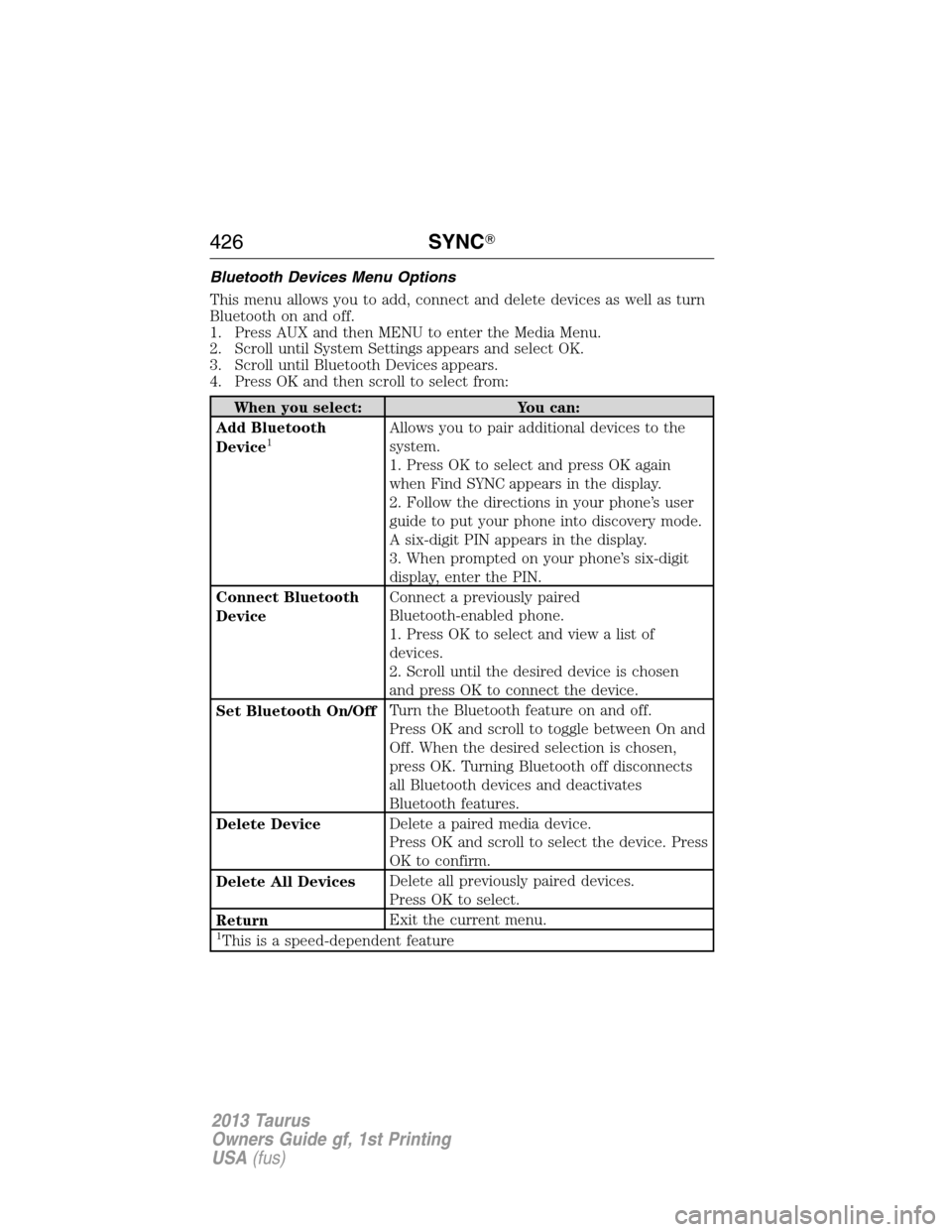
Bluetooth Devices Menu Options
This menu allows you to add, connect and delete devices as well as turn
Bluetooth on and off.
1. Press AUX and then MENU to enter the Media Menu.
2. Scroll until System Settings appears and select OK.
3. Scroll until Bluetooth Devices appears.
4. Press OK and then scroll to select from:
When you select: You can:
Add Bluetooth
Device
1Allows you to pair additional devices to the
system.
1. Press OK to select and press OK again
when Find SYNC appears in the display.
2. Follow the directions in your phone’s user
guide to put your phone into discovery mode.
A six-digit PIN appears in the display.
3. When prompted on your phone’s six-digit
display, enter the PIN.
Connect Bluetooth
DeviceConnect a previously paired
Bluetooth-enabled phone.
1. Press OK to select and view a list of
devices.
2. Scroll until the desired device is chosen
and press OK to connect the device.
Set Bluetooth On/OffTurn the Bluetooth feature on and off.
Press OK and scroll to toggle between On and
Off. When the desired selection is chosen,
press OK. Turning Bluetooth off disconnects
all Bluetooth devices and deactivates
Bluetooth features.
Delete DeviceDelete a paired media device.
Press OK and scroll to select the device. Press
OK to confirm.
Delete All DevicesDelete all previously paired devices.
Press OK to select.
ReturnExit the current menu.
1This is a speed-dependent feature
426SYNC�
2013 Taurus
Owners Guide gf, 1st Printing
USA(fus)
Page 430 of 541
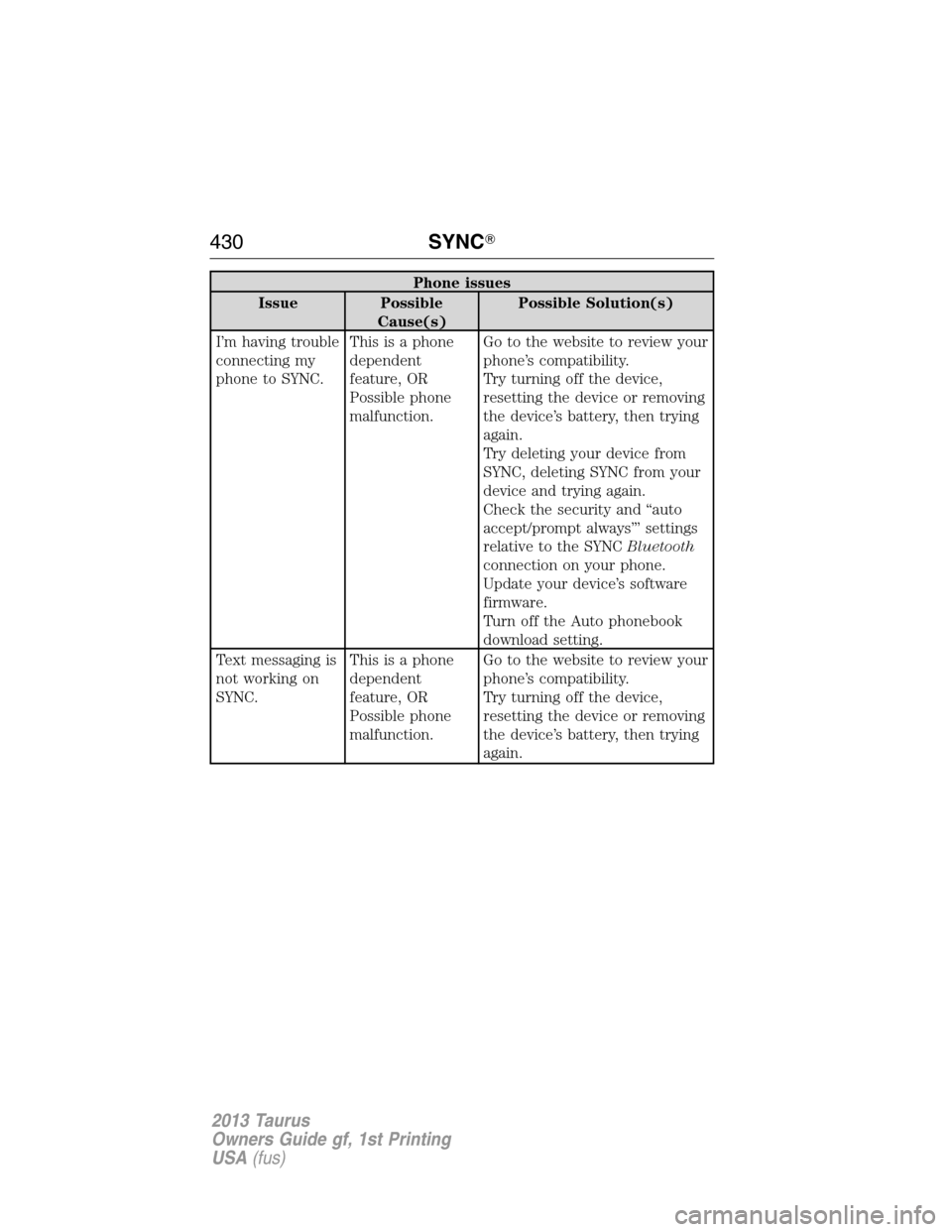
Phone issues
Issue Possible
Cause(s)Possible Solution(s)
I’m having trouble
connecting my
phone to SYNC.This is a phone
dependent
feature, OR
Possible phone
malfunction.Go to the website to review your
phone’s compatibility.
Try turning off the device,
resetting the device or removing
the device’s battery, then trying
again.
Try deleting your device from
SYNC, deleting SYNC from your
device and trying again.
Check the security and “auto
accept/prompt always”’ settings
relative to the SYNCBluetooth
connection on your phone.
Update your device’s software
firmware.
Turn off the Auto phonebook
download setting.
Text messaging is
not working on
SYNC.This is a phone
dependent
feature, OR
Possible phone
malfunction.Go to the website to review your
phone’s compatibility.
Try turning off the device,
resetting the device or removing
the device’s battery, then trying
again.
430SYNC�
2013 Taurus
Owners Guide gf, 1st Printing
USA(fus)
Page 431 of 541
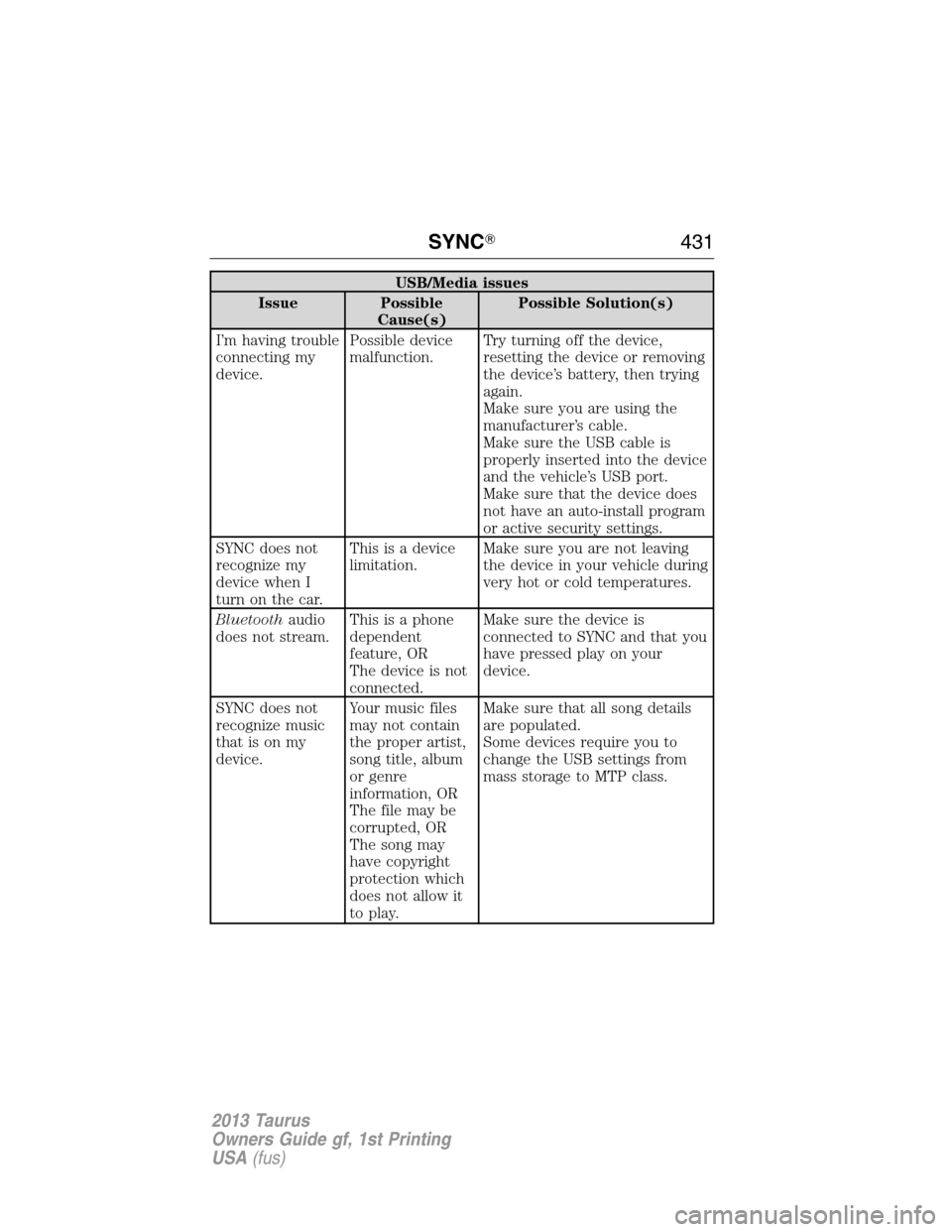
USB/Media issues
Issue Possible
Cause(s)Possible Solution(s)
I’m having trouble
connecting my
device.Possible device
malfunction.Try turning off the device,
resetting the device or removing
the device’s battery, then trying
again.
Make sure you are using the
manufacturer’s cable.
Make sure the USB cable is
properly inserted into the device
and the vehicle’s USB port.
Make sure that the device does
not have an auto-install program
or active security settings.
SYNC does not
recognize my
device when I
turn on the car.This is a device
limitation.Make sure you are not leaving
the device in your vehicle during
very hot or cold temperatures.
Bluetoothaudio
does not stream.This is a phone
dependent
feature, OR
The device is not
connected.Make sure the device is
connected to SYNC and that you
have pressed play on your
device.
SYNC does not
recognize music
that is on my
device.Your music files
may not contain
the proper artist,
song title, album
or genre
information, OR
The file may be
corrupted, OR
The song may
have copyright
protection which
does not allow it
to play.Make sure that all song details
are populated.
Some devices require you to
change the USB settings from
mass storage to MTP class.
SYNC�431
2013 Taurus
Owners Guide gf, 1st Printing
USA(fus)
Page 432 of 541
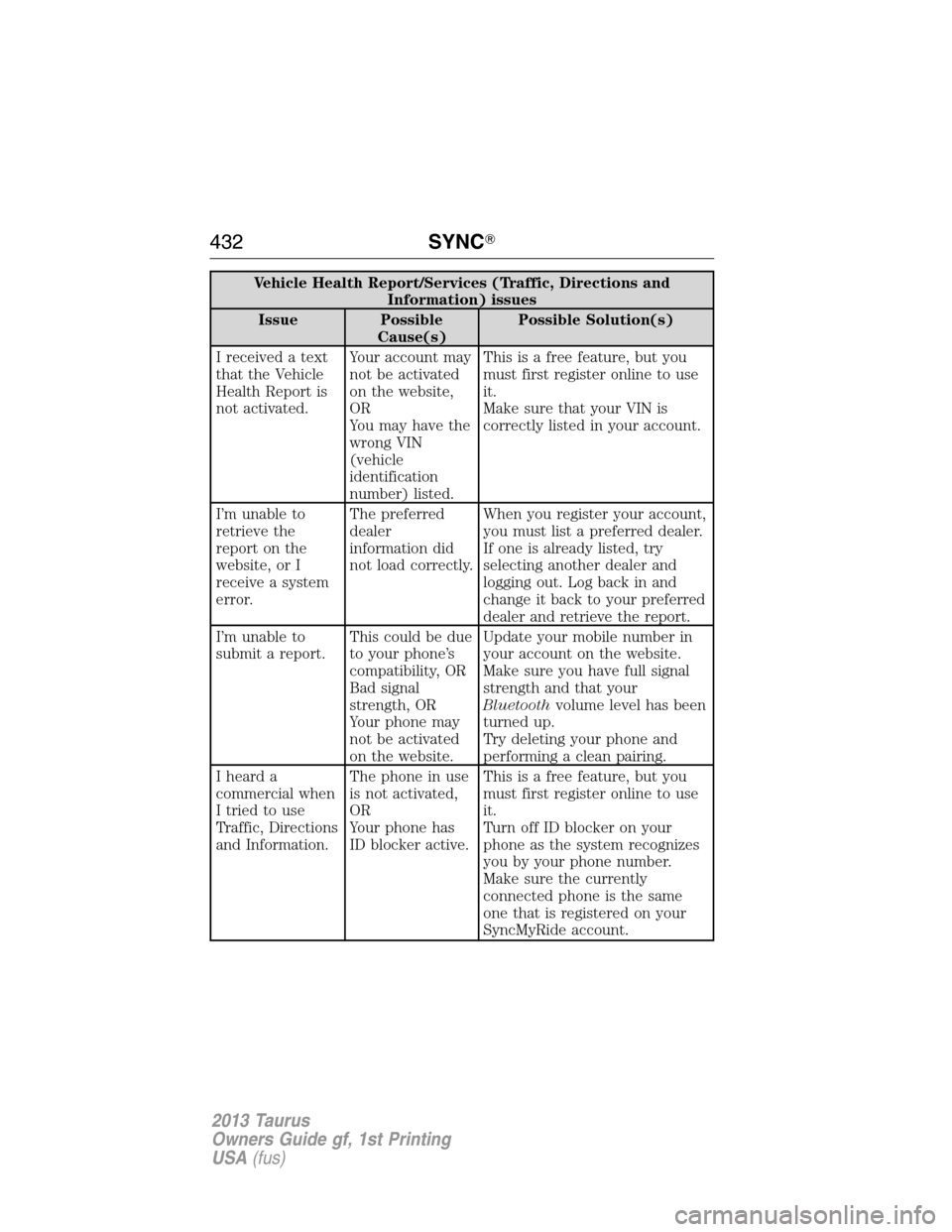
Vehicle Health Report/Services (Traffic, Directions and
Information) issues
Issue Possible
Cause(s)Possible Solution(s)
I received a text
that the Vehicle
Health Report is
not activated.Your account may
not be activated
on the website,
OR
You may have the
wrong VIN
(vehicle
identification
number) listed.This is a free feature, but you
must first register online to use
it.
Make sure that your VIN is
correctly listed in your account.
I’m unable to
retrieve the
report on the
website, or I
receive a system
error.The preferred
dealer
information did
not load correctly.When you register your account,
you must list a preferred dealer.
If one is already listed, try
selecting another dealer and
logging out. Log back in and
change it back to your preferred
dealer and retrieve the report.
I’m unable to
submit a report.This could be due
to your phone’s
compatibility, OR
Bad signal
strength, OR
Your phone may
not be activated
on the website.Update your mobile number in
your account on the website.
Make sure you have full signal
strength and that your
Bluetoothvolume level has been
turned up.
Try deleting your phone and
performing a clean pairing.
I heard a
commercial when
I tried to use
Traffic, Directions
and Information.The phone in use
is not activated,
OR
Your phone has
ID blocker active.This is a free feature, but you
must first register online to use
it.
Turn off ID blocker on your
phone as the system recognizes
you by your phone number.
Make sure the currently
connected phone is the same
one that is registered on your
SyncMyRide account.
432SYNC�
2013 Taurus
Owners Guide gf, 1st Printing
USA(fus)
Page 439 of 541

Speed-Restricted Features
Some features of this system may be too difficult to use while the vehicle
is in motion so they’re restricted from being modified unless the vehicle
is not moving. Some examples of these are listed below:
•Screens that are too crowded with information, such as Point of
Interest (POI) reviews and ratings, SIRIUS�Travel Link™ sports
scores, movie times, ski conditions, etc.
•Any action that requires using a keyboard, such as entering a
navigation destination or editing information
•All lists are limited so the user can view fewer entries (e.g. phone
contacts, recent phone call entries)
Listed below are more specific features that can only be modified while
the vehicle is not moving:
Restricted features
Cellular Phone Pairing a Bluetooth phone
Adding phonebook contacts or uploading
phonebook contacts (from a USB)
Lists entries are limited for phone contacts
and recent phone call entries
System Functionality Setting-up or editing shortcut buttons on the
home screen
Editing the keypad code
Enabling Valet Mode
Editing settings while the rear view camera or
Active Park Assist are active
Wi-Fi/Wireless Editing wireless settings
Editing the list of wireless networks
Videos/Photos/Graphics Playing video
Graphic album art carousel
Editing photos
Editing the screen’s wallpaper or adding new
wallpaper
MyFord Touch™ (If Equipped)439
2013 Taurus
Owners Guide gf, 1st Printing
USA(fus)
Page 443 of 541
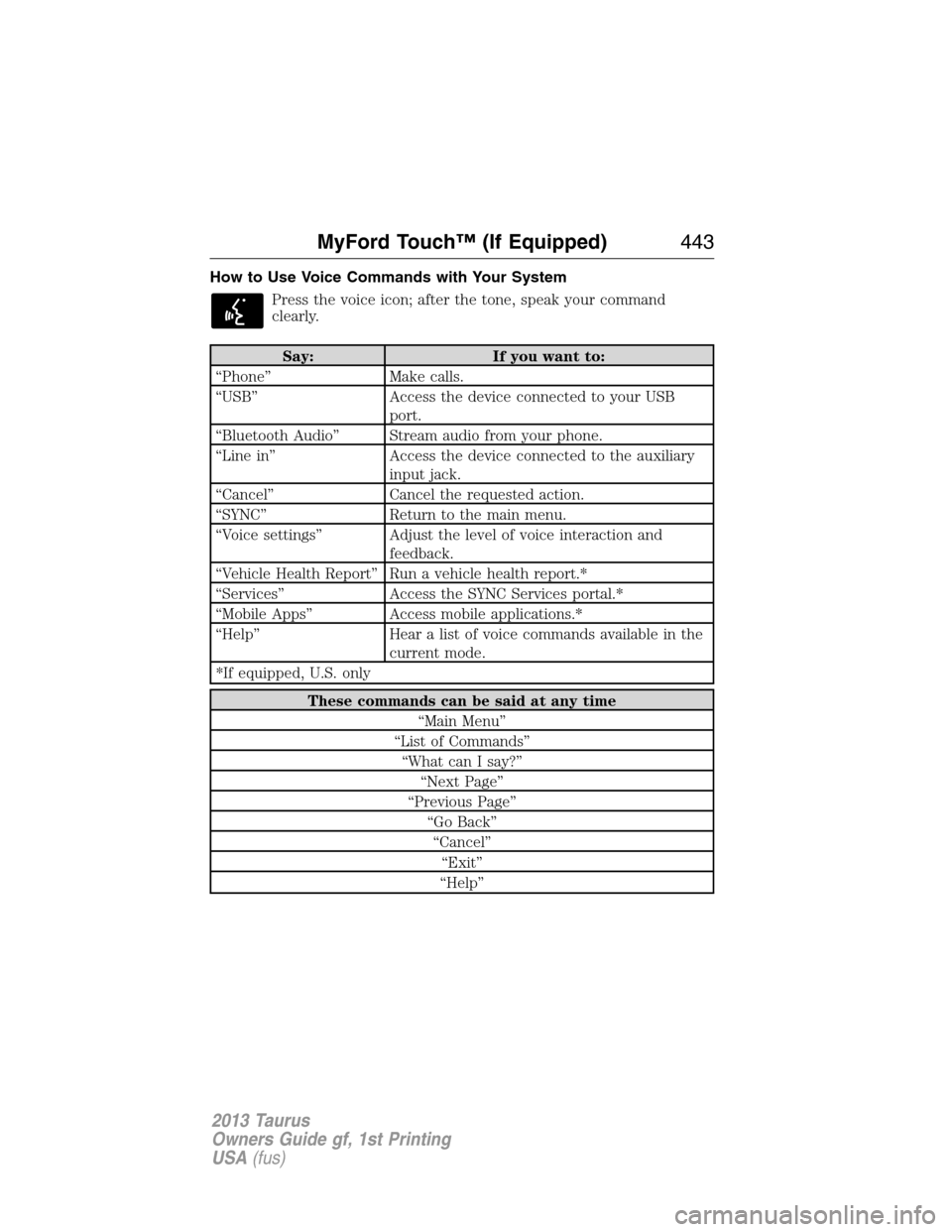
How to Use Voice Commands with Your System
Press the voice icon; after the tone, speak your command
clearly.
Say: If you want to:
“Phone” Make calls.
“USB” Access the device connected to your USB
port.
“Bluetooth Audio” Stream audio from your phone.
“Line in” Access the device connected to the auxiliary
input jack.
“Cancel” Cancel the requested action.
“SYNC” Return to the main menu.
“Voice settings” Adjust the level of voice interaction and
feedback.
“Vehicle Health Report” Run a vehicle health report.*
“Services” Access the SYNC Services portal.*
“Mobile Apps” Access mobile applications.*
“Help” Hear a list of voice commands available in the
current mode.
*If equipped, U.S. only
These commands can be said at any time
“Main Menu”
“List of Commands”
“What can I say?”
“Next Page”
“Previous Page”
“Go Back”
“Cancel”
“Exit”
“Help”
MyFord Touch™ (If Equipped)443
2013 Taurus
Owners Guide gf, 1st Printing
USA(fus)
Page 444 of 541
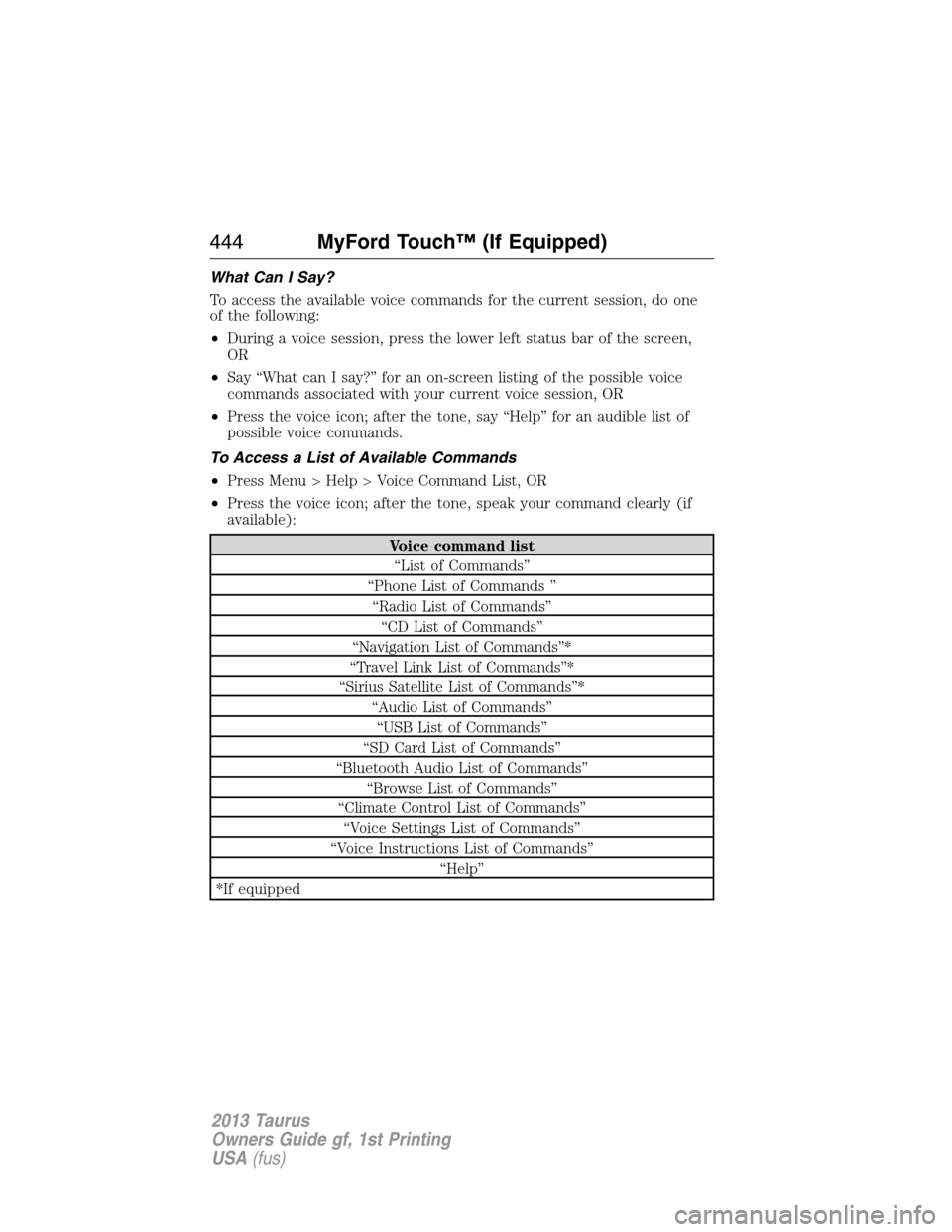
What Can I Say?
To access the available voice commands for the current session, do one
of the following:
•During a voice session, press the lower left status bar of the screen,
OR
•Say “What can I say?” for an on-screen listing of the possible voice
commands associated with your current voice session, OR
•Press the voice icon; after the tone, say “Help” for an audible list of
possible voice commands.
To Access a List of Available Commands
•Press Menu > Help > Voice Command List, OR
•Press the voice icon; after the tone, speak your command clearly (if
available):
Voice command list
“List of Commands”
“Phone List of Commands ”
“Radio List of Commands”
“CD List of Commands”
“Navigation List of Commands”*
“Travel Link List of Commands”*
“Sirius Satellite List of Commands”*
“Audio List of Commands”
“USB List of Commands”
“SD Card List of Commands”
“Bluetooth Audio List of Commands”
“Browse List of Commands”
“Climate Control List of Commands”
“Voice Settings List of Commands”
“Voice Instructions List of Commands”
“Help”
*If equipped
444MyFord Touch™ (If Equipped)
2013 Taurus
Owners Guide gf, 1st Printing
USA(fus)
Page 446 of 541
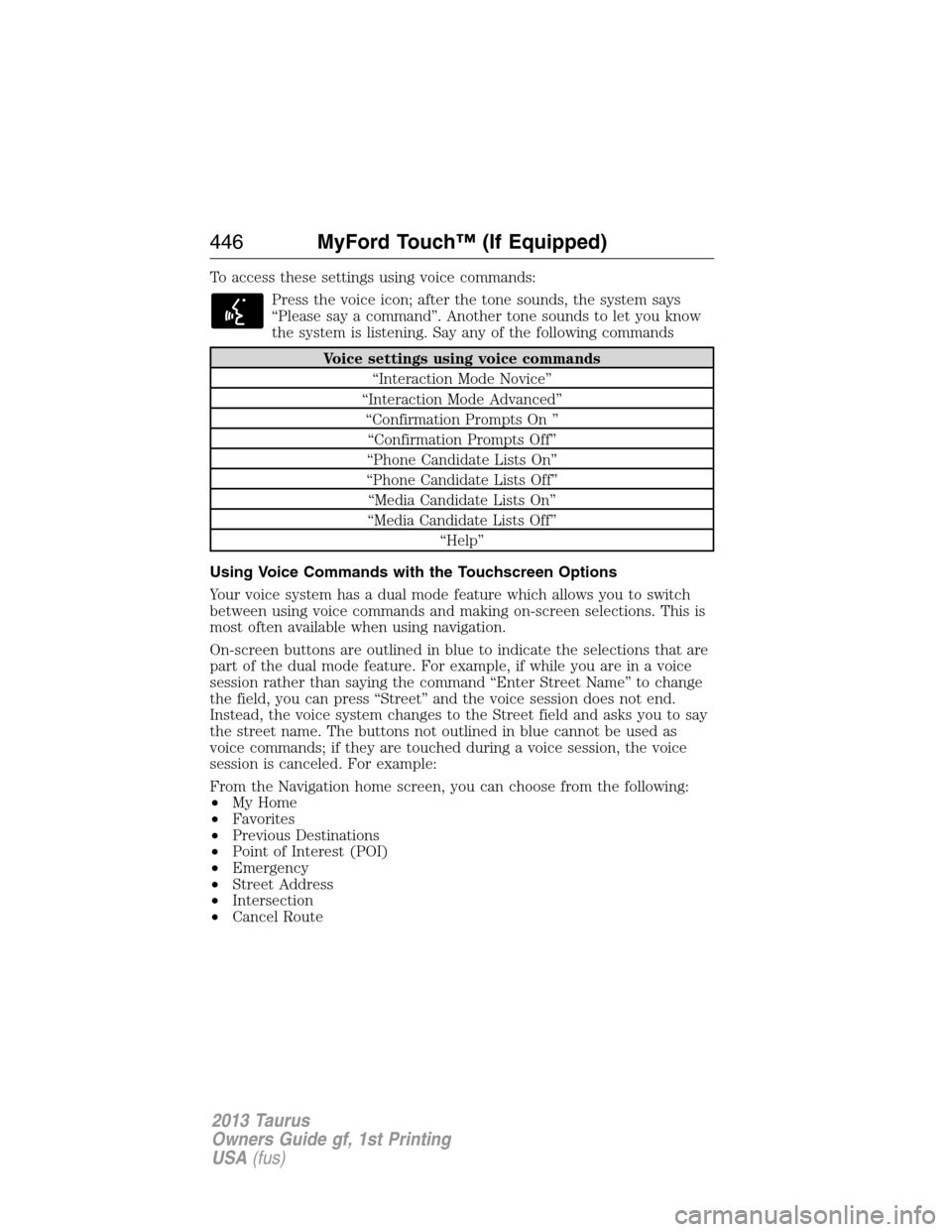
To access these settings using voice commands:
Press the voice icon; after the tone sounds, the system says
“Please say a command”. Another tone sounds to let you know
the system is listening. Say any of the following commands
Voice settings using voice commands
“Interaction Mode Novice”
“Interaction Mode Advanced”
“Confirmation Prompts On ”
“Confirmation Prompts Off”
“Phone Candidate Lists On”
“Phone Candidate Lists Off”
“Media Candidate Lists On”
“Media Candidate Lists Off”
“Help”
Using Voice Commands with the Touchscreen Options
Your voice system has a dual mode feature which allows you to switch
between using voice commands and making on-screen selections. This is
most often available when using navigation.
On-screen buttons are outlined in blue to indicate the selections that are
part of the dual mode feature. For example, if while you are in a voice
session rather than saying the command “Enter Street Name” to change
the field, you can press “Street” and the voice session does not end.
Instead, the voice system changes to the Street field and asks you to say
the street name. The buttons not outlined in blue cannot be used as
voice commands; if they are touched during a voice session, the voice
session is canceled. For example:
From the Navigation home screen, you can choose from the following:
•My Home
•Favorites
•Previous Destinations
•Point of Interest (POI)
•Emergency
•Street Address
•Intersection
•Cancel Route
446MyFord Touch™ (If Equipped)
2013 Taurus
Owners Guide gf, 1st Printing
USA(fus)