Page 138 of 541
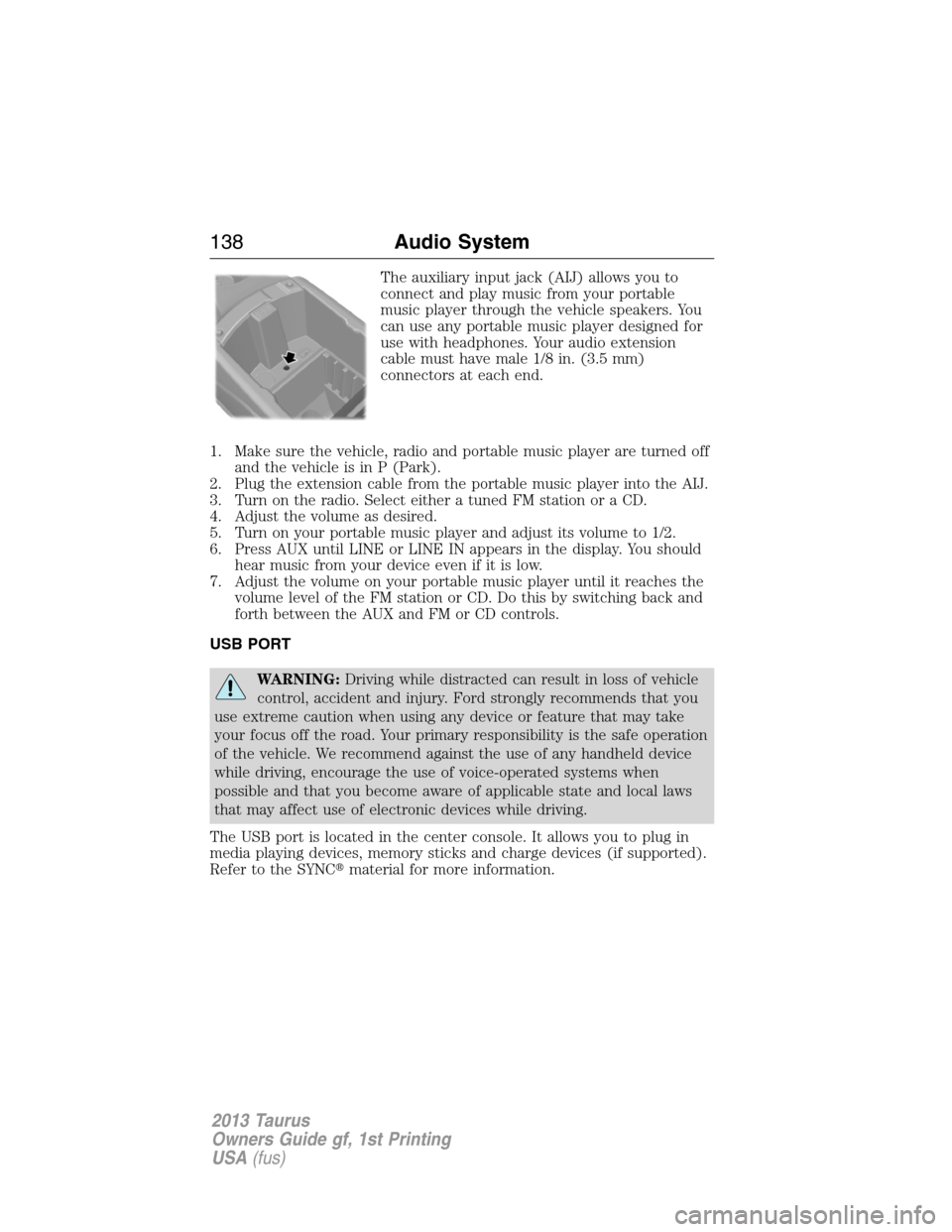
The auxiliary input jack (AIJ) allows you to
connect and play music from your portable
music player through the vehicle speakers. You
can use any portable music player designed for
use with headphones. Your audio extension
cable must have male 1/8 in. (3.5 mm)
connectors at each end.
1. Make sure the vehicle, radio and portable music player are turned off
and the vehicle is in P (Park).
2. Plug the extension cable from the portable music player into the AIJ.
3. Turn on the radio. Select either a tuned FM station or a CD.
4. Adjust the volume as desired.
5. Turn on your portable music player and adjust its volume to 1/2.
6. Press AUX until LINE or LINE IN appears in the display. You should
hear music from your device even if it is low.
7. Adjust the volume on your portable music player until it reaches the
volume level of the FM station or CD. Do this by switching back and
forth between the AUX and FM or CD controls.
USB PORT
WARNING:Driving while distracted can result in loss of vehicle
control, accident and injury. Ford strongly recommends that you
use extreme caution when using any device or feature that may take
your focus off the road. Your primary responsibility is the safe operation
of the vehicle. We recommend against the use of any handheld device
while driving, encourage the use of voice-operated systems when
possible and that you become aware of applicable state and local laws
that may affect use of electronic devices while driving.
The USB port is located in the center console. It allows you to plug in
media playing devices, memory sticks and charge devices (if supported).
Refer to the SYNC�material for more information.
138Audio System
2013 Taurus
Owners Guide gf, 1st Printing
USA(fus)
Page 139 of 541
MEDIA HUB
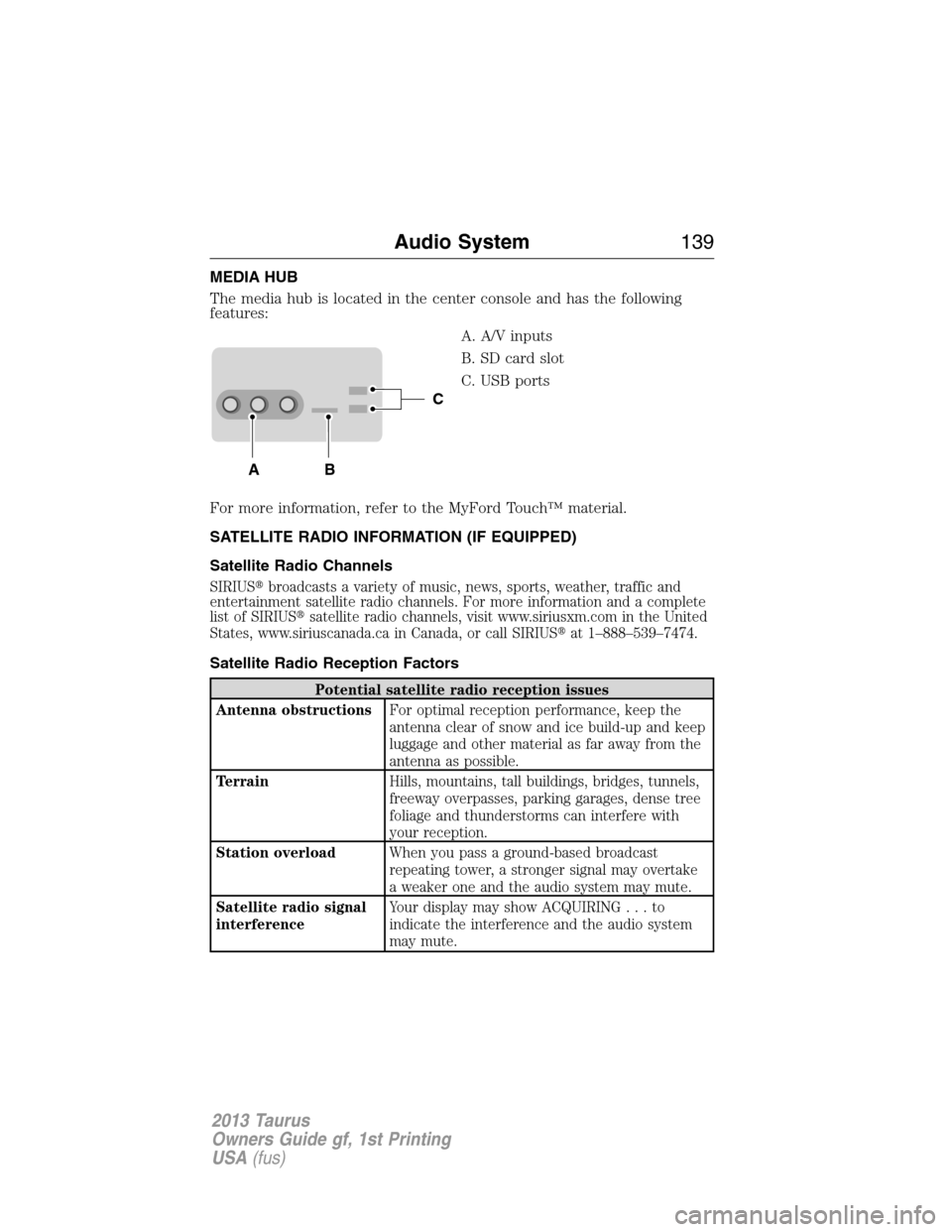
The media hub is located in the center console and has the following
features:
A. A/V inputs
B. SD card slot
C. USB ports
For more information, refer to the MyFord Touch™ material.
SATELLITE RADIO INFORMATION (IF EQUIPPED)
Satellite Radio Channels
SIRIUS�broadcasts a variety of music, news, sports, weather, traffic and
entertainment satellite radio channels. For more information and a complete
list of SIRIUS�satellite radio channels, visit www.siriusxm.com in the United
States, www.siriuscanada.ca in Canada, or call SIRIUS�at 1–888–539–7474.
Satellite Radio Reception Factors
Potential satellite radio reception issues
Antenna obstructionsFor optimal reception performance, keep the
antenna clear of snow and ice build-up and keep
luggage and other material as far away from the
antenna as possible.
TerrainHills, mountains, tall buildings, bridges, tunnels,
freeway overpasses, parking garages, dense tree
foliage and thunderstorms can interfere with
your reception.
Station overloadWhen you pass a ground-based broadcast
repeating tower, a stronger signal may overtake
a weaker one and the audio system may mute.
Satellite radio signal
interferenceYour display may show ACQUIRING...to
indicate the interference and the audio system
may mute.
C
BA
Audio System139
2013 Taurus
Owners Guide gf, 1st Printing
USA(fus)
Page 140 of 541
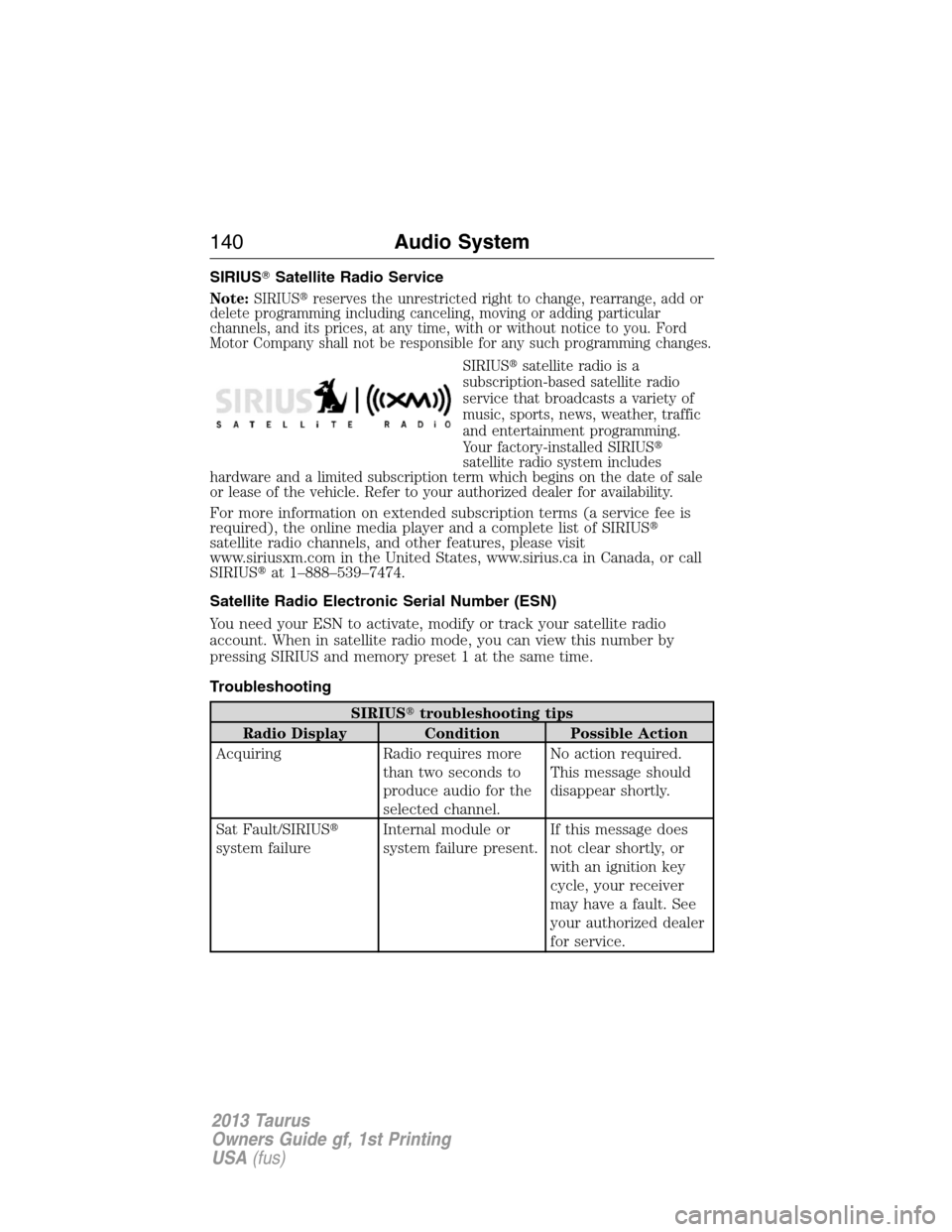
SIRIUS�Satellite Radio Service
Note:SIRIUS�reserves the unrestricted right to change, rearrange, add or
delete programming including canceling, moving or adding particular
channels, and its prices, at any time, with or without notice to you. Ford
Motor Company shall not be responsible for any such programming changes.
SIRIUS�satellite radio is a
subscription-based satellite radio
service that broadcasts a variety of
music, sports, news, weather, traffic
and entertainment programming.
Your factory-installed SIRIUS�
satellite radio system includes
hardware and a limited subscription term which begins on the date of sale
or lease of the vehicle. Refer to your authorized dealer for availability.
For more information on extended subscription terms (a service fee is
required), the online media player and a complete list of SIRIUS�
satellite radio channels, and other features, please visit
www.siriusxm.com in the United States, www.sirius.ca in Canada, or call
SIRIUS�at 1–888–539–7474.
Satellite Radio Electronic Serial Number (ESN)
You need your ESN to activate, modify or track your satellite radio
account. When in satellite radio mode, you can view this number by
pressing SIRIUS and memory preset 1 at the same time.
Troubleshooting
SIRIUS�troubleshooting tips
Radio Display Condition Possible Action
Acquiring Radio requires more
than two seconds to
produce audio for the
selected channel.No action required.
This message should
disappear shortly.
Sat Fault/SIRIUS�
system failureInternal module or
system failure present.If this message does
not clear shortly, or
with an ignition key
cycle, your receiver
may have a fault. See
your authorized dealer
for service.
140Audio System
2013 Taurus
Owners Guide gf, 1st Printing
USA(fus)
Page 141 of 541
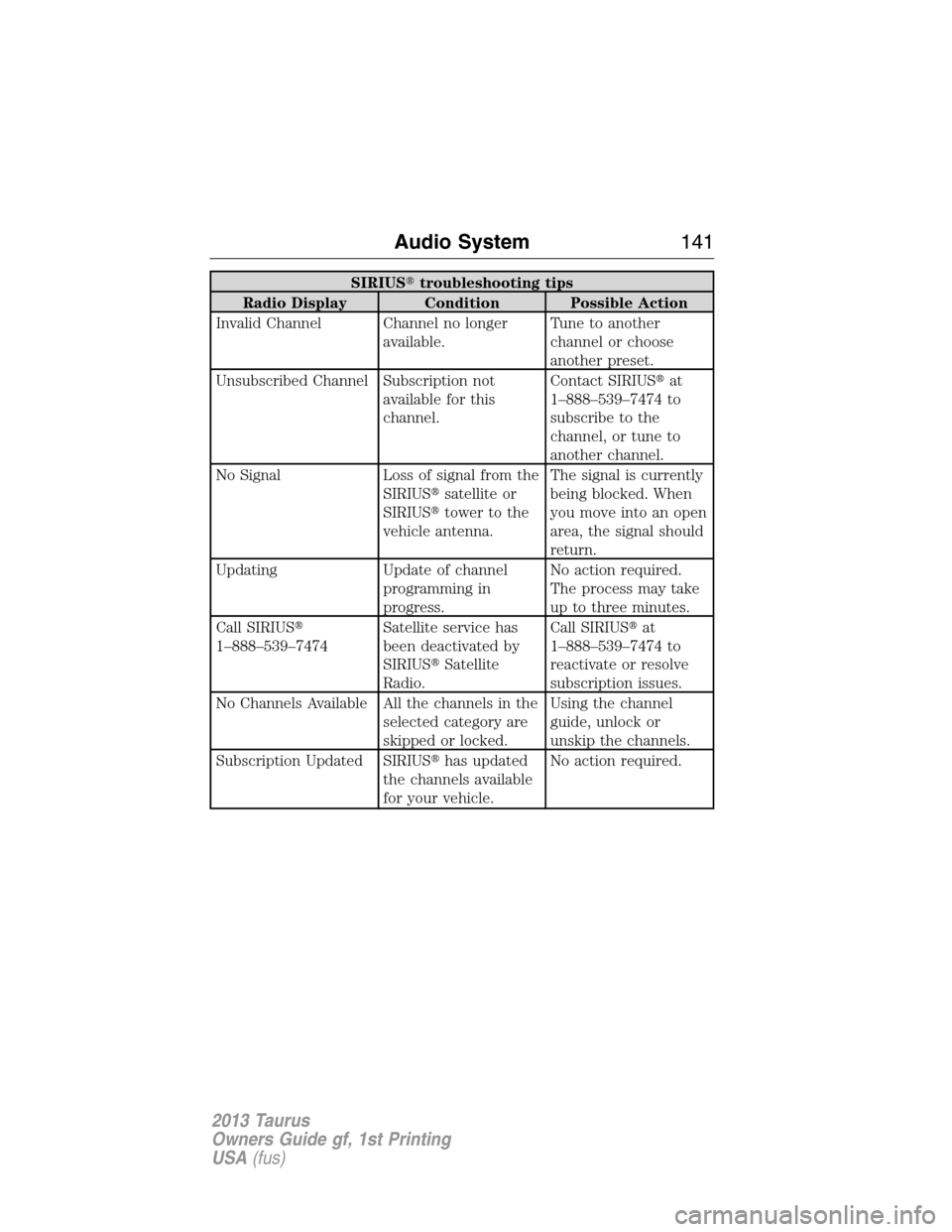
SIRIUS�troubleshooting tips
Radio Display Condition Possible Action
Invalid Channel Channel no longer
available.Tune to another
channel or choose
another preset.
Unsubscribed Channel Subscription not
available for this
channel.Contact SIRIUS�at
1–888–539–7474 to
subscribe to the
channel, or tune to
another channel.
No Signal Loss of signal from the
SIRIUS�satellite or
SIRIUS�tower to the
vehicle antenna.The signal is currently
being blocked. When
you move into an open
area, the signal should
return.
Updating Update of channel
programming in
progress.No action required.
The process may take
up to three minutes.
Call SIRIUS�
1–888–539–7474Satellite service has
been deactivated by
SIRIUS�Satellite
Radio.Call SIRIUS�at
1–888–539–7474 to
reactivate or resolve
subscription issues.
No Channels Available All the channels in the
selected category are
skipped or locked.Using the channel
guide, unlock or
unskip the channels.
Subscription Updated SIRIUS�has updated
the channels available
for your vehicle.No action required.
Audio System141
2013 Taurus
Owners Guide gf, 1st Printing
USA(fus)
Page 146 of 541
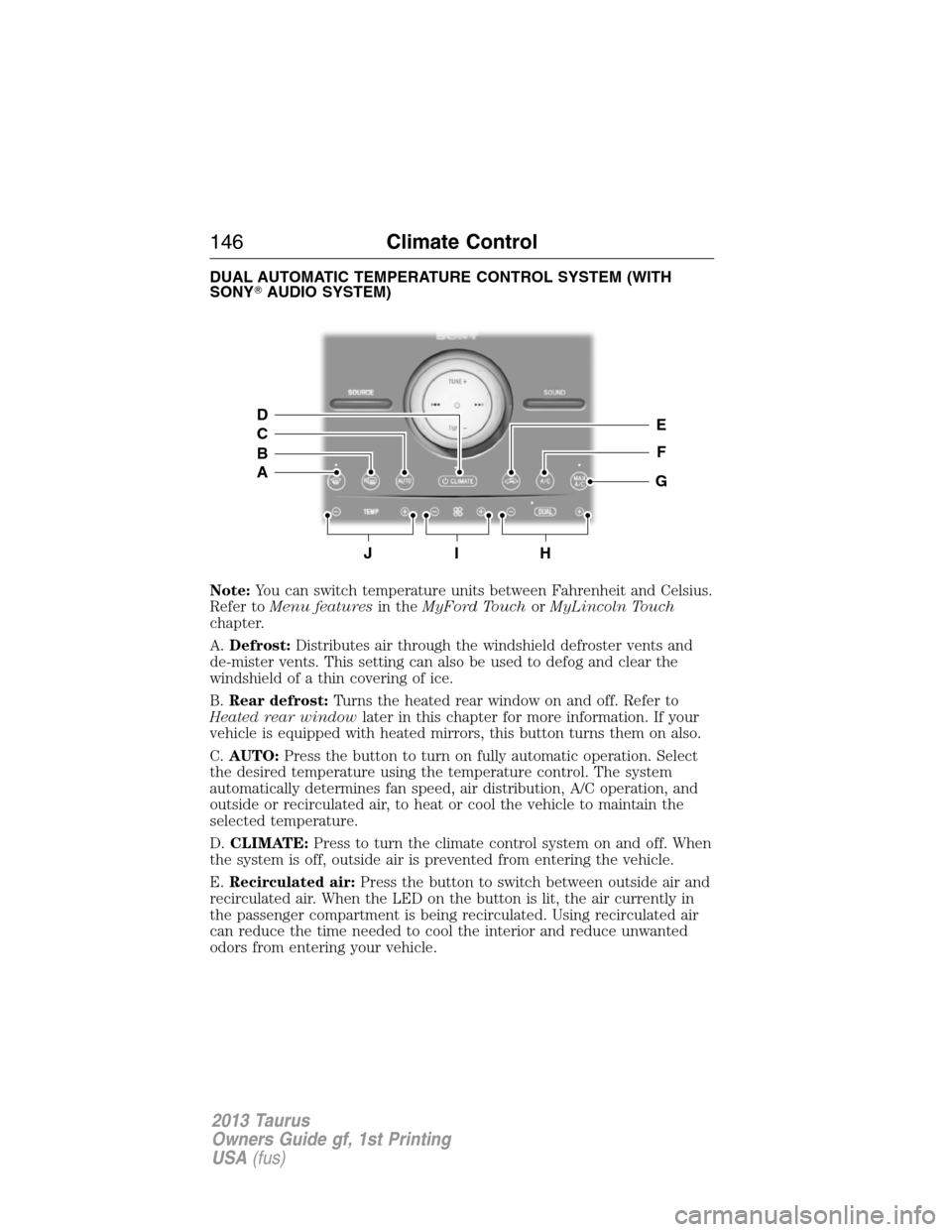
DUAL AUTOMATIC TEMPERATURE CONTROL SYSTEM (WITH
SONY�AUDIO SYSTEM)
Note:You can switch temperature units between Fahrenheit and Celsius.
Refer toMenu featuresin theMyFord TouchorMyLincoln Touch
chapter.
A.Defrost:Distributes air through the windshield defroster vents and
de-mister vents. This setting can also be used to defog and clear the
windshield of a thin covering of ice.
B.Rear defrost:Turns the heated rear window on and off. Refer to
Heated rear windowlater in this chapter for more information. If your
vehicle is equipped with heated mirrors, this button turns them on also.
C.AUTO:Press the button to turn on fully automatic operation. Select
the desired temperature using the temperature control. The system
automatically determines fan speed, air distribution, A/C operation, and
outside or recirculated air, to heat or cool the vehicle to maintain the
selected temperature.
D.CLIMATE:Press to turn the climate control system on and off. When
the system is off, outside air is prevented from entering the vehicle.
E.Recirculated air:Press the button to switch between outside air and
recirculated air. When the LED on the button is lit, the air currently in
the passenger compartment is being recirculated. Using recirculated air
can reduce the time needed to cool the interior and reduce unwanted
odors from entering your vehicle.
JIH
E
F
G
D
C
B
A
146Climate Control
2013 Taurus
Owners Guide gf, 1st Printing
USA(fus)
Page 174 of 541
CENTER CONSOLE
WARNING:Use only soft cups in the cupholder. Hard objects
can injure you in a collision.
Note:The appearance and features of the center console may be
different than shown based on your vehicle’s option level.
Your vehicle may be equipped with a variety of console features. These
include:
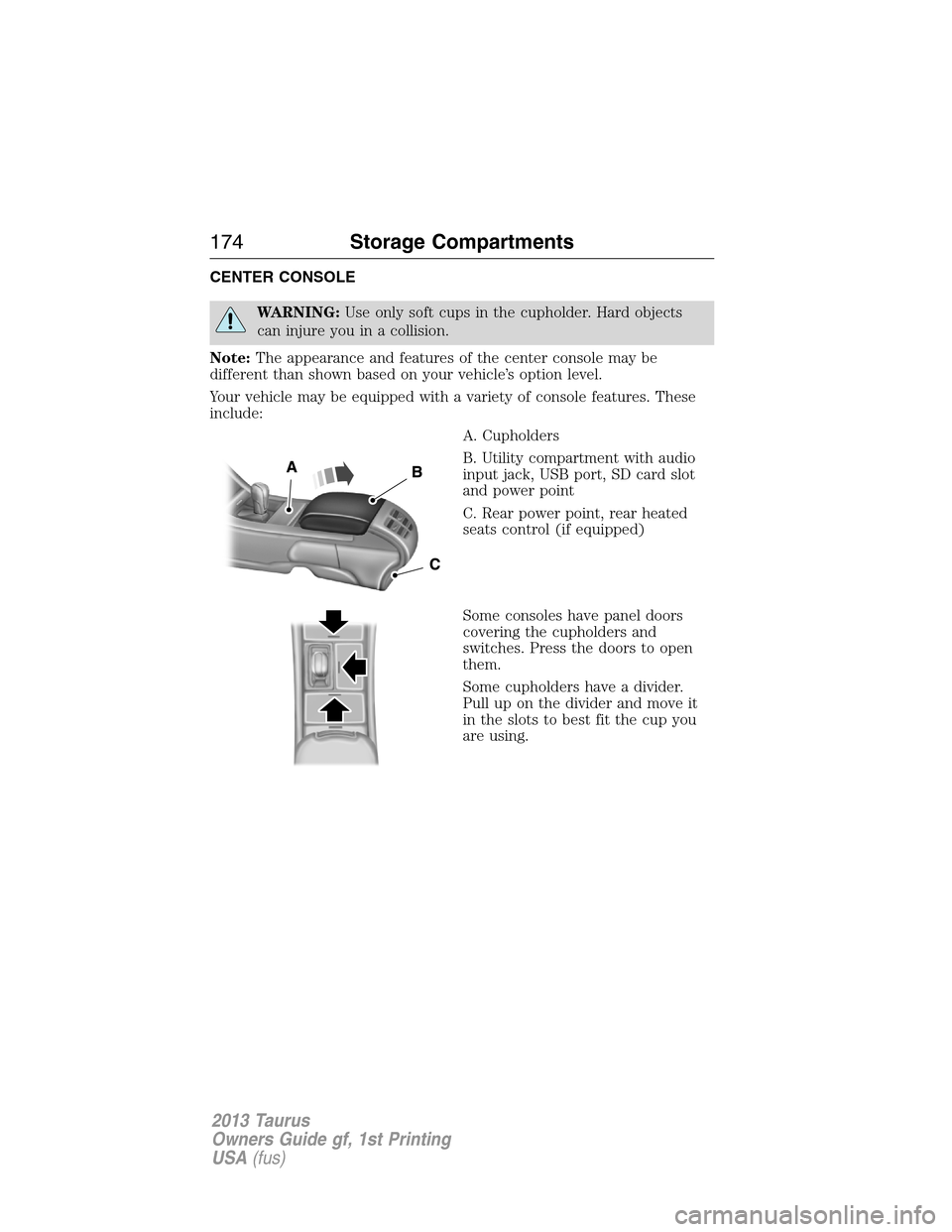
A. Cupholders
B. Utility compartment with audio
input jack, USB port, SD card slot
and power point
C. Rear power point, rear heated
seats control (if equipped)
Some consoles have panel doors
covering the cupholders and
switches. Press the doors to open
them.
Some cupholders have a divider.
Pull up on the divider and move it
in the slots to best fit the cup you
are using.
174Storage Compartments
2013 Taurus
Owners Guide gf, 1st Printing
USA(fus)
Page 277 of 541
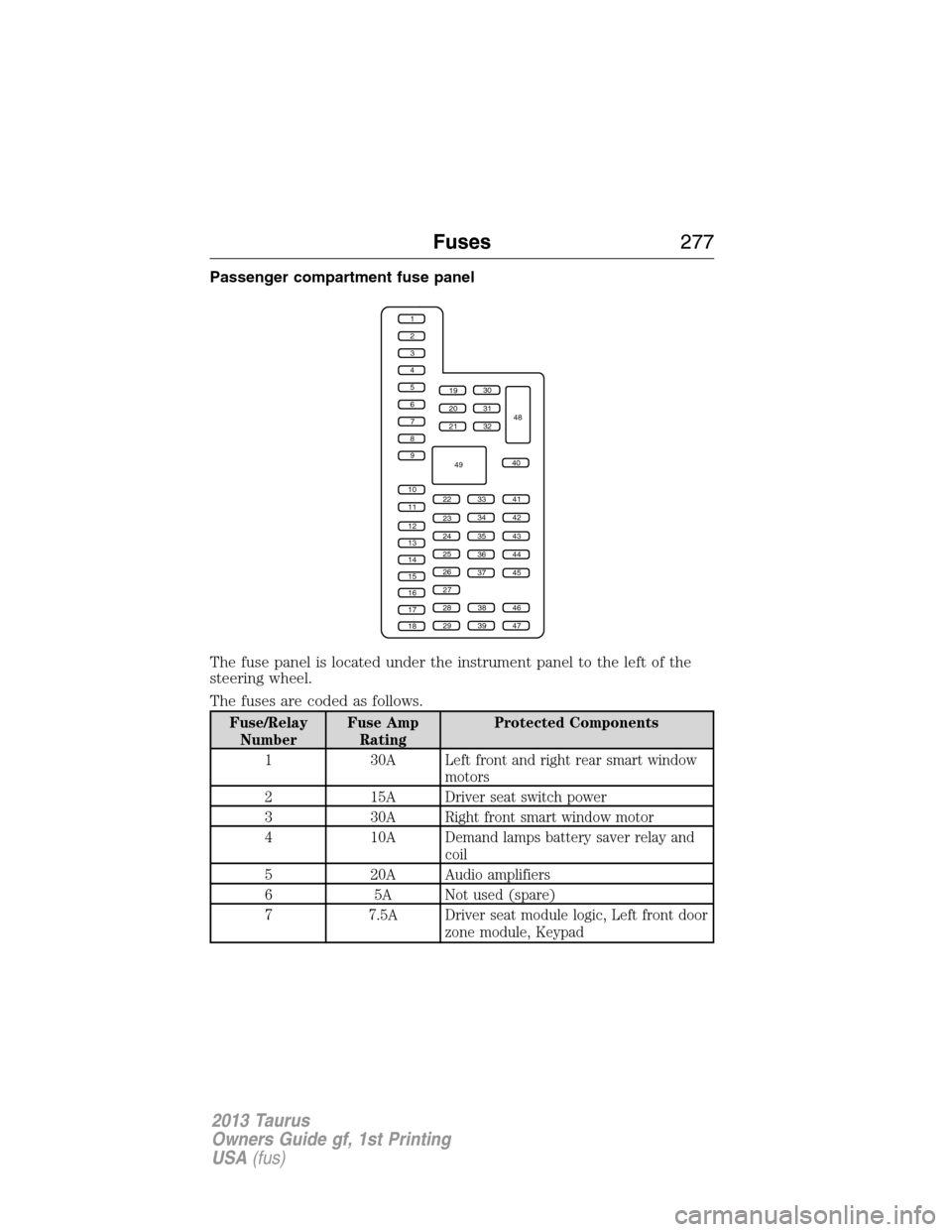
Passenger compartment fuse panel
The fuse panel is located under the instrument panel to the left of the
steering wheel.
The fuses are coded as follows.
Fuse/Relay
NumberFuse Amp
RatingProtected Components
1 30A Left front and right rear smart window
motors
2 15A Driver seat switch power
3 30A Right front smart window motor
4 10A Demand lamps battery saver relay and
coil
5 20A Audio amplifiers
6 5A Not used (spare)
7 7.5A Driver seat module logic, Left front door
zone module, Keypad
1
2
3
4
5
6
7
8
9
10
11
12
13
14
15
16
17
18
19
20
21
223341
42
43
44
45
34
35
36
37
23
24
25
26
27
283846
394729
32
40
31
30
48
49
Fuses277
2013 Taurus
Owners Guide gf, 1st Printing
USA(fus)
Page 278 of 541
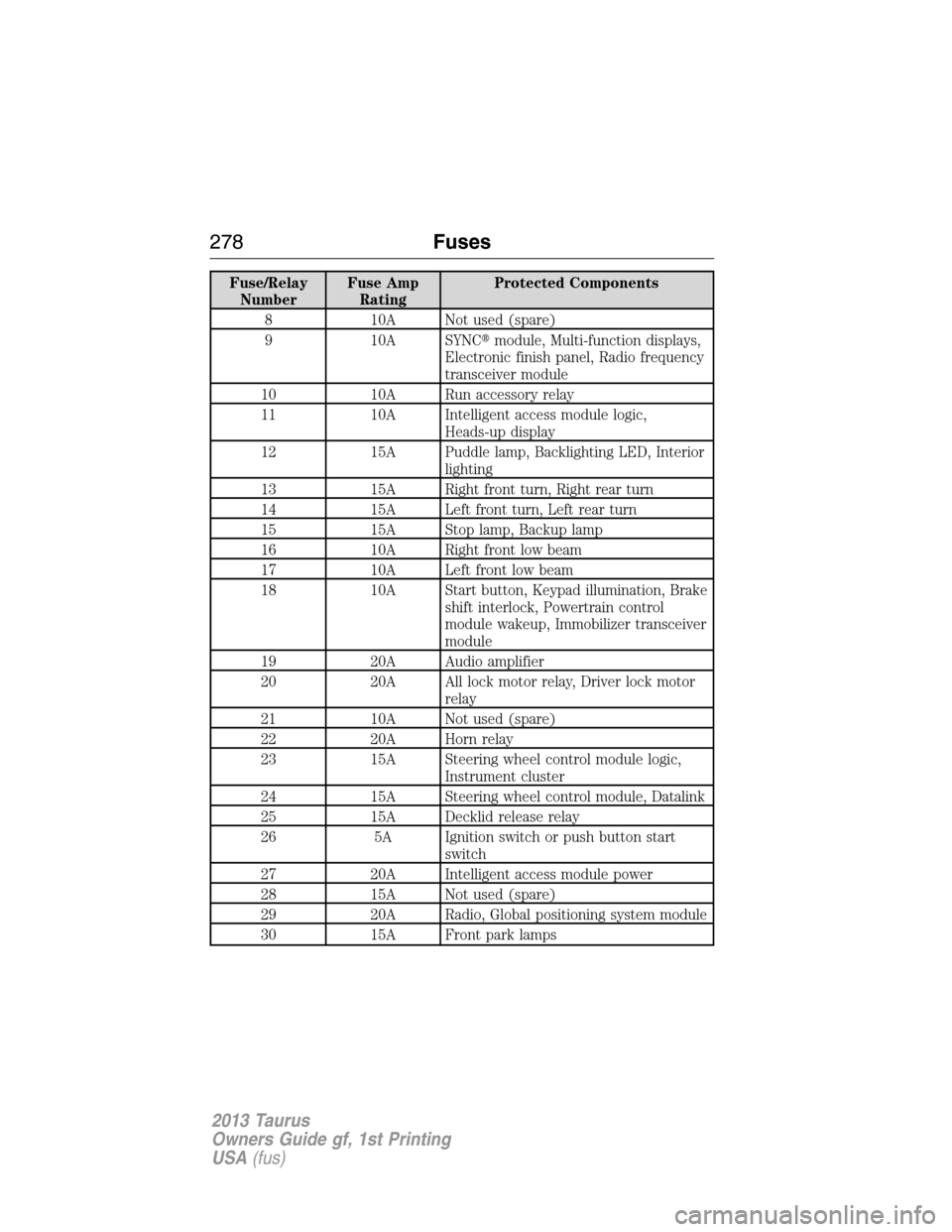
Fuse/Relay
NumberFuse Amp
RatingProtected Components
8 10A Not used (spare)
9 10A SYNC�module, Multi-function displays,
Electronic finish panel, Radio frequency
transceiver module
10 10A Run accessory relay
11 10A Intelligent access module logic,
Heads-up display
12 15A Puddle lamp, Backlighting LED, Interior
lighting
13 15A Right front turn, Right rear turn
14 15A Left front turn, Left rear turn
15 15A Stop lamp, Backup lamp
16 10A Right front low beam
17 10A Left front low beam
18 10A Start button, Keypad illumination, Brake
shift interlock, Powertrain control
module wakeup, Immobilizer transceiver
module
19 20A Audio amplifier
20 20A All lock motor relay, Driver lock motor
relay
21 10A Not used (spare)
22 20A Horn relay
23 15A Steering wheel control module logic,
Instrument cluster
24 15A Steering wheel control module, Datalink
25 15A Decklid release relay
26 5A Ignition switch or push button start
switch
27 20A Intelligent access module power
28 15A Not used (spare)
29 20A Radio, Global positioning system module
30 15A Front park lamps
278Fuses
2013 Taurus
Owners Guide gf, 1st Printing
USA(fus)