Page 356 of 541

TECHNICAL SPECIFICATIONS
Items CapacityFord Part Name or
equivalentFord Part Number /
Ford Specification
Brake fluid
1
Between MAX and
MIN on reservoirMotorcraft�DOT4LV
High Performance Motor
Vehicle Brake FluidPM-20 /
WSS-M6C65-A2 and ISO
4925 Class 6
Door latch, hood latch,
auxiliary hood latch,
seat tracks, trunk and
liftgate latches—Multi-Purpose Grease
(Lithium grease)XG-4 or XL-5 or
equivalent /
ESA-M1C93-B
Lock cylinders —Motorcraft�Penetrating
and Lock LubricantXL-1 /
None
Automatic transmission
fluid
2,3
10.9 quarts
(10.3L)
(6F50)
Motorcraft�
MERCON�LV AT F
2
XT-10-QLV /
MERCON�LV 11.6 quarts
(11.0L)
(6F55)
9.0 quarts (8.5L)
(6F35)
Rear differential (AWD)
fluid2.4 pints (1.15L)Motorcraft�SAE 80W-90
Premium Rear Axle
LubricantXY-80W90-QL /
WSP-M2C197-A
Power Transfer Unit
(PTU) fluid (AWD)
4
18 ounces (0.53L)Motorcraft�SAE
75W-140 Synthetic Rear
Axle LubricantXY-75W140-QL /
WSL-M2C192-A
356Capacities and Specifications
2013 Taurus
Owners Guide gf, 1st Printing
USA(fus)
Page 392 of 541
USING YOUR VOICE RECOGNITION SYSTEM
This system helps you control many features using voice commands. This
allows you to keep your hands on the wheel and focus on what is in front
of you.
Initiating a Voice Session
Push the voice icon; a tone sounds and “Listening” appears in
the display. Say any of the following:
Say: If you want to:
“Phone” Make calls.
“USB” Access the device connected to your USB
port.
“Bluetooth Audio” Stream audio from your phone.
“Line in” Access the device connected to the auxiliary
input jack.
“Cancel” Cancel the requested action.
“SYNC” Return to the main menu.
“Voice settings” Adjust the level of voice interaction and
feedback.
“Vehicle Health Report” Run a vehicle health report.*
“Services” Access the SYNC Services portal.*
“Mobile Apps” Access mobile applications.*
“Help” Hear a list of voice commands available in the
current mode.
*If equipped, U.S. only
System Interaction and Feedback
The system provides feedback through audible tones, prompts, questions
and spoken confirmations depending on the situation and the chosen
level of interaction (voice settings). You can customize the voice
recognition system to provide more or less instruction and feedback.
The default setting is to a higher level of interaction in order to help you
learn to use the system. You can change these settings at any time.
392SYNC�
2013 Taurus
Owners Guide gf, 1st Printing
USA(fus)
Page 416 of 541
SYNC Services Quick Tips
PortableYour subscription is associated with your
Bluetooth-enabled cellular phone number, not
your VIN (Vehicle Identification Number). You
can pair and connect your phone to any
vehicle equipped with Traffic, Directions and
Information and continue enjoying your
personalized services.
You can even access your account outside the
vehicle. Just use the number on your phone’s
call history. Traffic and Directions features do
not function properly but information services
and the 411 connect and text message
features are available.
MEDIA FEATURES
You can access and play music from your digital music player over the
vehicle’s speaker system using the system’s media menu or voice
commands. You can also sort and play your music by specific categories
such as artists, albums, etc.
SYNC is capable of hosting nearly any digital media player including:
iPod�, Zune™, “Plays from device” players, and most USB drives. SYNC
also supports audio formats such as MP3, WMA, WAV and ACC.
Connecting Your Digital Media Player via the USB Port
Note:If your digital media player has a power switch, ensure that the
device is turned on.
To connect using voice commands:
1. Plug the device into the vehicle’s USB port.
2. Press the voice icon and when prompted, say “USB”.
3. You can now play music by saying any of the appropriate voice
commands. Refer to the media voice commands.
To connect using the system menu:
1. Plug the device into the vehicle’s USB port.
2. Press AUX and then MENU to enter the Media Menu.
3. Scroll until Select Source appears and press OK.
4. Scroll to select USB and press OK.
416SYNC�
2013 Taurus
Owners Guide gf, 1st Printing
USA(fus)
Page 420 of 541
Press the voice icon and when prompted say “Bluetooth Audio” and then
any of the following:
“BLUETOOTH AUDIO”
“(Phone) (Media) (Bluetooth) Connections”
“Pause”
“Play”
“Play next track ”
“Play previous track ”
Media Menu Features
The media menu allows you to select your media source, how to play
your music (by artist, genre, shuffle, repeat, etc.), and also to add,
connect or delete devices.
1. Press AUX and then MENU to enter the Media Menu.
2. Scroll to cycle through:
When you select: You can:
Play MenuPlay your music by artist, album, genre,
playlists, tracks, similar music or to simply,
play all. You can also choose to Explore USB
to view the supported digital music files on
your playing device.
Refer to Play Menu later in this section for
more information.
420SYNC�
2013 Taurus
Owners Guide gf, 1st Printing
USA(fus)
Page 421 of 541
When you select: You can:
Select SourceSelect and play music from your USB port,
auxiliary input jack (line in) or stream music
from your Bluetooth-enabled phone.
Press OK to select, then scroll to choose from:
USB: Press OK to access music plugged into
your USB port. You can also plug in devices to
charge them (if supported by your device).
Once connected, the system indexes any
readable media files. (The time required to
complete this depends on the size of the
media content being indexed.) If Autoplay is
on, you can access media files randomly as
they are indexed. If turned off, indexed media
is not available until the indexing process is
complete. SYNC is capable of indexing
thousands of average size media and notifies
you if the maximum indexing file size is
reached.
Bluetooth Audio: This is a phone-dependent
feature which allows you to stream music
playing on your Bluetooth-enabled phone. If
supported by your device, you can press
SEEK to play the previous or next track.
Line in: Press OK to select and play music
from your portable music player over the
vehicle’s speakers.
Note:If you have already connected a device
to the USB port, you cannot access the line in
feature. Some digital media players require
both USB and line in ports to stream data and
music separately.
SYNC�421
2013 Taurus
Owners Guide gf, 1st Printing
USA(fus)
Page 423 of 541
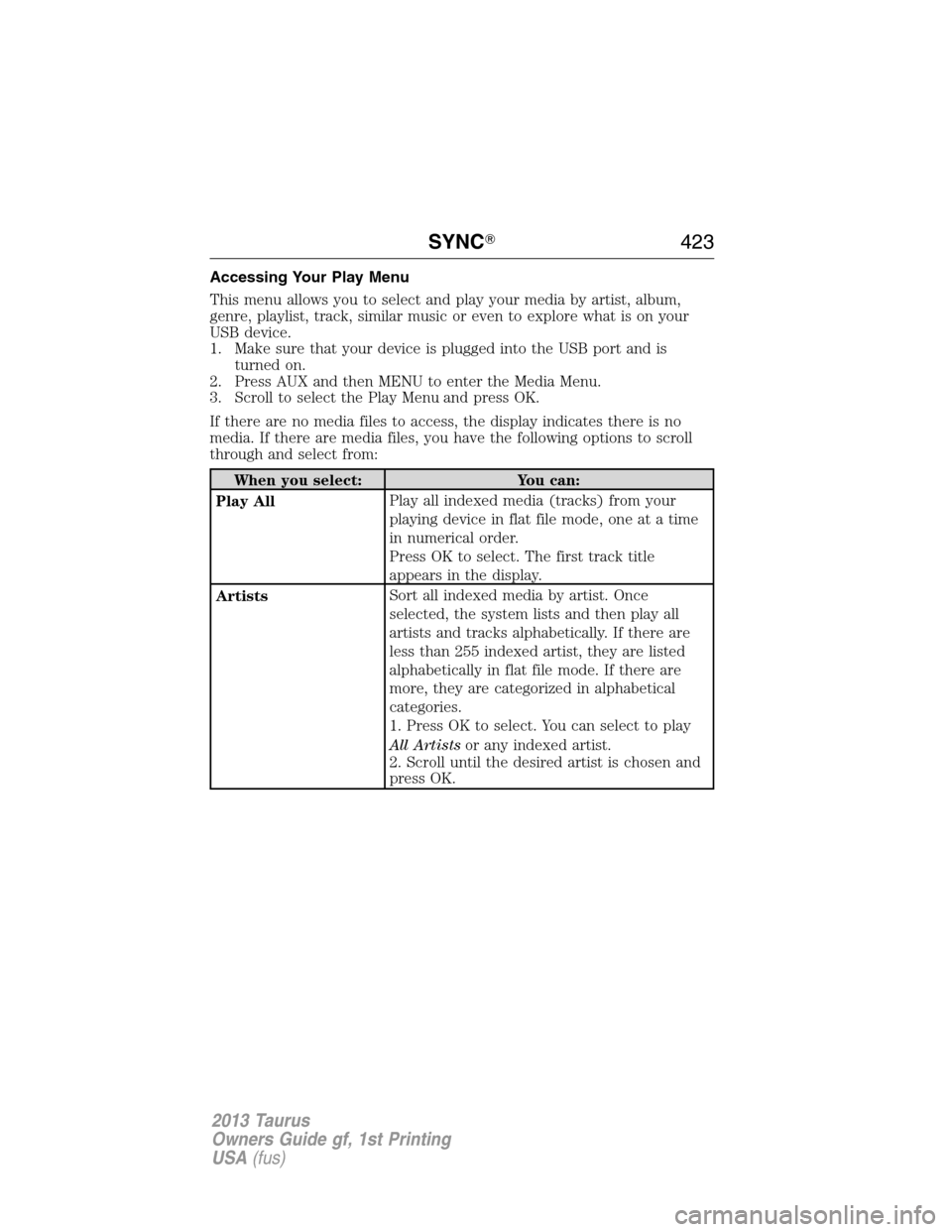
Accessing Your Play Menu
This menu allows you to select and play your media by artist, album,
genre, playlist, track, similar music or even to explore what is on your
USB device.
1. Make sure that your device is plugged into the USB port and is
turned on.
2. Press AUX and then MENU to enter the Media Menu.
3. Scroll to select the Play Menu and press OK.
If there are no media files to access, the display indicates there is no
media. If there are media files, you have the following options to scroll
through and select from:
When you select: You can:
Play AllPlay all indexed media (tracks) from your
playing device in flat file mode, one at a time
in numerical order.
Press OK to select. The first track title
appears in the display.
ArtistsSort all indexed media by artist. Once
selected, the system lists and then play all
artists and tracks alphabetically. If there are
less than 255 indexed artist, they are listed
alphabetically in flat file mode. If there are
more, they are categorized in alphabetical
categories.
1. Press OK to select. You can select to play
All Artistsor any indexed artist.
2. Scroll until the desired artist is chosen and
press OK.
SYNC�423
2013 Taurus
Owners Guide gf, 1st Printing
USA(fus)
Page 426 of 541
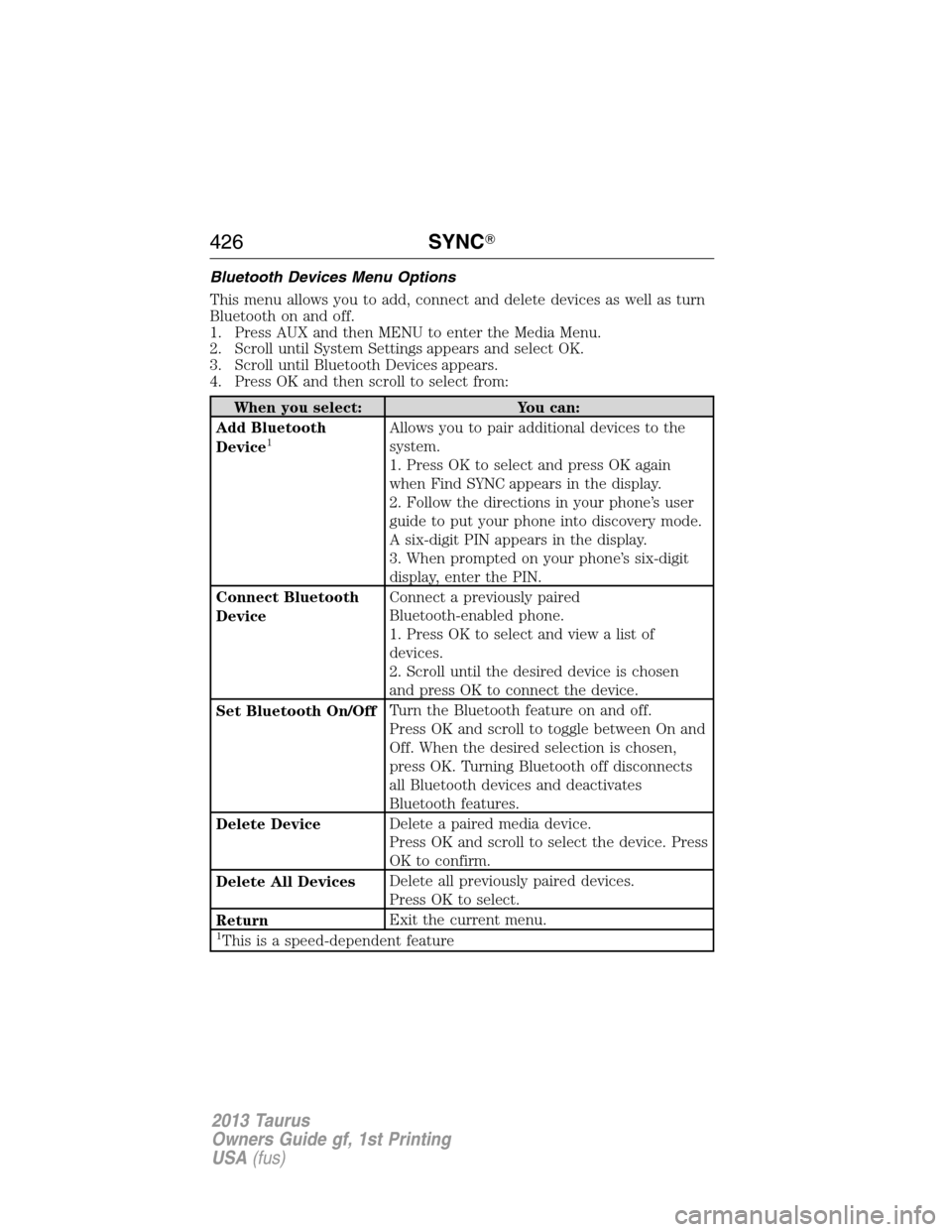
Bluetooth Devices Menu Options
This menu allows you to add, connect and delete devices as well as turn
Bluetooth on and off.
1. Press AUX and then MENU to enter the Media Menu.
2. Scroll until System Settings appears and select OK.
3. Scroll until Bluetooth Devices appears.
4. Press OK and then scroll to select from:
When you select: You can:
Add Bluetooth
Device
1Allows you to pair additional devices to the
system.
1. Press OK to select and press OK again
when Find SYNC appears in the display.
2. Follow the directions in your phone’s user
guide to put your phone into discovery mode.
A six-digit PIN appears in the display.
3. When prompted on your phone’s six-digit
display, enter the PIN.
Connect Bluetooth
DeviceConnect a previously paired
Bluetooth-enabled phone.
1. Press OK to select and view a list of
devices.
2. Scroll until the desired device is chosen
and press OK to connect the device.
Set Bluetooth On/OffTurn the Bluetooth feature on and off.
Press OK and scroll to toggle between On and
Off. When the desired selection is chosen,
press OK. Turning Bluetooth off disconnects
all Bluetooth devices and deactivates
Bluetooth features.
Delete DeviceDelete a paired media device.
Press OK and scroll to select the device. Press
OK to confirm.
Delete All DevicesDelete all previously paired devices.
Press OK to select.
ReturnExit the current menu.
1This is a speed-dependent feature
426SYNC�
2013 Taurus
Owners Guide gf, 1st Printing
USA(fus)
Page 427 of 541
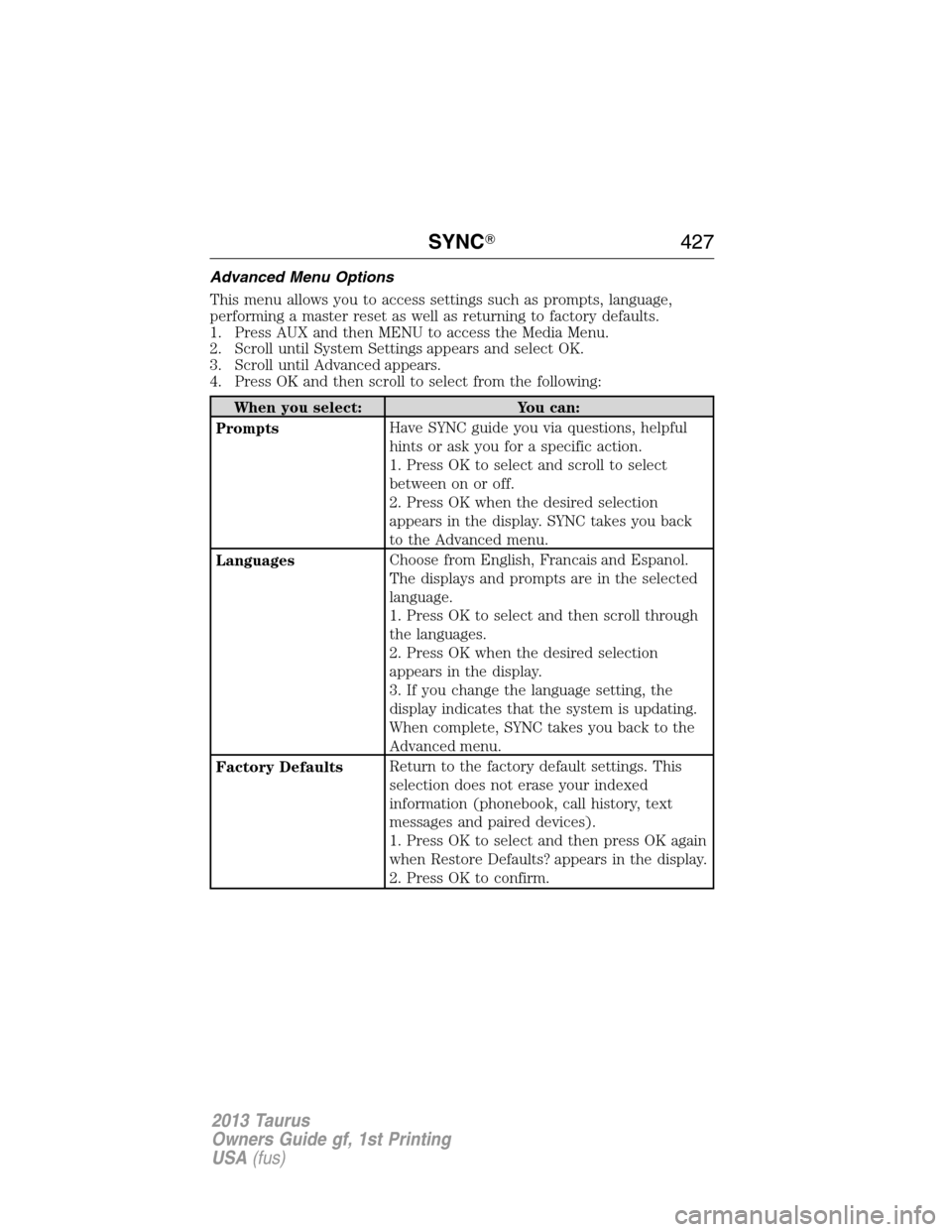
Advanced Menu Options
This menu allows you to access settings such as prompts, language,
performing a master reset as well as returning to factory defaults.
1. Press AUX and then MENU to access the Media Menu.
2. Scroll until System Settings appears and select OK.
3. Scroll until Advanced appears.
4. Press OK and then scroll to select from the following:
When you select: You can:
PromptsHave SYNC guide you via questions, helpful
hints or ask you for a specific action.
1. Press OK to select and scroll to select
between on or off.
2. Press OK when the desired selection
appears in the display. SYNC takes you back
to the Advanced menu.
LanguagesChoose from English, Francais and Espanol.
The displays and prompts are in the selected
language.
1. Press OK to select and then scroll through
the languages.
2. Press OK when the desired selection
appears in the display.
3. If you change the language setting, the
display indicates that the system is updating.
When complete, SYNC takes you back to the
Advanced menu.
Factory DefaultsReturn to the factory default settings. This
selection does not erase your indexed
information (phonebook, call history, text
messages and paired devices).
1. Press OK to select and then press OK again
when Restore Defaults? appears in the display.
2. Press OK to confirm.
SYNC�427
2013 Taurus
Owners Guide gf, 1st Printing
USA(fus)