Page 103 of 563
GENERAL INFORMATION
WARNING:Driving while distracted can result in loss of vehicle
control, accident and injury. Ford strongly recommends that
drivers use extreme caution when using any device or feature that may
take their focus off the road. Your primary responsibility is the safe
operation of the vehicle. We recommend against the use of any
handheld device while driving and that you comply with all applicable
laws.
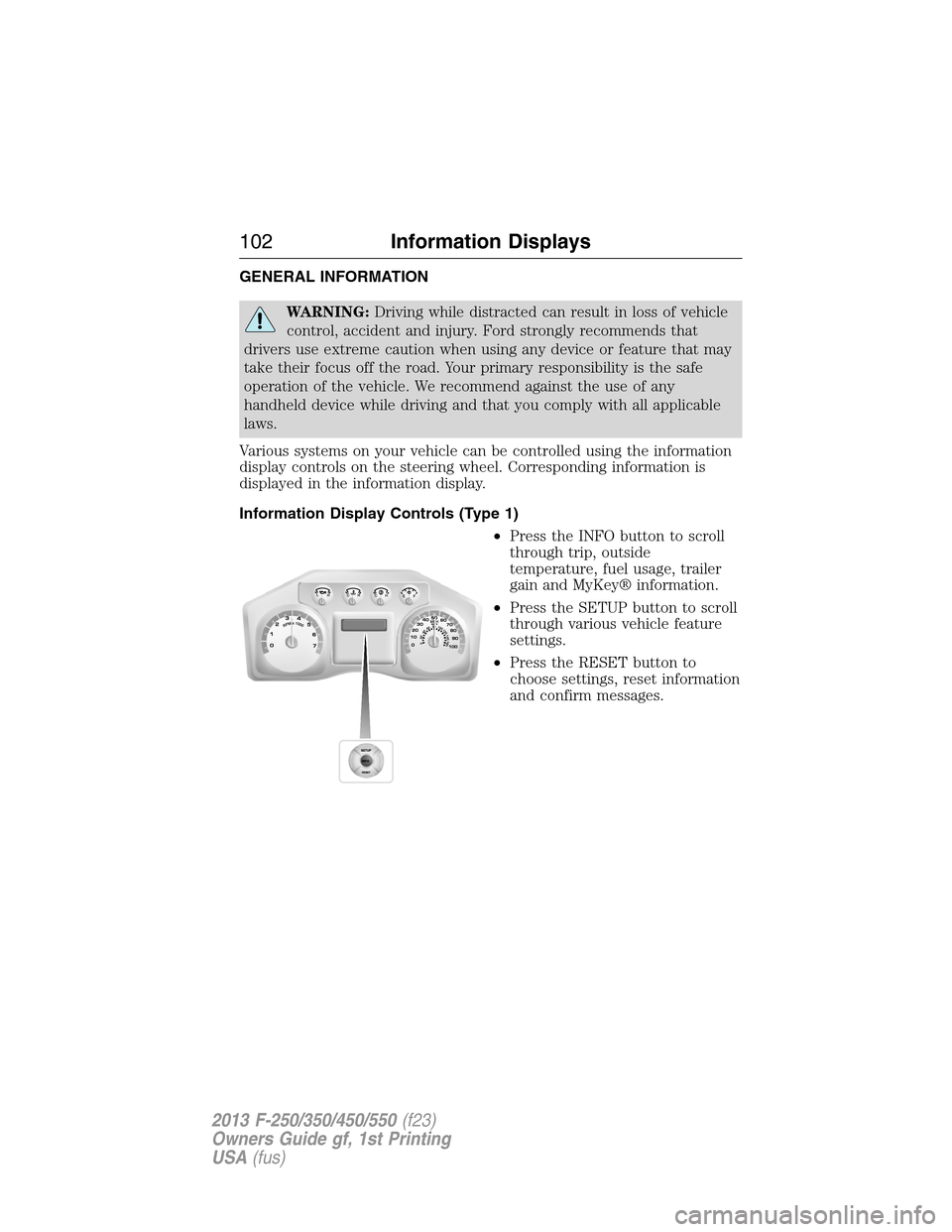
Various systems on your vehicle can be controlled using the information
display controls on the steering wheel. Corresponding information is
displayed in the information display.
Information Display Controls (Type 1)
•Press the INFO button to scroll
through trip, outside
temperature, fuel usage, trailer
gain and MyKey® information.
•Press the SETUP button to scroll
through various vehicle feature
settings.
•Press the RESET button to
choose settings, reset information
and confirm messages.
102Information Displays
2013 F-250/350/450/550(f23)
Owners Guide gf, 1st Printing
USA(fus)
Page 104 of 563
Info
Press the INFO button repeatedly to cycle through the following
features:
Note:Some options may appear slightly different or not at all if the
items are optional.
INFO
TRIP A/B
XXX° (if equipped)
MYKEY MILES (km) (if programmed)
XXX MILES (km) TO E
XX.X AVG MPG (L/100km)
MPG (L/km)
TIMER
TBC GAIN (if equipped)
EXHAUST FILTER (diesel only)
•TRIP A/B: Registers the distance of individual journeys. Press and
release the INFO button until TRIP A/B appears in the display (this
represents the trip mode). Press and hold the RESET button to reset.
Refer toUNITSlater in this section to switch the display from metric
to English.
•XXX° (outside air temperature) (if equipped): This displays the
outside temperature.
•MYKEY MILES (km) (if programmed): For more information, refer to
theMyKey®chapter.
•XXX MILES (km) TO E: This displays an estimate of approximately
how far you can drive with the fuel remaining in your tank under
normal driving conditions. Remember to turn the ignition off when
refueling to allow this feature to correctly detect the added fuel.
Distance to empty is calculated using a running average fuel economy,
which is based on your recent driving history of 500 miles (800 km).
This value is not the same as the average fuel economy display. The
running average fuel economy is re-initialized to a factory default
value if the battery is disconnected.
•XX.X AVG MPG (L/100km): Average fuel economy displays your
average fuel economy in miles/gallon or liters/100 km.
Information Displays103
2013 F-250/350/450/550(f23)
Owners Guide gf, 1st Printing
USA(fus)
Page 105 of 563
•MPG (L/km): This displays instantaneous fuel economy as a bar graph.
Your vehicle must be moving to calculate instantaneous fuel economy.
Instantaneous fuel economy cannot be reset.
•TIMER: Displays the trip elapsed drive time. Press and release RESET
to pause the timer. Press and hold RESET to reset the timer.
•TBC GAIN (if equipped): Displays the level of trailer brake gain or if
the trailer is not connected.
•EXHAUST FILTER (Diesel only): For more information, refer to the
Diesel exhaust system: oxidation catalyst/diesel particulate filter
systemin your diesel supplement for more information.
System Check and Vehicle Feature Customization
Press the SETUP button repeatedly to cycle the message center through
the following features:
Note:Some options may appear slightly different or not at all if the
items are optional.
Note:When returning to the SETUP menu and a non-English language
has been selected, HOLD RESET FOR ENGLISH will be displayed to
change back to English. Press and hold the RESET button to change
back to English.
SETUP
RESET FOR
SYSTEM CHECKpress the
RESET buttonOIL LIFE
EXHAUST FLUID LEVEL
(Diesel only)
ENGINE HOURS
ENGINE IDLE HOURS
CHARGING SYSTEM
DOOR
BRAKE SYSTEM
TBC GAIN = XX.X
FUEL LEVEL
MYKEY DISTANCE
MYKEY(S) PROGRAMMED
ADMIN KEYS PROGRAMMED
OIL LIFE
104Information Displays
2013 F-250/350/450/550(f23)
Owners Guide gf, 1st Printing
USA(fus)
Page 106 of 563

SETUP
UNITS press the
RESET buttonDistance English
Metric
Temperature Fahrenheit
Celsius
AUTOLAMP
(SEC)0 to 180 seconds
AUTOLOCK On or Off
AUTOUNLOCK On or Off
COURTESY
WIPEOn or Off
CREATE MYKEY / MYKEY SETUP / CLEAR MYKEY
RESET FOR ZONE SETTING (if equipped)
ZONE XX RESET = CHANGE (if equipped)
RESET FOR CALIBRATION (if equipped)
RESET FOR
REMOTE START
(if equipped)press the
RESET buttonOn or Off
5, 10, 15 minutes
TBC MODE
(if equipped)Electric or EOH
TRAILER SWAY
(if equipped)On or Off
LANGUAGE =
ENGLISH /
SPANISH /
FRENCHEnglish / Spanish / French
•RESET FOR SYSTEM CHECK: The message center will begin to cycle
through the vehicle systems and provide a status of the item if
needed. Some systems show a message only if a condition is present.
•OIL LIFE: This displays the remaining oil life. An oil change is
required whenever indicated by the message center and according to
the recommended maintenance schedule. USE ONLY
RECOMMENDED ENGINE OILS.
Information Displays105
2013 F-250/350/450/550(f23)
Owners Guide gf, 1st Printing
USA(fus)
Page 107 of 563
To reset the oil monitoring system to 100% after each oil change,
perform the following:
1. Press and release the SETUP button to display OIL LIFE XXX% HOLD
RESET = NEW.
2. Press and hold the RESET button for two seconds and release to reset
the oil life to 100%.
Note:To change oil life 100% value (if equipped with this feature) to
another value, proceed to Step 3.
3. Once OIL LIFE SET TO XXX% is displayed, release and press the
RESET button to change the Oil Life Start Value. Each release and press
will reduce the value by 10%.
•UNITS: Displays the current units in English or Metric.
•AUTOLAMP (SEC): This feature keeps your headlights on for up to
three minutes after the ignition is switched off.
•AUTOLOCK: This feature automatically locks all vehicle doors when
the vehicle is shifted into any gear, putting the vehicle in motion.
•AUTOUNLOCK: This feature automatically unlocks all vehicle doors
when the driver’s door is opened within 10 minutes of the ignition
being turned off.
•COURTESY WIPE: This feature allows for an extra swipe of the wipers
after a wipe/wash cycle.
•CREATE MYKEY / MYKEY SETUP / CLEAR MYKEY: For more
information refer toMyKey®in theLocks and Securitychapter.
•RESET FOR ZONE SETTING (if equipped): This feature changes the
compass zone setting.
Most geographic areas (zones) have a magnetic north compass point
that varies slightly from the northerly direction on maps. This variation
is four degrees between adjacent zones and will become noticeable as
the vehicle crosses multiple zones. A correct zone setting will
eliminate this error.
Refer toCompass zone/calibration adjustment.
•ZONE XX RESET = CHANGE (if equipped): The compass heading is
displayed as one of N, NE, E, SE, S, SW, W and NW in the message
center display.
Refer toCompass zone/calibration adjustment.
106Information Displays
2013 F-250/350/450/550(f23)
Owners Guide gf, 1st Printing
USA(fus)
Page 113 of 563
Truck Apps (cont’d)
Trailer
(cont’d)Active trailer name or default trailer
Accumulated trailer distance
Trailer gain and output
Trailer disconnected. Disregard this status if your vehicle
is not equipped with a factory installed trailer brake
controller. This message may appear when an aftermarket
TBC is used even when the trailer is connected.
Press OK for
optionsOptions
Change
Active TrailerWhen this is highlighted,
press the right arrow key to
change the currently
selected trailer. Use the up
and down arrows to select a
trailer and press the OK
button to choose the
highlighted trailer.
Adding a new trailer– Use
the up/down arrows to
highlight New Trailer and
press the right arrow key to
enter the New Trailer input
screen. Use the up/down
arrow keys to choose alpha,
numeric and symbol
characters and then press
the right arrow to move the
character space over.
Continue adding characters
as needed. Press the left
arrow to go back and
change a previously
selected character. When
finished with the new trailer
name, press OK to accept
the new trailer name.
11 2Information Displays
2013 F-250/350/450/550(f23)
Owners Guide gf, 1st Printing
USA(fus)
Page 117 of 563
Compass (if equipped):
Determine which magnetic zone you
are in for your geographic location
by referring to the zone map.
Settings (cont’d)
MyKey Create MyKey Hold OK to create MyKey
AdvanceTrac Always On / Selectable
MAX Speed 80 MPH (130 km/h) or Off
Speed Warning 45, 55 or 65 MPH (75, 90 or
105 km/h), Off
Volume Limiter On/Off
Clear MyKey Hold OK to Clear MyKey
Language English, Español, Français
Units Distance English
Metric
Temperature Fahrenheit
Celsius
System Reset Hold OK to Reset System to Factory Default
Information
In this mode, you can view different vehicle system information
and perform a system check.
Information
MyKey Admin Keys (Number of admin keys)
MyKeys (Number of MyKeys programmed)
MyKey Miles (km) (Distance traveled using a
programmed MyKey)
1 2 3
4
5
6 7 8 9 101112 13 14 15
11 6Information Displays
2013 F-250/350/450/550(f23)
Owners Guide gf, 1st Printing
USA(fus)
Page 119 of 563

AdvanceTrac® /
Traction Control
MessagesAction / Description
TRACTION
CONTROL OFFDisplayed when the traction control has been
disabled by the driver. Refer to theTraction
Controlchapter for more information.
Alarm/Security
MessagesAction / Description
TO STOP ALARM
START VEHICLEDisplayed when the perimeter alarm system is
armed and the vehicle is entered using the key
on the driver’s side door. In order to prevent
the perimeter alarm system from triggering,
the ignition must be turned to start or on
before the 12 second chime expires.
SECURITY SYSTEM
FAULTDisplayed when the security system has
detected a fault. See your authorized dealer
for service.
Brake System
MessagesAction / Description
BRAKE FLUID
LEVEL LOWIndicates the brake fluid level is low and the
brake system should be inspected immediately.
Refer toBrake fluidin theMaintenance
chapter.
CHECK BRAKE
SYSTEMDisplayed when the brake system needs
servicing. If the warning stays on or continues
to come on, contact your authorized dealer as
soon as possible.
PARK BRAKE
ENGAGEDDisplayed when the parking brake is set and
the vehicle is in motion.
WARNING:When the CLEANING EXHAUST FILTER message
appears in the message center, do not park near flammable
materials, vapors or structures until filter cleaning is complete.
11 8Information Displays
2013 F-250/350/450/550(f23)
Owners Guide gf, 1st Printing
USA(fus)