2013 FORD SUPER DUTY remove seats
[x] Cancel search: remove seatsPage 152 of 563

HEATED WINDOWS AND MIRRORS (IF EQUIPPED)
Heated Rear Window
Note:The engine must be running to use this feature.
Note:If your vehicle is equipped with a sliding rear window, the feature
still operates when the window is opened.
Press the button to clear the rear window of thin ice and fog. Press the
button again within 10 minutes to switch it off. It switches off
automatically after 10 minutes, or when you switch the ignition off.
Do not use razor blades or other sharp objects to clean the inside
of the rear window or to remove decals from the inside of the
rear window. This may cause damage to the heated grid lines and
will not be covered by your warranty.
Heated Exterior Mirror (If Equipped)
Note:Do not remove ice from the mirrors with a scraper or attempt to
readjust the mirror glass if it is frozen in place. These actions could
cause damage to the glass and mirrors.
Note:Do not clean the housing or glass of any mirror with harsh
abrasives, fuel or other petroleum-based cleaning products.
Both mirrors are heated to remove ice, mist and fog when the rear
window defroster is activated.
REMOTE START CLIMATE OPERATION (IF EQUIPPED)
The climate control system adjusts the cabin temperature during remote
start.
You cannot adjust the system during remote start operation. Turn the
ignition on to return the system to its previous settings. You can now
make adjustments. You will need to turn certain vehicle-dependent
features back on, such as:
•heated seats
•cooled seats
•heated steering wheel
•heated mirrors
•heated rear window.
Climate Control151
2013 F-250/350/450/550(f23)
Owners Guide gf, 1st Printing
USA(fus)
Page 155 of 563
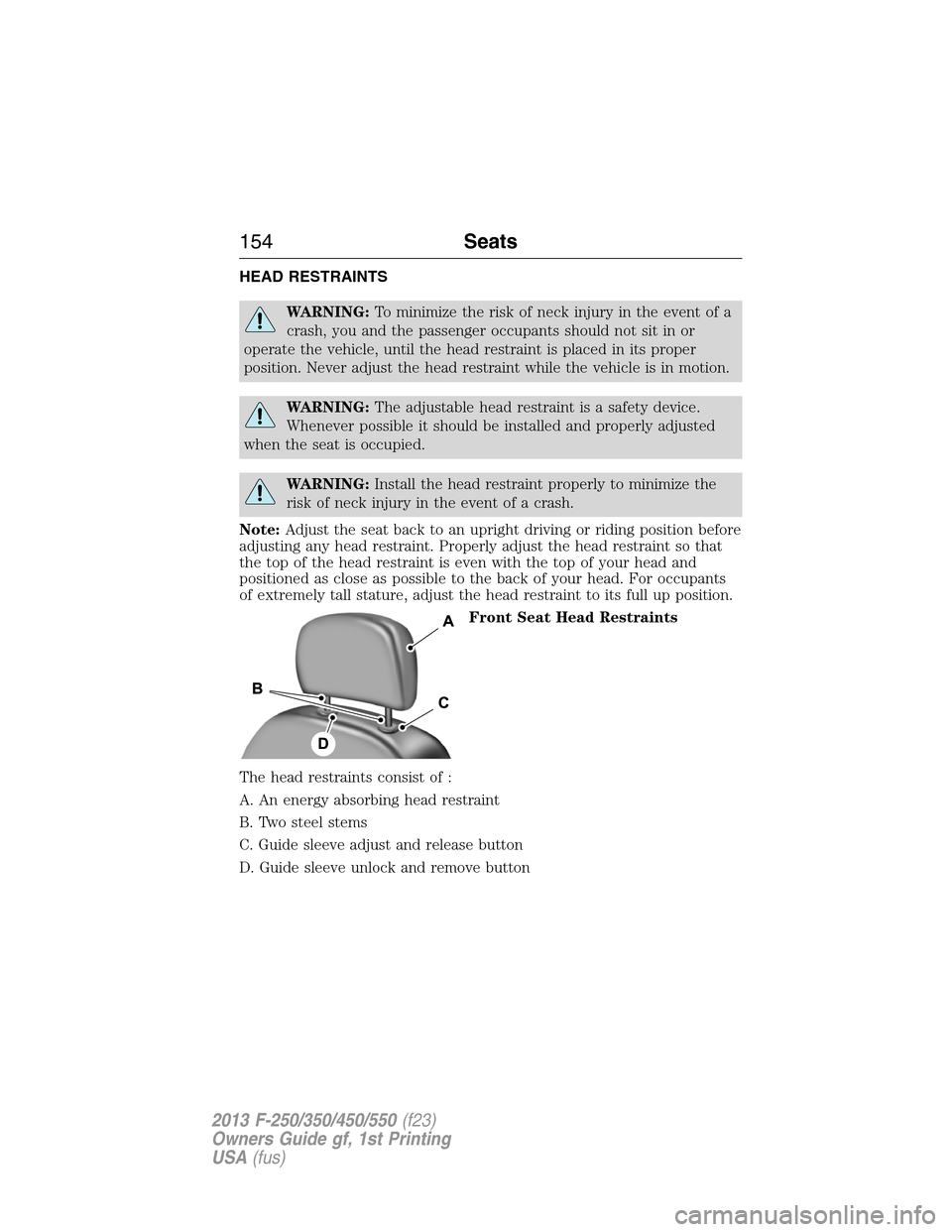
HEAD RESTRAINTS
WARNING:To minimize the risk of neck injury in the event of a
crash, you and the passenger occupants should not sit in or
operate the vehicle, until the head restraint is placed in its proper
position. Never adjust the head restraint while the vehicle is in motion.
WARNING:The adjustable head restraint is a safety device.
Whenever possible it should be installed and properly adjusted
when the seat is occupied.
WARNING:Install the head restraint properly to minimize the
risk of neck injury in the event of a crash.
Note:Adjust the seat back to an upright driving or riding position before
adjusting any head restraint. Properly adjust the head restraint so that
the top of the head restraint is even with the top of your head and
positioned as close as possible to the back of your head. For occupants
of extremely tall stature, adjust the head restraint to its full up position.
Front Seat Head Restraints
The head restraints consist of :
A. An energy absorbing head restraint
B. Two steel stems
C. Guide sleeve adjust and release button
D. Guide sleeve unlock and remove button
154Seats
2013 F-250/350/450/550(f23)
Owners Guide gf, 1st Printing
USA(fus)
Page 156 of 563
Adjusting the Head Restraint
Raise: Pull up the head restraint.
Lower:
1. Press and hold button C.
2. Push down on the head restraint.
Remove:
1. Pull up the head restraint until it reaches the highest adjustment
position.
2. Press and hold buttons C and D.
3. Pull up the head restraint.
Reinstall: Align the steel stems into the guide sleeves and push the head
restraint down until it locks.
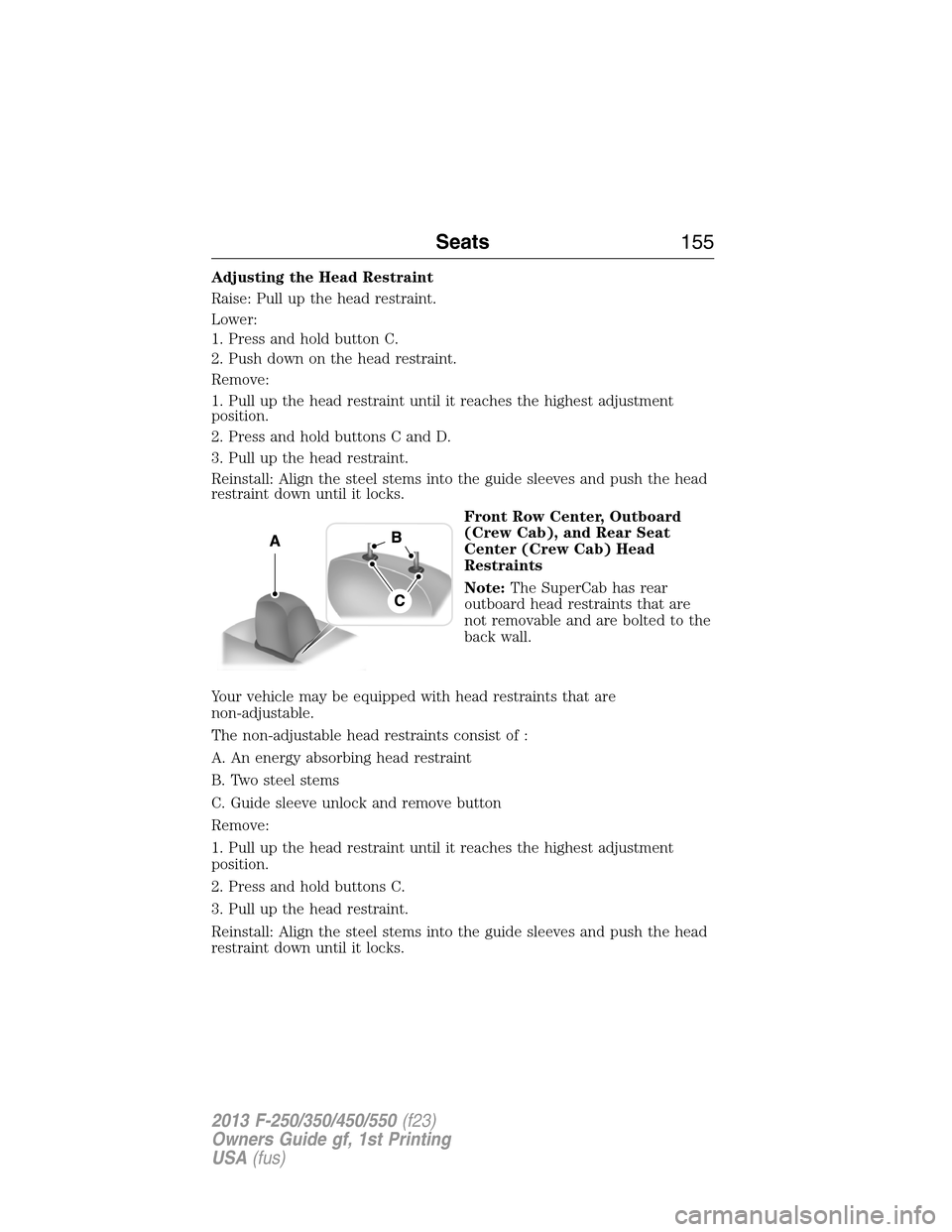
Front Row Center, Outboard
(Crew Cab), and Rear Seat
Center (Crew Cab) Head
Restraints
Note:The SuperCab has rear
outboard head restraints that are
not removable and are bolted to the
back wall.
Your vehicle may be equipped with head restraints that are
non-adjustable.
The non-adjustable head restraints consist of :
A. An energy absorbing head restraint
B. Two steel stems
C. Guide sleeve unlock and remove button
Remove:
1. Pull up the head restraint until it reaches the highest adjustment
position.
2. Press and hold buttons C.
3. Pull up the head restraint.
Reinstall: Align the steel stems into the guide sleeves and push the head
restraint down until it locks.
Seats155
2013 F-250/350/450/550(f23)
Owners Guide gf, 1st Printing
USA(fus)
Page 160 of 563

MEMORY FUNCTION (IF EQUIPPED)
This system allows automatic positioning of the driver seat, power
mirrors, and adjustable pedals to two programmable positions.
The memory control is located on the driver’s door.
•To program position 1, move the memory features to the
desired positions using the associated controls. Press and
hold button 1 for at least two seconds. A chime will
sound confirming that a memory position has been set.
•To program position 2, repeat the previous procedure
using button 2.
A memory position may be programmed at any time.
To program the memory feature to a remote entry transmitter, see
Remote entry systemin theLockschapter.
A programmed memory position can be recalled:
•in any gearshift position if the ignition is not on.
•only in positionPorNif the ignition is on.
The memory positions are also recalled when you press your remote
entry transmitter unlock control (if the transmitter is programmed to a
memory position) or, when you enter a valid personal entry code that is
programmed to a memory position. The mirrors will move to the
programmed position and the seat will move to the easy entry position.
The seat will move to the final position when the key is in the ignition (if
easy entry feature is enabled).
Easy-Entry and Exit Feature (If Equipped)
If the easy entry and exit feature is enabled, this feature automatically
moves the driver’s seat rearward 2 inches (5 centimeters) when the
transmission selector lever is in positionPand the key is removed from
the ignition.
If the seat is located less than 2 inches (5 centimeters) from the rear of
the seat track, the seat travel will be less than 2 inches (5 centimeters)
rearward.
The driver’s seat will return to the previous position when the key is put
in the ignition.
This feature is enabled or disabled through the information display. See
theInformation Displayschapter for more information.
21
Seats159
2013 F-250/350/450/550(f23)
Owners Guide gf, 1st Printing
USA(fus)
Page 162 of 563
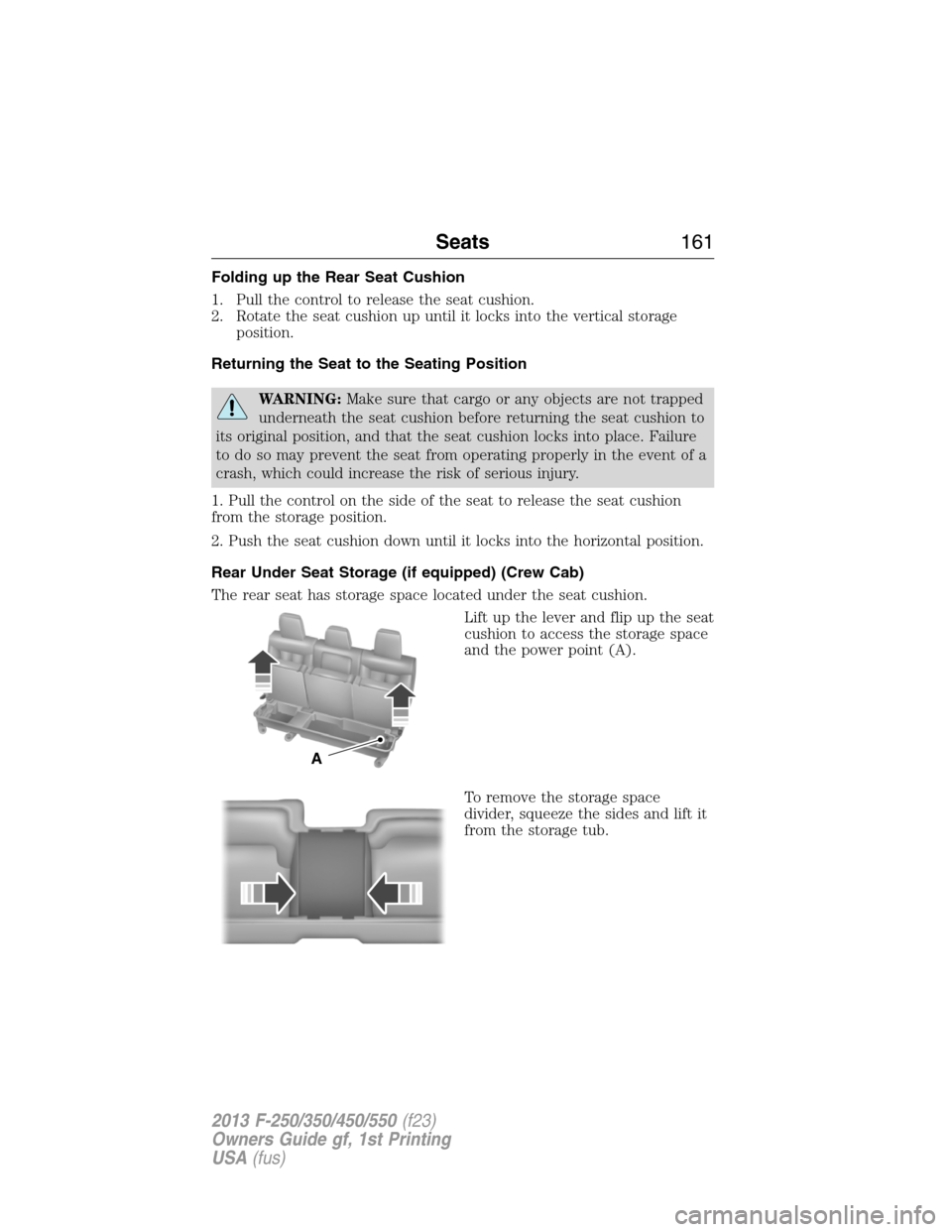
Folding up the Rear Seat Cushion
1. Pull the control to release the seat cushion.
2. Rotate the seat cushion up until it locks into the vertical storage
position.
Returning the Seat to the Seating Position
WARNING:Make sure that cargo or any objects are not trapped
underneath the seat cushion before returning the seat cushion to
its original position, and that the seat cushion locks into place. Failure
to do so may prevent the seat from operating properly in the event of a
crash, which could increase the risk of serious injury.
1. Pull the control on the side of the seat to release the seat cushion
from the storage position.
2. Push the seat cushion down until it locks into the horizontal position.
Rear Under Seat Storage (if equipped) (Crew Cab)
The rear seat has storage space located under the seat cushion.
Lift up the lever and flip up the seat
cushion to access the storage space
and the power point (A).
To remove the storage space
divider, squeeze the sides and lift it
from the storage tub.
A
Seats161
2013 F-250/350/450/550(f23)
Owners Guide gf, 1st Printing
USA(fus)
Page 166 of 563
Heated and Cooled Seats Air Filter Replacement (if equipped)
The heated and cooled seat system includes air filters that must be
replaced periodically. Seescheduled maintenance information.
The filter is located under each front seat. Access the filter from the 2nd
row foot-well area. Move the front seats all the way to the full front and
full up positions to ease access.
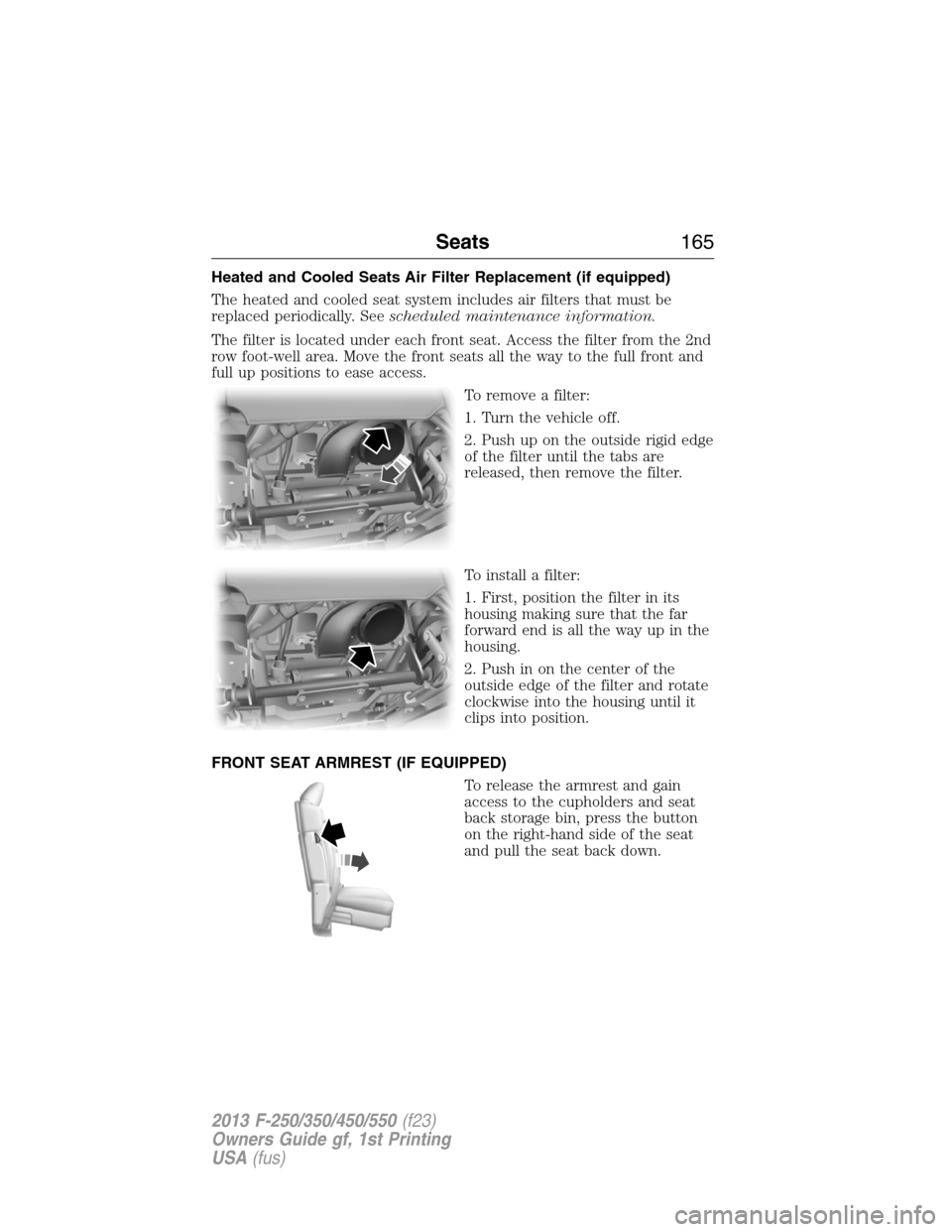
To remove a filter:
1. Turn the vehicle off.
2. Push up on the outside rigid edge
of the filter until the tabs are
released, then remove the filter.
To install a filter:
1. First, position the filter in its
housing making sure that the far
forward end is all the way up in the
housing.
2. Push in on the center of the
outside edge of the filter and rotate
clockwise into the housing until it
clips into position.
FRONT SEAT ARMREST (IF EQUIPPED)
To release the armrest and gain
access to the cupholders and seat
back storage bin, press the button
on the right-hand side of the seat
and pull the seat back down.
Seats165
2013 F-250/350/450/550(f23)
Owners Guide gf, 1st Printing
USA(fus)
Page 332 of 563
For fabric, carpets, cloth seats, safety belts and seats equipped with side
airbags:
•Remove dust and loose dirt with a vacuum cleaner.
•Remove light stains and soil with Motorcraft® Professional Strength
Carpet & Upholstery Cleaner.
•If grease or tar is present on the material, spot-clean the area first
with Motorcraft® Spot and Stain Remover. In Canada, use
Motorcraft® Multi-Purpose Cleaner.
•If a ring forms on the fabric after spot cleaning, clean the entire area
immediately (but do not oversaturate) or the ring will set.
•Do not use household cleaning products or glass cleaners, which can
stain and discolor the fabric and affect the flame retardant abilities of
the seat materials.
CLEANING THE INSTRUMENT PANEL AND INSTRUMENT
CLUSTER LENS
WARNING:Do not use chemical solvents or strong detergents
when cleaning the steering wheel or instrument panel to avoid
contamination of the airbag system.
Clean the instrument panel and cluster lens with a clean, damp, white,
cotton cloth, then use a clean and dry, white, cotton cloth to dry these
areas.
•Avoid cleaners or polishes that increase the gloss of the upper portion
of the instrument panel. The dull finish in this area helps protect the
driver from undesirable windshield reflection.
•Be certain to wash or wipe your hands clean if you have been in
contact with certain products, such as insect repellent and suntan
lotion, in order to avoid possible damage to the interior painted
surfaces.
•Do not use household or glass cleaners as these may damage the
finish of the instrument panel, interior trim and cluster lens.
•Do not allow air fresheners and hand sanitizers to spill on interior
surfaces. If a spill occurs, wipe off immediately. Damage may not be
covered by your warranty.
Vehicle Care331
2013 F-250/350/450/550(f23)
Owners Guide gf, 1st Printing
USA(fus)
Page 334 of 563
Low gloss paint area
The low gloss area of the instrument panel’s upper dash should be
cleaned with mild, soapy water and a soft, damp cloth, then dried with a
clean, dry cloth. When cleaning the low gloss areas:
•Do not usepaper towels or newspaper.
•Do not usesilicone or Teflon® (PTFE)-based products.
•Do not useexterior paint waxes or sealants.
Dust the low gloss areas with a clean, dry cloth, or use Motorcraft
Dusting Cloth (ZC-24).
CLEANING LEATHER SEATS
(IF EQUIPPED, EXCEPT FOR THE KING RANCH® EDITION)
Note:For the King Ranch® Edition leather seats, refer to a separate
section in this chapter.
•Clean spills and stains as quickly as possible.
•For routine cleaning, wipe the surface with a soft, damp cloth. For
more thorough cleaning, wipe the surface with a mild soap and water
solution. In Canada, use Motorcraft® Vinyl Cleaner (CXC-93). Dry the
area with a soft cloth.
•If the leather cannot be completely cleaned using a mild soap and
water solution, the leather may be cleaned using a commercially
available leather cleaning product designed for automotive interiors.
•To check for compatibility, first test any cleaner or stain remover on
an inconspicuous part of the leather.
•Do not use household cleaning products, alcohol solutions, solvents or
cleaners intended for rubber, vinyl and plastics, or oil/petroleum-based
leather conditioners. These products may cause premature wearing or
damage to the leather.
CLEANING LEATHER SEATS
(IF EQUIPPED WITH THE KING RANCH® EDITION)
Your vehicle is equipped with seating covered in premium, top-grain
leather which is extremely durable, but still requires special care and
maintenance in order to ensure longevity and comfort.
Regular cleaning and conditioning will maintain the appearance of the
leather.
Cleaning
For dirt, use a vacuum cleaner then use a clean, damp cloth or soft brush.
Vehicle Care333
2013 F-250/350/450/550(f23)
Owners Guide gf, 1st Printing
USA(fus)