2013 FORD SUPER DUTY center console
[x] Cancel search: center consolePage 91 of 563
Power Sliding Back Window (If Equipped)
WARNING:When operating the power sliding back window you
must ensure all rear seat occupants and/or cargo are not in the
proximity of the back window.
WARNING:Do not leave children unattended in the vehicle and
do not let children play with the power sliding back window.
They may seriously injure themselves.
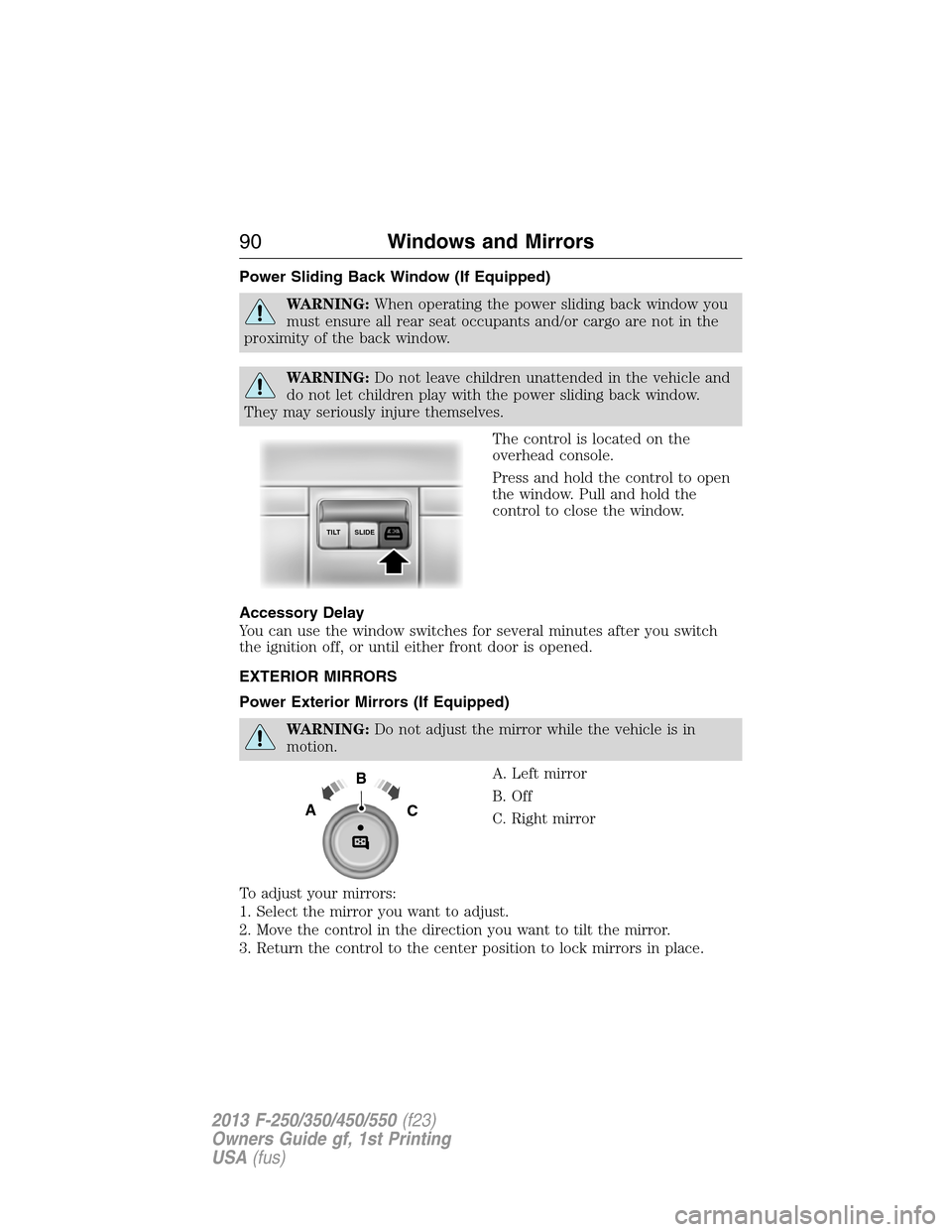
The control is located on the
overhead console.
Press and hold the control to open
the window. Pull and hold the
control to close the window.
Accessory Delay
You can use the window switches for several minutes after you switch
the ignition off, or until either front door is opened.
EXTERIOR MIRRORS
Power Exterior Mirrors (If Equipped)
WARNING:Do not adjust the mirror while the vehicle is in
motion.
A. Left mirror
B. Off
C. Right mirror
To adjust your mirrors:
1. Select the mirror you want to adjust.
2. Move the control in the direction you want to tilt the mirror.
3. Return the control to the center position to lock mirrors in place.
SLIDE TILT
B
AC
90Windows and Mirrors
2013 F-250/350/450/550(f23)
Owners Guide gf, 1st Printing
USA(fus)
Page 141 of 563
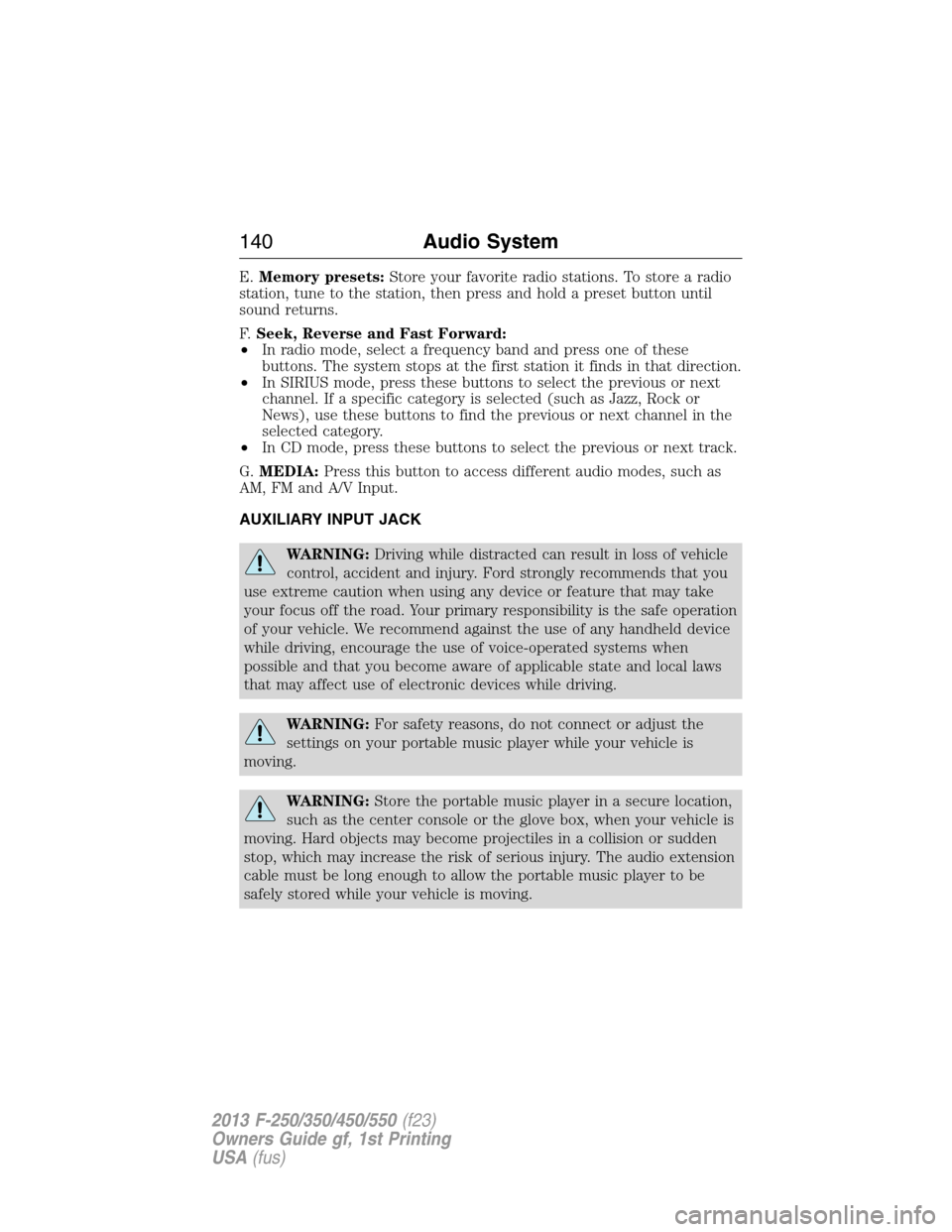
E.Memory presets:Store your favorite radio stations. To store a radio
station, tune to the station, then press and hold a preset button until
sound returns.
F.Seek, Reverse and Fast Forward:
•In radio mode, select a frequency band and press one of these
buttons. The system stops at the first station it finds in that direction.
•In SIRIUS mode, press these buttons to select the previous or next
channel. If a specific category is selected (such as Jazz, Rock or
News), use these buttons to find the previous or next channel in the
selected category.
•In CD mode, press these buttons to select the previous or next track.
G.MEDIA:Press this button to access different audio modes, such as
AM, FM and A/V Input.
AUXILIARY INPUT JACK
WARNING:Driving while distracted can result in loss of vehicle
control, accident and injury. Ford strongly recommends that you
use extreme caution when using any device or feature that may take
your focus off the road. Your primary responsibility is the safe operation
of your vehicle. We recommend against the use of any handheld device
while driving, encourage the use of voice-operated systems when
possible and that you become aware of applicable state and local laws
that may affect use of electronic devices while driving.
WARNING:For safety reasons, do not connect or adjust the
settings on your portable music player while your vehicle is
moving.
WARNING:Store the portable music player in a secure location,
such as the center console or the glove box, when your vehicle is
moving. Hard objects may become projectiles in a collision or sudden
stop, which may increase the risk of serious injury. The audio extension
cable must be long enough to allow the portable music player to be
safely stored while your vehicle is moving.
140Audio System
2013 F-250/350/450/550(f23)
Owners Guide gf, 1st Printing
USA(fus)
Page 143 of 563
MEDIA HUB (IF EQUIPPED)
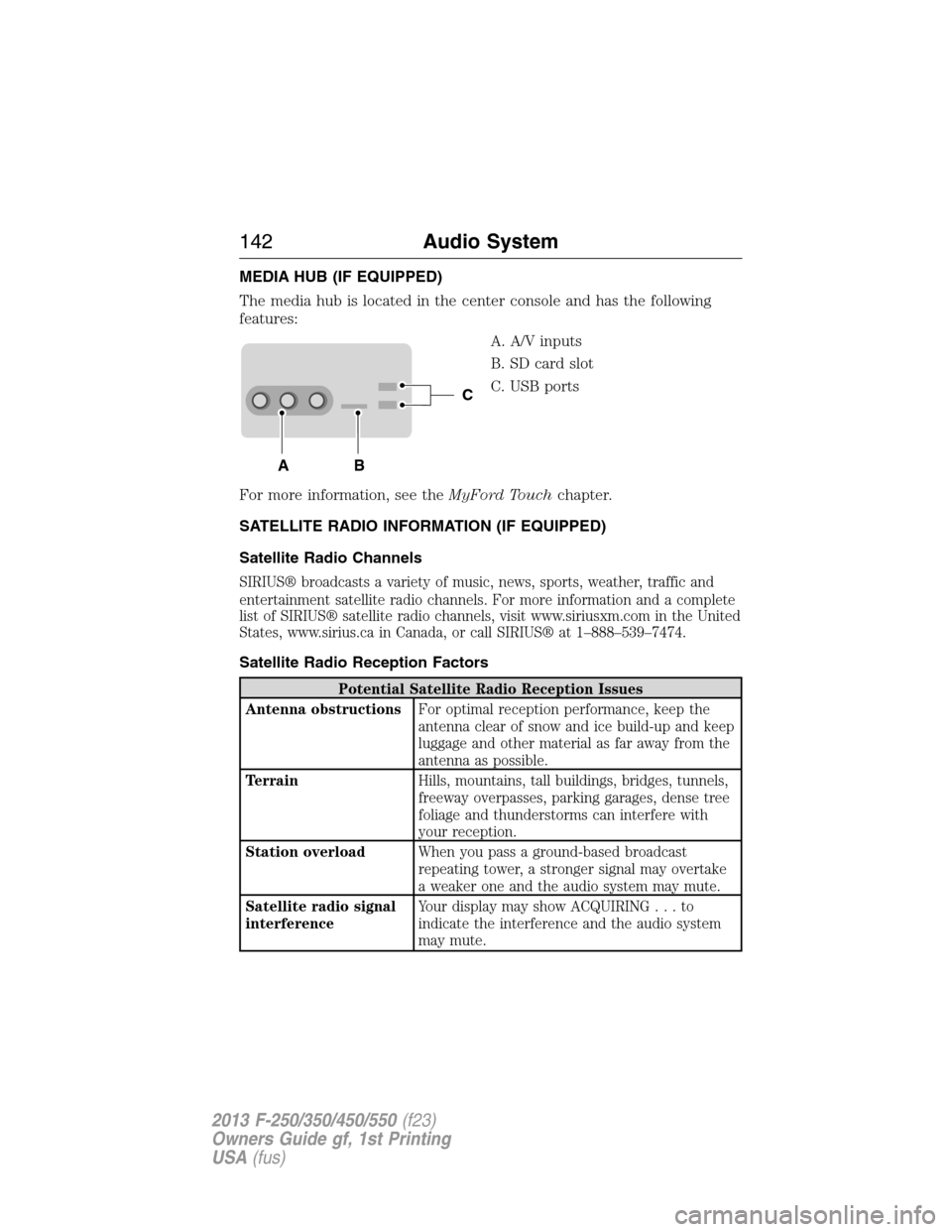
The media hub is located in the center console and has the following
features:
A. A/V inputs
B. SD card slot
C. USB ports
For more information, see theMyFord Touchchapter.
SATELLITE RADIO INFORMATION (IF EQUIPPED)
Satellite Radio Channels
SIRIUS® broadcasts a variety of music, news, sports, weather, traffic and
entertainment satellite radio channels. For more information and a complete
list of SIRIUS® satellite radio channels, visit www.siriusxm.com in the United
States, www.sirius.ca in Canada, or call SIRIUS® at 1–888–539–7474.
Satellite Radio Reception Factors
Potential Satellite Radio Reception Issues
Antenna obstructionsFor optimal reception performance, keep the
antenna clear of snow and ice build-up and keep
luggage and other material as far away from the
antenna as possible.
TerrainHills, mountains, tall buildings, bridges, tunnels,
freeway overpasses, parking garages, dense tree
foliage and thunderstorms can interfere with
your reception.
Station overloadWhen you pass a ground-based broadcast
repeating tower, a stronger signal may overtake
a weaker one and the audio system may mute.
Satellite radio signal
interferenceYour display may show ACQUIRING...to
indicate the interference and the audio system
may mute.
C
BA
142Audio System
2013 F-250/350/450/550(f23)
Owners Guide gf, 1st Printing
USA(fus)
Page 178 of 563
AUXILIARY POWER POINTS
WARNING:Do not plug optional electrical accessories into the
cigarette lighter socket (if equipped). Improper use of the lighter
can cause damage not covered by your warranty, and can result in fire
or serious injury.
Note:If used when the engine is not running, the battery will discharge.
There may be insufficient power to restart your engine.
Note:Do not insert objects other than an accessory plug into the power
point. This will damage the outlet and blow the fuse.
Note:Do not hang any type of accessory or accessory bracket from the
plug.
Note:Do not use the power point over the vehicle capacity of 12 volt
DC 180 watts or a fuse may blow.
Note:Do not use the power point for operating a cigarette lighter
element.
Note:Improper use of the power outlet can cause damage not covered
by your warranty.
Note:Always keep the power point caps closed when not in use.
Run the engine for full capacity use of the power point. To prevent the
battery from being discharged:
•Do not use the power point longer than necessary when the engine is
not running.
•Do not leave devices plugged in overnight or when the vehicle is
parked for extended periods.
Locations
Power points may be found:
•on the instrument panel (two locations).
•inside the center console storage compartment (if equipped).
•on the rear of the center console (if equipped).
•inside the 20-percent front seat console (if equipped).
•inside the rear under seat storage compartment (if equipped).
Auxiliary Power Points177
2013 F-250/350/450/550(f23)
Owners Guide gf, 1st Printing
USA(fus)
Page 179 of 563

110 Volt AC Power Point (If Equipped)
WARNING:Do not keep electrical devices plugged in the
powerpoint whenever the device is not in use. Do not use any
extension cord with the 110 volt AC power point, since it will defeat
the safety protection design. Doing so my cause the powerpoint to
overload due to powering multiple devices that can reach beyond the
150 watt load limit and could result in fire or serious injury.
Note:The cap should always be closed whenever the power point outlet
is not in use.
Note:The power point will turn off after 13 minutes if the ignition is on
without the engine running. Keep the engine running to use the power
point.
The 110 volt AC power point outlet is used for powering electrical
devices that require up to 150 watt. Exceeding the 150 watt limit will
cause the power point to cut off the power temporarily to provide
overload protection.
The power point may be located:
•on the back of the center console
•on the instrument panel.
The power point is not designed for the following electric appliances;
they may not work properly:
•Cathode ray tube type televisions
•Motor loads, such as vacuum cleaners, electric saws and other electric
power tools, compressor-driven refrigerators, etc.
•Measuring devices, which process precise data, such as medical
equipment, measuring equipment, etc.
•Other appliances requiring an extremely stable power supply:
microcomputer-controlled electric blankets, touch sensor lamps, etc.
178Auxiliary Power Points
2013 F-250/350/450/550(f23)
Owners Guide gf, 1st Printing
USA(fus)
Page 181 of 563
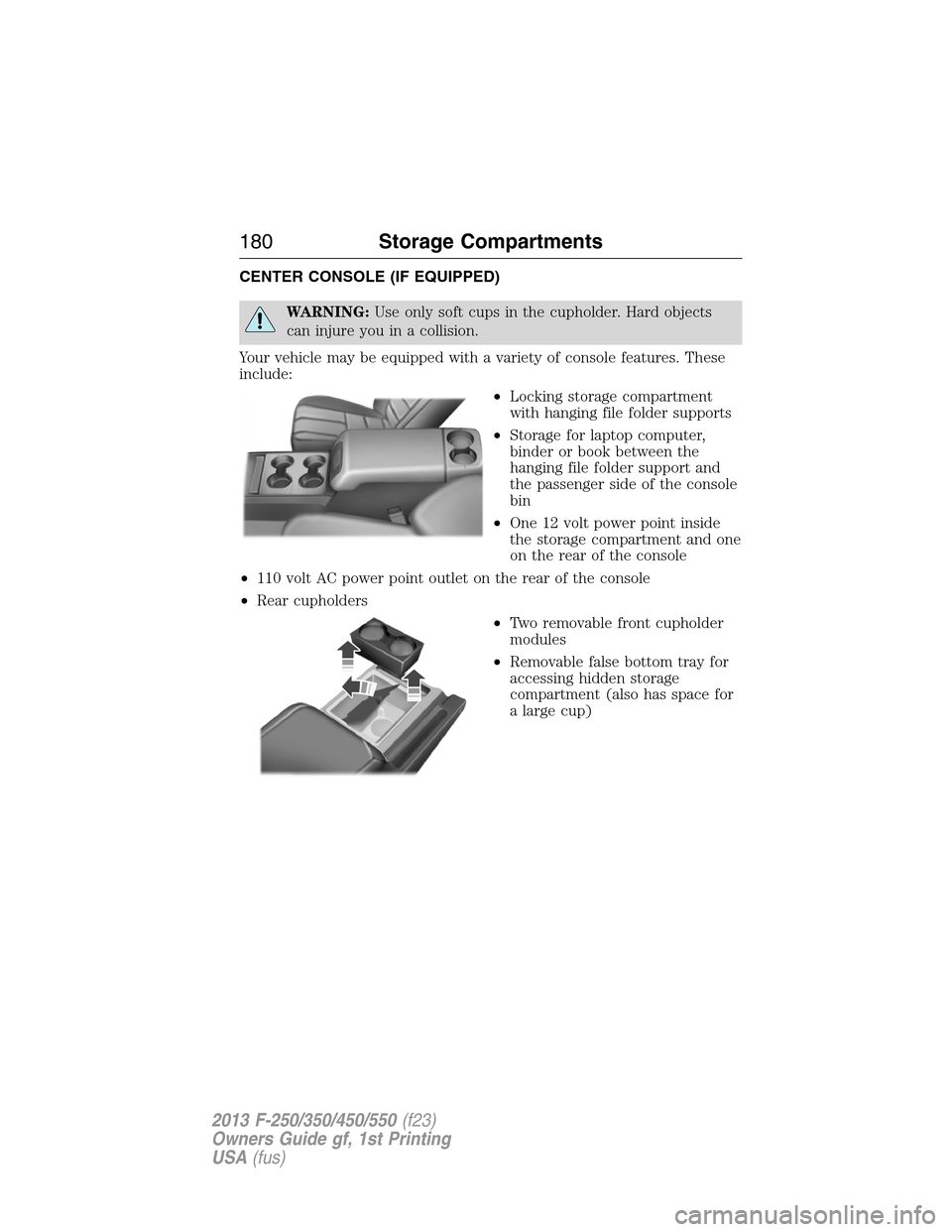
CENTER CONSOLE (IF EQUIPPED)
WARNING:Use only soft cups in the cupholder. Hard objects
can injure you in a collision.
Your vehicle may be equipped with a variety of console features. These
include:
•Locking storage compartment
with hanging file folder supports
•Storage for laptop computer,
binder or book between the
hanging file folder support and
the passenger side of the console
bin
•One 12 volt power point inside
the storage compartment and one
on the rear of the console
•110 volt AC power point outlet on the rear of the console
•Rear cupholders
•Two removable front cupholder
modules
•Removable false bottom tray for
accessing hidden storage
compartment (also has space for
a large cup)
180Storage Compartments
2013 F-250/350/450/550(f23)
Owners Guide gf, 1st Printing
USA(fus)
Page 225 of 563

PRINCIPLES OF OPERATION
WARNING:Vehicle modifications involving braking system,
aftermarket roof racks, suspension, steering system, tire
construction or wheel and tire size may change the handling
characteristics of the vehicle and may adversely affect the performance
of the AdvanceTrac® system. In addition, installing any stereo
loudspeakers may interfere with and adversely affect the AdvanceTrac®
system. Install any aftermarket stereo loudspeaker as far as possible
from the front center console, the tunnel, and the front seats in order
to minimize the risk of interfering with the AdvanceTrac® sensors.
Reducing the effectiveness of the AdvanceTrac® system could lead to
an increased risk of loss of vehicle control, vehicle rollover, personal
injury and death.
WARNING:Remember that even advanced technology cannot
defy the laws of physics. It’s always possible to lose control of a
vehicle due to inappropriate driver input for the conditions. Aggressive
driving on any road condition can cause you to lose control of your
vehicle increasing the risk of personal injury or property damage.
Activation of the AdvanceTrac® system is an indication that at least
some of the tires have exceeded their ability to grip the road; this could
reduce the operator’s ability to control the vehicle potentially resulting
in a loss of vehicle control, vehicle rollover, personal injury and death. If
your AdvanceTrac® system activates, SLOW DOWN.
The AdvanceTrac® with Roll Stability Control™ system helps you keep
control of your vehicle when on a slippery surface. The electronic
stability control portion of the system helps avoid skids and lateral slides
and roll stability control helps avoid a vehicle rollover. The traction
control system helps avoid drive wheel spin and loss of traction. See the
Traction Controlchapter for details on traction control system
operation.
224Stability Control
2013 F-250/350/450/550(f23)
Owners Guide gf, 1st Printing
USA(fus)
Page 441 of 563
SYNC AppLink™
Note:Your smartphone must be paired and connected to SYNC to access
AppLink.
Note:iPhone® users need to connect the phone to the USB port in
order to start the application. It is recommended to lock your iPhone®
after starting an application.
Note:The AppLink feature is not available if your vehicle is equipped
with the MyFord Touch® or MyLincoln Touch™ system.
Depending on your display type, you can access AppLink from the media
menu, the phone menu, or by using voice commands. Once an app is
running through AppLink, you can control main features of the app
through voice commands and steering wheel controls.
To Access Using the Phone Menu
1. Press the phone button to access the SYNC phone menu on-screen.
2. Scroll to Mobile Apps and press OK to access a list of available
applications.
3. Scroll through the list of available applications and press OK to select
a particular app.
4. Once an app is running through SYNC, you can access an app’s menu
by pressing the MENU button to first access the SYNC menu.
5. Select “SYNC-Media” by pressing OK.
6. Scroll until “
then press OK. From here, you can access an application’s features,
such as Thumbs up, Thumbs down, etc. For more information, please
visit www.SYNCMyRide.com.
To Access Using the Media Menu
1. Press AUX button on the center console.
2. Press MENU to access the SYNC menu.
3. Select “SYNC-Media” by pressing OK.
4. Then scroll to Mobile Apps and press OK to access a list of available
applications.
5. Scroll through the list of available applications and press OK to select
a particular app.
6. Once an app is running through SYNC, you can access an app’s menu
by pressing the MENU button to first access the SYNC menu.
7. Select “SYNC-Media” by pressing OK.
8. Scroll until “
then press OK. From here, you can access an application’s features,
such as Thumbs up, Thumbs down, etc. For more information, please
visit www.SYNCMyRide.com.
440SYNC®
2013 F-250/350/450/550(f23)
Owners Guide gf, 1st Printing
USA(fus)