2013 FORD SUPER DUTY display
[x] Cancel search: displayPage 448 of 563
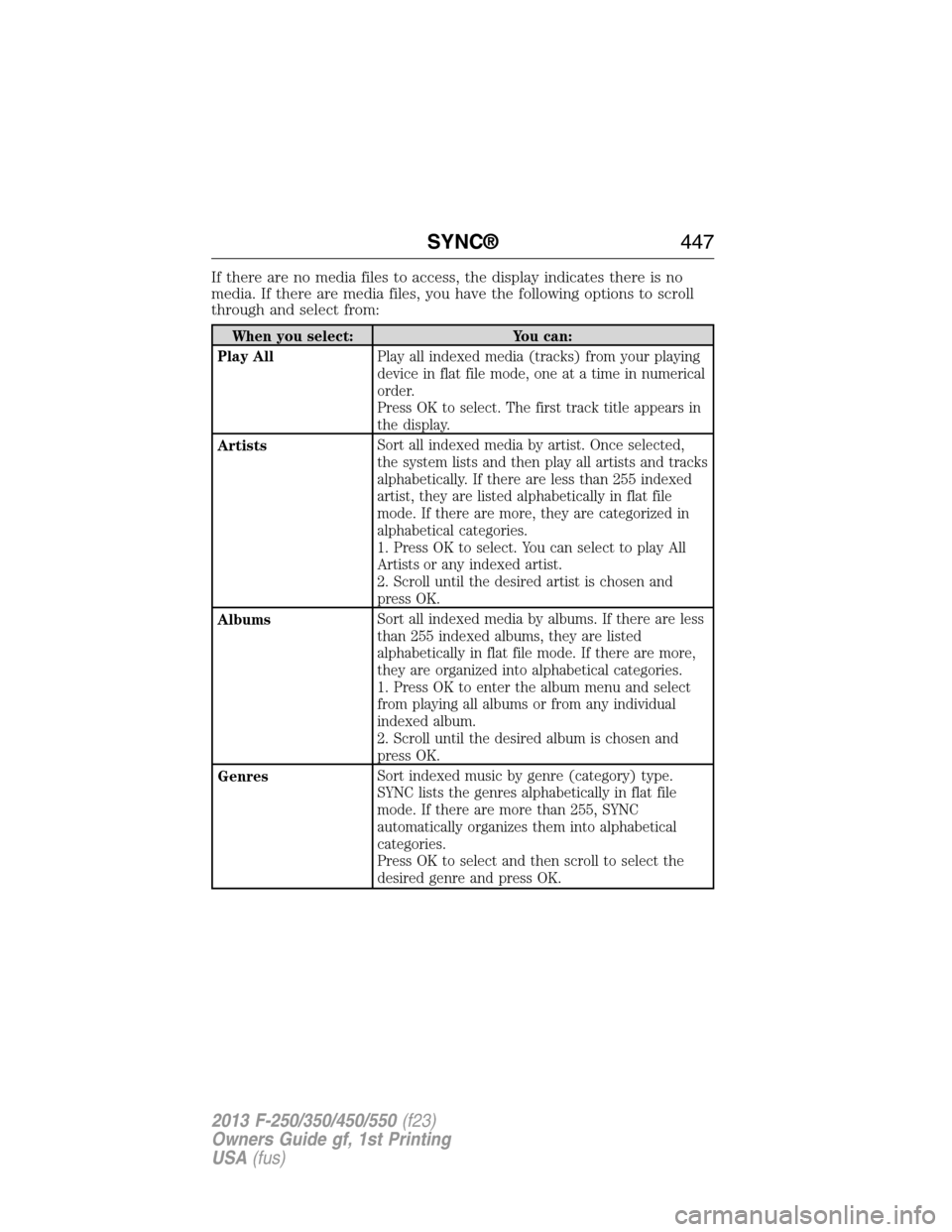
If there are no media files to access, the display indicates there is no
media. If there are media files, you have the following options to scroll
through and select from:
When you select: You can:
Play AllPlay all indexed media (tracks) from your playing
device in flat file mode, one at a time in numerical
order.
Press OK to select. The first track title appears in
the display.
ArtistsSort all indexed media by artist. Once selected,
the system lists and then play all artists and tracks
alphabetically. If there are less than 255 indexed
artist, they are listed alphabetically in flat file
mode. If there are more, they are categorized in
alphabetical categories.
1. Press OK to select. You can select to play All
Artists or any indexed artist.
2. Scroll until the desired artist is chosen and
press OK.
AlbumsSort all indexed media by albums. If there are less
than 255 indexed albums, they are listed
alphabetically in flat file mode. If there are more,
they are organized into alphabetical categories.
1. Press OK to enter the album menu and select
from playing all albums or from any individual
indexed album.
2. Scroll until the desired album is chosen and
press OK.
GenresSort indexed music by genre (category) type.
SYNC lists the genres alphabetically in flat file
mode. If there are more than 255, SYNC
automatically organizes them into alphabetical
categories.
Press OK to select and then scroll to select the
desired genre and press OK.
SYNC®447
2013 F-250/350/450/550(f23)
Owners Guide gf, 1st Printing
USA(fus)
Page 450 of 563
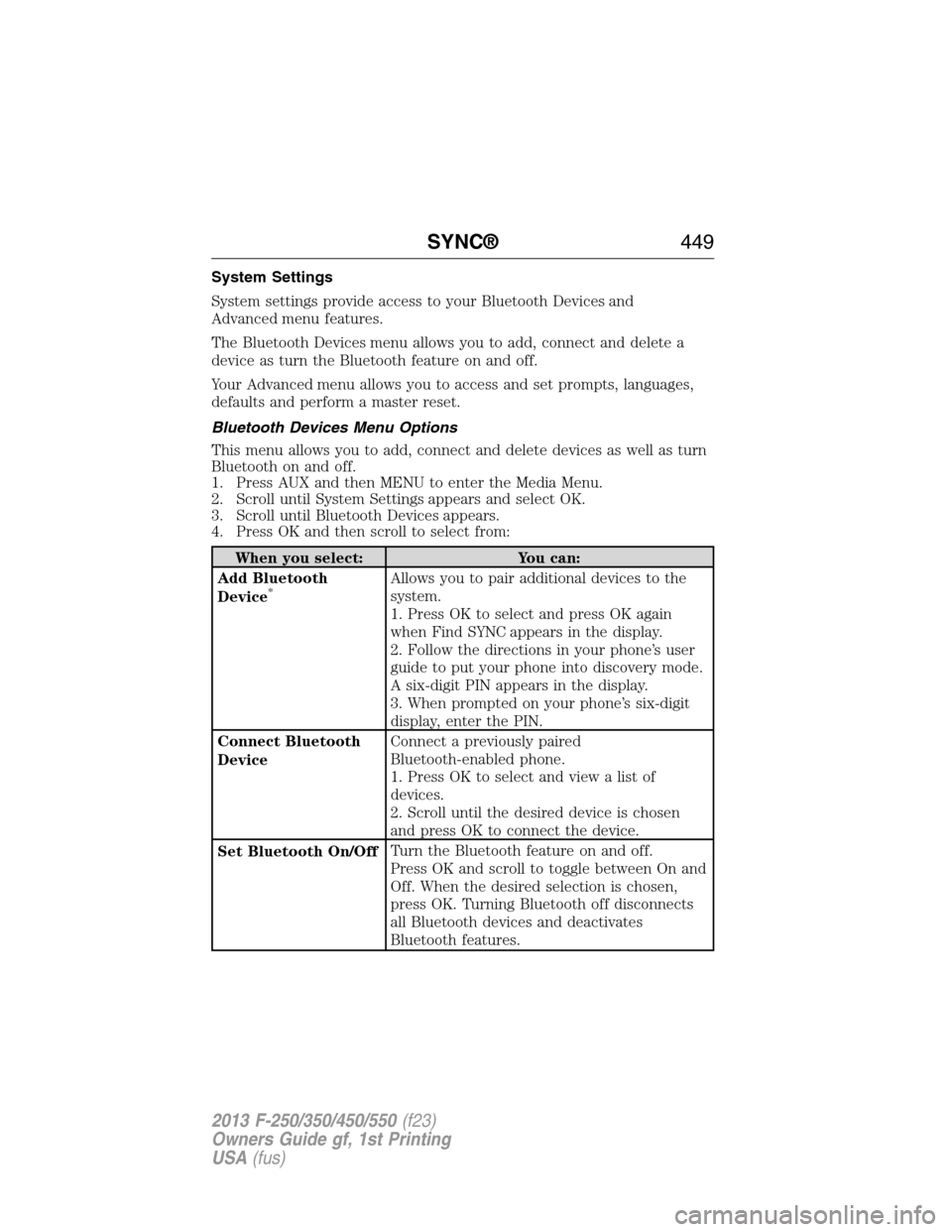
System Settings
System settings provide access to your Bluetooth Devices and
Advanced menu features.
The Bluetooth Devices menu allows you to add, connect and delete a
device as turn the Bluetooth feature on and off.
Your Advanced menu allows you to access and set prompts, languages,
defaults and perform a master reset.
Bluetooth Devices Menu Options
This menu allows you to add, connect and delete devices as well as turn
Bluetooth on and off.
1. Press AUX and then MENU to enter the Media Menu.
2. Scroll until System Settings appears and select OK.
3. Scroll until Bluetooth Devices appears.
4. Press OK and then scroll to select from:
When you select: You can:
Add Bluetooth
Device
*Allows you to pair additional devices to the
system.
1. Press OK to select and press OK again
when Find SYNC appears in the display.
2. Follow the directions in your phone’s user
guide to put your phone into discovery mode.
A six-digit PIN appears in the display.
3. When prompted on your phone’s six-digit
display, enter the PIN.
Connect Bluetooth
DeviceConnect a previously paired
Bluetooth-enabled phone.
1. Press OK to select and view a list of
devices.
2. Scroll until the desired device is chosen
and press OK to connect the device.
Set Bluetooth On/OffTurn the Bluetooth feature on and off.
Press OK and scroll to toggle between On and
Off. When the desired selection is chosen,
press OK. Turning Bluetooth off disconnects
all Bluetooth devices and deactivates
Bluetooth features.
SYNC®449
2013 F-250/350/450/550(f23)
Owners Guide gf, 1st Printing
USA(fus)
Page 451 of 563
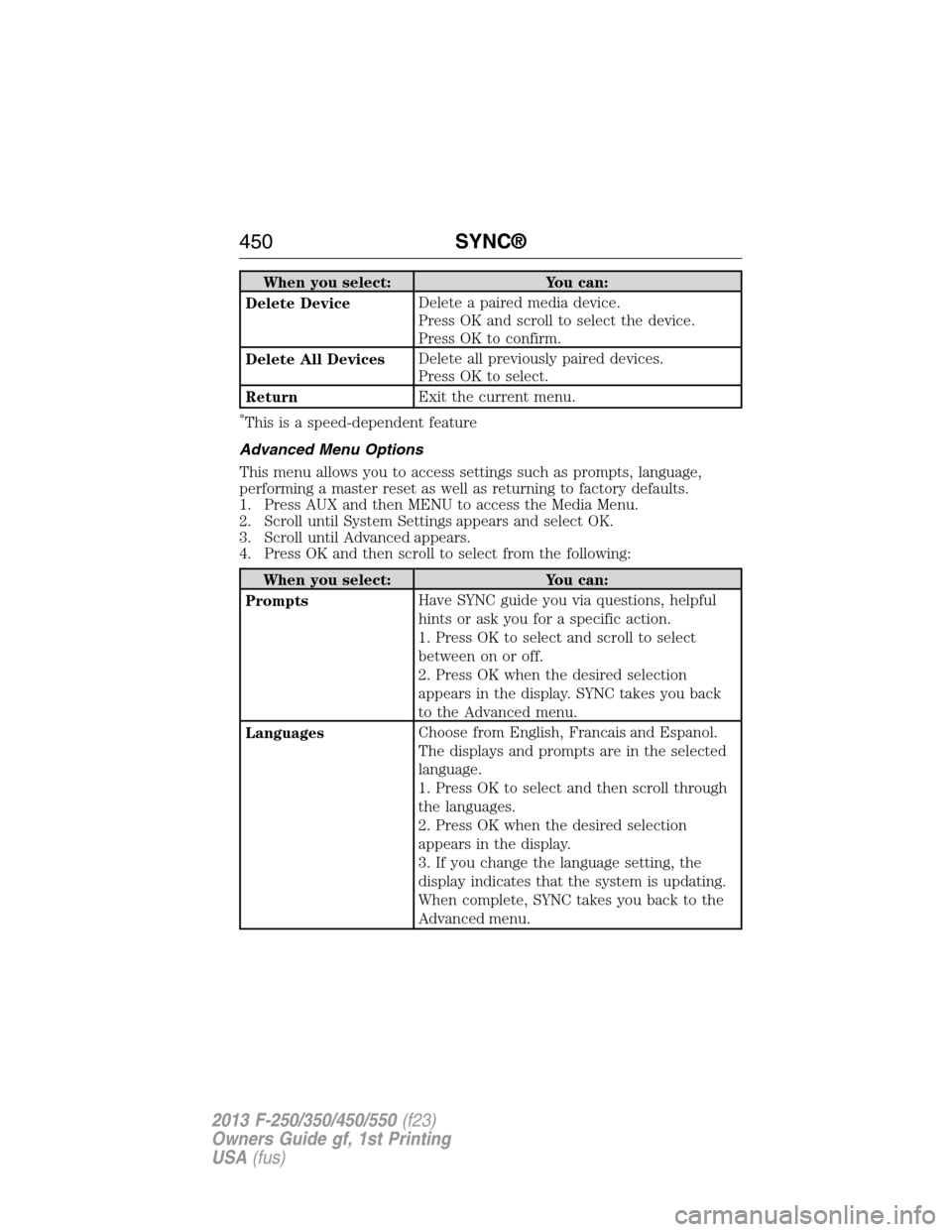
When you select: You can:
Delete DeviceDelete a paired media device.
Press OK and scroll to select the device.
Press OK to confirm.
Delete All DevicesDelete all previously paired devices.
Press OK to select.
ReturnExit the current menu.
*This is a speed-dependent feature
Advanced Menu Options
This menu allows you to access settings such as prompts, language,
performing a master reset as well as returning to factory defaults.
1. Press AUX and then MENU to access the Media Menu.
2. Scroll until System Settings appears and select OK.
3. Scroll until Advanced appears.
4. Press OK and then scroll to select from the following:
When you select: You can:
PromptsHave SYNC guide you via questions, helpful
hints or ask you for a specific action.
1. Press OK to select and scroll to select
between on or off.
2. Press OK when the desired selection
appears in the display. SYNC takes you back
to the Advanced menu.
LanguagesChoose from English, Francais and Espanol.
The displays and prompts are in the selected
language.
1. Press OK to select and then scroll through
the languages.
2. Press OK when the desired selection
appears in the display.
3. If you change the language setting, the
display indicates that the system is updating.
When complete, SYNC takes you back to the
Advanced menu.
450SYNC®
2013 F-250/350/450/550(f23)
Owners Guide gf, 1st Printing
USA(fus)
Page 452 of 563
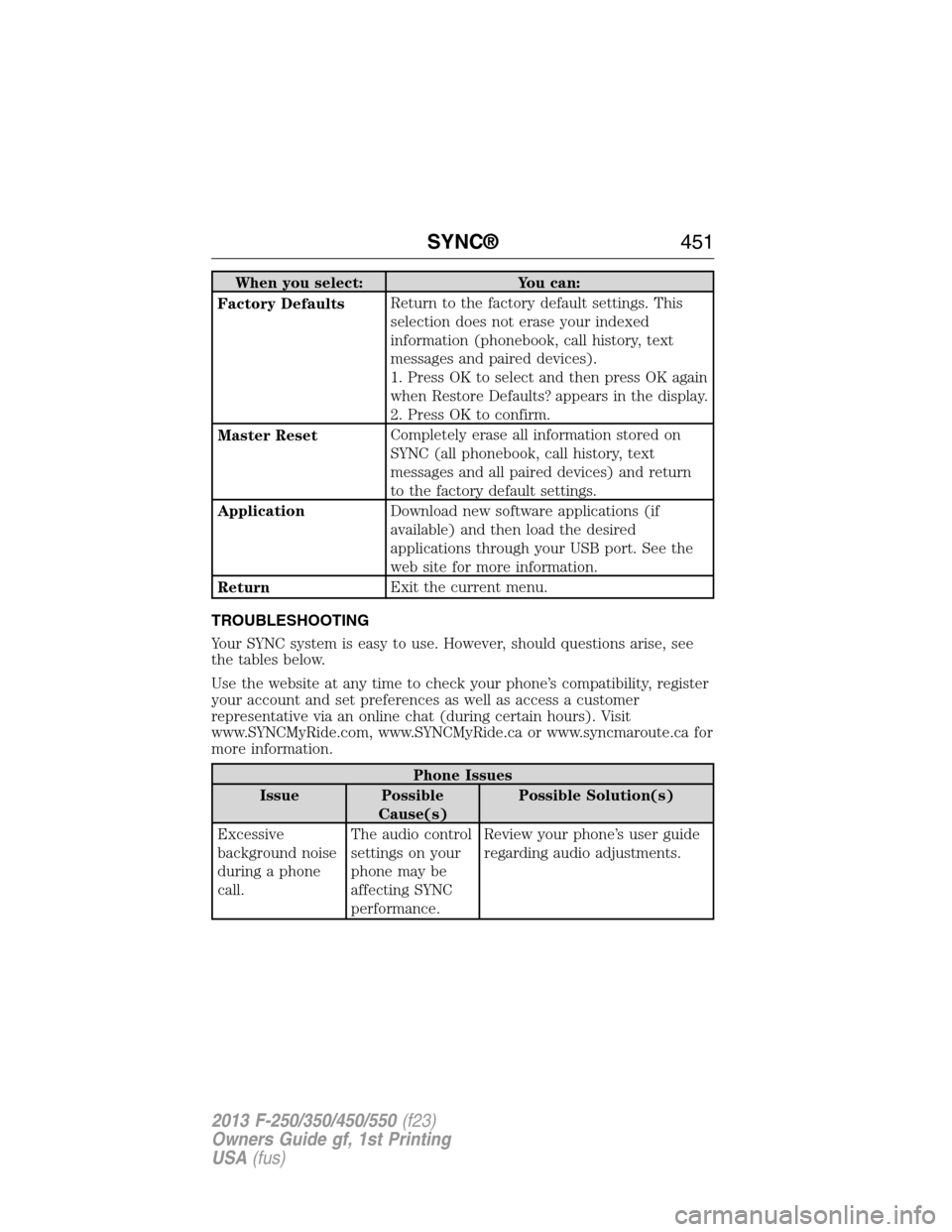
When you select: You can:
Factory DefaultsReturn to the factory default settings. This
selection does not erase your indexed
information (phonebook, call history, text
messages and paired devices).
1. Press OK to select and then press OK again
when Restore Defaults? appears in the display.
2. Press OK to confirm.
Master ResetCompletely erase all information stored on
SYNC (all phonebook, call history, text
messages and all paired devices) and return
to the factory default settings.
ApplicationDownload new software applications (if
available) and then load the desired
applications through your USB port. See the
web site for more information.
ReturnExit the current menu.
TROUBLESHOOTING
Your SYNC system is easy to use. However, should questions arise, see
the tables below.
Use the website at any time to check your phone’s compatibility, register
your account and set preferences as well as access a customer
representative via an online chat (during certain hours). Visit
www.SYNCMyRide.com, www.SYNCMyRide.ca or www.syncmaroute.ca for
more information.
Phone Issues
Issue Possible
Cause(s)Possible Solution(s)
Excessive
background noise
during a phone
call.The audio control
settings on your
phone may be
affecting SYNC
performance.Review your phone’s user guide
regarding audio adjustments.
SYNC®451
2013 F-250/350/450/550(f23)
Owners Guide gf, 1st Printing
USA(fus)
Page 459 of 563

INTRODUCTION
WARNING:Driving while distracted can result in loss of vehicle
control, accident and injury. Ford strongly recommends that
drivers use extreme caution when using any device or feature that may
take their focus off the road. Your primary responsibility is the safe
operation of the vehicle. We recommend against the use of any
handheld device while driving, encourage the use of voice-operated
systems when possible and that you become aware of applicable state
and local laws that may affect use of electronic devices while driving.
Note:Some features are not available while your vehicle is moving.
Note:Your system is equipped with a feature that allows you to access
and control audio features for 30 minutes after you switch the ignition
off (and no doors open).
This system uses a four-corner strategy to provide quick access several
vehicle features and settings. The touchscreen provides easy interaction
with your cellular phone, multimedia, climate control and navigation
system. The corners display any active modes within those menus, such
as phone status or the climate temperature.
SETTINGS
Press to select any of the following:
•Clock
•Display
•Sound
•Vehicle
•Settings
•Help
INFORMATION
Press to select any of the following:
•SYNC® Services
•SIRIUS® Travel Link™
•Alerts
•Calendar
•SYNC Apps
If the icon is yellow, seeAlertsin theInformationsection of this chapter.
458MyFord Touch® (If Equipped)
2013 F-250/350/450/550(f23)
Owners Guide gf, 1st Printing
USA(fus)
Page 461 of 563
HOME
Press to access your home screen. Depending on your vehicle’s
option package and software, your screens may vary in
appearance from the descriptions in this section. Your features may also
be limited depending on your market. Check with your authorized dealer
for availability.
Using the Touch-sensitive Controls on Your System
To turn a feature on and off, just touch the graphic with your finger. To
get the best performance from the touch-sensitive controls:
•Do not press hard on the controls. They are sensitive to light touch.
•Use your bare finger to touch the center of a touch-control graphic.
Touching off-center of the graphic may affect operation of a nearby
control.
•Make sure your hands are clean and dry.
•Since the touchscreen operates based on the touch of a finger, you
may have trouble using it if you are wearing gloves.
•Keep metal and other conductive material away from the surface of
the touchscreen as this may cause electronic interference (for
example, inadvertently turning on a feature other than the one you
meant to turn on).
Depending on your vehicle and option package, you may also have these
controls on your bezel:
•Power: Switch the media or climate features off and on.
•VOL:Control the volume of playing media.
•Fan: Control the speed of the climate system fan.
•Seek and Tune buttons: Use as you normally would in media modes.
•Eject: Eject a CD from the entertainment system.
•Radio preset buttons: Located below the touchscreen, you can use
these buttons to enter a radio preset in addition to using the
touchscreen.
•MEDIA:Touch the word repeatedly to see all available media modes.
The screen does not change, but you see the media change in the
lower left status bar.
•Hazard flasher: Switch the hazard flashers off and on.
Cleaning the Touchscreen Display
Use a clean, soft cloth such as one used for cleaning glasses. If dirt or
fingerprints are still visible, apply a small amount of alcohol to the cloth.
Do not pour or spray alcohol onto the display. Do not use detergent or
any type of solvent to clean the display.
460MyFord Touch® (If Equipped)
2013 F-250/350/450/550(f23)
Owners Guide gf, 1st Printing
USA(fus)
Page 469 of 563
Some of the voice commands that are available while viewing this screen
are:
“POINTS OF INTEREST” or “POI”
“Destination
“Search by name”
“Search by category”
“Change search area”
Note:These are just a sample of the voice commands available within
the Points of Interest section; the categories themselves are also
technically voice commands.
If you choose Intersection from the navigation screen, you can choose
from the following:
•1st Street
•2nd Street
•City
•State/Prov.
Some of the voice commands that are available while viewing this screen
are:
“INTERSECTION”
“Enter first street name”
“Change first street name”
“Enter second street name”
“Change second street name”
“Enter city”
“Change city”
“Enter state”
“Change state”
The dual mode feature is also available when the voice system displays a
list of items to pick from during a voice session, where you would be
able to touch the line item or say “Line 2”. If the system does not
understand a voice command, or there are multiple options, the system
displays a voice command list for you.
468MyFord Touch® (If Equipped)
2013 F-250/350/450/550(f23)
Owners Guide gf, 1st Printing
USA(fus)
Page 472 of 563
When you select: You can:
Options Sound Settingsallows you to adjust Bass,
Midrange, Treble, Balance and Fade, DSP
(Digital Signal Processing), Occupancy Mode,
and Speed Compensated Volume settings.
(Your vehicle may not have all these settings.)
Set PTY for Seek/Scanallows you to select
a category of music you would like to search
for and then choose to either seek or scan for
the stations.
RDS Text Displayallows you to view the
information broadcast by FM stations.
Auto Presets (AST)allows you to have the
system automatically store the six strongest
stations in your current location.
TAG Button(if available) allows you to tag a
song to download later. When you selectOn,
TAG appears on-screen when HD Radio is
active. You can touchTA Gto save the
information of the song that is playing. When
you plug in your portable music player, the
information transfers (if supported by your
device). When you are connected to iTunes®,
the tags appear to remind you of the songs
you would like to download. SeeHD Radio
informationlater in this chapter.
Direct TuneEnter the desired station number when
prompted. PressEnter.
MyFord Touch® (If Equipped)471
2013 F-250/350/450/550(f23)
Owners Guide gf, 1st Printing
USA(fus)