Page 110 of 475

Settings (cont’d)
MyKey Create MyKey Hold OK to Create MyKey
Traction Ctrl Always On or User Selectable
Max Speed 80 MPH (130 km/h) or Off
Speed Warning 45 mph (75 km/h), 55 mph
(90 km/h), 65 mph (105 km/h) or Off
Volume Limiter On or Off
Clear MyKeys Hold OK to Clear All MyKeys
System Reset Hold OK to Reset System to Factory Default
System Check
All active warnings will display first if applicable. The system check
menu may appear different based upon equipment options and current
vehicle status. Use the up/down arrow buttons to scroll through the
list.
Status Display
The following features will display in the information center.
Compass
Displayed in the status line at the bottom of the display. Displays the
vehicle’s heading direction.
To calibrate the compass: Enter the compass menu and select Calibrate.
Follow the prompts.
To set the compass zone: Enter the compass menu and select Set. Follow
the prompts. See the diagram below to determine your magnetic zone.
Determine which magnetic zone you
are in for your geographic location
by referring to the zone map.
1 2 3
4
5
6 7 8 9 101112 13 14 15
11 0Information Displays
2013 Focus(foc)
Owners Guide gf, 1st Printing
USA(fus)
Page 117 of 475
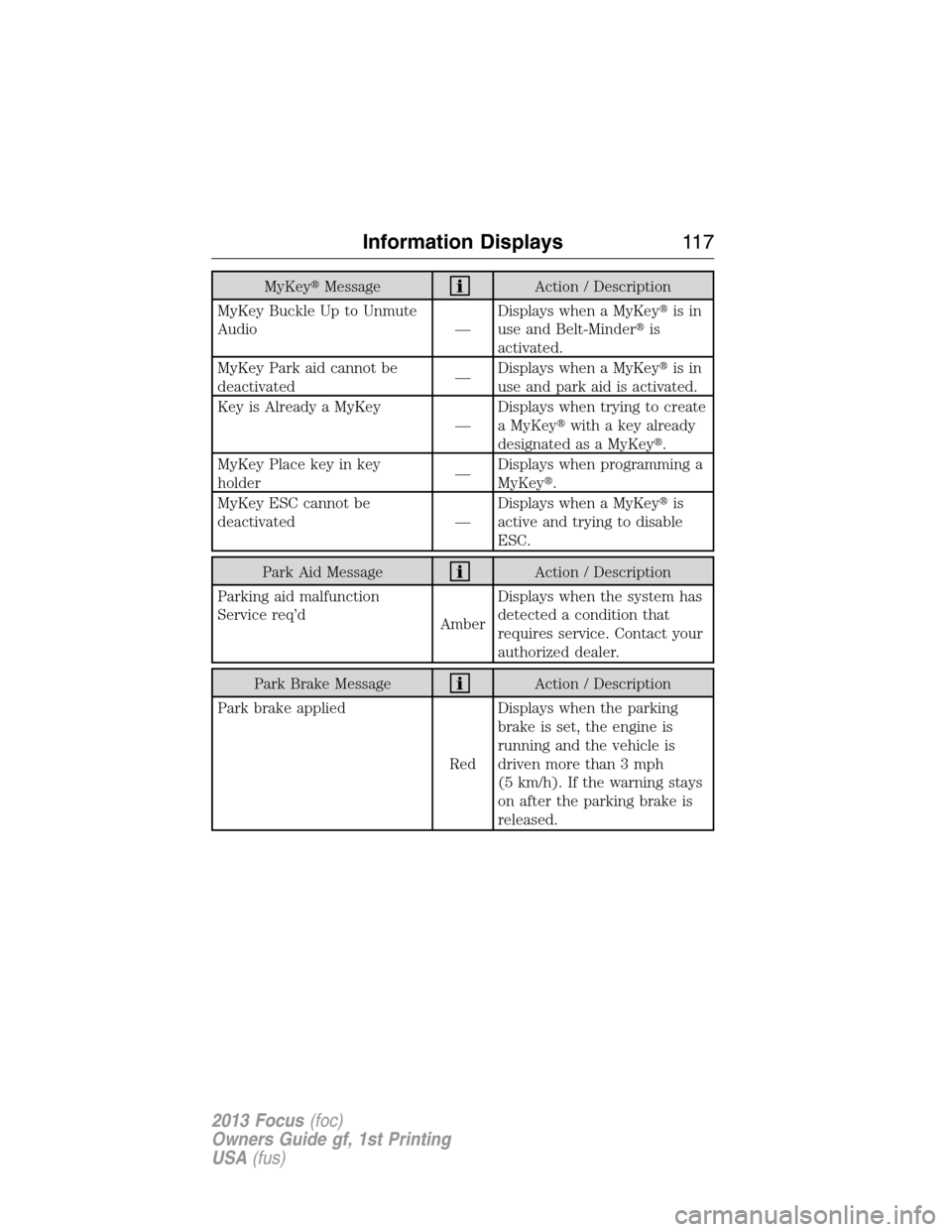
MyKey�MessageAction / Description
MyKey Buckle Up to Unmute
Audio —Displays when a MyKey�is in
use and Belt-Minder�is
activated.
MyKey Park aid cannot be
deactivated—Displays when a MyKey�is in
use and park aid is activated.
Key is Already a MyKey
—Displays when trying to create
a MyKey�with a key already
designated as a MyKey�.
MyKey Place key in key
holder—Displays when programming a
MyKey�.
MyKey ESC cannot be
deactivated —Displays when a MyKey�is
active and trying to disable
ESC.
Park Aid MessageAction / Description
Parking aid malfunction
Service req’d
AmberDisplays when the system has
detected a condition that
requires service. Contact your
authorized dealer.
Park Brake MessageAction / Description
Park brake applied
RedDisplays when the parking
brake is set, the engine is
running and the vehicle is
driven more than 3 mph
(5 km/h). If the warning stays
on after the parking brake is
released.
Information Displays11 7
2013 Focus(foc)
Owners Guide gf, 1st Printing
USA(fus)
Page 119 of 475
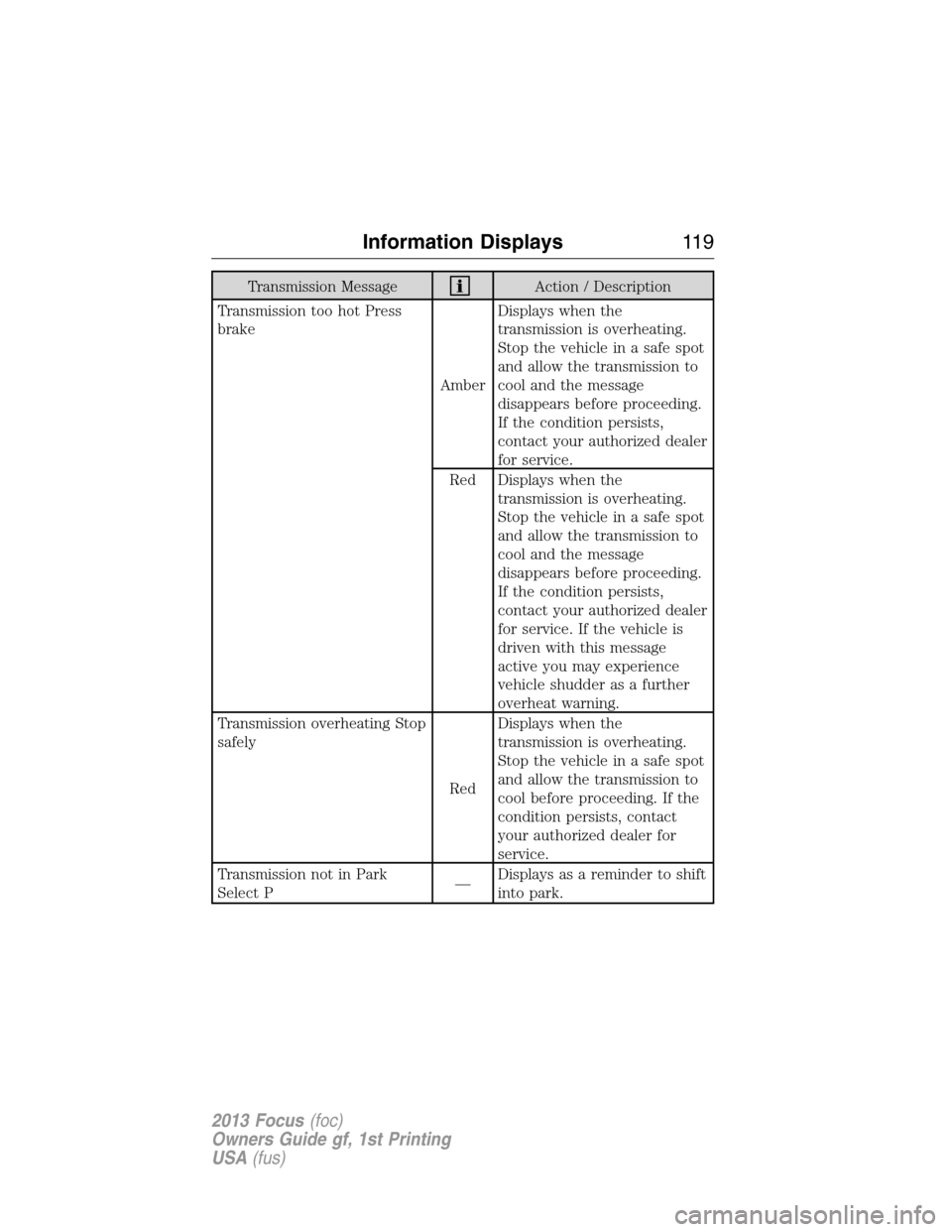
Transmission MessageAction / Description
Transmission too hot Press
brake
AmberDisplays when the
transmission is overheating.
Stop the vehicle in a safe spot
and allow the transmission to
cool and the message
disappears before proceeding.
If the condition persists,
contact your authorized dealer
for service.
Red Displays when the
transmission is overheating.
Stop the vehicle in a safe spot
and allow the transmission to
cool and the message
disappears before proceeding.
If the condition persists,
contact your authorized dealer
for service. If the vehicle is
driven with this message
active you may experience
vehicle shudder as a further
overheat warning.
Transmission overheating Stop
safely
RedDisplays when the
transmission is overheating.
Stop the vehicle in a safe spot
and allow the transmission to
cool before proceeding. If the
condition persists, contact
your authorized dealer for
service.
Transmission not in Park
Select P—Displays as a reminder to shift
into park.
Information Displays11 9
2013 Focus(foc)
Owners Guide gf, 1st Printing
USA(fus)
Page 121 of 475
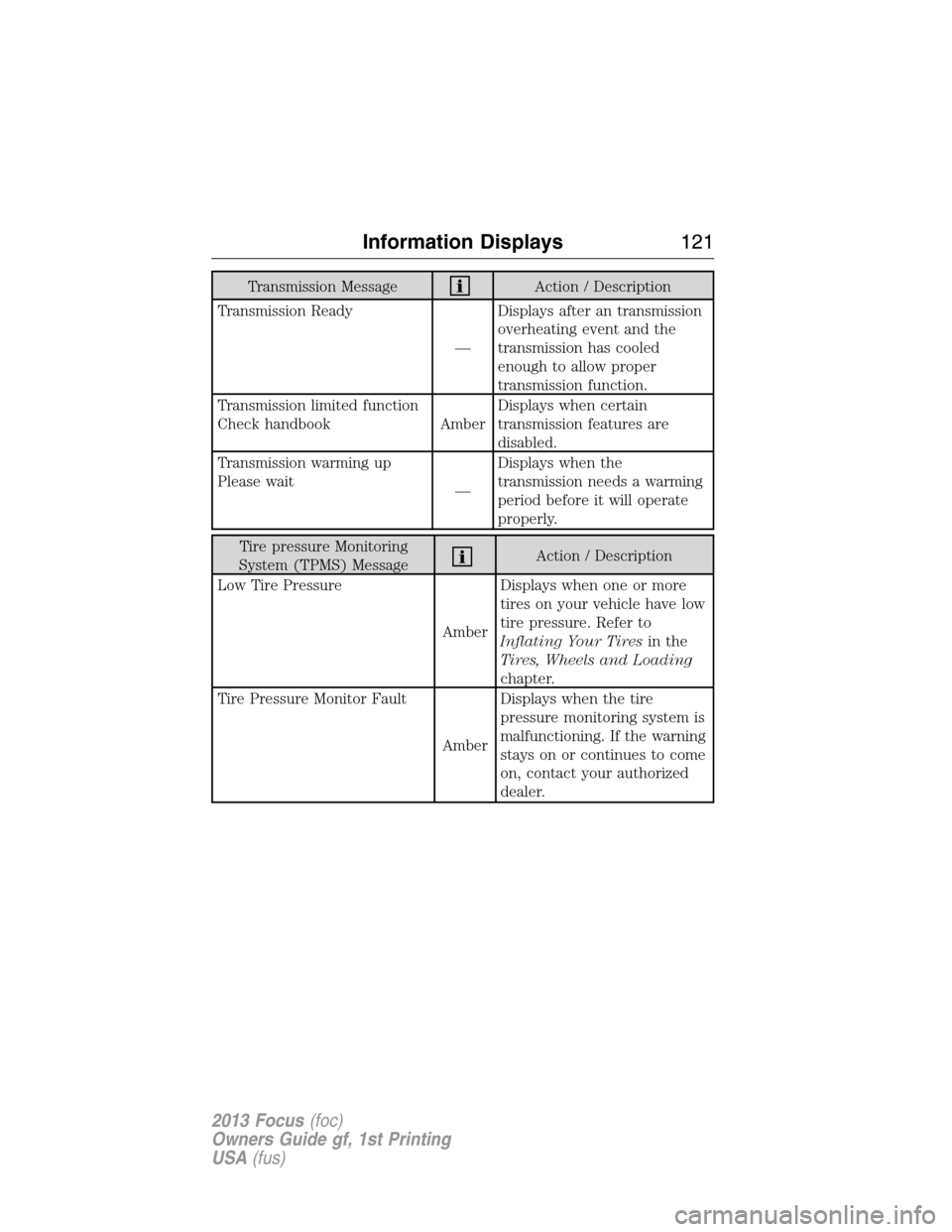
Transmission MessageAction / Description
Transmission Ready
—Displays after an transmission
overheating event and the
transmission has cooled
enough to allow proper
transmission function.
Transmission limited function
Check handbook AmberDisplays when certain
transmission features are
disabled.
Transmission warming up
Please wait
—Displays when the
transmission needs a warming
period before it will operate
properly.
Tire pressure Monitoring
System (TPMS) MessageAction / Description
Low Tire Pressure
AmberDisplays when one or more
tires on your vehicle have low
tire pressure. Refer to
Inflating Your Tiresin the
Tires, Wheels and Loading
chapter.
Tire Pressure Monitor Fault
AmberDisplays when the tire
pressure monitoring system is
malfunctioning. If the warning
stays on or continues to come
on, contact your authorized
dealer.
Information Displays121
2013 Focus(foc)
Owners Guide gf, 1st Printing
USA(fus)
Page 122 of 475
Tire pressure Monitoring
System (TPMS) MessageAction / Description
Tire Pressure Sensor Fault
AmberDisplays when a tire pressure
sensor is malfunctioning, or
your spare tire is in use. For
more information on how the
system operates under these
conditions, refer to
Understanding Your Tire
Pressure Monitoring System
(TPMS)in theTires, Wheels
and Loadingchapter. If the
warning stays on or continues
to come on, contact your
authorized dealer.
Traction Control /
AdvanceTrac�MessageAction / Description
Traction control off
—Displays when the traction
control system has been
switched off.
122Information Displays
2013 Focus(foc)
Owners Guide gf, 1st Printing
USA(fus)
Page 125 of 475
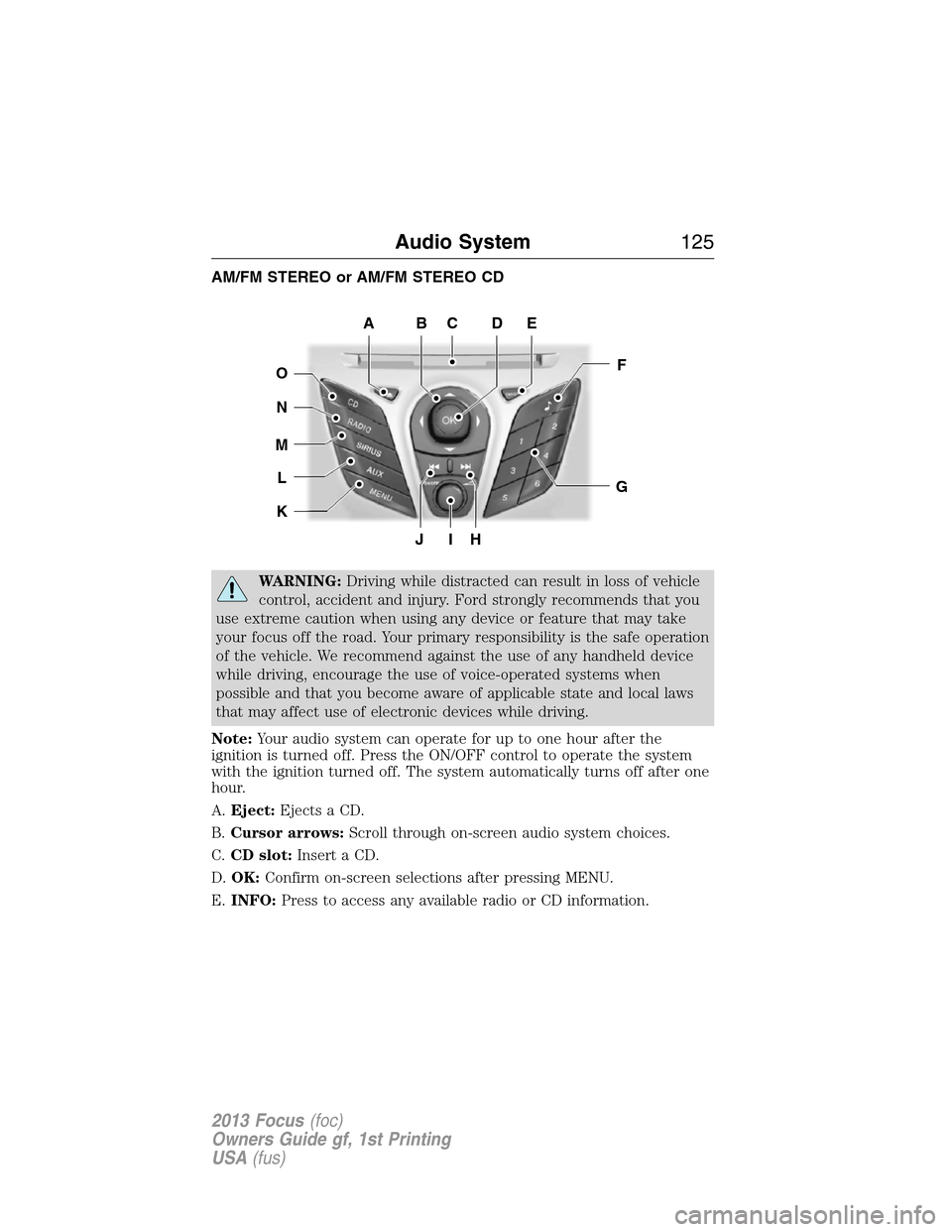
AM/FM STEREO or AM/FM STEREO CD
WARNING:Driving while distracted can result in loss of vehicle
control, accident and injury. Ford strongly recommends that you
use extreme caution when using any device or feature that may take
your focus off the road. Your primary responsibility is the safe operation
of the vehicle. We recommend against the use of any handheld device
while driving, encourage the use of voice-operated systems when
possible and that you become aware of applicable state and local laws
that may affect use of electronic devices while driving.
Note:Your audio system can operate for up to one hour after the
ignition is turned off. Press the ON/OFF control to operate the system
with the ignition turned off. The system automatically turns off after one
hour.
A.Eject:Ejects a CD.
B.Cursor arrows:Scroll through on-screen audio system choices.
C.CD slot:Insert a CD.
D.OK:Confirm on-screen selections after pressing MENU.
E.INFO:Press to access any available radio or CD information.
JIH
F
G
EDCBA
O
N
M
L
K
Audio System125
2013 Focus(foc)
Owners Guide gf, 1st Printing
USA(fus)
Page 127 of 475
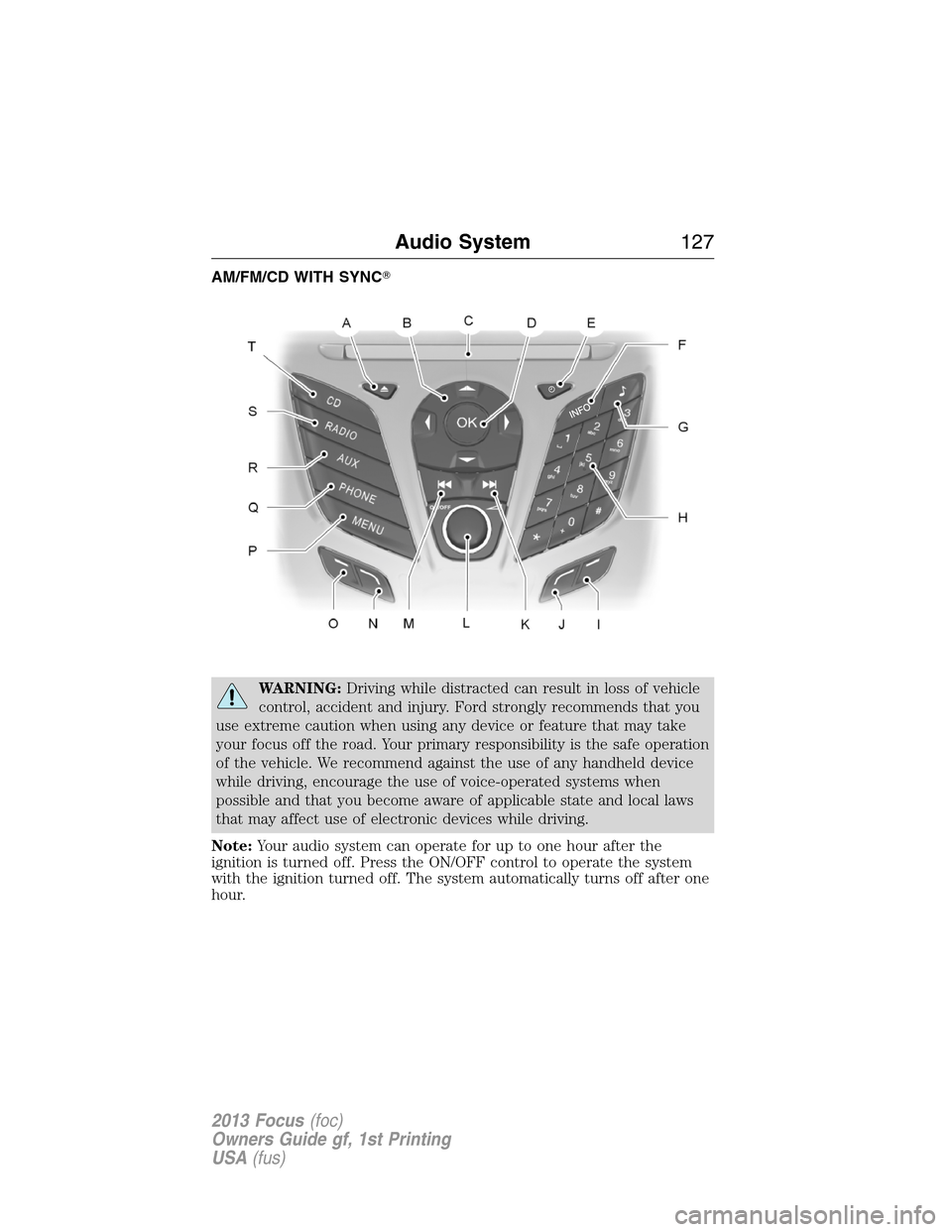
AM/FM/CD WITH SYNC�
WARNING:Driving while distracted can result in loss of vehicle
control, accident and injury. Ford strongly recommends that you
use extreme caution when using any device or feature that may take
your focus off the road. Your primary responsibility is the safe operation
of the vehicle. We recommend against the use of any handheld device
while driving, encourage the use of voice-operated systems when
possible and that you become aware of applicable state and local laws
that may affect use of electronic devices while driving.
Note:Your audio system can operate for up to one hour after the
ignition is turned off. Press the ON/OFF control to operate the system
with the ignition turned off. The system automatically turns off after one
hour.
Audio System127
2013 Focus(foc)
Owners Guide gf, 1st Printing
USA(fus)
Page 130 of 475
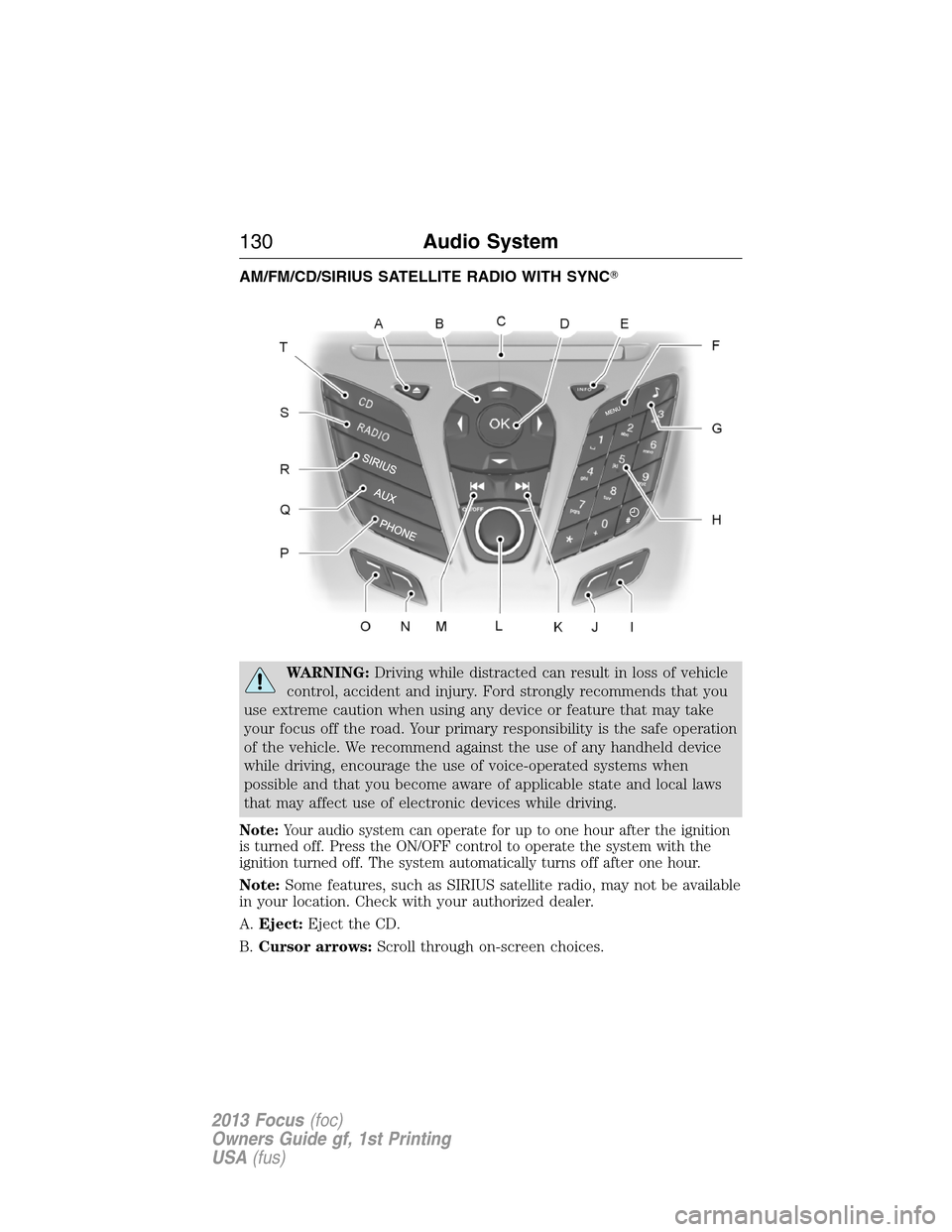
AM/FM/CD/SIRIUS SATELLITE RADIO WITH SYNC�
WARNING:Driving while distracted can result in loss of vehicle
control, accident and injury. Ford strongly recommends that you
use extreme caution when using any device or feature that may take
your focus off the road. Your primary responsibility is the safe operation
of the vehicle. We recommend against the use of any handheld device
while driving, encourage the use of voice-operated systems when
possible and that you become aware of applicable state and local laws
that may affect use of electronic devices while driving.
Note:Your audio system can operate for up to one hour after the ignition
is turned off. Press the ON/OFF control to operate the system with the
ignition turned off. The system automatically turns off after one hour.
Note:Some features, such as SIRIUS satellite radio, may not be available
in your location. Check with your authorized dealer.
A.Eject:Eject the CD.
B.Cursor arrows:Scroll through on-screen choices.
130Audio System
2013 Focus(foc)
Owners Guide gf, 1st Printing
USA(fus)