2013 FORD FOCUS instrument panel
[x] Cancel search: instrument panelPage 142 of 475
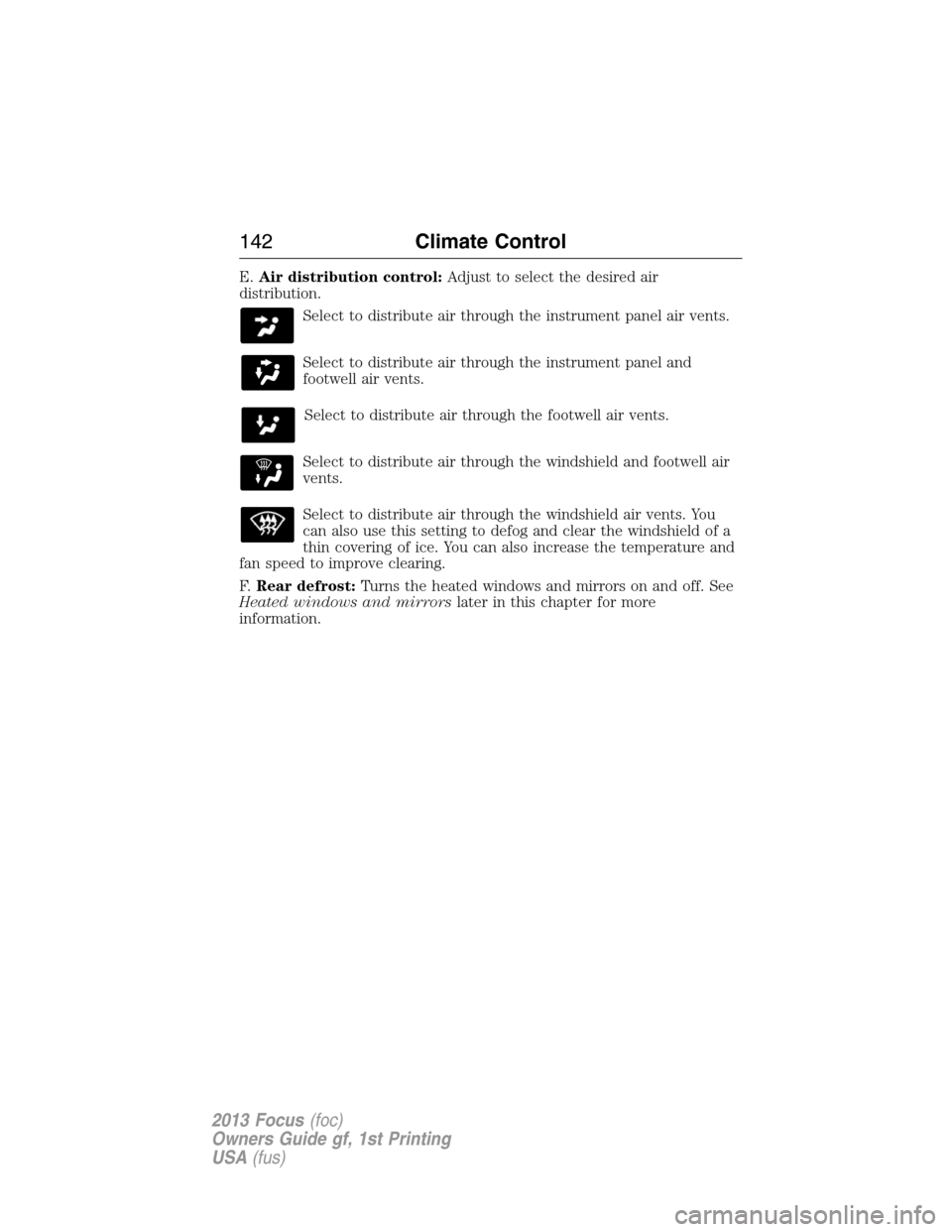
E.Air distribution control:Adjust to select the desired air
distribution.
Select to distribute air through the instrument panel air vents.
Select to distribute air through the instrument panel and
footwell air vents.
Select to distribute air through the footwell air vents.
Select to distribute air through the windshield and footwell air
vents.
Select to distribute air through the windshield air vents. You
can also use this setting to defog and clear the windshield of a
thin covering of ice. You can also increase the temperature and
fan speed to improve clearing.
F.Rear defrost:Turns the heated windows and mirrors on and off. See
Heated windows and mirrorslater in this chapter for more
information.
142Climate Control
2013 Focus(foc)
Owners Guide gf, 1st Printing
USA(fus)
Page 143 of 475
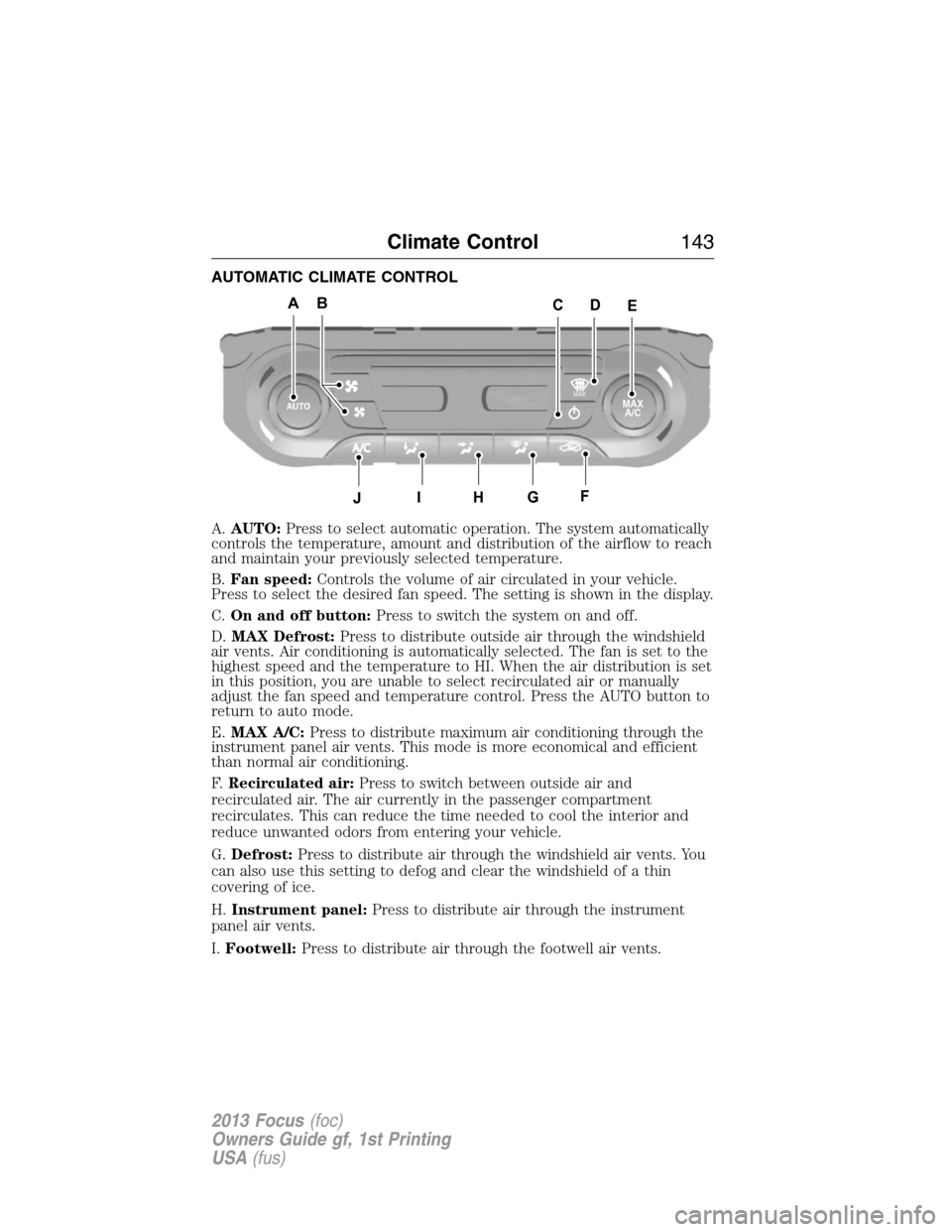
AUTOMATIC CLIMATE CONTROL
A.AUTO:Press to select automatic operation. The system automatically
controls the temperature, amount and distribution of the airflow to reach
and maintain your previously selected temperature.
B.Fan speed:Controls the volume of air circulated in your vehicle.
Press to select the desired fan speed. The setting is shown in the display.
C.On and off button:Press to switch the system on and off.
D.MAX Defrost:Press to distribute outside air through the windshield
air vents. Air conditioning is automatically selected. The fan is set to the
highest speed and the temperature to HI. When the air distribution is set
in this position, you are unable to select recirculated air or manually
adjust the fan speed and temperature control. Press the AUTO button to
return to auto mode.
E.MAX A/C:Press to distribute maximum air conditioning through the
instrument panel air vents. This mode is more economical and efficient
than normal air conditioning.
F.Recirculated air:Press to switch between outside air and
recirculated air. The air currently in the passenger compartment
recirculates. This can reduce the time needed to cool the interior and
reduce unwanted odors from entering your vehicle.
G.Defrost:Press to distribute air through the windshield air vents. You
can also use this setting to defog and clear the windshield of a thin
covering of ice.
H.Instrument panel:Press to distribute air through the instrument
panel air vents.
I.Footwell:Press to distribute air through the footwell air vents.
ABAAEAAC
J
D
AHAGAFAI
MAX
A/C
Climate Control143
2013 Focus(foc)
Owners Guide gf, 1st Printing
USA(fus)
Page 145 of 475
HINTS ON CONTROLLING THE INTERIOR CLIMATE
General Hints
Note:Prolonged use of recirculated air may cause the windows to fog
up.
Note:A small amount of air may be felt from the footwell air vents
regardless of the air distribution setting.
Note:To reduce humidity build-up inside your vehicle, do not drive with
the system switched off or with recirculated air always switched on.
Note:Do not place objects under the front seats as this may interfere
with the airflow to the rear seats.
Note:Remove any snow, ice or leaves from the air intake area at the
base of the windshield.
Manual Climate Control
Note:To reduce fogging of the windshield during humid weather, adjust
the air distribution control to the windshield air vents position. Increase
the temperature and fan speed to improve clearing if required.
Automatic Climate Control
Note:Do not adjust the settings when your vehicle interior is extremely
hot or cold. The system automatically adjusts to the previously stored
settings. For the system to function efficiently, the instrument panel and
side air vents should be fully open.
Note:At low ambient temperatures with AUTO selected, the air stream
is directed toward the windshield and side windows for as long as the
engine remains cold.
Note:When the system is switched off, outside air is prevented from
entering your vehicle.
Note:When the system is in AUTO mode, and the interior and exterior
temperatures are high, the system automatically selects recirculated air
to maximize cooling of the interior. When the selected air temperature is
reached, the system automatically selects outside air.
Note:When you select windshield defrosting and defogging, the
instrument panel and footwell level functions automatically switch off
and air conditioning switches on. Outside air flows into your vehicle.
Climate Control145
2013 Focus(foc)
Owners Guide gf, 1st Printing
USA(fus)
Page 146 of 475
Heating the Interior Quickly
Vehicles with Manual Climate
ControlVehicles with Automatic
Climate Control
1 Adjust the fan speed to the
highest speed setting.Press the high fan speed button
control.
2 Adjust the temperature control
to the highest setting.Adjust the temperature control
to the highest setting.
3 Adjust the air distribution
control to the footwell air vents
position.Press the footwell button to
distribute air to the footwell air
vents.
Recommended Settings for Heating
Vehicles with Manual Climate
ControlVehicles with Automatic
Climate Control
1 Adjust the fan speed to the
second speed setting.Press the slow fan speed button.
2 Adjust the temperature control
to the midway point of the hot
settings.Adjust the temperature control
to the midway point of the hot
settings.
3 Adjust the air distribution
control to the footwell and
windshield air vents position.Press the footwell and
windshield air distribution
buttons.
4 Close the instrument panel air
vents. Open the side air vents
and direct them toward the side
windows.
146Climate Control
2013 Focus(foc)
Owners Guide gf, 1st Printing
USA(fus)
Page 147 of 475
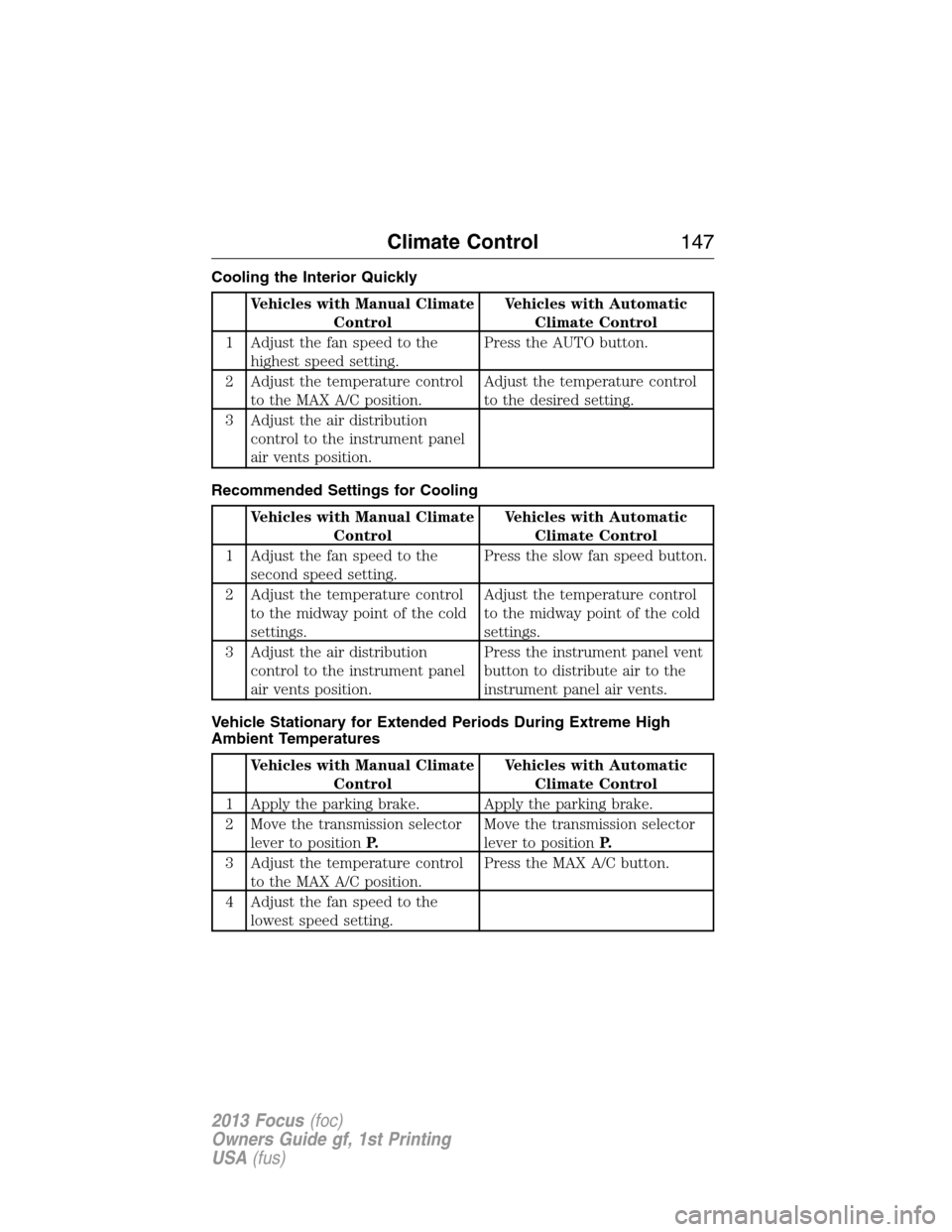
Cooling the Interior Quickly
Vehicles with Manual Climate
ControlVehicles with Automatic
Climate Control
1 Adjust the fan speed to the
highest speed setting.Press the AUTO button.
2 Adjust the temperature control
to the MAX A/C position.Adjust the temperature control
to the desired setting.
3 Adjust the air distribution
control to the instrument panel
air vents position.
Recommended Settings for Cooling
Vehicles with Manual Climate
ControlVehicles with Automatic
Climate Control
1 Adjust the fan speed to the
second speed setting.Press the slow fan speed button.
2 Adjust the temperature control
to the midway point of the cold
settings.Adjust the temperature control
to the midway point of the cold
settings.
3 Adjust the air distribution
control to the instrument panel
air vents position.Press the instrument panel vent
button to distribute air to the
instrument panel air vents.
Vehicle Stationary for Extended Periods During Extreme High
Ambient Temperatures
Vehicles with Manual Climate
ControlVehicles with Automatic
Climate Control
1 Apply the parking brake. Apply the parking brake.
2 Move the transmission selector
lever to positionP.Move the transmission selector
lever to positionP.
3 Adjust the temperature control
to the MAX A/C position.Press the MAX A/C button.
4 Adjust the fan speed to the
lowest speed setting.
Climate Control147
2013 Focus(foc)
Owners Guide gf, 1st Printing
USA(fus)
Page 148 of 475
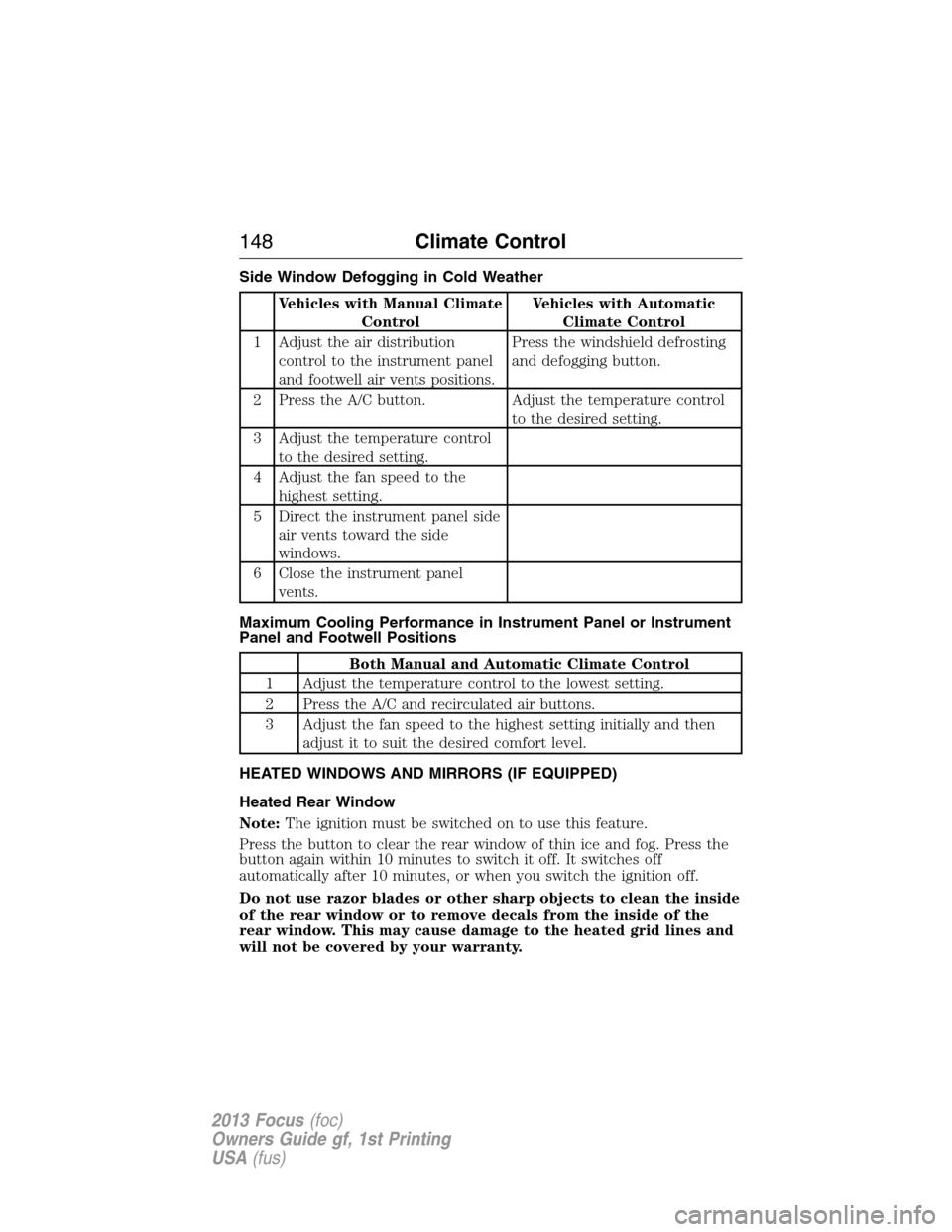
Side Window Defogging in Cold Weather
Vehicles with Manual Climate
ControlVehicles with Automatic
Climate Control
1 Adjust the air distribution
control to the instrument panel
and footwell air vents positions.Press the windshield defrosting
and defogging button.
2 Press the A/C button. Adjust the temperature control
to the desired setting.
3 Adjust the temperature control
to the desired setting.
4 Adjust the fan speed to the
highest setting.
5 Direct the instrument panel side
air vents toward the side
windows.
6 Close the instrument panel
vents.
Maximum Cooling Performance in Instrument Panel or Instrument
Panel and Footwell Positions
Both Manual and Automatic Climate Control
1 Adjust the temperature control to the lowest setting.
2 Press the A/C and recirculated air buttons.
3 Adjust the fan speed to the highest setting initially and then
adjust it to suit the desired comfort level.
HEATED WINDOWS AND MIRRORS (IF EQUIPPED)
Heated Rear Window
Note:The ignition must be switched on to use this feature.
Press the button to clear the rear window of thin ice and fog. Press the
button again within 10 minutes to switch it off. It switches off
automatically after 10 minutes, or when you switch the ignition off.
Do not use razor blades or other sharp objects to clean the inside
of the rear window or to remove decals from the inside of the
rear window. This may cause damage to the heated grid lines and
will not be covered by your warranty.
148Climate Control
2013 Focus(foc)
Owners Guide gf, 1st Printing
USA(fus)
Page 164 of 475

IGNITION SWITCH (IF EQUIPPED)
Note:When you switch the ignition off and leave your vehicle, do not
leave your key in the ignition. This could discharge your vehicle battery.
Note:To switch the engine off when your vehicle is moving, move the
transmission selector lever to positionN.Use the brakes to bring your
vehicle to a safe stop. After your vehicle has stopped, switch the engine
off and move the transmission selector lever to positionP.Turn the key
to position 0 or 1.
0 (Off):The ignition is off.
I (Accessory):Allows the electrical accessories, such as the radio, to
operate.
II (On):All electrical circuits are operational. Warning lamps and
indicators illuminate. This is the key position when driving.
III (Start):Cranks the engine. Release the key as soon as the engine
starts.
KEYLESS STARTING (IF EQUIPPED)
WARNING:The keyless starting system may not function if the key
is close to metal objects or electronic devices such as mobile phones.
Note:A valid key must be located inside the vehicle to switch the
ignition on and start the engine.
The start button is located on the instrument panel near the steering wheel.
Ignition On Mode
To switch the ignition on, press the start button. All
electrical circuits and accessories are operational, and
warning lamps and indicators illuminate.
START
STOP ENGINE
164Starting and Stopping the Engine
2013 Focus(foc)
Owners Guide gf, 1st Printing
USA(fus)
Page 200 of 475
WARNING:Use caution when using the rear video camera and
the liftgate is ajar. If the liftgate is ajar, the camera will be out of
position and the video image may be incorrect. All guidelines (if
enabled) have been removed when the liftgate is ajar.
WARNING:Use caution when turning camera features on or off
while in R (Reverse). Make sure the vehicle is not moving.
The rear view camera system provides a video image of the area behind
the vehicle. The image will be displayed in either in the rear view mirror
or the display in the center of the instrument panel.
During operation, lines appear in the display which represent your
vehicle’s path and proximity to objects behind the vehicle.
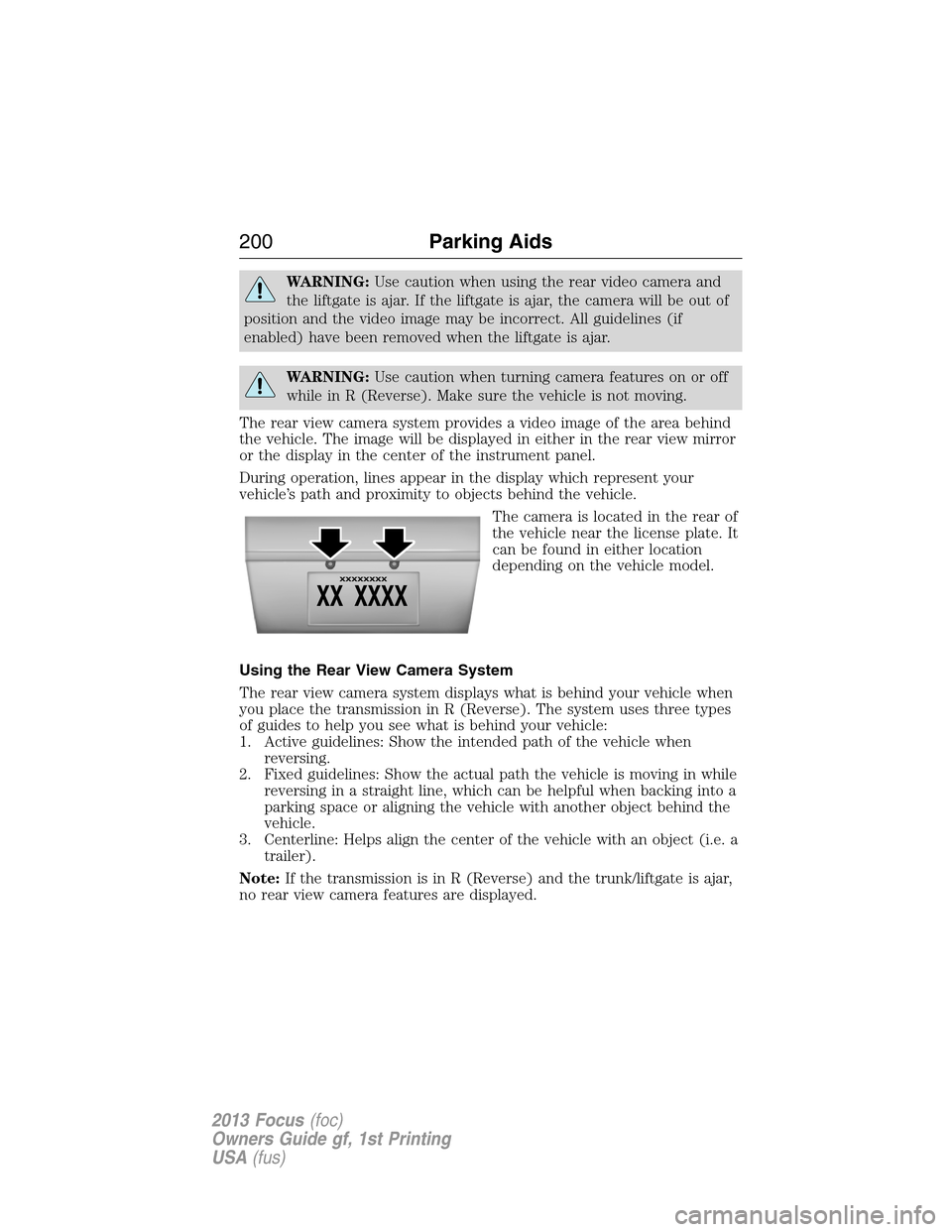
The camera is located in the rear of
the vehicle near the license plate. It
can be found in either location
depending on the vehicle model.
Using the Rear View Camera System
The rear view camera system displays what is behind your vehicle when
you place the transmission in R (Reverse). The system uses three types
of guides to help you see what is behind your vehicle:
1. Active guidelines: Show the intended path of the vehicle when
reversing.
2. Fixed guidelines: Show the actual path the vehicle is moving in while
reversing in a straight line, which can be helpful when backing into a
parking space or aligning the vehicle with another object behind the
vehicle.
3. Centerline: Helps align the center of the vehicle with an object (i.e. a
trailer).
Note:If the transmission is in R (Reverse) and the trunk/liftgate is ajar,
no rear view camera features are displayed.
200Parking Aids
2013 Focus(foc)
Owners Guide gf, 1st Printing
USA(fus)