Page 23 of 386
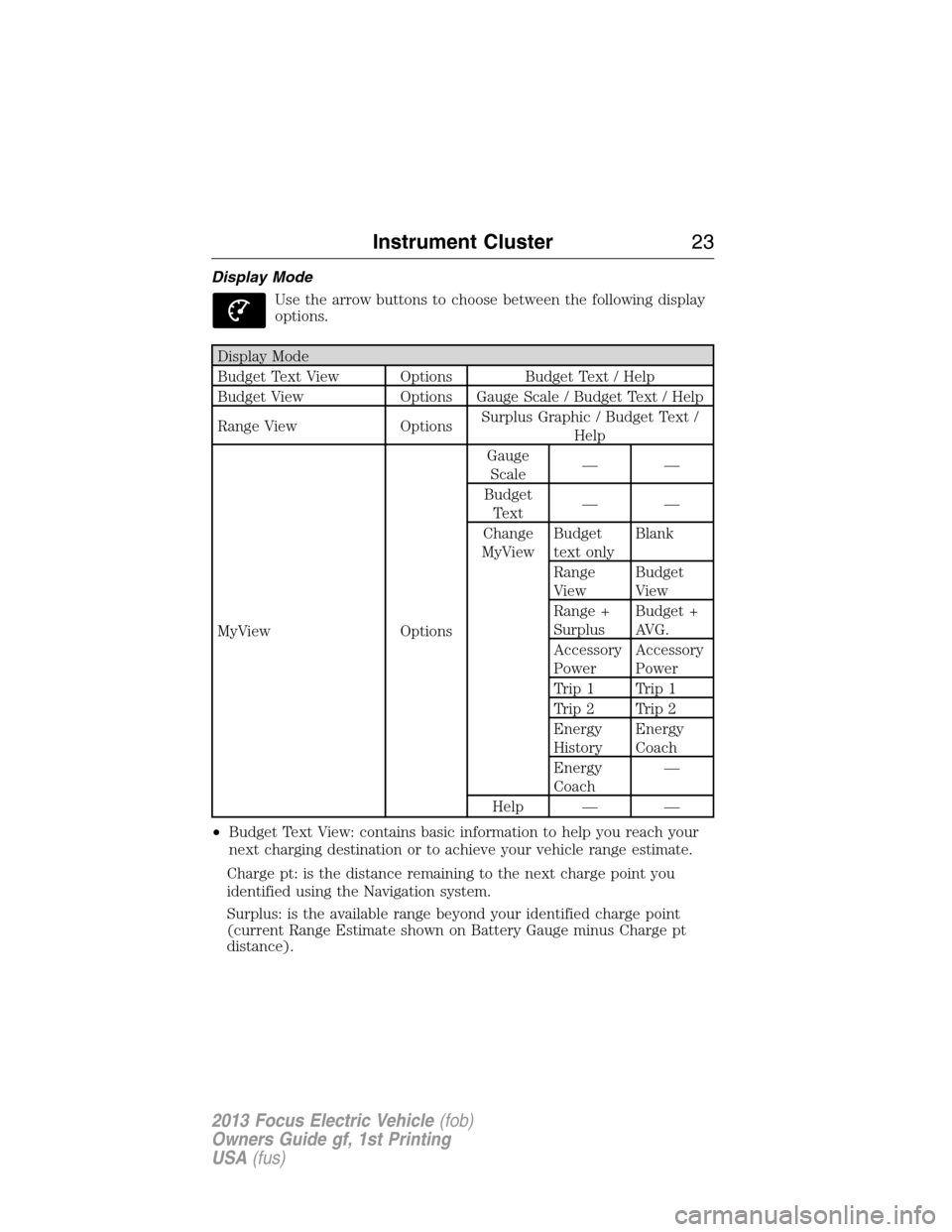
Display Mode
Use the arrow buttons to choose between the following display
options.
Display Mode
Budget Text View Options Budget Text / Help
Budget View Options Gauge Scale / Budget Text / Help
Range View OptionsSurplus Graphic / Budget Text /
Help
MyView OptionsGauge
Scale——
Budget
Text——
Change
MyViewBudget
text onlyBlank
Range
ViewBudget
View
Range +
SurplusBudget +
AVG.
Accessory
PowerAccessory
Power
Trip 1 Trip 1
Trip 2 Trip 2
Energy
HistoryEnergy
Coach
Energy
Coach—
Help — —
•Budget Text View: contains basic information to help you reach your
next charging destination or to achieve your vehicle range estimate.
Charge pt: is the distance remaining to the next charge point you
identified using the Navigation system.
Surplus: is the available range beyond your identified charge point
(current Range Estimate shown on Battery Gauge minus Charge pt
distance).
Instrument Cluster23
2013 Focus Electric Vehicle(fob)
Owners Guide gf, 1st Printing
USA(fus)
Page 40 of 386
D.SOUND:Allows you to adjust the sound settings (Treble, Bass,
Midrange, Fade and Balance).
E.Eject:Press the eject control to eject the CD.
F.TUNE +/TUNE - :
•In radio mode, you can search the frequency band in individual
increments.
•In SIRIUS mode, you can find the next or previous available SIRIUS
satellite station.
G.Volume:Turn to adjust the volume.
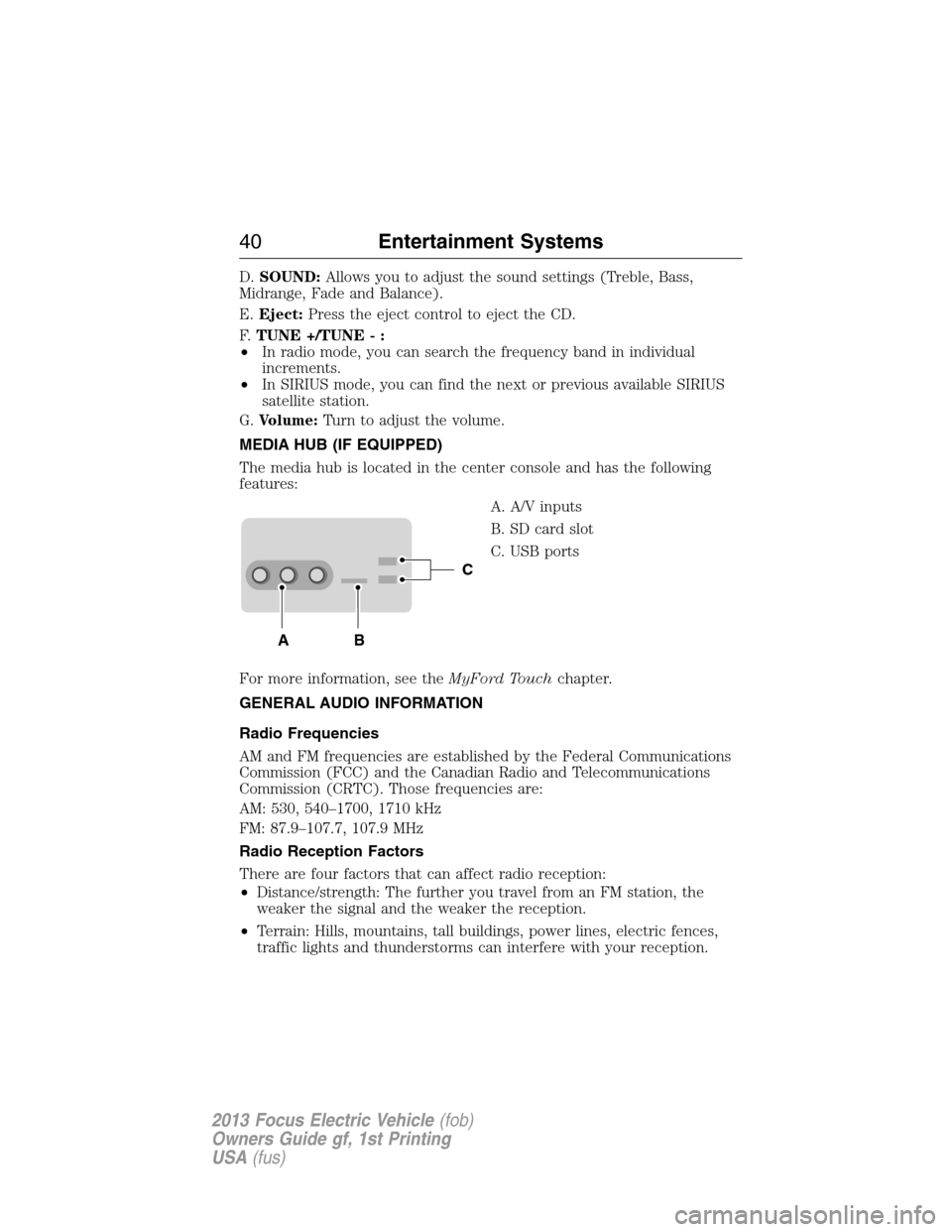
MEDIA HUB (IF EQUIPPED)
The media hub is located in the center console and has the following
features:
A. A/V inputs
B. SD card slot
C. USB ports
For more information, see theMyFord Touchchapter.
GENERAL AUDIO INFORMATION
Radio Frequencies
AM and FM frequencies are established by the Federal Communications
Commission (FCC) and the Canadian Radio and Telecommunications
Commission (CRTC). Those frequencies are:
AM: 530, 540–1700, 1710 kHz
FM: 87.9–107.7, 107.9 MHz
Radio Reception Factors
There are four factors that can affect radio reception:
•Distance/strength: The further you travel from an FM station, the
weaker the signal and the weaker the reception.
•Terrain: Hills, mountains, tall buildings, power lines, electric fences,
traffic lights and thunderstorms can interfere with your reception.
C
BA
40Entertainment Systems
2013 Focus Electric Vehicle(fob)
Owners Guide gf, 1st Printing
USA(fus)
Page 47 of 386
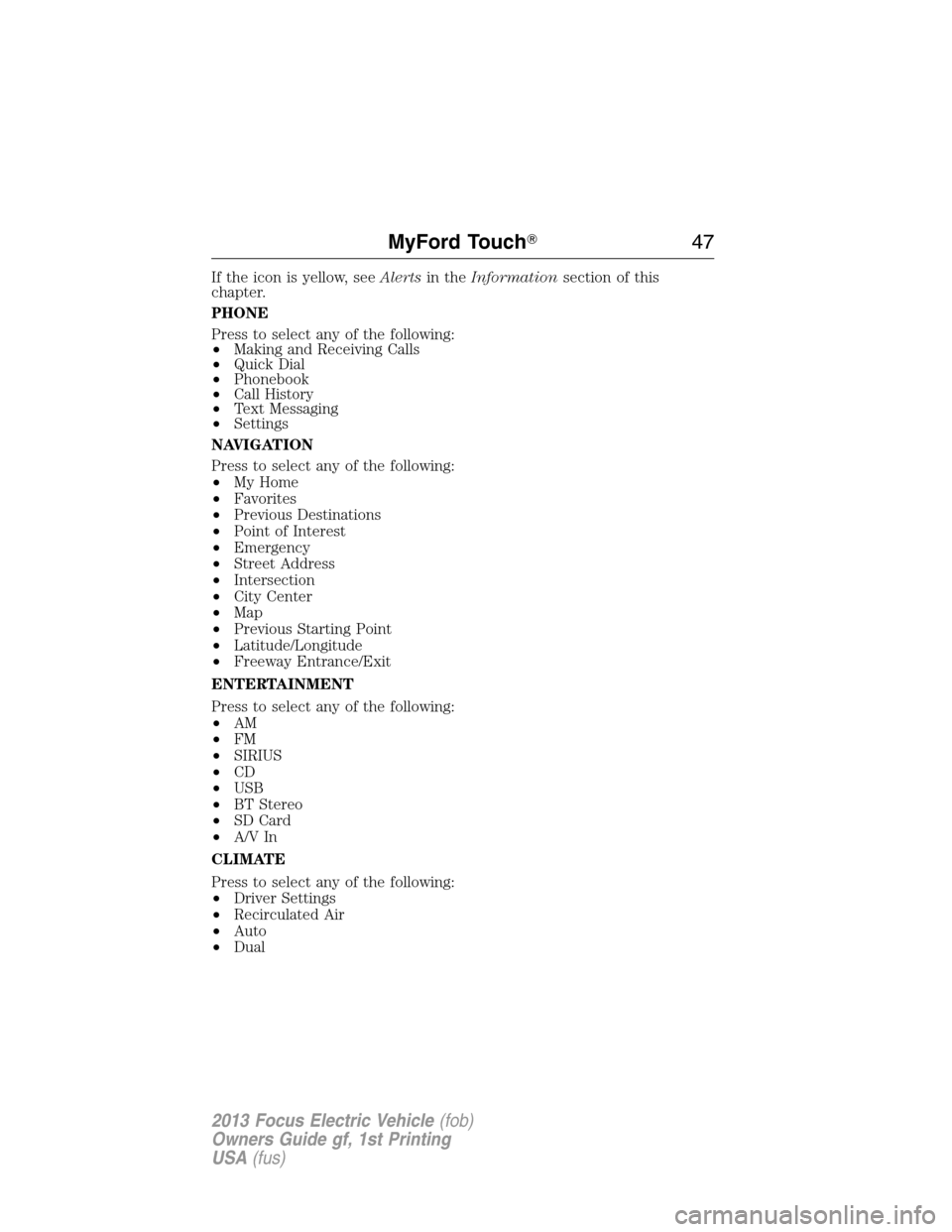
If the icon is yellow, seeAlertsin theInformationsection of this
chapter.
PHONE
Press to select any of the following:
•Making and Receiving Calls
•Quick Dial
•Phonebook
•Call History
•Text Messaging
•Settings
NAVIGATION
Press to select any of the following:
•My Home
•Favorites
•Previous Destinations
•Point of Interest
•Emergency
•Street Address
•Intersection
•City Center
•Map
•Previous Starting Point
•Latitude/Longitude
•Freeway Entrance/Exit
ENTERTAINMENT
Press to select any of the following:
•AM
•FM
•SIRIUS
•CD
•USB
•BT Stereo
•SD Card
•A/V In
CLIMATE
Press to select any of the following:
•Driver Settings
•Recirculated Air
•Auto
•Dual
MyFord Touch�47
2013 Focus Electric Vehicle(fob)
Owners Guide gf, 1st Printing
USA(fus)
Page 50 of 386
•Leave playing devices in the vehicle during extreme conditions as it
could cause them damage. See your device’s user guide for further
information.
•Attempt to service or repair the system. See your authorized dealer.
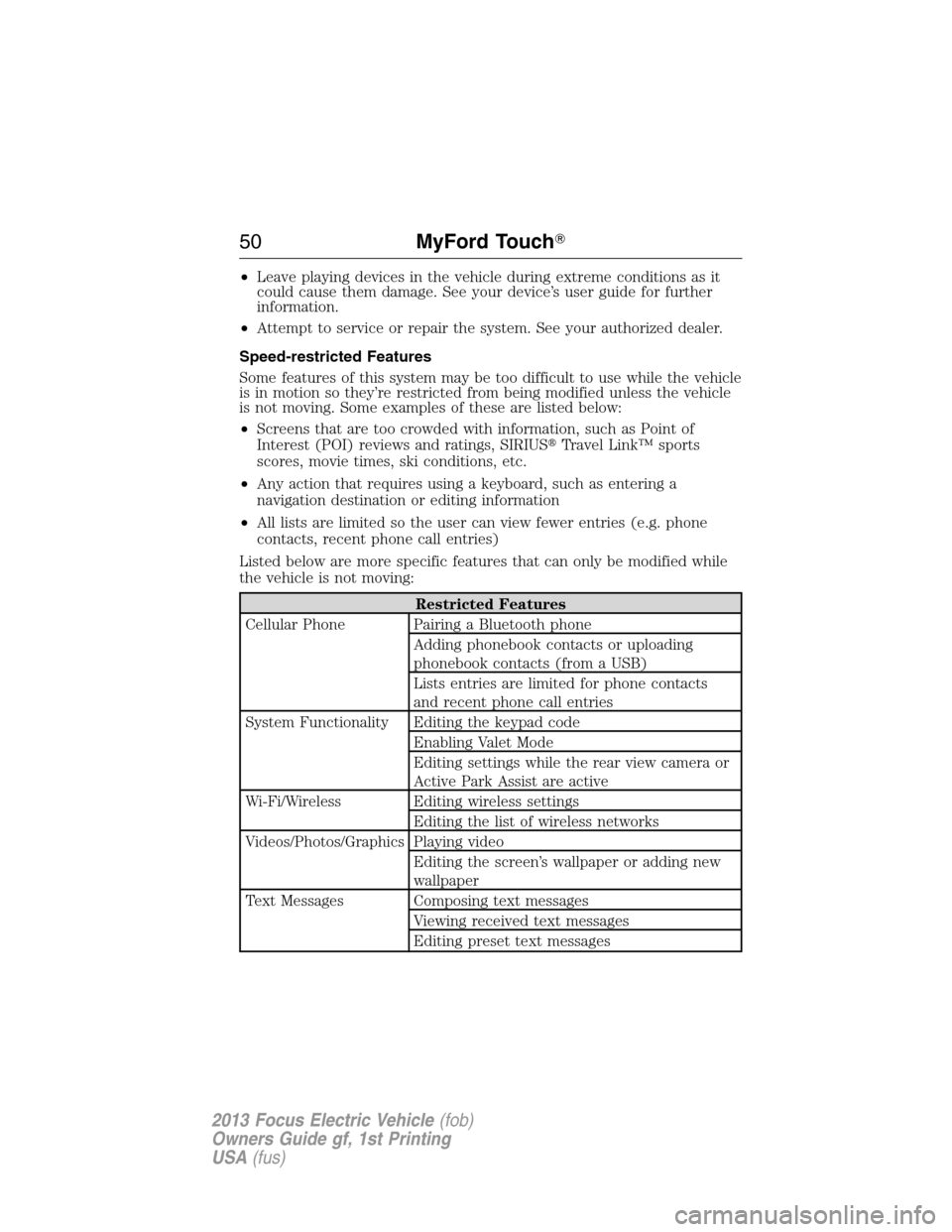
Speed-restricted Features
Some features of this system may be too difficult to use while the vehicle
is in motion so they’re restricted from being modified unless the vehicle
is not moving. Some examples of these are listed below:
•Screens that are too crowded with information, such as Point of
Interest (POI) reviews and ratings, SIRIUS�Travel Link™ sports
scores, movie times, ski conditions, etc.
•Any action that requires using a keyboard, such as entering a
navigation destination or editing information
•All lists are limited so the user can view fewer entries (e.g. phone
contacts, recent phone call entries)
Listed below are more specific features that can only be modified while
the vehicle is not moving:
Restricted Features
Cellular Phone Pairing a Bluetooth phone
Adding phonebook contacts or uploading
phonebook contacts (from a USB)
Lists entries are limited for phone contacts
and recent phone call entries
System Functionality Editing the keypad code
Enabling Valet Mode
Editing settings while the rear view camera or
Active Park Assist are active
Wi-Fi/Wireless Editing wireless settings
Editing the list of wireless networks
Videos/Photos/Graphics Playing video
Editing the screen’s wallpaper or adding new
wallpaper
Text Messages Composing text messages
Viewing received text messages
Editing preset text messages
50MyFord Touch�
2013 Focus Electric Vehicle(fob)
Owners Guide gf, 1st Printing
USA(fus)
Page 55 of 386
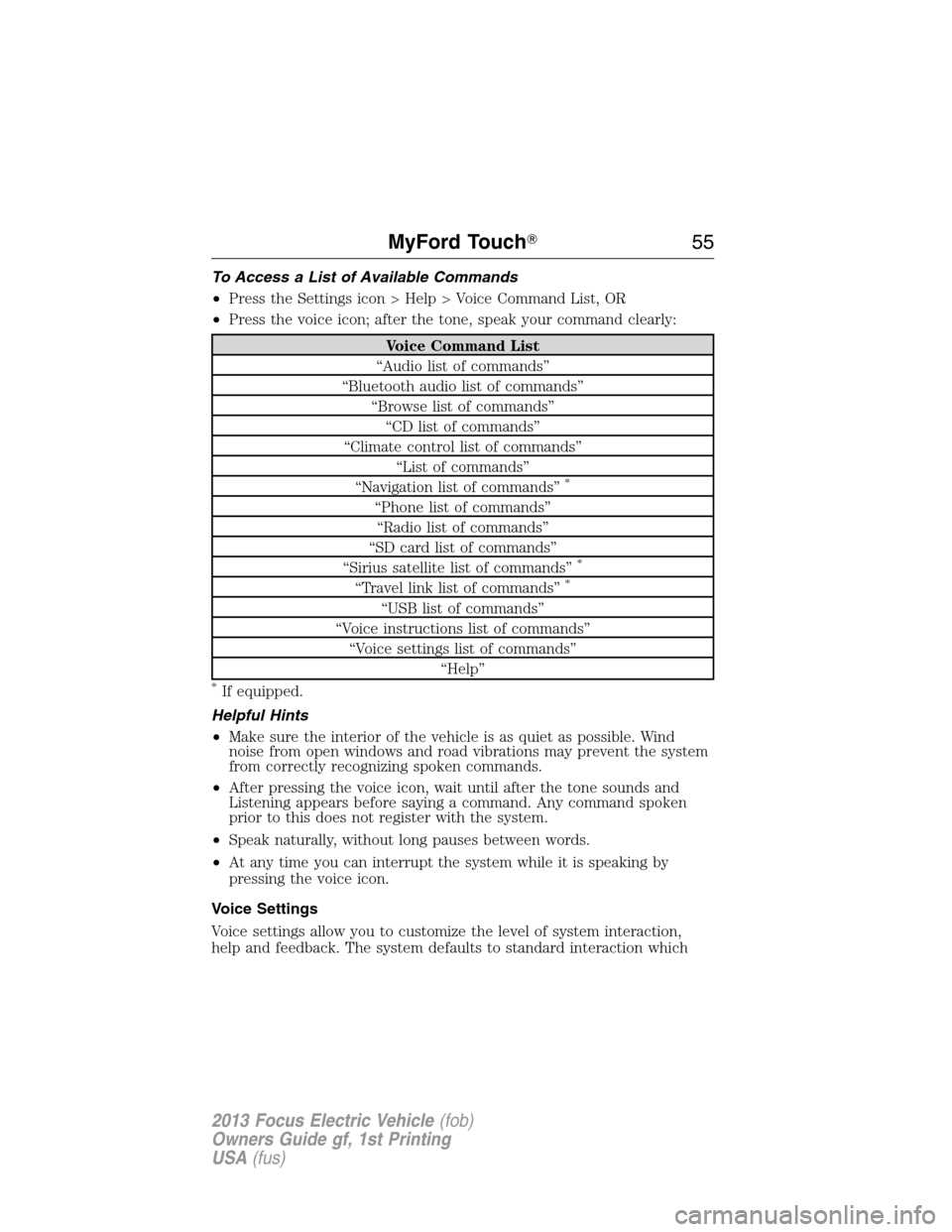
To Access a List of Available Commands
•Press the Settings icon > Help > Voice Command List, OR
•Press the voice icon; after the tone, speak your command clearly:
Voice Command List
“Audio list of commands”
“Bluetooth audio list of commands”
“Browse list of commands”
“CD list of commands”
“Climate control list of commands”
“List of commands”
“Navigation list of commands”
*
“Phone list of commands”
“Radio list of commands”
“SD card list of commands”
“Sirius satellite list of commands”
*
“Travel link list of commands”*
“USB list of commands”
“Voice instructions list of commands”
“Voice settings list of commands”
“Help”
*If equipped.
Helpful Hints
•Make sure the interior of the vehicle is as quiet as possible. Wind
noise from open windows and road vibrations may prevent the system
from correctly recognizing spoken commands.
•After pressing the voice icon, wait until after the tone sounds and
Listening appears before saying a command. Any command spoken
prior to this does not register with the system.
•Speak naturally, without long pauses between words.
•At any time you can interrupt the system while it is speaking by
pressing the voice icon.
Voice Settings
Voice settings allow you to customize the level of system interaction,
help and feedback. The system defaults to standard interaction which
MyFord Touch�55
2013 Focus Electric Vehicle(fob)
Owners Guide gf, 1st Printing
USA(fus)
Page 59 of 386
The dual mode feature is also available when the voice system displays a
list of items to pick from during a voice session, where you would be
able to touch the line item or say “Line 2”. If a command is not
understood or there are multiple options, the system returns a list for
you to choose from.
ENTERTAINMENT
Your system offers many media options. You can access these options
using the touchscreen or voice commands.
Browsing Device Content
When listening to any type of audio, you can browse through other
devices without having to change sources. For example, if you are
currently listening to the radio, you can browse all the artists that are
stored on your USB device.
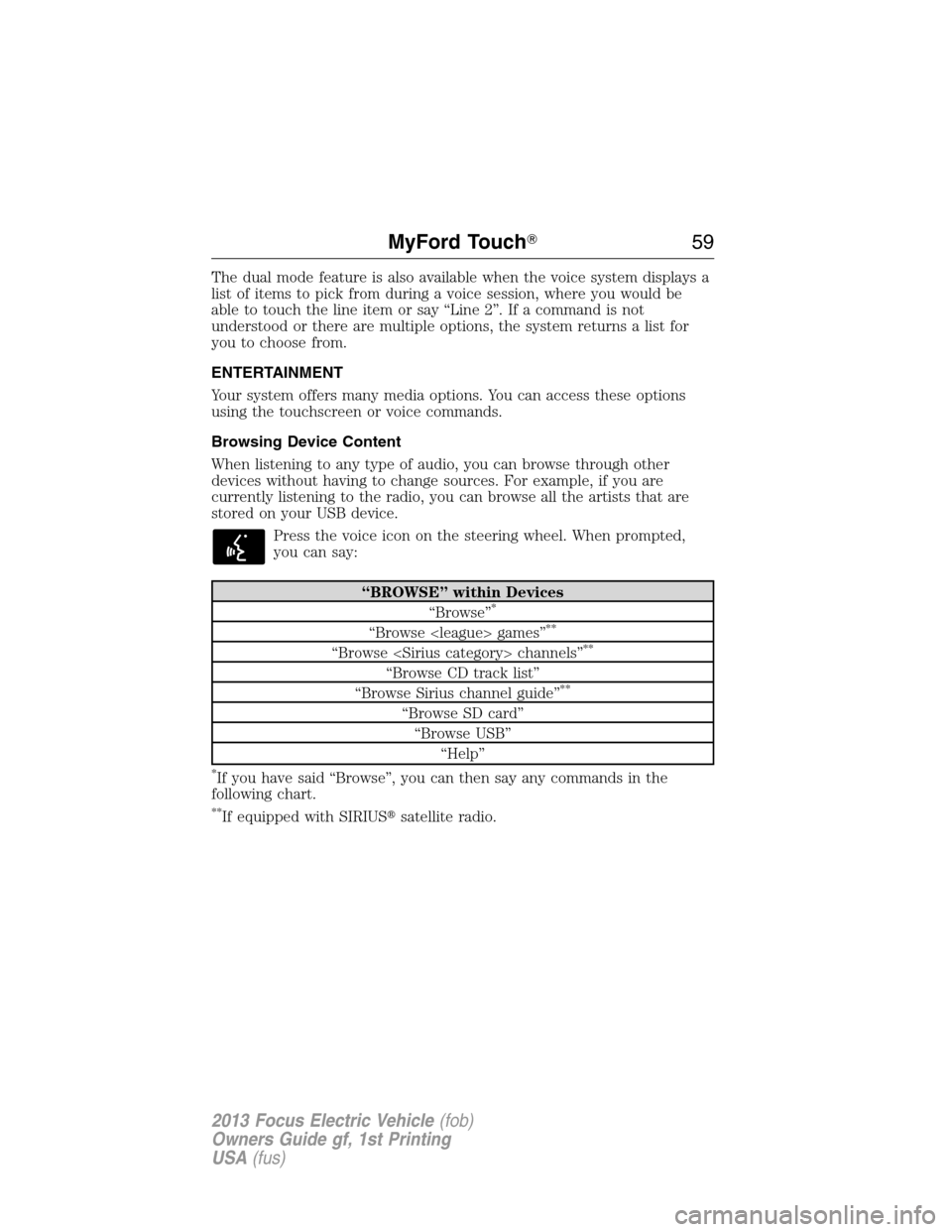
Press the voice icon on the steering wheel. When prompted,
you can say:
“BROWSE” within Devices
“Browse”*
“Browse games”**
“Browse channels”**
“Browse CD track list”
“Browse Sirius channel guide”**
“Browse SD card”
“Browse USB”
“Help”
*If you have said “Browse”, you can then say any commands in the
following chart.
**If equipped with SIRIUS�satellite radio.
MyFord Touch�59
2013 Focus Electric Vehicle(fob)
Owners Guide gf, 1st Printing
USA(fus)
Page 60 of 386
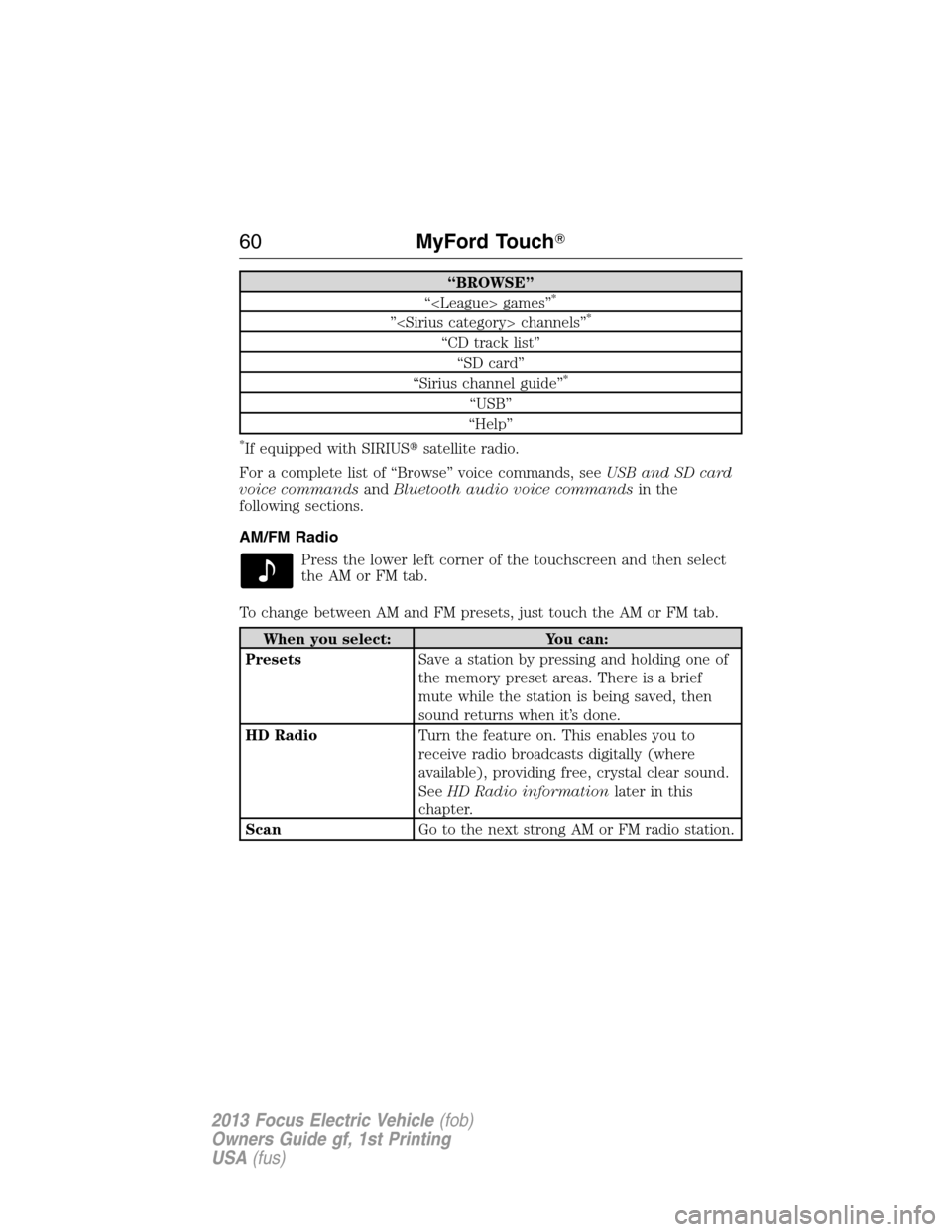
“BROWSE”
“ games”*
” channels”*
“CD track list”
“SD card”
“Sirius channel guide”
*
“USB”
“Help”
*If equipped with SIRIUS�satellite radio.
For a complete list of “Browse” voice commands, seeUSB and SD card
voice commandsandBluetooth audio voice commandsin the
following sections.
AM/FM Radio
Press the lower left corner of the touchscreen and then select
theAMorFMtab.
To change between AM and FM presets, just touch the AM or FM tab.
When you select: You can:
PresetsSave a station by pressing and holding one of
the memory preset areas. There is a brief
mute while the station is being saved, then
sound returns when it’s done.
HD RadioTurn the feature on. This enables you to
receive radio broadcasts digitally (where
available), providing free, crystal clear sound.
SeeHD Radio informationlater in this
chapter.
ScanGo to the next strong AM or FM radio station.
60MyFord Touch�
2013 Focus Electric Vehicle(fob)
Owners Guide gf, 1st Printing
USA(fus)
Page 74 of 386
SD Card Slot and USB Port
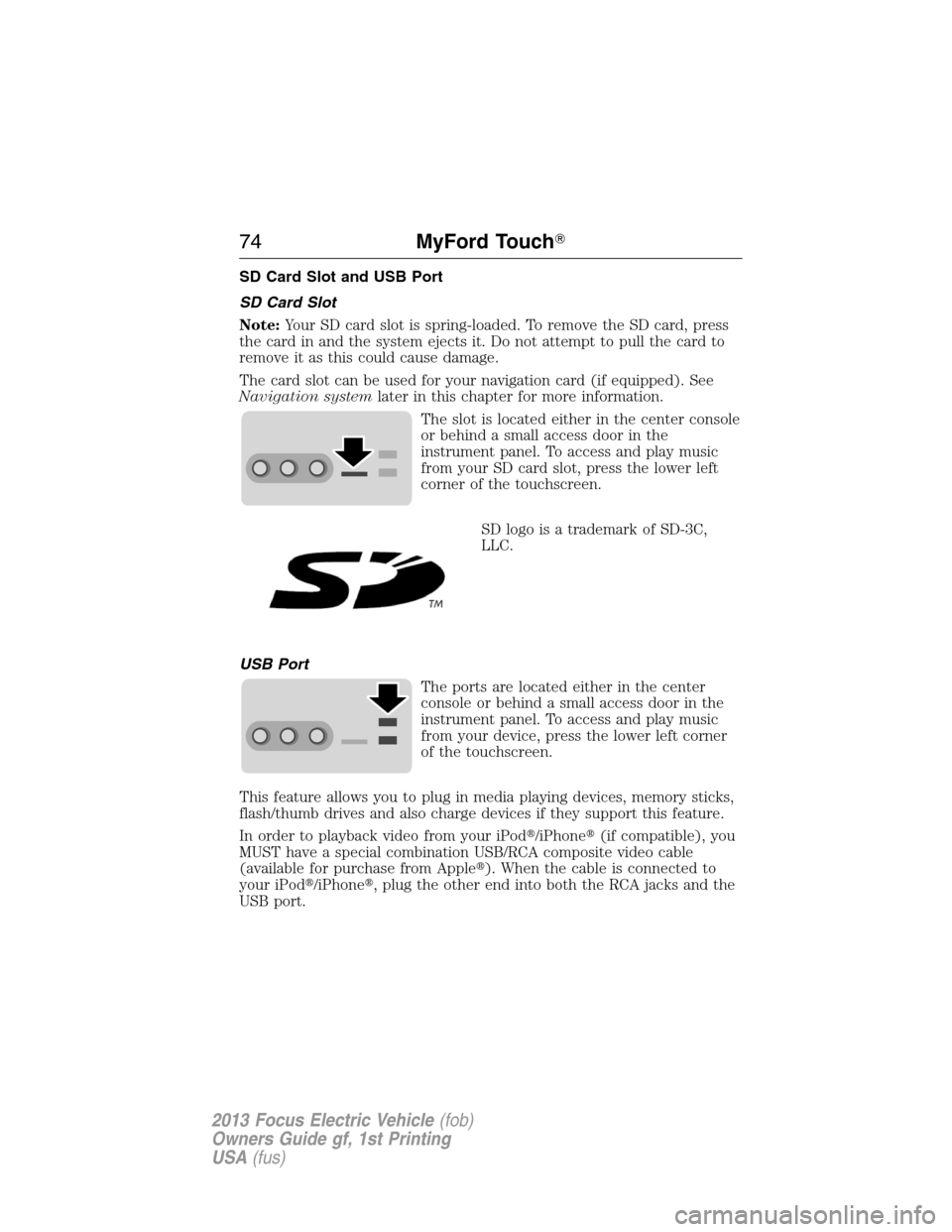
SD Card Slot
Note:Your SD card slot is spring-loaded. To remove the SD card, press
the card in and the system ejects it. Do not attempt to pull the card to
remove it as this could cause damage.
The card slot can be used for your navigation card (if equipped). See
Navigation systemlater in this chapter for more information.
The slot is located either in the center console
or behind a small access door in the
instrument panel. To access and play music
from your SD card slot, press the lower left
corner of the touchscreen.
SD logo is a trademark of SD-3C,
LLC.
USB Port
The ports are located either in the center
console or behind a small access door in the
instrument panel. To access and play music
from your device, press the lower left corner
of the touchscreen.
This feature allows you to plug in media playing devices, memory sticks,
flash/thumb drives and also charge devices if they support this feature.
In order to playback video from your iPod�/iPhone�(if compatible), you
MUST have a special combination USB/RCA composite video cable
(available for purchase from Apple�). When the cable is connected to
your iPod�/iPhone�, plug the other end into both the RCA jacks and the
USB port.
74MyFord Touch�
2013 Focus Electric Vehicle(fob)
Owners Guide gf, 1st Printing
USA(fus)