Page 121 of 558

Settings
MyKey Create MyKey Hold OK to Create MyKey
911 Assist Always On or User Selectable
Traction Control Always On or User Selectable
Max Speed 80 MPH (130 km/h) or Off
Speed Minder 45 mph (75 km/h), 55 mph
(90 km/h), 65 mph (105 km/h) or
Off
Volume Limiter
Clear MyKeys Hold OK to Clear MyKeys
System Reset Hold OK to Reset to Factory Default
System Check
All active warnings will display first if applicable. The system check
menu may appear different based upon equipment options and current
vehicle status. Use the up/down arrow buttons to scroll through the list.
TRIP AND FUEL ECONOMY COMPUTER
Resetting the Trip Computer
Press and hold OK on the current screen to reset the respective trip,
distance, time and fuel information.
Odometer
Registers the total accumulated distance for the lifetime of the vehicle.
This value cannot be reset.
Trip Odometer
Registers the distance of individual journeys.
Total Time
Registers the total time of a trip.
Information Displays121
2013 Flex(471)
Owners Guide gf, 1st Printing
USA(fus)
Page 122 of 558
Fuel Used
Shows the amount of fuel used for a given trip.
Distance to E
Indicates the approximate distance the vehicle will travel on the fuel
remaining in the tank. Changes in driving pattern may cause the value to
vary.
Inst Fuel Econ
Shows instantaneous fuel usage.
Average Fuel
Indicates the average fuel consumption since the function was last reset.
Compass (If Equipped)
Displays the vehicle’s heading direction.
To calibrate the compass: Enter the compass menu and select Calibrate.
Follow the prompts.
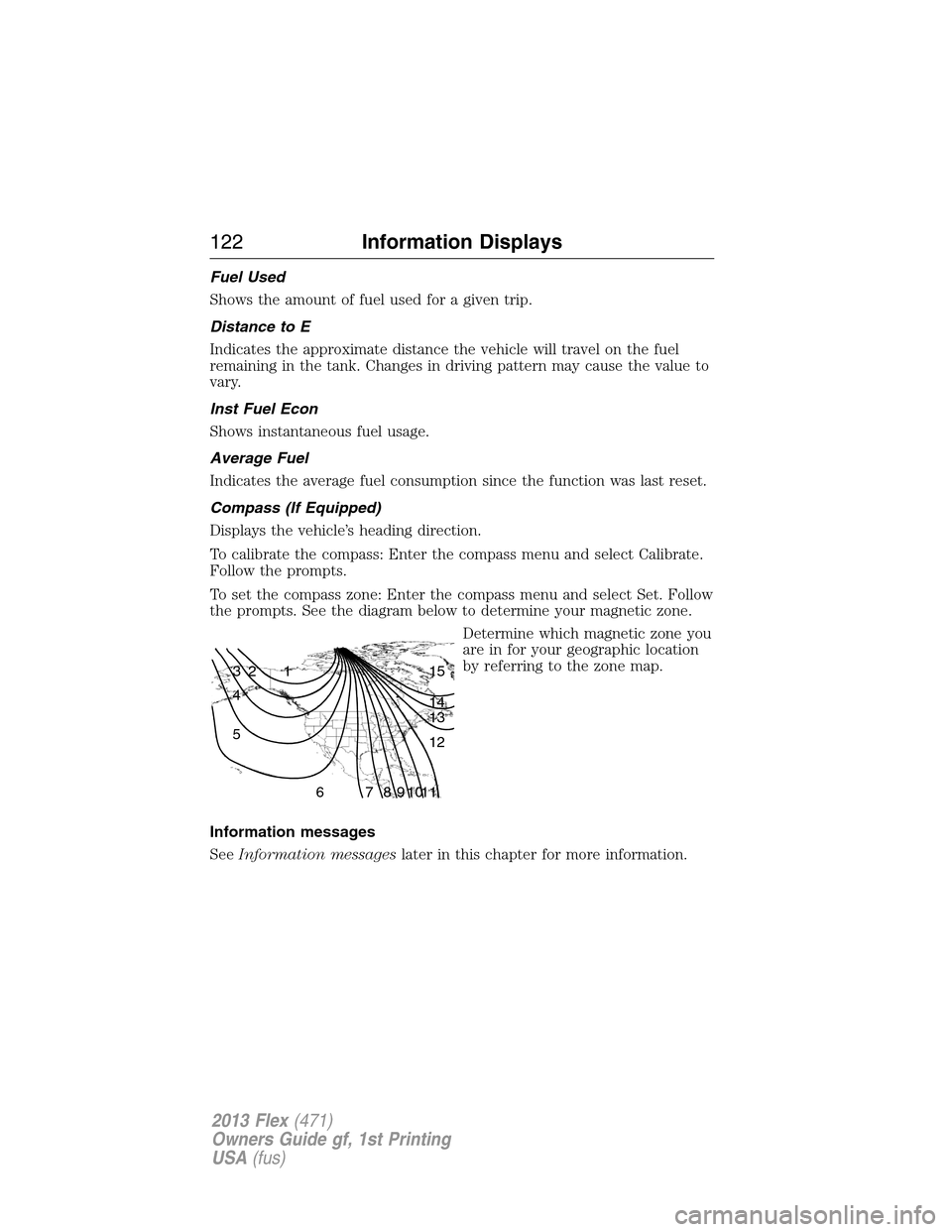
To set the compass zone: Enter the compass menu and select Set. Follow
the prompts. See the diagram below to determine your magnetic zone.
Determine which magnetic zone you
are in for your geographic location
by referring to the zone map.
Information messages
SeeInformation messageslater in this chapter for more information.
1 2 3
4
5
6 7 8 9 101112 13 14 15
122Information Displays
2013 Flex(471)
Owners Guide gf, 1st Printing
USA(fus)
Page 125 of 558

•Engine coolant temperature gauge: Indicates engine coolant
temperature. At normal operating temperature, the level indicator will
be in the normal range. If the engine coolant temperature exceeds the
normal range, stop the vehicle as soon as safely possible, switch off
the engine and let the engine cool.
•Intelligent AWD (if equipped): displays power distribution between the
front and rear wheels. More power to either front or rear wheels will
be displayed by more area filled in.
Trip1&2
Choose between the standard or enhanced trip display.
Trip1&2 Standard display†Enhanced
display
Trip distance X X
Elapsed trip time X X
Average fuel economy X
Estimated amount of fuel consumed X
Total odometer (lower left corner)
Press OK to pause the Trip 1 or 2 screen. Press again to un-pause.
Press and hold OK to reset the currently displayed trip information.
†When the vehicle is in P (Park), the enhanced display is always shown
regardless of setting.
•Trip distance — shows the accumulated trip distance.
•Elapsed trip time— timer stops when the vehicle is turned off and
restarts when the vehicle is restarted.
•Average fuel economy — shows the average fuel economy for a given
trip.
•Estimated amount of fuel consumed — shows the amount of fuel used
for a given trip.
Information Displays125
2013 Flex(471)
Owners Guide gf, 1st Printing
USA(fus)
Page 126 of 558

Fuel Economy
Use the left/right arrow buttons to choose the desired fuel
economy display.
Fuel EconomyInst Fuel
EconomyXX. Min Fuel
History
Instantaneous fuel usage X
†Fuel usage over a 5, 10, or
30 minute time spanX
Total odometer (lower left corner)
Press and hold OK to reset the currently displayed fuel usage
information.
†To configure the fuel usage time span, press the right arrow button
when in this screen.
•Inst. Fuel Economy: This display shows a visual graph of your
instantaneous fuel economy.
•XX. Min Fuel History: This display shows a bar chart of your fuel
history.
Settings
In this mode, you can configure different driver setting choices.
Note:Some items are optional and may not appear.
Driver Assist
Traction Control On (default setting) / Off
Blindspot On (default on key cycle) / Off
Collision Warning Sensitivity High / Normal / Low
Chimes On (default on key cycle) / Off
Warn-ON On (default on key cycle) / Off
Cross Traffic On (default on key cycle) / Off
Cruise Control Adaptive or Normal
Driver Alert On (default on key cycle) / Off
Rear Park Aid On (default on key cycle) / Off
Trailer Sway On (default on key cycle) / Off
126Information Displays
2013 Flex(471)
Owners Guide gf, 1st Printing
USA(fus)
Page 127 of 558

Vehicle
Auto Highbeam On / Off
Autolamp Delay Off or number of seconds
Easy Entry/Exit On / Off
DTE Calculation Normal / Towing
Locks Autolock On / Off
Autounlock On / Off
Remote
UnlockingAll doors / Driver’s door
Oil Life Reset Set to XXX %
Power Liftgate Enable / Disable
Remote StartClimate Control
(using this
feature allows
you to select
different climate
control modes
when the vehicle
is started using
the remote start
feature)Heater – A/C Auto / Last
Settings
Front Defrost Auto / Off
Rear Defrost Auto / Off
Driver Seat Auto / Off
Passenger Seat Auto / Off
Duration 5 / 10 /15 minutes
Quiet Start On / Off
System Enable / Disable
W ipersCourtesy Wipe On / Off
Rain Sensing On / Off
Reverse Wiper On / Off
*MyKey
Create MyKey Press and hold OK to create MyKey
911 Assist Always On / User Selectable
Traction Control Always On / User Selectable
Max Speed Set to 80 MPH (130 km/h) / Off
Speed Minder 45 mph (72 km/h), 55 mph (89 km/h), 65 mph
(105 km/h), Off
Information Displays127
2013 Flex(471)
Owners Guide gf, 1st Printing
USA(fus)
Page 141 of 558
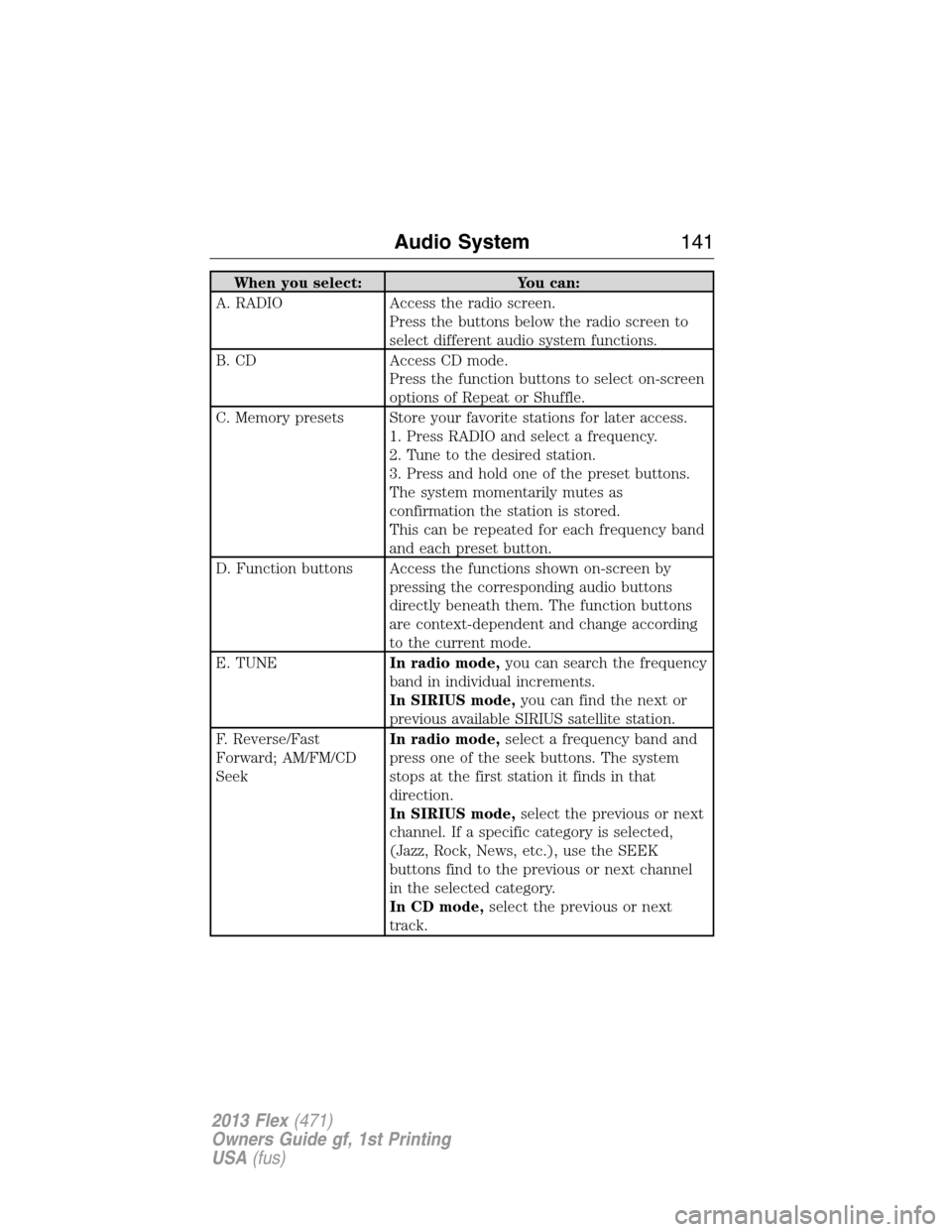
When you select: You can:
A. RADIO Access the radio screen.
Press the buttons below the radio screen to
select different audio system functions.
B. CD Access CD mode.
Press the function buttons to select on-screen
options of Repeat or Shuffle.
C. Memory presets Store your favorite stations for later access.
1. Press RADIO and select a frequency.
2. Tune to the desired station.
3. Press and hold one of the preset buttons.
The system momentarily mutes as
confirmation the station is stored.
This can be repeated for each frequency band
and each preset button.
D. Function buttons Access the functions shown on-screen by
pressing the corresponding audio buttons
directly beneath them. The function buttons
are context-dependent and change according
to the current mode.
E. TUNEIn radio mode,you can search the frequency
band in individual increments.
In SIRIUS mode,you can find the next or
previous available SIRIUS satellite station.
F. Reverse/Fast
Forward; AM/FM/CD
SeekIn radio mode,select a frequency band and
press one of the seek buttons. The system
stops at the first station it finds in that
direction.
In SIRIUS mode,select the previous or next
channel. If a specific category is selected,
(Jazz, Rock, News, etc.), use the SEEK
buttons find to the previous or next channel
in the selected category.
In CD mode,select the previous or next
track.
Audio System141
2013 Flex(471)
Owners Guide gf, 1st Printing
USA(fus)
Page 151 of 558

SIRIUS�Satellite Radio Service
Note:SIRIUS�reserves the unrestricted right to change, rearrange, add
or delete programming including canceling, moving or adding particular
channels, and its prices, at any time, with or without notice to you. Ford
Motor Company shall not be responsible for any such programming
changes.
SIRIUS�satellite radio is a
subscription-based satellite radio
service that broadcasts a variety of
music, sports, news, weather, traffic
and entertainment programming.
Your factory-installed SIRIUS�
satellite radio system includes
hardware and a limited subscription term which begins on the date of
sale or lease of the vehicle. Refer to your authorized dealer for
availability.
For more information on extended subscription terms (a service fee is
required), the online media player and a complete list of SIRIUS�
satellite radio channels, and other features, please visit
www.siriusxm.com in the United States, www.sirius.ca in Canada, or call
SIRIUS�at 1–888–539–7474.
Satellite Radio Electronic Serial Number (ESN)
You need your ESN to activate, modify or track your satellite radio
account. When in satellite radio mode, you can view this number by
pressing SIRIUS and memory preset 1 at the same time.
Troubleshooting
SIRIUS�troubleshooting tips
Radio Display Condition Possible Action
Acquiring Radio requires more
than two seconds to
produce audio for the
selected channel.No action required.
This message should
disappear shortly.
Audio System151
2013 Flex(471)
Owners Guide gf, 1st Printing
USA(fus)
Page 152 of 558
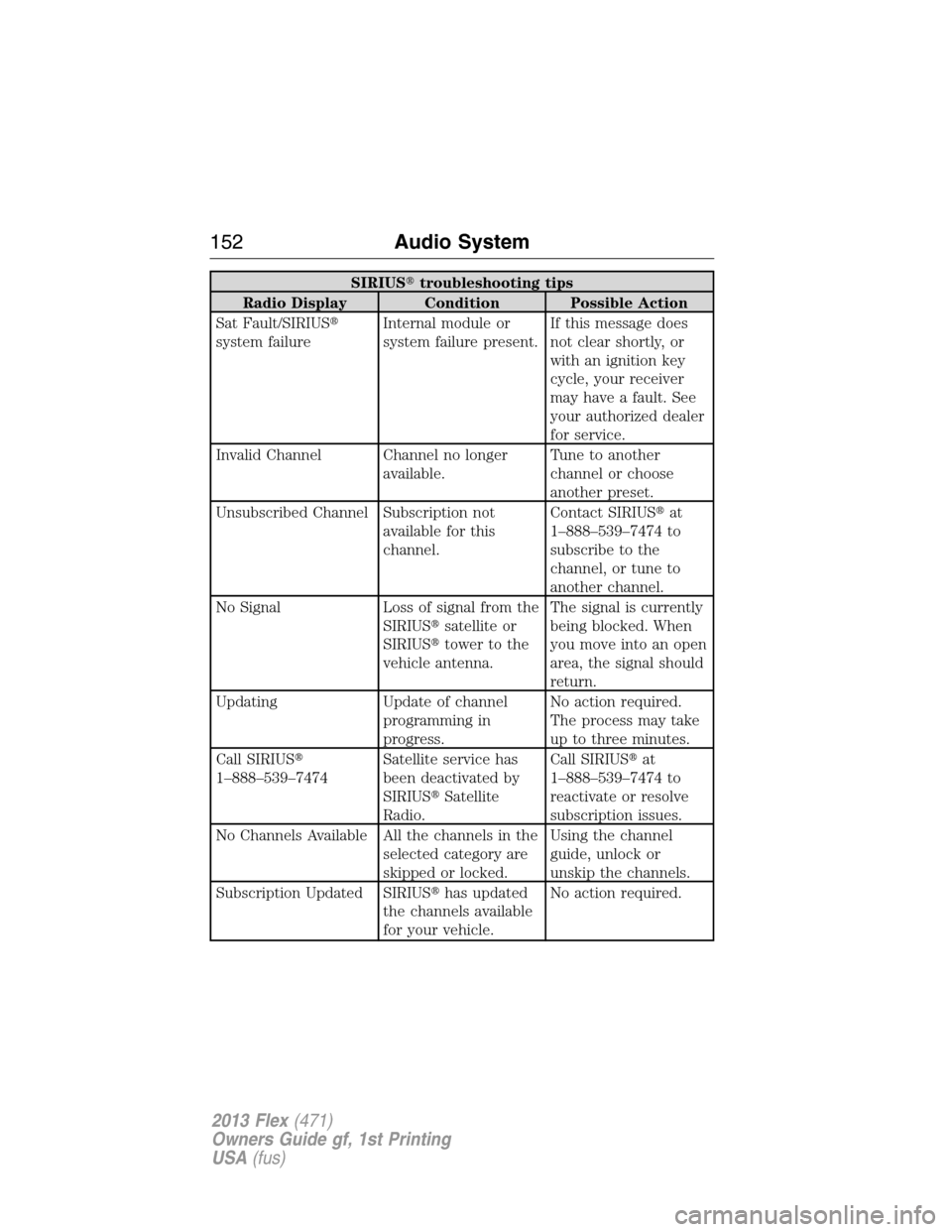
SIRIUS�troubleshooting tips
Radio Display Condition Possible Action
Sat Fault/SIRIUS�
system failureInternal module or
system failure present.If this message does
not clear shortly, or
with an ignition key
cycle, your receiver
may have a fault. See
your authorized dealer
for service.
Invalid Channel Channel no longer
available.Tune to another
channel or choose
another preset.
Unsubscribed Channel Subscription not
available for this
channel.Contact SIRIUS�at
1–888–539–7474 to
subscribe to the
channel, or tune to
another channel.
No Signal Loss of signal from the
SIRIUS�satellite or
SIRIUS�tower to the
vehicle antenna.The signal is currently
being blocked. When
you move into an open
area, the signal should
return.
Updating Update of channel
programming in
progress.No action required.
The process may take
up to three minutes.
Call SIRIUS�
1–888–539–7474Satellite service has
been deactivated by
SIRIUS�Satellite
Radio.Call SIRIUS�at
1–888–539–7474 to
reactivate or resolve
subscription issues.
No Channels Available All the channels in the
selected category are
skipped or locked.Using the channel
guide, unlock or
unskip the channels.
Subscription Updated SIRIUS�has updated
the channels available
for your vehicle.No action required.
152Audio System
2013 Flex(471)
Owners Guide gf, 1st Printing
USA(fus)