2013 FORD F250 light
[x] Cancel search: lightPage 368 of 577

When you believe your system is not operating properly
The main function of the tire pressure monitoring system is to warn you
when your tires need air. It can also warn you in the event the system is
no longer capable of functioning as intended. See the following chart for
information concerning your tire pressure monitoring system:
Low tire
pressure
warning lightPossible cause Customer action required
Solid warning
lightTire(s)
under-inflated1. Make sure tires are at the proper
pressure. SeeInflating your tiresin
this chapter.
2. After inflating your tires to the
manufacturer’s recommended
pressure as shown on the Tire Label
(located on the edge of driver’s door
or the B-Pillar), the vehicle must be
driven for at least two minutes over
20 mph (32 km/h) before the light
turns off.
Spare tire in use Repair the damaged road wheel and
tire and reinstall it on the vehicle to
restore system function. For a
description on how the system
functions, seeWhen your
temporary spare tire is installedin
this section.
Tire pressure
monitoring
system
malfunctionIf the tires are properly inflated and
the spare tire is not in use but the
light remains on, contact your
authorized dealer as soon as possible.
Tire rotation
without sensor
trainingOn vehicles with different front and
rear tire pressures, the system must
be retrained following every tire
rotation. SeeTire rotationin this
chapter.
Wheels and Tires367
2013 F-250/350/450/550(f23)
Owners Guide gf, 3rd Printing, December 2012
USA(fus)
Page 369 of 577
Low tire
pressure
warning lightPossible cause Customer action required
Flashing warning
lightSpare tire in use Repair the damaged road wheel and
tire and reinstall it on the vehicle to
restore system function. For a
description on how the system
functions, seeWhen your
temporary spare tire is installedin
this section.
Tire pressure
monitoring
system
malfunctionIf the tires are properly inflated and
the spare tire is not in use but the
light remains on, contact your
authorized dealer as soon as possible.
When inflating your tires
When putting air into your tires (such as at a gas station or in your
garage), the tire pressure monitoring system may not respond
immediately to the air added to your tires.
It may take up to two minutes of driving over 20 mph (32 km/h) for the
light to turn off after you have filled your tires to the recommended
inflation pressure.
How temperature affects your tire pressure
The tire pressure monitoring system monitors tire pressure in each
pneumatic tire. While driving in a normal manner, a typical passenger tire
inflation pressure may increase approximately 2 to 4 psi (14 to 28 kPa)
from a cold start situation. If the vehicle is stationary overnight with the
outside temperature significantly lower than the daytime temperature, the
tire pressure may decrease approximately 3 psi (21 kPa) for a drop of 30°F
(17°C) in ambient temperature. This lower pressure value may be detected
by the system as being significantly lower than the recommended inflation
pressure and activate the system warning light for low tire pressure. If the
low tire pressure warning light is on, visually check each tire to verify that
no tire is flat. If one or more tires are flat, repair as necessary. Check air
pressure in the road tires. If any tire is under-inflated, carefully drive the
vehicle to the nearest location where air can be added to the tires. Inflate
all the tires to the recommended inflation pressure.
368Wheels and Tires
2013 F-250/350/450/550(f23)
Owners Guide gf, 3rd Printing, December 2012
USA(fus)
Page 370 of 577

Tire Pressure Monitoring System Reset Procedure
WARNING:To determine the required pressure(s) for your
vehicle, see the Safety Compliance Certification Label (affixed to
either the door hinge pillar, door-latch post, or the door edge that
meets the door-latch post, next to the driver’s seating position), or Tire
Label located on the B-Pillar or the edge of the driver’s door. SeeLoad
Carryingfor more information.
Note:The tire pressure monitoring system reset procedure needs to be
performed after each tire rotation on vehicles that require different
recommended tire pressures in the front tires as compared to the rear
tires.
Overview
To provide the vehicle’s load carrying capability, some vehicles require
different recommended tire pressures in the front tires as compared to
the rear tires. The tire pressure monitoring system equipped on these
vehicles is designed to illuminate the low tire pressure warning light at
two different pressures; one for the front tires and one for the rear tires.
Since tires need to be rotated to provide consistent performance and
maximum tire life, the tire pressure monitoring system needs to know
when the tires are rotated to determine which set of tires are on the
front and which are on the rear. With this information, the system can
detect and properly warn of low tire pressures.
System reset tips:
•To reduce the chances of interference from another vehicle, the
system reset procedure should be performed at least three feet (one
meter) away from another Ford Motor Company vehicle undergoing
the system reset procedure at the same time.
•Do not wait more than two minutes between resetting each tire sensor
or the system will time-out and the entire procedure will have to be
repeated on all four wheels.
•A double horn chirp indicates the need to repeat the procedure.
Wheels and Tires369
2013 F-250/350/450/550(f23)
Owners Guide gf, 3rd Printing, December 2012
USA(fus)
Page 372 of 577

10. Turn the ignition off. If two short horn beeps are heard, the reset
procedure was unsuccessful and must be repeated.
If after repeating the procedure and two short beeps are heard when the
ignition is turned to off, seek assistance from your authorized dealer.
11. Set all four tires to the recommended air pressure as indicated on
the Safety Compliance Certification Label (affixed to either the door
hinge pillar, door-latch post, or the door edge that meets the door-latch
post, next to the driver’s seating position) or Tire Label located on the
B-Pillar or the edge of the driver’s door. SeeLoad Carryingfor more
information.
CHANGING A ROAD WHEEL
WARNING:The use of tire sealants may damage your tire
pressure monitoring system and should not be used. However, if
you must use a sealant, the tire pressure monitoring system sensor and
valve stem on the wheel must be replaced by an authorized Ford dealer.
WARNING:SeeTire Pressure Monitoring Systemin this
chapter for important information. If the tire pressure monitor
sensor becomes damaged, it will no longer function.
Note:
If your vehicle is equipped with the tire pressure monitoring system,
the indicator light will illuminate when the spare tire is in use. To restore
the full function of the monitoring system, all road wheels equipped with
tire pressure monitoring sensors must be mounted on the vehicle.
If you get a flat tire while driving, do not apply the brake heavily.
Instead, gradually decrease your speed. Hold the steering wheel firmly
and slowly move to a safe place on the side of the road.
If your vehicle is equipped with the tire pressure monitoring system,
have a flat serviced by an authorized dealer in order to prevent damage
to the system sensors. SeeTire Pressure Monitoring Systemin this
chapter. Replace the spare tire with a road tire as soon as possible.
During repairing or replacing of the flat tire, have the authorized dealer
inspect the system sensor for damage.
Wheels and Tires371
2013 F-250/350/450/550(f23)
Owners Guide gf, 3rd Printing, December 2012
USA(fus)
Page 376 of 577
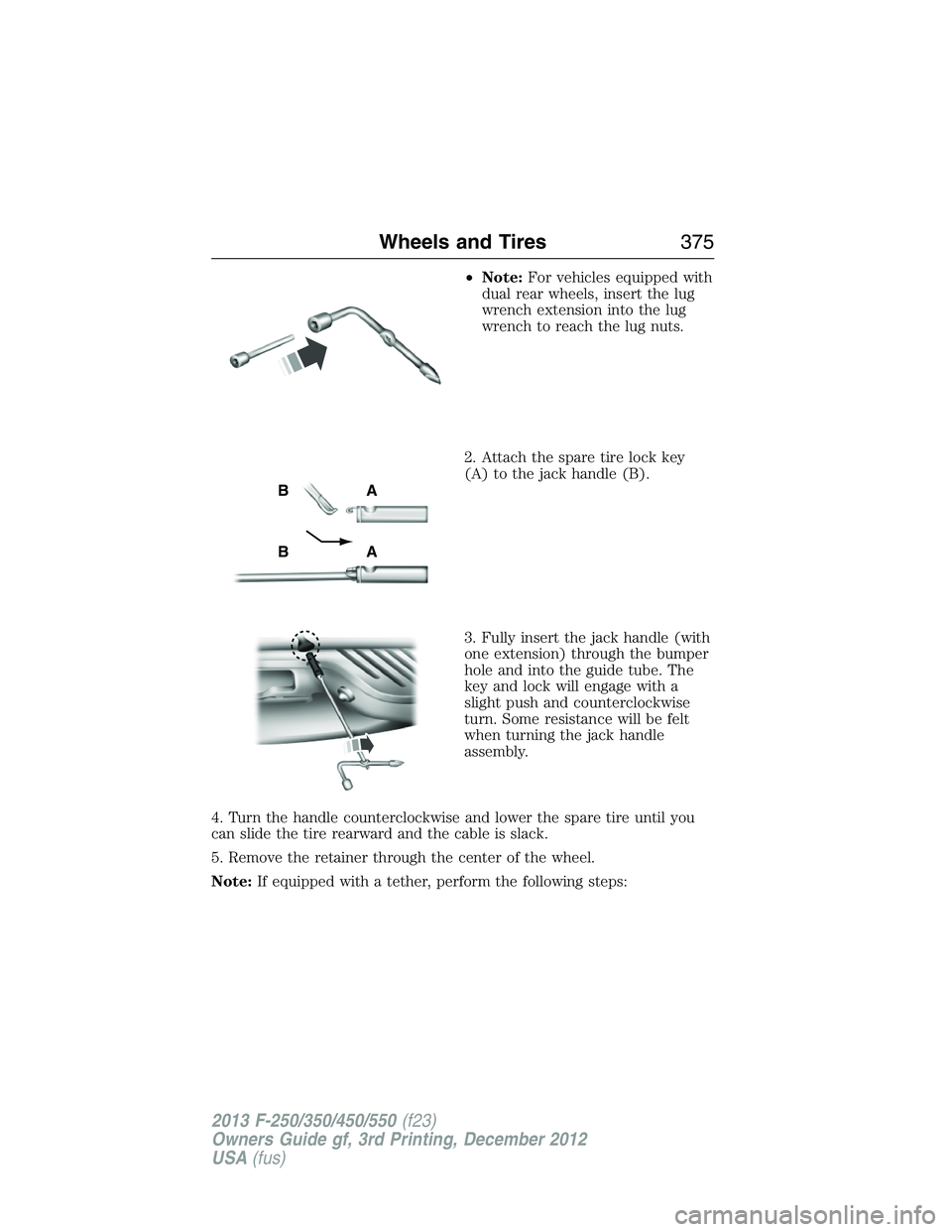
•Note:For vehicles equipped with
dual rear wheels, insert the lug
wrench extension into the lug
wrench to reach the lug nuts.
2. Attach the spare tire lock key
(A) to the jack handle (B).
3. Fully insert the jack handle (with
one extension) through the bumper
hole and into the guide tube. The
key and lock will engage with a
slight push and counterclockwise
turn. Some resistance will be felt
when turning the jack handle
assembly.
4. Turn the handle counterclockwise and lower the spare tire until you
can slide the tire rearward and the cable is slack.
5. Remove the retainer through the center of the wheel.
Note:If equipped with a tether, perform the following steps:
AB
AB
Wheels and Tires375
2013 F-250/350/450/550(f23)
Owners Guide gf, 3rd Printing, December 2012
USA(fus)
Page 406 of 577
Owner Checks and Services
Certain basic maintenance checks and inspections should be performed
every month or at six month intervals.
Check every month
Engine oil level.
Function of all interior and exterior lights.
Tires (including spare) for wear and proper pressure.
Windshield washer fluid level.
Check every six months
Battery connections. Clean if necessary.
Body and door drain holes for obstructions. Clean if necessary.
Cooling system fluid level and coolant strength.
Door weatherstrips for wear. Lubricate if necessary.
Hinges, latches and outside locks for proper operation. Lubricate if
necessary.
Parking brake for proper operation.
Safety belts and seat latches for wear and function.
Safety warning lamps (brake, ABS, airbag, safety belt) for operation.
Washer spray and wiper operation. Clean or replace blades as
necessary.
Scheduled Maintenance405
2013 F-250/350/450/550(f23)
Owners Guide gf, 3rd Printing, December 2012
USA(fus)
Page 419 of 577

EXCEPTIONS
Normal vehicle axle maintenance:Rear axles and power take-off units
with synthetic fluid and light-duty trucks equipped with Ford-design axles
are lubricated for life; do not check or change fluid unless a leak is
suspected, service is required or the assembly has been submerged in
water. During long periods of trailer towing with outside temperatures
above 70°F (21°C) and at wide-open throttle for long periods above
45 mph (72 km/h), non-synthetic rear axle fluids should be changed every
3000 miles (4800 kilometers) or three months, whichever comes first. This
interval can be waived if the axle is filled with 75W140 synthetic gear fluid
meeting Ford specification WSL-M2C192-A, part number F1TZ-19580-B or
equivalent. Add friction modifier XL-3 (EST-M2C118-A) or equivalent for
complete refill of Traction-Lok rear axles (seeTechnical specificationsin
theCapacities and Specificationschapter for details).
Police/Taxi/Livery vehicle axle maintenance:Change rear axle fluid
every 100000 miles (160000 km). Rear axle fluid change may be waived
if the axle was filled with 75W140 synthetic gear fluid meeting Ford
specification WSL-M2C192-A, part number FITZ-19580-B or equivalent.
Add four ounces (118 mL) of additive friction modifier XL-3
(EST-M2C118-A) or equivalent for complete refill of Traction-Lok rear
axles. The axle fluid should be changed anytime the axle has been
submerged in water.
California fuel filter replacement:If the vehicle is registered in
California, the California Air Resources Board has determined that the
failure to perform this maintenance item will not nullify the emission
warranty or limit recall liability prior to the completion of the vehicle’s
useful life. Ford Motor Company, however, urges you to have all
recommended maintenance services performed at the specified
intervals and to record all vehicle service.
Hot climate oil change intervals:Vehicles operating in the Middle
East, North Africa, Sub-Saharan Africa or locations with similar climates
using an American Petroleum Institute (API) Certified for Gasoline
Engines (Certification mark) oil of SM or SN quality, the normal oil
change interval is 5000 miles (8000 kilometers).
If the available API SM or SN oils are not available, then the oil change
service interval is 3000 miles (4800 kilometers).
Engine air filter replacement:Engine air filter life is dependent on
exposure to dusty and dirty conditions. Vehicles operated in these
conditions require frequent inspection and replacement of the engine air
filter.
418Scheduled Maintenance
2013 F-250/350/450/550(f23)
Owners Guide gf, 3rd Printing, December 2012
USA(fus)
Page 470 of 577
Using the Touch-sensitive Controls on Your System
To turn a feature on and off, just touch the graphic with your finger.
To get the best performance from the touch-sensitive controls:
•Do not press hard on the controls. They are sensitive to light touch.
•Use your bare finger to touch the center of a touch-control graphic.
Touching off-center of the graphic may affect operation of a nearby
control.
•Make sure your hands are clean and dry.
•
Keep metal and other conductive material away from the surface of the
touchscreen as this may cause electronic interference (for example,
inadvertently turning on a feature other than the one you meant to
turn on).
Depending on your vehicle and option package, you may also have these
controls on your bezel:
•Power: Switch the media or climate features off and on.
•VOL:Control the volume of playing media.
•Fan: Control the speed of the climate system fan.
•Seek and Tune buttons: Use as you normally would in media modes.
•Eject: Eject a CD from the entertainment system.
•Radio preset buttons: Located below the touchscreen, you can use
these buttons to enter a radio preset in addition to using the
touchscreen.
•MEDIA:Touch the word repeatedly to see all available media modes.
The screen does not change, but you see the media change in the
lower left status bar.
•Hazard flasher: Switch the hazard flashers off and on.
Cleaning the Touchscreen Display
Use a clean, soft cloth such as one used for cleaning glasses. If dirt or
fingerprints are still visible, apply a small amount of alcohol to the cloth.
Do not pour or spray alcohol onto the display. Do not use detergent or
any type of solvent to clean the display.
Support
The SYNC support team is available to help you with any questions you
aren’t able to answer on your own.
Monday-Saturday, 8:30 am-8pm EST
In the United States, call: 1–888–270–1055
In Canada, call: 1–800–565–3673
Times are subject to change due to holidays.
MyFord Touch® (If Equipped)469
2013 F-250/350/450/550(f23)
Owners Guide gf, 3rd Printing, December 2012
USA(fus)