Page 83 of 497

AUTOLAMPS
The autolamp system provides light
sensitive automatic on/off control of
the exterior lights normally
controlled by the headlamp control.
The autolamp system also keeps the
lights on for approximately
20 seconds or, if equipped with a
message center, you can select a
delay from 0–180 seconds after the
ignition switch is turned off. See
Message centerin theInstrument
Clusterchapter.
•To turn autolamps on, rotate the control counterclockwise one
position.
•To turn autolamps off, rotate the control to the off position.
INSTRUMENT LIGHTING DIMMER
Use to adjust the brightness of the
instrument panel and all applicable
switches in the vehicle during
headlamp and parking lamp
operation.
Move the control to the full upright
position, past detent, to turn on the
interior lamps.
Move the control to the full down
position, past detent, to prevent the
interior lights from illuminating when the doors are opened. When the
control is in the full down position, it acts as a dome lamp
defeat/override.
Note:If the battery is disconnected, discharged, or a new battery is
installed, the dimmer switch requires re-calibration. Rotate the dimmer
switch from the full dim position to the full dome/on position to reset.
This will ensure that your displays are visible under all lighting
conditions.
Lighting83
2013 Expedition(exd)
Owners Guide gf, 1st Printing
USA(fus)
Page 88 of 497
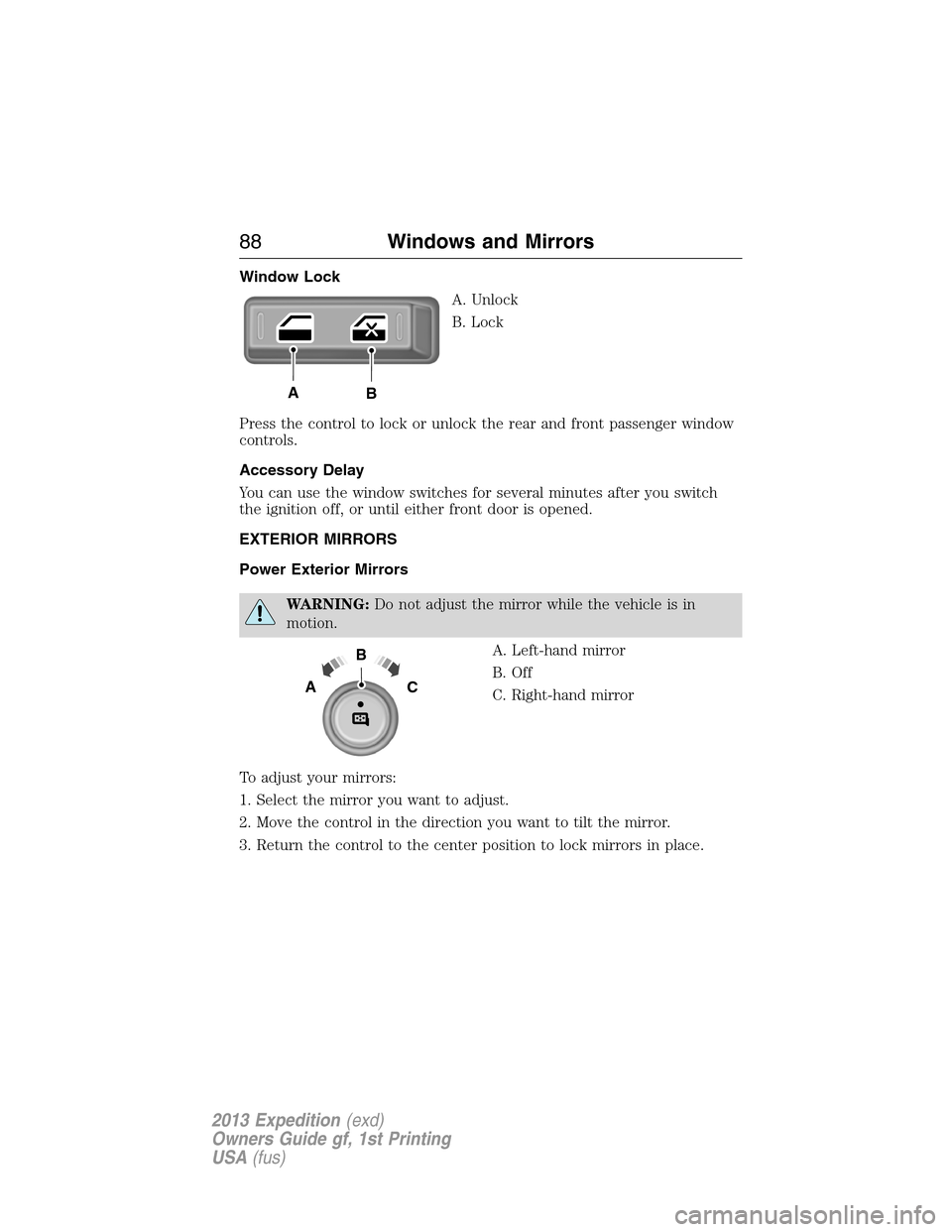
Window Lock
A. Unlock
B. Lock
Press the control to lock or unlock the rear and front passenger window
controls.
Accessory Delay
You can use the window switches for several minutes after you switch
the ignition off, or until either front door is opened.
EXTERIOR MIRRORS
Power Exterior Mirrors
WARNING:Do not adjust the mirror while the vehicle is in
motion.
A. Left-hand mirror
B. Off
C. Right-hand mirror
To adjust your mirrors:
1. Select the mirror you want to adjust.
2. Move the control in the direction you want to tilt the mirror.
3. Return the control to the center position to lock mirrors in place.
AB
B
AC
88Windows and Mirrors
2013 Expedition(exd)
Owners Guide gf, 1st Printing
USA(fus)
Page 91 of 497

INTERIOR MIRROR
WARNING:Do not adjust the mirror when your vehicle is
moving.
Note:Do not clean the housing or glass of any mirror with harsh
abrasives, fuel or other petroleum or ammonia based cleaning products.
You can adjust the interior mirror to your preference. Some mirrors also
have a second pivot point. This lets you move the mirror head up or
down and from side to side.
Auto-Dimming Mirror
Note:Do not block the sensors on the front and back of the mirror.
Mirror performance may be affected. A rear center passenger or raised
rear center head restraint may also block light from reaching the sensor.
The mirror will dim automatically to reduce glare when bright lights are
detected from behind your vehicle. It will automatically return to normal
reflection when you select reverse gear to make sure you have a clear
view when backing up.
CHILDMINDER MIRROR (IF EQUIPPED)
On double bin overhead consoles, the conversation mirror allows the
driver to view the rear seating area.
WARNING:Do not use the childminder mirror to view rearward
traffic, do not allow rear passengers to distract you from the
driving task, and make sure the rear view mirror has a clear view of
rearward traffic. Failure to do so could increase the risk of a crash from
an unseen vehicle, which may result in serious injury.
Press the release area on the rear
edge of the bin door to open the
childminder mirror. The door will
open to full open position.
The rear view mirror may have to
be adjusted to its lower arm
position to prevent interference
when the childminder mirror is
extended down.
Windows and Mirrors91
2013 Expedition(exd)
Owners Guide gf, 1st Printing
USA(fus)
Page 96 of 497

Anti-Lock Braking System
If it illuminates when you are driving, this indicates a
malfunction. You will continue to have the normal braking
system (without ABS) unless the brake warning lamp is also
illuminated. Have the system checked by your authorized dealer.
Battery
If it illuminates while driving, it indicates a malfunction. Switch
off all unnecessary electrical equipment and have the system
checked by your authorized dealer
Brake System
It will illuminate when the parking brake is engaged and the
ignition is on.
If it illuminates when you are driving, check that the parking
brake is not engaged. If the parking brake is not engaged, this indicates
low brake fluid level or a brake system malfunction. Have the system
checked immediately by your authorized dealer.
WARNING:Driving a vehicle with the brake system warning
light on is dangerous. A significant decrease in braking
performance may occur. It will take you longer to stop the vehicle.
Have the vehicle checked by your authorized dealer as soon as possible.
Driving extended distances with the parking brake engaged can cause
brake failure and the risk of personal injury.
Charging System
It will illuminate when the 12–volt battery is not charging
properly. Contact your authorized dealer as soon as possible.
This indicates a problem with the electrical system or a related
component.
Check 4X4
Displays with the message CHECK 4X4 when a four-wheel drive
fault is present. Refer to theInformation Displayschapter for
more information.
Cruise Control
It will illuminate when you switch this feature on.
96Instrument Cluster
2013 Expedition(exd)
Owners Guide gf, 1st Printing
USA(fus)
Page 98 of 497
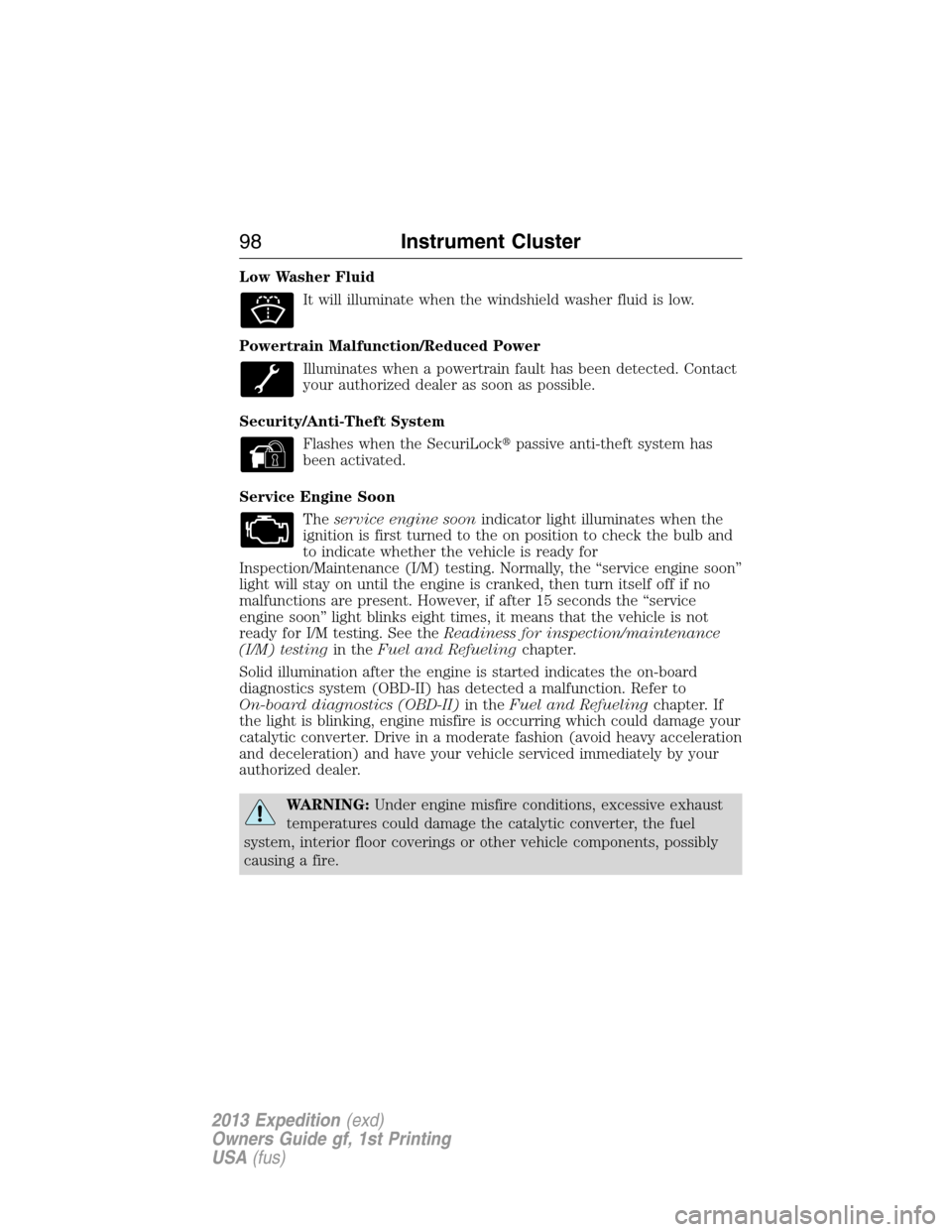
Low Washer Fluid
It will illuminate when the windshield washer fluid is low.
Powertrain Malfunction/Reduced Power
Illuminates when a powertrain fault has been detected. Contact
your authorized dealer as soon as possible.
Security/Anti-Theft System
Flashes when the SecuriLock�passive anti-theft system has
been activated.
Service Engine Soon
Theservice engine soonindicator light illuminates when the
ignition is first turned to the on position to check the bulb and
to indicate whether the vehicle is ready for
Inspection/Maintenance (I/M) testing. Normally, the “service engine soon”
light will stay on until the engine is cranked, then turn itself off if no
malfunctions are present. However, if after 15 seconds the “service
engine soon” light blinks eight times, it means that the vehicle is not
ready for I/M testing. See theReadiness for inspection/maintenance
(I/M) testingin theFuel and Refuelingchapter.
Solid illumination after the engine is started indicates the on-board
diagnostics system (OBD-II) has detected a malfunction. Refer to
On-board diagnostics (OBD-II)in theFuel and Refuelingchapter. If
the light is blinking, engine misfire is occurring which could damage your
catalytic converter. Drive in a moderate fashion (avoid heavy acceleration
and deceleration) and have your vehicle serviced immediately by your
authorized dealer.
WARNING:Under engine misfire conditions, excessive exhaust
temperatures could damage the catalytic converter, the fuel
system, interior floor coverings or other vehicle components, possibly
causing a fire.
98Instrument Cluster
2013 Expedition(exd)
Owners Guide gf, 1st Printing
USA(fus)
Page 104 of 497
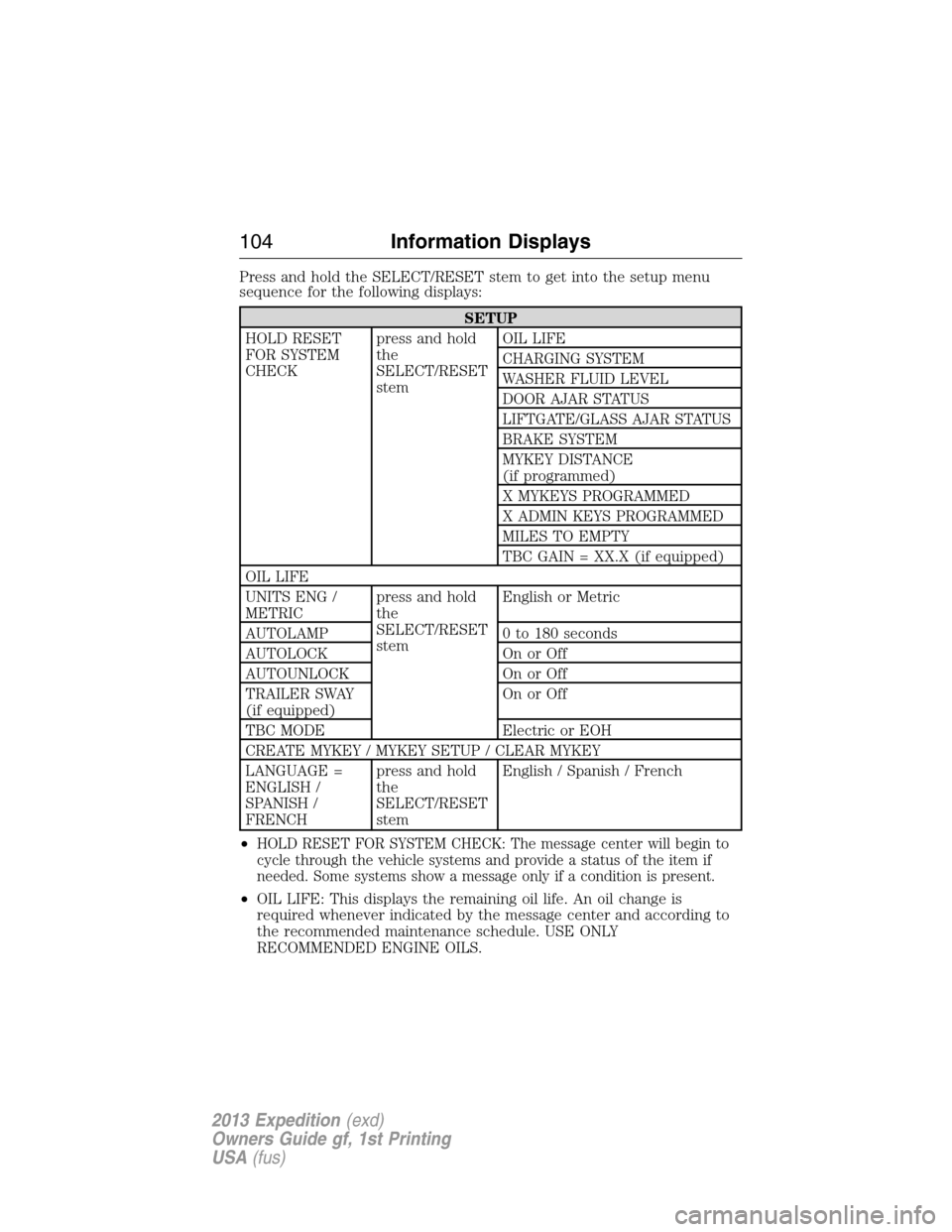
Press and hold the SELECT/RESET stem to get into the setup menu
sequence for the following displays:
SETUP
HOLD RESET
FOR SYSTEM
CHECKpress and hold
the
SELECT/RESET
stemOIL LIFE
CHARGING SYSTEM
WASHER FLUID LEVEL
DOOR AJAR STATUS
LIFTGATE/GLASS AJAR STATUS
BRAKE SYSTEM
MYKEY DISTANCE
(if programmed)
X MYKEYS PROGRAMMED
X ADMIN KEYS PROGRAMMED
MILES TO EMPTY
TBC GAIN = XX.X (if equipped)
OIL LIFE
UNITS ENG /
METRICpress and hold
the
SELECT/RESET
stemEnglish or Metric
AUTOLAMP 0 to 180 seconds
AUTOLOCK On or Off
AUTOUNLOCK On or Off
TRAILER SWAY
(if equipped)On or Off
TBC MODE Electric or EOH
CREATE MYKEY / MYKEY SETUP / CLEAR MYKEY
LANGUAGE =
ENGLISH /
SPANISH /
FRENCHpress and hold
the
SELECT/RESET
stemEnglish / Spanish / French
•
HOLD RESET FOR SYSTEM CHECK: The message center will begin to
cycle through the vehicle systems and provide a status of the item if
needed. Some systems show a message only if a condition is present.
•OIL LIFE: This displays the remaining oil life. An oil change is
required whenever indicated by the message center and according to
the recommended maintenance schedule. USE ONLY
RECOMMENDED ENGINE OILS.
104Information Displays
2013 Expedition(exd)
Owners Guide gf, 1st Printing
USA(fus)
Page 105 of 497
To reset the oil monitoring system to 100% after each oil change,
perform the following:
1. Press and release the SETUP button to display “OIL LIFE XXX%
HOLD RESET = NEW”.
2. Press and hold the RESET button for two seconds and release to reset
the oil life to 100%.
Note:To change oil life 100% value (if equipped with this feature) to
another value, proceed to Step 3.
3. Once “OIL LIFE SET TO XXX%” is displayed, release and press the
RESET button to change the Oil Life Start Value. Each release and press
will reduce the value by 10%.
•UNITS ENG / METRIC: Displays the current units in English or Metric.
•AUTOLAMP: This feature keeps your headlights on for up to three
minutes after the ignition is switched off.
•AUTOLOCK: This feature automatically locks all vehicle doors when
the vehicle is shifted into any gear, putting the vehicle in motion.
•AUTOUNLOCK: This feature automatically unlocks all vehicle doors
when the driver’s door is opened within 10 minutes of the ignition
being turned off.
•TRAILER SWAY (if equipped): This feature uses the electronic
stability control to mitigate trailer sway.
•TBC MODE (if equipped): Allows you to choose the trailer brake
mode.
•CREATE MYKEY / MYKEY SETUP / CLEAR MYKEY: For more
information refer to theMyKey�chapter.
•LANGUAGE = ENGLISH / SPANISH / FRENCH: Allows you to choose
which language the message center will display in.
Waiting four seconds or pressing the SELECT/RESET stem cycles the
message center through each of the language choices.
Press the SELECT/RESET stem to set the language choice when the
language you want appears.
Information Displays105
2013 Expedition(exd)
Owners Guide gf, 1st Printing
USA(fus)
Page 108 of 497
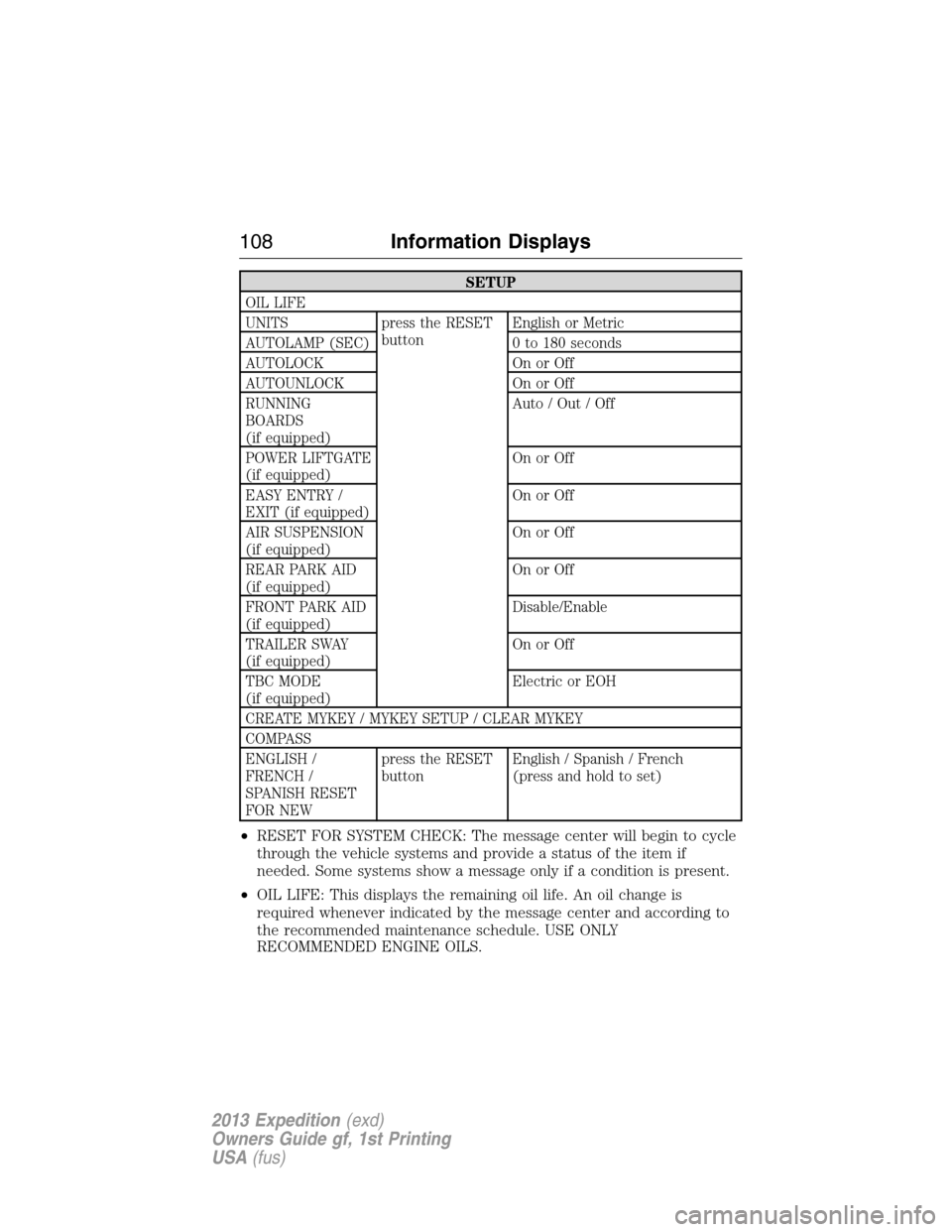
SETUP
OIL LIFE
UNITS press the RESET
buttonEnglish or Metric
AUTOLAMP (SEC) 0 to 180 seconds
AUTOLOCK On or Off
AUTOUNLOCK On or Off
RUNNING
BOARDS
(if equipped)Auto / Out / Off
POWER LIFTGATE
(if equipped)On or Off
EASY ENTRY /
EXIT (if equipped)On or Off
AIR SUSPENSION
(if equipped)On or Off
REAR PARK AID
(if equipped)On or Off
FRONT PARK AID
(if equipped)Disable/Enable
TRAILER SWAY
(if equipped)On or Off
TBC MODE
(if equipped)Electric or EOH
CREATE MYKEY / MYKEY SETUP / CLEAR MYKEY
COMPASS
ENGLISH /
FRENCH /
SPANISH RESET
FOR NEWpress the RESET
buttonEnglish / Spanish / French
(press and hold to set)
•RESET FOR SYSTEM CHECK: The message center will begin to cycle
through the vehicle systems and provide a status of the item if
needed. Some systems show a message only if a condition is present.
•OIL LIFE: This displays the remaining oil life. An oil change is
required whenever indicated by the message center and according to
the recommended maintenance schedule. USE ONLY
RECOMMENDED ENGINE OILS.
108Information Displays
2013 Expedition(exd)
Owners Guide gf, 1st Printing
USA(fus)