Page 143 of 497
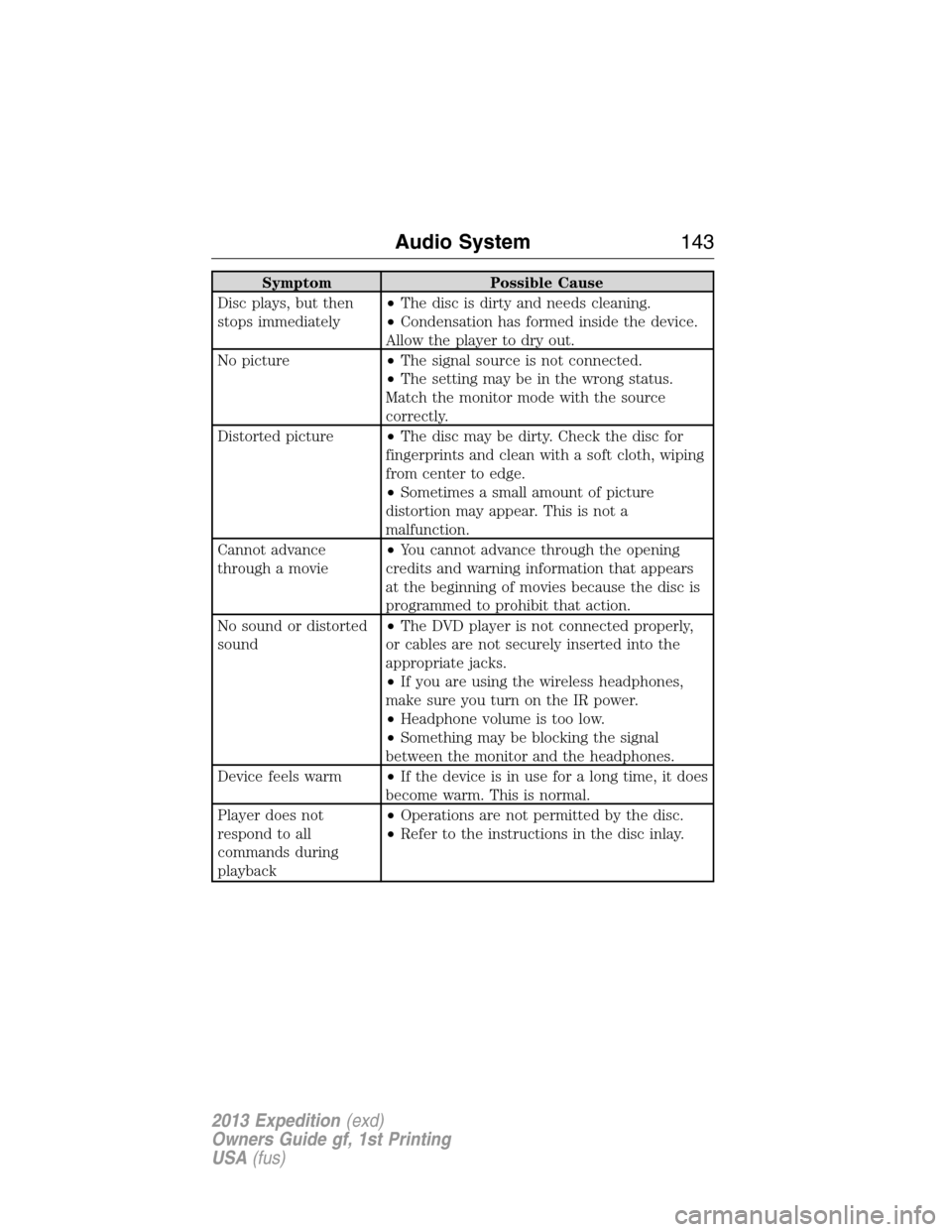
Symptom Possible Cause
Disc plays, but then
stops immediately•The disc is dirty and needs cleaning.
•Condensation has formed inside the device.
Allow the player to dry out.
No picture•The signal source is not connected.
•The setting may be in the wrong status.
Match the monitor mode with the source
correctly.
Distorted picture•The disc may be dirty. Check the disc for
fingerprints and clean with a soft cloth, wiping
from center to edge.
•Sometimes a small amount of picture
distortion may appear. This is not a
malfunction.
Cannot advance
through a movie•You cannot advance through the opening
credits and warning information that appears
at the beginning of movies because the disc is
programmed to prohibit that action.
No sound or distorted
sound•The DVD player is not connected properly,
or cables are not securely inserted into the
appropriate jacks.
•If you are using the wireless headphones,
make sure you turn on the IR power.
•Headphone volume is too low.
•Something may be blocking the signal
between the monitor and the headphones.
Device feels warm•If the device is in use for a long time, it does
become warm. This is normal.
Player does not
respond to all
commands during
playback•Operations are not permitted by the disc.
•Refer to the instructions in the disc inlay.
Audio System143
2013 Expedition(exd)
Owners Guide gf, 1st Printing
USA(fus)
Page 159 of 497
HEAD RESTRAINTS
WARNING:To minimize the risk of neck injury in the event of a
crash, you and the passenger occupants should not sit in and/or
operate the vehicle, until the head restraint is placed in its proper
position. Never adjust the head restraint while the vehicle is in motion.
WARNING:The adjustable head restraint is a safety device.
Whenever possible it should be installed and properly adjusted
when the seat is occupied.
WARNING:Install the head restraint properly to minimize the
risk of neck injury in the event of a crash.
Note:Adjust the seatback to an upright driving position before adjusting
any head restraint. Properly adjust the head restraint so that the top of
the head restraint is even with the top of your head and positioned as
close as possible to the back of your head. For occupants of extremely
tall stature, adjust the head restraint to its full up position.
Front Seat Head Restraints
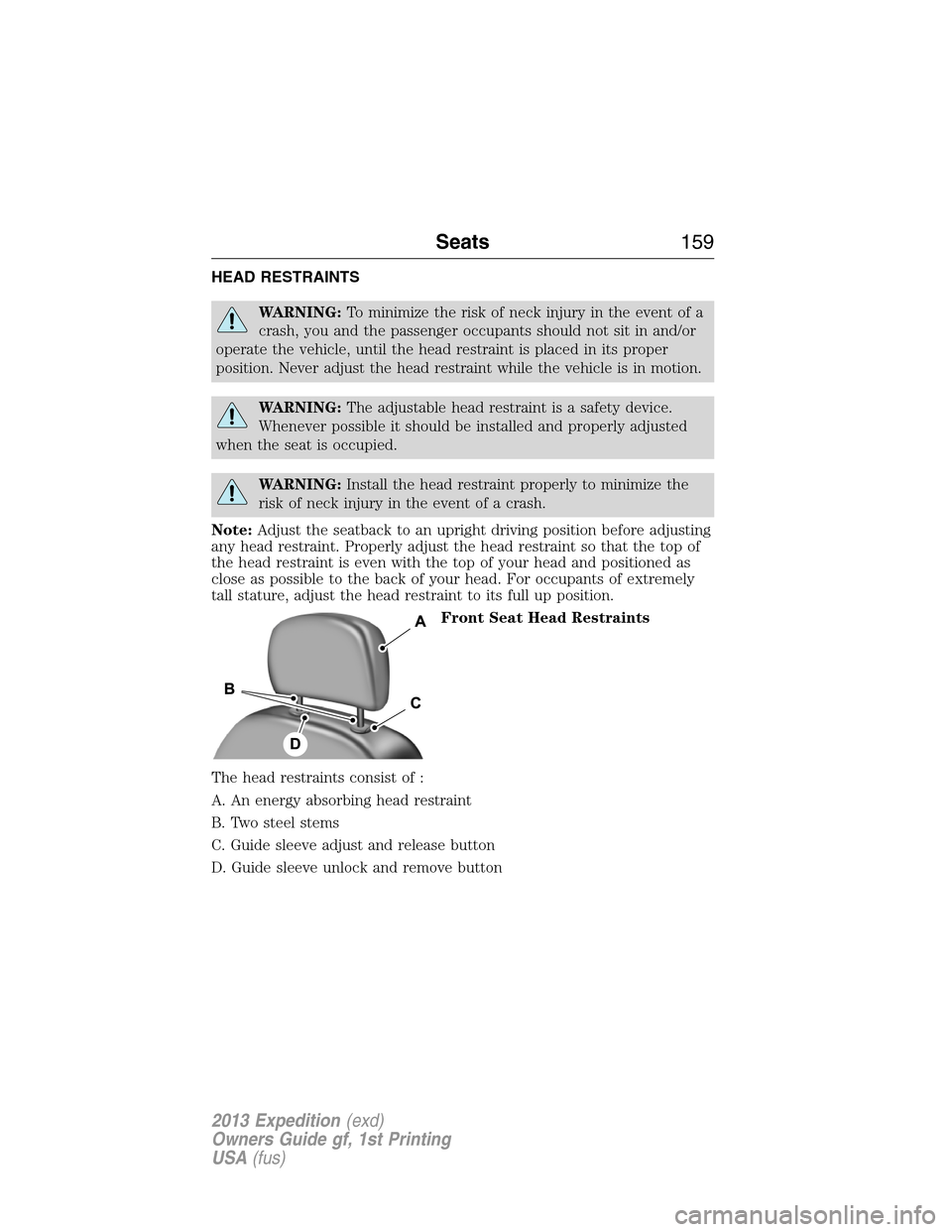
The head restraints consist of :
A. An energy absorbing head restraint
B. Two steel stems
C. Guide sleeve adjust and release button
D. Guide sleeve unlock and remove button
Seats159
2013 Expedition(exd)
Owners Guide gf, 1st Printing
USA(fus)
Page 160 of 497
Adjusting the Head Restraint
Raise
Pull up the head restraint.
Lower
1. Press and hold button C.
2. Push down on the head restraint.
Remove
1. Pull up the head restraint until it reaches the highest adjustment
position.
2. Press and hold buttons C and D.
3. Pull up the head restraint.
Reinstall
Align the steel stems into the guide sleeves and push the head restraint
down until it locks.
Second row outboard seat head restraints –The outboard head
restraints are non-adjustable, but they can be folded.
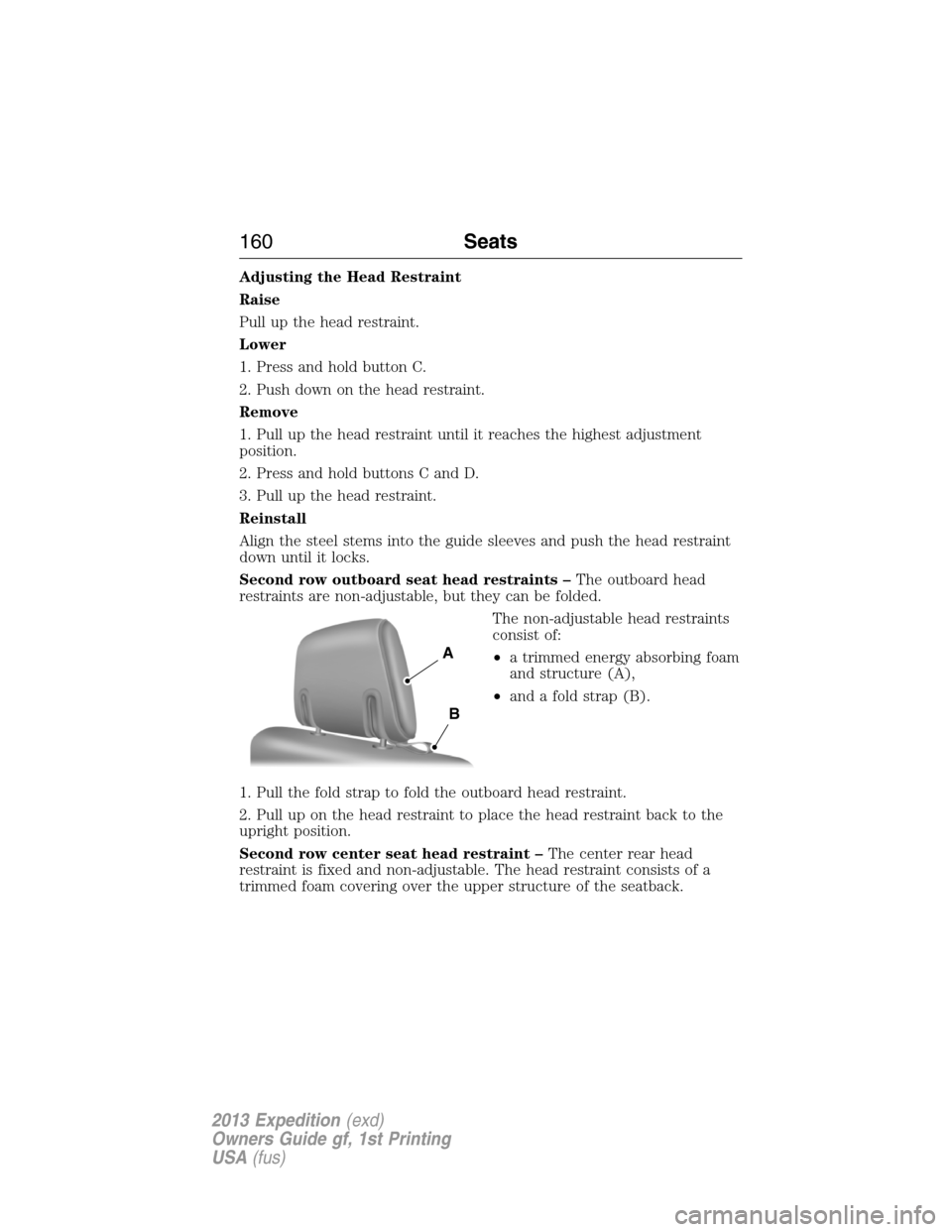
The non-adjustable head restraints
consist of:
•a trimmed energy absorbing foam
and structure (A),
•and a fold strap (B).
1. Pull the fold strap to fold the outboard head restraint.
2. Pull up on the head restraint to place the head restraint back to the
upright position.
Second row center seat head restraint –The center rear head
restraint is fixed and non-adjustable. The head restraint consists of a
trimmed foam covering over the upper structure of the seatback.
A
B
160Seats
2013 Expedition(exd)
Owners Guide gf, 1st Printing
USA(fus)
Page 165 of 497
Recalling Saved Memory Positions
To recall position 1 settings, press and release memory button 1. The
memory features will move to the saved memory 1 position.
The memory positions can also be recalled when you:
•press your remote entry transmitter unlock control (if the transmitter
is programmed to a memory position) or,
•enter a valid personal entry code that is programmed to a memory
position.
If the easy entry/exit feature is enabled, the mirrors and pedals will move
to the programmed memory position and the seat will move to the easy
entry position. The seat will move to the driving memory position when
the ignition is activated.
A programmed memory position can be recalled:
•in any gearshift position if the ignition is not on.
•only in positionPorNif the ignition is on.
Easy-Entry/Exit Feature (If Equipped)
If the easy entry/exit feature is enabled, this feature automatically moves
the driver’s seat rearward 2 inches (5 centimeters) when the
transmission selector lever is in positionPand the key is removed from
the ignition.
If the seat is located less than 2 inches (5 centimeters) from the rear of
the seat track, the seat travel will be less than 2 inches (5 centimeters)
rearward.
The driver’s seat will return to the previous position when the key is put
in the ignition.
This feature is enabled or disabled through the information display. See
theInformation Displayschapter for more information.
Seats165
2013 Expedition(exd)
Owners Guide gf, 1st Printing
USA(fus)
Page 167 of 497
Heated and Cooled Seats Air Filter Replacement (If Equipped)
The heated and cooled seat system includes air filters that must be
replaced periodically. Seescheduled maintenance informationfor
more information.
There is a filter located under each front seat. The filter can be accessed
from the second row seat. Move the front seats all the way forward and
up to ease access.
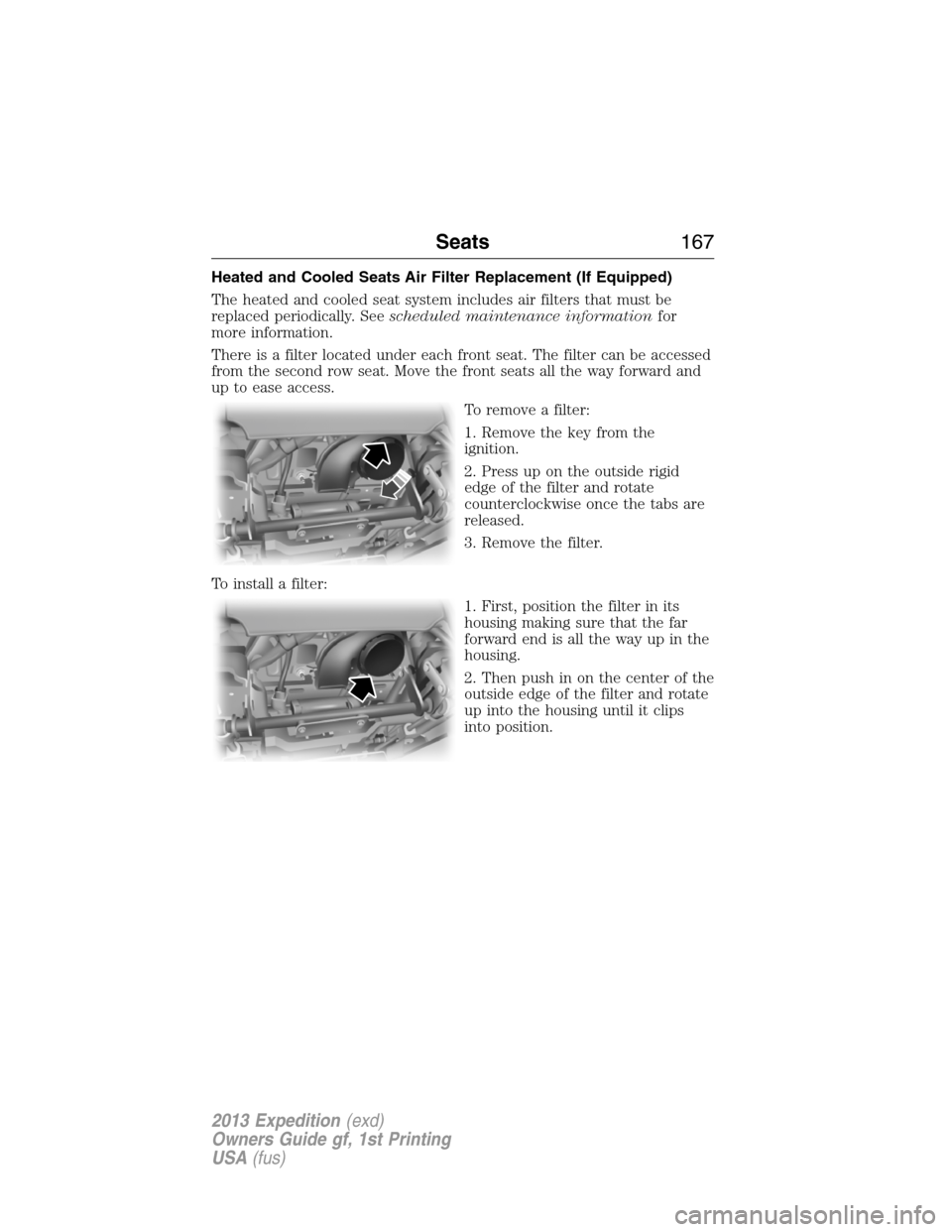
To remove a filter:
1. Remove the key from the
ignition.
2. Press up on the outside rigid
edge of the filter and rotate
counterclockwise once the tabs are
released.
3. Remove the filter.
To install a filter:
1. First, position the filter in its
housing making sure that the far
forward end is all the way up in the
housing.
2. Then push in on the center of the
outside edge of the filter and rotate
up into the housing until it clips
into position.
Seats167
2013 Expedition(exd)
Owners Guide gf, 1st Printing
USA(fus)
Page 169 of 497
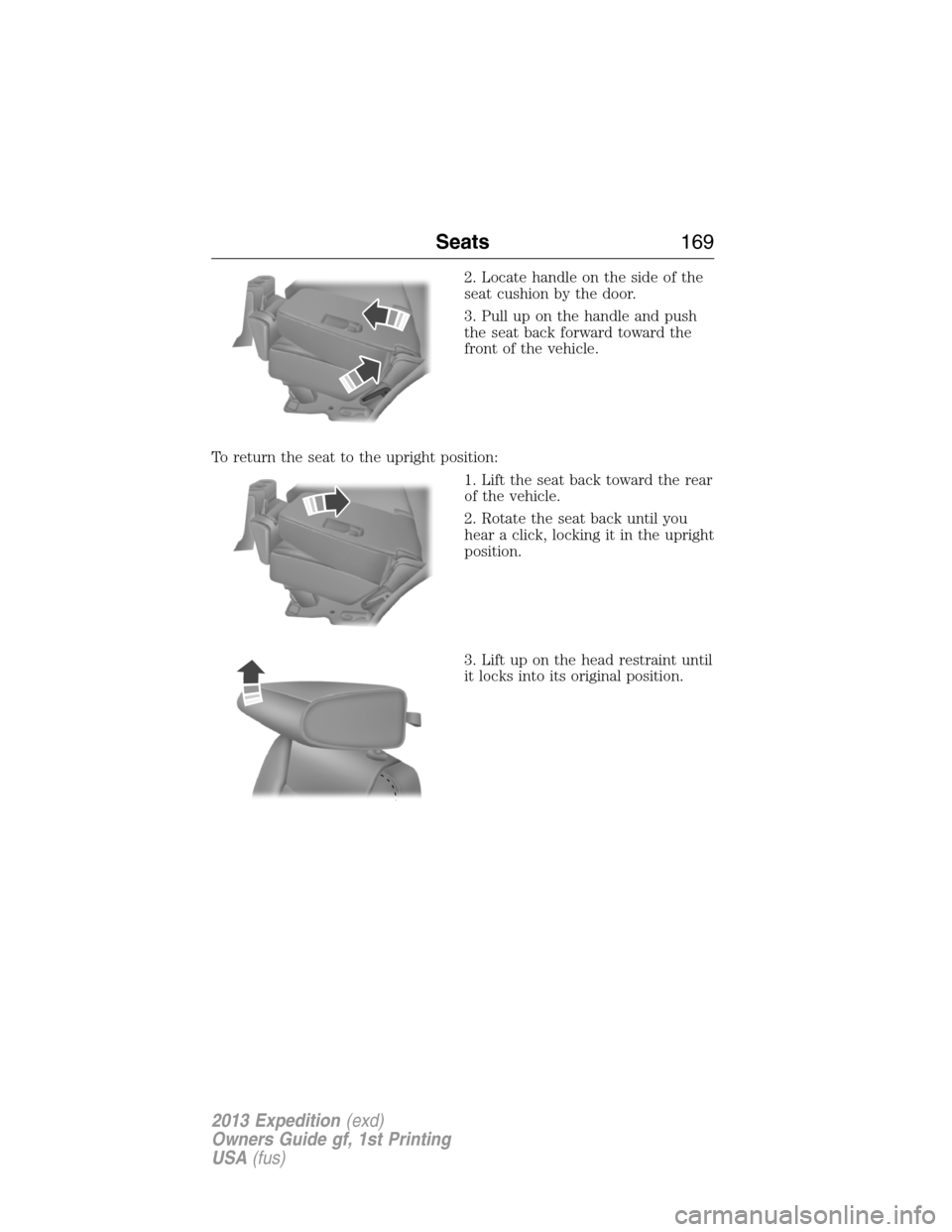
2. Locate handle on the side of the
seat cushion by the door.
3. Pull up on the handle and push
the seat back forward toward the
front of the vehicle.
To return the seat to the upright position:
1. Lift the seat back toward the rear
of the vehicle.
2. Rotate the seat back until you
hear a click, locking it in the upright
position.
3. Lift up on the head restraint until
it locks into its original position.
Seats169
2013 Expedition(exd)
Owners Guide gf, 1st Printing
USA(fus)
Page 172 of 497
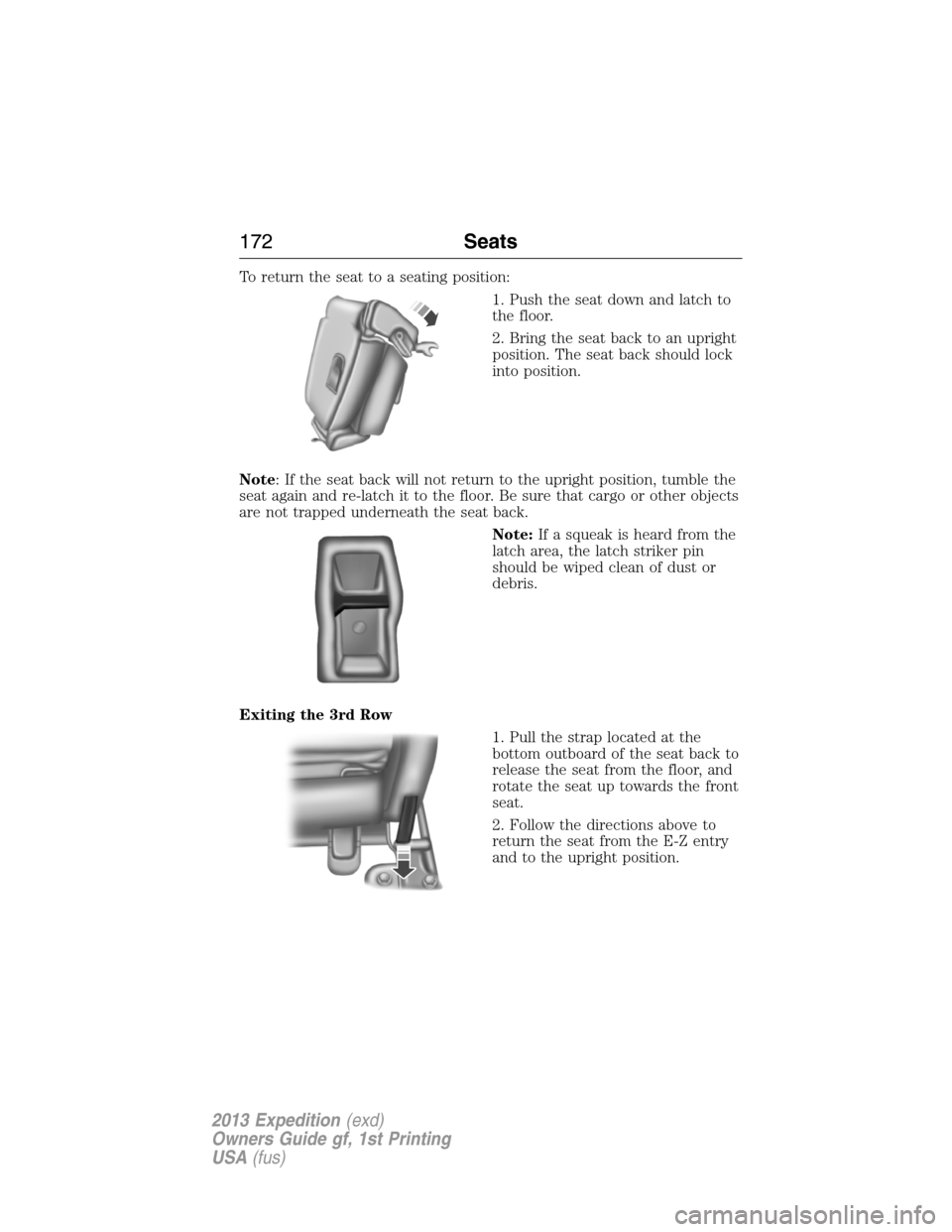
To return the seat to a seating position:
1. Push the seat down and latch to
the floor.
2. Bring the seat back to an upright
position. The seat back should lock
into position.
Note: If the seat back will not return to the upright position, tumble the
seat again and re-latch it to the floor. Be sure that cargo or other objects
are not trapped underneath the seat back.
Note:If a squeak is heard from the
latch area, the latch striker pin
should be wiped clean of dust or
debris.
Exiting the 3rd Row
1. Pull the strap located at the
bottom outboard of the seat back to
release the seat from the floor, and
rotate the seat up towards the front
seat.
2. Follow the directions above to
return the seat from the E-Z entry
and to the upright position.
172Seats
2013 Expedition(exd)
Owners Guide gf, 1st Printing
USA(fus)
Page 177 of 497
PowerFold�Third-row Seat (if equipped)
Note:The power fold down seats will operate for 10 minutes after the
ignition switch is in off. The transmission must be in positionP, and the
liftgate, or liftgate glass must be open. Similar to the battery saver
feature, the power 3rd row seat will be disabled 10 minutes after turning
the vehicle off.
Note: Be sure that the head restraints are folded down before powering
the 3rd row seat down.
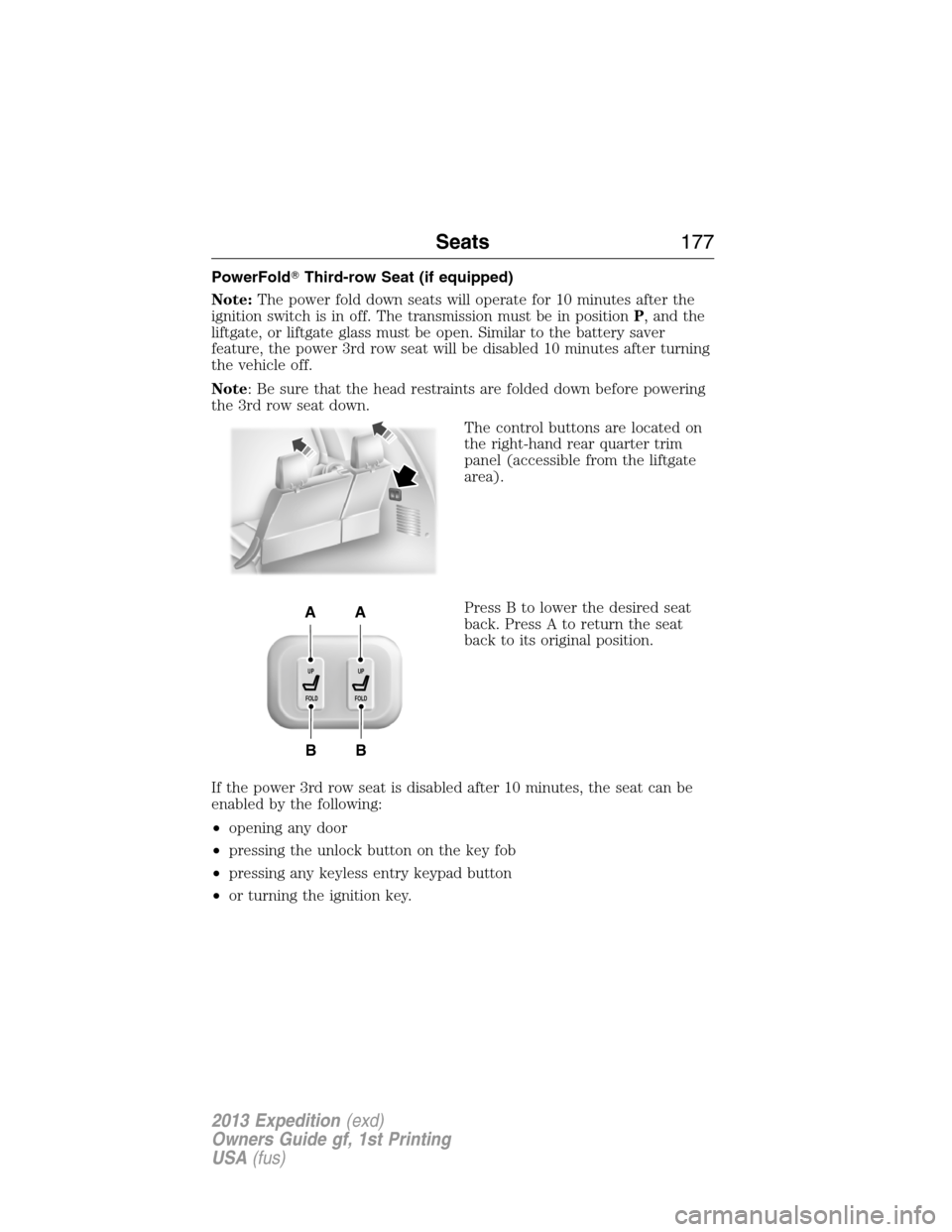
The control buttons are located on
the right-hand rear quarter trim
panel (accessible from the liftgate
area).
Press B to lower the desired seat
back. Press A to return the seat
back to its original position.
If the power 3rd row seat is disabled after 10 minutes, the seat can be
enabled by the following:
•opening any door
•pressing the unlock button on the key fob
•pressing any keyless entry keypad button
•or turning the ignition key.
B
AA
B
UP
FOLDUP
FOLD
Seats177
2013 Expedition(exd)
Owners Guide gf, 1st Printing
USA(fus)