2013 FORD ESCAPE reset
[x] Cancel search: resetPage 111 of 423

Satellite Radio Reception Factors
Potential Satellite Radio Reception IssuesFor optimal reception performance, keep the antenna
clear of snow and ice build-up and keep luggage and other
material as far away from the antenna as possible.
Antenna obstructions
Hills, mountains, tall buildings, bridges, tunnels, freeway
overpasses, parking garages, dense tree foliage and
thunderstorms can interfere with your reception.
Terrain
When you pass a ground-based broadcast repeating
tower, a stronger signal may overtake a weaker one and
the audio system may mute.
Station overload
Your display may show ACQUIRING...to indicate the
interference and the audio system may mute.
Satellite radio signal interfer-
ence
SIRIUS® Satellite Radio Service
Note: SIRIUS reserves the unrestricted right
to change, rearrange, add or delete
programming including canceling, moving
or adding particular channels, and its prices,
at any time, with or without notice to you.
Ford Motor Company shall not be
responsible for any such programming
changes.
SIRIUS satellite radio is a
subscription-based satellite radio service
that broadcasts a variety of music, sports,
news, weather, traffic and entertainment
programming. Your factory-installed
SIRIUS satellite radio system includes
hardware and a limited subscription term
which begins on the date of sale or lease
of the vehicle. Refer to your authorized
dealer for availability.
For more information on extended
subscription terms (a service fee is
required), the online media player and a
complete list of SIRIUS satellite radio
channels, and other features, please visit
www.siriusxm.com in the United States,
www.sirius.ca in Canada, or call SIRIUS at
1-888-539-7474.
Satellite Radio Electronic Serial
Number (ESN)
You need your ESN to activate, modify or
track your satellite radio account. When in
satellite radio mode, you can view this
number by pressing SIRIUS and memory
preset 1 at the same time.
111
Audio System
E142593
Page 112 of 423

Troubleshooting
Possible Action
Condition
Radio Display
No action required. This
message should disappear
shortly.
Radio requires more than
two seconds to produce
audio for the selected
channel.
Acquiring
If this message does not
clear shortly, or with an igni-
tion key cycle, your receiver
may have a fault. See your
authorized dealer for service.
Internal module or system
failure present.
Sat Fault/SIRIUS system
failure
Tune to another channel or
choose another preset.
Channel is no longer avail-
able.
Invalid Channel
Contact SIRIUS at 1-888-
539-7474 to subscribe to
the channel, or tune to
another channel.
Subscription not available
for this channel.
Unsubscribed Channel
The signal is currently being
blocked. When you move
into an open area, the signal
should return.
Loss of signal from the
SIRIUS satellite or SIRIUS
tower to the vehicle
antenna.
No Signal
No action required. The
process may take up to
three minutes.
Update of channel
programming in progress.
Updating
Contact SIRIUS at 1-888-
539-7474 to reactivate or
resolve subscription issues.
Satellite service has been
deactivated by SIRIUS
Satellite Radio.
Call SIRIUS 1-888-539-7474
Using the channel guide,
unlock or unskip the chan-
nels.
All the channels in the
selected category are
skipped or locked.
No Channels Available
No action required.
SIRIUS has updated the
channels available for your
vehicle.
Subscription Updated
112
Audio System
Page 122 of 423
WARNINGS
Install the head restraint properly to
help minimize the risk of neck injury
in the event of a collision.
Front seat head restraint
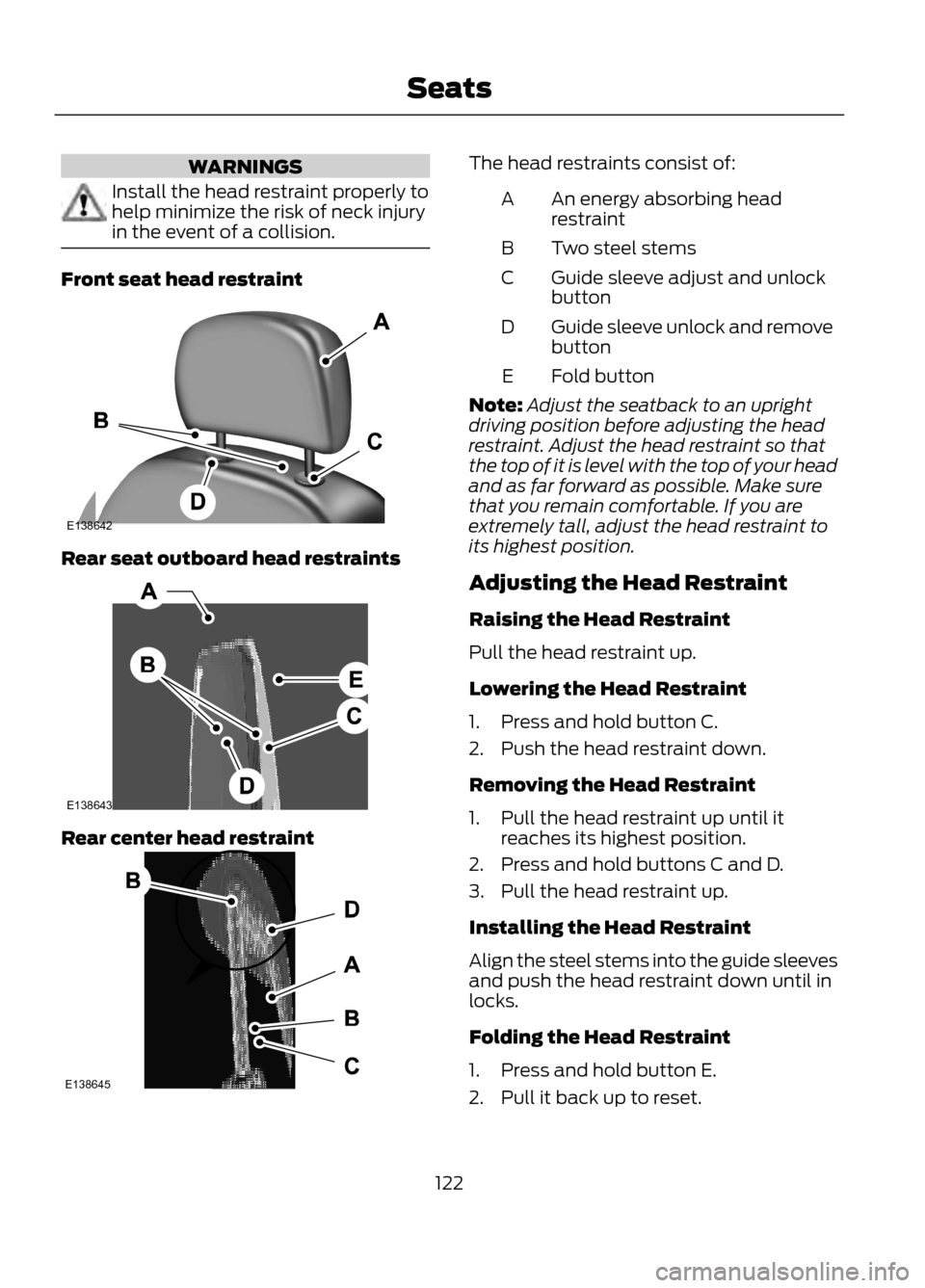
Rear seat outboard head restraints
Rear center head restraint
The head restraints consist of:An energy absorbing head
restraint
A
Two steel stems
B
Guide sleeve adjust and unlock
button
C
Guide sleeve unlock and remove
button
D
Fold button
E
Note: Adjust the seatback to an upright
driving position before adjusting the head
restraint. Adjust the head restraint so that
the top of it is level with the top of your head
and as far forward as possible. Make sure
that you remain comfortable. If you are
extremely tall, adjust the head restraint to
its highest position.
Adjusting the Head Restraint
Raising the Head Restraint
Pull the head restraint up.
Lowering the Head Restraint
1. Press and hold button C.
2. Push the head restraint down.
Removing the Head Restraint
1. Pull the head restraint up until it reaches its highest position.
2. Press and hold buttons C and D.
3. Pull the head restraint up.
Installing the Head Restraint
Align the steel stems into the guide sleeves
and push the head restraint down until in
locks.
Folding the Head Restraint
1. Press and hold button E.
2. Pull it back up to reset.
122
Seats
E138642
E138643
E138645
Page 143 of 423

Easy Fuel® No Cap Fuel System
WARNING
The fuel system may be under
pressure. If you hear a hissing sound
near the fuel filler door, do not refuel
until the sound stops. Otherwise, fuel may
spray out, which could cause serious
personal injury.
When fueling your vehicle:
1. Turn the engine off.
2. Open the fuel filler door.
3. Slowly insert the fuel filler nozzle fully into the fuel system, and leave the
nozzle fully inserted until you are done
pumping.
4. After you are done pumping fuel, slowly
remove the fuel filler nozzle. Allow
about ten seconds after pumping fuel
before removing the fuel filler nozzle.
This allows residual fuel to drain back
into the fuel tank and not spill onto the
vehicle.
Note: A fuel spillage concern may occur if
overfilling the fuel tank. Do not overfill the
tank to the point that the fuel is able to
bypass the fuel filler nozzle. The overfilled
fuel may run down the drain located below
and in front of the fuel filler door.
If the fuel fill inlet was not properly closed,
a Check fuel fill inlet message may appear
on the instrument cluster. See Warning
Lamps and Indicators (page 80).
At the next opportunity, do the following:
1. Safely pull off the road.
2. Turn off the engine.
3. Open the fuel filler door and remove any visible debris from the fuel fill
opening. 4. Insert either the fuel fill nozzle or the
fuel fill funnel provided with the vehicle
several times to dislodge any debris
and allow the inlet to close properly.
If this action corrects the problem, the
message may not reset immediately. It
may take several driving cycles for the
message to turn off. A driving cycle
consists of an engine start-up (after four
or more hours with the engine off) followed
by city or highway driving. Continuing to
drive with the message on may cause the
service engine soon lamp to turn on as
well.
EMISSION CONTROL SYSTEM
WARNINGS
Do not park, idle, or drive your vehicle
in dry grass or other dry ground cover.
The emission system heats up the
engine compartment and exhaust system,
which can start a fire.
Exhaust leaks may result in entry of
harmful and potentially lethal fumes
into the passenger compartment. If
you smell exhaust fumes inside your
vehicle, have your dealer inspect your
vehicle immediately. Do not drive if you
smell exhaust fumes.
Your vehicle is equipped with various
emission control components and a
catalytic converter which will enable your
vehicle to comply with applicable exhaust
emission standards. To make sure that the
catalytic converter and other emission
control components continue to work
properly:
To make sure that the catalytic converter
and other emission control components
continue to work properly:
• Use only the specified fuel listed.
• Avoid running out of fuel.
143
Fuel and Refueling
Page 169 of 423

Active guidelines are only shown with fixed
guidelines. To use active guidelines, turn
the steering wheel to point the guidelines
toward an intended path. If the steering
wheel position is changed while reversing,
the vehicle might deviate from the original
intended path.
The fixed and active guidelines fade in and
out depending on the steering wheel
position. The active guidelines are not
shown when the steering wheel position
is straight.
Always use caution while reversing.
Objects in the red zone are closest to your
vehicle and objects in the green zone are
farther away. Objects are getting closer to
your vehicle as they move from the green
zone to the yellow or red zones. Use the
side view mirrors and rear view mirror to
get better coverage on both sides and rear
of the vehicle.
Selectable settings for this feature are
ACTIVE + FIXED, FIXED and OFF.
Visual Park Aid Alert
Note:Visual park alert is only available
when the transmission is in R (Reverse).
Note: The reverse sensing system is not
effective at speeds above 3 mph (5 km/h)
and may not detect certain angular or
moving objects.
The system uses red, yellow and green
highlights which appear on top of the video
image when an object is detected by the
reverse sensing system. The alert highlights
the closest object detected. The reverse
sensing alert can be disabled and if visual
park aid alert is enabled, highlighted areas
are still displayed.
Selectable settings for this feature are ON
and OFF. Manual Zoom
WARNING
When manual zoom is on, the full
area behind the vehicle is not shown.
Be aware of your surroundings when
using the manual zoom feature.
Note: Manual zoom is only available when
the transmission is in R (Reverse).
Note: When manual zoom is enabled, only
the centerline is shown.
This allows you to get a closer view of an
object behind the vehicle. The zoomed
image keeps the bumper in the image to
provide a reference. The zoom is only
active while the transmission is in R
(Reverse). When the transmission is
shifted out of R (Reverse), the feature
automatically turns off and must be reset
when it is used again.
Selectable settings for this feature are OFF,
Level 1, Level 2 or Level 3. Press the up and
down arrows to change the view. The
selection level appears between the
buttons (i.e. Level 1). The default setting
for the manual zoom is OFF.
Rear Camera Delay
When shifting the transmission out of R
(Reverse) and into any gear other than P
(Park), the camera image remains in the
display until the vehicle speed reaches 5
mph (8 km/h). This occurs when the rear
camera delay feature is on, or until a radio
button is selected.
Selectable settings for this feature are ON
and OFF. The default setting for the rear
camera delay is OFF.
169
Parking Aids
Page 173 of 423
System Lights and Messages
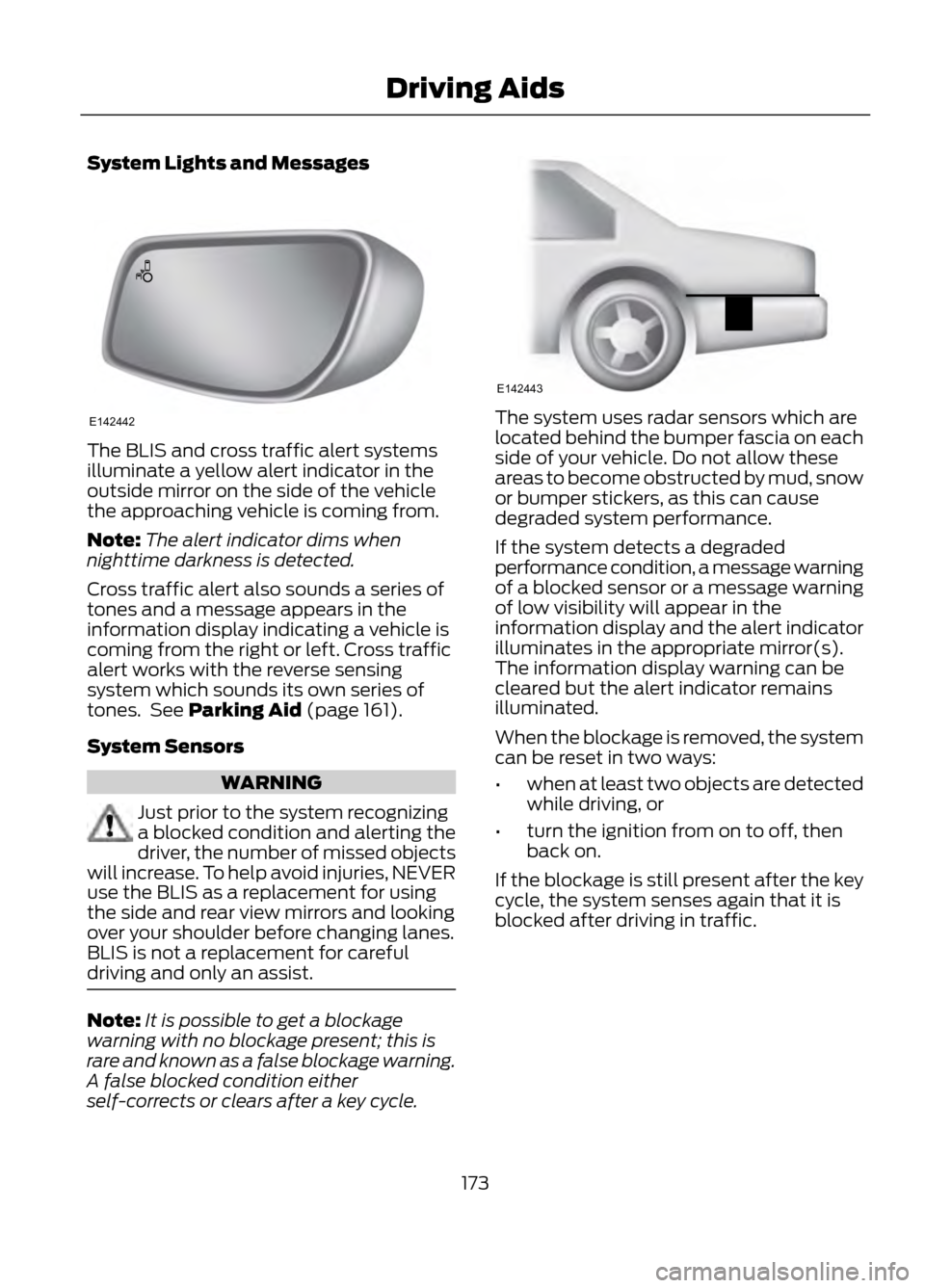
The BLIS and cross traffic alert systems
illuminate a yellow alert indicator in the
outside mirror on the side of the vehicle
the approaching vehicle is coming from.
Note:The alert indicator dims when
nighttime darkness is detected.
Cross traffic alert also sounds a series of
tones and a message appears in the
information display indicating a vehicle is
coming from the right or left. Cross traffic
alert works with the reverse sensing
system which sounds its own series of
tones. See Parking Aid (page 161).
System Sensors
WARNING
Just prior to the system recognizing
a blocked condition and alerting the
driver, the number of missed objects
will increase. To help avoid injuries, NEVER
use the BLIS as a replacement for using
the side and rear view mirrors and looking
over your shoulder before changing lanes.
BLIS is not a replacement for careful
driving and only an assist.
Note: It is possible to get a blockage
warning with no blockage present; this is
rare and known as a false blockage warning.
A false blocked condition either
self-corrects or clears after a key cycle.
The system uses radar sensors which are
located behind the bumper fascia on each
side of your vehicle. Do not allow these
areas to become obstructed by mud, snow
or bumper stickers, as this can cause
degraded system performance.
If the system detects a degraded
performance condition, a message warning
of a blocked sensor or a message warning
of low visibility will appear in the
information display and the alert indicator
illuminates in the appropriate mirror(s).
The information display warning can be
cleared but the alert indicator remains
illuminated.
When the blockage is removed, the system
can be reset in two ways:
• when at least two objects are detected
while driving, or
• turn the ignition from on to off, then
back on.
If the blockage is still present after the key
cycle, the system senses again that it is
blocked after driving in traffic.
173
Driving Aids
E142442
E142443
Page 174 of 423

Reasons for messages being displayedClean the fascia area in
front of the radar or remove the obstruction.
The radar
surface is dirty or
obstructed
Drive normally in traffic for
a few minutes to allow the radar to detect passing
vehicles so it can clear the blocked state.
The radar
surface is
not dirty or
obstructed
No action required. Thesystem automatically
resets to an unblocked
state once the rainfall or
snowfall rate decreases or stops. Do not use BLIS or
cross traffic alert in these conditions.
Heavy rain-
fall/snow- fall inter-
feres with the radar signals
System Limitations
The BLIS and cross traffic alert systems
do have their limitations; situations such
as severe weather conditions or debris
build-up on the sensor area may limit
vehicle detection.
The following are other situations that may
limit the BLIS:
• Certain maneuvering of vehicles
entering and exiting the blind zone.
• Vehicles passing through the blind zone
at very fast rates.
• When several vehicles forming a
convoy pass through the blind zone.
The following are other situations that may
limit the cross traffic alert system:
• Adjacently parked vehicles or objects
obstructing the sensors.
• Approaching vehicles passing at
speeds greater than 15 mph (24 km/h). •
Driving in reverse faster than 3 mph (5
km/h).
• Backing out of an angled parking spot.
False Alerts
Note: If the vehicle has a factory equipped
tow bar, and it is towing a trailer, the sensors
will detect the trailer and turn the BLIS off
to avoid false alerts. For non-factory
equipped tow bars you may want to turn
the BLIS off manually.
There may be certain instances when
either the BLIS or cross traffic alert
systems illuminate the alert indicator with
no vehicle in the coverage zone; this is
known as a false alert. Some amount of
false alerts are normal; they are temporary
and self-correct.
System Errors
If either system senses a problem with the
left or right sensor, the BLIS telltale
illuminates and remains on and the
following will appear in the information
display:
• BLIS: X sensor fault Service req’ d or
• Cross Traffic malfunction Service req’ d
When problems that may cause the left or
right indicator not to illuminate, only the
information display faults appear.
Switching the Systems Off and On
One or both systems can be switched off
temporarily by using the information
display control. See General Information
(page 84). When the BLIS is switched off,
you will not receive alerts and a telltale
illuminates in the information display. The
system switches back on whenever the
ignition is switched on.
174
Driving Aids
Page 175 of 423

One or both systems can also be switched
off permanently at your authorized dealer.
Once switched off, switching it back on
must also be done at your authorized
dealer.
ECO MODE
This system assists you in driving more
efficiently by constantly monitoring
characteristics of gear changing,
anticipation of traffic conditions and
speeds while driving.
The value of these characteristics is
represented by petals shown in the display,
with five petals being the most efficient.
The more efficiently you drive, the better
the rating, and the better your overall fuel
economy
Note:These efficiency values do not result
in a defined fuel consumption figure. It might
vary as it is not only related to these driving
habits, but also influenced by many other
factors such as short trips and cold starts.
Note: Frequent short trips, where the engine
does not fully warm up, will also increase
fuel consumption
The system is accessed using the
information display control. See General
Information (page 84). Type 1
Anticipation
A
Efficient speed
B
Anticipation
Adjust your vehicle speed and the distance
to other vehicles to avoid the need for
heavy braking or acceleration to improve
fuel economy.
Efficient speed
Reduce your cruising speed on open roads
to improve economy. Higher speeds use
more fuel.
Type 2 and 3
The relevant information is shown in the
display.
Resetting Eco Mode
Reset the average fuel consumption by
using the information display control.
Note: New values may take a short time to
calculate
175
Driving Aids
ABE142444