Page 109 of 631

�ADAPTIVE CRUISE CONTROL (ACC) — IF
EQUIPPED .......................... .244
▫ Adaptive Cruise Control (ACC) Operation . . . .246
▫ Activating Adaptive Cruise Control (ACC) . . . .247
▫ To Activate ......................... .248
▫ To Set A Desired ACC Speed .............250
▫ To Cancel .......................... .251
▫ ToTurnOff......................... .252
▫ To Resume Speed .....................252
▫ To Vary The Speed Setting ...............253
▫ Setting The Following Distance In ACC ......254
▫ Adaptive Cruise Control (ACC) Menu .......258
▫ Display Warnings And Maintenance ........259▫
Precautions While Driving With ACC .......261
▫ General Information ...................266
▫ Normal (Fixed Speed) Cruise Control Mode . . .266
▫ Forward Collision Warning — If Equipped. . . .268
� PARKSENSE® REAR PARK ASSIST — IF
EQUIPPED .......................... .271
▫ ParkSense® Sensors ....................271
▫ ParkSense® Warning Display .............271
▫ ParkSense® Display ....................272
▫ Enabling And Disabling ParkSense® ........275
▫ Service The ParkSense® Rear Park Assist
System ............................ .276
▫ Cleaning The ParkSense® System ..........276
▫ ParkSense® System Usage Precautions .......277
3
UNDERSTANDING THE FEATURES OF YOUR VEHICLE 107
Page 113 of 631
CAUTION!
To avoid damage to the mirror during cleaning, never
spray any cleaning solution directly onto the mirror.
Apply the solution onto a clean cloth and wipe the
mirror clean.
Outside Mirrors
To receive maximum benefit, adjust the outside mirror(s)
to center on the adjacent lane of traffic and a slight
overlap of the view obtained from the inside mirror.
NOTE:The passenger side convex outside mirror will
give a much wider view to the rear, and especially of the
lane next to your vehicle.
WARNING!
Vehicles and other objects seen in the passenger side
convex mirror will look smaller and farther away
than they really are. Relying too much on your
passenger side convex mirror could cause you to
collide with another vehicle or other object. Use your
inside mirror when judging the size or distance of a
vehicle seen in the passenger side convex mirror.
Automatic Dimming Mirror
3
UNDERSTANDING THE FEATURES OF YOUR VEHICLE 111
Page 118 of 631
BLIND SPOT MONITORING — IF EQUIPPED
The Blind Spot Monitoring (BSM) system uses two radar-
based sensors, located inside the rear bumper fascia, to
detect highway licensable vehicles (automobiles, trucks,
motorcycles, etc.) that enter the blind spot zones from the
rear/front/side of the vehicle.When the vehicle is started, the BSM warning light will
momentarily illuminate in both outside rear view mirrors
to let the driver know that the system is operational. The
BSM system sensors operate when the vehicle is in any
forward gear or REVERSE and enters stand by mode
when the vehicle is in PARK.
Rear Detection ZonesBSM Warning Light
116 UNDERSTANDING THE FEATURES OF YOUR VEHICLE
Page 119 of 631
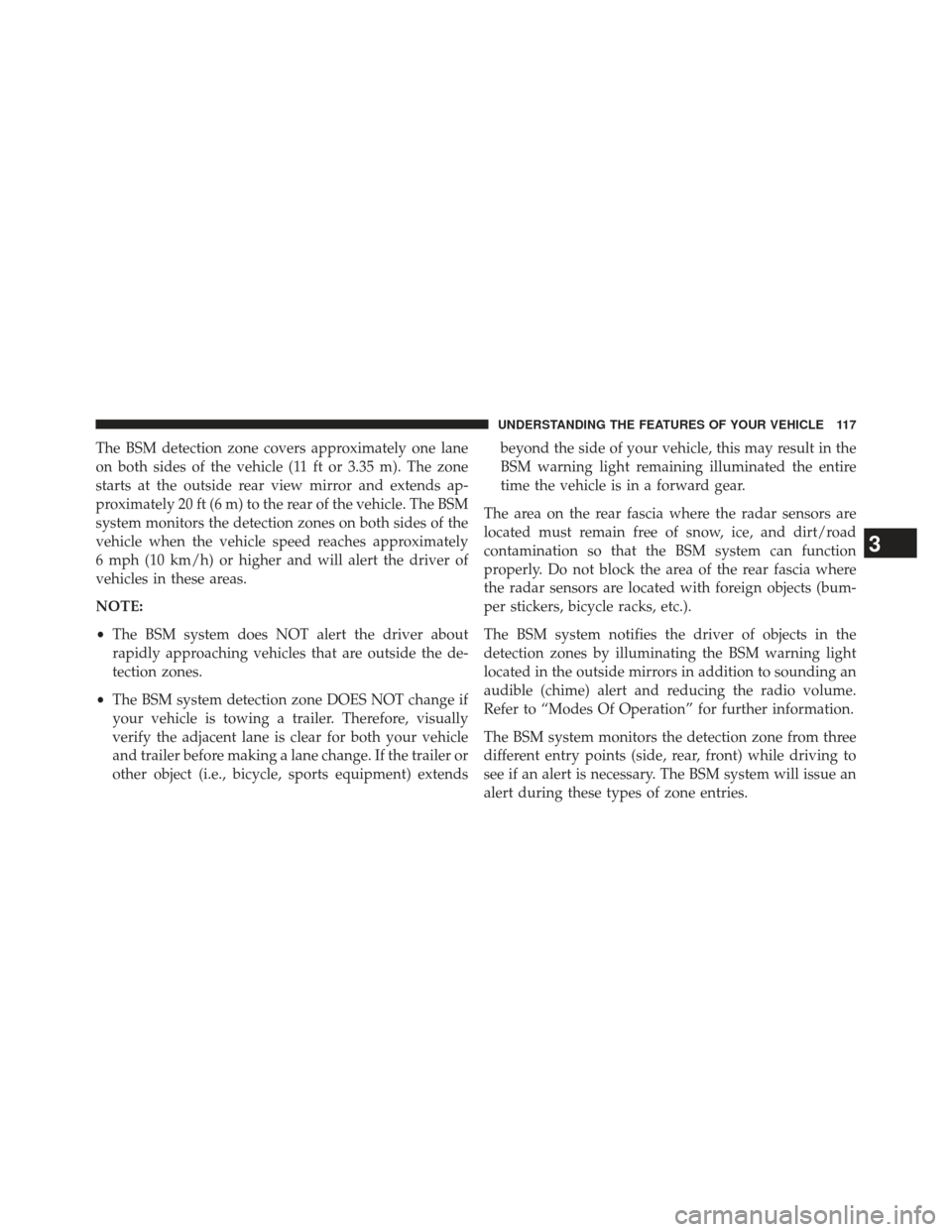
The BSM detection zone covers approximately one lane
on both sides of the vehicle (11 ft or 3.35 m). The zone
starts at the outside rear view mirror and extends ap-
proximately 20 ft (6 m) to the rear of the vehicle. The BSM
system monitors the detection zones on both sides of the
vehicle when the vehicle speed reaches approximately
6 mph (10 km/h) or higher and will alert the driver of
vehicles in these areas.
NOTE:
•The BSM system does NOT alert the driver about
rapidly approaching vehicles that are outside the de-
tection zones.
• The BSM system detection zone DOES NOT change if
your vehicle is towing a trailer. Therefore, visually
verify the adjacent lane is clear for both your vehicle
and trailer before making a lane change. If the trailer or
other object (i.e., bicycle, sports equipment) extends beyond the side of your vehicle, this may result in the
BSM warning light remaining illuminated the entire
time the vehicle is in a forward gear.
The area on the rear fascia where the radar sensors are
located must remain free of snow, ice, and dirt/road
contamination so that the BSM system can function
properly. Do not block the area of the rear fascia where
the radar sensors are located with foreign objects (bum-
per stickers, bicycle racks, etc.).
The BSM system notifies the driver of objects in the
detection zones by illuminating the BSM warning light
located in the outside mirrors in addition to sounding an
audible (chime) alert and reducing the radio volume.
Refer to “Modes Of Operation” for further information.
The BSM system monitors the detection zone from three
different entry points (side, rear, front) while driving to
see if an alert is necessary. The BSM system will issue an
alert during these types of zone entries.
3
UNDERSTANDING THE FEATURES OF YOUR VEHICLE 117
Page 121 of 631
Overtaking Traffic
If you pass another vehicle slowly (with a relative speed of
less than 10 mph (16 km/h) and the vehicle remains in the
blind spot for approximately 1.5 seconds, the warning light
will be illuminated. If the difference in speed between the
two vehicles is greater than 10 mph (16 km/h), the warning
light will not illuminate.
The BSM system is designed not to issue an alert on
stationary objects such as guardrails, posts, walls, foliage,
berms, etc. However, occasionally the system may alert
on such objects. This is normal operation and your
vehicle does not require service.
Overtaking/Approaching
Overtaking/Passing
3
UNDERSTANDING THE FEATURES OF YOUR VEHICLE 119
Page 123 of 631
WARNING!
The Blind Spot Monitoring system is only an aid to
help detect objects in the blind spot zones. The BSM
system is not designed to detect pedestrians, bicy-
clists, or animals. Even if your vehicle is equipped
with the BSM system, always check your vehicle’s
mirrors, glance over your shoulder, and use your turn
signal before changing lanes. Failure to do so can
result in serious injury or death.
Rear Cross Path
The Rear Cross Path (RCP) feature is intended to aid the
drivers when backing out of parking spaces where their
vision of oncoming vehicles may be blocked. Proceed
slowly and cautiously out of the parking space until the
rear end of the vehicle is exposed. The RCP system will
then have a clear view of the cross traffic and if an
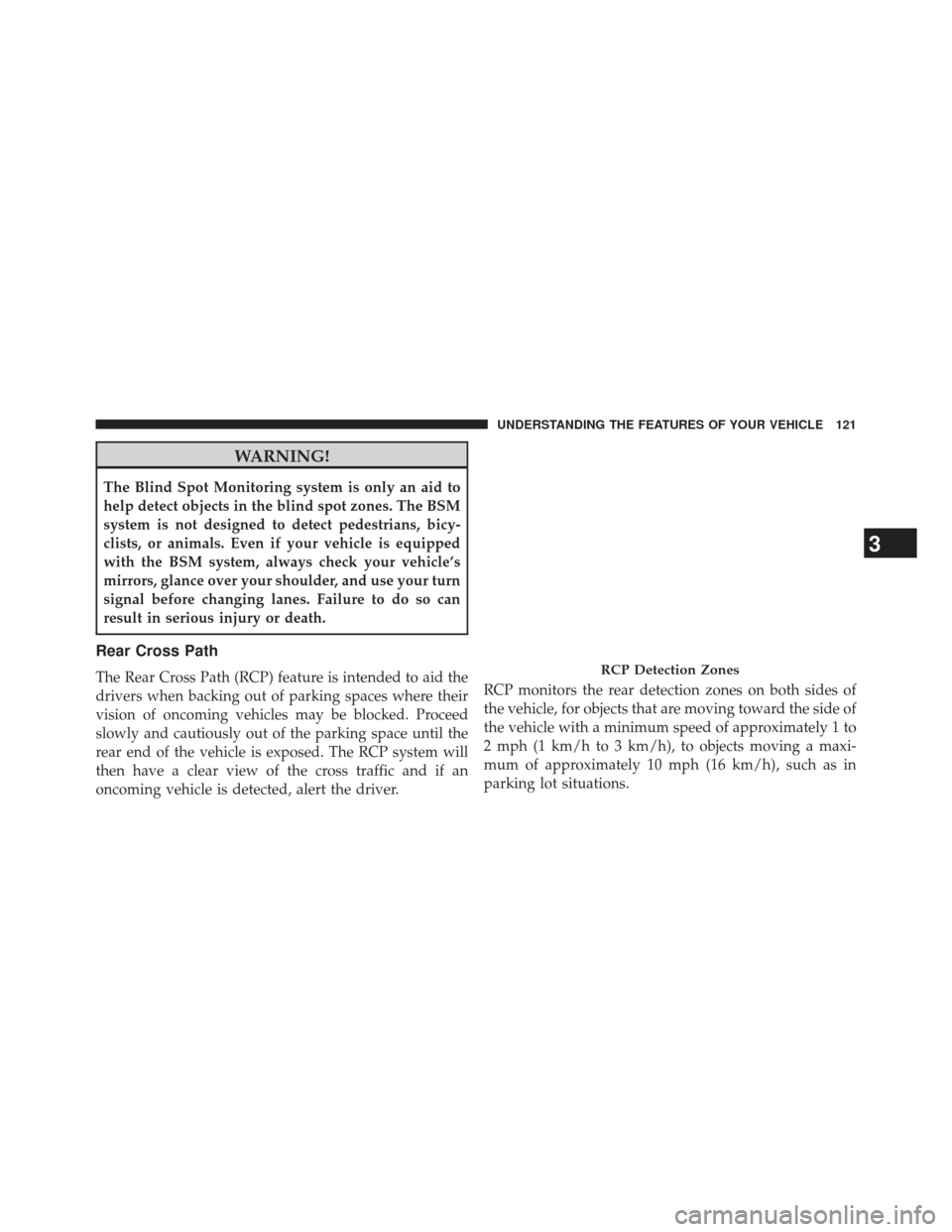
oncoming vehicle is detected, alert the driver.RCP monitors the rear detection zones on both sides of
the vehicle, for objects that are moving toward the side of
the vehicle with a minimum speed of approximately 1 to
2 mph (1 km/h to 3 km/h), to objects moving a maxi-
mum of approximately 10 mph (16 km/h), such as in
parking lot situations.RCP Detection Zones
3
UNDERSTANDING THE FEATURES OF YOUR VEHICLE 121
Page 124 of 631
NOTE:In a parking lot situation, oncoming vehicles can
be obscured by vehicles parked on either side. If the
sensors are blocked by other structures or vehicles, the
system will not be able to alert the driver.
When RCP is on and the vehicle is in REVERSE, the
driver is alerted using both the visual and audible
alarms, including reducing the radio volume.
WARNING!
RCP is not a Back Up Aid system. It is intended to be
used to help a driver detect an oncoming vehicle in a
parking lot situation. Drivers must be careful when
backing up, even when using RCP. Always check
carefully behind your vehicle, look behind you, and be
sure to check for pedestrians, animals, other vehicles,
obstructions, and blind spots before backing up. Fail-
ure to do so can result in serious injury or death.
Modes Of Operation
Three selectable modes of operation are available in the
Uconnect® System. Refer to “Uconnect® Settings” in
“Understanding Your Instrument Panel” for further in-
formation.
Blind Spot Alert
When operating in Blind Spot Alert mode, the BSM
system will provide a visual alert in the appropriate side
view mirror based on a detected object. However, when
the system is operating in RCP, the system will respond
with both visual and audible alerts when a detected
object is present. Whenever an audible alert is requested,
the radio volume is reduced.
122 UNDERSTANDING THE FEATURES OF YOUR VEHICLE
Page 128 of 631
WARNING!
Any voice commanded system should be used only
in safe driving conditions following all applicable
laws, including laws regarding phone use. Your at-
tention should be focused on safely operating the
vehicle. Failure to do so may result in a collision
causing serious injury or death.
The Uconnect® Phone is driven through your Bluetooth®
“Hands-Free Profile” mobile phone. Uconnect® features
Bluetooth® technology - the global standard that enables
different electronic devices to connect to each other without
wires or a docking station, so Uconnect® Phone works no
matter where you stow your mobile phone (be it your purse,pocket, or briefcase), as long as your phone is turned on and
has been paired to the vehicle’s Uconnect® Phone. The
Uconnect® Phone allows up to ten mobile phones or audio
devices to be linked to the system. Only one linked (or
paired) mobile phone and one audio device can be used with
the system at a time. The system is available in English,
Spanish, or French languages.
Uconnect® Phone Button
The Uconnect® Phone
Button is used to get
into the phone mode and make calls, show
recent, incoming, outgoing calls, view phone-
book etc., When you press the button you will
hear a BEEP. The beep is your signal to give a command.
126 UNDERSTANDING THE FEATURES OF YOUR VEHICLE