Page 182 of 543
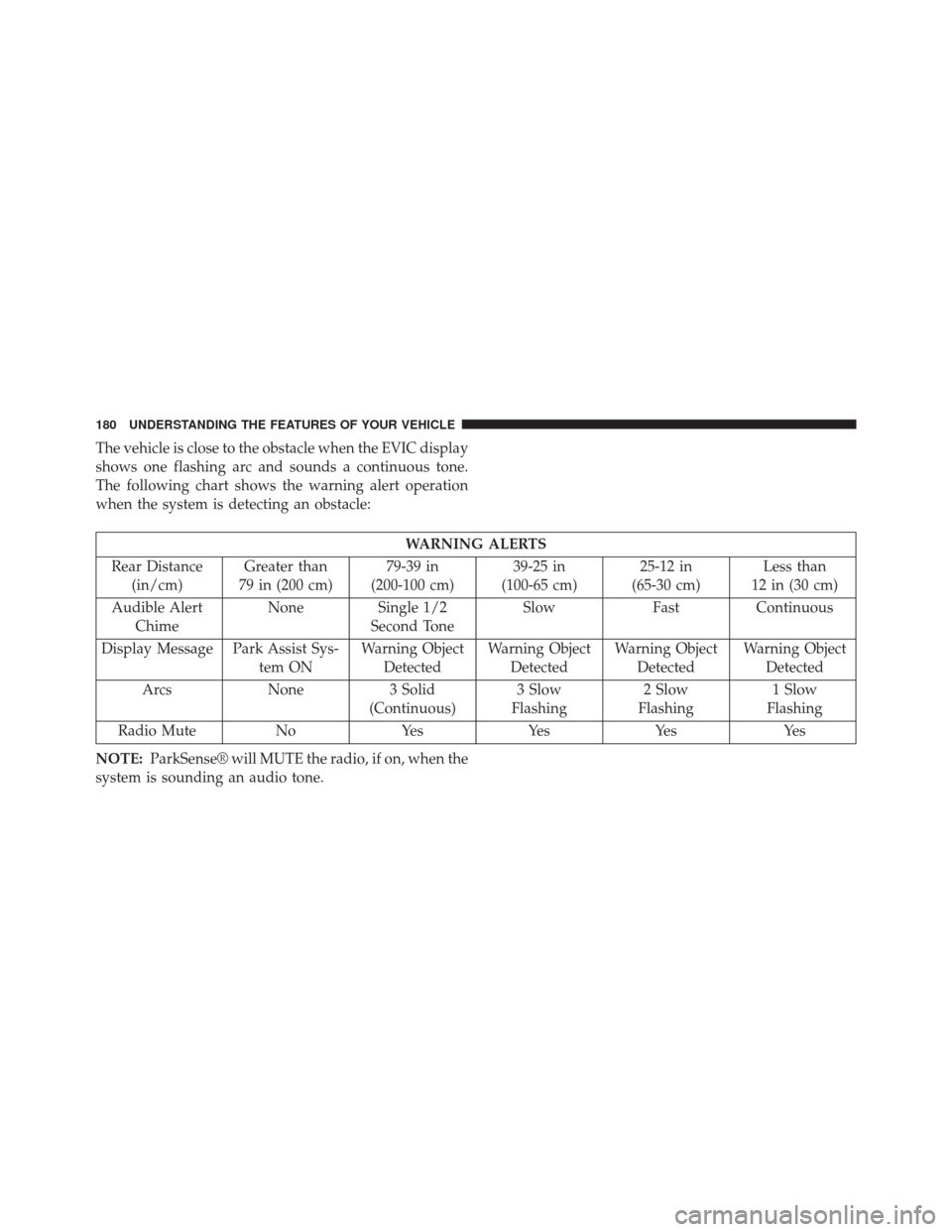
The vehicle is close to the obstacle when the EVIC display
shows one flashing arc and sounds a continuous tone.
The following chart shows the warning alert operation
when the system is detecting an obstacle:
WARNING ALERTS
Rear Distance (in/cm) Greater than
79 in (200 cm) 79-39 in
(200-100 cm) 39-25 in
(100-65 cm) 25-12 in
(65-30 cm) Less than
12 in (30 cm)
Audible Alert Chime None
Single 1/2
Second Tone Slow
FastContinuous
Display Message Park Assist Sys- tem ONWarning Object
Detected Warning Object
Detected Warning Object
Detected Warning Object
Detected
Arcs None3 Solid
(Continuous) 3 Slow
Flashing 2 Slow
Flashing 1 Slow
Flashing
Radio Mute NoYes YesYes Yes
NOTE: ParkSense® will MUTE the radio, if on, when the
system is sounding an audio tone.
180 UNDERSTANDING THE FEATURES OF YOUR VEHICLE
Page 210 of 543
�Uconnect® 730N/430/430N CD/DVD/HDD/
NAV — If Equipped ....................241
▫ Operating Instructions (Voice Command
System) — If Equipped .................241
▫ Operating Instructions (Uconnect® Phone) —
If Equipped ......................... .241
� Uconnect® 130 ........................ .242
▫ Operating Instructions — Radio Mode .......242
▫ Operation Instructions — CD MODE For
CD And MP3 Audio Play ................245
▫ Notes on Playing MP3 Files ..............247
▫ Operation Instructions - Auxiliary Mode .....250
� Uconnect® 130 WITH SATELLITE RADIO .....251
▫ Operating Instructions — Radio Mode .......251▫
Operation Instructions — CD MODE for
CD and MP3 Audio Play ................257
▫ Notes On Playing MP3 Files ..............259
▫ LIST Button (CD Mode for MP3 Play) .......262
▫ INFO Button (CD Mode for MP3 Play) ......263
▫ Operating Instructions (Uconnect® Phone) —
If Equipped ......................... .263
▫ Uconnect® Multimedia (Satellite Radio) —
If Equipped ......................... .264
� iPod®/USB/MP3 CONTROL —
IF EQUIPPED ........................ .268
▫ Connecting The iPod® Or External USB
Device ............................ .269
▫ Using This Feature .....................270
208 UNDERSTANDING YOUR INSTRUMENT PANEL
Page 211 of 543
▫Controlling The iPod® Or External USB
Device Using Radio Buttons ..............270
▫ Play Mode ......................... .271
▫ List Or Browse Mode ...................272
▫ Bluetooth Streaming Audio (BTSA) .........274
� HARMAN KARDON® Logic7® HIGH
PERFORMANCE MULTICHANNEL SURROUND
SOUND SYSTEM WITH DRIVER-SELECTABLE
SURROUND (DSS) — IF EQUIPPED .........276
� STEERING WHEEL AUDIO CONTROLS —
IF EQUIPPED ........................ .277
▫ Radio Operation ..................... .278
▫ CD Player .......................... .278�
CD/DVD DISC MAINTENANCE ...........279
� RADIO OPERATION AND MOBILE
PHONES ........................... .280
� CLIMATE CONTROLS ...................280
▫ Automatic Temperature Control (ATC) ......280
▫ Automatic Operation ...................281
▫ Blower Control ...................... .282
▫ Manual Operation .....................282
▫ Operating Tips ...................... .286
4
UNDERSTANDING YOUR INSTRUMENT PANEL 209
Page 226 of 543
ELECTRONIC VEHICLE INFORMATION CENTER
(EVIC)
The Electronic Vehicle Information Center (EVIC) fea-
tures a driver-interactive display which is located in the
instrument cluster.This system conveniently allows the driver to select a
variety of useful information by pressing the switches
mounted on the steering wheel. The EVIC consists of the
following:
•
System Status
• Vehicle Information Warning Message Displays
• Tire Pressure Monitor System
• Personal Settings (Customer-Programmable Features)
• Compass Display
• Outside Temperature Display
• Trip Computer Functions
• Uconnect® phone (If Equipped)
• Uconnect® gps Screens (If Equipped)
• Audio Mode Display
• Surround Sound Modes (if equipped with Driver-
Selectable Surround [DSS])
Electronic Vehicle Information Center (EVIC)
224 UNDERSTANDING YOUR INSTRUMENT PANEL
Page 244 of 543
Uconnect® 130
Operating Instructions — Radio Mode
NOTE:The ignition switch must be in the ON or ACC
position to operate the radio.
Power Switch/Volume Control (Rotary)
Push the ON/VOLUME control knob to turn on the
radio. Push the ON/VOLUME control knob a second
time to turn off the radio.
Electronic Volume Control
The electronic volume control turns continuously (360 de-
grees) in either direction, without stopping. Turning the
ON/VOLUME control knob to the right increases the vol-
ume, and to the left decreases it.
When the audio system is turned on, the sound will be
set at the same volume level as last played.
SEEK Buttons
Press and release the SEEK buttons to search for the next
listenable station in AM/FM mode. Press the right switch
to seek up and the left switch to seek down. The radio
will remain tuned to the new station until you make
Uconnect® 130
242 UNDERSTANDING YOUR INSTRUMENT PANEL
Page 247 of 543
SET/RND button, the station will continue to play but
will not be stored into pushbutton memory.
You may add a second station to each pushbutton by
repeating the above procedure with this exception: Press
the SET/RND button twice and SET 2 will show in the
display window. Each button can be set for SET 1 and
SET 2 in both AM and FM. This allows a total of 12 AM
and 12 FM stations to be stored into pushbutton memory.
The stations stored in SET 2 memory can be selected by
pressing the pushbutton twice.
Every time a preset button is used, a corresponding
button number will display.
Buttons1-6
These buttons tune the radio to the stations that you
commit to pushbutton memory (12 AM and 12 FM
stations).
DISC Button
Pressing the DISC button will allow you to switch from
AM/FM modes to Disc modes.
Operation Instructions — CD MODE For CD And
MP3 Audio Play
NOTE:
•The ignition switch must be in the ON or ACC position
to operate the radio.
• This radio is capable of playing compact discs (CD),
recordable compact discs (CD-R), rewritable compact
discs (CD-RW), compact discs with MP3 tracks and
multisession compact discs with CD and MP3 tracks.
Inserting Compact Disc(s)
Gently insert one CD into the CD player with the CD
label facing up. The CD will automatically be pulled into
the CD player and the CD icon will illuminate on the
4
UNDERSTANDING YOUR INSTRUMENT PANEL 245
Page 250 of 543
Supported Media (Disc Types)
The MP3 file recording media supported by the radio are
CDDA, CD-R, CD-RW, MP3, and CDDA+MP3.
Supported Medium Formats (File Systems)
The medium formats supported by the radio are ISO 9660
Level 1 and Level 2 and includes the Joliet extension.
When reading discs recorded using formats other than
ISO 9660 Level 1 and Level 2, the radio may fail to read
files properly and may be unable to play the file nor-
mally. UDF and Apple HFS formats are not supported.
The radio uses the following limits for file systems:
•Maximum number of folder levels: 8
• Maximum number of files: 255
• Maximum number of folders. (The radio display of file
names and folder names is limited. For large numbers
of files and/or folders, the radio may be unable to display the file name and folder name, and will assign
a number instead. With a maximum number of files,
exceeding 20 folders will result in this display. With
200 files, exceeding 50 folders will result in this dis-
play.)
• Maximum number of characters in file/folder names:
• Level 1: 12 (including a separator �.�and a three-
character extension)
• Level 2: 31 (including a separator �.�and a three-
character extension)
Multisession disc formats are supported by the radio.
Multisession discs may contain combinations of normal
CD audio tracks and computer files (including MP3 files).
Discs created with an option such as �keep disc open after
writing� are most likely multisession discs. The use of
multisession for CD audio or MP3 playback may result in
longer disc loading times.
248 UNDERSTANDING YOUR INSTRUMENT PANEL
Page 251 of 543
Supported MP3 File Formats
The radio will recognize only files with the *.MP3 exten-
sion as MP3 files. Non-MP3 files named with the *.MP3
extension may cause playback problems. The radio is
designed to recognize the file as an invalid MP3 and will
not play the file.
When using the MP3 encoder to compress audio data to
an MP3 file, the bit rate and sampling frequencies in the
following table are supported. In addition, variable bit
rates (VBR) are also supported. The majority of MP3 files
use a 44.1 kHz sampling rate and a 192, 160, 128, 96 or
VBR bit rate.
MPEG
Specification Sampling Fre-
quency (kHz) Bit Rate (kbps)
MPEG-1 Audio Layer 3 48, 44.1, 32 320, 256, 224,
192, 160, 128,
112, 96, 80, 64, 56, 48, 40, 32
MPEG-2 Audio Layer 3 24, 22.05, 16 160, 128, 144,
112, 96, 80, 64,56, 48, 40, 32, 24, 16, 8
ID3 Tag information for artist, song title, and album title
are supported for version 1 ID3 tags. ID3 version 2 is not
supported by the radios.
Playlist files are not supported. MP3 Pro files are not
supported.
4
UNDERSTANDING YOUR INSTRUMENT PANEL 249