Page 277 of 543

Play Mode
When switched to BTSA mode, some audio devices can
start playing music over the vehicle’s audio system, but
some devices require the music to be initiated on the
device first, then it will get streamed to the Uconnect®
phone system. Seven devices can be paired to the
Uconnect® phone system, but just one can be selected
and played.
Selecting A Different Audio Device
1. Press the PHONE button to begin.
2. After the�Ready�prompt and following the beep, say
�Setup�, then say �Select Audio Devices�.
3. Say the name of the audio device or ask the Uconnect® phone system to list the audio devices.
Next Track
Use the SEEK UP button, or press the VR button on the
radio and say “Next Track”, to jump to the next music
track on your cellular phone.
Previous Track
Use the SEEK DOWN button, or press the VR button on
the radio and say “Previous Track”, to jump to the
previous music track on your cellular phone.
Browse
Browsing is not available on a Bluetooth Streaming
Audio (BTSA) device. Only the current song that is
playing will display info.
4
UNDERSTANDING YOUR INSTRUMENT PANEL 275
Page 278 of 543

HARMAN KARDON® Logic7® HIGH
PERFORMANCE MULTICHANNEL SURROUND
SOUND SYSTEM WITH DRIVER-SELECTABLE
SURROUND (DSS) — IF EQUIPPED
Your vehicle is equipped with a Harman Kardon® audio
system with GreenEdge™ technology that offers superior
sound quality, higher Sound Pressure Levels (SPL) and
reduced energy consumption. The new system utilizes
proprietary amplifier and speaker technologies deliver-
ing substantial increases in component and system effi-
ciency levels.
The 12 Channel Class D GreenEdge high efficiency
amplifier is governed by a high voltage tracking power
supply and drives a 7.4-channel playback architecture.
The Harman Kardon® audio system offers the ability to
choose Logic 7 surround sound for any audio source. The
GreenEdge high-efficiency speaker designs ensure thesystem has higher SPL and a dramatic increase in dy-
namic sound quality. The speakers are tuned for maxi-
mum efficiency and perfectly matched to the amplifier
output stage ensuring state of the art multi-seat surround
sound processing.
Logic7® multichannel surround-sound technology deliv-
ers an immersive, accurate sound-stage to every seating
position This surround effect is available for audio from
any source - AM/FM/CD/ Satellite Radio or dashboard
AUX input; and is activated through the Electronic
Vehicle Information Center (EVIC). Refer to “Driver-
Selectable Surround Sound (DSS)” under “Electronic
Vehicle Information Center (EVIC)” in “Understanding
Your Instrument Panel”.
Selecting “Surround Sound” through the DSS modes
activates the Harman Kardon® Logic7® multichannel
surround-sound technology in your vehicle. Some audio
will sound better in DSS modes, others in Stereo mode.
276 UNDERSTANDING YOUR INSTRUMENT PANEL
Page 279 of 543
When in “Surround Sound” mode, balance is set auto-
matically. Fader control is available in surround mode
but should be set to the center position for optimal
surround performance.
STEERING WHEEL AUDIO CONTROLS — IF
EQUIPPED
The remote sound system controls are located on the rear
surface of the steering wheel. Reach behind the wheel to
access the switches.The right-hand control is a rocker-type switch with a
pushbutton in the center and controls the volume and
mode of the sound system. Pressing the top of the rocker
switch will increase the volume, and pressing the bottom
of the rocker switch will decrease the volume.
Remote Sound System Controls (Back View Of SteeringWheel)
4
UNDERSTANDING YOUR INSTRUMENT PANEL 277
Page 487 of 543
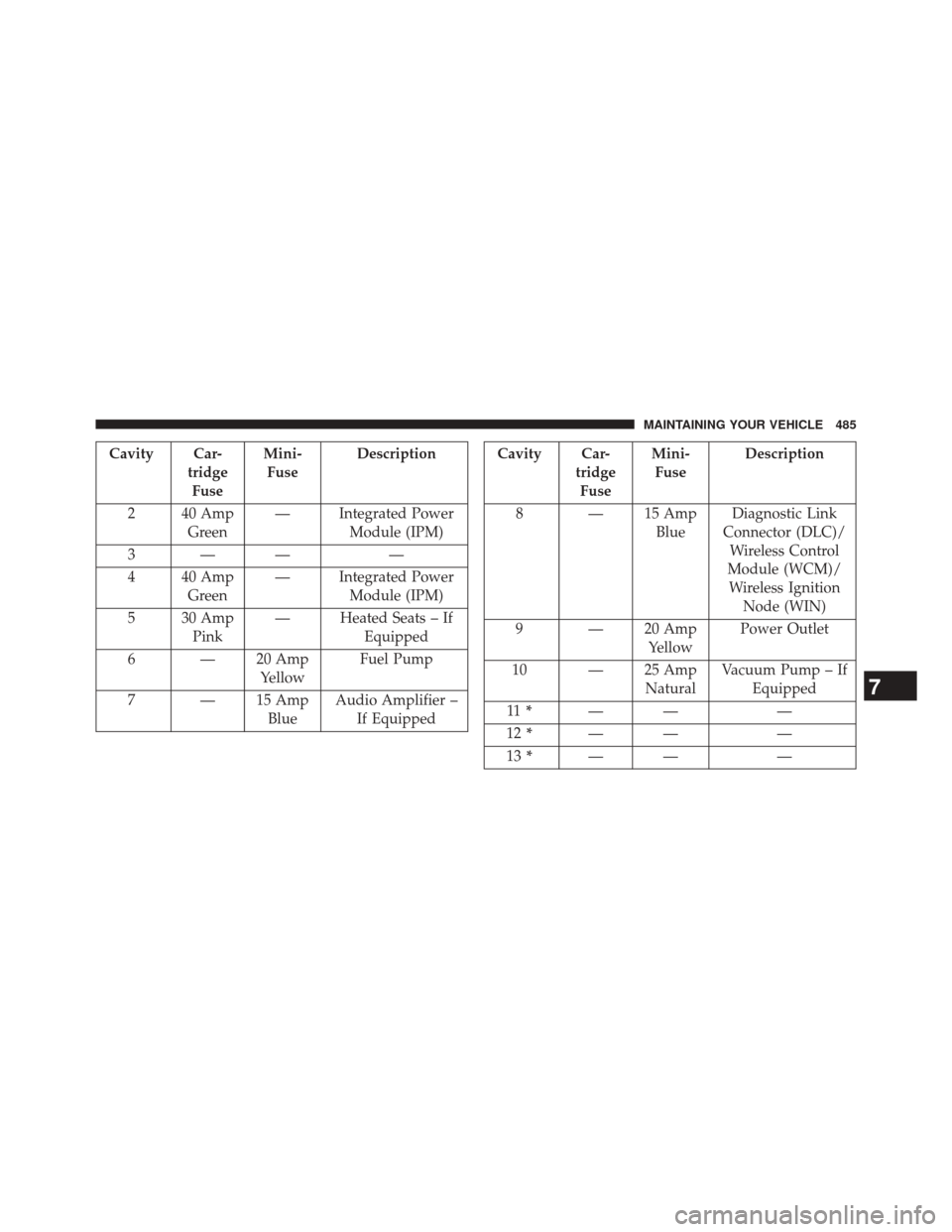
Cavity Car-tridgeFuse Mini-
Fuse Description
2 40 Amp Green — Integrated Power
Module (IPM)
3—— —
4 40 Amp Green — Integrated Power
Module (IPM)
5 30 Amp Pink — Heated Seats – If
Equipped
6 — 20 Amp YellowFuel Pump
7 — 15 Amp BlueAudio Amplifier –
If EquippedCavity Car- tridgeFuse Mini-
Fuse Description
8 — 15 Amp BlueDiagnostic Link
Connector (DLC)/ Wireless Control
Module (WCM)/ Wireless Ignition Node (WIN)
9 — 20 Amp YellowPower Outlet
10 — 25 Amp NaturalVacuum Pump – If
Equipped
11 * —— —
12 * —— —
13 * —— —
7
MAINTAINING YOUR VEHICLE 485
Page 537 of 543
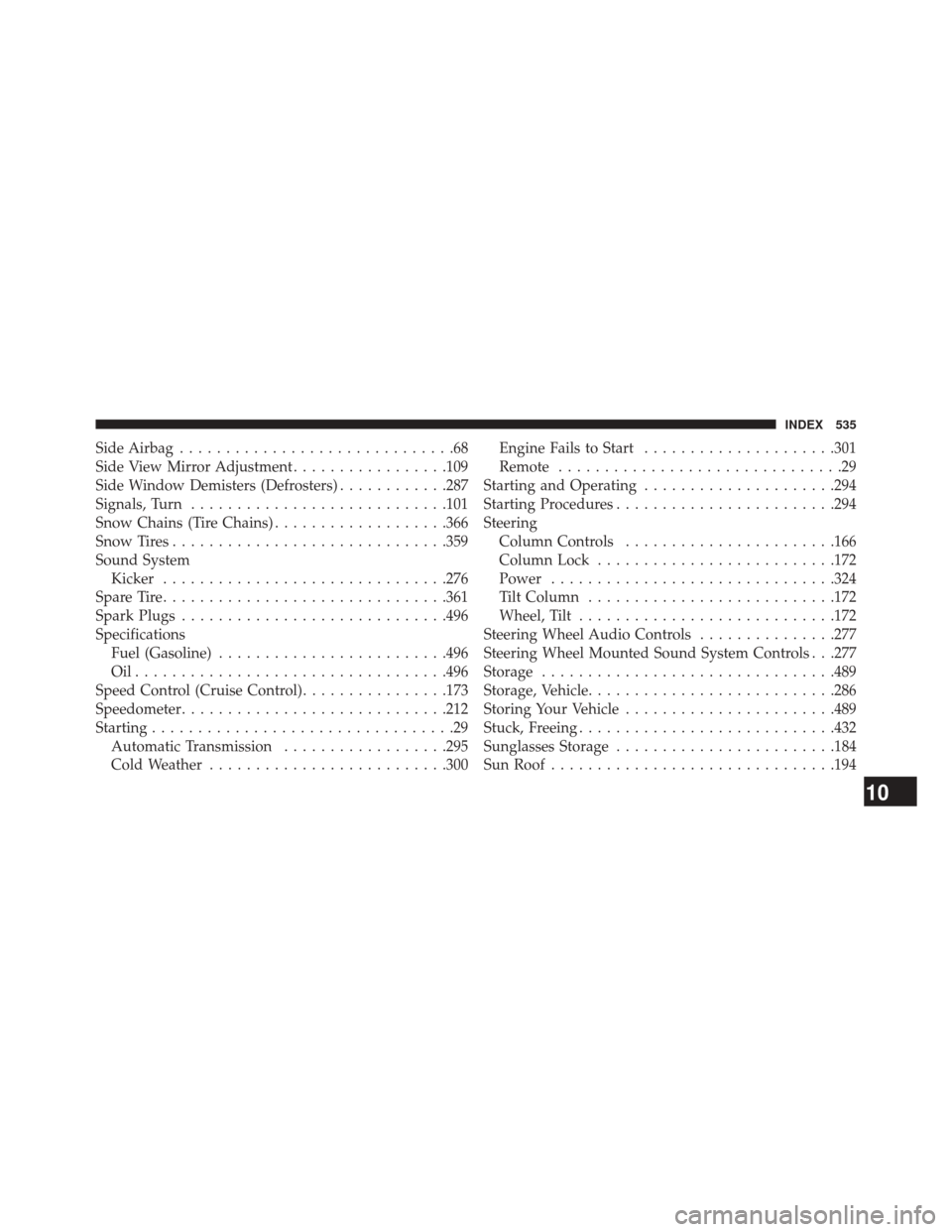
Side Airbag..............................68
Side View Mirror Adjustment .................109
Side Window Demisters (Defrosters) ............287
Signals, Turn ........................... .101
Snow Chains (Tire Chains) ...................366
Snow Tires ............................. .359
Sound System Kicker .............................. .276
Spare Tire .............................. .361
Spark Plugs ............................ .496
Specifications Fuel (Gasoline) ........................ .496
Oil................................. .496
Speed Control (Cruise Control) ................173
Speedometer ............................ .212
Starting .................................29
Automatic Transmission ..................295
Cold Weather ......................... .300Engine Fails to Start
.....................301
Remote ...............................29
Starting and Operating .....................294
Starting Procedures ....................... .294
Steering Column Controls ...................... .166
Column Lock ......................... .172
Power .............................. .324
Tilt Column .......................... .172
Wheel, Tilt ........................... .172
Steering Wheel Audio Controls ...............277
Steering Wheel Mounted Sound System Controls . . .277
Storage ............................... .489
Storage, Vehicle .......................... .286
Storing Your Vehicle ...................... .489
Stuck, Freeing ........................... .432
Sunglasses Storage ....................... .184
Sun Roof .............................. .194
10
INDEX 535