2013 Citroen C3 ignition
[x] Cancel search: ignitionPage 183 of 284
11
Practical information
181
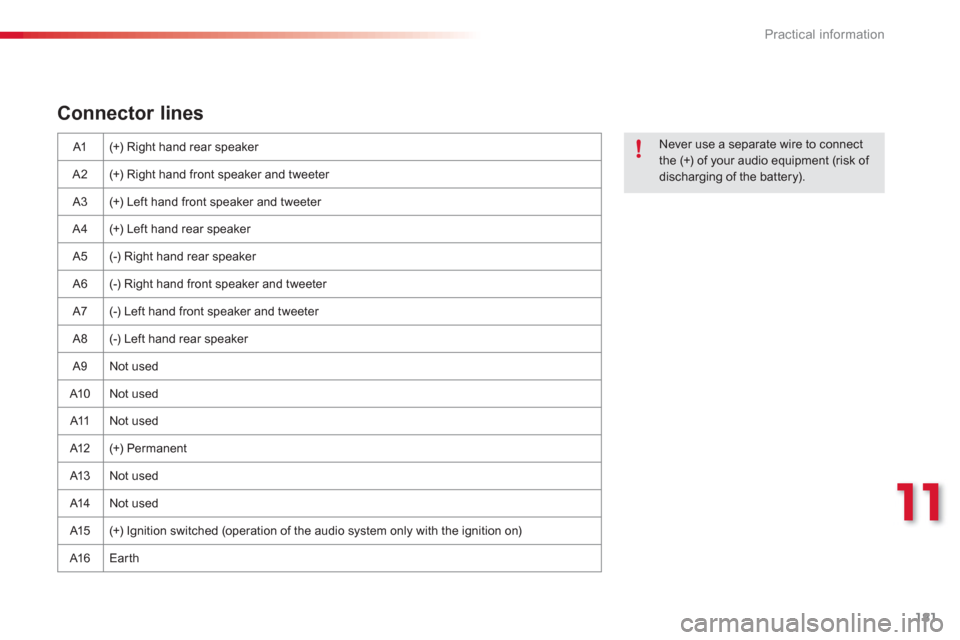
Connector lines
A1 (+) Right hand rear speaker
A2 (+) Right hand front speaker and tweeter
A
3 (+) Left hand front speaker and tweeter
A4 (+) Left hand rear speaker
A
5 (-) Right hand rear speaker
A
6 (-) Right hand front speaker and tweeter
A7
(-) Left hand front speaker and tweeter
A
8 (-) Left hand rear speaker
A
9 Not used
A10 Not used
A11 Not used
A12 (+) Permanent
A13 Not used
A14 Not used
A
15 (+) Ignition switched (operation of the audio system only with the ignition on)
A1
6 Earth
Never use a separate wire to connect
the (+) of your audio equipment (risk of discharging of the battery).
Page 198 of 284

196
EMERGENCY OR ASSISTANCE CALL
CITROËN LOCALISED EMERGENCY CALL
In an emergency, press this button for more than2 seconds. Flashing of the green LED and a voice message confi rm that the call has been made to the CITROËN Emergency service * . gg
Pressing this button again immediately cancels the request. The green LED goes off.
A press
(at any time) of more than 8 seconds on this button, cancels the
request.
CITROËN LOCALISED ASSISTANCE CALL
When the ignition is switched on, thegreen LED comes on for 3 seconds
indicating that the system is operating correctly.
If the oran
ge LED fl ashes: there is asystem fault.
If the orange LED is on continuously: the
backup battery must be replaced.
In either case, contact a CITROËN
dealer. Pressin
g this button again immediately cancels the request.
The cancellation is confi rmed b
y a voice message.
Press this button for more than 2 seconds to request
assistance if the vehicle breaks down.
A voice message confi rms that the call has been made *
.
OPERATION OF THE SYSTEM
The green LED remains on (without fl ashing) when communication is established. It goes off at the end of communication.
This call is dealt with b
y the CITROËN Emergency team which receiveslocating information from the vehicle and can send a detailed alert to theappropriate emergency services. In countries in which the team is not
operational, or when the locating service has been expressly declined,
the call is dealt with directl
y by the emergency services (11 2) without the
vehicle location.
If an impact is detected b
y the airbag control unit, and
independently of the deployment of any airbags, an emergency callis made automatically.
*
These services are sub
ject to conditions and availability.
Consult a CITROËN dealer. If you purchased your vehicle outside the CITROËN dealer network,
we invite
you to have a dealer check the confi guration of these servicesand, if desired, modifi ed to suit your wishes. In a multi-lingual country, confi guration is possible in the offi cial national language of your choice.
For technical reasons, particularl
y to improve the quality of Telematic services to customers, the manufacturer reserves the right to carry out
updates to the vehicle's on-board telematic system.
If you benefi t from the CITROËN eTouch offer, you also have availableadditional services in your MyCITROËN personal space, via the CITROËN y,y
Internet website in your country, accessible on www.citroen.com.
Page 223 of 284

06
221
Enter the same code on the telephone then accept
the connection.
Then accept automatic connection on the telephone to allow the
te
lephone to reconnect automatically every time the vehicle is started.
The abilit
y of the system to connect in only one mode depends on
the telephone. The two modes may both connect by default.
USING THE TELEPHONE
The "Hands-free mode
" should be used in preference if "Streaming" is not desired.
The services available depend on the network, the
SIM card and the compatibility of the Bluetooth telephone used. Check the telephone manual and with your network provider for details of the services available to you.
Select a code for the connection thenconfi rm "OK".
Depending on the type of telephone, the system will ask you to
accept or not the transfer of your contacts.
On return to the vehicle, the last telephone connected
automatically reconnects, within around 30 seconds after switching on the ignition (Bluetooth activated and visible).
To modi
fy the automatic connection mode, remove the pairingand pair the telephone again with the desired mode.
Page 236 of 284
08
234
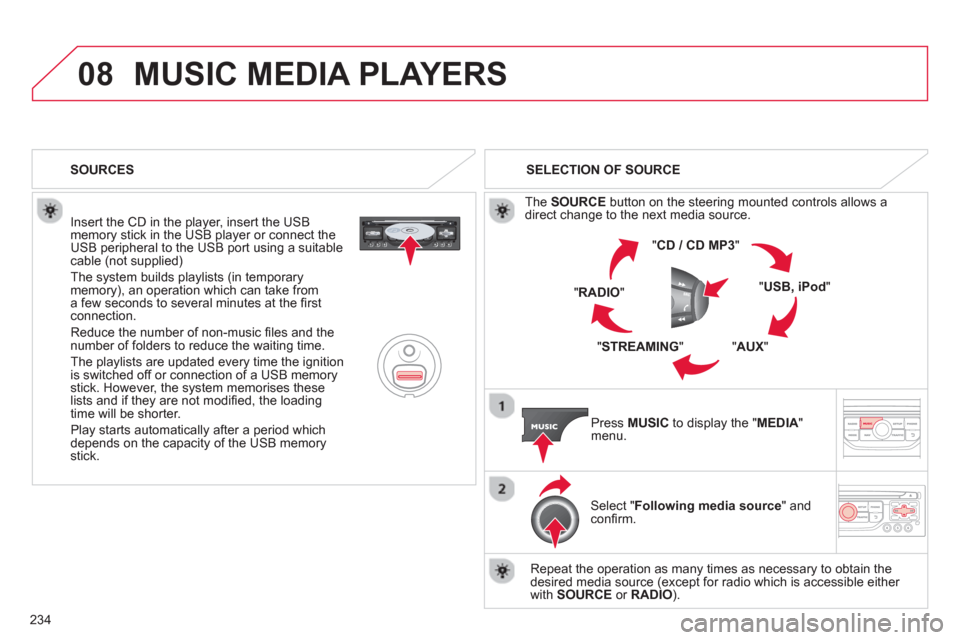
MUSIC MEDIA PLAYERS
Insert the CD in the player, insert the USBmemory stick in the USB player or connect theUSB peripheral to the USB port using a suitablecable (not supplied)
The system builds playlists (in temporarymemory), an operation which can take froma few seconds to several minutes at the fi rstconnection.
R
educe the number of non-music fi les and the number of folders to reduce the waiting time.
The pla
ylists are updated every time the ignition
is switched off or connection of a USB memory stick. However, the system memorises these
lists and if they are not modifi ed, the loadingtime will be shorter.
Pla
y starts automatically after a period which
depends on the capacity of the USB memory stick. SELECTION OF SOURCE
Th
e SOURCE
button on the steering mounted controls allows adirect change to the next media source.
" CD / CD MP
3
"
"
USB, iPod"
"AUX
" "
STREAMING
" "RADIO
"
Pr
ess MUSICto display the "MEDIA
" menu.
Select "Following media source " and confi rm.
Repeat the operation as many times as necessary to obtain the
desired media source (except for radio which is accessible either
with SOURCE
or RADIO). SOURCES
Page 260 of 284

05 USB BOX
The system puts together playlists (temporary memory) createdover a period which depends on the capacity of the USB device.
The other sources are available durin
g this time.
The pla
ylists are updated each time the ignition is switched off or each time a USB memory stick is connected.
When connectin
g for the fi rst time, the classifi cation suggested
is by folder. When you reconnect, the classifi cation selected
previously is retained.
Connect the memory stick to the port, directly or using a lead. If the audio equipment is switched
on, the USB source is detected as soon as it
is connected. Pla
y begins automatically after a
delay which depends on the capacity of the USB memory stick.
The
fi le formats supported are .mp3 (mpeg1 layer 3 only) and .wma (standard 9 only,
128 kbits/sec compression).
Certain playlist formats are supported (.m3u, ...)
On reconnection of the previous memory stickused, play is resumed automatically with the last
track played.
This unit consists o
f a USB port and an auxiliaryJack socket * . The audio fi les are transmitted
from a portable device - digital player or a USBmemory stick - to your Audio system and heard
via the vehicle's speakers.
USB memor
y stick (1.1, 1.2 and 2.0) or Apple®
player of generation 5 or later:
- U
SB memory sticks should be formattedFAT or FAT 32 (NTFS not supported),
- the Apple ®player lead is essential,
- navi
gation through the fi le database is also
possible by means of the steering mountedcontrols.
The list of compatible equipment and the compression rates supported are available from CITROËN dealers. pqpp
USING THE USB BOX
CONNECTING A USB MEMORY STICK
Other Apple®
players of earlier generations and®
players using the MTP protocol * :
- pla
y via Jack-Jack lead only (not supplied),
- navi
gation through the fi le database is from
the portable device.
*
Accordin
g to vehicle.
Page 263 of 284

06
261
BLUETOOTH FUNCTIONS
For safety reasons and because they require prolonged attentionon the part of the driver, the operations for pairing of the Bluetooth mobile telephone with the Bluetooth hands-free system of your
audio equipment must be carried out with the vehicle stationary
and the ignition on.
Pr
ess the MENU button.
A window is displayed with a message that a search is in progress.
Activate the telephone's Bluetooth
function
and ensure that it is "visible to all" (telephone confi guration.
In the menu, select:
- Bluetooth telephone
function -
Audio
- Bluetooth confi
guration
- P
erform a Bluetooth search
The services o
ffered depend on the network, the SIM card and thecompatibility of the Bluetooth equipment used.
Consult your telephone's manual and your operator to fi nd out which
services are available to you.
BLUETOOTH TELEPHONE SCREEN C
The TELEPH
ONE menu permits access to the following functions
in particular: Directory * , Call list, Pairing management.
The
fi rst 4 telephones recognised are displayed in this window.
A virtual ke
ypad is displayed in the screen:enter a code with at least 4 digits.
Confi rm by pressing OK.
A messa
ge that the pairing has been successful appears in thescreen.
Select the telephone to be connected from the list.
Only one
telephone can be connected at a time.
A messa
ge is displayed in the screen of the
telephone chosen. To accept the pairing, enter the same code on the telephone, then confi rm with OK.
The automatic connection authorised is onl
y active after the
telephone has been confi gured.
The directory and the call list can be accessed a
fter thesynchronisation period.
(Available according to model and version)
*
If your telephone is fully compatible.
I
f pairing fails, the number of attempts is not limited. Go to www.citroen.co.uk for more information
(compatibility, more help, ...).
PAIRING A TELEPHONE / FIR
ST CONNECTION
Page 279 of 284
.
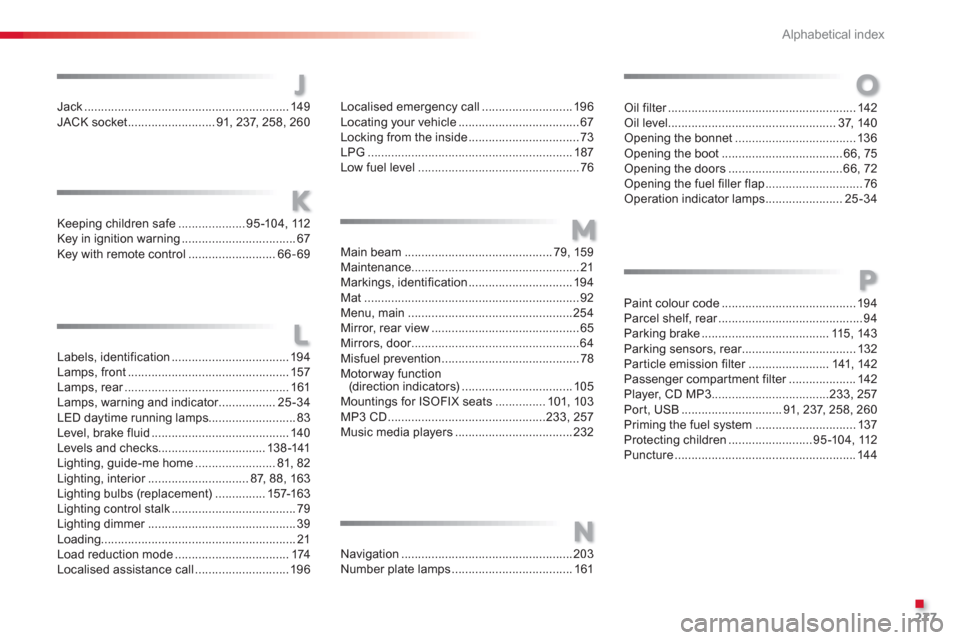
Alphabetical index
277
J
K
Jack .............................................................149JACK socket..........................91, 237, 258,260
L
Keeping children safe....................95-104, 112Key in ignition warning..................................67Key with remote control..........................66-69
M
Labels, identification ................................... 194Lamps, front................................................157Lamps, rear.................................................r161Lamps, warning and indicator.................r25-34LED daytime running lamps..........................83Level, brake fluid ......................................... 140Levels and checks................................138-141Lighting, guide-me home........................81, 82Lighting, interior..............................r87, 88, 163Lighting bulbs (replacement) ...............157-163Lighting control stalk.....................................79Lighting dimmer............................................r39Loading..........................................................21Load reduction mode..................................174Localised assistance call ............................196
Localised emergency call...........................196Locating your vehicle....................................67Locking from the inside .................................73LPG.............................................................187Low fuel level................................................76
N
Main beam ............................................79,159Maintenance..................................................21Markings, identification............................... 194Mat ................................................................92Menu, main.................................................254Mirror, rear view ............................................65Mirrors, door..................................................r64Misfuel prevention.........................................78Motorway function (direction indicators)................................. 105Mountings for ISOFIX seats...............101,103MP3 CD...............................................233, 257Music media players ...................................232
Navigation...................................................203Number plate lamps .................................... 161
Oil filter........................................................r142Oil level ..................................................37,140Opening the bonnet....................................136Opening the boot....................................66, 75Opening the doors ..................................66,72Opening the fuel filler flap.............................76Operation indicator lamps .......................25-34
O
Paint colour code........................................194Parcel shelf, rear...........................................r94Parking brake...................................... 115, 143Parking sensors, rear..................................r132Particle emission filter........................r141,142Passenger compartment filter....................r142Player, CD MP3...................................233, 257Port, USB..............................91,237, 258, 260Priming the fuel system ..............................137Protecting children.........................95-104, 112Puncture......................................................144
P