2013 CHEVROLET CORVETTE ESP
[x] Cancel search: ESPPage 33 of 414
Black plate (3,1)Chevrolet Corvette Owner Manual - 2013 - crc2 - 11/8/12
Keys, Doors, and Windows 2-3
.Check the location. Other
vehicles or objects may be
blocking the signal.
.Check the transmitter's battery.
See“Battery Replacement” later
in this section.
.If the transmitter is still not
working correctly, see your
dealer or a qualified technician
for service.
Remote Keyless Entry
(RKE) System Operation
The Remote Keyless Entry (RKE)
transmitter functions work up to
30 m (100 ft) away from the vehicle.
There are other conditions that can
affect the performance of the
transmitter. See Remote Keyless
Entry (RKE) System on page 2‑2.
The vehicle comes with
two transmitters. Each transmitter
will have a number on top of it,
“1” or“2.” These numbers
correspond to the driver of the
vehicle. For example, the memory seat position for driver 1 will be
recalled when using the transmitter
labeled
“1,”if enabled through the
DIC. See Memory Seats on
page 3‑4 andVehicle
Personalization on page 5‑51 for
more information.
Keyless Unlocking
Press the door handle sensor to
unlock and open the doors if the
RKE transmitter is within range. See
Door Locks on page 2‑7 and
“Passive Door Unlock” under
Vehicle Personalization on
page 5‑51 for additional information.
Keyless Locking
The doors lock after several
seconds if all doors are closed and
at least one RKE transmitter has
been removed from the interior of
the vehicle. To customize whether
the doors automatically lock when
exiting the vehicle, see “Passive
Door Locking” underVehicle
Personalization on page 5‑51 for
additional information. Keyless Trunk Opening
Press the hatch/trunk release button
located on the rear of the hatch/
trunk lid above the license plate to
open the trunk if the RKE
transmitter is within range. See
Hatch on page 2‑10
for additional
information.
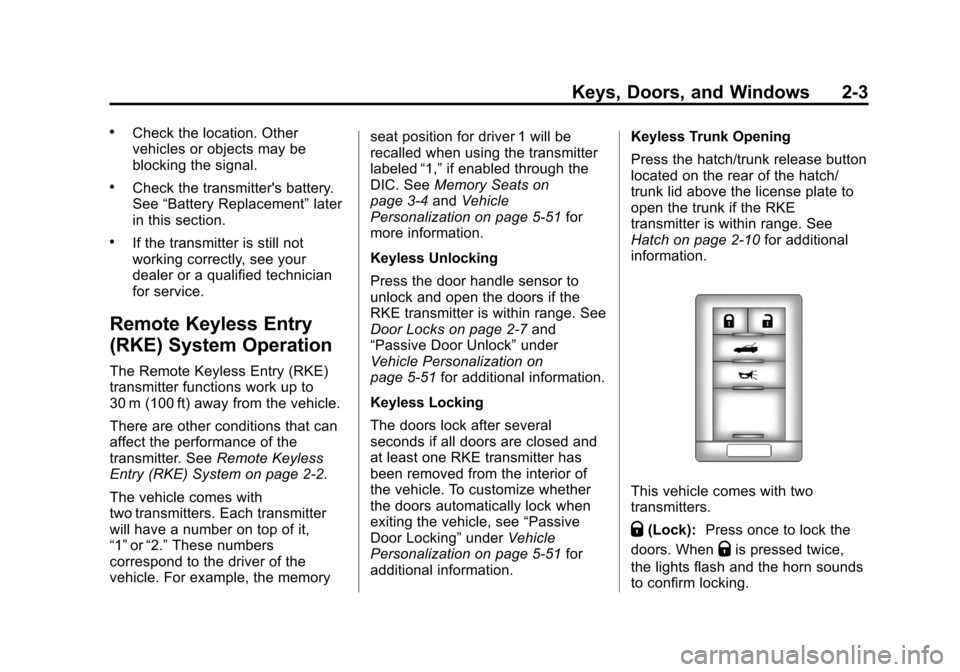
This vehicle comes with two
transmitters.
Q(Lock): Press once to lock the
doors. When
Qis pressed twice,
the lights flash and the horn sounds
to confirm locking.
Page 37 of 414
Black plate (7,1)Chevrolet Corvette Owner Manual - 2013 - crc2 - 11/8/12
Keys, Doors, and Windows 2-7
Door Locks
{WARNING
Unlocked doors can be
dangerous.
.Passengers—especially
children —can easily open
the doors and fall out of a
moving vehicle. When a door
is locked it will not open. You
increase the chance of being
thrown out of the vehicle in a
crash if the doors are not
locked. So, wear safety belts
properly and lock the doors
whenever you drive.
.Young children who get into
unlocked vehicles may be
unable to get out. A child can
be overcome by extreme heat
and can suffer permanent
injuries or even death from
heat stroke. Always lock your
vehicle whenever you
leave it.
(Continued)
WARNING (Continued)
.Outsiders can easily enter
through an unlocked door
when you slow down or stop
your vehicle. Locking your
doors can help prevent this
from happening.
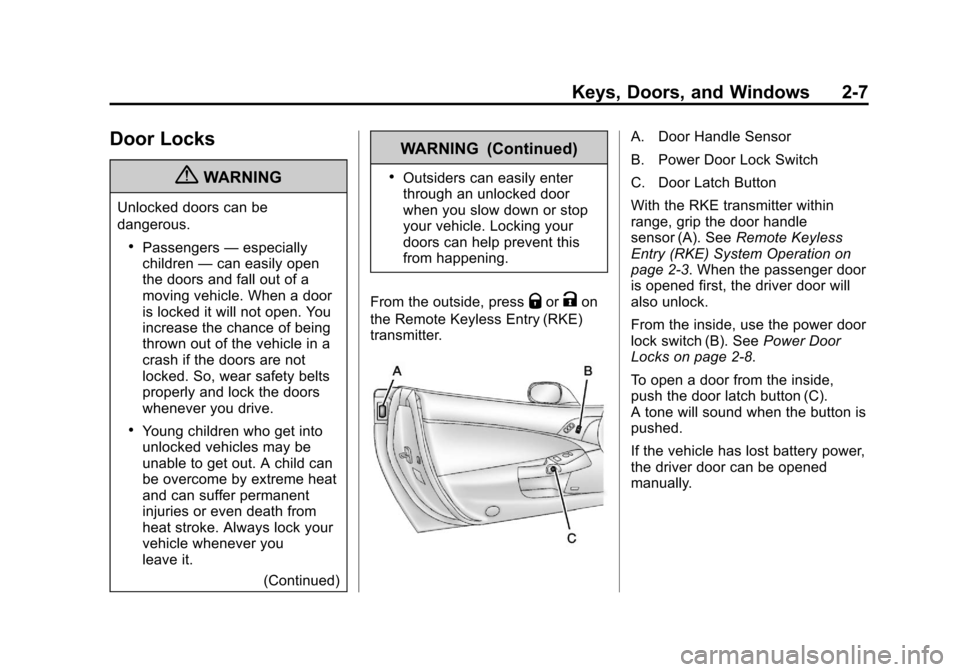
From the outside, press
QorKon
the Remote Keyless Entry (RKE)
transmitter.
A. Door Handle Sensor
B. Power Door Lock Switch
C. Door Latch Button
With the RKE transmitter within
range, grip the door handle
sensor (A). See Remote Keyless
Entry (RKE) System Operation on
page 2‑3. When the passenger door
is opened first, the driver door will
also unlock.
From the inside, use the power door
lock switch (B). See Power Door
Locks on page 2‑8.
To open a door from the inside,
push the door latch button (C).
A tone will sound when the button is
pushed.
If the vehicle has lost battery power,
the driver door can be opened
manually.
Page 46 of 414

Black plate (16,1)Chevrolet Corvette Owner Manual - 2013 - crc2 - 11/8/12
2-16 Keys, Doors, and Windows
Interior Mirrors
Automatic Dimming
Rearview Mirror
Adjust the rearview mirror to clearly
view the area behind the vehicle.
The mirror will automatically reduce
glare of the headlamps from behind.
The dimming feature and the
indicator light come on when the
vehicle is started. There may be an
on and off setting on the mirror.
P(On/Off):Press to turn this
feature on or off.
Vehicles with OnStar have three
additional control buttons for the
OnStar system. See OnStar
Overview on page 14‑1.
Map Lamps
If the mirror has map lamps, they
are located at the bottom of the
mirror. To manually turn the lamps
on or off, press the button next to
each lamp.
Cleaning the Mirror
Do not spray glass cleaner directly
on the mirror. Use a soft towel
dampened with water.
Windows
{WARNING
Never leave a child, a helpless
adult, or a pet alone in a vehicle,
especially with the windows
closed in warm or hot weather.
They can be overcome by the
extreme heat and suffer
permanent injuries or even death
from heat stroke.
Page 64 of 414

Black plate (4,1)Chevrolet Corvette Owner Manual - 2013 - crc2 - 11/8/12
3-4 Seats and Restraints
{WARNING
Sitting in a reclined position when
the vehicle is in motion can be
dangerous. Even when buckled
up, the safety belts cannot do
their job.
The shoulder belt will not be
against your body. Instead, it will
be in front of you. In a crash, you
could go into it, receiving neck or
other injuries.
The lap belt could go up over
your abdomen. The belt forces
would be there, not at your pelvic
bones. This could cause serious
internal injuries.
For proper protection when the
vehicle is in motion, have the
seatback upright. Then sit well
back in the seat and wear the
safety belt properly.
Do not have a seatback reclined if
the vehicle is moving.
Memory Seats
If available, the controls on the
driver door are used to program and
recall memory settings for the driver
seat, outside mirrors, and the
telescopic steering column (if
equipped).
The numbers on the back of the
Remote Keyless Entry (RKE)
transmitters correspond to the
numbers on the memory buttons.
Page 67 of 414
Black plate (7,1)Chevrolet Corvette Owner Manual - 2013 - crc2 - 11/8/12
Seats and Restraints 3-7
{WARNING
If either seatback is not locked, it
could move forward in a sudden
stop or crash. That could cause
injury to the person sitting there.
Always push and pull on the
seatbacks to be sure they are
locked.
To return a seatback to the sitting
position, lift up on the latch, raise
the seatback, and push the
seatback rearward. Push and pull
on the seatback to make sure it is
locked in place.
Heated Front Seats
{WARNING
If you cannot feel temperature
change or pain to the skin, the
seat heater may cause burns. To
reduce the risk of burns, people
with such a condition should use
care when using the seat heater,
especially for long periods of
time. Do not place anything on
the seat that insulates against
heat, such as a blanket, cushion,
cover, or similar item. This may
cause the seat heater to
overheat. An overheated seat
heater may cause a burn or may
damage the seat.
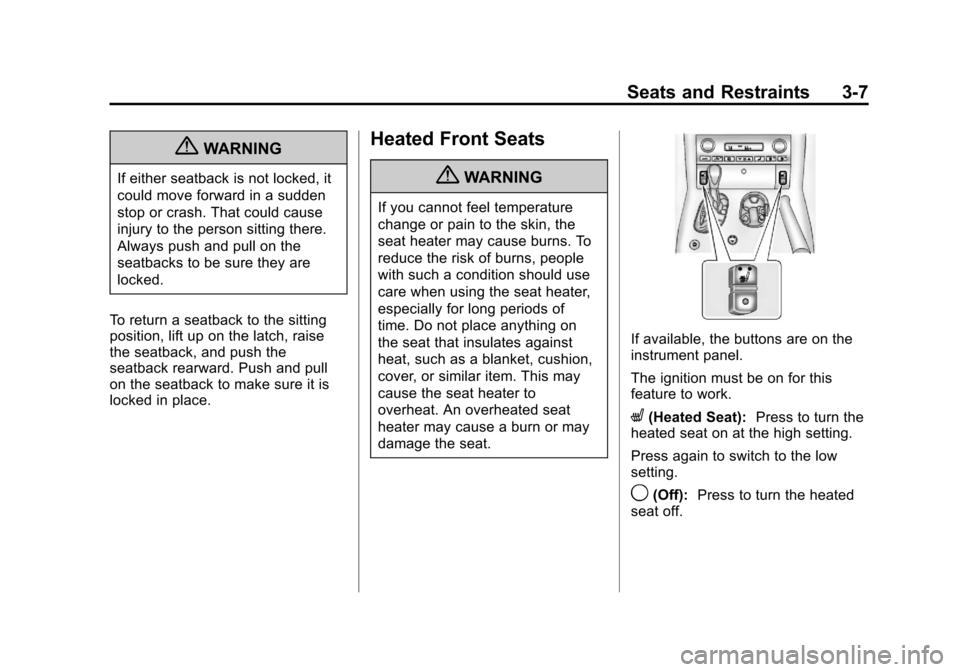
If available, the buttons are on the
instrument panel.
The ignition must be on for this
feature to work.
L(Heated Seat): Press to turn the
heated seat on at the high setting.
Press again to switch to the low
setting.
9(Off): Press to turn the heated
seat off.
Page 136 of 414
Black plate (32,1)Chevrolet Corvette Owner Manual - 2013 - crc2 - 11/8/12
5-32 Instruments and Controls
Within each mode, the display, can
be further customized by pressing
the PAGE button. Pressing this
button in each mode will turn off and
on the following:
.Street Mode—No tachometer,
circular tachometer, and linear
tachometer.
.Track Modes 1 and 2 —No
minor gauge, coolant
temperature, transmission oil
temperature (Automatic
Transmission only), engine oil
temperature, engine oil
pressure, and boost gauge.
While in Track Mode 1 or 2, the
maximum G value achieved
during the current ignition cycle
can be displayed by pressing
and holding the PAGE button.
The maximum G display will be
shown until the PAGE button is
released. The maximum G value
display will be identical to the
normal G value display,
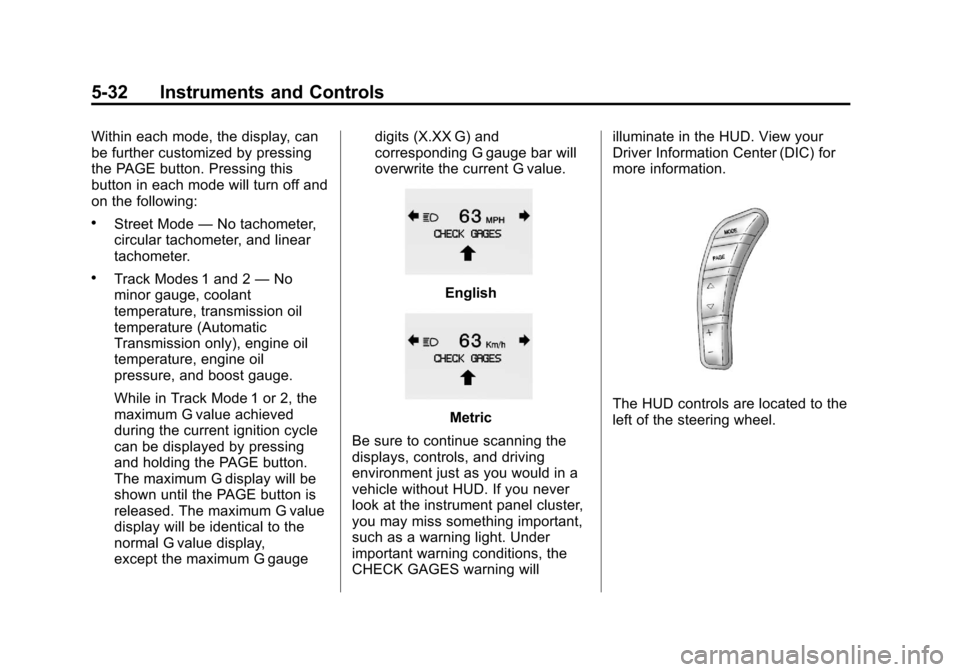
except the maximum G gauge digits (X.XX G) and
corresponding G gauge bar will
overwrite the current G value.English
Metric
Be sure to continue scanning the
displays, controls, and driving
environment just as you would in a
vehicle without HUD. If you never
look at the instrument panel cluster,
you may miss something important,
such as a warning light. Under
important warning conditions, the
CHECK GAGES warning will illuminate in the HUD. View your
Driver Information Center (DIC) for
more information.The HUD controls are located to the
left of the steering wheel.
Page 156 of 414
Black plate (52,1)Chevrolet Corvette Owner Manual - 2013 - crc2 - 11/8/12
5-52 Instruments and Controls
.The instrument panel cluster
dimming level and last selected
DIC display.
Separate personalization settings
are saved for two different drivers.
One of the Remote Keyless Entry
(RKE) transmitters is assigned to
driver 1. The other is assigned to
driver 2. The backs of the RKE
transmitters are labelled 1 or 2 to
correspond to each driver.
The current driver's preferences are
recalled when one of the following
occurs:
.The lock or unlock button on the
RKE transmitter, labelled 1 or 2,
is pressed.
.The appropriate memory
button, 1 or 2, located on the
driver door is pressed. See
Memory Seats on page 3‑4 for
more information.
.A valid RKE transmitter is
detected upon opening the
driver door. If more than one valid RKE
transmitter is detected upon opening
the driver door, the driver
preferences for the lowest driver
number will be recalled.
If an RKE transmitter that is not
labelled 1 or 2 is used, the
personalization system will not
recognize the transmitter. The Driver
Information Center (DIC) will not
display a current driver number and
the features that are normally
programmed through the DIC will be
set to the default states. Also, if the
OPTION button is pressed, the DIC
does not display the menus used to
set personalizations, but instead
displays OPTIONS UNAVAILABLE
for a few seconds.
Entering the Personal
Options Menu
To enter the personal options menu,
use the following steps:
1. If you have an automatic
transmission vehicle, turn the
vehicle on with the shift lever in
P (Park).
If you have a manual
transmission vehicle, turn the
vehicle on with the parking
brake set.
To avoid excessive drain on the
battery, it is recommended that
the headlamps are turned off.
2. Press the OPTION button and you will enter the PERSONAL
OPTIONS menu.
Page 162 of 414

Black plate (58,1)Chevrolet Corvette Owner Manual - 2013 - crc2 - 11/8/12
5-58 Instruments and Controls
Auto Unlock:This option allows
you to select whether the driver
door, both doors, or neither door
automatically unlocks when the shift
lever is moved into P (Park) for
automatic transmission vehicles or
when the ignition is turned off or is
in RAP for manual transmission
vehicles.
Press the OPTION button until
AUTO UNLOCK appears on the
display, then press the RESET
button to scroll through the following
modes:
.OFF
.DRIVER
.BOTH (default)
If you choose OFF, this option will
turn off.
If you choose DRIVER, on
automatic transmission vehicles, the
driver door will automatically unlock
when the shift lever is moved into
P (Park). On manual transmission vehicles, the driver door will
automatically unlock when the
ignition is turned off or is in RAP.
If you choose BOTH, on automatic
transmission vehicles, both doors
will automatically unlock when the
shift lever is moved into P (Park).
On manual transmission vehicles,
both doors will automatically unlock
when the ignition is turned off or is
in RAP.
When the mode you want is
selected, press the OPTION button
to set your choice and advance to
the next personal option.
Language:
This option allows you
to select the language the DIC, the
Head-Up Display (HUD), if your
vehicle has this feature, and the
radio uses to display messages.
Each language mode will be
displayed in its own language. For
example, English will be displayed
as ENGLISH, Spanish as
ESPANOL, etc. If your vehicle has
the navigation system, you will not
have the Japanese language mode. Press the OPTION button until
LANGUAGE appears on the display,
then press the RESET button to
scroll through the following modes:
.ENGLISH (default)
.DEUTSCH (German)
.FRANCAIS (French)
.ITALIANO (Italian)
.ESPANOL (Spanish)
.JAPANESE
If you choose a language that you
do not understand, press the
OPTION and RESET buttons for
five seconds. The DIC will begin
displaying all of the various
languages one by one for as long
as the buttons are pressed. When
the desired language is displayed,
release the buttons and the DIC will
set to this language.
When the mode you want is
selected, press the OPTION button
to set your choice and advance to
the next personal option.