2013 CHEVROLET CORVETTE display
[x] Cancel search: displayPage 162 of 414

Black plate (58,1)Chevrolet Corvette Owner Manual - 2013 - crc2 - 11/8/12
5-58 Instruments and Controls
Auto Unlock:This option allows
you to select whether the driver
door, both doors, or neither door
automatically unlocks when the shift
lever is moved into P (Park) for
automatic transmission vehicles or
when the ignition is turned off or is
in RAP for manual transmission
vehicles.
Press the OPTION button until
AUTO UNLOCK appears on the
display, then press the RESET
button to scroll through the following
modes:
.OFF
.DRIVER
.BOTH (default)
If you choose OFF, this option will
turn off.
If you choose DRIVER, on
automatic transmission vehicles, the
driver door will automatically unlock
when the shift lever is moved into
P (Park). On manual transmission vehicles, the driver door will
automatically unlock when the
ignition is turned off or is in RAP.
If you choose BOTH, on automatic
transmission vehicles, both doors
will automatically unlock when the
shift lever is moved into P (Park).
On manual transmission vehicles,
both doors will automatically unlock
when the ignition is turned off or is
in RAP.
When the mode you want is
selected, press the OPTION button
to set your choice and advance to
the next personal option.
Language:
This option allows you
to select the language the DIC, the
Head-Up Display (HUD), if your
vehicle has this feature, and the
radio uses to display messages.
Each language mode will be
displayed in its own language. For
example, English will be displayed
as ENGLISH, Spanish as
ESPANOL, etc. If your vehicle has
the navigation system, you will not
have the Japanese language mode. Press the OPTION button until
LANGUAGE appears on the display,
then press the RESET button to
scroll through the following modes:
.ENGLISH (default)
.DEUTSCH (German)
.FRANCAIS (French)
.ITALIANO (Italian)
.ESPANOL (Spanish)
.JAPANESE
If you choose a language that you
do not understand, press the
OPTION and RESET buttons for
five seconds. The DIC will begin
displaying all of the various
languages one by one for as long
as the buttons are pressed. When
the desired language is displayed,
release the buttons and the DIC will
set to this language.
When the mode you want is
selected, press the OPTION button
to set your choice and advance to
the next personal option.
Page 163 of 414
Black plate (59,1)Chevrolet Corvette Owner Manual - 2013 - crc2 - 11/8/12
Instruments and Controls 5-59
Personalize Name:This option
allows you to type in a name or
greeting that will appear on the DIC
display whenever the corresponding
RKE transmitter (1 or 2) is used or
one of the memory buttons (1 or 2)
located on the driver door is
pressed.
Press the OPTION button until
PERSONALIZE NAME appears on
the display, then press the RESET
button to scroll through the following
modes:
.YES
.NO (default)
If you choose YES, you can type in
a name that will appear on the DIC
display.
To program a name, use the
following procedure:
1. Enter the PERSONAL OPTIONS menu and select the driver
number (1 or 2) that you would
like to program by following the instructions listed previously
under
“Entering the Personal
Options Menu”.
2. Press the OPTION button until the PERSONALIZE NAME
option appears on the display.
3. Select YES under PERSONALIZE NAME by
pressing the RESET button.
4. Press the OPTION button and a cursor will display where you
can insert a letter.
5. Press the OPTION button again until the letter you want is
displayed. To scroll through the
letters faster and without a
beeping noise, keep the
OPTIONS button depressed.
There are alpha/numeric
characters and a blank space
available. 6. Press the RESET button to
select the letter of your choice
and proceed on to the next
space to the right.
If you make a mistake and would
like to clear or replace a letter,
perform the following steps:
6.1. Press the RESET button to reach the letter you would
like to change.
6.2. Press the OPTION button to scroll through the letter
choices.
6.3. Press the RESET button to select the letter and
proceed on to the next
space to the right.
7. Repeat Steps 5 and 6 until the name or greeting you want is
complete. After the name or
greeting is complete, keep
pressing the RESET button until
the display turns blank and exits
out of this option. You can
program up to 20 characters.
Page 164 of 414
Black plate (60,1)Chevrolet Corvette Owner Manual - 2013 - crc2 - 11/8/12
5-60 Instruments and Controls
If you choose NO, this option will
turn off.
If a customized name or greeting is
not programmed, the DIC display
will show Driver 1 or Driver 2 to
correspond with either the number
on the back of the RKE
transmitter (1 or 2) being used or to
the memory button (1 or 2) that is
pressed.
PERSONALIZE NAME is the last
option available to program in the
PERSONAL OPTIONS menu.
Pressing the OPTION button after
this setting will exit you from the
PERSONAL OPTIONS menu. The
last item you were in prior to
entering PERSONAL OPTIONS will
then display on the DIC.Universal Remote
System
SeeRadio Frequency Statement on
page 13‑20 for information
regarding Part 15 of the Federal
Communications Commission (FCC)
rules and Industry Canada
Standards RSS-210/220/310.
The FCC Grant of Equipment
Authorization Certificate number is
KOBGTE12C.
The Canadian Registration ID
number is 3521A-GTE12C.
Universal Remote System
Programming
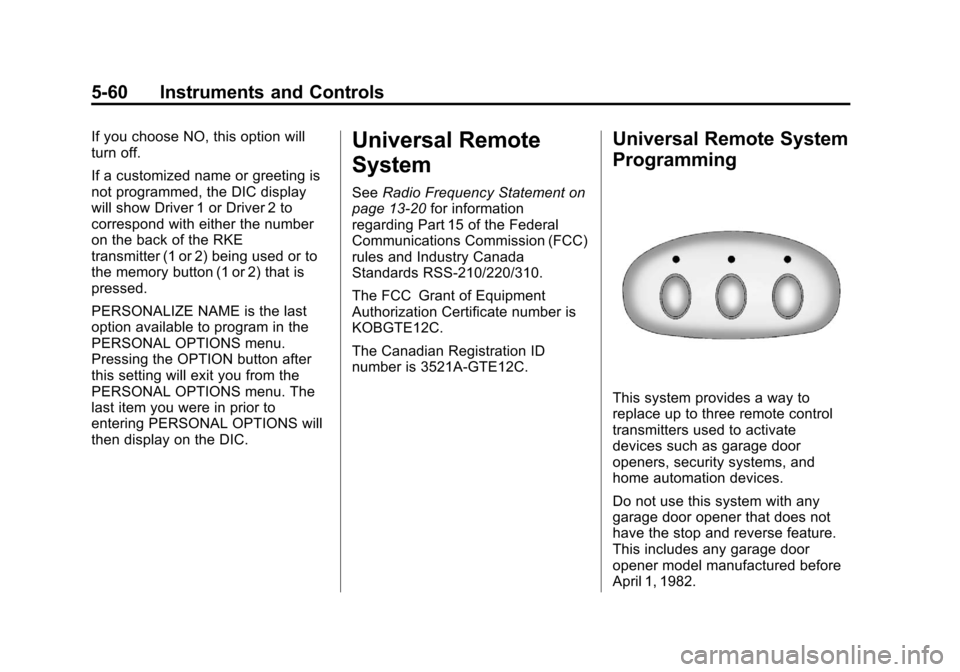
This system provides a way to
replace up to three remote control
transmitters used to activate
devices such as garage door
openers, security systems, and
home automation devices.
Do not use this system with any
garage door opener that does not
have the stop and reverse feature.
This includes any garage door
opener model manufactured before
April 1, 1982.
Page 173 of 414
Black plate (3,1)Chevrolet Corvette Owner Manual - 2013 - crc2 - 11/8/12
Lighting 6-3
instrument panel cluster may not be
as bright as usual. Make sure the
instrument panel brightness knob is
in the full bright position. See
Instrument Panel Illumination
Control on page 6‑6for more
information.
If it is dark enough outside and the
exterior lamp control is off, a
HEADLAMPS SUGGESTED
message will display on the Driver
Information Center (DIC). See Lamp
Messages on page 5‑42.
Turning the exterior lamp control to
off a second time, or turning on the
headlamps will remove the
HEADLAMPS SUGGESTED
message in the DIC. If the parking
lamps or the fog lamps were turned
on instead, the HEADLAMPS
SUGGESTED message will
continue to be displayed.
The regular headlamp system
should be turned on when needed.
To turn off the DRL, turn the exterior
lamp control to the off position or
shift into P (Park). The DRL will stay off until the control is toggled again
or the vehicle is shifted out of
P (Park).
This procedure applies only to
vehicles first sold in the United
States.
Twilight Sentinel
Twilight Sentinel®is an automatic
headlamp system. When activated,
this feature turns your headlamps
and parking lamps on and off by
sensing how dark it is outside.
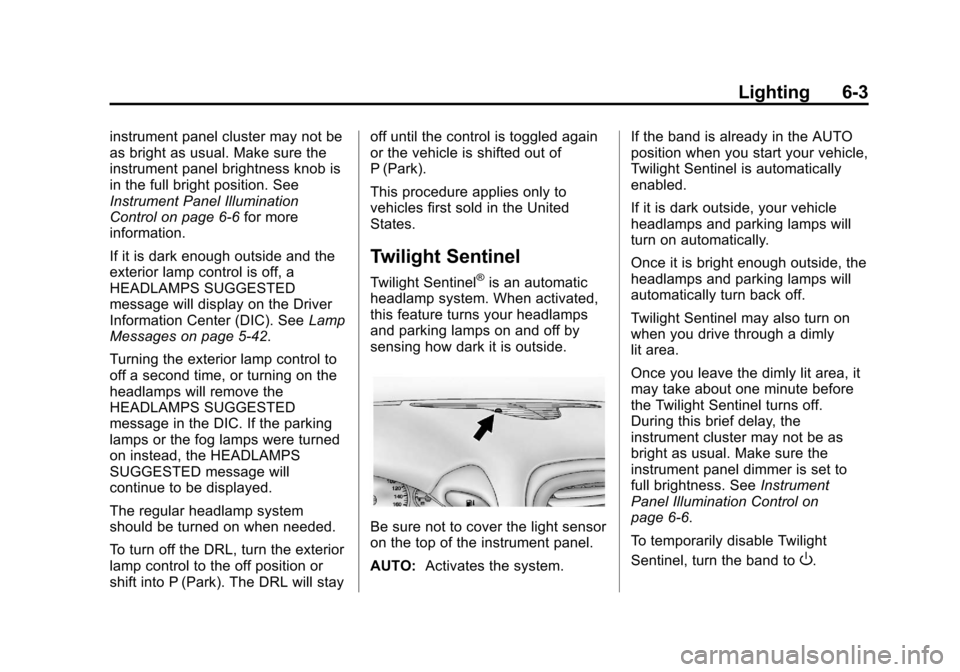
Be sure not to cover the light sensor
on the top of the instrument panel.
AUTO: Activates the system. If the band is already in the AUTO
position when you start your vehicle,
Twilight Sentinel is automatically
enabled.
If it is dark outside, your vehicle
headlamps and parking lamps will
turn on automatically.
Once it is bright enough outside, the
headlamps and parking lamps will
automatically turn back off.
Twilight Sentinel may also turn on
when you drive through a dimly
lit area.
Once you leave the dimly lit area, it
may take about one minute before
the Twilight Sentinel turns off.
During this brief delay, the
instrument cluster may not be as
bright as usual. Make sure the
instrument panel dimmer is set to
full brightness. See
Instrument
Panel Illumination Control on
page 6‑6.
To temporarily disable Twilight
Sentinel, turn the band to
O.
Page 180 of 414
Black plate (2,1)Chevrolet Corvette Owner Manual - 2013 - crc2 - 11/8/12
7-2 Infotainment System
Theft-Deterrent Feature
TheftLock®is designed to
discourage theft of the vehicle's
radio by learning a portion of the
Vehicle Identification Number (VIN).
The radio does not operate and
LOCKED displays if the radio is
stolen or moved to a different
vehicle.
When the when the ignition is in the
off position, a blinking red light on
the upper left side of the radio
indicates that TheftLock is armed.
Overview
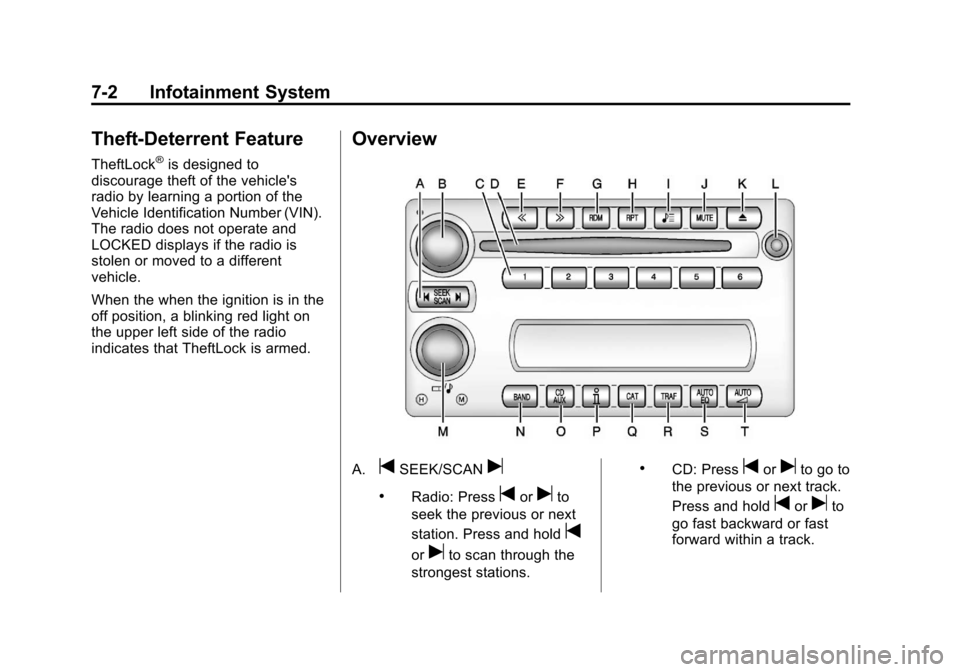
A.tSEEK/SCANu
.Radio: Presstoruto
seek the previous or next
station. Press and hold
t
oruto scan through the
strongest stations.
.CD: Presstoruto go to
the previous or next track.
Press and hold
toruto
go fast backward or fast
forward within a track.
Page 181 of 414

Black plate (3,1)Chevrolet Corvette Owner Manual - 2013 - crc2 - 11/8/12
Infotainment System 7-3
B. Power/Volume Knob
.Press to turn the system
on or off.
.Turn to adjust the volume.
C. Buttons 1−6
.Press to recall a favorite
station.
.Press and hold to save the
current station.
D. CD Slot
E.
{
.Radio: Press to seek the
previous station. Press and
hold to scan backward
through the strongest
stations.
.CD: Press to go to the
previous track. Press and
hold to go fast backward
within a track. F.
|
.Radio: Press to seek the
next station. Press and
hold to scan forward
through the strongest
stations.
.CD: Press to go to the next
track. Press and hold to
fast forward within a track.
G. RDM (Random)
.Press to play the CD
tracks in random order.
H. RPT (Repeat)
.Press to repeat the current
CD track.
I.
X(Song List)
.The Song List feature can
save 20 track selections.
J. MUTE
.Press to mute and unmute
the system.
K.
X(Eject)
.Press to eject the CD. L. Auxiliary Port
.3.5 mm (1/8 in) Auxiliary
Input Jack.
M.
O/e(Tune/Tone Menu)
.Press to open the Tone
Settings menu.
.Turn to manually find a
station.
N. BAND
.Press to scroll through the
available bands AM, FM,
or XM if equipped.
O. CD/AUX
.Press to listen to a CD or
an auxiliary source.
P.
V(Information)
.Press to display
information on the current
station or track.
Q. CAT (Category)
.Press to display a list of
XM categories.
Page 182 of 414
Black plate (4,1)Chevrolet Corvette Owner Manual - 2013 - crc2 - 11/8/12
7-4 Infotainment System
R. TRAF (Traffic)
.Press to find a station with
traffic information. See
AM-FM Radio on page 7‑6.
S. AUTO EQ (Auto Equalizer)
.Press to customize the EQ.
See Operation on
page 7‑4.
T. AUTO
3(Auto Volume)
.Press to set the automatic
volume to adjust for road
and wind noise. See
Operation on page 7‑4.
Operation
An indicator light on the upper left
side of the radio flashes when the
ignition is off, to indicate the
theft-deterrent feature is set. See
Theft-Deterrent Feature on
page 7‑2.
Playing the Radio
Power/Volume Knob: Press to
turn the system on and off. Turn to
increase or decrease the volume.
MUTE: Press to silence the
system. Press again to turn the
sound on.
This button is not available on the
Six-Disc CD Radio.
V(Information): Press until the
desired display is shown, then hold
for two seconds until the radio
beeps once to change the default
display. The selected display is now
the default.
For RDS:
Press
Vto change the display. The
display options are station name,
RDS station frequency, PTY, and
the name of the program (if
available).
Audio Settings
Press and holdO/ewhen no
tone or speaker control is displayed
to adjust all tone and speaker
controls to the middle position.
AUDIO SETTINGS CENTERED
displays.
Adjusting the Tone (Bass/
Treble)
O/e(Bass/Treble): To adjust
the bass or treble:
Press and release
O/euntil
BASS or TREBLE displays.
.Turn theO/eknob to
increase or to decrease the
level.
.Press and hold theO/eknob
until the level changes to the
middle position.
Page 183 of 414
Black plate (5,1)Chevrolet Corvette Owner Manual - 2013 - crc2 - 11/8/12
Infotainment System 7-5
Adjusting the Speakers
(Balance/Fade)
O/e(Balance/Fade):To adjust
the balance:
Press and release
O/euntil
BALANCE displays.
.Turn theO/eknob to move
the sound toward the right or the
left speakers.
.Press and hold theO/eknob
until the level changes to the
middle position.
To adjust the fade:
Press and release
O/euntil
FADE displays
.Turn theO/eknob to move
the sound toward the front or the
rear speakers.
.Press and hold theO/eknob
until the level changes to the
middle position. AUTO EQ (Automatic
Equalization):
The radio saves
separate AUTO EQ settings for
each preset and source.
For vehicles without the Bose
®
sound system:
.Press AUTO EQ to select
equalization settings designed
for CLASSICAL, POP, ROCK,
JAZZ, TALK, and COUNTRY.
.Select CUSTOM or change bass
or treble to return the EQ to the
manual bass and treble settings.
For vehicles with the Bose sound
system:
.Press AUTO EQ to select
equalization settings from EQ1
through EQ6.
.Select CUSTOM or change bass
or treble to return the EQ to the
manual bass and treble settings. AUTO
n(Automatic Volume):
Automatic volume automatically
adjusts the audio system to make
up for road and wind noise, by
increasing the volume as vehicle
speed increases.
For vehicles without the Bose sound
system:
1. Set the volume at the desired level.
2. Press AUTO
nto select
AUTO VOLUME MIN (minimum),
AUTO VOLUME MED (medium),
or AUTO VOLUME MAX
(maximum). Each higher setting
provides more volume
compensation at faster vehicle
speeds.
3. Press AUTO
nuntil AUTO
VOLUME OFF displays to turn
automatic volume off.