2013 CHEVROLET CAPTIVA SPORT cooling
[x] Cancel search: coolingPage 18 of 374
Black plate (14,1)Chevrolet Captiva Sport Owner Manual - 2013 - crc - 11/12/12
1-14 In Brief 3 : Sets a delay between wipes.
Move the switch on top of the lever
left for less frequent wipes or right
for more frequent wipes.
a : Slow wipes.
1 : Fast wipes.
Windshield Washer
Pull the windshield wiper lever to
spray windshield washer fluid and
activate the wipers. The wipers will
continue until the lever is released
or the maximum wash time is
reached.
Rear Window Wiper/Washer
The rear wiper and rear wash button
is on the instrument panel above the
climate control system.
= : Press to wash and wipe the
rear window.
5 : Press to turn the delayed
wiping on or off.
See Windshield Wiper/Washer on
page 5 ‑ 3 and Rear Window Wiper/
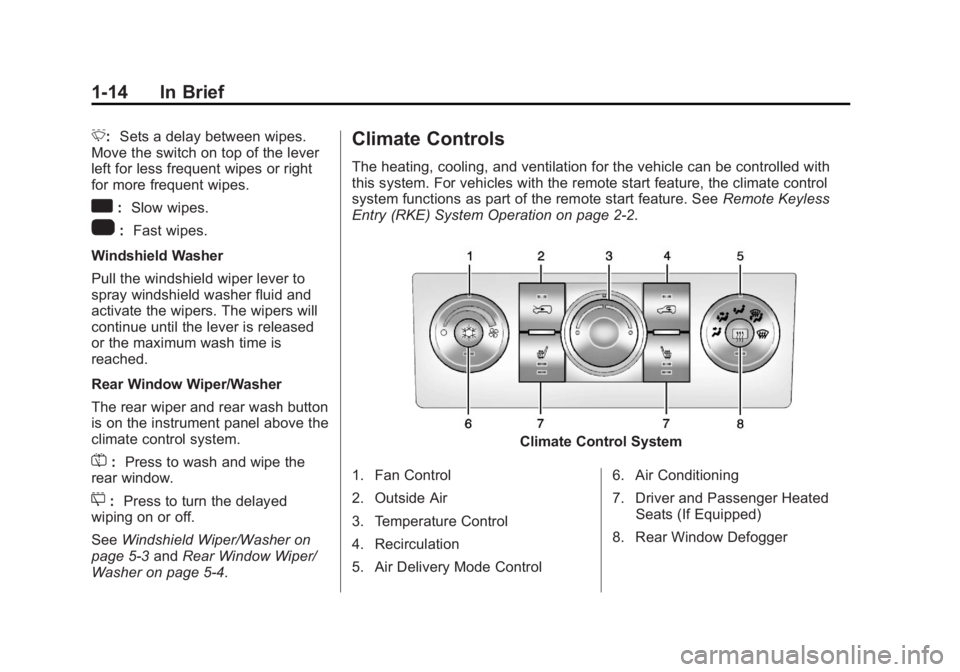
Washer on page 5 ‑ 4 . Climate Controls The heating, cooling, and ventilation for the vehicle can be controlled with
this system. For vehicles with the remote start feature, the climate control
system functions as part of the remote start feature. See Remote Keyless
Entry (RKE) System Operation on page 2 ‑ 2 .
Climate Control System
1. Fan Control
2. Outside Air
3. Temperature Control
4. Recirculation
5. Air Delivery Mode Control 6. Air Conditioning
7. Driver and Passenger Heated
Seats (If Equipped)
8. Rear Window Defogger
Page 97 of 374
Black plate (1,1)Chevrolet Captiva Sport Owner Manual - 2013 - crc - 11/12/12
Instruments and Controls 5-1
Instruments and
Controls Controls Steering Wheel Adjustment . . . 5-2
Steering Wheel Controls . . . . . . 5-2
Horn . . . . . . . . . . . . . . . . . . . . . . . . . . 5-3
Windshield Wiper/Washer . . . . . 5-3
Rear Window Wiper/
Washer . . . . . . . . . . . . . . . . . . . . . . 5-4
Compass . . . . . . . . . . . . . . . . . . . . . 5-4
Clock . . . . . . . . . . . . . . . . . . . . . . . . . 5-6
Power Outlets . . . . . . . . . . . . . . . . . 5-7
Warning Lights, Gauges, and
Indicators Warning Lights, Gauges, and
Indicators . . . . . . . . . . . . . . . . . . . . 5-8
Instrument Cluster . . . . . . . . . . . . 5-9
Speedometer . . . . . . . . . . . . . . . . 5-10
Odometer . . . . . . . . . . . . . . . . . . . . 5-10
Trip Odometer . . . . . . . . . . . . . . . 5-10
Tachometer . . . . . . . . . . . . . . . . . . 5-10
Fuel Gauge . . . . . . . . . . . . . . . . . . 5-10
Safety Belt Reminders . . . . . . . 5-11 Airbag Readiness Light . . . . . . 5-12
Passenger Airbag Status
Indicator (United States) . . . . 5-12
Charging System Light . . . . . . 5-13
Malfunction
Indicator Lamp . . . . . . . . . . . . . 5-14
Service Vehicle Soon
Light . . . . . . . . . . . . . . . . . . . . . . . 5-16
Brake System Warning
Light . . . . . . . . . . . . . . . . . . . . . . . 5-16
Electric Parking Brake
Light . . . . . . . . . . . . . . . . . . . . . . . 5-17
Antilock Brake System (ABS)
Warning Light . . . . . . . . . . . . . . 5-18
All-Wheel-Drive Light . . . . . . . . 5-18
Power Steering Warning
Light . . . . . . . . . . . . . . . . . . . . . . . 5-19
StabiliTrak ®
Indicator Light . . . 5-19
Traction Control System
(TCS) Warning Light . . . . . . . 5-19
Engine Coolant Temperature
Warning Light . . . . . . . . . . . . . . 5-20
Tire Pressure Light . . . . . . . . . . 5-20
Fuel Economy Light . . . . . . . . . 5-20
Low Fuel Warning Light . . . . . . 5-21
Security Light . . . . . . . . . . . . . . . . 5-21 Reduced Engine Power
Light . . . . . . . . . . . . . . . . . . . . . . . 5-21
High-Beam On Light . . . . . . . . . 5-22
Front Fog Lamp Light . . . . . . . . 5-22
Low Washer Fluid Warning
Light . . . . . . . . . . . . . . . . . . . . . . . 5-22
Cruise Control Light . . . . . . . . . 5-22
Door Ajar Light . . . . . . . . . . . . . . 5-22
Gate Ajar Light . . . . . . . . . . . . . . 5-23
Information Displays Driver Information
Center (DIC) . . . . . . . . . . . . . . . 5-23
Vehicle Messages Vehicle Messages . . . . . . . . . . . 5-28
Brake System Messages . . . . 5-28
Compass Messages . . . . . . . . . 5-29
Cruise Control Messages . . . . 5-29
Door Ajar Messages . . . . . . . . . 5-29
Engine Cooling System
Messages . . . . . . . . . . . . . . . . . . 5-30
Engine Oil Messages . . . . . . . . 5-30
Engine Power Messages . . . . 5-31
Fuel System Messages . . . . . . 5-31
Key and Lock Messages . . . . . 5-32
Lamp Messages . . . . . . . . . . . . . 5-32
Page 126 of 374
Black plate (30,1)Chevrolet Captiva Sport Owner Manual - 2013 - crc - 11/12/12
5-30 Instruments and Controls
Engine Cooling System
Messages ENGINE HOT A/C (Air
Conditioning) OFF This message displays when the
engine coolant becomes hotter than
the normal operating temperature.
To avoid added strain on a hot
engine, the air conditioning
compressor is automatically turned
off. When the coolant temperature
returns to normal, the A/C operation
automatically resumes. You can
continue to drive the vehicle.
ENGINE OVERHEATED IDLE
ENGINE Notice: If you drive the vehicle
while the engine is overheating,
severe engine damage may
occur. If an overheat warning
appears on the instrument cluster
and/or DIC, stop the vehicle as
soon as possible. Do not increase
the engine speed above normal idling speed. See Engine
Overheating on page 10 ‑ 18 for
more information.
This message displays when the
engine coolant temperature is too
hot. Stop and allow the vehicle to
idle until it cools down.
ENGINE OVERHEATED STOP
ENGINE Notice: If you drive the vehicle
while the engine is overheating,
severe engine damage may
occur. If an overheat warning
appears on the instrument cluster
and/or DIC, stop the vehicle as
soon as possible. Do not increase
the engine speed above normal
idling speed. See Engine
Overheating on page 10 ‑ 18 for
more information.
This message displays along with a
continuous chime when the engine
has overheated. Stop and turn the
engine off immediately to avoid
severe engine damage. See Engine
Overheating on page 10 ‑ 18 .Engine Oil Messages CHANGE ENGINE OIL NOW This message displays when
service is urgently required. This
indicates that the oil life remaining is
less than one percent and the oil
cannot work correctly to avoid
engine wear or damage. See your
dealer. See Engine Oil on page 10 ‑ 8
and Maintenance Schedule on
page 11 ‑ 3 .
Acknowledging this message will
not reset the OIL LIFE REMAINING
display. That must be done at the
OIL LIFE screen. See “ Oil Life ”
under Driver Information Center
(DIC) on page 5 ‑ 23 and Engine Oil
Life System on page 10 ‑ 10 .
CHANGE ENGINE OIL SOON
This message displays when oil life
remaining is between one and
five percent and service is required
for the vehicle. See your dealer. See
Engine Oil on page 10 ‑ 8 and
Maintenance Schedule on
page 11 ‑ 3 .
Page 148 of 374
Black plate (6,1)Chevrolet Captiva Sport Owner Manual - 2013 - crc - 11/12/12
6-6 Lighting
Lighting Features Entry Lighting If the dome lamp override button is
in the out position, the lamps inside
the vehicle automatically come on
when any door is opened or when
the Remote Keyless Entry (RKE)
Kbutton is pressed. After the door is
opened, the lamps remain on and
stay on for 20 seconds after the
doors are closed, or until the key is
put into the ignition and turned to
the ACC/ACCESSORY position.
The lamps will then gradually dim
until they are no longer lit.
Battery Load
Management The vehicle has Electric Power
Management (EPM) that estimates
the battery's temperature and state
of charge. It then adjusts the voltage
for best performance and extended
life of the battery. When the battery's state of charge
is low, the voltage is raised slightly
to quickly bring the charge back up.
When the state of charge is high,
the voltage is lowered slightly to
prevent overcharging. The voltage
may move up or down on the
voltmeter gauge or the voltage
display on vehicles with the Driver
Information Center. This is normal.
If there is a problem, an alert will be
displayed.
The battery can be discharged at
idle if the electrical loads are very
high. This is true for all vehicles.
This is because the generator
(alternator) may not be spinning fast
enough at idle to produce all the
power that is needed for very high
electrical loads.
A high electrical load occurs when
several of the following are on, such
as: headlamps, high beams, fog
lamps, rear window defogger,
climate control fan at high speed,
heated seats, engine cooling fans,
trailer loads, and loads plugged into
accessory power outlets. EPM works to prevent excessive
discharge of the battery. It does this
by balancing the generator's output
and the vehicle's electrical needs.
It can increase engine idle speed to
generate more power, whenever
needed. It can temporarily reduce
the power demands of some
accessories. Normally, these actions
occur in steps or levels, without
being noticeable.
Battery Power Protection The battery saver feature is
designed to protect the vehicle's
battery.
If any interior or exterior lamp is left
on and the ignition is turned off, the
battery rundown protection system
automatically turns the lamp off after
10 minutes.
Page 179 of 374
Black plate (1,1)Chevrolet Captiva Sport Owner Manual - 2013 - crc - 11/12/12
Climate Controls 8-1
Climate Controls Climate Control Systems Climate Control Systems . . . . . . 8-1
Automatic Climate Control
System . . . . . . . . . . . . . . . . . . . . . . 8-4
Air Vents Air Vents . . . . . . . . . . . . . . . . . . . . . . 8-8
Maintenance Passenger Compartment Air
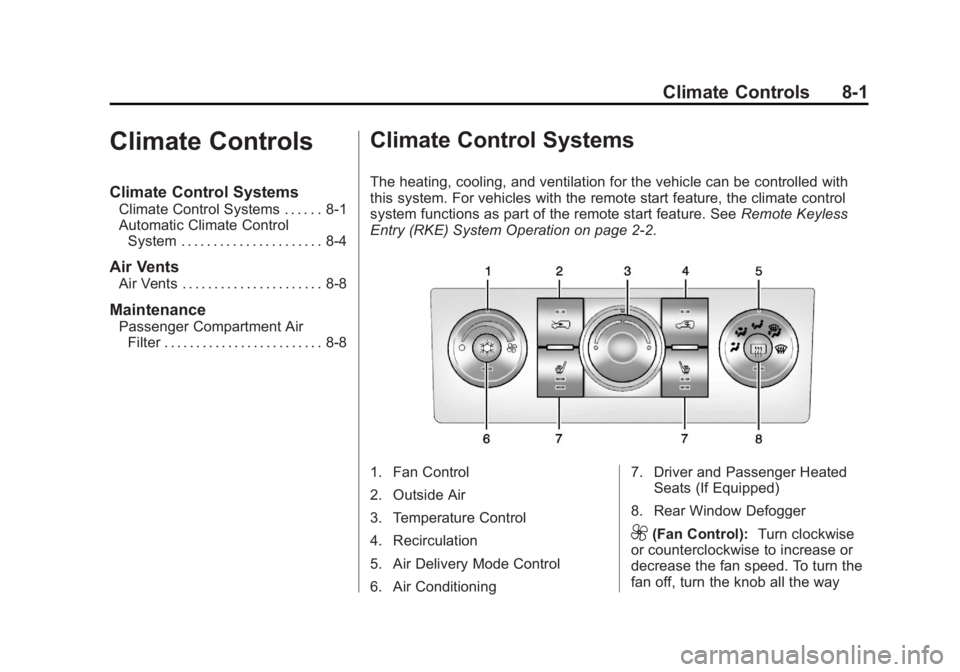
Filter . . . . . . . . . . . . . . . . . . . . . . . . . 8-8 Climate Control Systems The heating, cooling, and ventilation for the vehicle can be controlled with
this system. For vehicles with the remote start feature, the climate control
system functions as part of the remote start feature. See Remote Keyless
Entry (RKE) System Operation on page 2 ‑ 2 .
1. Fan Control
2. Outside Air
3. Temperature Control
4. Recirculation
5. Air Delivery Mode Control
6. Air Conditioning 7. Driver and Passenger Heated
Seats (If Equipped)
8. Rear Window Defogger
9 (Fan Control): Turn clockwise
or counterclockwise to increase or
decrease the fan speed. To turn the
fan off, turn the knob all the way
Page 181 of 374
Black plate (3,1)Chevrolet Captiva Sport Owner Manual - 2013 - crc - 11/12/12
Climate Controls 8-33. Turn the
# on.
4. Select the coolest temperature
and highest fan speed.
5. Once the vehicle's interior
temperature is below the outside
temperature, select recirculation
mode for enhanced cooling.
Using these settings together for
long periods of time may cause the
air inside the vehicle to become too
dry. To prevent this from happening,
after the air inside of the vehicle has
cooled, turn the recirculation
mode off.
The air conditioning system
removes moisture from the air, so a
small amount of water might drip
under the vehicle while idling or
after turning off the engine. This is
normal.
8 (Outside Air): Press to turn
the outside air mode on. An
indicator light comes on to show
that outside air is on. Air from
outside the vehicle will circulate
throughout the vehicle. The outside air mode can be used with all
modes, but it cannot be used with
the recirculation mode. Pressing this
button will cancel the
recirculation mode.
@ (Recirculation): Press to turn
on the recirculation mode. An
indicator light comes on to show
that recirculation is on. This mode
recirculates and helps to quickly
cool or heat the air inside the
vehicle. It can be used to prevent
outside air and odors from entering
the vehicle. Avoid using the
recirculation mode during high
periods of humidity and cool outside
temperatures since this may result
in increased window fogging.
If window fogging is experienced,
select the defrost mode.
Recirculation mode is not available
in floor, defog, or defrost modes and
will shut off automatically and
change to outside air. The indicator
will flash if the button is selected in
any of these modes. This helps prevent window fogging and
moisture building up inside the
vehicle.
Rear Window Defogger The rear window defogger uses a
warming grid to remove fog from the
rear window.
The rear window defogger only
works when the ignition is in
ON/RUN.
1 (Rear Window Defogger):
Press to turn the rear window
defogger on or off. An indicator light
on the button comes on to show that
the rear window is activated.
The rear window defogger stays on
for approximately 10 minutes after
the button is pressed, unless the
ignition is turned to ACC/
ACCESSORY or LOCK/OFF.
If turned on again, the defogger only
runs for approximately five minutes
before turning off again. At higher
vehicle speeds, the defogger may
Page 182 of 374
Black plate (4,1)Chevrolet Captiva Sport Owner Manual - 2013 - crc - 11/12/12
8-4 Climate Controls stay on continuously. The defogger
can also be turned off by turning off
the engine.
Notice: Do not use anything
sharp on the inside of the rear
window. If you do, you could cut
or damage the warming grid, and
the repairs would not be covered
by the vehicle warranty. Do not
attach a temporary vehicle
license, tape, a decal, or anything
similar to the defogger grid.
Heated Front Seats (If Equipped)
L or
M : Press to heat the driver
or passenger seat cushion and
seatback. To turn off, press the
button until the indicator lights turn
off. See Heated Front Seats on
page 3 ‑ 6 .
Remote Start Climate Control
Operation
For vehicles with the remote start
feature, when it is activated, the
climate control system heats and
cools the inside of the vehicle using
the modes that were set before the
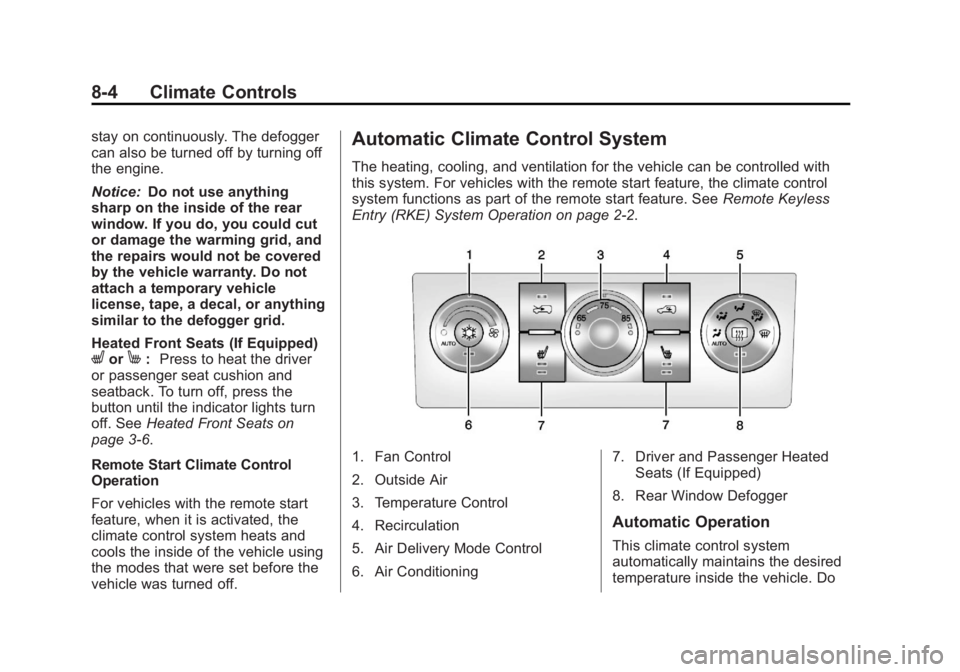
vehicle was turned off. Automatic Climate Control System The heating, cooling, and ventilation for the vehicle can be controlled with
this system. For vehicles with the remote start feature, the climate control
system functions as part of the remote start feature. See Remote Keyless
Entry (RKE) System Operation on page 2 ‑ 2 .
1. Fan Control
2. Outside Air
3. Temperature Control
4. Recirculation
5. Air Delivery Mode Control
6. Air Conditioning 7. Driver and Passenger Heated
Seats (If Equipped)
8. Rear Window Defogger
Automatic Operation
This climate control system
automatically maintains the desired
temperature inside the vehicle. Do
Page 195 of 374
Black plate (7,1)Chevrolet Captiva Sport Owner Manual - 2013 - crc - 11/12/12
Driving and Operating 9-7Other Rainy Weather Tips Besides slowing down, other wet
weather driving tips include: .
Allow extra following distance. .
Pass with caution. .
Keep windshield wiping
equipment in good shape. .
Keep the windshield washer fluid
reservoir filled. .
Have good tires with proper
tread depth. See Tires on
page 10 ‑ 36 ..
Turn off cruise control.
Highway Hypnosis Always be alert and pay attention to
your surroundings while driving.
If you become tired or sleepy, find a
safe place to park the vehicle
and rest.
Other driving tips include: .
Keep the vehicle well ventilated. .
Keep the interior
temperature cool. .
Keep your eyes moving — scan
the road ahead and to the sides. .
Check the rearview mirror and
vehicle instruments often.
Hill and Mountain Roads Driving on steep hills or through
mountains is different than driving
on flat or rolling terrain. Tips for
driving in these conditions include: .
Keep the vehicle serviced and in
good shape. .
Check all fluid levels and brakes,
tires, cooling system, and
transmission. .
Shift to a lower gear when going
down steep or long hills.
{ WARNING
If you do not shift down, the
brakes could get so hot that they
would not work well. You would
then have poor braking or even
(Continued) WARNING (Continued) none going down a hill. You could
crash. Shift down to let the engine
assist the brakes on a steep
downhill slope.
{ WARNINGCoasting downhill in N (Neutral)
or with the ignition off is
dangerous. The brakes will have
to do all the work of slowing down
and they could get so hot that
they would not work well. You
would then have poor braking or
even none going down a hill.
Steering may also be affected
when ignition is off. You could
crash. Always have the engine
running and the vehicle in gear
when going downhill.