2013 CHEVROLET CAPTIVA SPORT clock
[x] Cancel search: clockPage 180 of 374
Black plate (2,1)Chevrolet Captiva Sport Owner Manual - 2013 - crc - 11/12/12
8-2 Climate Controls counterclockwise. In any setting
other than off, the fan runs
continuously with the ignition on.
There will be some airflow
noticeable from the various outlets
when driving, even with the fan in
the off position. To turn off the air
completely, turn the fan to
9 and
select the @ button.
Temperature Control: Turn
clockwise or counterclockwise to
increase or decrease the
temperature inside the vehicle.
Air Delivery Mode Control: Turn
clockwise or counterclockwise to
change the current airflow mode.
Select from the following air delivery
modes:
H (Vent): Air is directed to the
instrument panel outlets.
) (Bi-Level): Air is divided
between the instrument panel and
the floor outlets.
6 (Floor): Air is directed to the
floor outlets with some air directed
to the windshield. When this mode is selected, the
system turns the recirculation mode
off. Recirculation mode cannot be
selected while in floor mode. This
helps prevent window fogging.
- (Defog): Clears the windows of
fog or moisture. Air is directed to the
floor outlets, with some air directed
to the windshield and side window
outlets. In this mode, the system
turns the recirculation mode off and
runs the air conditioning compressor
unless the outside air is at or below
freezing. Recirculation mode cannot
be selected while in defog mode.
This helps prevent window fogging.
0 (Defrost): Removes fog or frost
from the windshield more quickly.
Air is directed to the windshield and
the side window outlets. In this
mode, the system turns the
recirculation mode off automatically
and runs the air conditioning
compressor unless the outside air is
at or below freezing. Recirculation
mode cannot be selected while in
defrost mode. This helps prevent
window fogging. For best results, clear all snow and
ice from the windshield before
defrosting.
# (Air Conditioning): Press to
turn the air conditioning system on
or off. An indicator light comes on to
show that the air conditioning is on.
The air conditioning can be selected
in any mode as long as the fan is on
and the outside temperature is
above freezing. A flashing indicator
light indicates that the air
conditioning compressor is currently
not available.
On hot days, open the windows to
let hot inside air escape; then close
them. This helps reduce the time it
takes for the vehicle to cool down
and helps the system to operate
more efficiently.
For quick cool down on hot days,
select the following settings
together:
1. Select
H mode.
2. Select
8 .
Page 183 of 374

Black plate (5,1)Chevrolet Captiva Sport Owner Manual - 2013 - crc - 11/12/12
Climate Controls 8-5not cover the sensor on the top of
the instrument panel near the
windshield, or the sensor grille
below the climate control faceplate.
These two sensors help regulate the
inside air temperature.
AUTO (Automatic Fan): Turn the
fan knob to AUTO for the system to
automatically adjust the fan speed
to reach the desired inside
temperature.
Temperature Control: Select the
desired cabin air temperature
between 16-32°C (60-90°F).
Choosing the coldest or warmest
temperature setting does not cause
the system to heat or cool any
faster.
AUTO (Automatic Air Delivery
Mode): Turn the air delivery mode
knob to AUTO for the system to
automatically control the direction of
the airflow to help reach the desired
inside temperature.
The system automatically controls
the air inlet to supply the outside air
or recirculated inside air needed to heat or cool the vehicle faster. The
@ button indicator light is lit
whenever the recirculation mode
is on.
Press the
8 button to change to
outside air. However, the
recirculation mode may turn back on
automatically.
In cold weather, if the fan and air
delivery modes are in automatic, the
system starts at lower fan speeds to
avoid directing cold air into the
vehicle until warmer air is available.
The climate control system directs
air to the floor, but may
automatically change modes as the
vehicle warms up to maintain the
chosen temperature setting. The
length of time needed to warm the
interior depends on the outside
temperature and inside temperature
of the vehicle.
Manual Operation
9 (Fan Control): Turn clockwise
or counterclockwise to increase or
decrease the fan speed. To turn the fan off, turn the left knob to the
9 position. In any setting other than
off, the fan runs continuously with
the ignition on. The fan must be
turned on to run the air conditioning
compressor. There will be some
airflow noticeable from the various
outlets when driving, even with the
fan in the off position. To turn off the
air completely, turn the fan to
9 and select the @ button.
Temperature Control: Turn
clockwise or counterclockwise to
increase or decrease the
temperature. Select the desired
cabin air temperature between
16-32°C (60-90°F). Typically, the
best setting is near 23°C (75°F).
Choosing the coldest or warmest
temperature setting does not cause
the system to heat or cool any
faster.
Air Delivery Mode Control: Turn
clockwise or counterclockwise to
change the current airflow mode.
Page 226 of 374
Black plate (38,1)Chevrolet Captiva Sport Owner Manual - 2013 - crc - 11/12/12
9-38 Driving and Operating The tethered fuel cap is located
behind a hinged fuel door on the
driver side of the vehicle. On some
vehicles with Remote Keyless Entry,
the fuel door is locked and unlocked
when the vehicle doors are locked
and unlocked.
To remove the fuel cap, turn it
slowly counterclockwise. The fuel
cap has a spring in it; if the cap is
released too soon, it will spring back
to the right. To avoid fuel contact on
the painted surface of the vehicle
when filling the fuel tank, place the
tethered cap on the fuel filler door.
Be careful not to spill fuel. Do not
top off or overfill the tank and wait a
few seconds after you have finished
pumping before removing the
nozzle. Clean fuel from painted
surfaces as soon as possible. See
Exterior Care on page 10 ‑ 72 .
When replacing the fuel cap, turn it
clockwise until it clicks. Make sure
the cap is fully installed. The
diagnostic system can determine if
the fuel cap has been left off or improperly installed. This would
allow fuel to evaporate into the
atmosphere. See Malfunction
Indicator Lamp on page 5 ‑ 14 .
{ WARNINGIf a fire starts while you are
refueling, do not remove the
nozzle. Shut off the flow of fuel by
shutting off the pump or by
notifying the station attendant.
Leave the area immediately.
Notice: If a new fuel cap is
needed, be sure to get the right
type of cap from your dealer. The
wrong type of fuel cap might not
fit properly, might cause the
malfunction indicator lamp to
light, and could damage the fuel
tank and emissions system. See
Malfunction Indicator Lamp on
page 5 ‑ 14 . Filling a Portable Fuel
Container
{ WARNINGFilling a portable fuel container
while it is in the vehicle can cause
fuel vapors that can ignite either
by static electricity or other
means. You or others could be
badly burned and the vehicle
could be damaged. Always: .
Use approved fuel
containers. .
Remove the container from
the vehicle, trunk, or pickup
bed before filling. .
Place the container on the
ground.
(Continued)
Page 251 of 374

Black plate (17,1)Chevrolet Captiva Sport Owner Manual - 2013 - crc - 11/12/12
Vehicle Care 10-17
{ WARNINGAdding only plain water or some
other liquid to the cooling system
can be dangerous. Plain water
and other liquids, can boil before
the proper coolant mixture will.
The coolant warning system is set
for the proper coolant mixture.
With plain water or the wrong
mixture, the engine could get too
hot but you would not get the
overheat warning. The engine
could catch fire and you or
others could be burned. Use a
50/50 mixture of clean, drinkable
water and DEX-COOL coolant.
Notice: In cold weather, water
can freeze and crack the engine,
radiator, heater core and other
parts. Use the recommended
coolant and the proper coolant
mixture. { WARNINGYou can be burned if you spill
coolant on hot engine parts.
Coolant contains ethylene glycol
and it will burn if the engine parts
are hot enough. Do not spill
coolant on a hot engine.
1. Remove the coolant surge tank
pressure cap when the cooling
system, including the coolant
surge tank pressure cap and
upper radiator hose, is no
longer hot. Turn the pressure cap slowly
counterclockwise about
one-quarter of a turn. If a hiss
is heard, wait for that to stop.
This will allow any pressure
still left to be vented out the
discharge hose.
2. Keep turning the pressure cap
slowly, and remove it.
3. Fill the coolant surge tank with
the proper DEX-COOL coolant
mixture, to between the MIN and
MAX lines.
Page 261 of 374
Black plate (27,1)Chevrolet Captiva Sport Owner Manual - 2013 - crc - 11/12/12
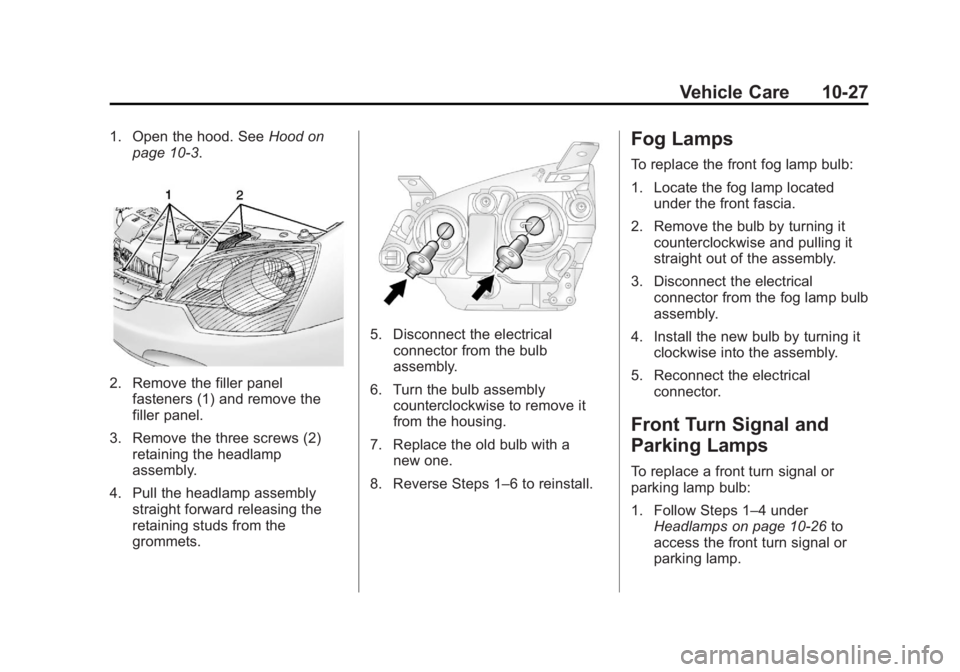
Vehicle Care 10-271. Open the hood. See Hood on
page 10 ‑ 3 .
2. Remove the filler panel
fasteners (1) and remove the
filler panel.
3. Remove the three screws (2)
retaining the headlamp
assembly.
4. Pull the headlamp assembly
straight forward releasing the
retaining studs from the
grommets. 5. Disconnect the electrical
connector from the bulb
assembly.
6. Turn the bulb assembly
counterclockwise to remove it
from the housing.
7. Replace the old bulb with a
new one.
8. Reverse Steps 1 – 6 to reinstall.Fog Lamps To replace the front fog lamp bulb:
1. Locate the fog lamp located
under the front fascia.
2. Remove the bulb by turning it
counterclockwise and pulling it
straight out of the assembly.
3. Disconnect the electrical
connector from the fog lamp bulb
assembly.
4. Install the new bulb by turning it
clockwise into the assembly.
5. Reconnect the electrical
connector.
Front Turn Signal and
Parking Lamps To replace a front turn signal or
parking lamp bulb:
1. Follow Steps 1 – 4 under
Headlamps on page 10 ‑ 26 to
access the front turn signal or
parking lamp.
Page 262 of 374
Black plate (28,1)Chevrolet Captiva Sport Owner Manual - 2013 - crc - 11/12/12
10-28 Vehicle Care
2. Turn the bulb to be replaced
counterclockwise to remove it
from the headlamp assembly.
3. Pull the bulb out of the bulb
socket assembly.
4. Push the new bulb into the bulb
socket assembly.
5. Insert the bulb assembly into the
headlamp assembly.
6. Turn the bulb assembly
clockwise until seated.
7. Reverse the steps to reinstall the
headlamp assembly. Taillamps, Turn Signal,
Stoplamps, and Back-Up
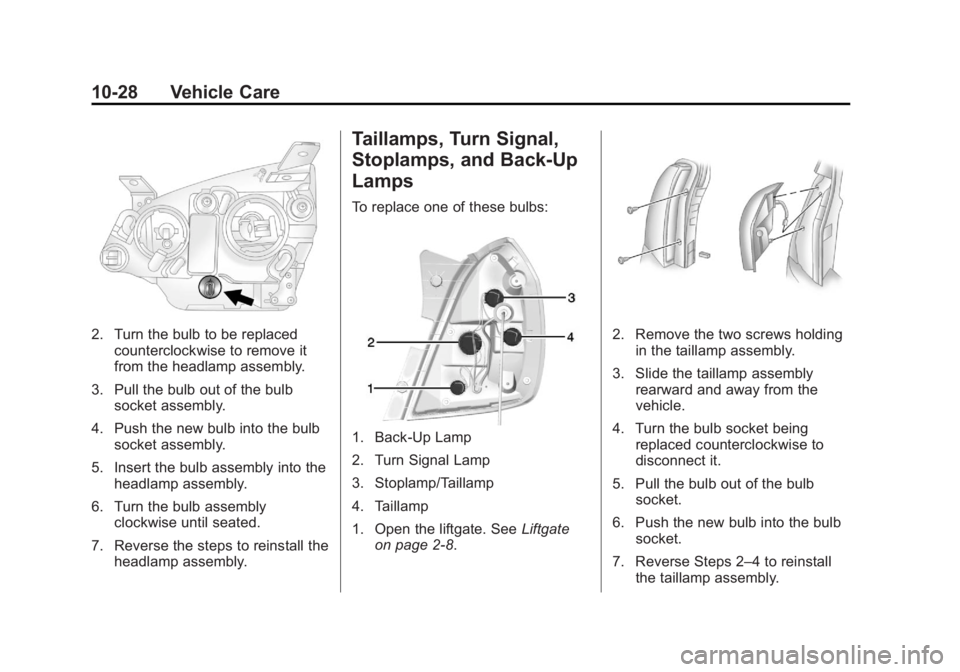
Lamps To replace one of these bulbs:
1. Back-Up Lamp
2. Turn Signal Lamp
3. Stoplamp/Taillamp
4. Taillamp
1. Open the liftgate. See Liftgate
on page 2 ‑ 8 . 2. Remove the two screws holding
in the taillamp assembly.
3. Slide the taillamp assembly
rearward and away from the
vehicle.
4. Turn the bulb socket being
replaced counterclockwise to
disconnect it.
5. Pull the bulb out of the bulb
socket.
6. Push the new bulb into the bulb
socket.
7. Reverse Steps 2 – 4 to reinstall
the taillamp assembly.
Page 263 of 374
Black plate (29,1)Chevrolet Captiva Sport Owner Manual - 2013 - crc - 11/12/12
Vehicle Care 10-29
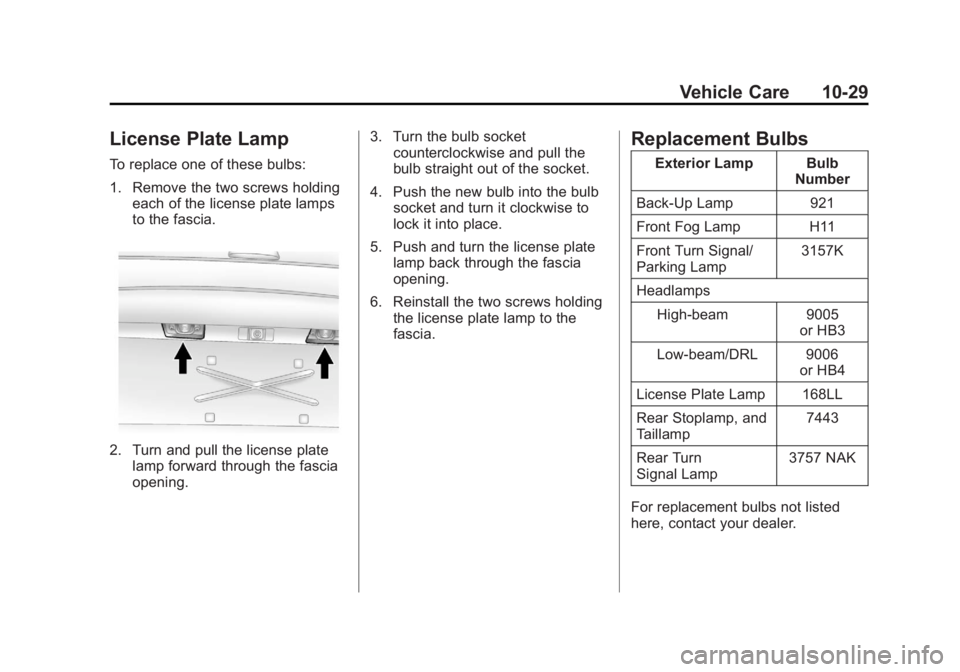
License Plate Lamp To replace one of these bulbs:
1. Remove the two screws holding
each of the license plate lamps
to the fascia.
2. Turn and pull the license plate
lamp forward through the fascia
opening. 3. Turn the bulb socket
counterclockwise and pull the
bulb straight out of the socket.
4. Push the new bulb into the bulb
socket and turn it clockwise to
lock it into place.
5. Push and turn the license plate
lamp back through the fascia
opening.
6. Reinstall the two screws holding
the license plate lamp to the
fascia. Replacement Bulbs Exterior Lamp Bulb
Number
Back-Up Lamp 921
Front Fog Lamp H11
Front Turn Signal/
Parking Lamp 3157K
Headlamps
High-beam 9005
or HB3
Low-beam/DRL 9006
or HB4
License Plate Lamp 168LL
Rear Stoplamp, and
Taillamp 7443
Rear Turn
Signal Lamp 3757 NAK
For replacement bulbs not listed
here, contact your dealer.
Page 292 of 374
Black plate (58,1)Chevrolet Captiva Sport Owner Manual - 2013 - crc - 11/12/12
10-58 Vehicle Care
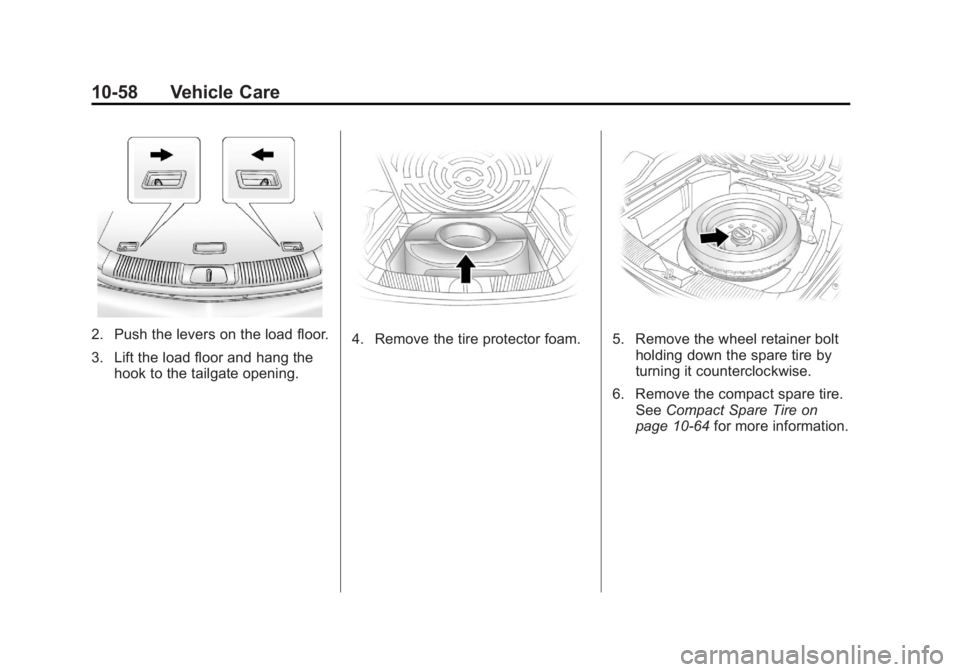
2. Push the levers on the load floor.
3. Lift the load floor and hang the
hook to the tailgate opening. 4. Remove the tire protector foam. 5. Remove the wheel retainer bolt
holding down the spare tire by
turning it counterclockwise.
6. Remove the compact spare tire.
See Compact Spare Tire on
page 10 ‑ 64 for more information.