2013 CADILLAC SRX cruise control
[x] Cancel search: cruise controlPage 232 of 432

Black plate (36,1)Cadillac SRX Owner Manual - 2013 - CRC - 11/9/12
9-36 Driving and Operating
J(On/Off):Press to turn the
system on and off. A white cruise
control indicator appears in the
instrument cluster when cruise is
turned on.
+RES (Resume/Accelerate): Move
the control up briefly to resume to a
previously set speed or to increase
vehicle speed if the cruise control is
already activated. SET−
(Set/Coast): Move the
control down briefly to set the speed
and activate cruise control or to
decrease vehicle speed if the cruise
control is already activated.
*(Cancel): Press to disengage
cruise control without erasing the
set speed from memory.
Setting Cruise Control
If the cruise button is on when not in
use, it could get pressed and go into
cruise when not desired. Keep the
cruise control button off when cruise
is not being used.
1. Press
J.
2. Get up to the desired speed.
3. Move the control down to SET− and release it.
4. Remove foot from the accelerator.
When the cruise control has been
set to the desired speed, the green
cruise control indicator appears on
the instrument cluster. Resuming a Set Speed
If the cruise control is set at a
desired speed and then the brakes
are applied, the cruise control is
disengaged without erasing the set
speed from memory.
Once the vehicle speed reaches
about 40 km/h (25 mph) or more,
move the control up toward +RES
briefly. The vehicle returns to the
previous set speed.
Increasing Speed While Cruise
Control is at a Set Speed
If the cruise control system is
already activated:.Move the control up toward
+RES and hold until the desired
speed is reached, then
release it.
.To increase vehicle speed in
small amounts, move the control
up toward +RES briefly and then
release it. Each time this is
done, the vehicle goes about
1.6 km/h (1 mph) faster.
Page 233 of 432

Black plate (37,1)Cadillac SRX Owner Manual - 2013 - CRC - 11/9/12
Driving and Operating 9-37
Reducing Speed While Cruise
Control is at a Set Speed
If the cruise control system is
already activated:
.Move the control toward
SET−and hold until the desired
lower speed is reached, then
release it.
.To decrease the vehicle speed in
small amounts, move the control
toward SET− briefly. Each time
this is done, the vehicle goes
about 1.6 km/h (1 mph) slower.
The cruise control system may
automatically brake to slow the
vehicle down.
Passing Another Vehicle While
Using Cruise Control
Use the accelerator pedal to
increase the vehicle speed. When
you take your foot off the pedal,
the vehicle will slow down to the
previous set cruise speed. Using Cruise Control on Hills
How well the cruise control will work
on hills depends upon the vehicle
speed, load, and the steepness of
the hills. When going up steep hills,
you might have to step on the
accelerator pedal to maintain the
vehicle speed. When going
downhill, you might have to brake or
shift to a lower gear to keep the
vehicle speed down. If the brake is
applied, the cruise control
disengages.
Ending Cruise Control
There are three ways to end cruise
control:
.Step lightly on the brake pedal.
.Press*.
.PressJ.
Erasing Speed Memory
The cruise control set speed is
erased from memory if
Jis
pressed or if the ignition is
turned off.
Adaptive Cruise Control
For vehicles with Adaptive Cruise
Control (ACC), it allows the driver to
select the cruise control set speed
and following gap. Read this entire
section before using this system.
The following gap is the following
time between your vehicle and a
vehicle detected directly ahead in
your path moving in the same
direction. If no vehicle is detected in
your path, ACC works like regular
cruise control. ACC uses camera
and radar sensors. See Radio
Frequency Statement on
page 13‑21 for information
regarding Part 15 of the Federal
Communications Commission (FCC)
rules and Industry Canada
Standards RSS-GEN/210/220/310.
Page 234 of 432

Black plate (38,1)Cadillac SRX Owner Manual - 2013 - CRC - 11/9/12
9-38 Driving and Operating
If a vehicle is detected in your path,
ACC can apply acceleration or
limited, moderate braking to
maintain the selected following gap.
To disengage ACC, apply the brake.
If ACC is controlling your vehicle
speed when the traction control
system (TCS) activates, the ACC
will automatically disengage. See
Traction Control System (TCS) on
page 9‑31. When road conditions
allow ACC to be safely used, the
ACC can be turned back on.{WARNING
ACC has limited braking ability
and may not have time to slow
the vehicle down enough to avoid
a collision with another vehicle
you are following. This can occur
when vehicles suddenly slow or
stop ahead, or enter your lane.
Also see“Alerting the Driver” in
this section. Complete attention is
always required while driving and
you should be ready to take
action and apply the brakes. See
Defensive Driving on page 9‑3.
{WARNING
Adaptive Cruise Control will not
detect or brake for children,
pedestrians, animals, or other
objects.
Do not use Adaptive Cruise
Control when:
.On winding and hilly roads or
when the sensors are
blocked by snow, ice, or dirt.
The system may not detect a
vehicle ahead. Keep the
entire front of the vehicle
clean.
.Visibility is low, such as in
fog, rain, or snow conditions.
Adaptive Cruise Control
performance is limited under
these conditions.
.On slippery roads where fast
changes in tire traction can
cause excessive wheel slip.
Page 235 of 432
:Press to turn the
system on or off.
+RES (Resume/Accelerate): Move
the control up briefly to res](/manual-img/23/7952/w960_7952-234.png "CADILLAC SRX 2013 2.G Owners Manual Black plate (39,1)Cadillac SRX Owner Manual - 2013 - CRC - 11/9/12
Driving and Operating 9-39
](On/Off):Press to turn the
system on or off.
+RES (Resume/Accelerate): Move
the control up briefly to res")
Black plate (39,1)Cadillac SRX Owner Manual - 2013 - CRC - 11/9/12
Driving and Operating 9-39
](On/Off):Press to turn the
system on or off.
+RES (Resume/Accelerate): Move
the control up briefly to resume to a
previously set speed or to increase
vehicle speed if the cruise control is
already activated.
SET– (Set/Coast): Move the
control down briefly to set the speed
and activate ACC or to decrease
vehicle speed if the cruise control is
already activated.
*(Cancel): Press to disengage
ACC without erasing the set speed
from memory.
3(Follow Distance Gap): Press
to select a following gap time (or
distance) setting for ACC. Select a
gap setting: Far, Medium, and Near.
Setting Adaptive Cruise Control
If the cruise button is on when not in
use, it could get bumped and go into
cruise when not desired. Keep the
cruise control button off when cruise
is not being used.
Select the set speed desired for
cruise. This is the vehicle speed
when no vehicle is detected in its
path slower than the set speed.
ACC will not set at a speed less
than 40 km/h (25 mph), although it
can be resumed when driving at
lower speeds.
To set ACC:
1. Press
].
2. Get up to the desired speed. 3. Move the control down to
SET− and release it.
4. Remove foot from the accelerator.
After ACC is set, it may immediately
apply the brakes if a vehicle is
closer than the selected follow gap.
The ACC indicator displays on the
instrument cluster. When the ACC is
active, the symbol will be lit.
Be mindful of speed limits,
surrounding traffic speeds, and
weather conditions when selecting
the set speed.
Resuming a Set Speed
If the ACC is set at a desired speed
and then the brakes are applied, the
ACC is disengaged without erasing
the set speed from memory.
Page 236 of 432

Black plate (40,1)Cadillac SRX Owner Manual - 2013 - CRC - 11/9/12
9-40 Driving and Operating
To begin using ACC again, move
the control up toward +RES briefly.
The vehicle returns to the previous
set speed.
Increasing Speed While ACC is at
a Set Speed
If ACC is already activated, do one
of the following:
.Use the accelerator to get to the
higher speed. Move the control
toward SET–, then release it and
the accelerator pedal. The
vehicle will now cruise at the
higher speed.
When the accelerator pedal is
pressed, ACC will not brake
because it is overridden.
A warning message will appear
on the Driver Information Center
(DIC). SeeCruise Control
Messages on page 5‑31.
.Move the control toward +RES
and hold until the desired set
speed appears on the display,
then release it.
.To increase vehicle speed in
small amounts, move the control
toward +RES and then release
it. Each time this is done, the
vehicle goes 1.6 km/h (1 mph)
faster.
When it is determined that there is
no vehicle in front of your vehicle
slower than the set speed, then the
vehicle speed will increase to the
set speed.
Reducing Speed While ACC is at a
Set Speed
If ACC is already activated, do one
of the following:
.Use the brake to get to the
desired lower speed. Move the
control toward SET– and release
the accelerator pedal. The
vehicle will now cruise at the
lower speed.
.Move the control toward
SET− and hold until the desired
lower speed is reached, then
release it.
.To decrease the vehicle speed in
small amounts, move the control
toward SET− briefly. Each time
this is done, the vehicle goes
about 1.6 km/h (1 mph) slower.
Selecting the Follow Distance
When a slower moving vehicle is
detected ahead, ACC will adjust the
vehicle's speed and attempt to
maintain the follow distance gap
selected.
Press
3on the steering wheel to
adjust the following gap. Each press
cycles the gap button through three
settings: Far, Medium, or Near.
When pressed, the current gap
setting displays briefly on the
instrument cluster. The gap setting
will be maintained until it is
changed.
Page 238 of 432

Black plate (42,1)Cadillac SRX Owner Manual - 2013 - CRC - 11/9/12
9-42 Driving and Operating
If this symbol is not displaying, ACC
will not respond to or brake to
vehicles ahead.
ACC automatically slows the vehicle
down and adjusts vehicle speed to
follow the vehicle in front at the
selected follow gap. The vehicle
speed increases or decreases to
follow the vehicle in front of you, but
will not exceed the set speed. It may
apply limited braking, if necessary.
When braking is active, the brake
lights will come on. The automatic
braking may feel or sound different
than if the brakes were applied
manually. This is normal.Stationary or Very Slow-Moving
Objects
{WARNING
Adaptive Cruise Control (ACC)
may not detect and react to
stopped or slow-moving vehicles
ahead of you. For example, the
system may not brake for a
vehicle that it has never detected
moving. This can occur in
stop-and-go traffic or when a
vehicle suddenly appears due to
a vehicle ahead changing lanes.
Your vehicle may not stop and
could cause a crash. Use caution
when using ACC. Your complete
attention is always required while
driving and you should be ready
to take action and apply the
brakes.ACC Automatically Disengages
ACC may automatically disengage
and the driver will need to manually
apply the brakes to slow the
vehicle when:.The sensors are blocked.
.There is no traffic and nothing to
detect on the side of the road.
.There is a fault in the system.
.The brakes get heated.
The ACC active symbol will not be
displayed when ACC is no longer
active.
Notification to Resume ACC
ACC will maintain a follow time/
distance gap behind a detected
vehicle and slow your vehicle to a
stop behind that vehicle.
Page 241 of 432
Black plate (45,1)Cadillac SRX Owner Manual - 2013 - CRC - 11/9/12
Driving and Operating 9-45
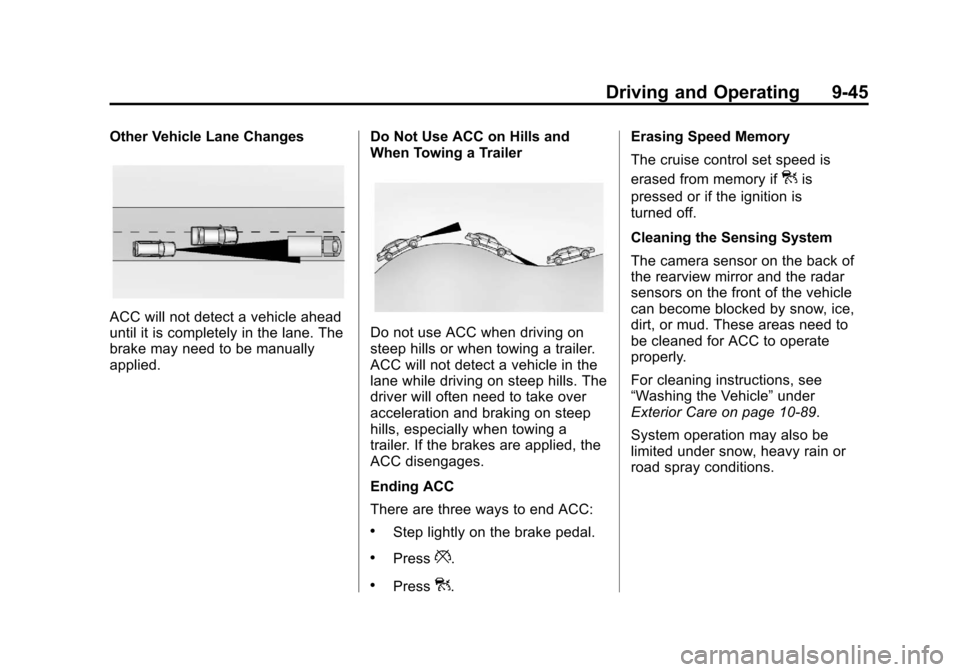
Other Vehicle Lane Changes
ACC will not detect a vehicle ahead
until it is completely in the lane. The
brake may need to be manually
applied.Do Not Use ACC on Hills and
When Towing a TrailerDo not use ACC when driving on
steep hills or when towing a trailer.
ACC will not detect a vehicle in the
lane while driving on steep hills. The
driver will often need to take over
acceleration and braking on steep
hills, especially when towing a
trailer. If the brakes are applied, the
ACC disengages.
Ending ACC
There are three ways to end ACC:
.Step lightly on the brake pedal.
.Press*.
.Press].Erasing Speed Memory
The cruise control set speed is
erased from memory if
]is
pressed or if the ignition is
turned off.
Cleaning the Sensing System
The camera sensor on the back of
the rearview mirror and the radar
sensors on the front of the vehicle
can become blocked by snow, ice,
dirt, or mud. These areas need to
be cleaned for ACC to operate
properly.
For cleaning instructions, see
“Washing the Vehicle” under
Exterior Care on page 10‑89.
System operation may also be
limited under snow, heavy rain or
road spray conditions.
Page 244 of 432

Black plate (48,1)Cadillac SRX Owner Manual - 2013 - CRC - 11/9/12
9-48 Driving and Operating
Use caution while changing lanes
when towing a trailer, as the RCTA
detection zones that extend out
from the back of the vehicle do not
move further back when a trailer is
towed.
With URPA, as the vehicle backs
up at speeds of less than 8 km/h
(5 mph), the sensors on the rear
bumper detect objects up to 2.5 m
(8 ft) behind the vehicle that are
within a zone 25 cm (10 in) high off
the ground and below bumper level.
{WARNING
The parking assist system does
not detect children, pedestrians,
bicyclists, animals, or objects
located below the bumper or that
are too close or too far from the
vehicle. It is not available at
speeds greater than 8 km/h
(5 mph). To prevent injury, death,
or vehicle damage, even with
parking assist, always check the(Continued)
WARNING (Continued)
area around the vehicle and
check all mirrors before moving
forward or backing.
The instrument cluster parking
assist display has bars that show
“distance to object”and object
location information for URPA, and
on some vehicles, for the Front
Parking Assist system. As the object
gets closer, more bars light up.
When an object is first detected in
the rear, one beep will be heard
from the rear, or both sides of the
Safety Alert Seat will pulse two
times. When an object is very close (<0.6 m (2 ft) in the vehicle rear,
or <0.3 m (1 ft) in the vehicle front),
five beeps will sound from the rear
or front, or both sides of the Safety
Alert Seat will pulse five times.
Beeps for Front Parking Assist are
higher pitched than for Rear Parking
Assist.
Vehicles with Adaptive Cruise
Control (ACC) have the Backing
Warning System, which is designed
to help avoid or reduce the harm
caused by backing crashes. The
system can warn of rear objects
when backing up at speeds greater
than 8 km/h (5 mph).
The Backing Warning System will
beep once from the rear when a
potential object threat is first
detected, or pulse twice on both
sides of the Safety Alert Seat. When
the system detects a potential
imminent crash, beeps will be heard
from the rear, or five pulses will be
felt on both sides of the Safety Alert
Seat. There may also be a brief,
sharp application of the brakes.