2013 BMW M3 COUPE esc
[x] Cancel search: escPage 10 of 311

5
Notes
Vehicle equipment
This Owner's Manual de
scribes all models and
all series-specific equipm ent, country-specific
equipment, and optional equipment that is
offered in the series. For this reason, this
Owner's Manual also de scribes and illustrates
some equipment that may not be available in
your vehicle, for example due to the special
options or national-market version selected.
This also applies to safety related functions and
systems.
If equipment and models are not described in
this Owner's Manual, please consult the
accompanying Supplementary Owner's
Handbooks.
Status of this Owner's Manual
at time of printing
BMW pursues a policy of continuous, ongoing
development that is conceived to ensure that
our vehicles continue to embody the highest
quality and safety standards combined with
advanced, state-of-the-art technology. For this
reason, it is possible in exceptional cases that
features described in this Owner's Manual
could differ from those on your vehicle.
Updates after press date
Updates after press date for the Owner's Man-
uals, when necessary, are issued as appendices
to the printed Quick Reference Guide for the
vehicle.
Your own safety
Warranty
Your vehicle is technically configured for the
operating conditions and registration require-
ments applying in the country of first delivery –
homologation. If your vehicle is to be operated
in a different country it might be necessary to
adapt your vehicle to po tentially differing oper- ating conditions and permit requirements. If
your vehicle does not co
mply with the homolo-
gation requirements in a certain country you
cannot lodge warranty claims for your vehicle
there.
Further information can be obtained from your
service center.
Maintenance and repair
Advanced technology, e.g. the use of
modern materials and powerful electron-
ics, requires specially adapted maintenance
and repair methods. You should therefore have
the corresponding work on your vehicle
performed only by your BMW center or at a
workshop that works according to BMW repair
procedures with corres pondingly trained per-
sonnel. If this work is not carried out properly,
there is a danger of subsequent damage and
related safety hazards. <
Parts and accessories
For your own safety, use genuine parts
and accessories approved by BMW.
When you purchase accessories tested and
approved by BMW and Or iginal BMW Parts, you
simultaneously acquire the assurance that they
have been thoroughly te sted by BMW to ensure
optimum performance when installed on your
vehicle.
BMW warrants these parts to be free from
defects in material and workmanship.
BMW will not accept any liability for damage
resulting from installation of parts and accesso-
ries not approved by BMW.
BMW cannot test every pr oduct made by other
manufacturers to verify if it can be used on a
BMW safely and without risk to either the
vehicle, its operation, or its occupants.
Original BMW Parts, BMW Accessories and
other products approved by BMW, together
with professional advice on using these items,
are available from all BMW centers.
00320051004F004C00510048000300280047004C0057004C005200510003
Page 17 of 311
12
At a glanceDashboard
Dashboard
Vehicle equipment
In this chapter, all pr oduction, country, and
optional equipment that is offered in the model
range is described. For this reason, descrip- tions will be given of some equipment that may
not be available in a vehi
cle, for example due to
the special options or national-market version
selected. This also app lies to safety related
functions and systems.
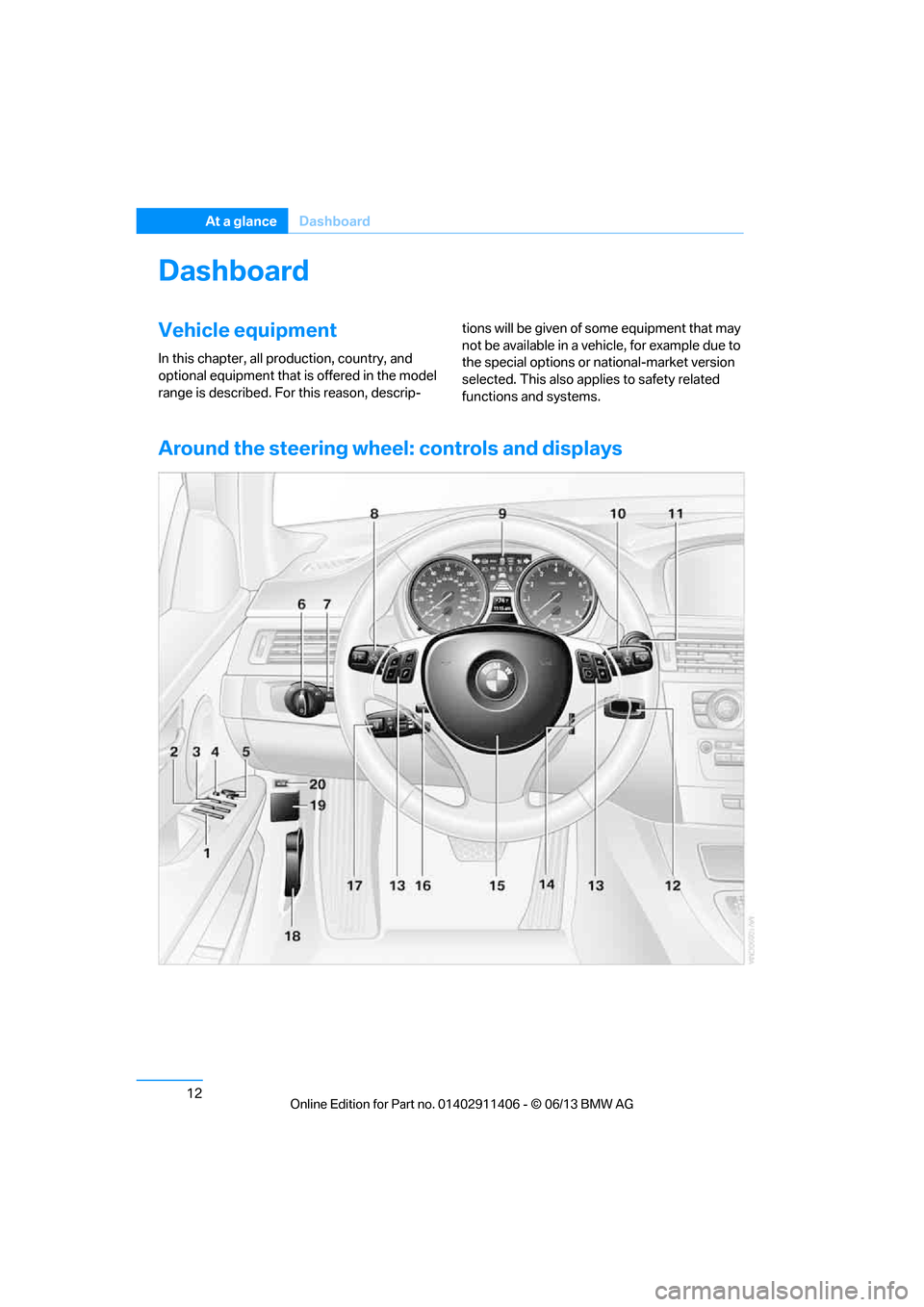
Around the steering wheel : controls and displays
00320051004F004C00510048000300280047004C0057004C005200510003
Page 20 of 311

15
Dashboard
At a glance
Indicator and warning lamps
The concept
Indicator and warning lamps can light up in a
variety of combinations and colors.
Several of the lamps are checked for proper
functioning and light up temporarily when the
engine is started or the ignition is switched on.
Text messages
Text messages at the to
p edge of the Control
Display describe the mean ings of the indicator
and warning lamps.
Supplementary text messages
You can call up more information on the Control
Display, e.g. on the cause of a malfunction and
on how to respond, via Check Control, refer to
page 92.
In urgent cases, this information will be shown
as soon as the corresponding lamp comes on.
Indicator lamps without text messages
The following indicator lamps notify you that
certain functions are active:
High beams/headlamp flasher 112
Fog lamps 113
Lamp flashes:
DSC or DTC is regulating the propul-
sive forces in order to maintain driving
stability 98
Parking brake applied 64
Canada: parking brake applied 64
Engine malfunction with adverse
effect on emissions 261
Canada: engine malfunction with
adverse effect on emissions 261
00320051004F004C00510048000300280047004C0057004C005200510003
Page 22 of 311

17
Dashboard
At a glance
6
CD/DVD drive 178
7 Changing
>Radio station 169
> Track 178
9 Controller 20
Can be turned, pressed, or moved in four
directions
10 Buttons on the controller 20
Selecting menus directly
12 Programmable memory keys 25
13 Switching entertainment audio sources on/
off and adjusting volume 166
14 Ejecting a CD/DVD 178
Automatic recirculated air control
AUC and recirculated air
mode
117
Maximum cooling 116
ALL program 117
Air volume 117
Defrosting windows 118
Rear window defroster 118
Seat heating 53
8 Park Distance Control PDC 96
Coupe:
Roller sunblinds 124
Coupe:
Hill Descent Control HDC 99
11 Convertible:
Opening and closing retractable
hardtop
44
00320051004F004C00510048000300280047004C0057004C005200510003
Page 25 of 311
20
At a glanceiDrive
iDrive
Vehicle equipment
In this chapter, all pr oduction, country, and
optional equipment that is offered in the model
range is described. For this reason, descrip-
tions will be given of some equipment that may
not be available in a vehi cle, for example due to
the special options or national-market version
selected. This also app lies to safety related
functions and systems.
The concept
iDrive integrates the fu nctions of a large num-
ber of switches. This allows these functions to
be operated from a single central position.
Make entries only when traffic and road
conditions permit; otherwise, you may
endanger vehicle occupants and other road
users by being distracted. <
Controls at a glance
Controls
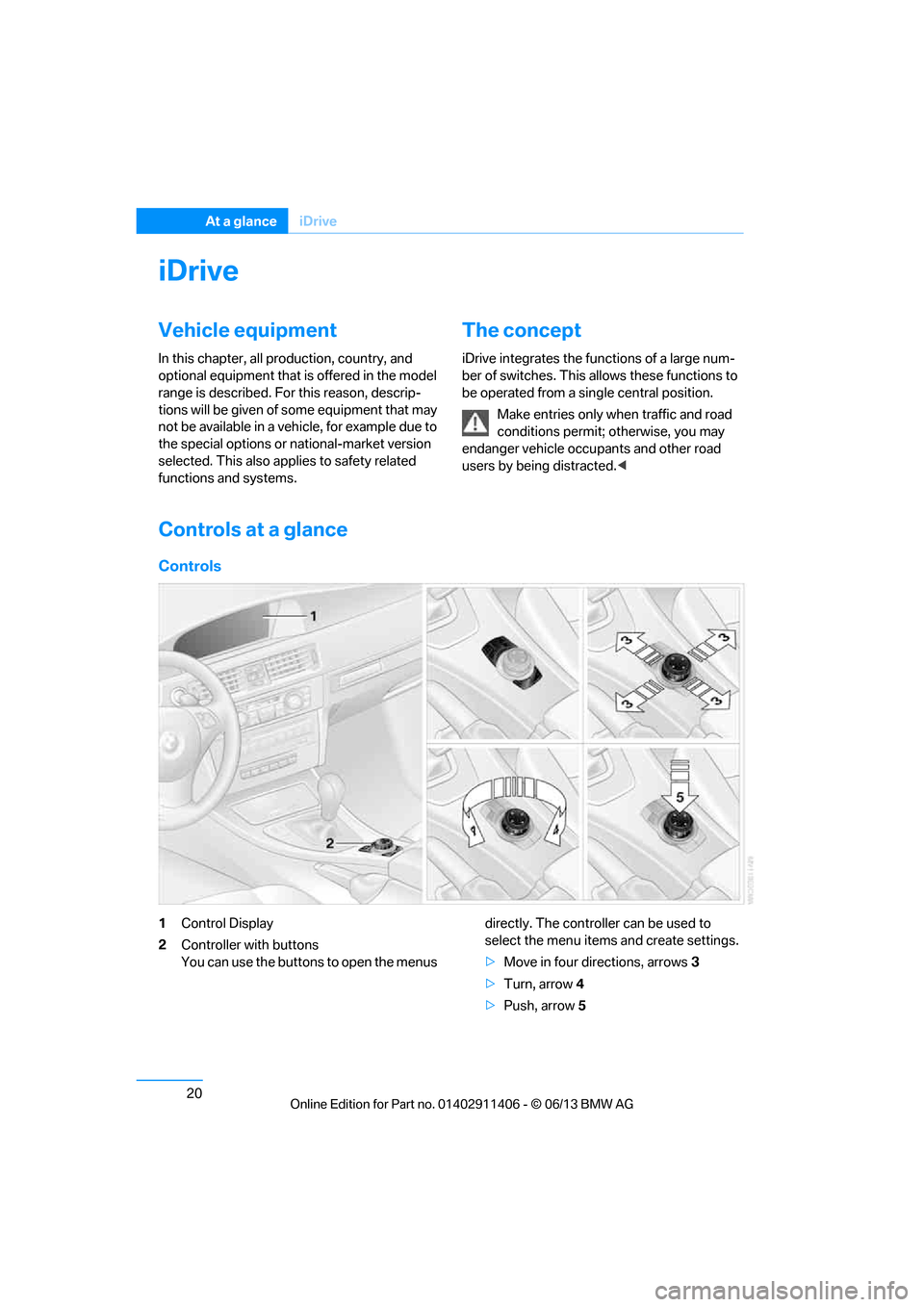
1Control Display
2 Controller with buttons
You can use the buttons to open the menus directly. The controller can be used to
select the menu item
s and create settings.
> Move in four directions, arrows 3
> Turn, arrow 4
> Push, arrow 5
00320051004F004C00510048000300280047004C0057004C005200510003
Page 32 of 311

27
Voice activation system
At a glance
Voice activation system
Vehicle equipment
In this chapter, all production, country, and
optional equipment that is offered in the model
range is described. For this reason, descrip-
tions will be given of some equipment that may
not be available in a vehi
cle, for example due to
the special options or national-market version
selected. This also app lies to safety related
functions and systems.
The concept
> The voice activation system can be used
to control most functions by spoken
commands.
> Functions that can only used when the vehi-
cle is stopped cannot be operated using the
voice activation system.
> The system includes a special microphone
on the driver's side.
> In the Owner's Manual, {...} indicates com-
mands for the voice activation system.
> In the Owner's Manual, {{...}} indicates the
answers from the voice activation system.
Prerequisite
On the Control Display, set a language that is
also supported by the vo ice activation system
to permit identification of the commands to be
spoken.
Setting the langua ge, refer to page95.
Saying commands
Activating voice activation system
1.Press the button on the steering wheel.
2. Wait for the acoustic signal.
3. Say the command. This symbol on th
e Control Display and
an acoustic signal notify you that the voice
activation system is activated.
If no additional commands are possible,
continue by operating the function via iDrive.
Finishing voice input
Press the button on the steering wheel
or
Possible commands
Most menu items on the Control Display can be
spoken as commands.
The available commands depend on which
menu is currently selected on the Control
Display.
There are short commands for functions of the
main menu.
Some list entries such as phone book entries
can also be selected using the voice activation
system. Make sure to say list entries the same
way as they appear in the respective list.
Having the possible commands read
aloud
To have the available commands read aloud:
{ Cancel }
{ Voice commands }
00320051004F004C00510048000300280047004C0057004C005200510003
Page 36 of 311

This chapter is intended to provide you with
information for complete control of your vehicle. All features and accessories that are useful for
driving and your safety, comfort andconvenience, are described here.
Controls
00320051004F004C00510048000300280047004C0057004C005200510003
Page 37 of 311

32
ControlsOpening and closing
Opening and closing
Vehicle equipment
In this chapter, all pr oduction, country, and
optional equipment that is offered in the model
range is described. For this reason, descrip-
tions will be given of some equipment that may
not be available in a vehi cle, for example due to
the special options or national-market version
selected. This also app lies to safety related
functions and systems.
Remote control
Each remote control contains a rechargeable
battery that is automatically recharged when it
is in the ignition lock while the car is being
driven. Use each remote control at least twice a
year for longer road trips in order to maintain the
batteries' charge status. In cars with Comfort
Access, the remote control contains a replace-
able battery, refer to page 41.
The settings called up and implemented when
the car is unlocked de pend on which remote
control is used to unlock the car, refer to
Personal Profile, next column.
In addition, informatio n about service require-
ments is stored in the remote control, refer to
Service data in the remote control, page 260.
Integrated key
Press button1 to release the key.
The integrated key fits the following locks:
> Glove compartment, refer to page 124
> Driver's door, refer to page 36
New remote controls
Your BMW center can supply new remote con-
trols with integrated keys as additional units or
as replacements in the event of loss.
Personal Profile
The concept
You can set many of your BMW's functions to
suit your personal needs and preferences.
Without any action on yo ur part, Personal Pro-
file ensures that most of these settings are
stored for the remote control currently in use.
When you unlock the car, the remote control
used for the purpose is recognized and the
settings stored for it are called up and
implemented.
This means that your pe rsonal settings will be
activated for you, even if in the meantime your
car was used by someone else with another
remote control and the corresponding settings.
The individual settings are stored for a maxi-
mum of four remote cont rols. They are stored
for two remote controls if Comfort Access is in
use.
00320051004F004C00510048000300280047004C0057004C005200510003