2013 BMW M3 CONVERTIBLE trans
[x] Cancel search: transPage 232 of 311

227
ConnectedDrive
Communications
Using BMW Online
To select and display content:
>
Turn the controller to highlight an element.
> Press the controller to display an element.
Opening the start page
1.Open "Options".
2. "Display start page"
Loading a new page
1.Open "Options".
2. "Reload"
Canceling
1.Open "Options".
2. "Cancel loading"
Customer Relations
Overview
Contact Customer Relations for information on
all aspects of your vehicle.
Calling Customer Relations
Vehicle not equipped with BMW Assist
or TeleService
1."BMW Assist" or "ConnectedDrive"
2. "Customer Relations"
The Customer Relations phone number is dis-
played. If a mobile phone is paired, a connection
is established to Customer Relations.
Vehicle equipped with BMW Assist or
TeleService
1."BMW Assist" or "ConnectedDrive"
2. "Customer Relations"
3. "Start service"
Service Request
Overview
Inform your BMW center that you need to
schedule a service appointment. The Teleser-
vice data is transmitted during a Service
Request. If possible, your BMW center will
establish contact with you.
Starting a Service Request
1."BMW Assist" or "ConnectedDrive"
2. "Service Request"
3. "Start service"
Automatic Serv ice Request
The Teleservice data ne cessary for servicing
the vehicle are automatica lly sent to your BMW
center prior to the servic e deadline. If possible,
the center will contac t you and a service
appointment can be arranged.
Check when your BMW center was notified.
00320051004F004C00510048000300280047004C0057004C005200510003
Page 233 of 311
228
CommunicationsConnectedDrive
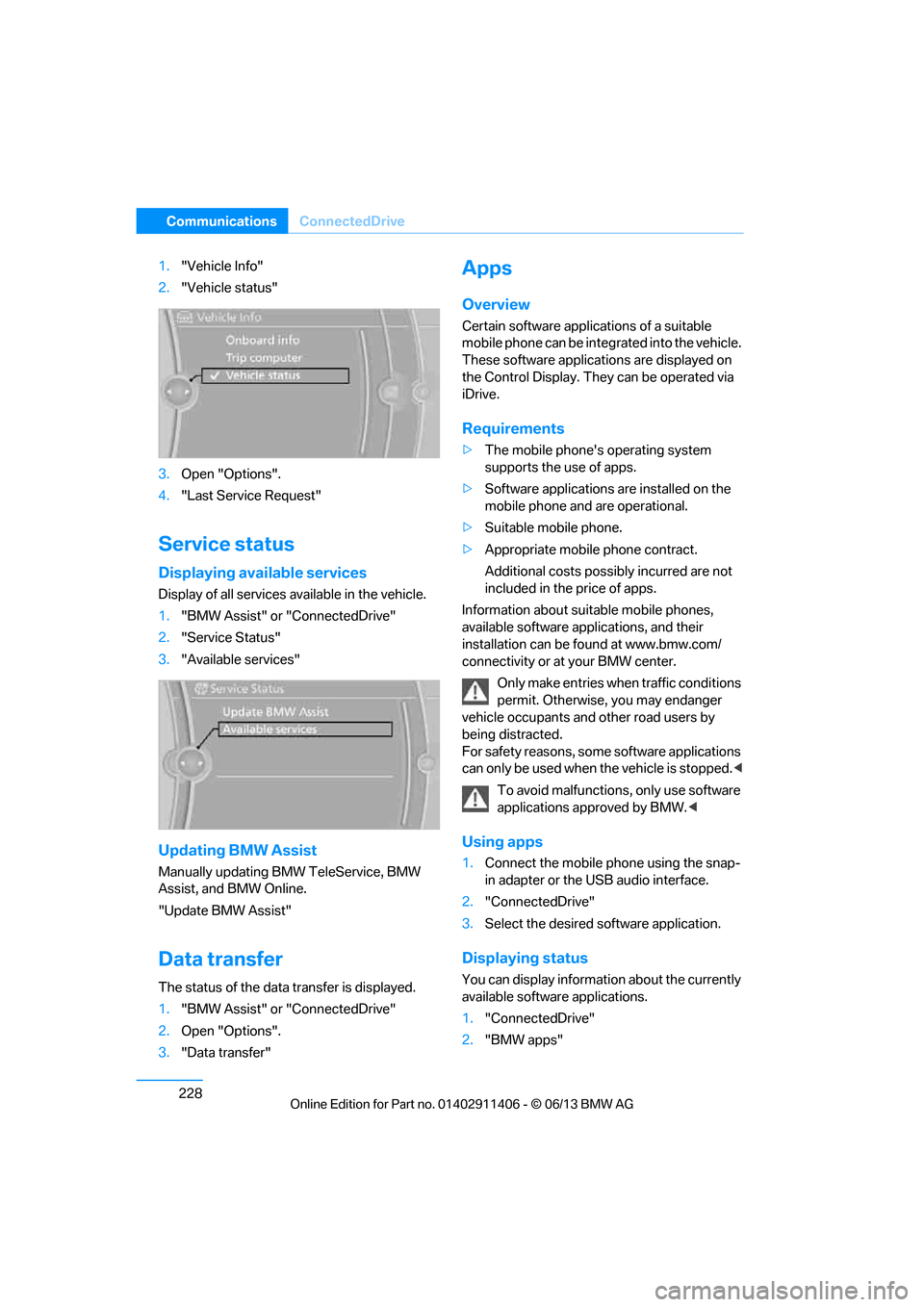
1."Vehicle Info"
2. "Vehicle status"
3. Open "Options".
4. "Last Service Request"
Service status
Displaying available services
Display of all services available in the vehicle.
1. "BMW Assist" or "ConnectedDrive"
2. "Service Status"
3. "Available services"
Updating BMW Assist
Manually updating BM W TeleService, BMW
Assist, and BMW Online.
"Update BMW Assist"
Data transfer
The status of the data transfer is displayed.
1. "BMW Assist" or "ConnectedDrive"
2. Open "Options".
3. "Data transfer"
Apps
Overview
Certain software applications of a suitable
mobile phone can be integrated into the vehicle.
These software applicat ions are displayed on
the Control Display. They can be operated via
iDrive.
Requirements
> The mobile phone's operating system
supports the use of apps.
> Software applications are installed on the
mobile phone and are operational.
> Suitable mobile phone.
> Appropriate mobile phone contract.
Additional costs possibly incurred are not
included in the price of apps.
Information about suit able mobile phones,
available software applications, and their
installation can be found at www.bmw.com/
connectivity or at your BMW center.
Only make entries when traffic conditions
permit. Otherwise, you may endanger
vehicle occupants and other road users by
being distracted.
For safety reasons, some software applications
can only be used when the vehicle is stopped. <
To avoid malfunctions, only use software
applications approved by BMW. <
Using apps
1.Connect the mobile phone using the snap-
in adapter or the USB audio interface.
2. "ConnectedDrive"
3. Select the desired software application.
Displaying status
You can display information about the currently
available software applications.
1."ConnectedDrive"
2. "BMW apps"
00320051004F004C00510048000300280047004C0057004C005200510003
Page 234 of 311

229
ConnectedDrive
Communications
Plugin
Selected functions of the mobile phone are
displayed on the Control
Display. They can be
operated via iDrive.
1. Connect the mobile phone using the snap-
in adapter.
2. "ConnectedDrive"
3. "PlugIn"
4. "Activate PlugIn"
5. Use the controller to navigate in the dis-
played functions and select the desired
category or track, for example.
Press the button to move one level up or
back within the func tions of the mobile
phone.
Press the button twice to return back to
the main menu.
Notes
>The range of apps that are displayed in the
Control Display depends on the range of
software applications installed on the
mobile phone.
> The data transfer of the software applica-
tions from the mobile phone to the vehicle
may take some time. Some software appli-
cations are dependent on the speed of the
available Internet connection of the mobile
phone.
> Certain versions of the mobile phone used
and the software they use may not permit
apps to be used at the same time as the
Bluetooth hands-free system.
If necessary, restart the software applica-
tion on the mobile phone after completing a
call.
00320051004F004C00510048000300280047004C0057004C005200510003
Page 255 of 311

250
MobilityWheels and tires
Tire identification marks
Knowledge of the labeling on the side of the tire
makes it easier to identify and choose the right
tires.
Tire size
Speed code letter
Q = up to 100 mph or 160 km/h
T = up to 118 mph or 190 km/h
H = up to 131 mph or 210 km/h
V = up to 150 mph or 240 km/h
W = up to 167 mph or 270 km/h
Y = up to 186 mph or 300 km/h
Tire Identification Number
Tires with DOT codes meet the guidelines of
the US Department of Transportation.
DOT code:
Tire age
The manufacturing date of tires is contained in
the tire coding: DOT ... 1013 means that the tire
was manufactured in week 10 of 2013.
BMW recommends that you replace all tires
after 6 years at most, even if some tires may last
for 10 years.
Uniform Tire Quality Grading
Quality grades can be found where applicable
on the tire sidewall betw een tread shoulder and
maximum section width. For example:
Tread wear 200 Traction AA
Temperature A
DOT Quality Grades
Tread wear
Traction AA A B C
Temperature A B C
All passenger car tires must conform to
Federal Safety Requir ements in addition
to these grades. <
Tread wear
The tread wear grade is a comparative rating
based on the wear rate of the tire when tested
under controlled conditio ns on a specified gov-
ernment test course. For example, a tire graded
150 would wear one and one-half (1 γ) times as
well on the government course as a tire graded
100. The relative performance of tires depends
upon the actual conditio ns of their use, how-
ever, and may depart significantly from the
norm due to variations in driving habits, service
practices and differences in road characteris-
tics and climate.
Traction
The traction grades, from highest to lowest, are
AA, A, B, and C.
These grades represent the tire's ability to stop
on wet pavement, as measured under con-
trolled conditions on specified government test
surfaces of asphalt and concrete. A tire marked
C may have poor traction performance.
e.g.
Nominal width in mm
Aspect ratio
in
Ξ
Radial belt construction
Rim diameter in inches
Load rating,
not on ZR tires
Speed code letter, in
front of the R on ZR tires
225/45 R1791 V
e.g.
Manufacturer's
code for tire make
Tire size and
tire design
Tire ageDOT xxxx xxx 4012
00320051004F004C00510048000300280047004C0057004C005200510003
Page 267 of 311

262
MobilityCare
Care
Vehicle equipment
In this chapter, all pr oduction, country, and
optional equipment that is offered in the model
range is described. For this reason, descrip-
tions will be given of some equipment that may
not be available in a vehi cle, for example due to
the special options or national-market version
selected. This also app lies to safety related
functions and systems.
Washing the vehicle
Notes
When using steam cleaners or high-pres-
sure cleaning jets, ma ke sure to maintain
a sufficient distance and stay below a maximum
temperature of 140 °F/60 6.
Too close a distance, too high a pressure, or too
high a temperature may cause damage or pre-
liminary damage that can then lead to long-term
damage.
Follow the operating instructions for the steam
jet or high-pressure washer. <
When using high-pressure washers, do
not spray the sensors, e.g. of the Park
Distance Control, for an extended period and
maintain a distance of at least 1 ft/30 cm from
them. <
Regularly remove foreign objects, e.g. leaves, in
the vicinity of the windshield when the hood is
open.
Wash the vehicle more frequently, particularly
in winter.
Heavy soiling and road salt can lead to vehicle
damage.
Automatic car washes
Notes
In car washes with high pressures and
nozzle positions, wate r may drip into the
vehicle around the windows. <
Please note the following:
> Give preference to car washes that use
cloth or soft brushes in order to avoid paint
damage.
> Wheels and tires must not be damaged by
transport devices.
> Fold in exterior mirror, refer to page 55; oth-
erwise, they can be damaged due to the
width of the vehicle.
> Deactivate the rain sensor, refer to page 73,
to prevent undesired wiper operation.
> Remove additional add-on parts, e.g. spoil-
ers or phone antennas, if they could be
damaged.
> Unscrew the rod antenna.
> Leave the remote control in the ignition
lock.
Avoid car washes with guide rail heights
over 4 in/10 cm, otherwise there is
danger of damaging chassis parts. <
Convertible: retractable hardtop
Proceed as you would in a normal car wash.
When you open a wet hardtop, water
drops may run into the trunk. If necessary,
remove items from the trunk beforehand to
avoid water stains or soiling. <
00320051004F004C00510048000300280047004C0057004C005200510003
Page 268 of 311

263
Care
Mobility
Driving into an automatic car wash
Perform the following steps to ensure that the
vehicle can roll:
Manual transmission:
1.
Shift into neutral.
2. Release parking brake, refer to page 64.
3. Switch off the engine.
4. Leave the remote cont rol in the ignition
lock.
Automatic transmission:
1. Insert the remote control into the ignition
lock, even with Comfort Access.
2. Shift selector lever into position N.
3. Release parking brake, refer to page 64.
4. Switch off the engine.
5. Leave the remote cont rol in the ignition
lock.
Sport automatic transmission with double
clutch:
Before driving into an automatic car wash,
perform the following steps to ensure that the
vehicle can roll:
1. Insert the remote control into the ignition
lock, even with Comfort Access.
2. Engage transmission position N.
3. Release parking brake, refer to page 64.
4. Switch off the engine.
5. Leave the remote control in the ignition lock
so that the vehicle can roll.
The transmission is switched into position P:
> Automatically after approx. 30 minutes
> If you remove the infrared remote control
from the ignition lock
Headlamps
After washing the vehicle
After washing the ve hicle, apply the
brakes briefly to dry them; otherwise,
water can reduce braking efficiency over the
short term and the brake discs can corrode.
formation and to reduce wiper noise and wiper
blade wear.
Vehicle care
Care products
BMW recommends using BMW cleaning and
care products since they have been tested and
approved for this purpose.
Follow the instructions on the packaging.
When cleaning inside the vehicle, always
open the doors and windows. Only use prod-
ucts designed for cleaning vehicles. Cleaning
agents can contain substances that are danger-
ous or hazardous to your health. <
Vehicle paintwork
Regular care contributes to driving safety and
value retention. Enviro nmental influences in
regions with elevated leve ls of air pollution or
natural contaminants such as tree sap or pollen
can impact vehicle paintwork. The frequency
and scope of car care should be adapted
accordingly.
Immediately remove particularly corrosive sub-
stances such as spilled fuel , oil, grease, or bird
droppings to prevent damage to the paintwork.
Leather care
Frequently remove dust from the leather using
a cloth or vacuum cleaner.
Otherwise, dust and road grit in the pores and
folds of the leather will otherwise have an abra-
sive effect, resulting in increased wear and
causing the leather surface to become brittle
prematurely.
In order to prevent staining, e.g due to clothing,
clean the leather approximately every two
months.
Clean light-colored leather more frequently as it
shows dust and dirt more noticeably.
00320051004F004C00510048000300280047004C0057004C005200510003
Page 272 of 311

267
Replacing components
Mobility
When working on electrical systems,
always begin by switching off the con-
sumer in question; otherwise, short-circuits
could result. To avoid possible injury or equip-
ment damage when replacing bulbs, observe
any instructions provided by the bulb
manufacturer. <
For care of the headla mps, please follow the
instructions in the ch apter entitled 'Care'.
To replace lamps not described here,
please contact your BMW center. <
Light-emitting diodes LED
Light-emitting diodes installed behind translu-
cent lenses serve as the light source for many of
the controls, displays, and equipment in your
vehicle. These light-emitting diodes, which
operate using a concept similar to that applied
in conventional lasers, are officially designated
as Class 1 light-emitting diodes.
Do not remove the co vers or expose the
eyes directly to the unfiltered light source
for several hours; otherw ise, this could cause
irritation of the retina. <
Headlight lenses
In cool or humid weather, condensation may
form on the interior of outside lamps. The con-
densation will disappear after a short time when
driving with the headlamps switched on. The
headlamp glasses do not need to be changed.
If the headlamps do not defrost despite driving
with the headlamps switch ed on, and additional
moisture builds up, for example water droplets
in the lamps, have them checked by your BMW
center.
Xenon lamps
These bulbs have a very lo ng service life and are
highly unlikely to fail. If a xenon lamp fails never-
theless, switch on the fog lamps and continue
the journey with great ca re, provided that local
legislation does not prohibit this. Have all work on the xenon lamp system,
including bulb replacements, performed
only by your BMW center . Due to high voltage,
there is a risk of fatal injury if work on the xenon
lamps is carried out improperly. <
Access to the lamps
1.Switch off the lamps and take the remote
control out of the ignition lock.
2. Remove the upper co ver from the head-
lamp. To do so, use a screwdriver to press
the catches towards the rear, see arrows,
and pull the cover forward and out.
Follow the same steps in reverse order to
reattach the cover. Be careful when installing the cover;
otherwise, leaks co uld occur and cause
damage to the headlamp system. <
Parking lamps and roadside parking
lamps, daytime running lights
These lamps use LED technology for operation.
If they malfunction, please contact your BMW
center.
Corner-illuminating lamps
H3 bulb, 55 watts
1.Switch off the lamps and take the remote
control out of the ignition lock.
2. Remove the cover, re fer to Access to the
lamps.
00320051004F004C00510048000300280047004C0057004C005200510003
Page 276 of 311

271
Replacing components
Mobility
>
Seat and mirror memory
The positions must be stored again, refer to
page 53.
> Inside rearview mirror with digital compass
The system must be calibrated, refer to
page 123.
> Active steering
The system automatically initializes itself
briefly during a trip. The system is deacti-
vated during this time, refer to page 105.
> xDrive
The system automatically initializes itself
during a trip. Indicator lamps light up during
this time. If the lamps do not go out during
the current trip, have the system checked.
Disposal of old battery
Have old batteries disposed of by your
BMW center or bring them to a recycling
center. Maintain the ba ttery in an upright
position for transport and storage. Always
secure the battery against tipping over during
transport.<
Fuses
Never attempt to repair a blown fuse and
do not replace a defective fuse with a
substitute of another co lor or amperage rating;
otherwise, this could lead to a circuit overload,
ultimately resulting in a fire in the vehicle. <
Open the cover in the glove compartment and
remove it.
Plastic tweezers are loca ted on the distributor
box.
See the rear of the cover for information on fuse
assignment.
Spare fuses are available at your BMW center.
00320051004F004C00510048000300280047004C0057004C005200510003