2013 BMW ACTIVEHYBRID3 climate settings
[x] Cancel search: climate settingsPage 37 of 220

Using the guest profile
The guest profile can be used to make individual
settings without affecting the three Personal
Profiles.
This can be useful for drivers who are using the
vehicle temporarily and do not have their own
profile.1."Settings"2."Profiles"3.The current profile is selected.4.Open "Guest".5.Adjust the settings.
Note: the guest profile cannot be renamed.
Display profile list during start
The profile list can be displayed during each
start for selecting the desired profile.
1."Settings"2."Profiles"3.Open "Options".4."Display user list at startup"
Personal Profile settings
The following functions and settings can be
stored in a profile.
More information on the settings can be found
under:
▷Collision warning: warning time, last setting
on/off.▷Exterior mirror position.▷CD/Multimedia: audio source listened to
last.▷Unlocking/locking of the vehicle: settings.▷Driving Dynamics Control: sport program▷Driver's seat position: automatically re‐
trieved after unlocking.▷Programmable memory buttons: assign‐
ment.▷Head-up Display: selection, brightness, po‐
sition and rotation of the display.▷Headlamp courtesy delay feature: time set‐
ting.▷Tone: tone settings.▷Automatic climate control/Automatic cli‐
mate control with enhanced features: set‐
tings.▷Navigation: map views, route criteria, voice
output on/off.▷Park Distance Control PDC: adjusting the
signal tone volume.▷Radio: stored stations, station listened to
last, special settings.▷Backup camera: selection of functions and
type of display.▷Side View: selection of the display type.▷Language on the Control Display.▷Lane departure warning: last setting, on/off.▷Active Blind Spot Detection: last setting, on/
off.▷Daytime running lights: current setting.▷Triple turn signal activation.▷Locking the vehicle: after a brief period or
after starting to drive.
Central locking system
The concept
The central locking system becomes active
when the driver's door is closed.
The system simultaneously engages and re‐
leases the locks on the following:
▷Doors.▷Trunk lid.▷Fuel filler flap.
Operating from the outside
▷Via the remote control.Seite 37Opening and closingControls37
Online Edition for Part no. 01 40 2 917 825 - II/13
Page 133 of 220
Climate control functions in detail
Temperature Turn the wheel to set the desired
temperature.
The automatic climate control reaches this tem‐
perature as quickly as possible, if necessary by
increasing the cooling or heating output, and
then keeps it constant.
Avoid rapidly switching between different tem‐
perature settings. The automatic climate control
will not have sufficient time to adjust the set
temperature.
AUTO program Press the button.
Air flow, air distribution, and tempera‐
ture are controlled automatically.
Depending on the selected temperature, AUTO
intensity, and outside influences, the air is di‐
rected to the windshield, side windows, upper
body, and into the footwell.
The cooling function, refer to page 133, is
switched on automatically with the AUTO pro‐
gram.
At the same time, a condensation sensor con‐
trols the program so as to prevent window con‐
densation as much as possible.
Intensity of the AUTO program
With the AUTO program switched on, automatic
control of the air flow and air distribution can be
adjusted.
Press the left or right side of the button:
decrease or increase the intensity.
The selected intensity is shown on the display
of the automatic climate control.Maximum cooling
Press the button.
The system is set to the lowest tem‐
perature, maximum air flow and recirculated-air
mode.
Air flows out of the vents for the upper body re‐
gion. The vents need to be open for this.
The air is cooled fastest when the engine is run‐
ning.
The air flow can be adjusted when the program
is active.
Cooling function
The passenger compartment can be cooled
with the engine running or switched off.
Press the button.
The air is cooled and dehumidified and,
depending on the temperature setting, warmed
again.
Depending on the weather, the windshield may
fog up briefly when the engine is started.
The cooling function is switched on automati‐
cally with the AUTO program.
When using the automatic climate control, con‐
densation water, refer to page 155, develops
that exits underneath the vehicle.
Automatic recirculated-air control/
recirculated-air mode
You can respond to unpleasant odors or pollu‐
tants in the immediate environment by tempo‐
rarily suspending the supply of outside air. The
system then recirculates the air currently within
the vehicle.
Press the button repeatedly to select
an operating mode:▷LEDs off: outside air flows in continuously.▷Left LED on, automatic recirculated-air con‐
trol: a sensor detects pollutants in the out‐Seite 133Climate controlControls133
Online Edition for Part no. 01 40 2 917 825 - II/13
Page 135 of 220
Ventilation
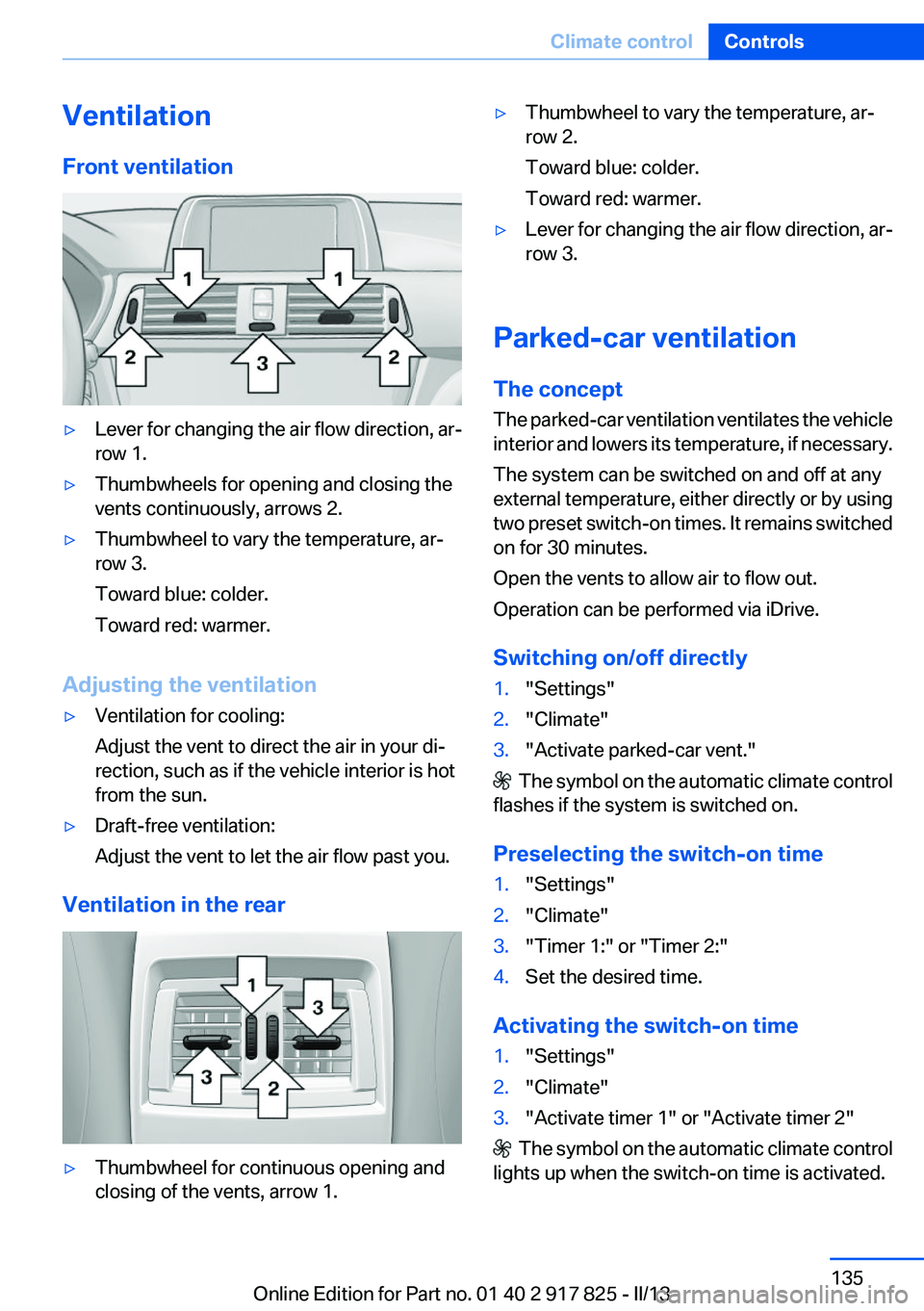
Front ventilation▷Lever for changing the air flow direction, ar‐
row 1.▷Thumbwheels for opening and closing the
vents continuously, arrows 2.▷Thumbwheel to vary the temperature, ar‐
row 3.
Toward blue: colder.
Toward red: warmer.
Adjusting the ventilation
▷Ventilation for cooling:
Adjust the vent to direct the air in your di‐
rection, such as if the vehicle interior is hot
from the sun.▷Draft-free ventilation:
Adjust the vent to let the air flow past you.
Ventilation in the rear
▷Thumbwheel for continuous opening and
closing of the vents, arrow 1.▷Thumbwheel to vary the temperature, ar‐
row 2.
Toward blue: colder.
Toward red: warmer.▷Lever for changing the air flow direction, ar‐
row 3.
Parked-car ventilation
The concept
The parked-car ventilation ventilates the vehicle
interior and lowers its temperature, if necessary.
The system can be switched on and off at any
external temperature, either directly or by using
two preset switch-on times. It remains switched
on for 30 minutes.
Open the vents to allow air to flow out.
Operation can be performed via iDrive.
Switching on/off directly
1."Settings"2."Climate"3."Activate parked-car vent."
The symbol on the automatic climate control
flashes if the system is switched on.
Preselecting the switch-on time
1."Settings"2."Climate"3."Timer 1:" or "Timer 2:"4.Set the desired time.
Activating the switch-on time
1."Settings"2."Climate"3."Activate timer 1" or "Activate timer 2"
The symbol on the automatic climate control
lights up when the switch-on time is activated.
Seite 135Climate controlControls135
Online Edition for Part no. 01 40 2 917 825 - II/13
Page 161 of 220
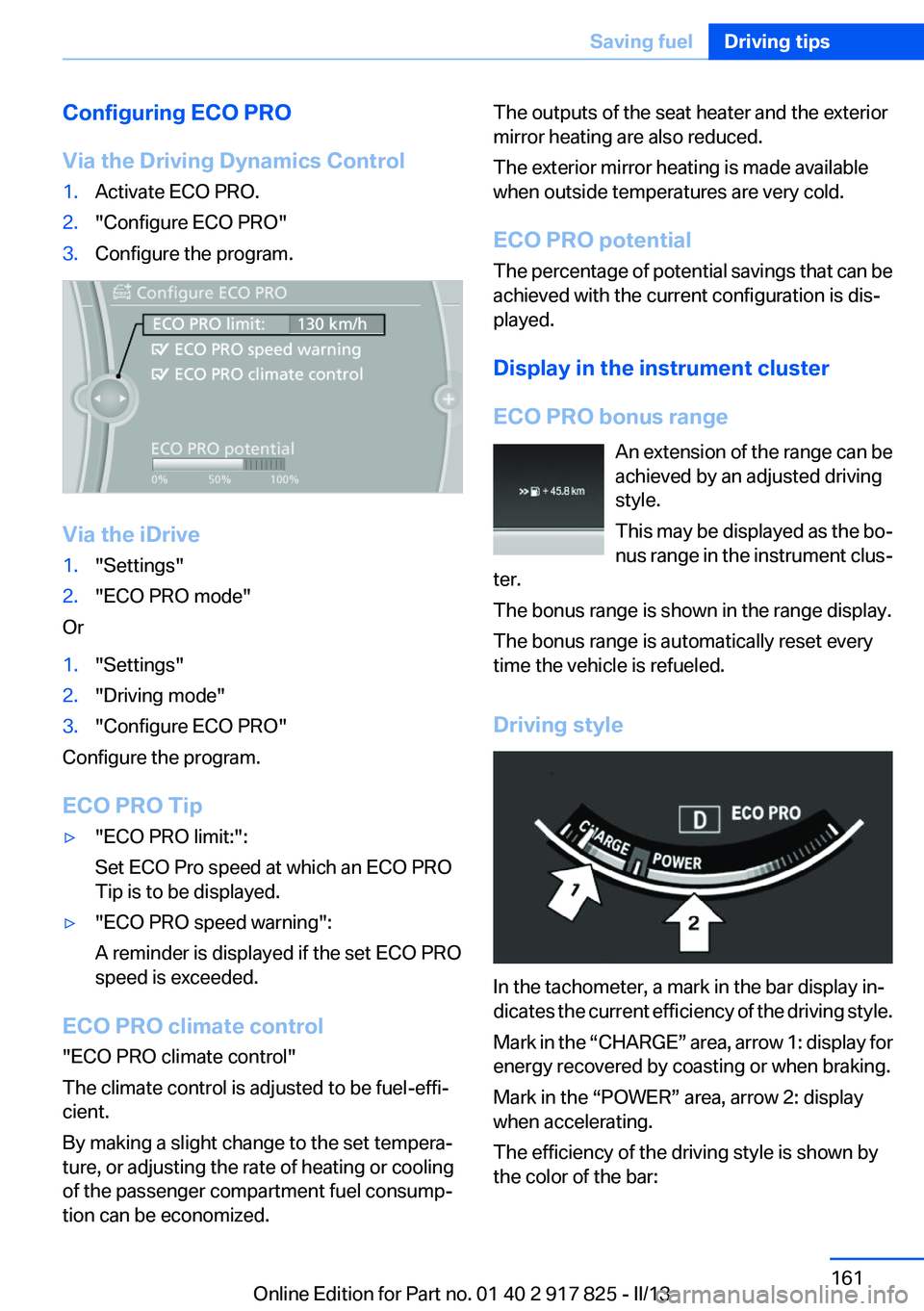
Configuring ECO PRO
Via the Driving Dynamics Control1.Activate ECO PRO.2."Configure ECO PRO"3.Configure the program.
Via the iDrive
1."Settings"2."ECO PRO mode"
Or
1."Settings"2."Driving mode"3."Configure ECO PRO"
Configure the program.
ECO PRO Tip
▷"ECO PRO limit:":
Set ECO Pro speed at which an ECO PRO
Tip is to be displayed.▷"ECO PRO speed warning":
A reminder is displayed if the set ECO PRO
speed is exceeded.
ECO PRO climate control
"ECO PRO climate control"
The climate control is adjusted to be fuel-effi‐
cient.
By making a slight change to the set tempera‐
ture, or adjusting the rate of heating or cooling
of the passenger compartment fuel consump‐
tion can be economized.
The outputs of the seat heater and the exterior
mirror heating are also reduced.
The exterior mirror heating is made available
when outside temperatures are very cold.
ECO PRO potential
The percentage of potential savings that can be
achieved with the current configuration is dis‐
played.
Display in the instrument cluster
ECO PRO bonus range An extension of the range can be
achieved by an adjusted driving
style.
This may be displayed as the bo‐
nus range in the instrument clus‐
ter.
The bonus range is shown in the range display.
The bonus range is automatically reset every
time the vehicle is refueled.
Driving style
In the tachometer, a mark in the bar display in‐
dicates the current efficiency of the driving style.
Mark in the “CHARGE” area, arrow 1: display for
energy recovered by coasting or when braking.
Mark in the “POWER” area, arrow 2: display
when accelerating.
The efficiency of the driving style is shown by
the color of the bar:
Seite 161Saving fuelDriving tips161
Online Edition for Part no. 01 40 2 917 825 - II/13
Page 211 of 220

Brake lights, adaptive 108
Brake pads, breaking in 152
Braking, notes 154
Breakdown assis‐ tance 194, 195
Breaking in 152
Brightness of Control Dis‐ play 88
Bulb replacement 183
Bulb replacement, front 184
Bulb replacement, halogen headlamps 184
Bulb replacement, rear 189
Bulb replacement, xenon headlamps 187
Bulbs and lamps 183
Button, Start/Stop 63
Bypassing, refer to Jump- starting 195
C
California Proposition 65 Warning 7
Camera, backup camera 121
Camera, care 203
Camera, Side View 125
Camera, Top View 123
Can holder, refer to Cu‐ pholder 148
Car battery 191
Car care products 201
Care, displays 203
Care, vehicle 201
Cargo 156
Cargo area, enlarging 144
Cargo area lid 41
Cargo area, storage compart‐ ments 149
Cargo straps, securing cargo 157
Car key, refer to Remote con‐ trol 34
Carpet, care 202
Car wash 200 Catalytic converter, refer to
Hot exhaust system 154
CBS Condition Based Serv‐ ice 181
CD/Multimedia, see user's manual for Navigation, Enter‐
tainment and Communica‐
tion
Center armrest 147
Center console 16
Central locking system 37
Central screen, refer to Control Display 18
Changes, technical, refer to Safety 7
Changing parts 183
Changing wheels 191
Changing wheels/tires 173
CHARGE, energy recovery 67
Charge indicator, high-voltage battery 79
Check Control 75
Children, seating position 59
Children, transporting safely 59
Child restraint fixing sys‐ tem 59
Child restraint fixing system LATCH 60
Child restraint fixing systems, mounting 59
Child safety locks 62
Child seat, mounting 59
Child seats 59
Chrome parts, care 202
Cigarette lighter 142
Cleaning, displays 203
Climate control 132
Clock 78
Closing/opening from in‐ side 41
Closing/opening via door lock 40
Closing/opening with remote control 38
Clothes hooks 148 Coasting 66
Collision warning 103
Combination switch, refer to Turn signals 68
Combination switch, refer to Wiper system 69
Combustion engine, start‐ ing 65
Comfort Access 42
COMFORT program, Dynamic Driving Control 114
Compartments in the doors 147
Compass 140
Computer 84
Condensation on win‐ dows 134
Condensation under the vehi‐ cle 155
Condition Based Service CBS 181
Confirmation signal 39
ConnectedDrive, see user's manual for Navigation, Enter‐
tainment and Communica‐
tion
Contact with water, hybrid system 199
Control Display 18
Control Display, settings 87
Controller 18, 19
Control systems, driving sta‐ bility 111
Convenient opening 38
Coolant 180
Coolant temperature 78
Cooling function 133
Cooling, maximum 133
Cooling system 180
Corrosion on brake discs 155
Cruise control 116
Cruising range 78
Cupholder 148
Current fuel consumption 81 Seite 211Everything from A to ZReference211
Online Edition for Part no. 01 40 2 917 825 - II/13