2013 BMW 135I CONVERTIBLE stop
[x] Cancel search: stopPage 14 of 284
13
Dashboard
At a glance
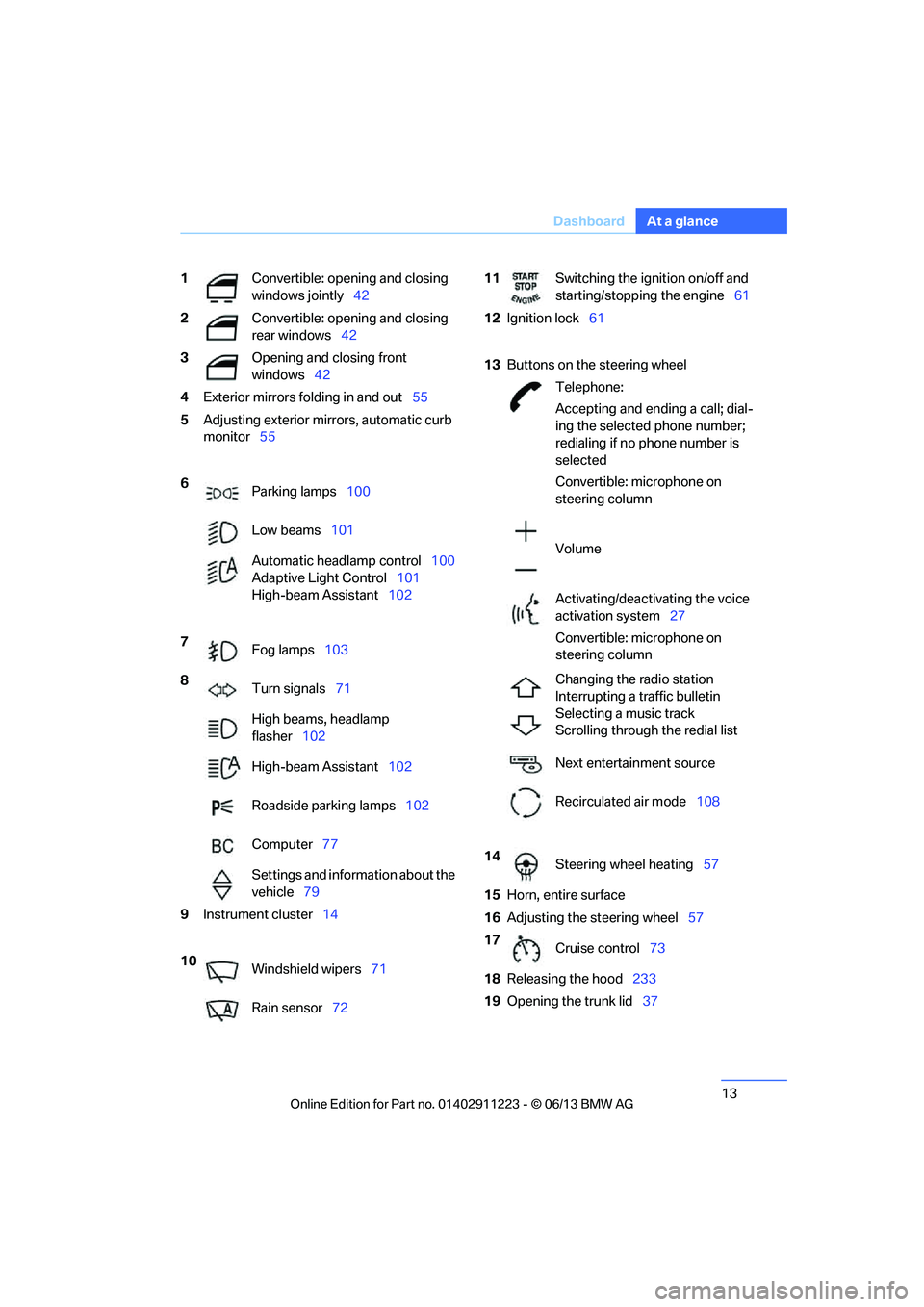
1
Convertible: opening and closing
windows jointly 42
2 Convertible: opening and closing
rear windows 42
3 Opening and closing front
windows42
4 Exterior mirrors fo lding in and out55
5 Adjusting exterior mirrors, automatic curb
monitor 55
6 Parking lamps 100
Low beams 101
Automatic head lamp control100
Adaptive Light Control 101
High-beam Assistant 102
7 Fog lamps 103
8 Turn signals 71
High beams, headlamp
flasher 102
High-beam Assistant 102
Roadside parking lamps 102
Computer 77
Settings and information about the
vehicle 79
9 Instrument cluster 14
10 Windshield wipers 71
Rain sensor 7211Switching the ignition on/off and
starting/stopping the engine 61
12 Ignition lock 61
13 Buttons on the steering wheel
Telephone:
Accepting and ending a call; dial-
ing the selected phone number;
redialing if no phone number is
selected
Convertible: microphone on
steering column
Volume
Activating/deactivating the voice
activation system 27
Convertible: microphone on
steering column
Changing the radio station
Interrupting a traffic bulletin
Selecting a music track
Scrolling through the redial list
Next entertainment source
Recirculated air mode 108
14 Steering wheel heating 57
15 Horn, entire surface
16 Adjusting the steering wheel 57
17 Cruise control 73
18 Releasing the hood 233
19 Opening the trunk lid 37
00320051004F004C00510048000300280047004C0057004C005200510003
Page 28 of 284
27
Voice activation system
At a glance
Voice activation system
Vehicle equipment
In this chapter, all production, country, and
optional equipment that is offered in the model
range is described. For this reason, descrip-
tions will be given of some equipment that may
not be available in a vehi
cle, for example due to
the special options or national-market version
selected. This also app lies to safety related
functions and systems.
The concept
> The voice activation system can be used
to control most functions by spoken
commands.
> Functions that can only used when the vehi-
cle is stopped cannot be operated using the
voice activation system.
> The system includes a special microphone
on the driver's side.
> In the Owner's Manual, {...} indicates com-
mands for the voice activation system.
> In the Owner's Manual, {{...}} indicates the
answers from the voice activation system.
Prerequisite
On the Control Display, set a language that is
also supported by the vo ice activation system
to permit identification of the commands to be
spoken.
Setting the langua ge, refer to page87.
Saying commands
Activating voice activation system
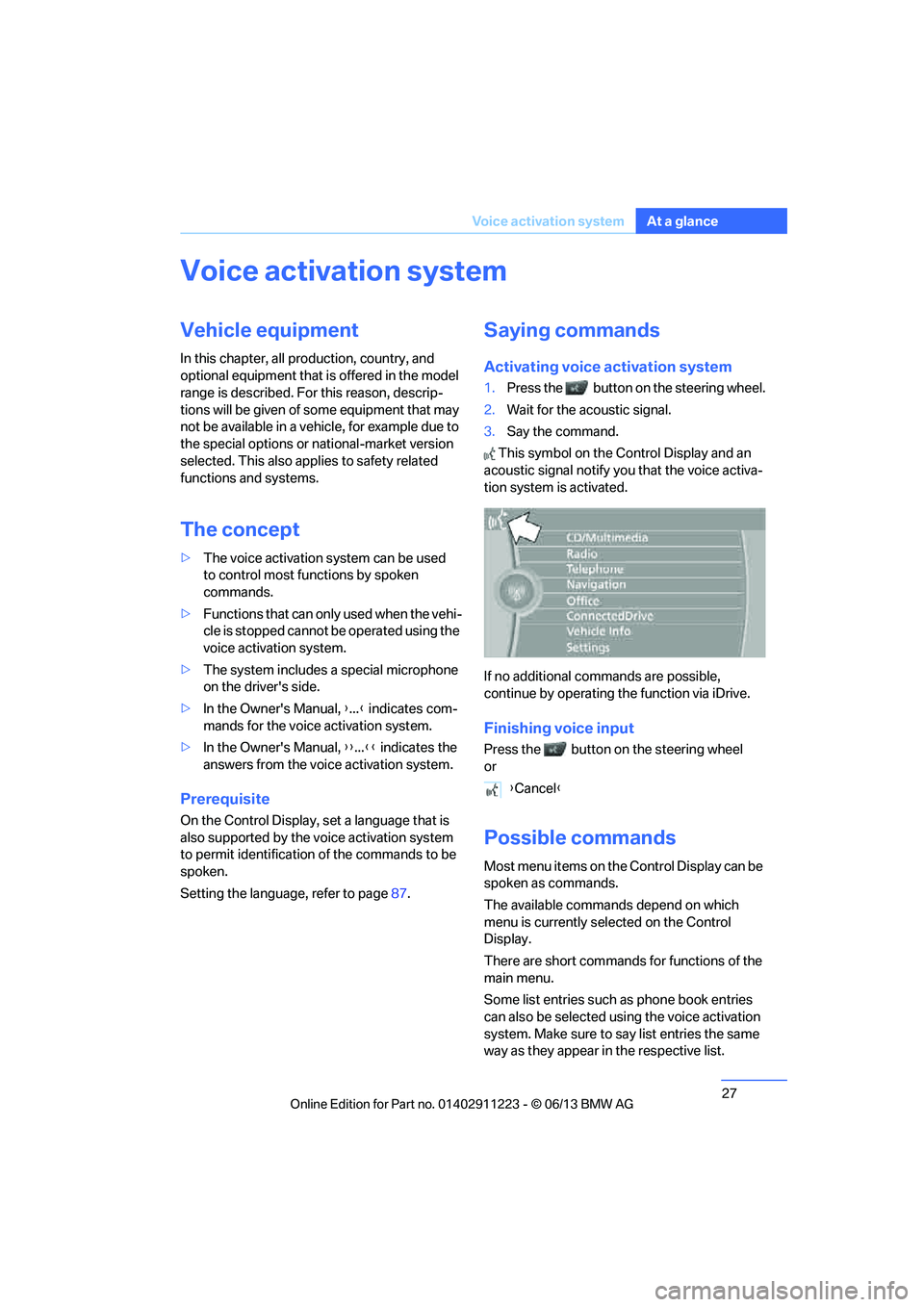
1.Press the button on the steering wheel.
2. Wait for the acoustic signal.
3. Say the command.
This symbol on the Control Display and an
acoustic signal notify yo u that the voice activa-
tion system is activated.
If no additional commands are possible,
continue by operating the function via iDrive.
Finishing voice input
Press the button on the steering wheel
or
Possible commands
Most menu items on the Control Display can be
spoken as commands.
The available commands depend on which
menu is currently selected on the Control
Display.
There are short commands for functions of the
main menu.
Some list entries such as phone book entries
can also be selected using the voice activation
system. Make sure to say list entries the same
way as they appear in the respective list. {
Cancel }
00320051004F004C00510048000300280047004C0057004C005200510003
Page 42 of 284

41
Opening and closing
Controls
Convertible: window and convertible
top operation
With the ignition at radio readiness or beyond,
you can open and close the windows and the
convertible top when a remote control is
located inside the vehicle.
Unlocking the trunk lid separately
Press the button on the ou
tside of the trunk lid.
This corresponds to pressing the button. If the vehicle detects that a remote con-
trol has been accident ally left inside the
locked vehicle after the trunk lid is closed, the
lid will reopen. The haza rd warning flashers
flash and a signal sounds. <
Switching on radio readiness
Pressing the Start/Stop button switches on
radio readiness.
Do not depress the brake or the clutch; other-
wise, the engine will start immediately.
Starting the engine
The engine can be started or the ignition can be
switched on when a remote control is inside the
vehicle. It is not necessa ry to insert a remote
control into the ignition lock, refer to page 61.
Switching off the engine in cars with
automatic transmission
The engine can only be switched off when the
selector lever is in po sition P, refer to page 63.
To switch the engine off when the selector lever
is in position N, the remote control must be in
the ignition lock.
Malfunctions
Local radio waves can in terfere with the func-
tion of Comfort Access, for example when a
mobile phone is in the immediate vicinity of the
remote control or by when a mobile phone is
being charged in the vehicle. If this happens, open and close the vehicle via
the buttons on the remote control or using the
integrated key. To star
t the engine afterward,
insert the remote control into the ignition lock.
Warning lamps
The warning lamp in the instrument
cluster lights up when you attempt to
start the engine: the engine cannot
be started. The remote co ntrol is not inside the
vehicle or is malfunctio ning. Take the remote
control with you inside the vehicle or have it
checked. If necessary, insert another remote
control into the ignition lock.
The warning lamp in the instrument
cluster lights up wh ile the engine is
running: the remote control is no
longer inside the vehicle. After the engine is
switched off, the engine can only be restarted
within approx. 10 seconds.
The indicator lamp in the instrument
cluster comes on and a message
appears on the Control Display:
replace the battery in the remote control.
Replacing the battery
The remote control for Comfort Access con-
tains a battery that will need to be replaced from
time to time.
1. Take the integrated ke y out of the remote
control, refer to page 32.
2. Remove the cover.
00320051004F004C00510048000300280047004C0057004C005200510003
Page 43 of 284
42
ControlsOpening and closing
3.Insert the new battery with the plus side
facing up.
4. Press the cover on to close.
Dispose of the old battery at a recycling
center or at your BMW center. <
Windows
To prevent injuries, watch the windows
while closing them.
Take the remote contro l out of the ignition
when you leave the car; otherwise, children
could operate the electric windows and possi-
bly injure themselves. <
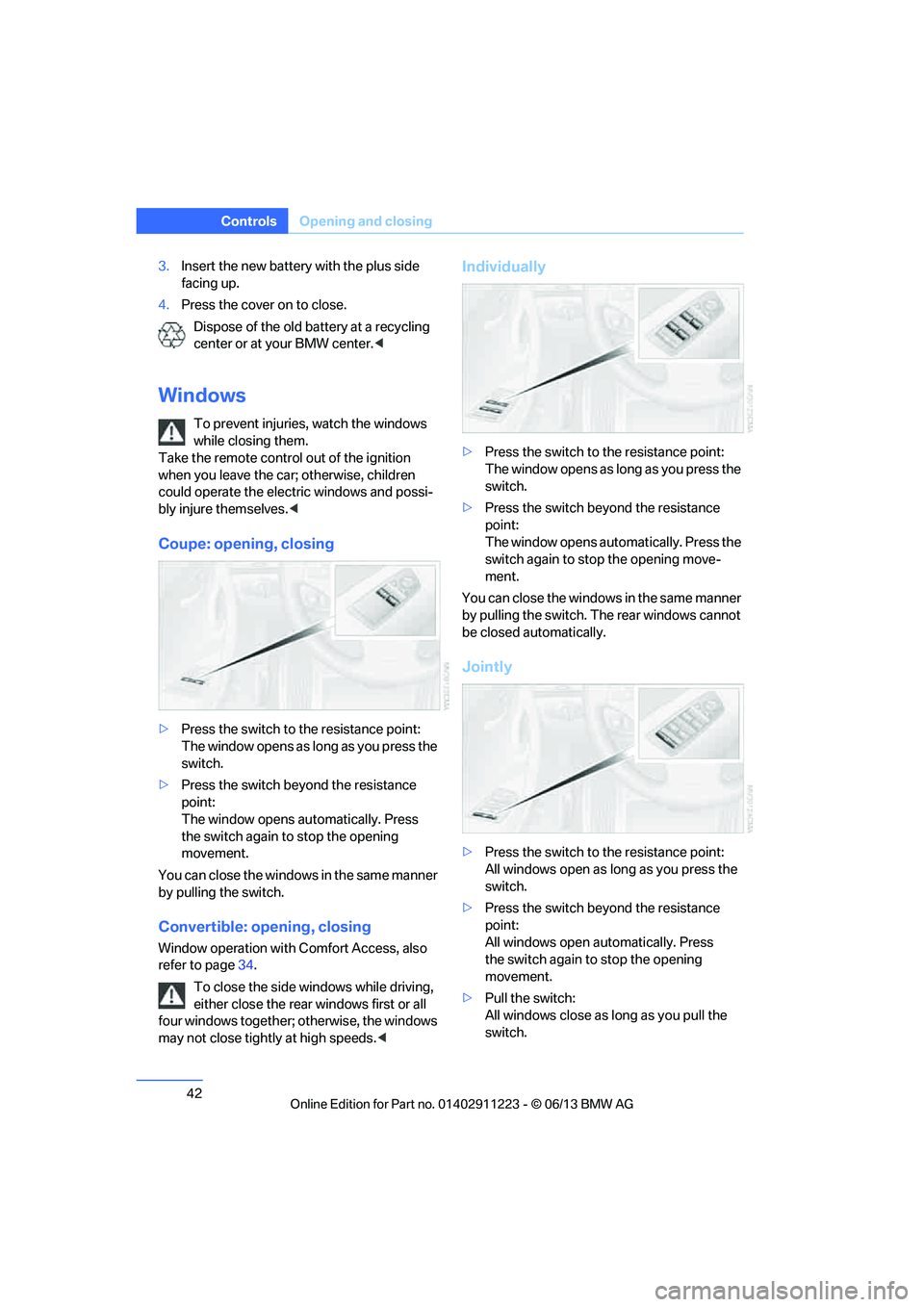
Coupe: opening, closing
>Press the switch to the resistance point:
The window opens as long as you press the
switch.
> Press the switch beyond the resistance
point:
The window opens automatically. Press
the switch again to stop the opening
movement.
You can close the windows in the same manner
by pulling the switch.
Convertible: opening, closing
Window operation with Comfort Access, also
refer to page 34.
To close the side windows while driving,
either close the rear windows first or all
four windows together; otherwise, the windows
may not close tightly at high speeds. <
Individually
>Press the switch to the resistance point:
The window opens as long as you press the
switch.
> Press the switch beyond the resistance
point:
The window opens automatically. Press the
switch again to stop the opening move-
ment.
You can close the windows in the same manner
by pulling the switch. Th e rear windows cannot
be closed automatically.
Jointly
> Press the switch to the resistance point:
All windows open as lo ng as you press the
switch.
> Press the switch beyond the resistance
point:
All windows open automatically. Press
the switch again to stop the opening
movement.
> Pull the switch:
All windows close as long as you pull the
switch.
00320051004F004C00510048000300280047004C0057004C005200510003
Page 44 of 284
43
Opening and closing
Controls
After switching off the ignition
When the remote control
is removed or the igni-
tion is switched off, you can still operate the
windows for approx. 1 minute as long as no
door has been opened.
Convenient opening and closing
For Convenient opening and closing using the
remote control, refer to page 34. For Conve-
nient closing using Comfort Access, refer to
Locking on page 40.
Pinch protection system
If the closing force exceeds a specific value as a
power window closes, the closing action is
interrupted and the window reopens slightly.
Despite the pinch protection system
check and clear the window's travel path
prior to closing it; otherwise, the safety system
might fail to detect certain kinds of obstruc-
tions, such as thin objects, and the window
would continue closing.
Do not install any accessories that might inter-
fere with window movement. Otherwise, the
pinch protection system could be impaired.
Convertible: the rear windows are not equipped
with pinch protection. Therefore, watch them
closely when closing to avoid personal injury. <
Closing without pinch protection
If there is an external danger, or if ice on the
windows, etc., prevents you from closing the
windows normally, proceed as follows:
1.Pull the switch past the resistance point and
hold it there. Pinch protection is limited and
the window reopens slightly if the closing
force exceeds a certain value.
2. Pull the switch again past the resistance
point within approx. 4 seconds and hold it
there. The window closes without pinch
protection.
Coupe: glass roof, electric
To prevent injuries, watch the glass roof
while closing it.
Take the remote contro l with you when you
leave the car; otherwise, children could operate
the roof and possibly injure themselves. <
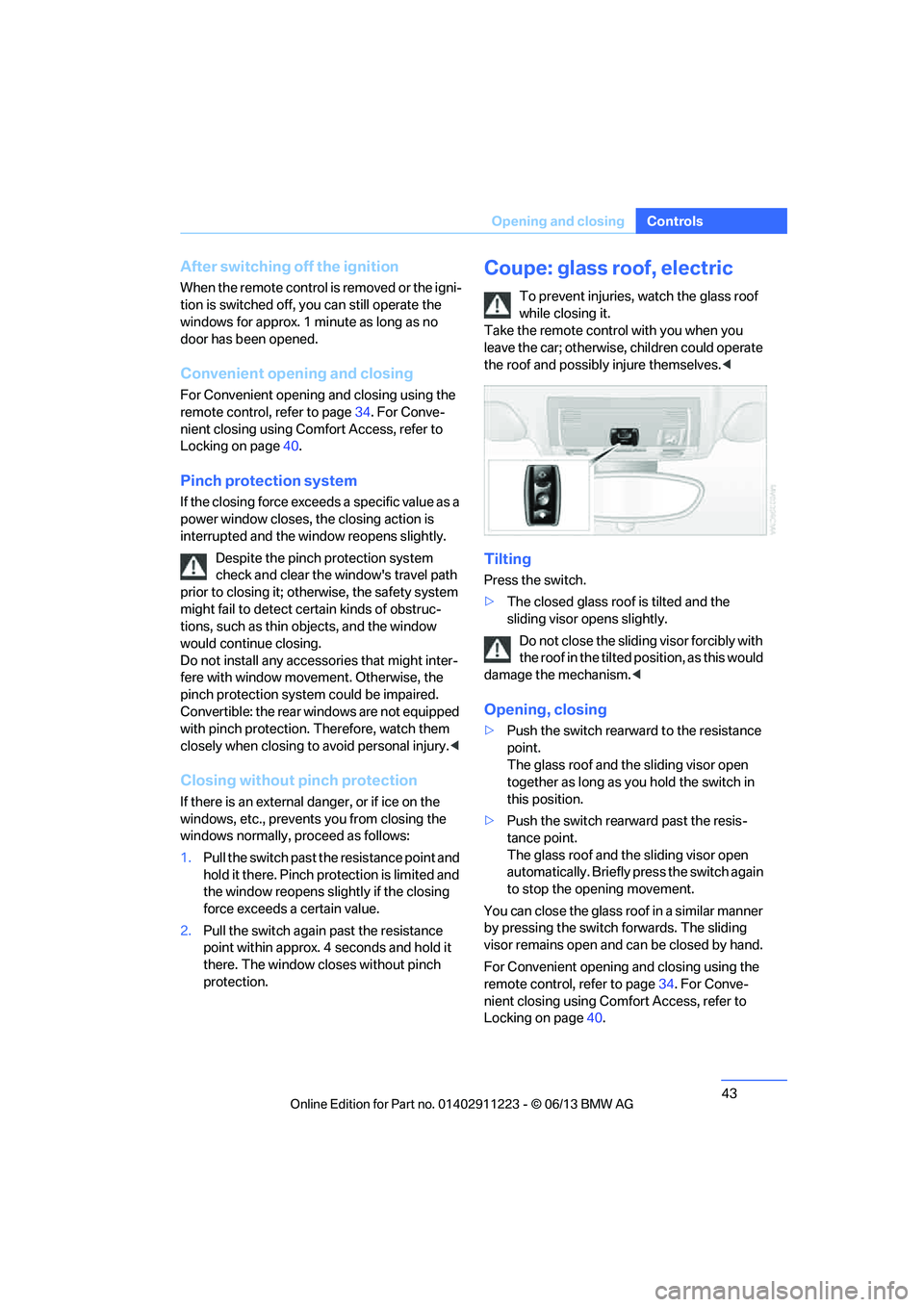
Tilting
Press the switch.
>The closed glass roof is tilted and the
sliding visor opens slightly.
Do not close the sliding visor forcibly with
the roof in the tilted position, as this would
damage the mechanism. <
Opening, closing
>Push the switch rearward to the resistance
point.
The glass roof and the sliding visor open
together as long as you hold the switch in
this position.
> Push the switch rearward past the resis-
tance point.
The glass roof and the sliding visor open
automatically. Briefly press the switch again
to stop the opening movement.
You can close the glass roof in a similar manner
by pressing the switch forwards. The sliding
visor remains open and can be closed by hand.
For Convenient opening and closing using the
remote control, refer to page 34. For Conve-
nient closing using Comfort Access, refer to
Locking on page 40.
00320051004F004C00510048000300280047004C0057004C005200510003
Page 54 of 284
53
Adjustments
Controls
Coupe: folding head restraint down and
up
Only fold down a head restraint if no one will be
sitting in the seat in qu
estion. Fold up the head
restraints again before transporting passengers
in the rear.
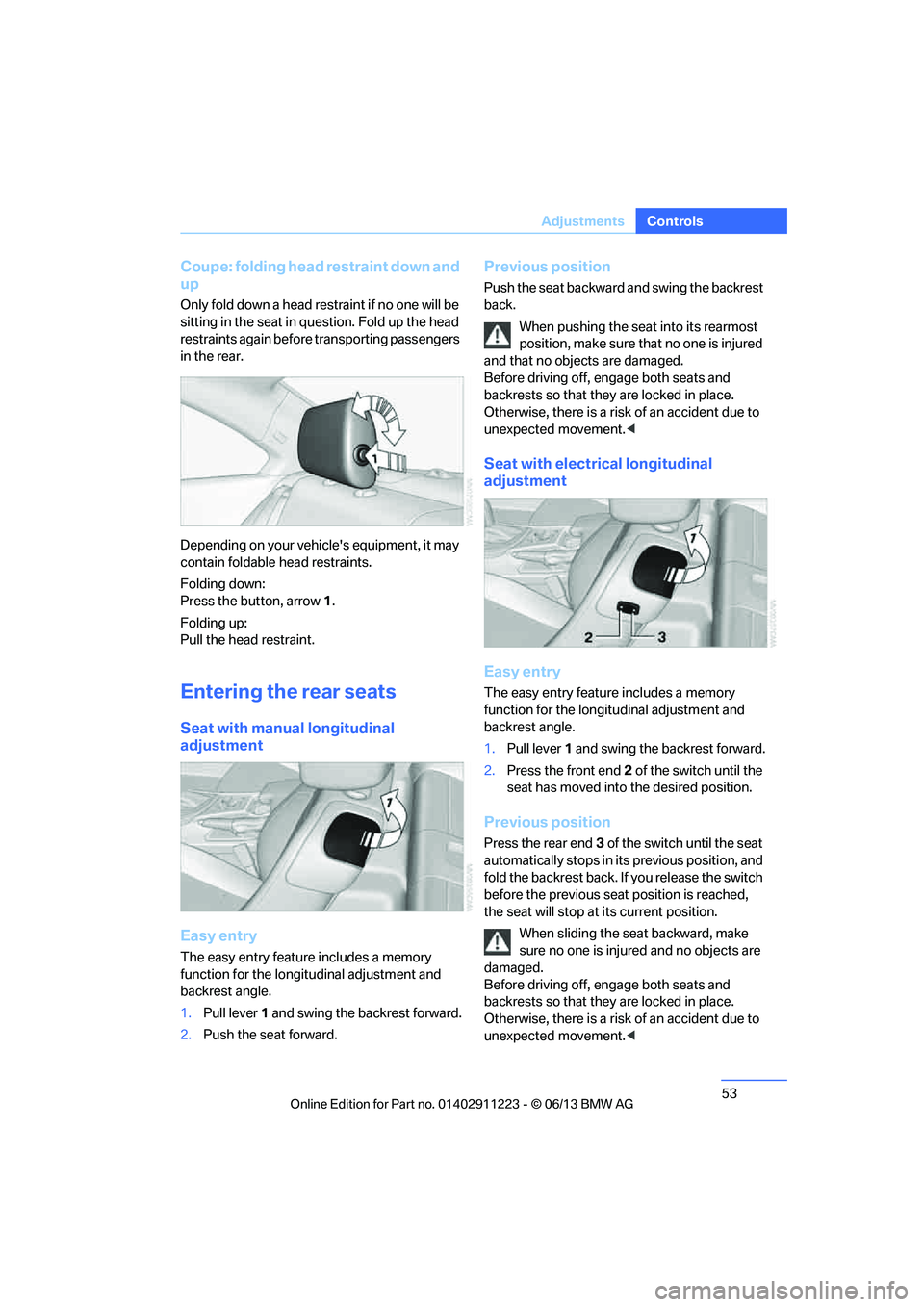
Depending on your vehicle's equipment, it may
contain foldable head restraints.
Folding down:
Press the button, arrow 1.
Folding up:
Pull the head restraint.
Entering the rear seats
Seat with manual longitudinal
adjustment
Easy entry
The easy entry feature includes a memory
function for the longitudinal adjustment and
backrest angle.
1. Pull lever 1 and swing the backrest forward.
2. Push the seat forward.
Previous position
Push the seat backward and swing the backrest
back.
When pushing the seat into its rearmost
position, make sure that no one is injured
and that no objects are damaged.
Before driving off, engage both seats and
backrests so that they are locked in place.
Otherwise, there is a risk of an accident due to
unexpected movement. <
Seat with electrical longitudinal
adjustment
Easy entry
The easy entry feature includes a memory
function for the longitudinal adjustment and
backrest angle.
1. Pull lever 1 and swing the backrest forward.
2. Press the front end 2 of the switch until the
seat has moved into the desired position.
Previous position
Press the rear end 3 of the switch until the seat
automatically stops in its previous position, and
fold the backrest back. If you release the switch
before the previous seat position is reached,
the seat will stop at its current position.
When sliding the seat backward, make
sure no one is injured and no objects are
damaged.
Before driving off, engage both seats and
backrests so that they are locked in place.
Otherwise, there is a risk of an accident due to
unexpected movement. <
00320051004F004C00510048000300280047004C0057004C005200510003
Page 62 of 284
61
Driving
Controls
Driving
Vehicle equipment
In this chapter, all production, country, and
optional equipment that is offered in the model
range is described. For this reason, descrip-
tions will be given of some equipment that may
not be available in a vehi
cle, for example due to
the special options or national-market version
selected. This also app lies to safety related
functions and systems.
Ignition lock
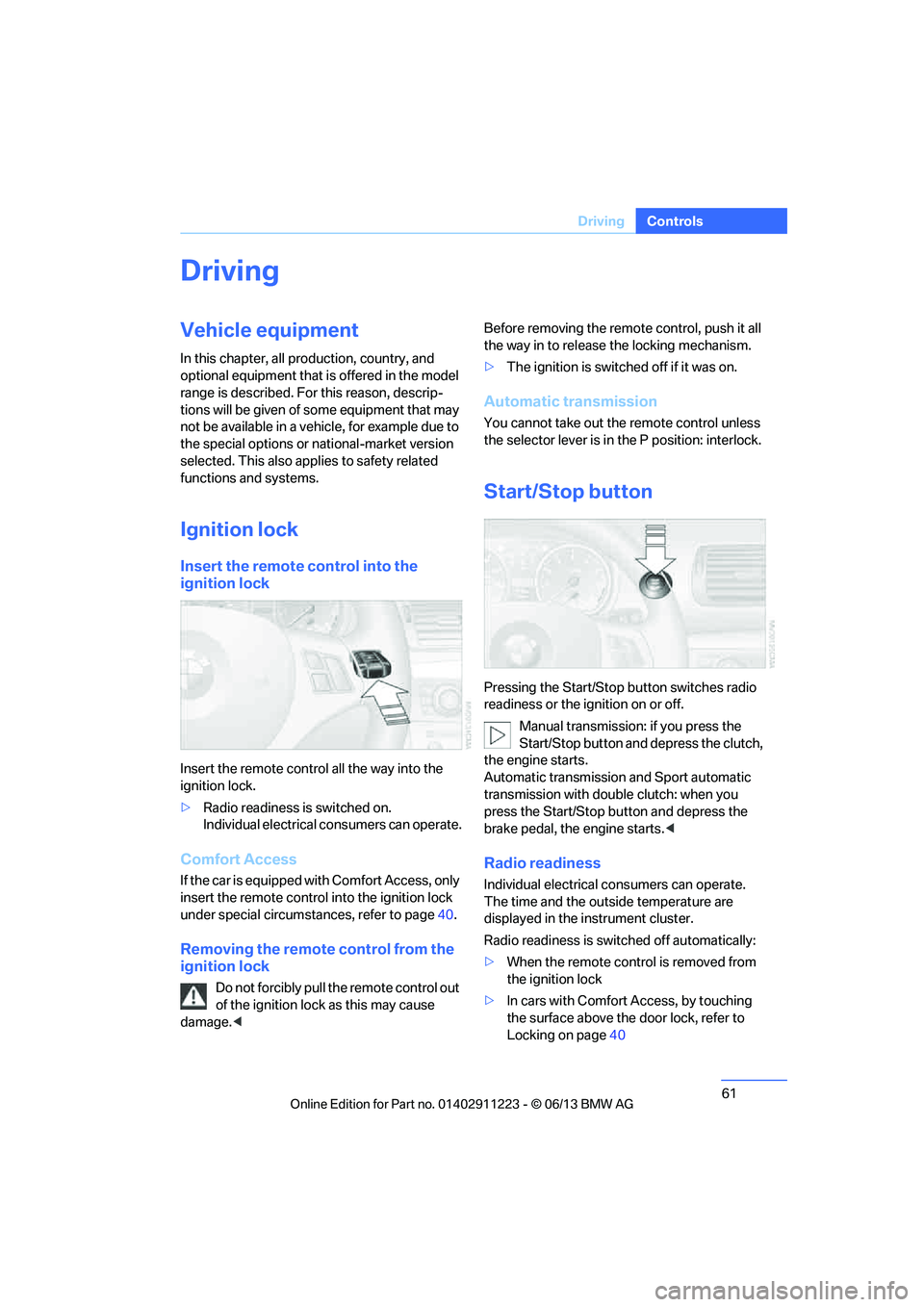
Insert the remote control into the
ignition lock
Insert the remote contro l all the way into the
ignition lock.
> Radio readiness is switched on.
Individual electrical consumers can operate.
Comfort Access
If the car is equipped with Comfort Access, only
insert the remote control into the ignition lock
under special circumstances, refer to page 40.
Removing the remote control from the
ignition lock
Do not forcibly pull the remote control out
of the ignition lock as this may cause
damage. < Before removing the remote control, push it all
the way in to release
the locking mechanism.
> The ignition is switched off if it was on.
Automatic transmission
You cannot take out the remote control unless
the selector lever is in the P position: interlock.
Start/Stop button
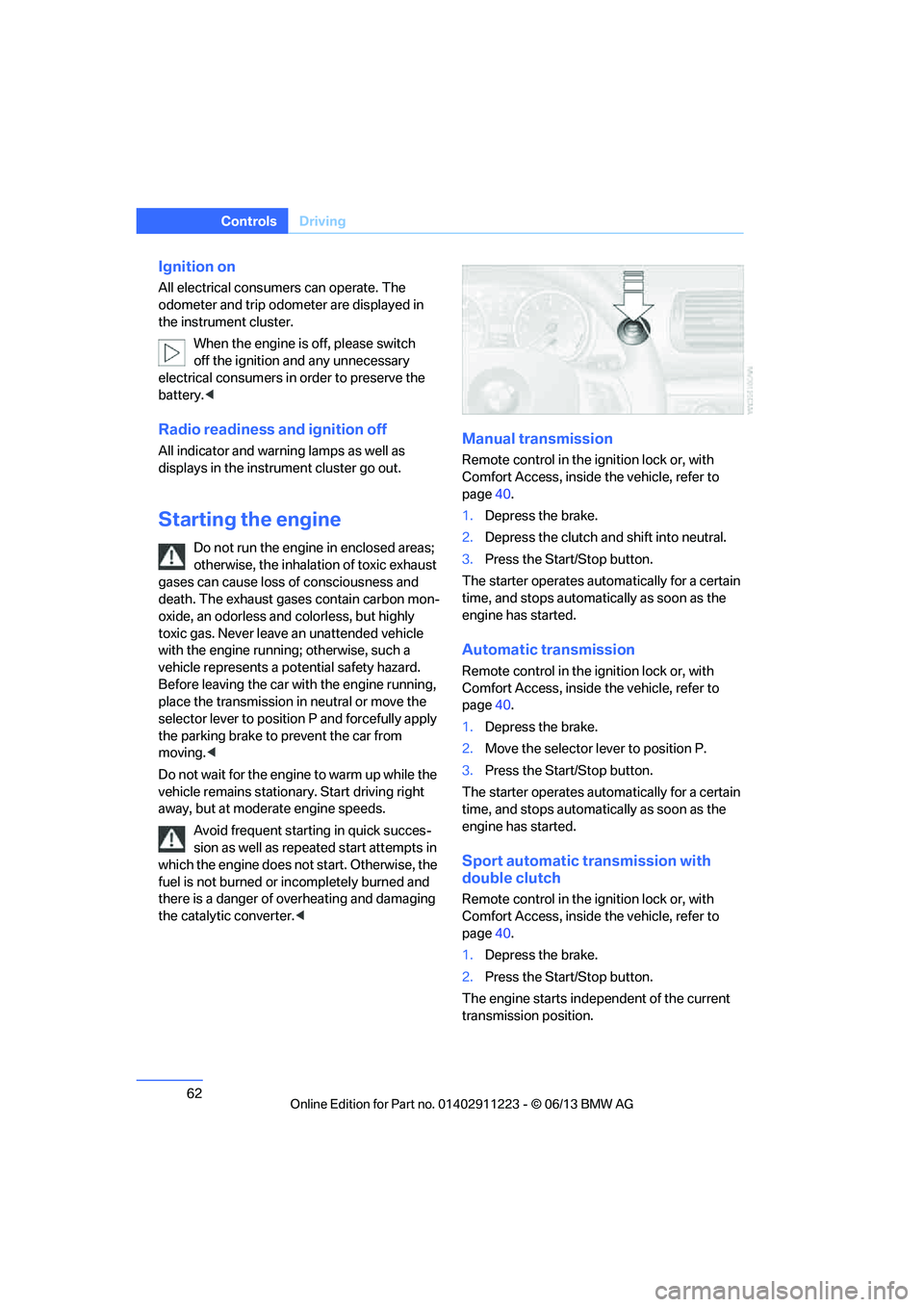
Pressing the Start/Stop button switches radio
readiness or the ignition on or off.
Manual transmission: if you press the
Start/Stop button and depress the clutch,
the engine starts.
Automatic transmission and Sport automatic
transmission with doub le clutch: when you
press the Start/Stop button and depress the
brake pedal, the engine starts. <
Radio readiness
Individual electrical consumers can operate.
The time and the outside temperature are
displayed in the instrument cluster.
Radio readiness is switched off automatically:
> When the remote control is removed from
the ignition lock
> In cars with Comfort Access, by touching
the surface above the door lock, refer to
Locking on page 40
00320051004F004C00510048000300280047004C0057004C005200510003
Page 63 of 284
62
ControlsDriving
Ignition on
All electrical consumers can operate. The
odometer and trip odometer are displayed in
the instrument cluster.
When the engine is off, please switch
off the ignition and any unnecessary
electrical consumers in order to preserve the
battery. <
Radio readiness and ignition off
All indicator and warnin g lamps as well as
displays in the instrument cluster go out.
Starting the engine
Do not run the engine in enclosed areas;
otherwise, the inhalati on of toxic exhaust
gases can cause loss of consciousness and
death. The exhaust gases contain carbon mon-
oxide, an odorless and colorless, but highly
toxic gas. Never leave an unattended vehicle
with the engine running; otherwise, such a
vehicle represents a po tential safety hazard.
Before leaving the car with the engine running,
place the transmission in neutral or move the
selector lever to positi on P and forcefully apply
the parking brake to prevent the car from
moving. <
Do not wait for the engine to warm up while the
vehicle remains stationary. Start driving right
away, but at moderate engine speeds. Avoid frequent starting in quick succes-
sion as well as repeated start attempts in
which the engine does no t start. Otherwise, the
fuel is not burned or incompletely burned and
there is a danger of overheating and damaging
the catalytic converter. <
Manual transmission
Remote control in the ignition lock or, with
Comfort Access, inside the vehicle, refer to
page40.
1. Depress the brake.
2. Depress the clutch an d shift into neutral.
3. Press the Start/Stop button.
The starter operates automatically for a certain
time, and stops automatically as soon as the
engine has started.
Automatic transmission
Remote control in the ignition lock or, with
Comfort Access, inside the vehicle, refer to
page 40.
1. Depress the brake.
2. Move the selector lever to position P.
3. Press the Start/Stop button.
The starter operates automatically for a certain
time, and stops automatically as soon as the
engine has started.
Sport automatic transmission with
double clutch
Remote control in the ignition lock or, with
Comfort Access, inside the vehicle, refer to
page 40.
1. Depress the brake.
2. Press the Start/Stop button.
The engine starts independent of the current
transmission position.
00320051004F004C00510048000300280047004C0057004C005200510003