2013 AUDI S8 warning lights
[x] Cancel search: warning lightsPage 98 of 318

96 Audi adaptive cruise control and braking guard
• You must also press the brake pedal when
the vehicle is stopped.
Switching adaptive cruise control off
• Push the lever away from you into position
@ until it clicks into p lace. The message
ACC off appears.
@ Indicator lights
II-Adaptive cruise control is switched on . No
vehicles are detected up ahead. The stored
speed is maintained.
I-A moving vehicle is detected up ahead .
The adaptive cruise control system regulates
the speed and d istance to the moving vehicle
ahead and acce lerates/brakes automatica lly.
S, -Adaptive cruise contro l is switched o n. A
mov ing vehicle up ahead was detected. Your
vehicle remains stopped .
I-When au tomatic braking is not able to
keep enough distance to a p reviously detected
mov ing vehicle up ahead, you must take con
trol and brake ¢
page 98 , Prompt for driver
intervention.
© Display
If adap tive cruise control is not shown in the
d isplay, you can call it up with the multifunc
tion steering wheel buttons~
page 23.
Based on the symbols in the display , you can
determ ine if the system is maintaining a dis
tance to the vehicle ahead and w hat that dis
tance is.
No vehicle -No vehicle ahead was detected.
White vehicle -A vehicle ahead was detected .
Red vehicle -Prompt for the driver to take ac
tion ¢
page 98 .
Both arrows on the scale© indicate the dis
tance to the vehicle ahead . No arrow appears
when the vehicle is on an open road and there is no object ahead. If an object is detected
ahead, the arrow moves on the scale .
The green zone on the scale shows the stored d istance. For information on changing the stored distance, refer to
¢
page 97. If the
distance se lected is too close or may soon be
come too close, the arrows move into the red
z one on the sca le.
A WARNING
Improper use of the adaptive cruise con
trol can cause collisions, other accidents
and serious personal injur ies .
- Pressing the
!SET ! button when driving at
speeds below
20 mph (30 km/h), w ill au
tomatically accelerate the vehicle to
20
mph (30 km/h), which is the minimum
speed that can be set .
(D Tips
-If you switch the ignit ion or the adaptive
cruise control off, the set speed is erased
from the system memory.
- You cannot switch the Electron ic Stabili
zation Control (ESC) to the SPORT mode
when adaptive cruise control is switched
on .
Changing the speed
Applies to vehicles: with Audi adaptive cruise control
0
f
• 0
Fig. 99 Selecto r lever : chang ing t he spee d
• To increase or reduce the speed in incre
ments,
tap the lever up or down.
-
-a)
N
q :r
~
"' To increase or reduce the speed qu ickly,
hold the lever up or down until the red L ED
@ reaches the desired speed ¢ page 95,
fig . 98.
Following any changes, the new stored speed
will be displayed briefly in the display @
¢ page 95 , fig. 98.
Page 114 of 318
112 Night vision assistant
Night vision assistant
Description
Applies to vehicles: with night v isio n ass istant
Fig. 114 Display: n ight vis ion assistant
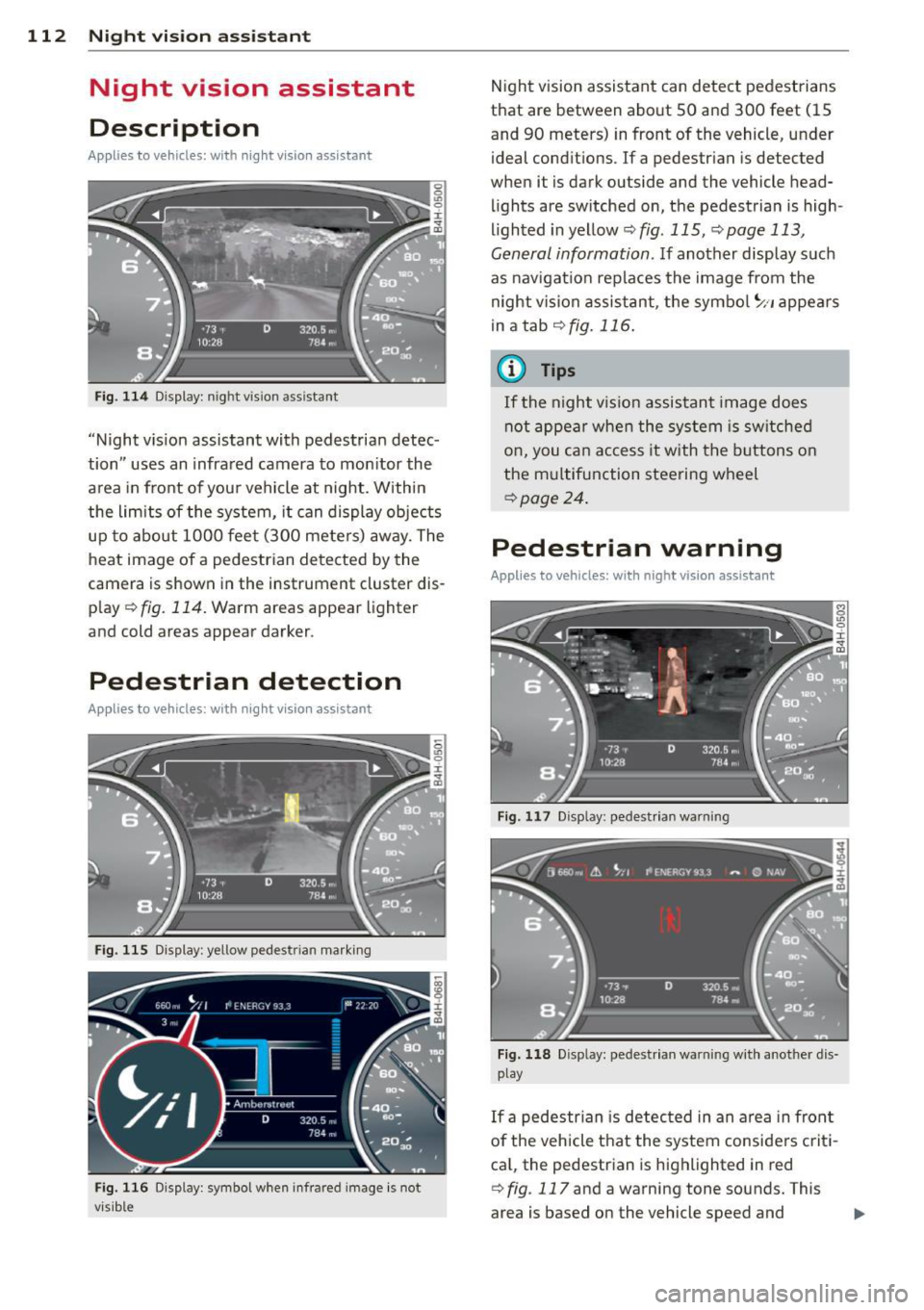
"Night vis ion assistant with pedestrian detec
tion" uses an infrared camera to monitor the
area in front of you r vehicle at night. Within
the limits of the system, it can display objects
up to about 1000 feet (300 meters) away. The
heat image of a pedestrian detected by the
camera is shown in the instrument cluster dis
p lay ¢
fig. 114. Warm areas appear lighter
and cold areas appear darker.
Pedestrian detection
Applies to vehicles: with nig ht v isio n ass istant
Fig. 115 Display: yellow pedestr ian marking
Fig. 116 Display: symbol when infrared image is not
visib le
Night vision assistant can detect pedestrians
that are between about 50 and 300 feet (15
and 90 meters) in front of the vehicle, under
ideal conditions.
If a pedestrian is detected
when it is dark outside and the vehicle head
lights are switched on, the pedestrian is high
lighted in yellow¢
fig. 115, ¢page 113,
General information.
If another display such
as navigation replaces the image from the
night vision assistant, the symbo l
~11 appears
in a tab
¢fig . 116 .
(D Tips
If the night v ision assistant image does
not appear when the system is switched
on, you can access it with the buttons on
the multifunction steering wheel
¢page 24.
Pedestrian warning
Applies to vehicles: wit h night vision assistant
Fig. 117 D isp lay: pedestrian warning
Fig. 118 Disp lay: pedestr ian warning w ith another dis
play
If a pedestr ian is detected in an area in fron t
of the vehicle that the system considers criti
ca l, the pedestrian is highlighted in red
¢
fig . 117 and a warning tone sounds. This
area is based on the vehicle speed and
Page 116 of 318
114 Night vision assistant
• Switch the ignition on and turn the light
sw itch to the
AUTO position or tD .
• To sw itch night vision ass istant on, press
the~ ,, button
c> fig. 120 . The image from
the night vision camera appea rs in the in
strument cluster display .
• Press the button~ -, aga in to switc h night vi
s ion assistant off .
Settings in the MMI
Appl ies to vehicles: with night v isio n ass istant
Fig. 121 Disp la y: examp le of pede strian detect ion and
warn ing tone switc hed off
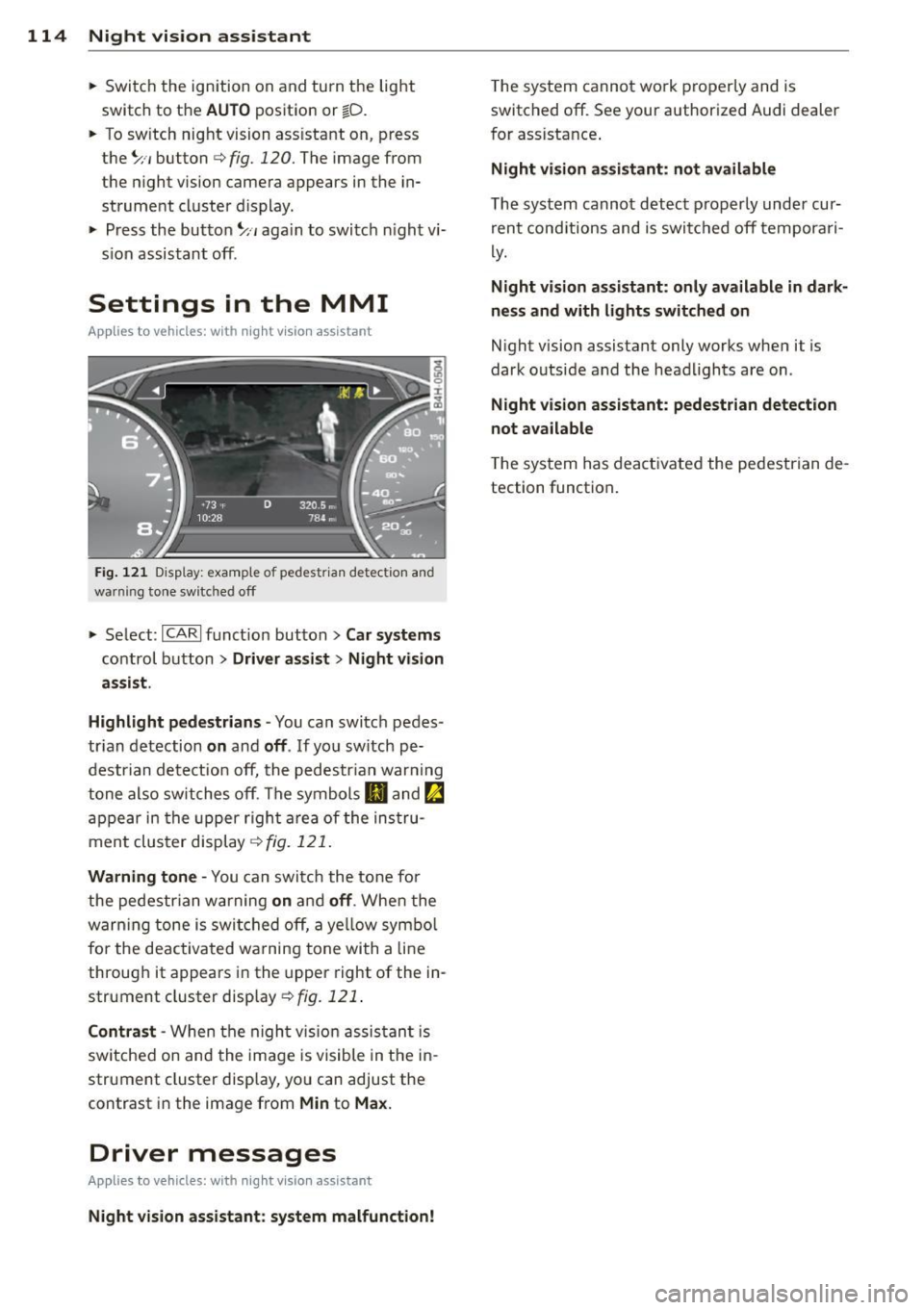
• Select : I CARI funct ion button > Car systems
control button > Driver assist > Night vision
assist.
Highlight pedestrians -
You can switch pedes
tr ian detection
on and off . If you sw itch pe
destrian detection off, the pedestr ian war ning
tone also switches off. The symbols
IJ and ~
appear in the upper right area of the instru
ment cluster display
c> fig. 121.
Warning tone -You can switch the tone for
the pedestrian warning
on and off . When the
warn ing tone is switched off, a ye llow symbol
for the deactivated wa rning tone with a line
through it appears in the upper right of the in
strument cluster display
c> fig. 121 .
Contrast -When the night vis ion assistant is
sw itched on and the image is visible in the in
strument cluster display, you can adjust the
contrast in the image from
Min to Max.
Driver messages
Appl ies to veh icles: with night visi on ass istant
Night vision assistant: system malfunction!
The system cannot work properly and is
switched off. See your authorized Audi dealer
for assistance .
Night vision assistant: not available
The system cannot detect properly under cur
rent cond itions and is switched off temporari
ly.
Night vision assistant: only available in dark
ness and with lights switched on
Night vision assistant only works when it is
dark outside and the headlights are on.
Night vision assistant: pedestrian detection
not available
T he system has deactivated the pedestrian de
tection function.
Page 146 of 318

144 Safety belts
Safety belts
General notes
Always wear safety belts!
Wearing safety belts correctly saves lives!
This chapter exp lains why safety be lts are nec
essary, how they work and how to adjust and
wear them correctly .
.. Read a ll the information that fo llows and
heed all of the instructions and WARNINGS.
A WARNING
Not wearing safety belts or wearing them
improperly increases the risk of serious
personal injury and death .
- Safety belts are the sing le most effective
means available to reduce the risk of se
rious injury and death in automob ile acci
dents . For your protection and that of
your passenge rs, always co rrectly wear
safety belts when the vehicle is moving .
- Pregnant women, injured, or physically
impaired persons must also use safety
belts. Like all veh icle occupants, they are
more like ly to be seriously injured if they
do not wear safety be lts . The best way to
protect a fetus is to protect the mother -
throughout the entire pregnancy.
Number of seats
Your Audi has a total of five seating positions: two in the front and three in the rear. In some
vehicles, there are four seat ing pos itions: two
in the front and two in the rear. Each seating
position has a safety belt.
A WARNING
Not wearing safety belts or wearing them
improperly increases the risk of ser ious
personal injury and death .
- Never strap more than one person, in
cluding small ch ildren, into any belt.
It is
especially dangerous to place a safety
belt over a child sitting on your lap. -
Never let more people ride in the vehicle
than there are safety belts available.
- Be s ure everyone riding in the vehicle is
properly restrained with a separate safe
ty belt or child restra int.
~ Safety belt warning light
Your vehicle has a warning system for the
driver and front seat passenger to remind you
about the importance of buckling-up.
F ig. 155 Safety bel t warni ng light in the instr ument
cl uster -en larged
Befor e dr ivi ng o ff, alway s:
.. Fasten your safety belt and make sure you
are wearing it properly .
.. Make sure that your passengers a lso buck le
up and properly wear their safety be lts.
.. Protect children with a child restraint sys-
tem appropriate for the s ize and age .
The warning light . in the instrument cluster
lights up when the ignition is on as a reminder
to fasten the safety belts. In addit ion, you will
hear a warning tone for a certain per iod of
t ime .
Fasten your sa fet y belt and m ake s ure th at
y ou r passenge rs also prope rly put on the ir
s afe ty belt s.
A WARNING
--Safety belts are the s ingle most effective
means available to reduce the risk of se
rious inju ry and death in automobile acci
dents. Fo r you r protection and that of
your passengers, a lways cor rectly wear
safety belts when the vehicle is moving .
Page 206 of 318

204 Intelligent technology
temperature. This determines the current
state of charge and the power of the battery .
Idling current management
Idling current management reduces energy
consumption while the vehicle is stand ing.
With the ignition switched off, it contro ls the
energy supply to the various e lectrica l compo
nents. Data from battery diagnosis is consid
ered.
Depending on the battery's state of charge,
individual consumers are gradually turned off
to prevent excessive discharge of the battery
and thus maintain starting capability.
Dynamic energy management
While the vehicle is being driven, dynamic en
e rgy management distributes the energy gen
erated according to the needs of the individu
al components. It regu lates consumption, so
that more electrical energy is not being used
than is being generated and ensures an opti
mal state of charge for the battery.
Q) Tips
- But even energy management cannot negate the limits of physics. Consider
that the power and life of a battery are
li mited.
- If starting ability is threatened, the indi
cator light[•) appears
Q page 16, D
Battery.
What you should know
The highest priority is given to maintaining
starting capability.
The battery is severely taxed in short-distance
driving, in city traffic and during the cold time
of year. Abundant electrical energy is re
qu ired, but only a little is generated.
It is also
cr itica l if the engine is not running and electri
cal components are turned on. In this in
stance energy is being consumed but none is
being generated .
It is in precise ly these situations that you will
notice energy management active ly regu lat
ing the d istribution of energy.
Vehicle stands for an extended period
If you do not drive your vehicle over a period
of seve ral days or weeks, e lectr ica l compo
nents are gradually cut back or switched off .
This reduces energy consumption and main
tains starting capability over a longer period .
Some of the convenience functions may not
operate, such as the interior lights or the
power seat adjustment . The convenience
funct ions will be available again when you
switch on the ignition and start the engine.
With the engine turned off
If you listen to the radio, for example, with
the engine turned off or use other MMI func
tions, the battery is being discharged .
If starting capab il it y is jeopardized due to en
ergy consumption, the following warning ap
pears in the MMI display:
Please start the engine soon or the system
will be turned off.
The warn ing ind icates that the system will be
turned off automatically after 3 minutes. If
you w ish to continue using the functions, you
have to sta rt the eng ine .
With the engine running
Although electrical energy is generated when
the vehicle is being driven, the battery can be
come discharged. This happens mostly when
little energy is being generated and a grea t
deal consumed and the battery's state of
charge is not optimal.
T o b ring the energy bala nce back into equili
brium, consumers which req uire espec ially
large amounts of energy are temporarily cut
back or switched off . Heating systems in par
ticular require a great deal of energy. If you
notice, for examp le, that the heated seats* or
the heated rear window are not heating, they
have been temporarily cut back or switched .,.
Page 211 of 318

Avoid full throttle
Driving at moderate speeds saves fuel and
improves your mileage.
11-Try and keep well below your car's maxi-
mum speed.
Accelerating gently reduces fuel consump tion, engine wear, and does not disturb the
environment.
F ue l consumption, exhaust emissions and en
g ine noise increase disproportionately at high
speeds. If you drive at approximately three
quarters of top speed, fuel consumption will
be reduced by one half. Never drive faster
than the posted speed limit and weather con
d itions permit .
Reducing unnecessary idling
Even when your car is just idling it burns up
fuel.
11-Shut the engine off when you are not driv
ing the vehicle.
"" Do not warm up the veh icle by letting the
engine run at idle .
The idling phase is automat ically reduced for
vehicles w ith the Start/Stop system . It is effi
cient to switch
off the engine in vehicles with
out the Start-Stop-System when stopped at ra il road crossings and long red lights. Turning
the eng ine
off for just 30 -40 seconds saves
mo re fuel than is burned by s tarting the en
gine again.
It takes a long time fo r the engine to wa rm up
fu lly when it is running at idle. Howeve r, wear
and noxious emissions are especially high
when the engine is warming up. So you should
drive away as soon as you start the engine and
avoid running at h igh rpms while the engine is
still warming up.
CD Note
Do not leave engine idling unattended af
ter starting. If warning lights shou ld come
on to indicate improper operation, they
Dri vin g and en vironm ent 209
would go unheeded. Extended idling a lso
produces heat, which could result in over
heating or other damage to the veh icle or
other property.
Regular maintenance
A badly tuned engine unnecessarily wastes a lot of fuel.
11-Have your vehicle serviced at reg ular inter-
vals .
By having your ve hicle reg ularly se rviced by an
Audi dealer he lps to ensure that it runs prop
erly and economically . The condition of your
vehicle not only affects its safety and ability to
ho ld its va lue, it also affects
fuel co nsump
tion .
Chec k your oil e ach t ime you fill y our t ank.
T he amou nt of o il used is re lated to engine
load and speed.
It is normal for the oil consumption of a new
engine to reac h its lowest value after a certa in
mileage has bee n driven.
You must drive your veh icle about 3,000 m iles
(5,000 kilometers) before you can properly
assess oil consumpt ion.
This also applies to fuel consumption and en gine output .
CD Note
-Have your veh icle ma inta ined properly
and in accordance with the service rec
ommendations in your Warranty
& Ma in
tenance book let . Lack of proper mainte
nance as well as improper use of the ve
hicle will impai r the function of the
em ission cont ro l system and cou ld lead
t o damage.
- Do not alter or remove any component of
t he Emission Control System unless ap
proved by the manufacture r.
- Do not alter or remove any devi ce, such
as heat shie lds, switches, ign ition w ires,
valves, which are designed to protect
your vehicle's Emission Control System
•
•
Page 213 of 318

Trailer towing Driving with a trailer
General information
Your Audi was designed primarily for passen
ger transportation .
If you plan to tow a trai ler, p lease remember
that the addit ional load will affect durab ility,
economy and performance .
Trailer towing not on ly places more stress on
the vehicle, it also calls for more concentra
tion from the driver.
F or this reason, a lways fo llow the operating
and d riving instr uctions provided and use
common sense.
(D Note
If you are going to tow a trai ler, you must
activate the trailer operat ion mode
~ page 211, Operating instructions.
Technical requirements
Trailer hitch
Use a weight-carrying hitc h co nforming to the
gross trailer we ight. The hitch must be suita
b le for your veh icle and trailer and must be
mounted secure ly on the veh icle's chassis at a
technically sound location . Use only a trailer
hi tch wit h a removab le ball moun t. A lways
check with t he trail er hitch ma nufactur er to
make sure tha t you are using the corre ct
hi tch.
Do not use a bumper hitch.
The hitc h must be installed in such a way that
i t does not interfere with the impac t-absorb
i ng bumpe r sys tem. No mod ifica tio ns should
be made to the vehicle exh aust a nd brake sys
tems . From time to time, check that a ll hitch
mo unt ing bolts remain securely fastened.
W hen you are not towing a trail er, remove the
traile r hitch ball mount. Th is prevents the
hi tch from causing damage sho uld your ve hi
cle be str uck from behind ¢& .
Trailer towin g 211
Trailer brakes
If your trailer is equippe d wi th a br akin g sys
tem, check to be s ure that i t conforms to all
r egulations .
T he trailer hy draul ic brak e sys tem mus t not be
direc tly connec ted to the vehi cle' s h ydraulic
brake system .
Safety chains
Always use safety chains between your veh icle
and the tra ile r.
Trailer lights
Trai ler lights must meet all regu lations. Be
su re to check with your Audi dealer for cor rect
wir ing, swi tches and relays .
Mirrors
If you are unable to see the traffic behind you
us ing the reg ular o utside mirrors, then you
must insta ll extended mirrors. It is imp ortant
that you
always have clea r v is ion to the rear.
A WARNING ...__ -
Afte r removing the trailer hitch, do not
stor e it i n yo ur v ehicl e. In cas e o f sudden
b ra king, the hitch co uld fly forwar d and in
ju re you or your p ass en ger s.
Operating instructions
Fi g. 189 MM I dis pl ay: tow ing mode on
Ma ximum trailer weight
A trai ler fo r you r vehicle is limited to a typical
class 1 or class 2 tra iler.
ll>
Page 215 of 318

drive at the maximum permissible speed. Re
duce your speed even more if load, weather or
wind condit ions are unfavorable -part icularly
when going downhill.
Reduce vehicle speed
immediatel y if the trail
er shows the slightest sign of swaying .
Do not
try to stop the swaying by accelerating.
Observe speed limits . In some areas, speeds
for vehicles towing trailers are lower than for
regular vehicles .
A lways app ly brakes early. When driving
downhill, shift into a lower gear to use the en
gine braking effect to slow the vehicle . Use of
the brakes a lone can cause them to overheat
and fail.
Coolant temperature
The coolant temperature gauge c:> page 10
must be observed carefully. The coo lant tem
perature can increase if you drive on long in
clines in a low gear at high engine speeds. Re
duce your speed immed iate ly if the L EDs in
the top part of the display turn on.
F or more information about indicator lights,
refer to. ~
page 16.
A WARNING
Anyone not properly restrained in a mov
ing vehicle is at a much greater risk in an
accident . Never let anyone r ide in your car
who is not properly wear ing the restra ints
provided by Aud i.
Trailer towing tips
Important to know
Your veh icle hand les different ly when tow ing
-
a trailer because of the addit ional weight and
d ifferent weight distribution . Safety, perform
ance and economy will greatly depend on how
carefully you load your trailer and operate
your ng .
Before you actually tow your trailer, practice
turning, stopping and backing up in an area
away from traffic. Keep practicing until you
Trailer towing 213
have become completely familiar with the way
your vehicle-trai ler combination behaves and
responds.
Backing up is difficult and requires practice .
Backing up with a t railer generally requires
steering action opposite to that when backing
up your vehicle without a tra iler.
Maintain a greater distance between your ve
hicle and the one in front of you . You wi ll need
more room to stop. To compensate for the
trailer, you w ill need a larger than normal
turning radius.
When passing, remembe r that you cannot ac
ce lerate as fast as you norma lly would be
cause of the added load. Make sure you have
enough room to pass. After passing, allow plenty of room for your trailer before chang
ing lanes again.
Avoid jerky starts, sharp turns or rapid lane changes.
(D Tips
- Do not tow a trailer during the break-in
period of your vehicle.
- If you tow a trailer, your Audi may re
quire more frequent maintenance due to
the extra load
c:> page 296.
Parking on a slope
Do not park on a slope with a trailer. If it can
not be avoided, do so only a~er doing the fol
lowing:
When parking:
.,. App ly the foot brake.
.,. Have someone p lace chocks under both the
vehicle and the trailer wheels .
.,. With chocks in place, slowly release the
brakes until the wheel chocks absorb the
load.
.,. Turn the wheels towards the curb .
.,. Apply the parking brake .
.,. Select the P selector lever posit ion .
When restarting after parking:
.,. Apply the foot brake.
•
•