2013 AUDI S4 SEDAN radio
[x] Cancel search: radioPage 124 of 294
122 Homelink®
Programming the transmitter (version
A)
Applies to vehicles: with Homelink
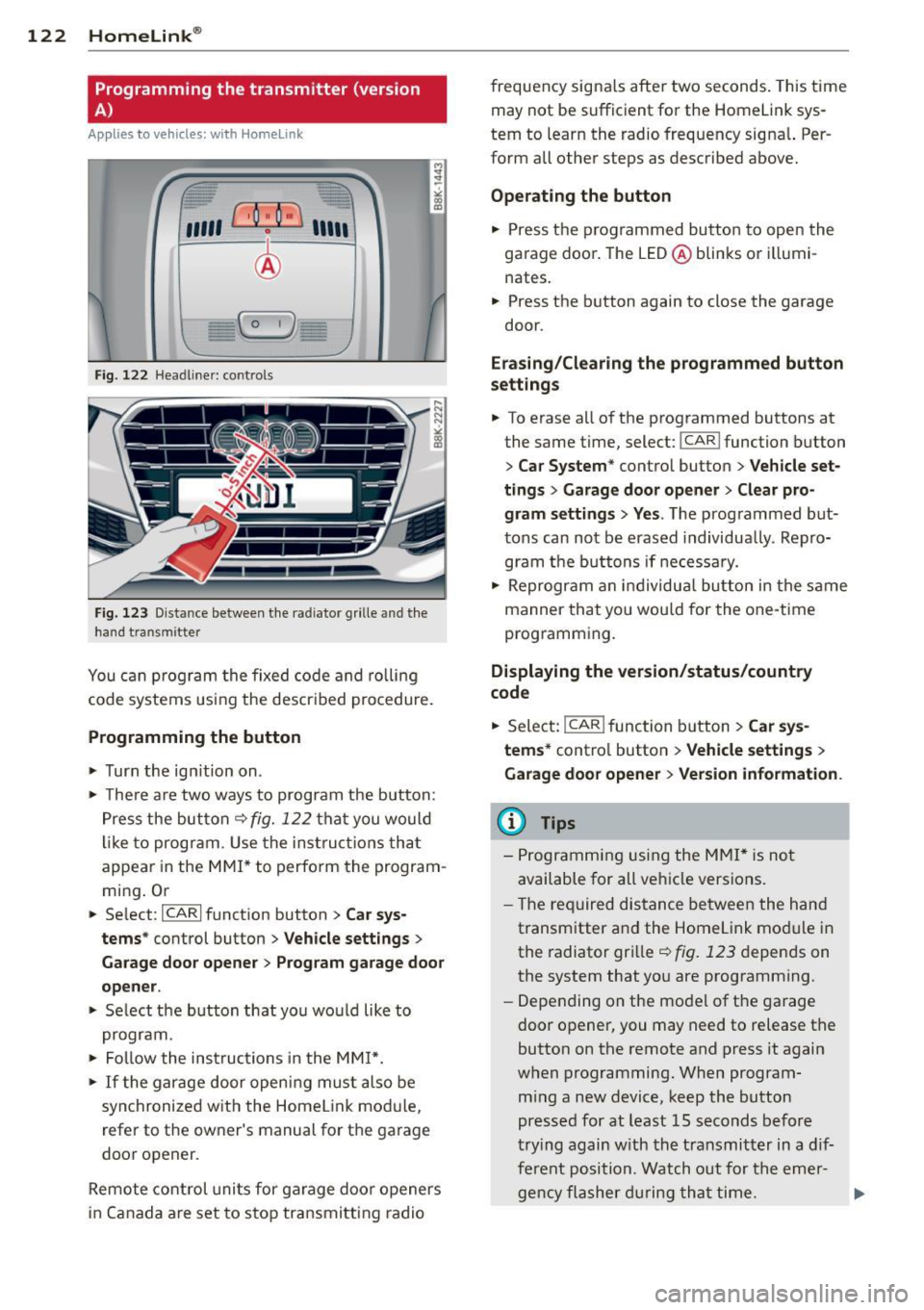
Fig. 122 Head line r: controls
Fig. 123 Dista nce between the radiator grille and the
hand transm itter
You can program the fixed code and rolling
code systems using the described procedure.
Programming the button
.,. Turn the ignition on .
.,. There are two ways to program the button:
Press the button
q fig. 122 that you would
like to program . Use the instructions that
appear in the MMI* to perform the program
ming. Or
.,. Select :
~IC~A~R~I function button > Car sys
tems*
control button > Vehicle settings>
Garage door opener> Program garage door
opener .
.,. Select the button that you would like to
program.
.,. Follow the instructions in the
MMI*.
.,. If the garage door opening must also be
synchronized with the Homelink module,
refer to the owner's manual for the garage
door opener.
Remote control units for garage door openers
in Canada are set to stop transmitting radio frequency
signals after two seconds. This time
may not be sufficient for the Homelink sys
tem to learn the radio frequency signal. Per
form all other steps as described above.
Operating the button
.,. Press the programmed button to open the
garage door. The LED@blinks or illumi
nates .
.,. Press the button again to close the garage
door.
Erasing/Clearing the programmed button
settings
.,. To erase all of the programmed buttons at
the same time, select:
I CAR ! function button
> Car System* control button > Vehicle set·
tings
> Garage door opener> Clear pro
gram settings> Yes .
The programmed but
tons can not be erased individually. Repro
gram the buttons if necessary .
.,. Reprogram an individual button in the same
manner that you would for the one-time
programming .
Displaying the version/status/country
code
.,. Select: !CAR ! function button> Car sys
tems*
control button > Vehicle settings >
Garage door opener > Version information .
@ Tips
- Programming using the MMI* is not
available for all vehicle versions.
- The required distance between the hand
transmitter and the Homelink module in
the radiator grille
q fig. 123 depends on
the system that you are programming .
- Depending on the model of the garage
door opener, you may need to release the
button on the remote and press it again
when programming. When program
ming a new device, keep the button
pressed for at least 15 seconds before
trying again with the transmitter in a dif
ferent position . Watch out for the emer-
gency flasher during that time. .,..
Page 125 of 294
-For security reasons, we recommend that
you clear the programmed buttons be
fore se lling the vehicle .
Programming the transmitter (version
B)
Applies to vehicles: with Home Link
,,,,, r ,o :O·,) ,,;;~
®
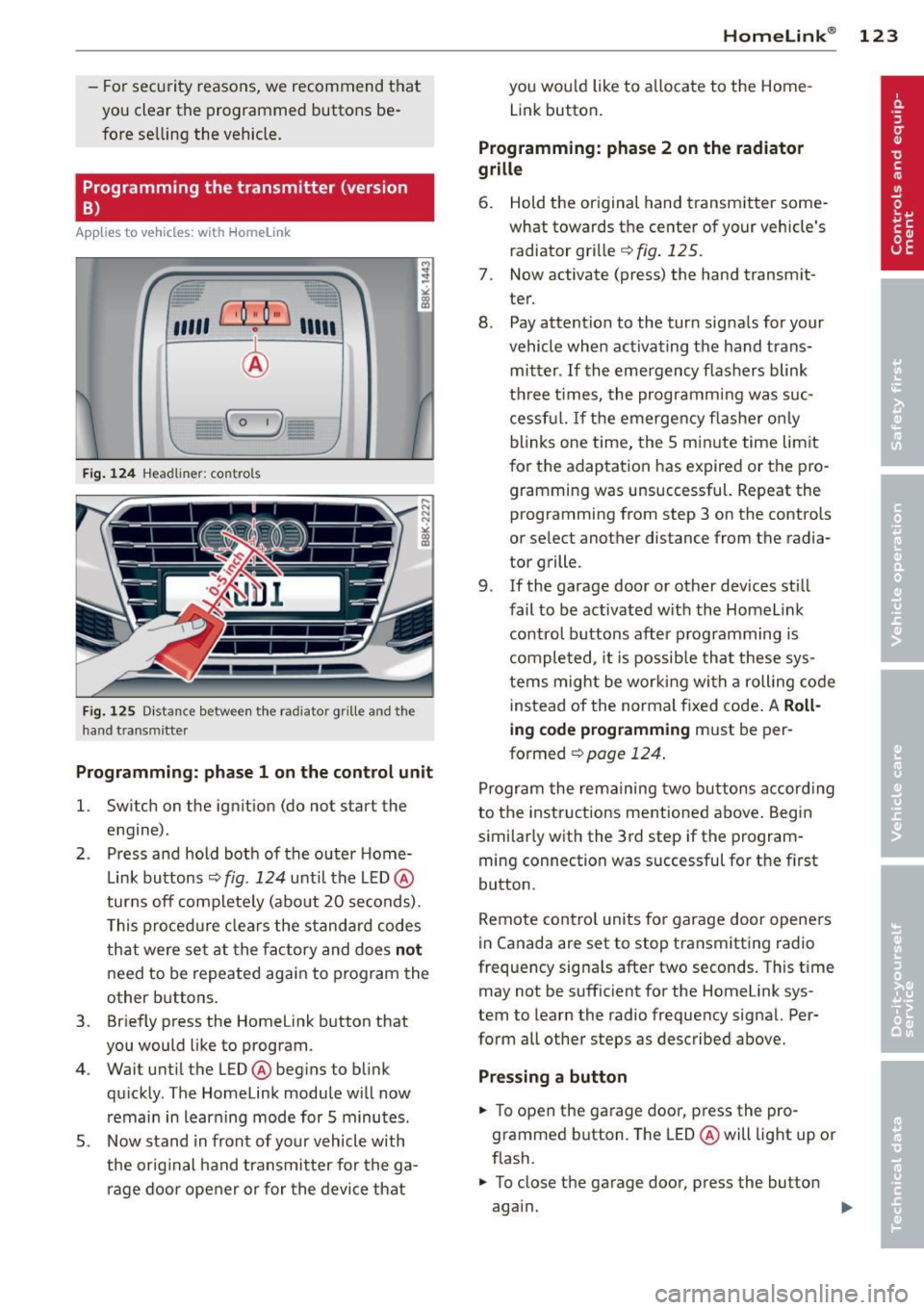
Fig. 124 Hea dli ner: c o n tro ls
Fig. 125 Dis ta n ce betw een th e radiato r gri lle a nd the
hand t rans mitte r
Programming: phase 1 on the control unit
l. Switch on the ignition (do not start the
engine) .
2 . Press and hold both of the outer Home
Link buttons ¢
fig. 124 unti l the LED @
turns off completely (about 20 seconds).
This procedure clears the standard codes
that were set at the factory and does
not
need to be repeated again to program the
other buttons .
3 . Briefly press the Homelink button that
you would like to program .
4. Wait until the LED @beg ins to blink
quickly . The Homelink module will now
remain in learning mode for 5 minutes.
5 . Now stand in front of your vehicle with
the original hand transmitter for the ga
rage door opener or for the device that
Homelink ® 123
you wou ld like to allocate to the Home
Link button .
Programming: phase 2 on the radiator
grille
6. Hold the or iginal hand transmitter some
what towards the center of your vehicle's radiator grille ¢
fig. 125.
7. Now activate (press) the hand transm it
ter.
8. Pay attention to the turn sig nals for your
vehicle when activating the hand trans
mitter .
If the emergency flashers blink
three times, the programm ing was suc
cessful. If the emergency flasher only
blinks one time, the 5 minute time lim it
for the adaptation has expired or the pro
gramming was unsuccessful. Repeat the
programming from step 3 on the controls
or se lect another distance from the radia
tor grille.
9. If the garage door or other devices still
fail to be activated with the Homelink control buttons after programming is
completed, it is possible that these sys
tems might be working with a roll ing code
instead of the normal fixed code . A
Roll
ing code programming must be per
formed ¢
page 124.
Program the remaining two buttons according
to the instructions ment ioned above . Begin
similarly with the 3rd step if the program
ming connection was successful for the f irst
button .
Remote contro l units for garage door openers
in Canada are set to stop transmitting radio
frequency signa ls after two seconds . This time
may not be sufficient for the Homelink sys
tem to learn the radio frequency signal. Per
form all other steps as described above.
Pressing a button
.,. To open the garage door, press the pro
grammed b utton. The LED @will light up or
flash.
.,. To close the garage door, press the button
aga in.
Page 160 of 294
158 Airb ag sys te m
There are some impor tant things you have to
know to make sure that the effectiveness of
the system will not be impa ired and t hat dis
carded components do not cause injury or pol
l ute t he e nvironm ent.
A WARNING
Improp er care, s ervicing a nd r epair proce
dures can increase t he risk of personal in
jury and death by preventing an airbag
from deploy ing when needed o r deploying
an airbag unexpectedly:
- Never cover, obstruct, or change the
steering wheel ho rn pad or airbag cover
or the instrument pane l or modify them
in any way.
- Never attach any objects such as cu
pholders or telephone mountings to the
surfaces covering the airbag units .
- F or cleaning the horn pad or instrumen t
pane l, use only a soft, dry cloth or one
moistened with plain water. Solvents or
cleaners co uld damage the airbag cover
or change the stiffness or strength of the
material so that the airbag cannot de
ploy and protect proper ly.
- Never repa ir, adjust, or change any parts
of the airbag system .
- All work on the steering wheel, instru
ment pane l, front seats or electrical sys
tem (including the installation of audio
equipment, cellular telephones and CB
radios, etc .) must be performed by a
qualified tech nician who has the t raining
and special equipment necessary.
- For any wor k on the ai rbag system, we
st rongly recommend that you see you r
au thori zed Audi dealer or qualified wo rk
shop .
- Never mod ify the front bumper or parts
of the veh icle body.
- Always make su re that the side airbag
can infla te wi tho ut interferen ce:
- Never insta ll seat covers or replace
ment upho lstery over the front seat
backs that have not been spec ifically
approved by Audi . -
Never use additional seat c ushions that
cover the areas where the side a irbags
inflate.
- Damage to the orig inal seat covers or
to the seam in the area of the side a ir
bag module must a lways be repaired
immediately by an author ized Audi
dealer .
- The airbag system can be activated only
once. After an airbag has inflated, it
m ust be replaced by an autho rized Aud i
dea le r o r qualified technician who has
the techni cal info rmation, training and
specia l equipment necessary.
- T he airbag system can be deployed only
once . After an airbag has been deployed,
it mus t be replaced with new replace
ment parts designed an d approved espe
cially fo r your A udi model version. Re
p lacement of complete airbag systems
or airbag components must be per
formed by qualified workshops on ly.
Make sure that any airbag serv ice action
is entered in your Audi Warranty
& Main
tenance booklet unde r
AIRBAG REPLAC E
M ENT RECORD .
-In accidents when an airbag is dep loyed,
the vehicle batte ry separates the alterna
tor and the star ter from the vehicle elec
tr ica l system fo r safe ty reasons w ith a
py rotechn ic circuit inte rrupter.
- Work on the pyrotechnic c ircuit inter
rupter must only be performed by a
qualified dea le r - risk of an accident!
- If the vehicle or the circuit interr upter
is scrapped, all applicable safety pre
cautions must be fo llowed.
@ For the sake of the environment
Undeployed airbag modules and preten
s ione rs might be classif ied as Perchlorate
Ma teria l -special handling may app ly, see
www.dtsc.ca .gov/hazardouswaste/per
ch lorate. W hen the veh icle or parts o f th e
r est rain t sys tem including airb ag modu les
s a fety be lts wi th pre tensioners are scrap
ped, all applicab le laws and regulations
must be observed. Your authorized Audi
1J1-
Page 193 of 294
With the engine turned off
If you listen to the radio, for example, with
the engine turned off or use other MMI func
tions, the battery is being discharged .
If starting capability is jeopardized due to en
ergy consumption, the following warning ap
pears in the MMI display :
Please start the engine soon or the system
will be turned off.
The warning indicates that the system will be
turned off automatically after 3 minutes . If
you wish to continue using the functions , you
have to start the engine.
With the engine running
Although electrical energy is generated when
the vehicle is being driven , the battery can be
come discharged . This happens mostly when
little energy is being generated and a great
deal consumed and the battery's state of
charge is not optimal.
To bring the energy balance back into equili brium, consumers which require especially
large amounts of energy are temporarily cut
back or switched off . Heating systems in par
ticular require a great deal of energy. If you
notice , for example , that the heated seats* or
the heated rear window are not heating, they
have been temporarily cut back or switched
off. These systems will be available again as
soon as the energy balance has been restored.
You will also notice that engine idle speed has
been increased slightly. This is normal and not
a cause for concern . By increasing engine idle
speed the additional energy required is gener
ated and the battery is charged.
Intelligent technology 191
•
•
Page 207 of 294
Your authorized Audi dealer can provide clean
ing products that have been tested and ap
proved for your vehicle .
Care of interior
Infotainment components
The Radio/MM!* display may be clea ned with
a soft cloth and commercially-availab le "LCD
cleaner" . The cloth should be coated lightly
when the cleaning solution when cleaning the
display .
The
MMI* controls must be cleaned first with
a brush so that dirt does not enter the un it or
enter between the buttons and the housing.
Then wiping the controls with a cloth damp
ened with dish detergent and water is recom
mended.
(D Note
- To avoid scratch ing the display, you
shou ld never clean it dry.
- To prevent damage, make s ure fl uids do
not enter the controls.
Aluminum trim
Use only neutral-pH products to remove spots
and depos its from alum inum surfaces.
Chrome care products and alkaline cleaners
will attack alum inum surfaces and can dam
age them ove r time.
A WARNING
Always read and heed all WARNINGS and
other information
r::> page 199.
Fabrics and fabric coverings
Fa brics and fabric coverings (e.g. seats, door
trim panels, etc.) should be cleaned at regular
intervals with a vacuum cleaner. This removes
surface dirt particles which could become em bedded in the fabr ic through use. Steam
cleaners should not be used, because the
steam tends to push the dirt deeper into the
fabric and lock it there.
Cleaning and protection 205
Normal cleaning
Generally, we recommend using a soft sponge
or a lint -free microfiber cloth to the clean fab
ric. Brushes shou ld only be used for carpets
and floor mats, since other fabric surfaces
could be harmed by brushes.
Normal sur face stains can be cleaned using a
commercially available foam cleaner . Spread
the foam on the s urface of the fabric with a
soft sponge and work it in gently. Do not satu
rate the fabric. Then pat the foam dry using
absorbent, dry cloths (e.g. m icrofiber cloth)
and vacuum it after it has dried completely.
Cleaning stains
Stains caused by beverages (e.g. coffee, fr uit
jui ce, etc.) can be treated with a mild deter
gent solution. Apply the detergent solution
with a sponge. In the case of stubborn stains,
a detergent paste can be applied directly to
the stain and worked into the fabric. After
wards, use copious amounts of clean water to
remove the remaining deterge nt. Apply the
water with a damp cloth or sponge and pat
the fabric dry with an absorbent, dry cloth.
Stains from choco late or makeup should have
detergent paste rubbed into them. After
wards, remove the soap with water (damp
sponge).
Alcohol can be used to treat stains from
grease, oil , lipstick or a ballpoint pen. Melted
grease or dye must be patted off using ab
sorbent materia l.
It may be necessary to re
treat the areas with detergent paste and wa
ter.
In the case of genera l soiling of the upho ls
tery and cover material, we recommend hiring
a specia list t hat has the equipment to clean
the seat covers and other fabr ic surfaces by
shampooing and spray extraction.
A WARNING
Always read and heed all WARNINGS and
the information
r::> page 199.
•
•
Page 222 of 294
220 Checking and filling
Checking the engine oil level
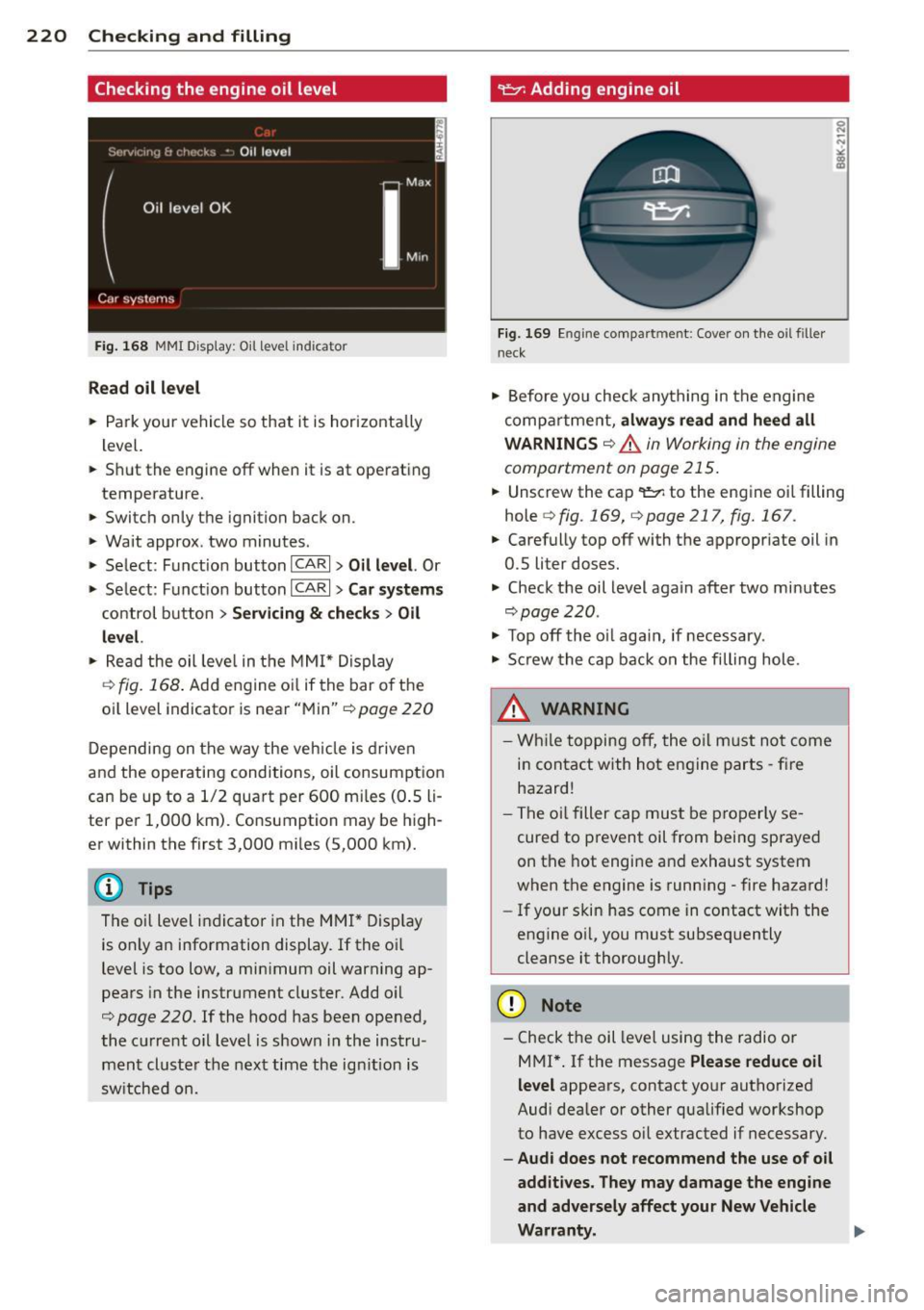
Fig . 168 MMI D isp lay : O il le ve l indic ator
Read oil level
• Park your vehicle so that it is horizontally
level.
.. Shut the engine off when it is at operating
temperature.
.. Switch only the ignition back on.
• Wait approx . two minutes .
> Select: Funct ion button ICARI > Oil level. Or
> Se lect : Funct ion button ICARI > Car systems
control button > Servicing & checks > Oil
level.
• Read the oil leve l in the MMI* Display
c::>fig. 168 . Add eng ine oi l if the bar o f the
oil level indicator is near "Min"
c::> page 220
Depending on the way the vehicle is driven
and the operating conditions, oil consumption
can be up to a 1/2 quart per 600 mi les (0 .5 li
ter per 1,000 km). Consumption may be high
er within the first 3,000 mi les (5 ,000 km).
The o il level indicator in the MMI* Display
is only an information display. If the o il
level is too low, a min imum oil warning ap
pears in the instrument cluster. Add o il
c::> page 220. If the hood has been opened,
the current oil level is shown in the instru
ment cluster the next time the ign ition is
switched on.
~ Adding engine oil
Fig. 169 En g in e compart ment: Cover on the oil filler
neck
• Before yo u check anything in the engine
compa rtme nt,
always read and heed all
WARNINGS
c::> .A in Working in the engine
compartment on page 215 .
.. Unscrew the cap
q fig . 169, qpage 217, fig. 167 .
.. Carefully top off with the appropriate oil in
0.5 liter doses.
.. Check the oil level again after two minutes
qpage220 .
• To p off the o il aga in, if necessary.
• Screw the cap back on the filling hole.
.8_ WARNING
- While topping off, the oil must not come
in contact with hot engine parts - fire
hazard!
- The oil filter cap must be properly se
cured to prevent oil from being sprayed
on the hot engine and exhaust system
when the engine is running - fire hazard!
- If your skin has come in contact with the
engine oi l, you must subsequently
cleanse it thoroughly.
(D Note
- Check the oil level using the radio or
M Ml*.
If the message Please reduce oil
level
appears, contact your authorized
Audi dealer or other qualified workshop
to have excess oil extracted if necessary.
- Audi does not recommend the use of oil
additives . They may damage the engine
and adversely affect your New Vehicle
Warranty. ..,
Page 231 of 294

(D Note
Never use a fast charger as a booster to
start the engine . This will seriously dam
age sensitive electronic components, such
as control units, relays, radio, etc ., as well
as the battery charger .
Battery replacement
The new battery must have the same specifi
cations and dimensions as the original equip
ment battery .
Intelligent energy management in your vehi
cle is responsible for d istributing the electr i
cal energy throughout your vehicle
c::>
page 190 . The intelligent energy manage
ment system w ill keep the engine battery
charged bette r then vehicles w ithout t his sys
tem. To make sure the additional electr ica l en
ergy is available once again after you have
changed the battery, we recommend that you
install batteries of the same type and manu
facture only (the same as those installed at
the time your vehicle was delivered). Specifi
cations are listed on the bat tery hous ing. Your
author ized Audi dealer must code the battery
in the energy management system to enable
you to use the energy management functions
correctly after replac ing the battery .
If it is not possible to use a battery of this
type, the new battery must have the same ca
pacity, voltage (12 volts) , amperage, con
struction and plug sea ling.
When insta lling the battery, make sure the ig
nition and all electr ical consumers are turned
off.
(D Note
Make sure the ventilation hose on the s ide
of the battery is connected , othe rwise
fumes or battery ac id can leak out .
@ For the sake of the environment
Because of the problem of proper d isposal
of a battery, we recommend your author
ized Aud i dealer change the battery for
Checkin g and fillin g 229
you. Batteries contain sul fur ic acid and
l ead and must always be disposed of prop
erly in comp liance with a ll environmental
regulations. Disposing of vehicle batter ies
i mproperly is very dangerous to the envi
ronment .
Windshield/headlight*
washer container
Fig. 173 En gin e compart men t: Cove r on the w ind
s hi eld an d headligh t* was her fl uid conta iner
The washer fluid container is marked w ith the
symbol
Q on its cap c::> fig. 173, c::> page 217,
fig. 167 .
.,. Before you check anything in the engine
compa rtment,
always read and heed all
WARNINGS
c::> .&. in Working in the engine
compartment on page 215.
.,. Lift the f iller cap tongue to add washer flu
id. You can fi ll the container to the top .
.. Press the cap back onto the fi ller neck after
filling the container .
You can find the reservoir
capacity in the table
in c::>
page 2 70 .
Clean water should be used when filling up. If
possib le, use soft water to prevent scaling on
the washer jets . Always add a glass cleaner
solution (with frost protection in the winter) .
(D Note
Do not mix engine coolant antifreeze or
any other additives to fill up the wind
shield washer reservoir .
•
•
Page 233 of 294

-Never mount used tires on yo ur vehicle if
you are not sure of their "previous histo
ry." Old used tires may have bee n dam
aged even though the damage cannot be
seen that can lead to sudden tire failure
and loss of vehicle control.
Glossary of tire and loading terminology
Accessory weight
means the comb ined weight (in excess of
those standard items wh ich may be rep laced)
of automati c transmission, power steering,
power br akes, power wi ndows, power sea ts,
radio, and heater, to the ex tent that these
items are avai lab le as factory -installed equip
ment (whether installed or not).
Aspect ratio
means the ratio of the height to the w idt h of
the tire in percent. Numbers of 55 or lower in
d icate a low sidewall fo r improved s teer ing re
sponse and better overall handling on dry
pavement.
Bead
means the pa rt of the t ire that is made of
s teel wires, wrapped or re inforced by ply cor ds
and that is shaped to fit the r im.
Bead separation
means a b reakdown of the bond between
components in the bead.
Cord
means the strands forming the plies in the
tire.
Cold t ir e infl ation pr essure
means the tire pressure recommended by the
vehicle manufacturer for a t ire of a designated
size that has not been dr iven for more than a
couple of miles (kilometers) at low speeds in
the three hour period before the tire pressure i s measu red or adjusted.
Tire s an d wheel s 231
-If you notice un usua l vibration or if the
veh icle pulls to one side when driv ing, a l
ways stop as soon as it is safe to do so and check the wheels and tires for dam
age.
Curb weight
mea ns the weight of a motor ve hicle w ith
standard equipment includ ing t he maximum
capa city of fuel, o il, and coolant, ai r cond i
tion ing a nd addi tional weig ht o f optiona l
equipment .
Extra load tire
means a tire design to operate at higher loads
and at higher inflation pressures than the cor
respondi ng s tanda rd tire. Extra load tires may
be identified as "X L", "xl", "EXTRA LOAD", o r
"R F" on the sidewall .
Gross Axle Weight Rating ( "GAWR ")
mea ns the load-carrying capacity of a single
axle system, measured at the tire-ground in
te rfaces.
Gross Vehicle Weight Rating ( "GVWR ")
means the maximum total loaded we ight of
t h e ve hicle.
Groo ve
means the space between two adjacent tread
ribs.
Load rating (code )
means the maximum load tha t a t ire is rated
to carry for a given inflation pressure. Yo u
may not find this information on all tires be
ca use it is not required by law.
Maximum load rating
me ans the load r ating for a tire at the maxi
mum pe rm issi ble inflat ion pressure for that
ti re .
•
•
...