2013 AUDI Q5 battery
[x] Cancel search: batteryPage 40 of 316

38 Openin g and clo sing
Emergency unlocking of the ignition key
In the event of malfunc tions in the electrical
system, it may happen that you cannot re
move the ignition key.
Fi g. 28 Ig nit io n swi tc h with igni tio n key
If you are unable to remove the ignit ion key,
for example because the vehicle battery is dis
charg ed, proceed as follows :
• Press the release button @
c::> fig. 28 and
pull the mechanical key ® out of the master
key .
• Lock the vehicle using th e m echanical key
c::> page 41.
• Have the elect ric al system inspected by an
au thor ized Audi dealership .
Electronic immobilizer
The immobilizer helps to prevent unauthor
ized use of your vehicle.
Inside th e key th ere is a compute r chip . This
chip automatically deactiv ates the elect roni c
immobili zer when you insert the key in the ig
n ition lock. When you remove the key from
the ign ition lock, the e lectronic immob ilizer is
automatically activated once again .
@ Tips
-The vehicle cannot be started if an unau
thorized key is used . The vehicle may not
start if another radio device such as a key
fo r another vehicle o r a tra nsponder is
l oca ted on the key ring .
- For Decla rat ion of Compliance to United
States FCC and Indus try Canada regula
tions
c::> page 298.
Power locking system
General description
The power locking system locks or unlocks all
doors and the rear lid simultaneously .
You can lock and unlock the vehicle cen trally .
You have the following choices :
- Remote master key
c::> page 40
-Door hand les with Convenience key *
c::>page40,
- Lock cylinder at the driver 's doo r
c::>page 41, or
- Powe r locking switch inside
c::> page 42.
Selective unlocking
When you lock the vehicle, the power locki ng
system will lock the doo rs and the rear l id .
When unloc king, you can set in the radio or in
t h e MMI* whethe r
only the dr iver's door or
t h e enti re veh icle should be unlocked
c::> page 3 9.
Automat ic lock ing
The automatic locking feature locks a ll the ve
hicle doors and the rear li d w hen you dr ive
f as ter than 9 mph (15 km/ h).
The car is unlocked again once the ign ition key
is removed . In add ition, the vehicle ca n be un
locked if the open ing fun ct ion in the power
locki ng sy stem switch or at one of the door
levers is actua ted .
Additionally , in the event of a crash with air
bag deployment the doo rs a re automatically
u nlocked to allow access to the vehicle.
Anti-theft alarm warning system
If the anti -theft ala rm warn ing system de
tects a b reak-in in to the vehicle, acoustic and
visual war ning s ignals are tr iggered .
The anti-theft warning system is activated au
tomat ically when you lock t he vehicle . It is de
activated when unlocki ng using the
remote
key , with the mechanical key , and when you
swit ch on the ignition .
IJII,
Page 43 of 316

Locking v ehicle
• Move the selector leve r to the P position
(automatic transmiss ion), otherwise the ve
hicle cannot be locked.
• Touch th e sensor at the door hand le
c:> fig . 30 to lock the vehicle c:> A in General
description on page 39.
Do not reach inside
the door handle .
T he vehicle can be locked and unlocked at any
door. It depends on the settings in the radio
or in the
MM!* whether the entire vehicle is
unlocked or one of the doors
c:> page 39 . The
master key must be within a range of about
5 feet (1.5 meters) from the appropr iate door
or the rear lid .
It makes no difference whether
the master key is in your jacket pocket or in
your brief case.
If you grip the door handle while locking, this
can adversely affect the lock ing funct ion.
It is not possible to re -open the door for a
brief period directly after closing it . Th is al
l ows you to ensure that the doors are properly
l ocked.
& WARNING
Read and follow a ll WARN INGS c:> &. in
General description on page 39.
@ Tips
-
If your vehicle has been standing for an ex
tended period, please note the follow ing:
- The proximity sensors are deactivated af-
ter a few days to save power. You then
have to pull on the door handle once to
u nlock the veh icle and a second time to
open the veh icle.
- To prevent the battery from being dis
charged and to preserve your vehicle's
ability to start for as long as possible,
the energy management system gradu
ally switches off unnecessary conven
ience funct ions. It is possible t hat you
will not be able to unlock your vehicle us i ng these conven ience functions .
Openin g an d clos ing 41
-For Declaration of Compliance to United
States FCC and Industry Canada reg ula·
t ions
c:> page 298.
Operating locks with the mechanical key
In the event of o failure of the power locking
system, the driver's door can locked and un
locked with the mechanical key at the lock
cylinder.
Fig. 31 Key turns fo r open ing and clos ing
To unlo ck the vehicle
• Insert the mechanical key into the lock of
the dr iver's door .
• Turn the mechanical key to position @
c:>fig. 31 .
To lock th e vehicl e
• Move the selector lever to the P pos ition
(automat ic t ransm ission) .
• Close a ll windows and doors properly.
• Turn the mechanical key in the lock of the
d river's door to the lock position @
c:> A in
General description on page 39.
If the power lock ing system fails, there is
emergency lock ing for the passenger's doo r
and the rear doors
c:> page 42.
WARNING
Read and follow all WARNINGS c:> &. in
General description on page 39 .
(D Tips
-After the ignition is switched on, the
powe r locking system swit ch and the un
locking button fo r th e rear lid~ in the
door are enab led .
Page 47 of 316

-Always ensure that no one is with in
range of the rear lid when it is mov ing, in
particular close to the h inges and the up
per and lower edges - fingers or hands
can be p inched.
- To help prevent po isonous exhaust gas
from being drawn into the vehicle, al
ways keep the rear lid closed while dr iv
ing. Never transport objects larger than
those which fit comp letely into the lug
gage are a, because then the rear lid can
not be fully closed.
- Never leave you r vehicle unattended es
pecially wi th the rear lid left open. A
child could crawl into the car through the
luggage compartment and pull the lid
shut, becom ing trapped and unab le to
get out. To reduce the risk of persona l in
jury, never let children p lay in or around
your vehicle . A lways keep the rear lid as
well as the vehicle doors closed when not in use.
- If there is a luggage rack or bicycle rack mounted on the rear lid, it may not be
able to open completely or an opened
rear lid may close by itself because of the
added weight . So t he open rear lid must
be s upported or the weight must be re
moved from the luggage rack first .
(1) Tips
-As soon as the electrical connection to
the trailer socket is completed on
vehicles with a factory installed tow ing
hitch, or a trailer hitch that was installed
l ater according to factory spec ifications,
the automatic rear lid function can only be operated via the handle in the rear lid.
- If the vehicle battery charge drops below
a certain level, you can still open or close
the rear lid manually, however, you will
need to apply more force to close it .
- If the rear lid on a locked vehicle is un
locked with the m iddle button
c::; on the
remote key, the rear lid is automatically
l ocked again immediately after clos ing .
This is in dicated by the tu rn signals
bl inking .
Openin g an d clos ing 45
- The following applies to vehicles equip
ped with the Convenience key* feature: if
the remote control key is left in the lug
gage compartment, luggage compart
ment w ill automatically unlock itself af
ter you lock the vehicle . Th is prevents
you from unintentionally lock ing you r
key in the luggage compartment.
Emergency unlocking
of the luggage
compartment lid
The luggage compartment lid can be released
in an emergency from the inside .
Fig. 38 Luggage compartment lid interior
The luggage compa rtmen t lid can be released
i n an emergency from ins ide the luggage com
partment.
~ Remove the cover from the luggage com
partment lid .
~ Press the lever in the d irection of the arrow
until the luggage compartment lid releases.
Page 49 of 316

@ Tips
After the ignition has been switched off,
the windows can still be opened or closed
for about 10 minutes. The power windows are not switched
off until the dr iver's door
or passenger's door has been opened.
Convenience opening/closing
The windows and the Panoramic sliding sun
roof* can be opened and closed with the me
chanical key or the emergency key.
C
F ig. 41 Key turns for opening and closing
Convenience opening feature
§
ci: 0)
• Use the emergency key or pull the mechani
cal key out of the master key¢
page 3 7.
• Insert the key into the lock of the driver 's
door.
• Turn the key to position¢
fig. 41 @until all
the windows have reached the desired posi
tion and the Panoramic sliding sunroof* is
tilted.
Convenience closing feature
• Use the emergency key or pull the mechani
cal key out of the master key¢
page 3 7.
• Turn the key in the lock of the driver's door
to the lock position @ until the windows
and the Panoramic sliding sunroof* are
closed ¢.,&. .
When you open or close the Panoramic sliding
sunroof*, the power sunshade will also open
or close.
Opening and closing 47
A WARNING
- Never close the windows and the Panor
amic sliding sunroof* inattentively and
without checking -there is risk of injury.
- You must always watch when the win
dows are be ing raised so that no one can
be trapped. If you re lease the key, the
clos ing action is immediately cance led.
- Always read and heed WARNING
¢.&. in
General description on page 39.
Correcting window regulator
malfunction
After disconnecting the vehicle battery, the
one-touch up and down feature must be acti
vated again.
• Pull and ho ld the power window sw itch un
til the w indow is comp lete ly closed.
• Release the sw itch.
• Pull the switch again for one second. The
automatic closing/opening is now reactivat
ed.
Panoramic sliding
sunroof
Operation
App lies to veh icles: w ith Panoramic sl iding sunroof
Fig . 42 Sect ion from headliner: Knob for Panoramic
s liding sunroof
Tilting
• Th e sun roof can be tilted or closed only in
sw itch position @¢
fig. 42
• To tilt it, briefly press the switch¢ fig. 42.
• To close it, briefly pull the switch ¢.,&. . ..,.
Page 55 of 316

Notes o n these featur es
-The turn signals only work with the ignition
turned on. The indicator lights
II or Ill in
the instrument cluster
¢page 14 also b link.
- After you have turned a corner, the turn sig-
nal switches off automatica lly.
- The
high beam works only when the head
lights are on. The indicator light
II in th e
instrument cluster illuminates when the
high beams are on.
- The
headlight flasher wo rks only as long as
you hold the lever -even if there are no
lights turned on. The indicator light
II in
the instrument cluster illuminates when you
use the headlight flasher.
A WARNING
Do not use the high beam or headlight
flasher if you know that thes e cou ld blind
oncoming traffic.
Interior lights
Front interior lights
-
The front interior lights also contain reading
lights for the driver and passenger .
r ,,,,, , 11111
~8 ,~
G) Gl
,o . . o
I
Fig. 49 Headliner: Fro nt inte rior/rea ding lights
The rocker switch @¢ fig. 49 for operating
the interior lighting has the following func
tions :
Door cont act swi tch
.,. Place the switch @ in the middle position.
Inte rior light switched on
.,. Place the switch@ in posit ion I.
Clear vision 5 3
Interior light switch ed off
.,. Place the sw itch @ in position 0.
Front re ad in g lights ~
.,. Press one of the switches@ to turn the
r ight or left reading light on or off .
With the door contact switch turned on, the
interior lights turn on as soon as you unlock
the vehicle or open the doors. The lighting is
also turned on when the ignition key is re
moved. The lights go out about 30 seconds af
ter the doors are closed. When the vehicle is locked or when the ignition is turned on, the
interior lights are turned off.
When a doo r is open, the interior lights are
tu rned off after about 10 minutes to prevent
draining of the battery .
The brightness of the lights is controlled au
tomat ica lly by a d immer when they are
swi tched on and off.
Rear interior lights
There are reading lights in the rear for the
passengers .
Fig . 50 Headliner: Rear read ing lig hts
The read ing l ights are switched on and off us
ing the buttons ~-
Depending on your model, the appearance
and the location of the reading lights may be
different .
Page 86 of 316

84 On th e road
• Press the key ¢fig . 97- the engine will
start.
Switching the ignition on /off
If you wou ld like to switch the ignition o n
without starting the eng ine, follow these
steps:
• Insert the key into the ignition lock.
• Press the key b riefly
w itho ut press the
brake pedal.
• To switch the ignition off, press the key
again .
When starting the engine, major e lectr ica l
loads are switched off temporarily.
You can only remove the key w ith the ignition
switched off. To do this, you have to press on
the key aga in.
If the engine should not start immediately,
the starting process is automatically stopped
after a sho rt time. Repeat starting procedu re.
Sw it c hing the ignition /engine off
automatically *
The following applies to vehicles with Start
Stop-System* /Hybrid drive*: to prevent the
battery from drain ing, the ignit ion and the en
g ine will switch off automatically under the
following conditions :
- T he veh icle has al ready bee n driven .
- The driver's door is opened .
- The driver's seat belt is removed.
- The brake peda l is not pressed down.
- The veh icle is stationary.
I n th is case, the activated low beam w ill be re
p laced by the side marker lights. The side
marker lights will switch off after a certain pe
riod of time or w hen you lock the vehicle .
A WARNING
-Never allow the engine to run in confined
spaces - danger of asphyxiation .
- Never remove the ign ition key from the
ignition lock while the vehicle is moving.
Otherw ise, the steering lock could sud- denly engage and yo
u wo uld not be able
to steer the vehicle .
- Always take the key with you whenever
you leave your vehicle. Otherw ise, the
engine could be started or electrical
equ ipment such as the power windows
could be operated. This can lead to seri
ous injury.
- Never leave children or persons requiring
assistance unattended in the vehicle . The
doors can be locked using the remote
transmitte r, prevent ing people from es
caping from the ve hicle on t heir own in
t he event of an emergency. Depending
on the time of year, peop le inside the ve
hicle can be exposed to very high or very
low tempe ratu res .
(D Note
Avoid high eng ine rpm, f ull throttle and
heavy engine loads unti l the engine has
r eached operating temperat ure - ot her
wise yo u risk eng ine damage.
@ For the sake of the environment
Do not let the engine run wh ile pa rked to
warm up. Begin driving immediately. This
r educes unnecessary emissions .
(D Tips
-If the key cannot be removed from the
ignition lock, you have to pull the me
chanical key out of the master key in or
der to be able to lock the vehicle
¢page 38.
-After starting a cold engine, there may
be a brief period of increased noise be
cause the oil pressure must f irst bu ild up
in the hydraulic valve adjusters . This is
normal and not a cause for concern.
- If you leave the ve hicle with the ignition
switched on, the ignit io n w ill switch off
afte r a certain per iod of t im e. Please
note that ele ctri cal eq uipment su ch as
exterior l igh ts will sw itch off as well
when that happens .
Page 88 of 316
86 On the road
(D Note
If the engine has been under heavy load
for an extended period, heat builds up in
the engine compartment after the engine
is switched off -there is a risk of damaging
the engine. Allow the engine to run at idle
for about two minutes before switching it
off.
Convenience key
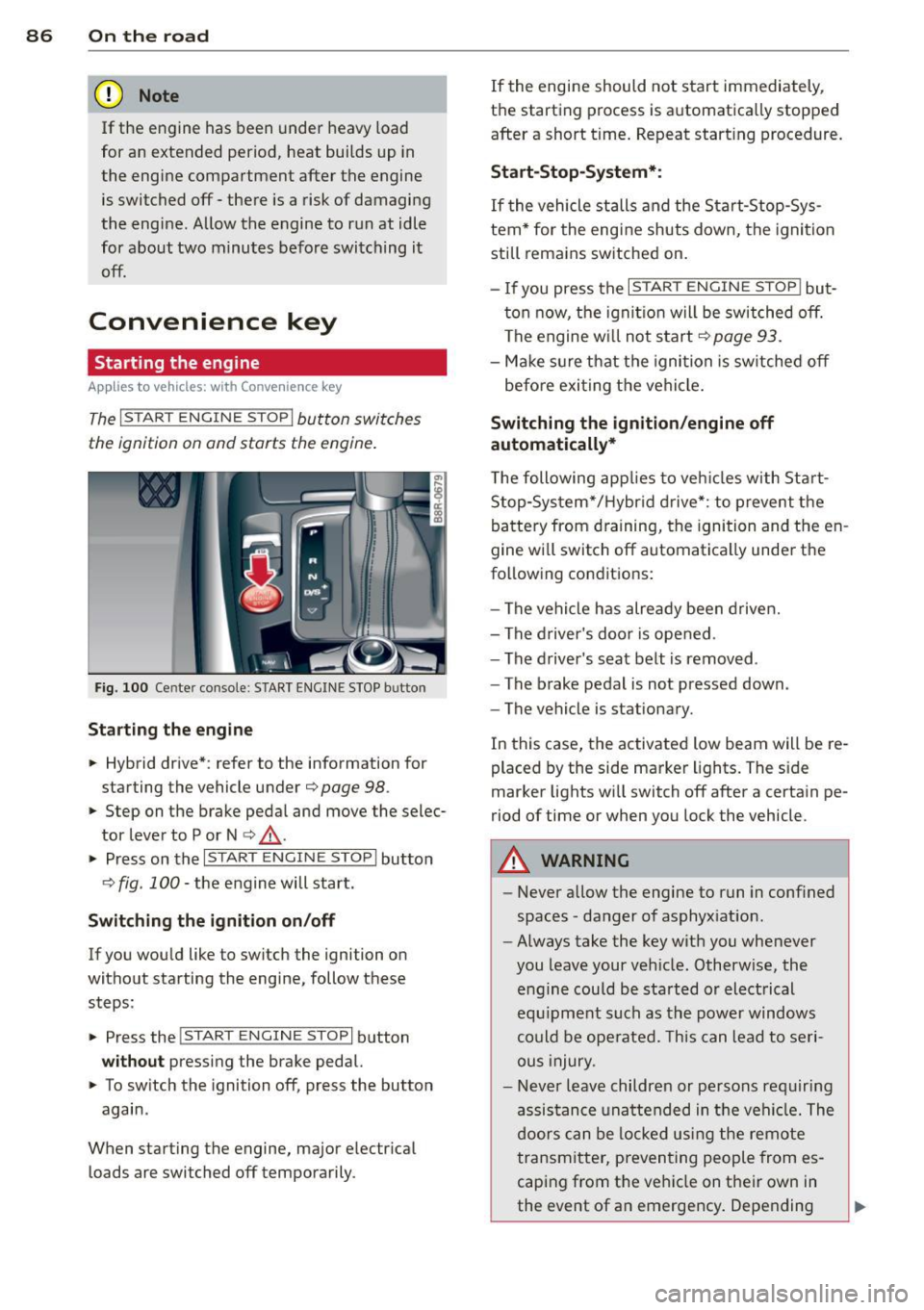
Starting the engine
Appl ies to vehicles: with Convenience key
The I STAR T ENGINE S TOP! button switches
the ignition on and starts the engine .
Fig. 100 Center console: START ENGINE STOP butto n
Starting the engine
.. Hybrid drive* : refer to the information for
starting the vehicle under
¢ page 98 .
.. Step on the brake peda l and move the selec
tor lever to P or N
¢ ,& .
.. Press on the r:I s==T::-:: A--=R== T=-c E=-c N:-;--:::: G-.,,.I ::-:N-;::: E-,S== T;:-; O:;--;P:cil button
c;, fig . 100 -the engine will start .
Switching the ignition on/off
If you would like to switch the ignition on
without starting the eng ine, follow these
steps :
.. Press the
!START ENGINE STOP! button
without pressing the brake pedal.
.. To sw itch the ignition off, press the button
again .
When starting the engine, major electr ical
loads are switched off temporarily . If
the engine should not start immediately,
the starting process is automatically stopped
after a short t ime. Repeat start ing procedure.
Start -Stop-System*:
If the vehicle stalls and the Start-Stop-Sys
tem* for the eng ine shuts down, the ignition
still remains switched on.
- If you press the
I START ENGINE STOP I but
ton now, the ignitio n will be switched off.
The engine w ill not start
¢page 93.
-Make sure that the igni tion is sw itched off
befo re exiting the vehicle.
Switching the ignition /engine off
automatically*
T he following app lies to veh icles with Start
Stop-System*/Hybrid drive*: to prevent the
battery from draining, the ignition and the en
gine wi ll switch off automatically unde r the
following conditions:
- The vehicle has already been driven.
- The driver's door is opened .
- The driver 's seat belt is removed .
- The brake pedal is not pressed down .
- The vehicle is stat ionary.
In this case, the activated low beam will be re
placed by the side marker lights. The side
marker lights wi ll switch off after a certain pe
riod of time or when you lock the vehicle.
A WARNING
--Never allow the engine to run in conf ined
spaces -danger of asphyx iat ion.
- Always take the key with you whenever
you leave your veh icle. Otherw ise, the
engine could be sta rted or electrical
equ ipment such as the power windows
could be operated. This can lead to seri
ous injury.
- Never leave children or persons requiring
assistance unattended in the vehi cle. The
doors can be locked us ing the remote
transmitter, preventing people from es
caping from the veh icle on their own in
the event of an emergency . Depending
Page 94 of 316

92 On the road
Starting/stopping the engine
Applies to vehicles: with Start-Stop-Syste m
Fig. 102 Instrument cluste r: Eng ine switched off (stop
phase)
.. Slow the vehicle to a stop using the brake
and keep pressing the brake pedal. The en
gine w ill switch off. The
[IJ indic ator light
appears in the instrument cluster display
and - also appears in the trip com
puter .
.. When you take your foot off the brake ped
al, the engine restarts. The indicator light
turns off .
Additional information
The engine will switch off in the P, 0/5 and N
positions as well as in manual mode. In the P
position, the engine will also remain off if you
take your foot off the brake pedal. The engine
starts again when you select another selector
lever position and take your foot off the brake
pedal.
If you select the R position during a Stop phase, the eng ine will start aga in .
Shift from 0/5 to P qu ickly to prevent the en
g ine from starting unintentionally when shift
ing through R.
You can determine for yourself if the engine
will stop or not by reduc ing or increasing the
amount of force you use to press the brake
pedal. For example, if you only lightly press
on the brake pedal in stop-and and-go traffic
or when tu rning, the eng ine will not switch off
when the vehicle is stationary. As soon as you
press the brake down harder, the engine will
switch off.
(D Tips
-Press the brake pedal during a stop
phase to keep the vehicle from rolling.
- When you stop and the start-stop-sys
tem turns the engine off, the ignition re
mains on. Make sure that the ignition is
switched off before exiting the vehicle.
- The ignition will turn off if you press the
!START ENGINE STOPI * button during a
stop phase.
- The image in the display is slightly differ
ent in some models.
General information
Applies to vehicles: with Start-Stop-System
The standard Start-Stop-mode can be cancel
led for different system-related reasons.
Fig. 103 Instrument cluster: Engi ne-Stop tempora rily
unavailable
Engine will not switch off
Before each stop phase, the system checks if
certain conditions have been met. For exam
ple , the eng ine will
not be switched off in the
following sit uations:
- The engine has not reached the minimum
required temperature for Start-Stop -mode.
- The interior temperature selected by the A/C
system has not been reached.
- The outside temperature is extremely high/
low.
- The windsh ield is being defrosted
~page 81.
-The parking system* is switched on .
- The battery charge level is too low .
- The steering wheel is sharply turned or
there is a steering movement.