2013 AUDI A8 park assist
[x] Cancel search: park assistPage 88 of 318

86 On the road
driving force has been built up at the
wheels.
E mergency brake function
An emergency brake ensures t hat the vehicle
can be slowed down even if the
normal brakes
fail
c::> page 87, Emergency braking .
Indicator lights
-If the parking b rake is closed w ith the igni
t ion
sw itch ed on the indicator lights come
on - (USA models)/ . (Canada models)
i n the i nstr ument cluster and in the switch .
- If the par king brake is closed w ith the igni
t ion
s wit ched off the indicato r lights come
on - (USA models)/ . (Canada models)
in the instrument cluster and in the switch
for about 20 seconds.
.&_ WARNING
Do not press the accelerator peda l inadver
tently if the vehicle is stat ionary but the
eng ine is running and a gear is selected.
Otherw ise the vehicle will start to move
immed iate ly and could result in a crash .
@ Note
If the symbo l. in the display or the ind i
cator light
1111 (USA models) . (Cana
da models) in the instrument cluster flash
es, there is a malfunction in the brake sys
tem . Please refer to the detai led descrip
tion of the indicator lights
c::> page 14.
- If the indicato r light - (USA mod-
els) . (Canada mode ls) or
liJ turns
on, there may be a malfunction in the parking b rake
c::> poge 15.
(D Tips
- You can apply the pa rking brake at any
t ime - even w ith the ignition switched
off . T he ignit ion must be on in order to
r elease the parking brake.
- Occ asiona l noises when the par king
brake is applied and re leased are no rma l
and are not a ca use for concern .
- When the vehicle is par ked, the par king
brake goes through a se lf -test cycle at regu
lar interva ls. Any associated noises
are normal.
Parking
Parking
.,. Stop the vehicle with the foot brake .
.,. Pull the switch(®) to apply the parking
brake.
.,. Select the P selector lever position
c::>page 115.
.,. Turn the engine off c::> _&. .
In addit ion on inclin es and g rades
.,. Turn the steering whee l so that your vehicle
w ill roll aga inst the curb in ca se it should
start to move.
.&_ WARNING
- When you leave your vehicle - even if on
ly br iefly - always take the ignit io n key
wit h you. This applies pa rticularly when
children remain in the vehicle. Otherwise
the children co uld s tart the engine, re
lease the parking brake or operate elec
trica l equipment (e.g . power windows) .
There is the r isk o f an accident.
- When the vehicle is locked, no one - par
ticularly not children should rema in in
the vehicle. Locked doors make it more
d ifficult for emergency workers to get in
to the vehicle - putting lives at risk .
· Starting from rest
The starting assist function ensures that the
parking broke is released au tomatically upon
star ting.
Stopping a nd applying parking brak e
.,. Pull the switch(®) to apply the parking
brake.
St arting and automatically releasing the
parking brake
.,. When you start to drive as usual , the park
ing brake is a utomatically rel eased and your
vehicle beg ins to move. ..,..
Page 102 of 318

100 Audi adaptive cruise control and braking guard
(end of a traffic jam or vehicle that has
broken down in traffic).
- Always remember that the radar sensor
for the braking guard works only within
defined detection and range limits that
may prevent the proper detection of oth
er vehicles.
- The radar sensor's function and range
can be reduced by rain, snow and heavy
spray. Moving vehicles up ahead may not
be promptly detected or may not be de
tected at all.
- Reflective surfaces including crash barri
ers or tunnel entrances may impair the
function of the radar sensor.
(D Tips
- You can cancel the braking with increas
ing force that is initiated by the system
by braking yourself, by accelerating no
ticeably or by swerving.
- Braking guard error messages
r::> page 100.
-Keep in mind that braking guard can
brake unexpectedly . Always secure any
cargo or objects that you are transport
ing to reduce the risk of damage or in
jury.
Settings in the MMI
Applies to vehicles: with Audi adaptive cruise control
• Select: ICARI function button > Car systems
control button > Driver assist > Audi brak
ing guard.
System -
Switch braking guard On and Off.
When you switch the ignition on, the message
Audi braking guard off appears if the system
is switched off.
Early warning -The distance and approach
warnings in the display can be switched
On/
Off.
Tips
- Your settings are automatically stored
and assigned to the remote control key being used at the time the settings are
made.
- If you switch the ESC to sport mode,
braking guard switches off automatically
~page 200.
- Switch braking guard off when you are
loading the vehicle onto a vehicle carrier,
train, ship or other type of transporta
tion. This can prevent undesired warn
ings from the braking guard system.
Messages
Applies to vehicles: with Aud i adapt ive cru ise contro l
ACC unavailable
ACC and braking guard: unavailable
The system cannot detect moving vehicles up
ahead correctly and is switched off. The sen
sors have been displaced or are not working
properly. The Audi pre sense functions may al
so be affected. Drive to your authorized Audi
dealer or authorized Audi service facility im
mediately to have the malfunction corrected.
ACC: unavailable at this time. No sensor vi
sion
ACC and braking guide: unavailable at this
time. No sensor vision
This message appears if the sensor view is ob structed, for example by leaves, snow, heavy
spray or dirt . Clean the sensors
r:> page 93,
fig. 93.
ACC: unavailable at this time. Incline too
steep
The road exceeds the maximum possible an
gle for proper adaptive cruise control opera
tion. Adaptive cruise control is switched off .
ACC: only selector lever positions D, S or M
available
Select the D, Sor M selector lever position.
ACC: unavailable at this time. Parking brake
set
The adaptive cruise control system switches
off automatically if the parking brake is set. .,.
Page 115 of 318

steering angle. The pedestrian warning prompts you to pay even closer attention to
the area in front of the vehicle and to watch
out for pedestrians.
If another display such as the trip comp uter
replaces the image from the night vision as
sistant, the indicator light turns red when
there is a pedestrian warn ing .
c:> fig. 118 .
@ Tips
The pedestrian marking and warning tone
can be adjusted in the MMI
r=>poge 114.
General information
Applies to vehicles: with night v isio n ass istant
N 0
8 :i:
~
Fig. 119 Fron t of the veh icle: night vision ass istant
camera
The following situations may affect the func
tion of the night vision assistant system:
- poor v is ib ility such as snow, rain, fog or
heavy road spray
- dirty lens on the night vision assistant cam-
era
Make sure the night vision assistant camera
i::> fig. 119 is not cove red by stickers, deposits
or any other obstructions because that can
prevent the camera from working properly.
F or information on cleaning the lens, refer to
c:> page 218.
Pedestrian detection depends on the differ
ence in temperature between the person and
the background. Pedestrians may not be de
tected if the temperature difference is too
sma ll. The pedestrian highlighting feature is
deactivated at temperatures above 77 °F (25
0
() and when it is light outside.
Night vision assistant 113
A WARNING
Night vision assistant has limits and can
not always detect pedestr ians . Always pay
close attention to traffic and the area
around your vehicle even when night vision
assistant is switched on.
- Night vision assistant can only warn
about people located within the visual
range of the infrared camera. The visual
range corresponds to the image in the in
strument cluster display.
- Night vision assistant may not detect
peop le and highlight them if
- they are not in an upright posit ion, for
example if they are sitt ing, crouching
or lying down and/or
- if the outline in the display is incom
plete or interrupted, for example be
cause the person is part ially hidden by
a parked vehicle .
@ Tips
-Pedestrian detection and the pedestrian
warm ing are limited to objects that are
detected as pedestrians. The system
does not detect an imals. Even though
the shape and warmth radiated by each
object detected is evaluated, the system
does have limitations and it can give in
correct warnings .
- For technical reasons, the image pauses
in split second intervals.
Switching on and off
Applies to vehicles: wit h night vision assistant
Fig . 120 Area around th e ligh t sw itch: night vis ion as·
s istant button .,.
Page 120 of 318

118 Autom atic Tran smissi on
preve nt the vehicle from "creep ing" , you
must keep your foot on the brake in all
selector lev er positions except P and N
when the e ng ine is r unning. Do not inad
vertently press the accelerator pe dal
w hen the veh icl e is stationary . Otherwise
the vehicle will s tart to move immediate
ly, even if the park ing brake is se t. This
cou ld result in a c rash.
- Do not ride the brakes or press the brake
peda l too often or too long when dr iving
down a hill. Constant braking causes the
brakes to ove rheat and s ubstant ially re
duces braking performance, increases
braking distance or causes comp lete fail
ure of the brake system.
Hill descent control
The hill descent control system assists the
driver when driving down declines.
H ill descent control is activated when these
lector lever is in D/S and you press t he b rake
pedal. The transmission automat ically se lects
a gear that is suitab le for the incline. Hill de
scent control tries to maintain the speed ach ieved at the time of brak ing, within physical
and techn ical limitations. If may still be nec
essary to adjust the speed with the brakes .
H ill descent control switches off once the de
cline levels out or you press the accelerator
pedal.
Hill descent control is also activated when the
speed is set by starting the cruise control sys
tem c:>
page 90.
A WARNING -
Hill descent control ca nnot overcome
physical limitations, so it may not be able
t o maintain a constant speed under all
condi tion s. Alw ays be ready to ap pl y the
bra kes.
Shifting manually
The shift paddles allow the driver to shift the
gears manually .
Fig . 1 25 Steer ing whee l: sh ift in g manually
" To shift to a higher or lowe r gear tempo rari
ly, tap the
0 or 0 shift padd le c:> fig. 125.
" To switch manual mode on, press the~
button. An M and the gear that is current ly
engaged appear in the instrument cluster
disp lay @ c:>
page 115, fig. 122.
" To shift up one gear, tap the rig ht shift pad
dle
0 c:> fig . 125 .
" To s hift down one gear, tap the left shift
paddle Q.
" To swi tch manual mode off, press the~
but ton again, or
" Move the se lector lever back and release it .
T he transm iss io n automatically sh ifts up or
down before cr itical engine spee d is reached.
T he transm iss ion only allows manual sh ifting
whe n the eng ine speed is w ith in the pe rmit
ted range .
The eng ine braking effect increases when you
downsh ift when going downhill .
Kick-down
Kick-down enables maximum acceleration .
When you press the accelerator pedal down
beyond the resistance point, the automatic
transmission downsh ifts into a lower gear, de
pending on veh icle speed and eng ine RPM . It
shifts up into the next higher gear once the
max imum specified engine RP M is reached .
Iii>
Page 123 of 318
Parking systems
General information
App lies to vehicles: with park in g system plus/rear view
camera/peripheral cameras
Depending on your vehicle's equipment, vari
ous parking aids will help you when parking
and maneuvering.
The
advanced parking system with rear view
camera
ass ists you when parking by audibly
and v isua lly indicating objects detected
in
front of
and behind the vehicle . The rear view
camera shows the area behind the vehicle in
the Infotainment display. This display assists
you when you are cross or para llel parking
c:;,page 122.
The peripheral cameras assist you with park
ing and maneuvering. You are aided by various
cameras depending on the vehicle equipment level ¢
page 126. In addition, you are assist
ed by the functions from the sensors
c:;, page 122, Sensors, c:;, page 124 , Visual
display .
A WARNING
-Always look fo r traff ic and check the area
around your vehicle by looking at it di
rect ly as well. The parking system cannot
replace the driver's attention. The driver
is a lways respons ible for safety during
parking and for all other maneuvers.
- Please note that some sur faces, such as
clothing, are not detected by the system .
- Sensors and cameras have blind spots in
which peop le and objects cannot be de
tected. Be especially cautious of children
and animals.
- The sensors can be displaced by impacts
or damage to the radiator grille, bumper,
wheel housing and the underbody. The
parking systems may become impaired
as a result. Have your authorized Audi
dealer or qualified workshop check their
function.
- Make sure the sensors are not covered by
stickers, deposits or any other obstruc
t ions as it may impair the sensor func-
Parking systems 121
tion. For information on cleaning, refer
to
c:;, page 218.
(D Note
-Some objects are not detected by the
system under certain circumstances:
- Objects such as barr ier chains, trailer
draw bars, vertical poles or fences
- Objects above the sensors such as wall
extensions
- Objects w ith specific surfaces or struc
tures such as chain link fences or pow
der snow .
- If you continue driving closer to a low-ly
ing object, it may disappear from the
sensor range. Note that you w ill no lon
ger be warned about this obstacle .
(D Tips
- The system may provide a warning even
though there are no obstacles in the cov
erage area in some situations, such as:
- certain road surfaces or for long grass.
- externa l ult rason ic so urces e.g. from
cleaning vehicles.
- heavy rain, snow or thick vehicle ex
haust.
- We recommend that you practice park
ing in a traffic-free location or parking
lot to become familiar w ith the system.
When doing this, there should be good
light and weather cond itions.
- You can change the volume and pitch of
the signals as we ll as the disp lay
c:;, page 131.
-Please refer to the instructions for tow
ing a trailer
c:;, page 131.
- What appears in the infotainment dis
play is somewhat time-delayed.
Page 125 of 318

If the distance to an obstacle remains con
stant, the volume of the distance warning
gradually drops after about four seconds (this
does not apply in the continuous tone range).
Rear view camera
The rear view camera is locat ed above the rear
license plate bracket. Make sure that the lens
for the parking system
r::;, fig. 131 is not cov
ered by deposits or any other obstructions be
cause this can affect the function of the park
ing system. For information on clean ing, refer
to
c;, page 218.
The rear view camera coverage area includes
(Dr::;, fig. 130. Only this area is shown in the
Infotainment display. Objects that are outside
of this area @are not displayed.
The accuracy of the orientation lines and the
blue surfaces is reduced if the adaptive air
suspens ion* is faulty, if the veh icle is lifted or
if the
dynamic mode is activated r::;, page 109.
A WARNING
-Always read and follow the applicable
warnings
r::;, &. in General information on
page 121.
- If the position and the installation angle
of the rear view camera was changed, for
example, after a collision, do not contin
ue to use the system for safety reasons.
Have it checked by your authorized Audi
dealership or authorized repair facility.
- Only use the rear view camera to assist
you if it shows a good, clear picture. For
example, the image may be affected by
the sun shining into the lens, dirt on the
lens or if there is a system fault.
- Use the rear view camera only if the lug
gage compartment lid is comp letely
closed. Make sure any objects you may
have mounted on the luggage compart
ment lid do not block the rear view cam
era .
- The camera lens enlarges and distorts the field of vision. The object appears both altered and inaccurate on the
screen.
Parking systems 123
-In certain situations, people or objects in
the display appear closer or further
away:
- objects that do not touch the ground,
such as the bumper of a parked vehicle,
a trailer hitch or the rear of a truck. Do
not use the help lines in this case.
- If driven from a level surface onto an
inclin e, or a downward slope.
-If driven toward protruding objects.
- If the vehicle is carrying too much load
in the rear.
(D Note
-Always read and follow the applicable
warnings
r::;, (D in General information on
page 121.
- The orange colored orientation lines in
the Infotainment display show the vehi cle path depending on the steering
wheel angle. The front of the vehicle
front swings out more than the rear of
the vehicle. Maintain plenty of distance
so that your outside mirror or a corner of
your vehicle does not collide with any ob stacles.
Page 128 of 318

126 Parking systems
long side of the blue surface so that there is
sufficient space from the obstacle. The sur
face m ust not be to uchi ng. You will a lso need
to start tur ning the steer ing wheel much ear
lier. The blue curve
r:::;, fig. 13 7 must not touch
the obstacle and should have sufficient room .
@ Tips
The left or right orientation lines and sur
faces will be displayed, depending on the turn signa l be ing used .
Peripheral cameras
Introduction
Applies to vehicles: with top view camera system
In addition to the f unctions from the sensors
c::> page 122, Sensors, c::> page 124, Visual dis
play,
this parking system contains peripheral
cameras. Depending on the ve hicle equ ip
ment, you are assisted by various
views such
as periphera l view, corner views at the front
and rear of the veh icle, and views di rectly in
fro nt of o r behind the vehicle.
General information
Applies to vehicles: with top view camera system
Fig. 138 Locat io n of peripheral cameras
Depending on the vehicle equ ipment, the pe
ripheral cameras are found in the radiator
grille, i n the luggage compartment lid and on
both exterior mirrors
r:::;, fig . 138 . Make sure
that the lenses are not covered by deposits or
any other obstructions as it may impair the
system. For information on cleani ng, refer to
c::> page 218.
In the to p view mode, b lack corners are
shown in t he vehicle silhouette . Objects in
these areas are outside of the camera 's field
of
view and are not detected .
T he accuracy of the o rientation lines and the
blue surfaces is reduced if the adaptive air
suspension * is faulty, if the vehicle is lifted or
if the
dy namic mode is activated r:::;, page 109.
A WARNING
-- Always read and follow the applicable
warn ings
r:::;, & in General information on
page 121 .
-If the position or the installat io n angle
of a camera was changed, after a colli
sion for example, do not continue to use
the system fo r safety reasons. Have it
checked by your author ized Audi deale r
sh ip.
- Keep in mind that the image in the dis
p la y is distorted if the exterior mi rror
housing has bee n manually adjusted .
- U se the
rear mode and the corn er view
( rear)
m od e only when the luggage com
partment lid is fu lly closed . Otherw ise
the image in the display will be d istort
ed .
- The vehicle surro undings are shown us
ing the came ra images. The vehicle im
age is shown by the system. Ob jects and
obstacles above the camera are not d is
p layed.
- Camera lenses enlarge and distort the field of vision. The objects appear both
altered and inaccurate on the screen.
(D Note
- Always read and follow the applica ble
warnings
¢ (I) in General information on
page 121.
- The Infotainment d isplay shows the di
rection in which the rear of the vehicle is
traveling based on the steer ing whee l
ang le. The front of the vehicle front
sw ings out mo re than the rear of the
ve
hicl e. M aintain pl enty of d istance so that .,_
Page 130 of 318
128 Parking systems
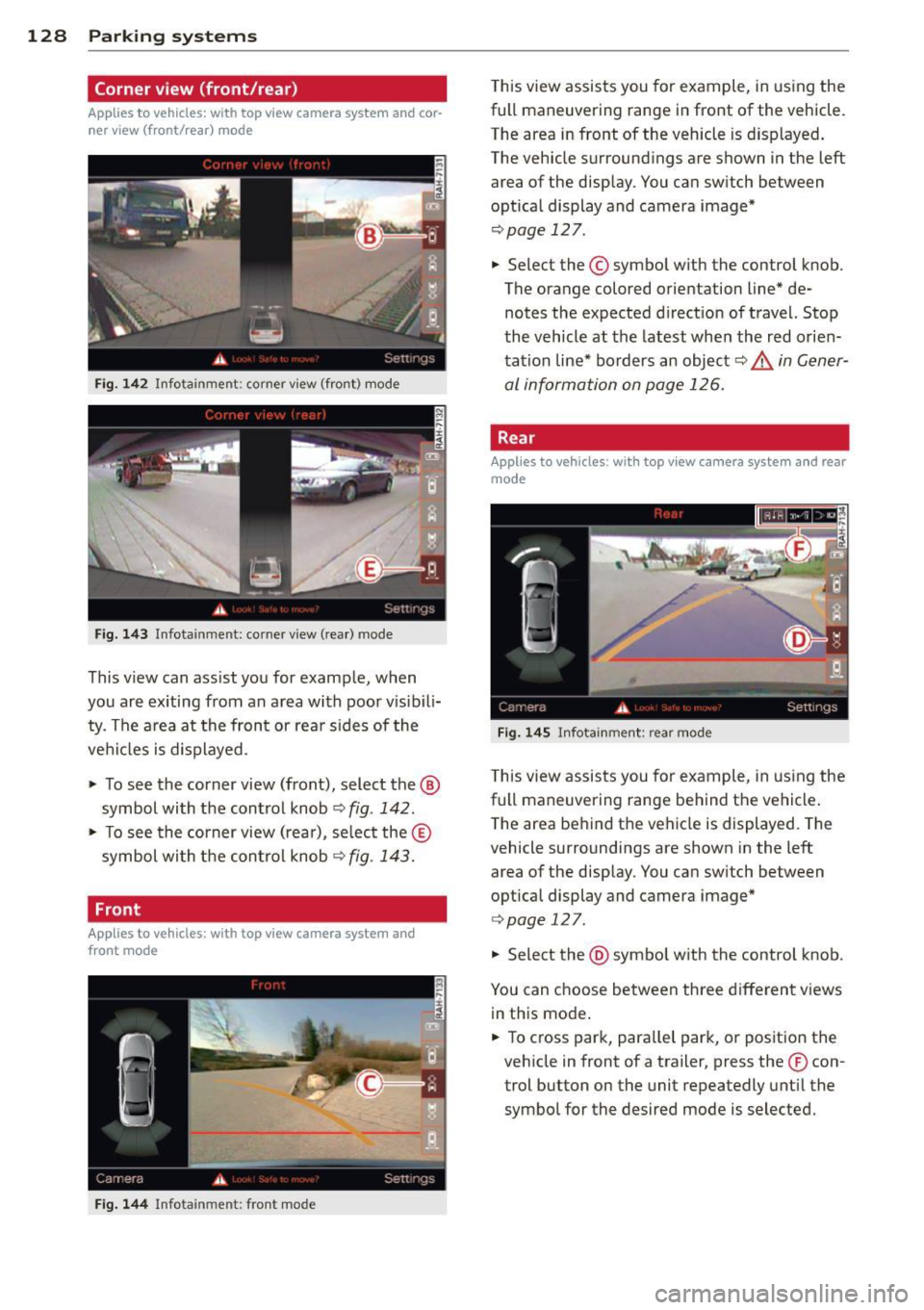
Corner view (front/rear)
Applies to vehicles: with top view camera system and cor
ner view (front/rear) mode
Fig-142 Infotainment : corner v iew (front) mode
Fig. 143 Infota inment: corner v iew (rear) mode
This v iew can ass ist you for example, when
you are exiting from an a rea with poor v isib ili
ty . The a rea at the front or rea r sides of the
vehi cles is d isplayed .
"' To see the corner view (front), select the @
symbol with the control knob
<=.> fig . 142 .
"' To see the corner view (rea r), se lect the ®
symbol wi th t he contro l knob
r=.> fig . 143.
Front
Appl ies to vehicles : with top view camera system and
front mode
F ig . 144 In fota inm ent: fr ont mo de
This view assists you for example, in using the
full maneuvering range in front of the vehicle.
The area in front of the vehicle is d isplayed .
The veh icle surroundings are shown in the left
area of the disp lay . You ca n sw itch between
optical display and camera image*
r=.> page 12 7 .
.. Select the © symbo l with the control knob .
The orange colored orientation line* de notes the expected direction of travel. Stop
the vehicle at the latest whe n the red orie n
tation line* bo rders an object~&.
in Gener
al information on page 126.
Rear
Applies to vehicles : w ith top view camera system and rear
mode
F ig . 14 5 Infota inm ent : re ar mode
Th is view assis ts you for example, in us ing the
full maneuvering range behind the vehicle .
T he area be hind t he vehicle is displayed. The
vehicle surroundings are shown in the left
area of the display. You can sw itch between
optical display and camera image*
¢ page 127 .
.. Select the @symbo l w ith the control knob _
You can c hoose between three d ifferent views
in th is mode .
.. To cross park, para llel park, o r position the
veh icle in front of a trailer, press the ® con
trol button on the unit repeatedly unt il the
symbol for the desired mode is selected.