2013 AUDI A6 hose
[x] Cancel search: hosePage 8 of 306

6 About this Owner's Manual
This owner's manua l contains important infor
mation, tips, suggestions, and warnings for
the use of your veh icle.
Make sure that this owner's manua l is always
located in the vehicle. This is especia lly impor
tant if you allow other people to drive the ve
h icle, or if you sell it.
This owner's manua l descr ibes the
equipment
range
specified for this mode l at the editoria l
deadline date. Some of the equipment descri
bed here will on ly be available at a later date,
or only in specific markets.
Some sections in this owner's manua l do not
apply to a ll vehicles . In that case, the
range of
applicability
is g iven at the beginn ing of the
section, e.g. "Applies to vehicles: w ith Ad
vanced Parking System" . In add it ion, optional
or vehicle -specific equipment is indicated by
a n aster isk
" *" .
Illustrations may be different from those in
your vehicle, and are intended to be viewed as
a basic guide .
You will find a
table of contents at the begin
n ing of this book, which disp lays all topics de
scr ibed in this manual in order of appearance.
You will find an alphabetical
index at the end
of this book .
All
directions , such as "left", "right", "front",
''back", are relative to the direct ion of travel.
* Optional or vehicle-specific equipment
.,.. This section continues on the next page.
® Registered trademarks are identified with
a®. If this symbol is missing, it is no guar
antee that the terms can be used free ly .
~ &. Cross-reference to a "WARN ING!" with-
in a section. For indication w ith a page num
ber, the corresponding "WARNING!" can be
found outside of the section .
A WARNING
Text with this symbol contains important
information on safety and how to reduce
the risk of personal injury or death.
(D Note
Text with this symbo l draws your attention
to potentia l sources of damage to your ve
hicle.
@) For the sake of the environment
Text with this symbo l contains information
abo ut the environment and how you can
help protect it.
{!) Tips
Text with this symbo l contains specia l tips
and other information about gett ing the
most out of your vehicle and its features.
Page 27 of 306

Instruments and warning/indicator lights 25
~ Press the button @ to access a func tion fo r
t h e p rog rammable stee ring w heel button* .
Accessing Vehicle functions
~ Select t he fi rs t t ab wi th the roc ker switch
(D .
~ Press the button ~ @. T he Vehicle func
tion s
menu appears ¢ fig. 7.
~ To select a men u item, turn a nd p ress the
t hu mbwheel @.
Resetting values to zero
~ Select t he on-board computer / Efficien cy
program
men u it em in the Vehicle func
tion s
menu.
~ You can now select between the long-te rm
memo ry and short-te rm memory .
~ To reset the va lues in a memory, press and
hold the thumbwhee l@ for one second.
Assigning a function to the
programmable steering wheel button*
~ Se lect : ICAR lf u nct ion button> ( Car) * sys
tems
control button > Vehicle settings >
Steering wheel button .
The last function se lected displays when you
switch the ignition o n.
On-board computer
You ca n call u p the following informa tion in
the on-board computer:
- D ate
- Driv ing time (h) from the s ho rt- term memo-
r y
- Ave rag e co nsump tion in
MP G (l/ 100 km)
from the s ho rt -term me mory
- Ave rag e spe ed in mph (km/h) from the
sho rt-term memo ry
- Distance driven in m iles (km) from the
sho rt-term me mory
- Cu rrent fuel consumption in
M PG (l/100
km)
- Sho rt-term memo ry overview
- Long-term memo ry overview
The sho rt-t erm memo ry co llec ts dr iving info r
mat io n from the time the ignition is switched
on until it is switched off. If yo u continue dr iv - ing within
two ho urs a fter switch ing the ign i
tion off, the new values are incl uded when cal
c ul ating the c urrent t rip informati on.
Unlik e the s ho rt-t erm memory, t he lo n g- term
memo ry is not erase d automatically. Yo u can
select t he time pe riod for evaluating trip in
format ion y ourse lf.
F o r so me vehicle f uncti ons, you can a ccess t he
trip informa tion from t he tem porary memory
in the line CD¢ fig .
5.
The current fue l consumption can be d is
played using a bar ¢ fig.
10 . The a verage c on
s u mption (mpg) store d in the sho rt-term
memo ry is a lso displayed . E lectr ica l ene rgy
can be sto red in the battery when the vehicle
is coast ing or d riving downhill (recupe rat ion) .
The bar will move toward
D .
Efficiency program
The efficiency program ca n he lp you to use
l ess fue l. It evaluates drivin g info rmation in
reference to f uel consumption and sh ows oth
er equipment influencing consumption as well
as shift recomme ndat ions . ¢
page 26. Fu el
economy messages
c> page 26 prov ide t ips
fo r eff ic ient driving . The efficiency program
uses d istance and cons umption data from t rip
c ompu ter
1.
To d isp lay the eff ic iency p rogram, call up Ve
hicle function s
and select the menu opt io n
Efficiency program . If the data are del eted in
th e eff icie ncy prog ram, those values a re a lso
r e set in t rip comp ute r.
(D Tips
-All stor ed values will be lost if t he vehi
cl e bat tery is disc onnec ted.
- Fu el co nsump tions (average and cu r
re nt) , r ange and speed a re disp laye d in
m etric units on Cana dian mod els.
Page 36 of 306

34 Openin g and clo sing
- Applies to vehicles with power side door
closer *:
- When closing a door, make sure noth
i ng can interfere w ith the doo r. T his
could cause ser ious perso nal inj ury.
- You ca n stop the door from clos ing at
any time by pulling on the inside or
out side door handle.
(0 Tips
- In the event of a c rash wi th airbag de
ployment a ll locked doo rs will be auto
m atically unlo cked to g ive access to the
vehicle occ upants from the outside.
- If the power loc king system should ma l
func tion, you can lo ck the dr iver's door
u sing the mechanical key
I:!> pdge 3 7.
- If the power locking system should fai l,
you can st ill open the f ue l t ank flap in a n
emergency ¢
page 223.
-You are well advised no t to keep valua
bles inside an unattended vehicle, visib le
or not . Even a properly locked vehicle
ca nnot provide the sec urity of a safe.
- If the LED in the up per edge of the driv
er's door panel comes on fo r abo ut
30
seconds after t he vehicle is locked, there
i s a ma lfunction in the power locking or
the anti-theft warning system. Have the
malfunction corrected by an author ized
A udi dealersh ip or qua lified repa ir fac ili
ty .
Setting power locking
The driver con determine the functions for
power locking in the MMI.
.,. Select : ICARI function button> (Car )* sy s
tems
control button > Vehicle sett ings >
Central locking .
Unlock doors -You can decide if All doors or
only the
Dr iver should unlock. The rear lid al
so unlocks when
All is selected . If you select
Driver in a vehicle with a convenience key*,
only the door whose handle you pull will un l ock. If you se
lect
Dri ver, a ll the doors and rear lid
will unlock if you press them button on the re
mote control maste r key twice.
Loc k exterior trunk handle -If you se lect On ,
the rear lid handle is locked . In this case the
rear lid can be opened with the b utton
cs on
the master key or with the
cs button in the
driver's door . In veh icles with a convenience
key* , you can still open the rear lid using the
handle if an authorized master key is near the
proxim ity sensor .
Fold mir rors * -If you select On , the exterior
rearview mirrors fold in automatically when
you press the
~ button on the remote control
master key or touch the sensor* in the ha ndle.
Tone when locking -When you select On, a
confirmation tone sounds when you lock the
vehicle .
Locking and unlocking the vehicle with
, the remote control
F ig . 20 Re mote co ntrol : funct io n buttons
N 0
q Cl
~
Eithe r the driver's door on ly or the ent ire vehi
cle w ill unlock when the unlock button m
(@ )
is p ressed once, depending on the settings in
the MMI
I:!> page 34.
.,. Press button ffi (@ ) to un lock the vehicle
¢fig. 20.
.,. Press button~( @) to lock the vehicle¢.&
in General description on page 33 .
.,. Press bu tton cs( @) briefly to unlock t he
re ar lid .
.,. Push the red
I PANIC I button (@ ) to activate
the panic function . The horn sounds and the
turn signa ls flash. Push the red
I PANIC I but
ton again to deactivate the pan ic function . .,.
Page 39 of 306
opening function in the power locking sys
tem switch.
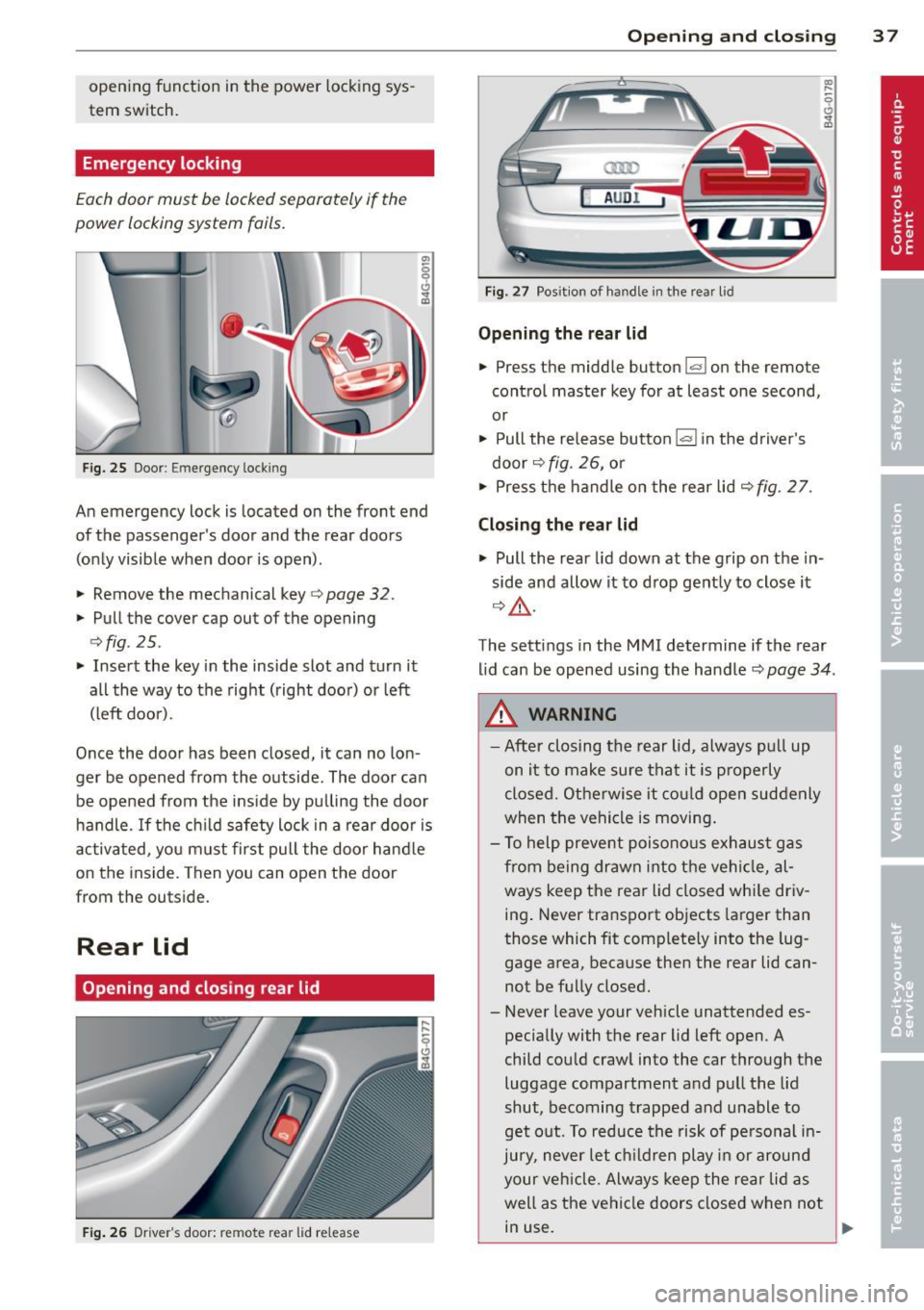
Emergency locking
Each door must be locked separately if the
power locking system fails.
F ig. 25 Door: Emergency locking
An emergency lock is located on the front end
of the passenger's door and the rear doors (on Ly visible when door is open).
• Remove the mechanical key
c> page 32.
• Pull the cover cap out of the opening
c>fig . 25 .
• Insert the key in the inside slot and turn it
all the way to the right (right doo r) or left
(left door).
Once the door has been closed, it can no lon
ger be opened from the outside. The door can be opened from the ins ide by pu lling the door
h andle. If the c hild safety lock in a rear door is
activa ted, yo u m ust first pull the door hand le
on the inside. T hen you can open the door
from the outs ide.
Rear lid
Opening and closing rear lid
Fig . 26 Driver's door: remote rear lid release
Op enin g an d clos ing 3 7
a:ro
AUD!
Fig. 27 Posit ion of handle in the rear lid
Opening the re ar lid
• Press the middle button l.::::rl on the remote
control master key for at least one second,
or
• Pull the release button
l.::::rl i n the driver's
door
c> fig. 26, o r
• Press the handle on the rear lid
c> fig. 2 7.
Clo sin g the re ar lid
a, .....
9 (!) ...
"'
• Pull the rear lid down at the grip on the in
side and allow it to d rop gently to close it
c> &, .
The settings in the MMI determine if the rear
lid can be opened using the handle
c> page 34.
A WARNING
- After closing the rear lid, always pu ll up
on it to make sure that it is p roperly
closed. Otherwise it co uld open suddenly
when the vehicle is moving .
- To help prevent poisono us exhaust gas
from being drawn into the vehi cle, al
ways keep the rear lid closed whi le driv
ing . Never transport objects larger than
those which fit complete ly into the lug
gage area, because then the rear lid can not be fu lly closed.
- Never leave your vehicle unattended es
pecially with the rear lid left open. A
child cou ld crawl into the car through the
luggage compartment and pul l the lid
shut, becoming trapped and unable to
get o ut. To reduce the risk of pe rsonal in
jury, never let ch ildren play in or around
your veh icle. Always keep the rear lid as
well as the vehicle doors closed when not in use.
Page 110 of 306

108 Automatic Transmission
This prevents too much stress from being placed on the locking mechanism.
multitronic transmission : Your vehicle is
equipped with
hill hold assist allowing you to
start while on an incline. The system is acti
vated when the brake pedal is pressed down
and held
for a few seconds. T he brake pres
sure will hold for
o moment after the brake
pedal loosens to prevent the vehicle from roll
ing backwards while starting up .
A WARNING
-The vehicle can also roll when the engine
is stopped .
- Unintended vehicle movement can cause serious injury.
- Never leave your vehicle with the engine
running while in gear. If you must leave
your vehicle when the engine is running, activate the parking brake and move the
selector lever to P.
- Power is still transmitted to the wheels
when the engine is running at idle. To
prevent the vehicle from "creeping ", you
must keep your foot on the brake when
the engine is running and the selector lever is in D/S or R or "tiptronic" mode is
selected.
- Do not press the accelerator pedal when
changing the selector lever position
while the vehicle is stationary and the
engine is running.
- Never shift into R or P while driving.
- Before driving down a steep slope, re-
duce your speed and shift into a lower
gear with "tiptronic".
- Do not ride the brakes or press the brake
pedal too often or too long when driving
down a hill. Constant braking causes the
brakes to overheat and substantially re
duces braking performance, increases
braking distance or causes complete fail
ure of the brake system.
- To prevent the vehicle from rolling back
when stopping on inclines, always hold it
in place with the brake pedal or parking
brake. -
Never hold the vehicle on an incline with
a slipping clutch. The clutch opens auto
matically when it becomes too hot from
the overload . An indicator lamp
[O] illu
minates and a driver message appears
~ page 110 when the clutch is overload
ed.
- If the engine must remain running, never
have any driving position engaged when
checking under the hood. Make sure the
selector lever has securely engaged and
is locked in P with the parking brake set
~ page 219, Engine comportment. Oth
erwise, any increase in engine speed may
set the vehicle in motion, even with the
parking brake applied.
(D Note
- 5 tronic ®- and tiptronic transmission :
When stopping on an incline, do not try
to hold the vehicle in place by pressing
the accelerator pedal while a driving gear
is selected . This can cause the transmis
sion to overheat and can damage it. Acti
vate the parking brake or press the brake
pedal to prevent the vehicle from rolling .
- 5 tronic ®- and tiptronic transmission : Al
lowing the vehicle to roll when the en
gine is stopped and the selector lever is
in N will damage the transmission be
cause it is not lubricated under those cir
cumstances.
(D Tips
For safety reasons, the parking brake is re
leased automatically only when the driv
er's safety belt is engaged in the buckle.
Hill descent control
Applies to vehicles: with mult itronic/5 tronic/tiptronic
The hill descent control system assists the
driver when driving down declines.
Hill descent control is activated when these
lector lever is in D/S and you press the brake
pedal. The transmission automatically selects .,.
Page 116 of 306

114 Parking systems
the next to last segment is displayed. Obsta
cles in the collision area, includ ing those out
side of the vehicle 's path, are shown in red. Do
not continue driving farther forward or in re
verse
q .&. in General informa tion on
page 112 , q (f)in General information on
page 112 .
Rear view camera
Introduction
Applies to vehicles: with parki ng system p lus wit h rear
view camera
Fig. 120 Ill ustration: Cross parking
Fig. 121 Illustration: parallel park ing
In addition to parking system plus
q page 113, this parking system also has a
rear view camera .
You can use
cross parking for example, to
park in a parking space or in a garage
q fig. 120. You can use parallel parking if you
would like to park on the side of the road
r::;, fig . 121 .
General information
Applies to vehicles: with parking system plus with rear
v iew camera
Fig. 122 Area covered (D and area not covere d@ by
t he r ear v ie w ca mera
Fig. 123 Rea r lid : Locatio n of th e re ar view ca mera
The rear view camera is located above the rear
license plate bracket. Make sure that the lens
for the parking system
q fig . 123 is not cov
ered by deposits or any other obstructions be
cause this can affect the function of the park
ing system . For information on cleaning, refer
to
q page 211.
The rear view camera coverage area includes
(D q fig. 122 . Only this area is shown in the
Infotainment display . Objects that are outside
of this area @are not displayed.
The accuracy of the orientation lines and the
blue surfaces is reduced if the adaptive air
suspension* is faulty, if the vehicle is lifted or
if the
Dynamic mode is activated r::;, page 98 .
A WARNING
-
- Always read and follow the applicable
warn ings
r::;, .&. in General information on
page 112.
-If the position and the installation angle
-
of the rear view camera was changed, for ~
Page 135 of 306

A WARNING ,~
To help prevent poisonous exhaust gas
from being drawn into the vehicle, always
keep the rear lid closed while driving .
- Never transport objects larger than
those fitting completely into the luggage
area because the rear lid cannot be fully
closed.
- If you absolutely must drive with the rear
lid open, observe the following notes to
reduce the risk of poisoning:
- Close all windows,
- Close the power roof*,
- Open all air outlets in the instrument
panel,
- Switch off the air recirculation,
- Set the fresh air fan to the highest
speed.
A WARNING
Always make sure that the doors, all win dows, the power roof* and the rear lid are
securely closed and locked to reduce the
risk of injury when the vehicle is not being
used.
- After closing the rear lid, always make
sure that it is properly closed and locked.
- Never leave your vehicle unattended es
pecially with the rear lid left open. A
child could crawl into the vehicle through
the luggage compartment and close the
rear lid becoming trapped and unable to
get out. Being trapped in a vehicle can
lead to serious personal injury.
- Never let children play in or around the
vehicle .
- Never let passengers ride in the luggage
compartment. Vehicle occupants must
always be properly restrained in one of
the vehicle's seating positions.
Gj) Tips
-Air circulation helps to reduce window fogging. Stale air escapes to the outside
through vents in the trim panel. Be sure
to keep these slots free and open .
-
Driving Safely 133
-The tire pressure must correspond to the
load. The tire pressure is shown on the
tire pressure label. The tire pressure la
bel is located on the driver's side B-pillar.
The tire pressure label lists the recom
mended cold tire inflation pressures for
the vehicle at its maximum capacity
weight and the tires that were on your
vehicle at the time it was manufactured. For recommended tire pressures for nor
mal load conditions, please see chapter
~page 244.
Tie-downs
The luggage compartment is equipped with
four tie-downs to secure luggage and other
items.
Use the tie-downs to secure your cargo prop
erly<>
page 132, Loading the luggage com
partment.
In a collision, the laws of physics mean that
even smaller items that are loose in the vehi
cle will become heavy missiles that can cause
serious injury. Items in the vehicle possess en
ergy which vary with vehicle speed and the
weight of the item. Vehicle speed is the most
significant factor.
For example , in a frontal collision at a speed
of 30 mph (48 km/h), the forces acting on a 10-lb (4.5 kg) object are about 20 times the
normal weight of the item. This means that
the weight of the item would suddenly be about 200 lbs. (90 kg) . You can imagine the
injuries that a 200 lbs . (90 kg) item flying
freely through the passenger compartment
could cause in a collision like this.
A WARNING
Weak, damaged or improper straps used
to secure items to tie-downs can fail dur
ing hard braking or in a collision and cause
serious personal injury.
-Always use suitable mounting straps and properly secure items to the tie-downs in
'
•
•
Page 140 of 306
138 Safety belts
occupant will slam violently into the steering
wheel, instrument panel, windshield, or what
ever else is in the way
c::> fig. 148. This impact
with the vehicle interior has all the energy
t hey had just before the crash.
Never rely on a irbags alone for protection.
Even when they deploy, airbags provide only
additional protection. Airbags are not sup
posed to deploy in all kinds of accidents. Al
though your Audi is equipped with airbags, all
vehicle occupants, including the driver , must
wear safety belts correctly in order to mini
mize the risk of severe injury or death in a
crash.
Remember too, that airbags will deploy only
once and that your safety belts are always
there to offer protection in those accidents in
which airbags are not supposed to deploy or
when they have already deployed . Unbelted
occupants can also be thrown out of the vehi
cle where even more severe or fatal injuries
can occur.
It is also important for the rear passengers to
wear safety belts correctly. Unbelted passen
gers in the rear seats endanger not only them
selves but also the driver and othe r passen
gers ~
fig. 149. In a frontal collision they will
be thrown forward violently, where they can
hit and injure the driver and/or front seat pas
senger .
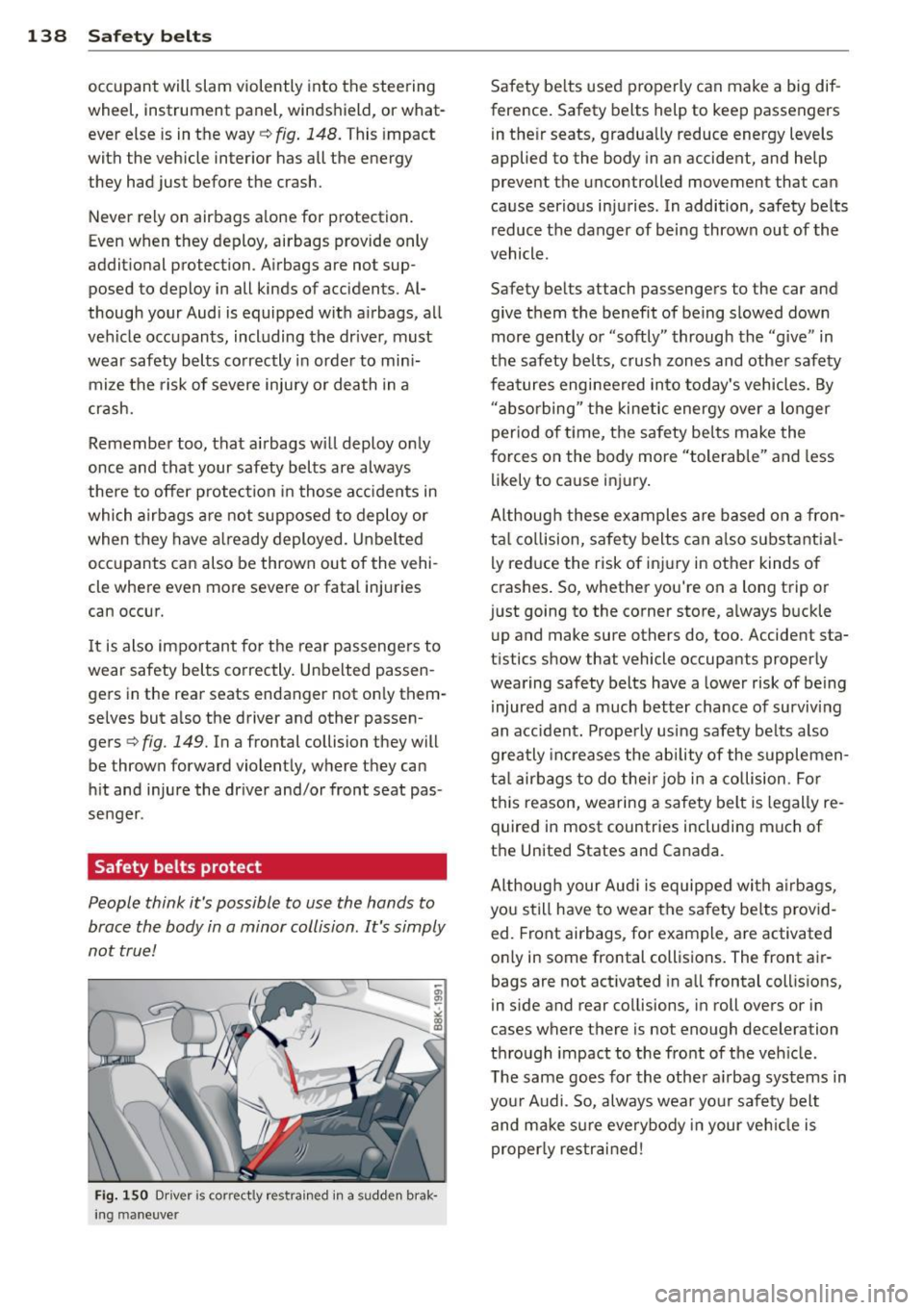
Safety belts protect
People think it's possible to use the hands to
brace the body in a minor collision . It's simply
not true !
Fig. 150 Driver is co rr ect ly re strain ed in a sudd en brak
ing maneuve r
Safety belts used properly can make a big dif
ference. Safety belts help to keep passengers
in their seats, gradually reduce energy levels
applied to the body in an accident, and help
prevent the uncontrolled movement tha t can
cause serious injuries . In addition, safety belts
reduce the danger of being thrown out of the
vehicle .
Safety belts attach passengers to the car and
give them the benefit of being slowed down
more gently or "softly" through the "give" in
the safety belts, crush zones and other safety
features engineered into today's vehicles. By
"absorbing " the kinetic energy over a longer
period of ti me, the safety belts make the
forces on the body more "tolerable" and less
likely to cause injury.
Although these examples are based on a fron
tal collision, safety belts can also substantial
ly reduce the r isk of injury in other kinds of
crashes. So, whether you're on a long trip or
just going to the corner store, always buckle up and make sure others do, too. Accident sta
tistics show that vehicle occupants properly
wearing safety belts have a lower risk of being
injured and a much better chance of surviving
an accident. Properly using safety belts also
greatly increases the ability of the supplemen
tal airbags to do their job in a collision . For
this reason, wearing a safety belt is legally re
quired in most countries including much of
the United States and Canada.
Although your Audi is equipped with airbags,
you still have to wear the safety belts provid
ed. Front airbags , for example, are activated
only in some frontal collisions. The front air
bags are not activated in all frontal collisions,
in side and rear collisions, in roll overs or in
cases where there is no t enough decelera tion
through impact to the front of the vehicle .
The same goes for the other airbag systems in
your Audi . So, always wear your safety belt
and make sure everybody in your vehicle is
properly restrained!