2013 AUDI A4 SEDAN lock
[x] Cancel search: lockPage 53 of 294
@ Tips
-The windshield wipers are switched off
when the ignition is turned off . Activate
the windshie ld w ipers after the ignit ion
i s sw itched back on by mov ing the w ind
s hi eld wiper lever to any pos ition .
- Worn or dirty windshie ld wiper blades
result in streak ing. Th is can affect the
rain senso r* function . Check your wind
s hi eld wiper blades regularly .
- The washer fluid nozzles of the wi nd
s hi eld washer system are heated at low
temperatures when t he ig nit ion is on.
- When stopp ing temporarily, (e .g . at a
traff ic light) the s et speed of the w ind
s hi eld wipers is automatically red uced by
one speed.
Replacing windshield wiper blades
Wiper blades in good condition help keep the
windshield clear.
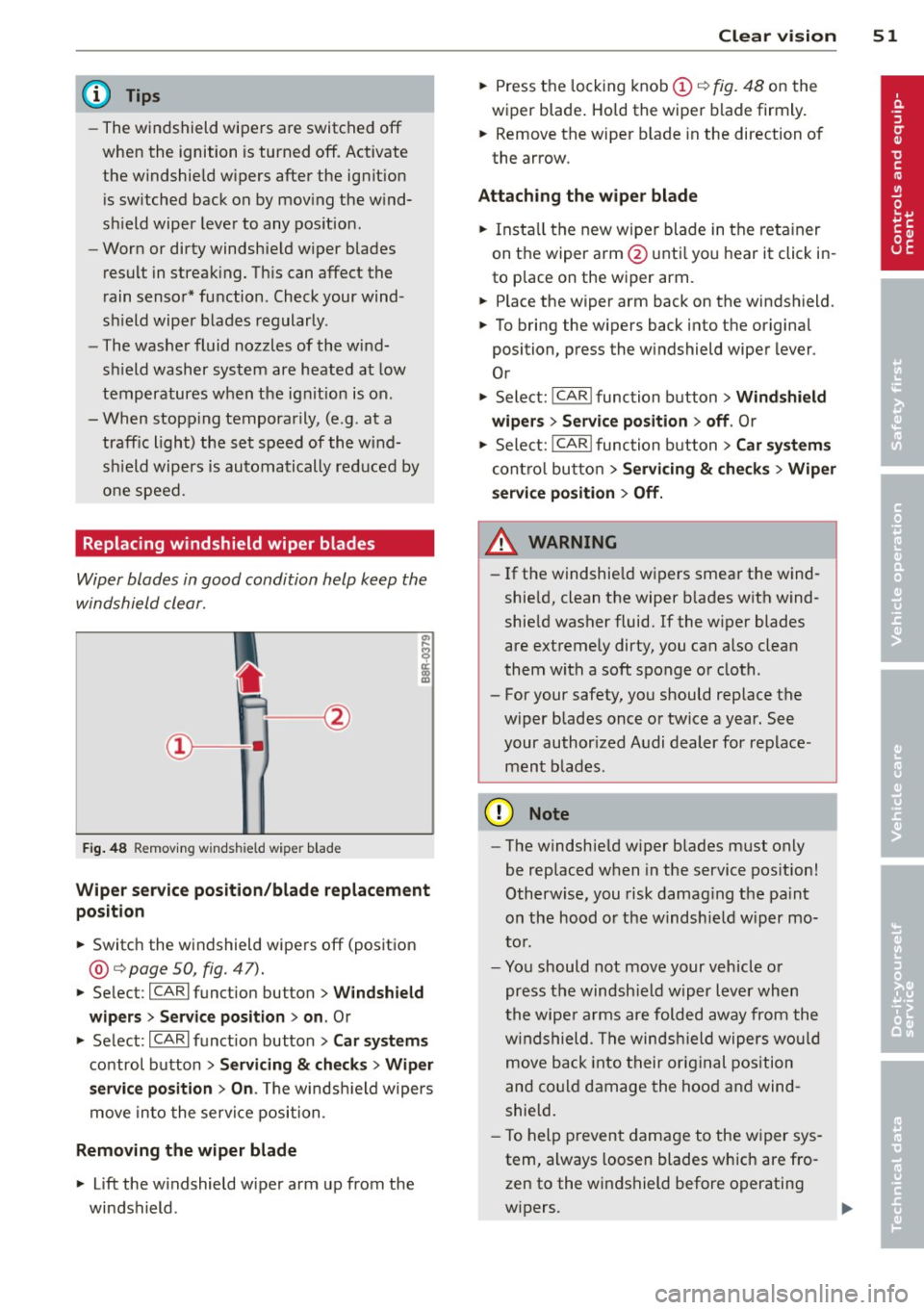
F ig. 48 R emov ing wi nds hie ld w iper bla de
Wiper service position /blade replacement
posit ion
... Switc h the windshield wipe rs off (position
@ ¢ page 50, fig. 47).
"'Se lec t: ICAR lfunct ion bu tton> Windshield
wipers
> Service position > on . Or
... Se lect: ICARI funct io n button>
Car systems
control button > Servicing & checks > Wiper
servic e position > On .
The winds hield wipers
move in to the servi ce position .
Removing the wiper blade
... Lift the w indshield wipe r arm up from the
windshield .
Clear vis ion 51
"' Press the lock ing knob (D ¢ fig. 48 on the
wiper blade . Ho ld the wipe r blade firmly .
... Remove the wiper b lade in the direction of
the arrow .
Attaching the wiper blade
... Insta ll the new wiper blade in t he reta iner
on the wiper arm @unti l yo u h ear it click in
to place on the wiper arm .
... Place the wiper arm back on the winds hield.
... To bring the w ipers back into the original
position, pres s the windshield wiper lever .
Or
"' Select: I CAR ! function b utton >
Windshield
wipers
> Service position > off . Or
... Sele ct: I CAR
I func tion b utt on > Car sy stem s
cont ro l butto n > Servicing & che cks > Wip er
service position
> Off.
A WARNING
- If the windshie ld w ipers smear the wind
shie ld, clean the wiper b lades with wind
shie ld washer fluid. If the w iper blades
are extremely dirty, you can a ls o clea n
them with a soft sponge o r cloth .
- For your safety, you should rep lace the
w iper blades once o r twice a year . See
your author ized A udi dealer for replace
ment b lades .
(D Note
-The windsh ie ld w iper blades must only
be replaced when in the service pos ition!
Otherw ise, you risk damag ing the pa int
on the hood o r the w indshie ld w iper mo
to r .
- Yo u should not move your vehicle or
press the windsh ie ld w ip er l ever when
t he wipe r arms are folded away from the
w ind shield. The windsh ie ld wiper s wo uld
move b ack into their orig inal position
and co uld damage the hoo d and wind
shield.
- T o help prevent damage to the w iper sys
tem , always loosen blades w hich are fro
zen to the windshield before operating
w ipers.
Page 59 of 294
Head restraints
Front head restraints
Applies to vehicles: with adj ustable head restraints
Head restraints that ore adjusted according
to body size, along with the seat belt , offer
effective protection .
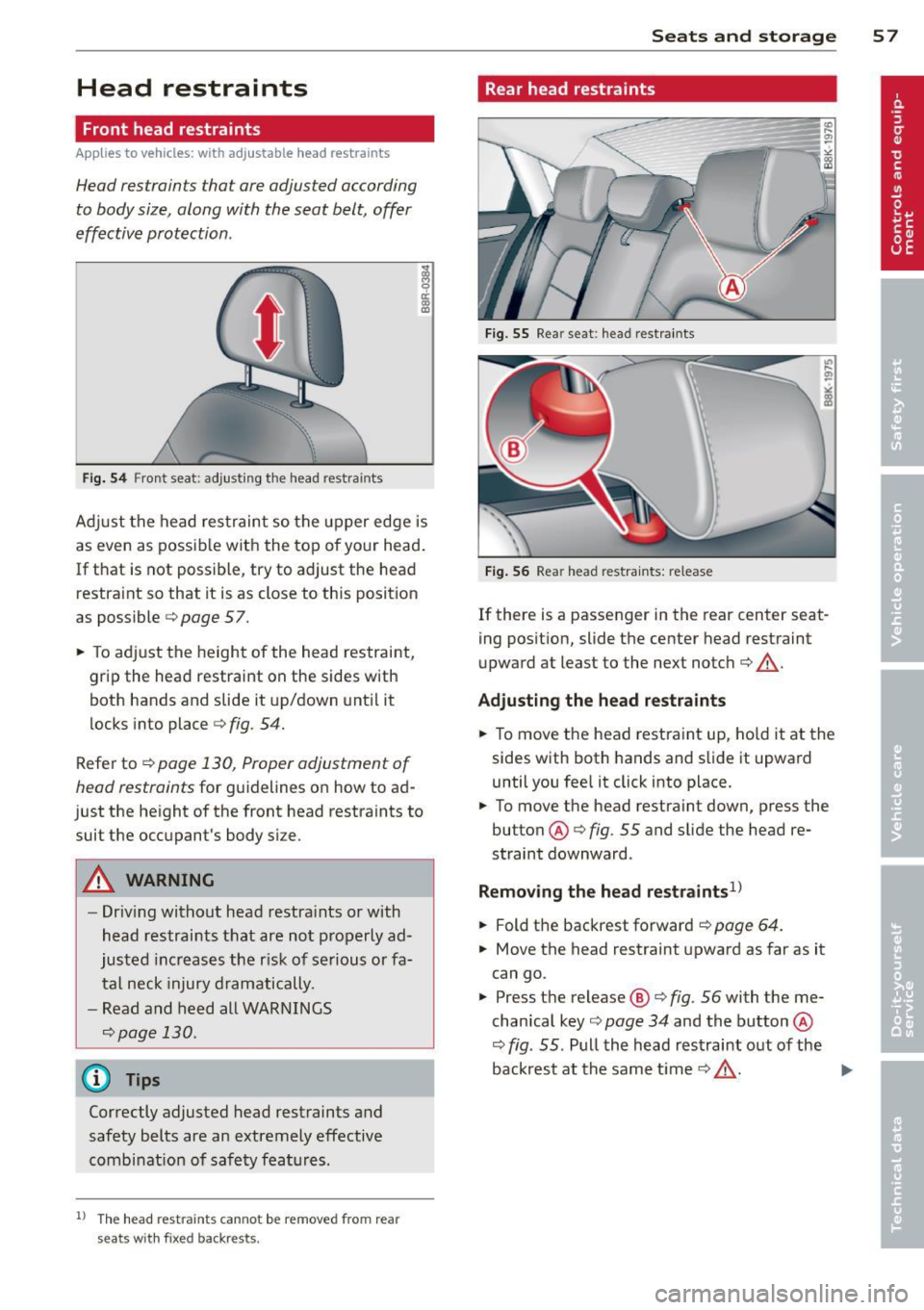
Fig. 54 Fron t seat: adjusting the head rest ra in ts
Ad just the head restraint so the upper edge is
as even as possible with the top of your head.
If that is not poss ible, try to adjust the head
restraint so that it is as close to this position
as possible
¢ page 57.
~ To adjust the height of the head restraint,
grip the head restraint on the sides with
both hands and slide it up/down until it
locks into place
¢fig. 54.
Refer to ¢ page 130, Proper adjustment of
head restraints
for guidelines on how to ad
just the height of the front head restraints to
suit the occupant's body size .
A WARNING
-Driving without head restra ints or with
head restraints that are not properly ad
justed increases the r isk of serious or fa
tal neck injury dramatically.
- Read and heed all WARNINGS
¢page 130.
@ Tips
Correctly adjusted head restraints and
safety belts are an extremely effective
combinat ion of safety features .
l) The head restr aints cann ot be re move d fro m rear
se ats with fixe d backr ests.
-
Seats and storage 57
Rear head restraints
Fig. 55 Rea r seat : head restraints
Fig. 56 Rear head restraints: release
If there is a passenger in the rear center seat
ing position, slide the center head restraint
upward at least to the next notch¢&_.
Adjusting the head restraints
~ To move the head restraint up, hold it at the
sides with both hands and slide it upward
until you feel it click into place.
~ To move the head restraint down, press the
button @¢
fig. 55 and slide the head re
straint downward .
Removing the head restraints1>
~ Fold the backrest forward ¢ page 64.
~ Move the head restraint upward as far as it
can go.
~ Press the release@¢ fig. 56 with the me
chanical key¢
page 34 and the button @
¢
fig . 55 . Pull the head restraint out of the
backrest at the same time¢&_ .
~
Page 60 of 294

58 Seats and storage
Install ing the head restraints
.,. Slide the posts on the head restra int down
into the guides un til you feel the posts click
into place.
.,. Press the button @
Q fig. 55 and slide the
head restraint all the way down. You sho uld
not be able to pull the head restra int out of
the backrest .
So that the driver can have a better view to
the rear, the head restraints should be pushed
down complete ly when the rear seats are not
occupied.
A WARNING
- Read and heed all WARNINGS
9page 130 .
-Only remove the rear seat head rest raints
when necessa ry in order to install a chi ld
sea t
Q page 173. Insta ll the head re
stra in t again immedia tely once the c hild
sea t is removed. Driving w ithout head re
st raints or w ith head restra ints that a re
not properly adjusted increases the risk
of serious or fata l neck injury dramatical
ly.
@ Tips
Correctly adjus ted head restraints and
safety belts are an extremely effective
comb inat ion of safety features .
Seat memory
Description
Applies to vehicles: wit h memory fu nctio n
The memo ry function a llows you to quickly
and eas ily s to re and reca ll personal seating
profiles for the dr iver. The memory func tion is
operated through the master key and the memory buttons in the driver's door .
The driver's seating profi le is stored and as
signed to the master key each t ime the vehicle
is locked. The seating p rof ile is recalled auto
matica lly when the vehicle is un locked. If two
peop le use one vehicle, it is recommended t
h at each person always uses "their own"
master key .
Up to 2 seat p rofiles can be stored i n the
memo ry but tons in the drive r's door . Once
they are stored, these seat profiles can be se
lected at any time.
In add ition to the dr iver's se at settings, yo u
c a n a lso store and access the exterior mirror
adjus tment setti ngs * using the remote con
tro l key or memory button.
Remote control key
Applies to veh icles: w it h seat memory
To assign the dr iver's seat settings to the re
mote control key when locking the vehicle, the
funct ion must be act ivated in the radio or
MMI*
.,. Select: !CAR ! function button> Seat adjust
ment > Dr iver's seat
> Remote control ke y >
on.Or
.,. Select : I CAR I function b utton > Car systems
cont ro l butto n > Ve hicle setting s > Seats >
Driver's sea t> Remote contr ol ke y> On.
(@ Tips
If yo u do not want anothe r drive r's set·
ti ngs to be assigned to the remote key,
swi tc h off the memory f unct ion usi ng the
radio or
M MI* or th e IOFFI butto n
9page 58.
Memory buttons
Applies to veh icles : w it h seat memory
Fig . 57 Drive r's door : mem ory function buttons
The memory buttons a re located in the driv
er's door.
Page 63 of 294

(upholder
Fig. 61 Ce nter console: front cupholder
Fig. 62 Rear armrest: rea r cupho lder
Opening rear cupholders
~ To open the cupholder, press on the symbol
ii@ ~ fig. 62 .
~ To adjust the arm @, swing it in the direc
tion of the arrow.
~ Place the beverage in the holder and release
the arm. The arm swings back by itself and
automatically secures the beverage .
Closing cupholders
~ To close the cupholder, press on the center
section between the two arms and push the
cupholder in the slot as far as it will go.
A WARNING
Spilled hot liquid can cause an accident
and personal injury.
- Never carry any beverage containers with
hot liquids, such as hot coffee or hot tea,
in the vehicle while it is moving . In case
of an accident, sudden braking or o ther
vehicle movement, hot liqu id could spill,
caus ing scald ing burns . Spilled hot liquid
can also ca use an accident and personal
injury.
Seats and storage 61
-Use on ly soft cups in the cupholder. Hard
cups and glasses can cause injury in an
accident.
- Never use the cupho lder or adapter as an
ashtray -risk of fire.
(D Note
Only drink containers with lids should be
carried in the cupholder. Liquid could spill
out and damage your vehicle's electronic
equipment or stain the upholstery, etc.
Glove compartment
The glove compartment is illuminated and
can be locked.
Fig . 63 G love compar tment
~ To open the glove compartment, pull the
handle in the direction of the arrow~
fig. 63
and swing the cover down to open.
~ To close the glove compartment, push the
glove compartment lid upward until the lock
engages .
T he glove compartment can be locked using
the mechanical key~
page 34.
On the right side in the glove compartment is
a holder with the key body into which the
eme rgency key must be clipped to be able to
start the veh icle.
&_ WARNING
To reduce the risk of personal injury in an
accident or sudden stop, always keep the
glove compartment closed while driving .
-
Page 64 of 294

62 Seat s a nd s tor ag e
Addit ional storage
There are a variety of storage compa rtments
and fasteners in var ious places in the vehicle.
- In the roof headliner above the rearview
mirror .
- On the back of the front seat . The com pa rt
ment can hold a maximum weight of 1 kg.
- On the left and right of the luggage com
partment, behind the s ide trim.
- Garment hooks on the pillars in the rear of
the vehicle .
A WARNING
-When driving, do not leave any hard ob
jects on the rear wi ndow shelf or allow
your pet to s it on the shelf. They could
become a hazard for ve hicle occ upan ts in
the event of sudden braking or a crash.
- Always remove objects from the instru
ment pane l. Any items no t stored could
slide around inside the vehicle while driv
ing or when accelerating or when apply
ing the brakes or when driving around a
corner.
- When you are driving make sure that
anything you may have placed in the cen
ter console or other storage locations cannot fall out into the footwells. In case
of sudden braking you would not be able
to brake or accelerate .
- Any articles of cloth ing that you have
hung up must not interfere with the driv
er's v iew. The coat hooks are designed
only for lightweight clothing. Never hang
any clothing wit h hard, po inted or heavy
objects in the pockets on the coat hooks .
During sudden braking or in an accident -
especially if the airbag is deployed -
these objects could injure any passen
gers inside the vehicle .
- To reduce the risk of persona l injury in an
acc ident or sudden stop, always keep the
glove compartment closed while dr iving.
- Read and fo llow all WARNINGS
i=> page 161, Important safety instruc
tions on the side airbag system.
- Hang clothes in such a way that they do
not impa ir the driver's vision.
- The coat hooks must on ly be used for
lightweight clothing. Do not leave any
heavy or sharp edged objects in the pock
ets which may interfere with the s ide cur
tain airbag deployment and can cause pe rsonal injury in a crash.
- Do not use coat hangers for hanging
cloth ing o n the coat hooks as t his can in
terfere with proper deployment of the
side curta in a irbags in an a ccident.
- Do not hang heavy objects on the coat
hooks , as they could cause personal in
jury in a sudden stop.
- Always keep the compa rtment above the
rea rv iew mirror closed while d riving to
re duc e the risk of i nju ry in the event of
sudden b raking m aneuvers or a collision.
(£} Note
Objects located on the rear shelf that rub
against the rea r window could damage the
hea ting wi res for the rear window defog"
ger.
(D Tips
- A vent slot is located between the shelf
and the rear w indow. Do not bloc k the
vent wi th any items you may place o n the
rear window she lf.
- Do not place b ulky items on the rear win
dow shelf as they co uld restrict or block
the drive r's vision in the rear view mirror.
Page 67 of 294

Folding the backrest back into the upright
position
• Fold the backrest back up again until it
latches and the red marking @ is no longer
visible ¢&_ .
You can lock the backrest when it is latched in
p lace using the mechanica l key ¢
page 34 ©
¢ fig. 65. This prevents any access to the lug
gage compartment from the vehicle interior.
You can only enlarge the luggage compart
ment if the backrest is not locked.
A WARNING
-The backrest must always be securely
latched so that the safety belt of the cen
ter seating position can work properly to
help protect the occupant.
- The backrest must be securely latched in
posit ion so that no items contained in
the luggage compartment can slide for
ward upon sudden braking .
-Always check whether the latch is fully
engaged by pulling the seatback for
ward.
- Never allow safety belts to become dam
aged by being caught in door or seat
hardware.
- Torn or frayed safety belts can tear and
damaged belt hardware can break in a
crash . Inspect the belts periodically .
Belts showing damage to webbing, bind
ings, buckles, or retractors must be re
placed.
(D Note
- If yo u move the front seat back when the
rear seat backrest is fo lded forward, yo u
could damage the head restraints on the
rear seat.
- Slide the belt guide on the outside safety
belt all the way up before folding the
backrest back forward. Make sure the
seat belt is not pinched or damaged
when the rear seat backrest if folded
back. Other objects should be removed
Seats and storage 65
from the rear seat bench to protect the
seatback from damage.
Tie-downs and cargo net
Applies to veh icles: w ith cargo net
The cargo net prevents small objects from
sliding.
Fig. 66 Lu gga ge compa rtm ent: cargo net str etch ed
o ut
Fig . 67 Lu ggage compart men t: ca rgo net at the top of
the lu gg age compartment
Net stretched out
• To secure objects with the cargo net , hang
the front hooks on the net in the tie-downs
first and then hang the rear hooks¢
fig. 66.
Net at the top of the luggage
compartment
• Hang the hooks on the cargo net in the tie
downs on the floor at the rear of the lug
gage compartment¢
fig. 67.
• Fold down the hooks at the upper area of
the luggage compartment down, pull the
net up and hang the eyelets on the net on
the hooks .
In a collision, the laws of physics mean that
even smaller items that are loose in the vehi
cle w ill turn into heavy m iss iles that can cause
serious injury. Items in the vehicle pick up
IJi,,-
Page 69 of 294

@ Tips
-Never stow the ski sack away when it is
still wet or damp (for example, snow
melting from skis) . A llow it to dry com
plete ly before stowing it away .
- When transporting skis or snowboards,
tighten the securing strap between the
bindings.
- Position skis in the ski sack w ith the
po inted ends facing the front and ski
poles w ith the pointed ends facing the
rear .
- You can lock or unlock the pass-through
using the mechanical key . This prevents
any access to the luggage compartment
from the vehicle interio r.
Parcel shelf
The parce l shelf behind the rear seatback can
be used to carry light items of cloth ing.
& WARNING
No heavy or hard objects should be placed
on the parcel she lf. They are a hazard to
the vehicle occupants during sudden brak
ing. The is a r isk of injury .
Please make sure that the heating wires
for the rear window defogger are not dam
age by abrasive objects.
To ensure problem -free ventilation, the
ventilation s lots between the rear window
and the parce l shelf must not be covered .
Seat s an d sto rage 67
Page 71 of 294

Warm and cold 69
Operation
We recommend pressing the IAUTO I button and setting the temperature to 72 °F (22 °C).
Fig. 70 Automatic cl imate control system: control
Fig. 71 3-zone deluxe automatic cl imate control': controls
Press the buttons to turn the functions on or
off. Use the d ials to adjust the temperature,
the blower speed and the a ir distribution. The
LE D in a button will light up when the func
tion is switched on. The settings are displayed
for a few seconds in the radio or MMI* display.
In vehicles with a 3-zone deluxe automat ic cl i
mate control systems *, the dr iver and front
passenger side can be adjusted separately.
The settings are also d isplayed in the climate
con trol system display.
IOFFI Switching the climate control
system on/off
The IOF FI button switches the climate control
sys tem on or off.
It also switches on when you press the knob. Airflow from
outside is
blocked when the climate control system is
switched off.
IACI Switching cooling mode on/off
The air is not coo led and humidity is not re
moved when cooling mode is switched off.
This can cause fog on the w indows. Cooling
mode switches off automatically when the
outside temperature is be low zero.
1- 1 Switching recirculation mode on/off
In recircu lation mode, the air inside the vehi
cle is circulated and filtered. This prevents the
unfiltered air outside the vehicle from enter
ing the vehicle interior. We recommend