2013 AUDI A4 SEDAN transmission
[x] Cancel search: transmissionPage 4 of 294

2 Table of contents Vehicle literature .. .. .. .. .. ... .
5
About this Owner's Manual . . . 6
Controls and equipment .. ... .
Ins truments and controls .. . .
General illus tration .... ... .. .. ... .
Instruments and warning /
indicator lights ........ .. .. .. . .
Ins truments . .. .. ..... ... .. .. ... .
War ning/ indi cator lights ... .. ... .. .
Driver information d isplay .. . .
Introduct ion . .. .. ..... ... .. .. ... .
Trip computer .. .. ..... ... .. .. ... .
Gearshift Indicator ........ .. .. ... .
Efficiency program ........ .. .. .. . .
Service interval d isp lay .. .. .. .. .. . .
On -Board Diagnostic system (OBD) .. .
Opening and closing .... .. .. . .
Power locking system .. ... .. .. .. . .
R ear lid .. .. ................ ... . . 8
8
8
10
1 0
1 3
24
24
25
27
27
29
30
32
32
39
C hil d safety locks . . . . . . . . . . . . . . . . . 40
P ower wi ndows ........ .. .. .. .. . .
Sliding/ tilt ing su nroof ..... .. .. .. . .
Va let par king .. .. ..... ... .. .. ... .
Clear vision .. ........ .. .. .. .. . .
Lig hts ..... ... . ...... ... .. .. ... .
I nter ior lights .. .. ..... ... .. .. ... .
V1s 1on ..... ... .. ..... ... .. .. ... .
W iper and washer system .. .. .. .. . .
Dig ita l compass .............. ... .
Seats and storage ... .. .. ... .. .
General recommendat ions . .. .. ... .
Front seats .............. .. .. ... .
H ead restraints . .......... ... .. . .
Seat memory ............. ... .. . .
Ashtr ay .. .. ... .... ...... .. .. .. . .
C igarette lig hte r .......... .. .. .. . .
12-vo lt socket ........... .... ... .
S torage . ... .. . .. ..... ... .. .. ... .
Roo f rack . .... .. ..... ... .. .. ... .
Luggage compartment . ... .. .. ... . 4
0
42
4 3
44
4 4
47
4 7
so
52
54
54
55
57
58
59
5 9
60
60
63
64
Warm and cold ... .. ..... .... . .
Climate co ntrols . ... ... ..... ... .. .
68
68
On the road . . . . . . . . . . . . . . . . . . . 72
Stee ring . . . . . . . . . . . . . . . . . . . . . . . . 72
Ign it io n lock . . . . . . . . . . . . . . . . . . . . . 72
Convenience key . . . . . . . . . . . . . . . . . . 75
Driver messages . . . . . . . . . . . . . . . . . . 76
E lectromechanical parking brake . . . . 77
Speed warning system . . . . . . . . . . . . . 79
Cru ise cont ro l . . . . . . . . . . . . . . . . . . . . 81
Transmission . . . . . . . . . . . . . . . . . . 83
Manua l transm ission . . . . . . . . . . . . . . 83
mult it ron ic ® , t ipt ron ic . . . . . . . . . . . . . 83
S troni c® . . . . . . . . . . . . . . . . . . . . . . . . 89
Audi adaptive cruise control
and braking guard . . . . . . . . . . . .
97
I n troduc tion . . . . . . . . . . . . . . . . . . . . . 9 7
Genera l informa tion . . . . . . . . . . . . . . 9 7
Audi adaptive cruise contro l . . . . . . . . 99
Audi braking gua rd . . . . . . . . . . . . . . . 103
Messages . . . . . . . . . . . . . . . . . . . . . . . 105
Audi side assist .... ..... ... .. .
Lane change ass istant 107
107
Audi drive select
. . . . . . . . . . . . . . 111
Driving settings . . . . . . . . . . . . . . . . . . 111
Park assist . . . . . . . . . . . . . . . . . . . . . 114
Pa rking system . . . . . . . . . . . . . . . . . . . 114
Pa rking system (rear) . . . . . . . . . . . . . . 114
Pa rking system (rear, with rear view
camera) . . . . . . . . . . . . . . . . . . . . . . . . 115
Homelink ® . . . . . . . . . . . . . . . . . . . . 121
U niversa l remote control........ ... 121
Safety first . . . . . . . . . . . . . . . . . . . . 126
Driving Safely . . . . . . . . . . . . . . . . . 126
Genera l notes . . . . . . . . . . . . . . . . . . . . 126
Proper occupant seating positions . . . 127
Pedal a rea . . . . . . . . . . . . . . . . . . . . . . . 131
Stow ing luggage . ............. .. . 132
Repo rting Safe ty Defe cts . . . . . . . . . . . 13 4
Page 11 of 294

CD
@
®
©
®
®
(j)
Door handle
Memory buttons (dr iver's seat)
Power locking sw itch
Button for side ass ist
A ir outlets
L ight switch
Control lever for :
- T urn signal and high beam
@ Multi-function steering wheel
with:
- Horn
- Driver's airbag
- Audio/video, telephone, navi
gation and vo ice recognition
buttons
- Rocker switches for tiptron ic 58
36
107
44
45
148
opera tion or . . . . . . . . . . . . . . 88, 93
® ISET lbutton . . . . . . . . . . . . . . . . 11
@ Instrument cluster . . . . . . . . . . 10
@ Reset button for trip odometer 12
@ Sw itches for:
- Windsh ield wiper/washer 50
- Trip computer . . . . . . . . . . . . . 25
@ Ignition lock ............. . .
(8) Adjustable s teer ing column
@ Control lever for :
- Cruise contro l ......... ... .
- Adaptive cruise control .. .. .
@ Ins trumen t lighting .... .. .. .
@ Release lever for the engine
hood .. .. .. .. ........... .. .
@ Data L ink Connector for On
B oard Diag nostics (OBD II) . .. .
@ Sw itch for unlock ing the trunk
lid .. .. .. ................. .
@ Adjuster control fo r outside m ir-
r ors .. .. .. .. ........... .. .
@ Power window switches ... .. .
@ Rad io-Display1l or MMI-Display 72
72
8
1
97
47
215
30
39
47
40
l) T he image in t he d is pl ay will app ear e it h er in mu lt iple
c o lor s or in a singl e co lor , de pen din g o n th e vehicl e
e q ui pment. T he m ulti co lo r im age w ill b e used i n this
O w ner's M anual becau se bo th mu lt i co lo r and sin gle
c o lor ver sio ns are almos t ide ntic al.
In strument s and control s 9
@) Depending on options:
- Rad io system
- CD changer
Emergency flasher
G love compartment (lockab le)
Front passenger's airbag .....
Depend ing o n options, sw itches
for:
46
61
148
- Audi drive se lect .......... .
111
- Electronic Stabilization Con-
trol . ... .. .. .. . .. ... .... .
- Rear window sun shade .. .. . 184
49
@ Deluxe automat ic cl imate con-
trol ...... .. .... .......... .
@) Depending on options, selecto r
lever or shift lever for :
68
-Manual transmission . . . . . . . 83
- Automatic transmission . . . . . 83
@ Asht ray with ciga rette lighter 59, 59
@ Depend ing on options:
- MMI contro l console or :
- Aud i drive select........... 111
- Electronic Stabilizat ion Con-
trol button . . . . . . . . . . . . . . . 184
- Power switch for rear window sun shade . . . . . . . . . . . . . . . . 49
@ I STA RT ENGI NE STOPI button 75
@) Electromec hanical pa rking
brake . . . . . . . . . . . . . . . . . . . . . 77
(D Tips
-Some of the equipment o r fea tures
show n in the genera l ill ustration may be
standard equ ipment on your vehicle or
may be optional eq uipment depending
on your model. Always as k your author
ized Aud i dea ler if you have a quest ion
about your vehicle.
- Operat ion of the Multi Med ia Interface
(MMI) is described in a separate manua l.
Page 17 of 294

Instrument s and warnin g/indic ator ligh ts 15
ml
adaptive light *
¢page22
m
Light-/rain sensor*
¢page22
-
B
Adaptive dampers*
¢page 22
Ill
Sport differential *
¢page22
m
Ignition lock
¢page 23
Ill
Steering column lock
¢page 18
,1,ij
Electromechanical steering, dy-
namic steering*./
¢page 188
Transmission
g
-multitronic®, tiptronic
¢page88
- S tronic® ¢ page 95
m
Transmission
-S t ro nic ® ¢ page 95
Other indicator l ight s
11
1!11 Turn signals
llfa ¢page23
CRUISE
•
I
•
USA models: Cruise control
¢page81
Canada models : Cruise control
¢page 81
Audi adaptive cruise control *
¢page 100
Audi adaptive cru ise control *
¢page 100
-High beam
¢page45
BRAKE /((J)) Brake system
The ligh t illum ina tes when the ignition is
sw itche d on.
It goes out a fter the eng ine has been started. This
indicates that the b rake
warning light is functioning properly.
If th e brake warning light doe s not light up
when the engine is cranking, th ere may be a
malfunction in the electrical system . In thi s
case, contact your Audi dealer .
If the brake system wa rn ing/ indica tor light
t u rns o n, there is a b ra ke sys tem ma lfunction .
1111 (USA model s)/. (Canada model s)
Stop v ehicl e and check brake fluid lev el
If the indicator l ight turns on and the mes
sage appears , proceed as follows:
.,. Pull off the road.
.,. Stop the vehicle.
.,. Tu rn off the engine.
.,. Check the b rake fluid level¢
page 224.
.,. Contact your nearest autho rized repair fa-
cility if necessa ry.
Warning! Fault in brake system . Contact
d ealer
If the ABS indicator light fl!S (USA models)/
(11 (Canada mode ls), the ESC ind icator light
Ji1 and the b rake system indicator light
1111 (U SA mode ls)/ . (Canada mode ls) turn
o n and the message appears, the ABS, ESC
and braking d is tribut ion are not worki ng ¢ ,&. .
Carefully drive to your author ized Audi dealer
immediately to have the malfunct ion correct
ed ¢,&. .
1111 (USA models )/. (Canada models)
Parking brake system fault! See owner' s
manual
- If the ind icator light and the message ap
pear
when stationary or after switch ing the
ignition on ,
check if you can release the
park ing brake . Afte r releasing the parki ng
brake, carefully d rive to your au thor ized
Audi dea le r i mmedia tely t o have the ma l
fu nction corre cted. If yo u can not release the
parking brake, see k professiona l assistance .
-If the ind icator light and the message ap-
pea r
while driving , th e e mergen cy b ra ki ng
fu nction may not be avail able.
It may not be .,..
Page 26 of 294

24 Driver information d isplay
Driver information
display
Introduction
The Driver information display inside the in
strument cluster provides you, the driver ,
with important information.
Fig. 7 Ins trum en t cl uster : ce nter display
Fig. 8 W iper lev er: con trols fo r th e menu disp lay
Center display
W ith the ignition on, the display in the Dr iver
I nformation System shows the following in
formation :
- CD* inserted or Radio* station set
- Outside temperature* : At temperatures be-
low 41 °F (+5 °C), a snowflake symbol ap
pears in front of the temperature display
c::> .&_.
-Warning if one of the doors, front lid or en-
gine compartment lid is not closed .
Additional functions
You can open the following functions in the
Driver Information System display by pressing
the
! RESET I button c::> fig. 8 one or more times:
Digital speedometer*
Tire pressure monitoring *
~page248
Trip computer*
Efficiency program*
Service interval display
c::>page25
c::> page 27
c::> page 29
--·-
Gearshift selector positions
Automatic transmission
Adaptive cruise control*
Auto Check Control
c::> page 79
Some functions and vehicle components are
scanned for their operating status when you
switch the ignition on and whi le you are driv
ing. Malfunctions or required service proce
dures are signaled audibly and indicated by
red and yellow illuminated symbols and re
minders in the d isplay.
A WARNING
--- Never rely exclusively on the outside
temperature display to determine if a
road surface is icy or not. Keep in mind
that road surfaces, especially br idges
and overpasses, could be ice covered and
slippery even at an outside temperature
above 41 °F (+5 °C).
- Always remember, even if the "snow
flake" symbol (ice warning) does not ap
pear in the disp lay, black ice cou ld be on
the road.
- Always reduce your speed and drive with
specia l care in cold weather cond itions
when the chance of encountering icy
road surfaces increases.
¢j) Tips
If the vehicle is stationary, or if you are
driving at a very low speed, the tempera
ture shown in the display might be s light ly
higher than the actual outs ide tempera
ture. This i.s caused by the heat being radi
ated from the engine .
Page 30 of 294

28 Driver information d isplay
• Press the I RESET I button @c:::> page 26,
fig. 11 repeatedly until the efficiency pro
gram appears in the display.
The effic iency program can help you to use
less fuel. It evaluates driving information in
reference to fuel consumption and shows oth
er equipment influencing consumption as well
as shift recommendations. Fuel economy messages c:::>
page 29 prov ide tips for effi
cient driving .
The efficiency program uses distance and con
sumption data from trip computer
1. If the
data are deleted in the eff iciency program,
those values are also reset in trip computer
1.
Enhanced shift indicator
Applies to vehicles: with manual transmission and trip
co mpute r with efficiency program
Fig . 14 D is p lay: e nhance d shi ft ind icato r
• In the efficiency program, press the func
tion selection switch c:::>
page 26, fig. 11 @
repeated ly until the enhanced shift indicator
appears in the display.
The effic iency program also has an enhanced
shift indicator. This enhanced shift indicator
follows the same concept as the "standard"
shift indicator
c:::> page 27. The selected and
the recommended gears are highlighted in
colors like a traffic light.
The color of the circle indicates if the most
suitable gear is engaged or if you should shift
up or down. Green
circle w ithout No gear or the most
or w ith a gear su itable gear is en
gaged
Yellow circle
c:::> fig. 14 Shift up or down one
gear
Red circle Shift up two gears
(D Note
This enhanced shift indicator can help you
conserve fuel.
It is not designed to recom
mend the correct gear in all driving situa
tions. Only the driver can decide which
gear is correct in certain driving situations
such as when passing another vehicle,
driving on hills or towing a trailer .
(!) Tips
-The enhanced shift indicator display is
different in vehicles with a monochrome
display .
- The "standard" shift indicator* disap
pears when the-enhanced shift indicator
is displayed .
Other equipment
Applies to vehicles: with trip computer with eff iciency
program
Fig. 15 D isplay : oth er equi pm en t
• In the efficiency program, press the func
tion selection switch ¢
page 26, fig. 11 @
repeatedly until the other equipment ap
pears in the display .
Other equipment that is currently affecting
fuel consumption is listed in the efficiency program. The disp lay shows up to three other
items of equipment @. The equipment using
the most fuel is listed first .
If more than three ""
Page 37 of 294

@ For the sake of the environment
Dispose of dead batteries properly so as
not to pollute the environment.
@ Tips
The replacement battery must be the
same specification as the original.
Emergency unlocking of the ignition key
In the event of malfunctions in the electrical
system, it may happen that you cannot re move the ignition key .
• Remove the mechanical key<:? page 34.
• Lock the vehicle using the mechanical key
<:?page 37.
• Have the e lectrica l system inspected by an
authori zed Audi dealership .
Locking and unlocking the vehicle with
the remote control
Fig. 22 Remote master key: function but tons
• Press button @to unlock the vehicle
Qfig . 22.
• Press button fij to lock the vehicle QA in
General description on page
32 .
• Press button ,c:;5 briefly to unlock the rear
lid .
• Press the button
,c:;5 for at least one second
to open the rear lid .
• Push the red
I PANIC I button to activate the
panic function. The horn sounds and the
turn s ignals flash . Push the red
I PANIC ! but
ton again to deactivate the panic function.
If the vehicle is unlocked and no door, the rear
lid or the hood is opened within 60 seconds,
Opening and closing 35
the vehicle locks itself again automat ica lly.
This feature prevents the vehicle from being
accidentally left unlocked over a long period of time.
It depends on the settings in the radio or
MMI* whether the entire vehicle is unlocked
or only certain doors <:?
page 37.
On vehicles with automatic transmission, the
selector lever must be in the P position, other
wise the vehicle cannot be locked.
A WARNING
Read and follow all WARNINGS ¢.&. in
General description on page
32.
(D Tips
- In order to make sure the locking func
tion is working, you should a lways keep
your eye on the vehicle to make sure it is properly locked.
- Do not use the remote control if you are
inside the car, otherwise you may unin
tentionally lock the vehicle, and then you
would set off the anti-theft alarm when
you try to start the eng ine or open a
door . In case this happens anyhow, push
t he unlock button@.
- Use the pan ic function only if you are in
an emergency s ituation.
-Add itional remote control key functions
¢page 41 .
Page 74 of 294
7 2 On the road
On the road
Steering
Manually adjustable steering wheel
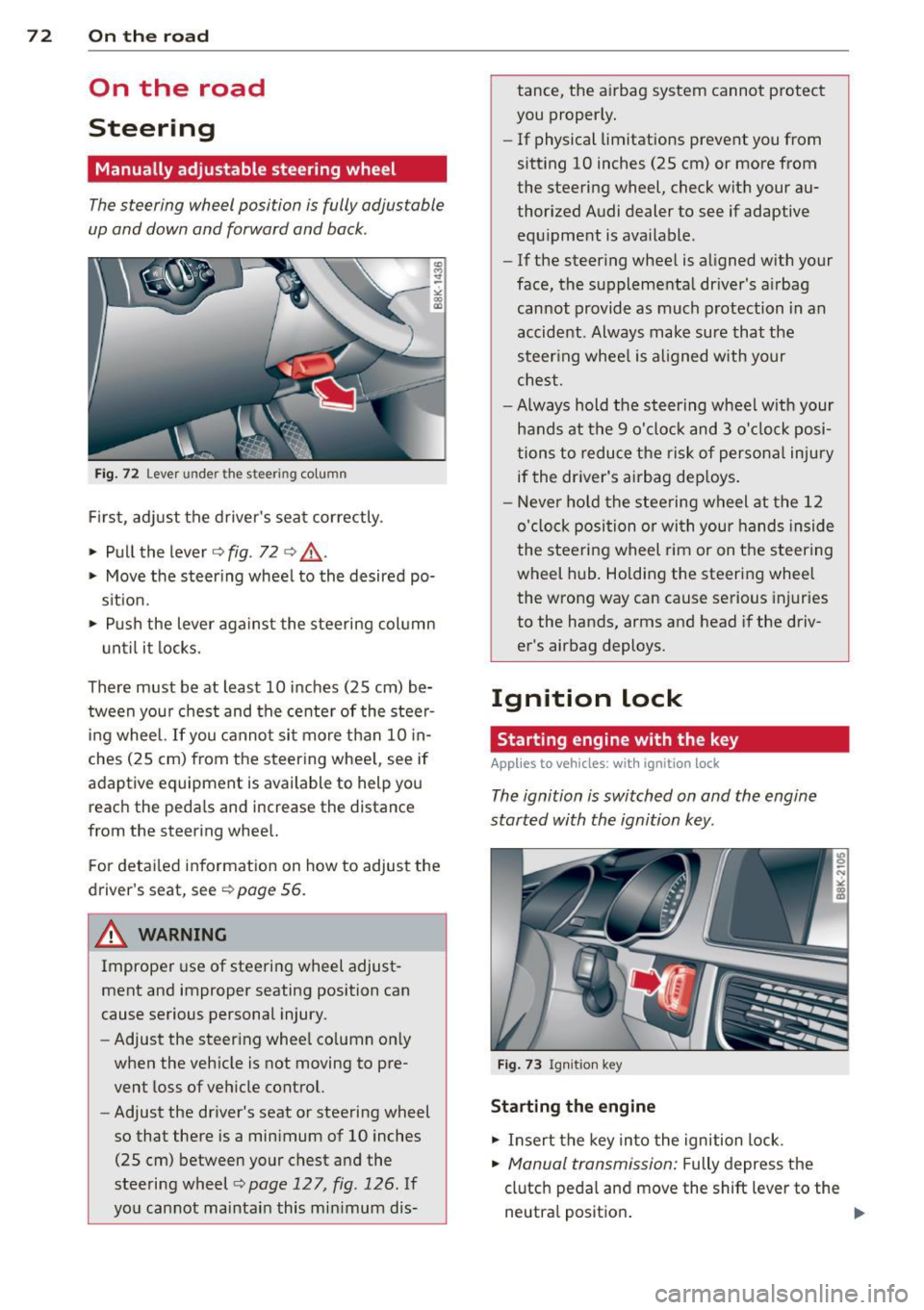
The steering wheel position is fully adjustable
up and down and forward and bock .
" a, a,
Fig. 72 Lever under the steer ing colu mn
First, adjust the driver's seat correctly .
• Pull the lever
o fig . 72 o ,& .
• Move the steer ing whee l to the desired po
s it ion.
~ Push the lever aga inst the steering column
u ntil it locks.
There must be at least 10 inches (25 cm) be tween your chest and the center of the steer
ing wheel. If you cannot sit more than 10 in
ches (25 cm) from the steering whee l, see if
adaptive equipment is available to help you
reach the pedals and increase the distance
from the steering whee l.
F or detai led information on how to adjust the
driver's seat, see
o poge 56.
A WARNING
Improper use of steering wheel adjust
ment and improper seating position can
cause serious personal injury.
- Adjust the steer ing whee l co lumn on ly
when the veh icle is not moving to pre
vent loss of veh icle control.
- Adjust the driver's seat or steering wheel
so that there is a minimum of 10 inches
(25 cm) between your chest and the
steering wheel
c;, page 12 7, fig . 126 . If
yo u cannot maintain this min imum dis- tance, the airbag system cannot protect
you proper ly.
- If physical limitations prevent you from
sitting 10 inches (25 cm) or more from
the steering wheel, check with your au
thorized Audi dealer to see if adaptive equ ipment is ava ilable .
- If the steer ing wheel is aligned with your
face, the supplemental driver's a irbag
cannot provide as much protection in an
accident . Always make sure that the
steer ing wheel is aligned with your
chest.
- Always hold the steering wheel w ith your
hands at the 9 o'clock and 3 o'clock posi
tions to reduce the risk of persona l injury
if the driver's airbag dep loys .
- Never hold the stee ring wheel at the 12
o'clock position or with your hands inside
the steeri ng wheel rim or on the steering
wheel hub . Holding the steering wheel
the wrong way can cause se rious injuries
to the hands, arms and head if the driv
er's airbag deploys.
Ignition lock
Starting engine with the key
Applies to vehicles : w ith ign ition lock
The ignition is switched on and the engine
started with the ignition key .
Fig. 73 Igni tion k ey
Sta rting the engine
• Insert the key into the ignition lock.
• Manual transmission: Fully depress the
clutch pedal and move the shift lever to the
neutra l position .
Page 75 of 294

~ Automatic transmission: Step on the brake
peda l and move the se lector lever to the P
or N position .
~ Press the key c:> fig. 73 -the eng ine will
start.
Sw itching the i gnition on /off
If you wou ld like to switch the ignition on
without starting the engine, follow t hese
steps :
~ Insert the key i nto the igni tion lock .
~ Press the key b riefly w ithout press ing the
clutch peda l (for manual transmissions) or
the brake peda l (for automatic transmis
s ions) .
~ To sw itch the ignition off, press the key
again .
When starting the engine, ma jor e lectr ica l
loads are switched off temporarily .
You can only remove the key with the ignition
switched off.
I f the engine sho uld not star t immediately,
the starting process is automatically stopped
after a short time. Repeat starting procedure .
A WARNING
-Never allow the engine to run in confined
spaces -danger of asphyxiation.
- Never remove the ign ition key from the
ignition look while the vehicle is moving.
Otherw ise, the steering lock could sud
denly engage and you would not be able
to steer the vehicle.
- Always take the key with you whenever
you leave your vehicle . Otherwise, the
engine could be star ted or e lectr ica l
equipment such as the power w indows
cou ld be operated. This ca n lead to seri
o us inj ury.
- Never leave c hildren or persons requ iring
assistan ce unattended in the vehicle. The
doors c an be lo cked using the remote
t ransmit ter, preventing people from es
caping from the vehicle on their own in
the event of an emergency. Depend ing
on the time of year, people inside the ve-
On the ro ad 73
hicle can be exposed to very high or very
low temperatu res.
(D Note
Avoid high eng ine rpm, fu ll th rottle and
heavy engine loads unti l the engine has
reached operating tempe rat ure -other
wise you r isk eng ine damage.
@ For the sake of the environment
Do not let the engine run w hile parked to
warm up. Begin dr iv ing immediately. T his
reduces unnecessary emissions.
@ Tips
- If the key cannot be removed from the
ignition lock, you have to pull the me
chanical key out of the maste r key in or
der to be able to lock the vehi-
cle c:>
page 35.
-After starting a cold engine, t here may
be a brief peri od of increased no ise be
cause the oil press ure must first bu ild up
in the hydraulic valve ad justers. This is
normal and not a cause for concern.
- If you leave the veh icle with the ignition
switched on, the ig nition w ill switch off
afte r a certa in per iod of t ime . Please
note that ele ctrical eq uipment such as
exterior ligh ts w ill sw itch off as well
w hen that happens .