2013 AUDI A4 SEDAN center
[x] Cancel search: centerPage 68 of 294

66 Seats and st o rage
kinetic energy which varies with the vehicle
and the weight of the item . Vehicle speed is
the most significant factor .
F or example, in a frontal coll is ion at a speed
of 30 mph ( 48 km/h), the forces acting on a
10 -lb (5 kg) object are about 20 times the
normal weight of the item. Th is means that
the weight of the item would suddenly be the
equivalent of about 200 lbs (90 kg). One can
eas ily imagine the injur ies that an item of that
weight flying freely through the passenger compartment can cause in a co llision at a
speed conside red relat ively low.
& WARNING
Weak, d amaged or improper s traps used
to secure items to t ie-downs can fail du r
ing hard brak ing or in a coll ision and cause
serious persona l in jury .
- Always use suitab le retaining straps and
properly secure items to the tie-downs in
the luggage compartment to help pre
vent items from shifting or flying for
ward.
- Never attach a child seat tether strap to
a tie-down.
- For strength-related reasons, the mount
ing hooks can only be used to secure ob
jects weighing up to 10 lb. (5 kg). Heav i
er objects w ill not be adequately secured
- there is a r isk of injury .
Ski sack
Applies to vehicles: with sk i sack
Long objects such as skis or snowboards can
be transported in the ski sack.
F ig . 6 8 Backre st: pass-t hrough cover
Fig. 69 Rear bench seat: secu ring the sk i sack
Loading
.,. Fold t he rear seat center armrest down.
.,. Fold the pass-through cover
¢ fig. 68 -arrow- down.
.,. Slide the ski sack from the luggage com
pa rtment thro ugh the pass-through w it h
t he zipper at the rear¢ .&,.
Securing
.,. Insert the ski sack strap @¢ fig . 69 in the
center buckle @.
.,. Pull the safety belt taut on the free end of
the belt @.
A WARNING
-
-The ski sa ck is intende d only for the
transportat io n of skis and other light ob
jects . To red uce the risk of serio us per
sonal injury , never transport heavy or
pointed objects in the ski sack.
- When braking rapi dly or during an acci
dent, the load could be d isplaced and
cause injury to occupants .
- Sharp edges on the load must be covered
for protection. A lways fasten the belt
tightly around the sack and its contents
¢fig.
69.
- For safety reasons, do not transport
mo re than two pairs of sk is in the ski
sack.
- You must secure the ski sack with the
strap afte r load ing.
- Make sure all objects that you are trans
porting in the pass-through are sec ured .
Otherwise they could slide around du ring
sudden b rak ing maneuvers and cause in-
Jury. ..,.
Page 72 of 294
70 Warm and cold
switching recirculation mode on when driving
through a tunnel or when sitting in traffic
c:::> &. .
The IAU TO I button or I@ FRON T I butt on
switches recircu lation mode off .
IAUTO I Switching automatic mode on
Automatic mode mainta ins a constant tem
perature inside the vehicle. Air temperature,
airflow and air distribution are controlled au
tomatically.
Adjusting the temperature
Temperatures between 60 °F (+16 °C) and
84 °F ( +28 °C) can be set . Outside of this
range,
LO or HI will appea r in the climate con
trol system disp lay. At both of these settings,
the climate control system runs continuously
at maximum cooling or heating power . There
is no temperature regu lation.
~ Adjusting the airflow
You can adjust the airflow manually to su it
your needs . To have the airflow regulated au
tomatically , press the
!AUTO ! button.
~ Adjusting the air distribution
You can manually select the vents where the
a ir will flow . To have the air d istribution regu
lated automatically, press the
IAUTOI button .
~ Adjusting seat heating*
Pressing the button switches the seat heating
on at the highest sett ing (level 3) . The LEDs
indicate the temperature leve l. To reduce the
temperature, press the button again . To
switch the seat heating off , press the button
repeatedly until the LED turns off .
After 10 minutes , the seat heating automati
cally switches from level 3 to leve l 2.
I@ FR ON T I Switch the defroster on/off
The windshield and s ide windows are defrost
ed or cleared of condensation as quickly as
possible . The max imum amount of air flows
mainly from the vents below the windshield.
Recirculation mode switches off . Th e tempera
ture is controlled automatically. T
he
!AUTO I button switches the defroster off.
l !iiil R EAR I Switching rear window heater
on/off
T he rea r window heater only operates when
the engine is running. It switches off auto
matically after a few m inutes, depending on
the outside temperature .
T o prevent the rea r window heater from
switching off automatically, press and hold
the
l oo REAR I button for more than 2 seconds .
This remains stored until the ignition is
switched off.
Air vents
You can open and close the center and rear air
vents using the thumbwhee ls. The levers ad
just the direction of the airflow from the
vents.
In vehicles with a 3-zone deluxe automatic cli
mate control system*, you can adjust the air
temperature in the rear by turning the thumb
wheel toward the red side to make it warmer
or toward the b lue s ide to make it cooler.
A WARNING
-- Do not use the recirculation for extended
periods of time . The windows could fog
up since no fresh air can enter the vehi
cle . If the windows fog up, press the air
recir culation butto n aga in imm ediately
to switch off the air recirculation func
tion or se lect defrost.
- I ndivid uals w ith reduced sensitivity to
pa in or temperature could develop burns
when using the seat heating function . To
red uce the risk of injury, these individu
als shou ld not use seat heating.
(D Note
To avoid damage to the heating elements
in the seats, do not kneel on the seats or
place heavy loads on a small area of the
seat.
Page 74 of 294
7 2 On the road
On the road
Steering
Manually adjustable steering wheel
The steering wheel position is fully adjustable
up and down and forward and bock .
" a, a,
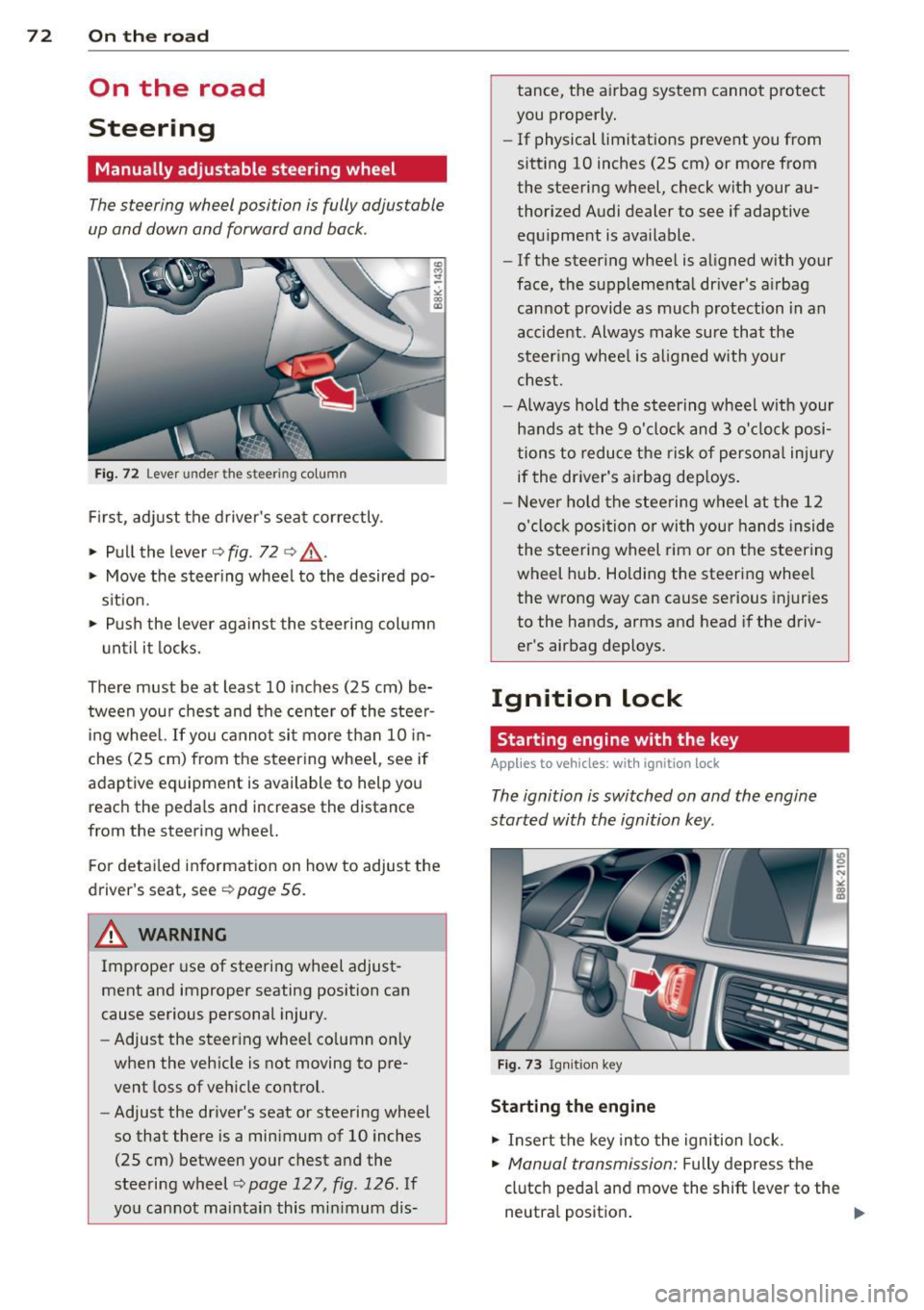
Fig. 72 Lever under the steer ing colu mn
First, adjust the driver's seat correctly .
• Pull the lever
o fig . 72 o ,& .
• Move the steer ing whee l to the desired po
s it ion.
~ Push the lever aga inst the steering column
u ntil it locks.
There must be at least 10 inches (25 cm) be tween your chest and the center of the steer
ing wheel. If you cannot sit more than 10 in
ches (25 cm) from the steering whee l, see if
adaptive equipment is available to help you
reach the pedals and increase the distance
from the steering whee l.
F or detai led information on how to adjust the
driver's seat, see
o poge 56.
A WARNING
Improper use of steering wheel adjust
ment and improper seating position can
cause serious personal injury.
- Adjust the steer ing whee l co lumn on ly
when the veh icle is not moving to pre
vent loss of veh icle control.
- Adjust the driver's seat or steering wheel
so that there is a minimum of 10 inches
(25 cm) between your chest and the
steering wheel
c;, page 12 7, fig . 126 . If
yo u cannot maintain this min imum dis- tance, the airbag system cannot protect
you proper ly.
- If physical limitations prevent you from
sitting 10 inches (25 cm) or more from
the steering wheel, check with your au
thorized Audi dealer to see if adaptive equ ipment is ava ilable .
- If the steer ing wheel is aligned with your
face, the supplemental driver's a irbag
cannot provide as much protection in an
accident . Always make sure that the
steer ing wheel is aligned with your
chest.
- Always hold the steering wheel w ith your
hands at the 9 o'clock and 3 o'clock posi
tions to reduce the risk of persona l injury
if the driver's airbag dep loys .
- Never hold the stee ring wheel at the 12
o'clock position or with your hands inside
the steeri ng wheel rim or on the steering
wheel hub . Holding the steering wheel
the wrong way can cause se rious injuries
to the hands, arms and head if the driv
er's airbag deploys.
Ignition lock
Starting engine with the key
Applies to vehicles : w ith ign ition lock
The ignition is switched on and the engine
started with the ignition key .
Fig. 73 Igni tion k ey
Sta rting the engine
• Insert the key into the ignition lock.
• Manual transmission: Fully depress the
clutch pedal and move the shift lever to the
neutra l position .
Page 79 of 294

Shift to N or P to start engine
This message appea rs whe n attempti ng to
s ta rt the engine if the se le ctor lever for the
a u tomatic t ransmission is not in the P or N
p osition. The engine can on ly be sta rted w ith
the selector in these posit ions .
Is the key in the vehicle?
This m essage appears if the maste r key is re
moved from t he vehi cle w ith the eng ine run
ni ng.
If the mas ter key is no longe r in the ve
hicl e, yo u ca n not swi tch on the igni tion a fter
s t opping the eng ine a nd you also canno t st art
the eng ine again. Mo reover, yo u cannot lock
the vehicle from the outside with the key .
Shift to P otherwise vehicle can roll away.
Doors do not lo ck if lever is not in P.
This m essage appea rs for safety reaso ns
along w it h a wa rning signa l.
It appears if t he
s e lec to r l ever for the aut omat ic tra n sm iss io n
i s no t in the P po sition when switch ing off t he
ignit ion . Move the se lector lever to the P pos i
tion, othe rwise the veh icle is not sec ured
aga inst rolling away. You a lso cannot lock the
ve hicle using the locking button * on the door
h andle or using the remote key.
Convenience key defective! Use ignition lock
Thi s m essa ge appe ars if the eng ine mu st be
s ta rted or s to p ped using the ignition key and
no t th e
I S TART ENGINE STOP! button.
On the road 7 7
Electromechanical
parking brake
Operation
The ele ctromechani cal parking brake replaces
the hand br ake.
Fi g. 77 Center console: Park ing b rake
.,. Pull on the switc h@ ¢ fig. 77 to apply the
parking brake. The ind icator lig ht in the
sw itch illuminates.
.,. Step on the brake pedal or the accele rator
pedal and press the switch at the same t ime
t o re lease the par king brake. The indicator
light in the sw itch goes out.
Your vehicle is equipped with an e lectrome
c hanical p arking bra ke. The pa rking bra ke is
d esigned to p revent the ve hicle from rolling
u nin ten tionally and repla ces the hand b ra ke.
In add ition to the normal fu nctions of a tradi
t ional ha nd b rake, the electromechanical
par king b rake provides vario us conv enience
and sa fe ty f unct ion s.
When starting from rest
- The integral start ing ass ist helps you when
dr iving by automat ica lly releasi ng the par k
ing b ra ke ¢
pag e 78, Starting from rest .
-When start ing on inclines, the starting as
sis t preven ts the veh icle from unintentiona l
ly ro lling back . The braking force of the
pa rk ing brake is no t released u ntil su ffici ent
driving for ce h as been bui lt up at the
w heel s. ..,.
Page 86 of 294

84 Transmi ssion
Driving the automatic transmission
App lies to vehicles: with multitron ic or tiptro nic
Fig. 82 Sh ift gate on the center co nso le : selector lever
with release button
Starting the engine
• The selector lever must be in N or P.
St arting off
• Press and hold the brake pedal.
• Press and hold the release button in these
lector lever handle and move the selector
lever from P or
N to D/S and release the but
ton¢ ,&..
> Wait briefly until the transmission has shift
ed (you will feel a slight movement).
> Remove your foot from the brake pedal and
acce lerate .
Rocking back and forth to become
un stuc k
• Sh ift on ly between D/S and R when the ve
hicle is at a full stop and the engine is run
ning at idle speed .
Stopp ing
> Press and ho ld the brake pedal unt il the ve
hicle has come to a complete stop.
• Keep the brake pedal depressed so that the
vehicle cannot roll forward or backward
whi le it is idling ¢,&. .
• Once stopped,
do not depress the accelera-
tor pedal to rev up the engine¢,&..
Parking
If the selector lever is not in the P position
when you open the driver's door, the vehicle
could ro ll. The message
Tra nsmi ssio n: C ar
m ay roll! Shift to p ark!
appears. •
Press and hold the brake peda l until the ve
hicle has come to a comp lete stop.
• Set the park ing brake firm ly ¢
page 78,
Parking.
• Press and hold the release button in these
lector lever handle, move the se lector lever
into P and then let go of the release button
¢ ,&. .
The eng ine can only be
s ta rt e d when these
lector lever is in the P or N positions .
On s lopes, activate the parking brake first and
then move the selector lever to the P position.
This prevents too much stress from being
placed on the locking mechanism.
Vehicles with multitronic transmission: Your
vehicle is equ ipped with
hill hold as sist allow
ing you to start while on an incline . The sys
tem is activated when the brake pedal is
pressed down and held
f or a few s econd s. The
brake p ressu re will hold for
a moment after
the b rake peda l loosens to p reven t the veh icle
from roll ing bac kwards wh ile s tarting up .
_& WARNING
-= -
- Unintended vehicle movement can cause
serio us injury .
- When the se lector lever is in a driving
pos ition, the vehicle may creep, even at
idle speed. Therefore do not release
the pa rking bra ke o r foot brake u ntil
you are ready to move, beca use power
is transmitted to the wheels as soon as
a driving position is engaged.
- Do no t accelerate wh ile selecting a
driv ing position. At this time the en
gine must be at idle speed so that un
due stress is not placed on the clutches
in the transmiss ion.
- Remember: Even when stopped briefly
with the automatic transmission in 0/5
or R, engine power is being transmit
ted to the wheels. Your veh icle cou ld
"creep" forward or backward . Whe n
stopped, keep the brake pedal fu lly de
pressed and use the parking brake if
Page 90 of 294

88 Transmission
Manual shift program
Applies to vehicles: with multitronic or tiptron ic
Using the manual shift program you can
manually select gears .
Fig. 85 Center console : shift ing t he multitro nic/t ip ·
tronic manual ly
Fig . 86 Steering wheel: Shift buttons
Gear selection with selector lever
"' N
N
~
" a> CD
The tiptronic mode can be selected either with
the vehicle stationary or on the move .
.,. Push the selector lever to the right from
DI
S. As soon as the transmission has switched
over , the selected gear appears in the dis
play.
.,. To upshift, push the selector lever forward
to the plus position
0 ¢ fig. 85 .
.,. To downshift, push the lever to the minus
position
0 -
Gear selection with paddle levers*
The shift buttons are activated when these
lector lever is in D/S or the tiptronic manual
shift program.
.,. To upshift, touch the button on the right
0
¢fig . 86.
.,. To downshift, touch the button on the left
0-
When accelerating, the transmission will au
tomatically shift into the next gear before the
engine reaches its maximum RPM .
If you apply a light throttle when accelerat
ing, tiptronic will automatically shift from 1st
to 2nd gear to save fuel. If you apply a heavy
throttle, the transm iss ion will stay in 1st gear
until near maximum RPM is reached, or until
the driver shifts into 2nd gear .
If you take your foot off the accelerator pedal
when driving down a steep incline, tiptronic
will downshift from the selected gear into the
next lower gear until it reaches 1st gear,
based on road speed and engine RPM . Auto ·
matic downshifting is interrupted as soon as
you apply the throttle again .
(D Tips
-When you shift into the next lower gear,
the transmission will downshift only
when there is no possibility of over-rev
ving the engine.
- When the kick-down comes on, the
transmission will shift down to a lower
gear, depending on vehicle and engine
speeds .
- Tiptronic is inoperative when the trans
m ission is in the fail-saf e mode.
Transmission malfunction
Applies to vehicles: with mult itronic or tiptronic
[O] Transmission: Press brake pedal and se
lect gear again .
Press the brake pedal and select the desired
selector lever position again. You can then
continue driving.
[O] Transmission overheating: Please drive
conservatively.
The transmission temperature has increased
s ignificantly due to the sporty driving manner.
Drive in a less sporty manner until the tern·
perature returns to the normal range and the
indicator light switches of.
[O] Transmission malfunction: You can con-
tinue driving ..,.
Page 93 of 294

-If you accidentally select N while driving,
take your foot off the accelerator pedal immediately and wait for the engine to
slow down to idle before selecting D/S.
- If there is a power failure, the selector
lever will not move out of the P position.
The emergency release can be used if
this happens¢page
95.
Selector lever lock
App lies to vehicles: with S tro nic transmiss ion
The selector lever lock prevents you from se
lecting a gear accidentally, causing the vehi
cle to roll .
I
Fig. 90 Selecto r leve r lock
To release the selector lever lock:
.,.. Switch the ignition on .
.,.. Press the brake pedal
while pressing the in-
terlock button .
Automatic shift lock (ASL)
The selector lever is locked in the P and N po
sitions when the ignition is turned on. You must press the brake pedal and the interlock
button to select another position . As a re
minder to the driver, the following warning
appears in the instrument cluster display
when the selector is in P and N :
When stationary apply brake pedal while se
lecting gear
The selector lever lock only functions when
the vehicle is stationary and at speeds up to 3 mph (5 km/h) . At higher speeds, the lock is
automatically deactivated in the N position .
The selector lever is not locked when shifting
qu ickly through N, for example from R to 0/5.
Transmission 91
This makes it possible to free the vehicle when
it is stuck by "rocking" it. The selector lever
lock engages if the lever stays in N longer
than 1 second when the brake pedal is not
pressed.
Interlock button
The interlock button in the selector lever han
dle prevents you from moving the selector
lever inadvertently while in some selector lev
er positions . Pressing the interlock button re
leases the selector lever lock. The positions
that require the interlock button to be press
ed are marked in color in the illustration
¢fig . 90.
Ignition key safety interlock
You can only remove the key after switching
the ignition off if the selector lever is in the P
position . The selector lever will be locked in
the P posit ion as long as the key is not in the
ignition.
Driving information
App lies to vehicl es: wi th S tronic tra nsmi ssio n
The transmission shifts up and down auto
matically when in the driving gears .
Fig. 91 Section of the center console: Selector lever
w ith in terlock button
.., N
N
N
"' .. ID
You can only start the engine when the selec
tor lever is in the P or N position .
Starting from a stop
.,.. Press and hold the brake pedal.
.,.. Press and hold the interlock button (in the
selector lever handle), move the selector
lever to the desired position such as D/S
~ page 90 and release the interlock button. IIJ,,
Page 95 of 294
press the brake pedal to prevent the ve
hicle from rolling .
- Allow ing the ve hicl e to roll when the en
gine is stopped and the selector lever is i n N will dama ge the S tronic transm is
s ion because it is not lubricated under
those c ircumstances.
@ Tips
For safety reasons, the park ing brake is re
leased automatically only when the dr iv-
er's safety belt is engaged in the buck le.
Hill descent control
Applies to vehicles: with S tro nic transmiss ion and hill de
scent co ntrol
T he hill descen t control sys tem assists the
driver when driving down declines .
Hill desce nt co ntrol is activated when these
l ec to r lever is in D/S and you press the bra ke
p edal. The S tro nic tr ansm ission au tom atically
shifts down into a gear sui table for the de
cline. Hi ll descent control tr ies to maintain
the speed achieved at the time of braking,
wit hin physical and techn ica l limitations . If
may still be necessary to adjust the speed
with the brakes.
H ill descent control switches off once the de
cline levels out or you press t he accelerator
pedal.
On ve hicles with the cruise co ntrol system *
c::> page 81, hill descent control is also act ivat
ed when the speed is set.
A WARNING
-
Hi ll descent control cannot overcome
physical l imitations, so it may not be able
t o m aintain a cons tant speed under all
c o nditions. Alway s be r eady to app ly th e
br ak es.
Transm ission 93
Manual shift program
Applies to vehicles: wit h S tronic transm ission
Using the manual shift program you can
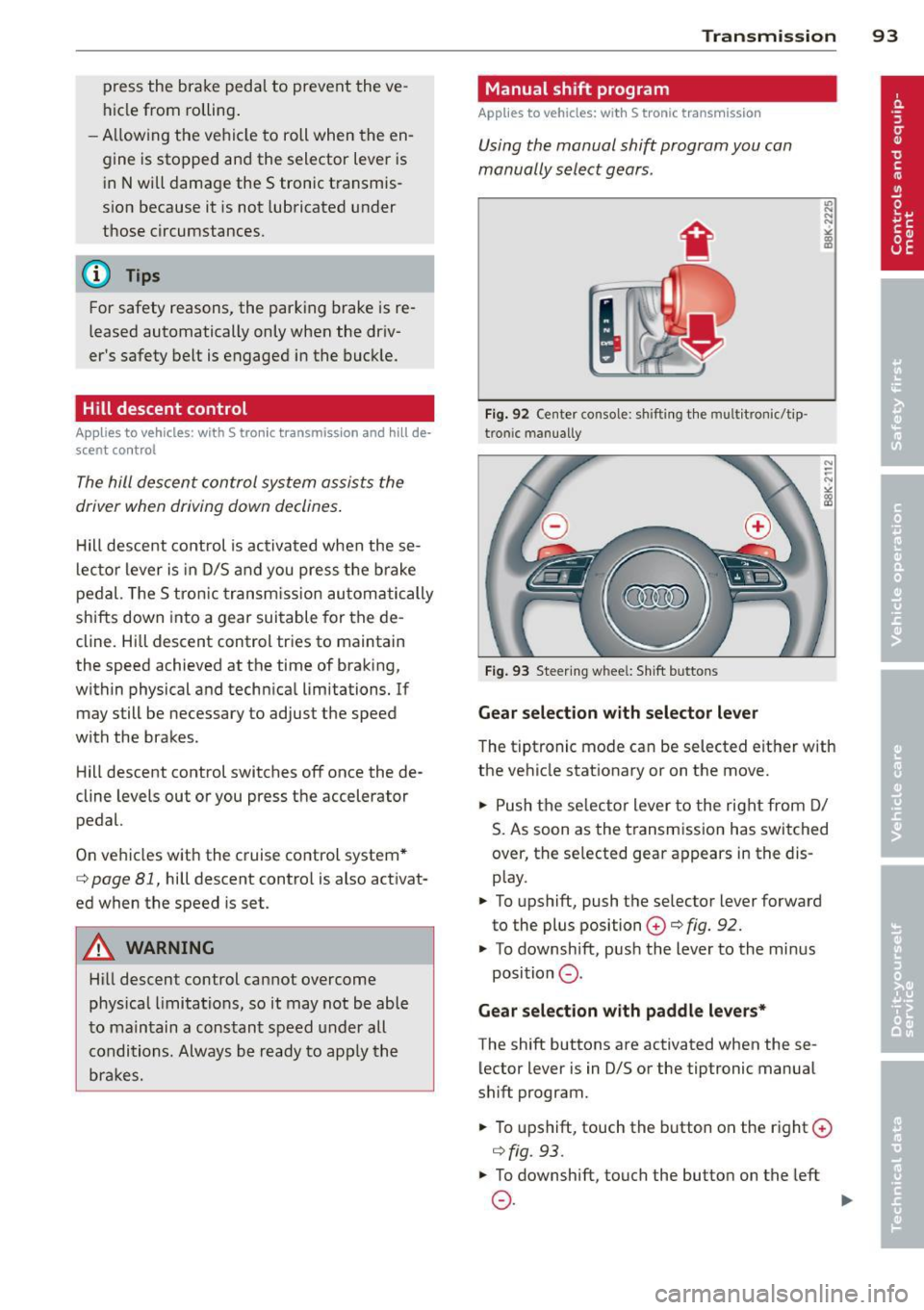
manually select gears .
Fig. 92 Center console : sh ift in g t he m ult itron ic/t ip ·
tro nic m an u ally
Fig. 93 Steering w hee l: S hift b utto ns
Gear selection with selector lever
"' ... .... "!
"' co a,
The tipt ronic mode can be selected eit her with
the ve hicle stat ionary or on the move.
.,. Push the se lec tor lever to the rig ht from D/
S. As soon as the t ransmission has switched
over, the se lected gear ap pears in the dis
p lay .
.,. To upshift, push the se lector lever forward
to the plus position
0 c::> fig. 92.
.,. To downshift, pus h the lever to the mi nus
position
0 .
Gear selection with paddle levers*
The shift buttons are activated when these
lector lever is in D/S or the tiptronic manual
shift program .
.,. To upshift, touch the button o n the right ©
c::> fig. 93 .
.,. To downshift , touch the butto n on the left
0 . ~