2013 AUDI A4 SEDAN ESP
[x] Cancel search: ESPPage 39 of 294

- You cannot open the doors or the rear lid
from the
outside (increased security, for ex
ample when you are stopped at a red light).
- The diodes in the power locking switches il
luminate when all the doors are closed and
locked.
- Front doors: you can unlock and open the
doors from the inside by pu lling on the door
handle .
- Rear doors: pull the door handle
once to re
lease the lock . Pull the hand le
again to open
the door.
- If you have a crash and the airbag is activat
ed, the doors automatically unlock.
A WARNING
- The power locking switch works with the
ignition off and automatically locks the
entire vehicle when it is actuated .
- On a vehicle locked from the outside the
power locking system switch is inopera
t ive .
- locked doors make it more difficult for
emergency workers to get into the vehi
cle, which puts lives at risk . Do not leave
anyone behind in the vehicle, especially
ch ildren.
@ Tips
Your vehicle is locked automatically at a
speed of
9 mph (15 km/h) (Auto lock)
r=:>poge 32. You can unlock the vehicle
again using the opening function in the
power locking system switch[@].
Setting power locking
In the radio/MM!*, you con set which doors
the central locking system will unlock.
~ Select : ICARI funct ion button > Central lock
ing .
Or
~ Select: ~ I C~ A~R ~I funct ion button > Car systems
control button > Vehicle settings > (Central
locking)*.
Single door unlocking /Unlock doors * -
you
can specify which doors unl ock when you open
the vehicle .
Opening and closing 3 7
- Select ing off/All and pressing the Im button
on the remote control key unlocks the entire
veh icle.
- Selecting
on/Driver and pressing the Im but
ton on the remote control key once un locks
only the driver's door. In vehicles with a con
venience key*, only the door whose handle
you pull will unlock. If you press the
l@J but
ton twice, the entire vehicle will unlock . If
you press the
Ii button, the entire vehicle
w ill always lock .
luggage comp. lock/Lock exterior trunk han
dle -
If you select On, you can no longer open
the luggage compartment using the rear lid
handle
r=:> page 39, fig. 28. In this case, the
rear lid can be opened with the
l""'I bu tto n on
the master key
r=:> page 35, fig. 22 or with the
l""'I * button in the driver's door.
Tone when locking -if you select On, a tone
will sound when you lo ck the vehicle.
Auto Lock /Lock when driving -if you select
On, the entire vehicle w ill lock automatically
when the speed reaches 9 mph (IS km/h).
Emergency locking
Fig. 25 D rive r's doo r: lock cylinder
Fig . 26 Fro nt passenger 's doo r/ rear doors*: eme rgency
lock .,..
Page 46 of 294

44 Clear vision
Clear vision
Lights
Switching the lights on and off
Fig . 36 Instrument panel: headlight control switch
Light switch -~ -
Turn the switch c:> fig . 36 to the correspond ing
position . When the lights are switched on, the
,o o~ symbol turns on.
0 -The lights are off or the daytime running
lights are on:
- USA models: The daytime running lights are
activated when the light switch
c:> fig . 36 is
in the
O position or the AUTO position (only
in daylight conditions) . The daytime running
lights function can be turned on and off in
the radio or MMI* menu
Exterior lighting
c:> page 45, c:> ,&. .
-Canada models: The daytime running lights
are activated when the light switch
c:>fig . 36
is in the O position, :oo; position or the AUTO
position (only in daylight conditions). The
daytime running lights function cannot be
turned off
c:> & .
AUTO* -Automatic headlights switch on and
off depending on brightness, for example in
twilight, during rain or in tunnels
c:> & .
:o o; -Side marker lights
io -Low beam headlights
Fog lights/rear fog light(s)*
Press the appropriate button c:> fig. 36:
}0 -Fog lights
0$ -Rear fog light(s)
adaptive light*
When switched on, adaptive light adapts to
curves in the road depending on the vehicle
speed and the steering angle. This provides
b etter lighting through the curve . The system
operates at speeds between app roximately
6 mph (10 km/h) and 68 mph (110 km/h).
Static cornering light* (vehicles with adaptive
light) - the cornering light switches on at
speeds up to approximately 25 mph (40 km/
h) when a certain steering wheel angle is
reached or when a turn signal is activated. The
area to the side of the vehicle is illuminated
better when turning .
The adaptive light and the co rnering light only
function when the switch is in the AU TO posi
tion (automatic headlights*) .
A WARNING
--
- Daytime running lights and automatic
headlights* are only intended to assist
the driver . They do not relieve the driver
of his responsibility to check the head
lights and to turn them on manually ac
cording to the current light and visibility
conditions. For example, fog cannot be
detected by the light sensors*. So always
switch on the headlights
io under these
weather conditions and when driving in
the dark.
- Crashes can happen when you cannot see
the road ahead and when you cannot be
seen by other motorists. Always turn on
the headlights so that you can see ahead
and so that others can see your car from
the back.
- Please obey all laws when using the
lighting systems described here.
(D Note
The rear fog lights* should only be turned
on in accordance with traffic regulation, as
the lights are bright for following traffic. ..,.
Page 47 of 294

(D Tips
-The light sensor * for headl ight control is
l ocated in the rear view m irror mount.
You should therefore not apply any st ick
ers to the windsh ield in this area in order
to prevent malfunctions or failures .
- Some exterior lighting functions can be
adjusted
¢ page 45.
-When yo u remove you r key from the igni
tion w hile the vehicle's lights are turned
on, a buzzer sounds as long as the driv
er's door is open.
- In cool or damp weather, t he ins ide of
the headlights, turn signa ls and tail
li ghts can fog ove r due to the tem pera
ture diffe ren ce betw een the inside and
outside. They will clear shor tly after
swi tching t hem on. This d oes not aff ect
the service life of the ligh ting.
- In the even t of a ligh t sensor malfunc
tion, the drive r is no tifie d in the inst ru
ment cluster disp lay ~
page 2 2.
Turn signals and high beam lever
The lever operates the turn signal s, the high
beams and the headlight flasher .
Fig. 37 Turn sig na l and high beam leve r
Turn signals ¢i ¢
The turn s ignals activate when you move the
l ever into a turn s ignal position when the ign i
tion is sw itched on.
(D -right turn signal
@ -Left turn signa l
The turn s ignal b links three times if you just
tap the lever . Clear
vi
sion 45
High beams and headlight flasher @:D
Move the lever to the corresponding posit io n:
@ -high beams on
@-high beams off or headlight flasher
T he ind icator light
II in the instr ument clus
ter turns on .
Notes on these features
-The turn signals on ly wor k w it h t he ignition
t urned on. The indica tor l igh ts
11 or II in
the instrument cluste r also blink .
- Aft er you have tu rned a corner, the turn s ig
na l swi tches off au tom atically .
- The
high beam wo rks only when the head
lights a re on. The indicator Ligh t. in the
instrumen t clus ter illuminates when the
high beams are on .
- The
headligh t flasher works on ly as long as
you ho ld the lever -even if the re are no
lights switched o n. The ind icator light
Ill i n
the inst rument cluster illuminates when you
use the headlight flasher.
&_ WARNING
Do not use the h igh beam or head light
flasher if you kn ow that these could b lind
oncom ing traffic.
Adjusting exterior lighting
The functions are selected in the radio or
MM!* .
.. Select: I CAR ! function b utton > Exter io r
light ing .
Or
.. Select: I CAR I function button > Car Systems
cont ro l butto n > Vehicle settings > Exterior
lighting .
Coming home (light when leav ing car )*,
Leaving home (light when unlocking car)*
The coming home function illumi nates the
area around the vehicle when the ignition is
switched off and the drive r's door is open ed.
Depend ing on ve hicle equipment, t he fu nction
can be sw itched on and off or the length of
time the lights rem ain on* can be ad justed . .._
Page 49 of 294

Interior lights
Front/rear interior lights
Fig. 39 Front headliner: inte rior ligh ting con trols
Fig . 40 Rear headlin er: rear rea ding lights
@ Interio r lig ht s
Press the sw itch c:::> fig. 39 in the correspond
ing position.
0 -Interior lights off
I -Interior lights on
If the switch is in the center position, the in te
rior lights turn on automatically when you un
lock the vehicle, open a door or remove the ig
n ition key . The inter ior lights turn
off several
seconds after your close the doors , when you
l ock the vehicle or when you turn the ig nition
on. When a door is open, the light turns
off
after a few minutes.
@ Front /re ar reading lights
To turn a reading light on/off , press the but
ton ~
c:::> fig. 39 or c:::> fig . 40 .
The appearance and location of the rear read
ing lights may differ depending on the model. Clear vi
sion 4 7
Instrument illumination
The basic brightness of the illumination for
the instruments, the center console and the
display can be adjusted.
F ig . 4 1 Ins trum ent ill u min atio n
.,. Press the knob to release it .
.. Turn the knob toward"-" or"+ " to reduce or
i ncrease the brightness .
.,. Press the knob aga in to return it to its origi
nal position.
(D Tips
The instrument illumination (for dials and
needles) lights on when the ignition is
switched on and the vehicle lights are
turned off . As the daylight fades, the illu
mination of the dials likewise d ims auto
matically and w ill go out completely when
the outs ide light is very low. This feature is
meant to rem ind you to sw itch on the
headlights when outs ide light conditions
become poor .
Vision
Adjusting the exterior mirrors
Fig. 42 Forwar d sect io n of dr iv er's armrest : pow er mir
r o r cont rols
Page 50 of 294

48 Clear vis ion
Turn the knob to the desi red position :
Q/P -In t his position , you can adjust the
d river's and front passenger's exter ior mirro rs
by turn ing the knob in the des ired direc tion.
(jjjl -The m irrors are h eated depending on the
outside temperatu re.
P assenger exterio r mirro r tilt funct ion*
( only with memory for ext erior mirrows)
To help you see the curb when backing into a
pa rking space, the surface of the m irror t ilts
slig htly . The knob m ust be in the
P posit ion
for this to happen .
You can ad just the ti lted mirro r surface by
turning the knob in the desired direction .
When you move out of reverse and into ano th
e r gear, t he new mirror posi tion is stored and
assigned to the key you are using .
The mir ro r goes bac k into its origina l posit io n
once yo u drive forward f aste r tha n 9 mph
(1 5 km/h) or switch the ignition off .
_& WARNING
Curved mirror s urfaces (convex or spheri
cal *) increase your field of view . Remem
ber that vehicles or other objects will ap
pear smaller and farther away than when
seen in a flat m irror. If you use this mirror
to estimate distances of following veh icles
when c hanging lanes , you co uld estimate
incorrectly and ca use an accident .
{CT) Note
- If you wash the vehicle in an automatic
ca r wash, you must fold t he exterior m ir
r o rs in to reduce the r is k of damage to
the mirrors .
(i) Tips
- The exterior mirro r settings are sto red
wi th the memory funct ion* c::>
page 58.
-If there should be a ma lfunct ion in the
electrical system, yo u can st ill adjust the
exter ior mirro rs by press ing the edge of
t h e m irror. Dimming the mirrors
F
ig. 43 Auto matic dimmin g rearview m ir ro r*
Manu al d imming rear view m irror
• Pull the lever on the bottom of the m irror
back .
Automat ic dimming rearview mirror*
....
• Press the button @c::> fig. 43. The indica tor
light @turns on . The rearview and exter io r*
mirrors dim a utomatically when light shines
on them, for example from head lights on a
veh icle to the rear.
_& WARNING ..__
Electro lyte fluid can leak from automatic
d imm ing mirrors if the glass is b roken .
E lec trolyte fluid can irritate skin, eyes a nd
r espirato ry system.
- Repeated or prolonged expos ure to e lec
trolyte can cause irritation to the respira
t ory syste m, especially among people
with asthma or o ther resp irator y condi
tions . Ge t fresh air immediately by leav
ing the vehicle o r, if that is no t possib le,
open windows and doors all the way.
- If electroly te gets into the eyes, fl ush
them thorough ly with large amounts of
clean water fo r at least 15 minutes;
medical attention is recommended.
- If electrolyte contacts skin, fl ush affect
ed area with clean water fo r at least 15
minutes and then wash affected area
with soap and water; medical attention
is recommended. Thoroughly wash af
fected cloth ing and shoes before reuse.
Page 52 of 294

50 Clear vis ion
& WARNING
When lowering or raising the sunshade,
make sure there is nothing in its way and
that it has a free path to travel. This could
cause personal injury .
@ Tips
-Pressing the button lt!tl several times
consecutively can tr igger the overload
protection . The sun shade can only be ex
te nded/retracted again after a b rief wa it
ing period.
- The rear window sun shade only func
tions when the veh icle inter ior is warmer
than 14°F (-10°C).
Wiper and washer system
Switching the windshield wipers on
Fig. 47 Windshie ld wipe r lever
Move the windshield wiper lever to the corre
sponding position:
@ - Windshie ld wiper
off
(D -Interval mode. To extend/shorten the
wiper intervals, move the switch @to the
left/right. In vehicles with a rain sensor* the
wipers turn on in the rain once the vehicle
speed exceeds approximate ly 2 mph (4 km/h) .
The higher the sensitivity of the rain sensor* is
set (switch @to the right), the earlier the
windshie ld w ipers react to moisture on the
windsh ield . In some models, you can sw itch
rain sensor mode
off and switch intermittent
mode on in the MM I*. Select:
I CAR I funct ion
button
> Car Systems contro l button > Driver assist
> Rain
sensor. In intermittent mode,
you can adjust the interval time using the@
switch.
@ -Slow w iping
@ -Fast wip ing
© -Single wipe
®-Clean the windshield. To eliminate water
droplets, the windshield wiper performs one
afterwipe operation after several seconds
while driving. You can switch this function
off
by moving the lever to position @within 10
seconds of the afterwipe operat ion. The after
wipe function is reactivated the next time the
ignition is sw itched on.
Cleaning the headlights* . The headlight wash
er system* operates only when the headlights
are on. If you move the lever to position @,
the headlights are washed in intervals.
& WARNING
- The rain sensor is only intended to assist
the driver. The driver is still responsib le
for manually switching the wipers on ac
cording to the visibility cond itions.
- The windshield may not be treated with
water-repell ing windshield coating
agents. Unfavorable conditions, such as
wetness, darkness, low sun, can result in increased glare. Wiper blade chatter is
also possib le.
- Properly functioning windsh ield wiper
blades are required for a clear view and
safe driving
i::> page 51, Replacing
windshield wiper blades.
(D Note
- In the case of frost, check whether the
windshield wiper blades are frozen to
the windshield. Switching on the wind
shield wipers can damage the wiper
blades!
- Prior to using a car wash, the w indshield
w iper system must be sw itched
off (lever
in position @). This helps to prevent un
intentional switching on and damage to
the windsh ield wiper system. ..,.
Page 56 of 294

54 Seat s a nd s tor ag e
Seats and storage
General recommen
dations
Why is your seat adjustment so
important?
The safety belts and the airbag system can
only provide maximum protection if the front
seats are correctly adjusted.
There are various ways of adjust ing the front
seats to provide safe and comfortable support
for the driver and the front passenger . Adjust
your seat properly so that :
- you can easily and quick ly reach all the
switches and controls in the instrument
panel
-your body is prope rly supported thus reduc
ing physical stress and fatigue
- the safety be lts and airbag system can offer
maximum protection ¢
page 144.
In the following sec tions, you will see exactly
how you can best adjust you r seats .
There are special regulations and instructions
for insta lling a child safety seat on the front
passenger's seat. Always follow the informa
tion rega rd ing child safety provided in
G page 165, Child Safety.
WARNING
Refer to G page 126, Driving Safely for
important information, tips, suggestions
and warnings that you should read and fol
low for your own safety and the safety of
your passengers.
A WARNING
, -
Incorrect seating position of the dr iver and
all other passengers can result in serious
personal inj ury .
- Always keep your feet on the f loor when
the vehicle is in motion -never put your
feet on top of the instrument panel, out of the w indow or on top of the seat cush
ion. This app lies especially to the passen- gers
. If your seating position is incorrect,
you increase the risk of injury in the case of sudden braking or an accident. If the
airbag inflates and the seating position is incorrect, this could result in pe rsonal
in ju ry or even death.
- It is important for both the driver and front passenge r to keep a distance of at
least 10 inches (25 cm) between them
selves and the steering wheel and/or in
strumen t panel.
If you're s itting any
closer than th is, the a irbag system can
not protect you properly. In addition, the
front seats and head restraints m ust be
adj usted to your body height so that they
can give you max imum protect ion.
- Always try to keep as much distance as
possible between yourself and the steer
ing wheel or instrument panel.
- Do not adjust the driver's or front pas
senger's seat while the vehicle is moving.
Your seat may move unexpectedly , caus
ing sudden loss of veh icle control and
personal injury. If you adjust you r seat
while the veh icle is moving, yo u are out
of pos it ion.
Driver's seat
The correct seat position is important for safe
and relaxed driving .
We recommend that you adjust the dr iver's
seat in the follow ing manner:
.. Adjust the seat in fore and aft direction so
that you can easily push the pedals to the
floor wh ile keeping your knees slightly bent
G &. in Why is your seat adjustment so im
portant? on page 54 .
.,. Adjust the seatback so that when you sit
w ith your back against t he seatback, you can
s till grasp the top of the steering whee l.
.. Applies to veh icles with adjustable head re
straints: Adjust the head restraint so the up
per edge is as even as possible with the top
of yo ur head. If that is not possib le, try to
adjust the head restraint so that it is as .,.
Page 57 of 294
close to this position as possible
c:>page 57.
A WARNING
Never place any objects in the driver's foot
well. An object could get into the pedal
area and interfere with pedal function. In
case of sudden braking or an accident, you
would not be able to brake or accelerate .
Front passenger's seat
Always move the front passenger seat into
the rearmost position .
To avoid contact with the airbag while it is de
ploying, do not sit any closer to the instru
ment panel than necessary and always wear
the three-point safety belt provided adjusted
correctly . We recommend that you adjust the
passenger's seat in the following manner:
.,. Bring the backrest up to an (almost) upright
position.
Do not ride with the seat reclined .
"" Applies to vehicles with adjustable head re
stra ints: Adjust the head restraint so the up
per edge is as even as possible with the top
of your head. If that is not possible, try to
adjust the head restraint so that it is as
close to this position as possible
c:> page 57.
.,. Place your feet on the floor in front of the
passenger's seat .
Front seats
Manual seat adjustment
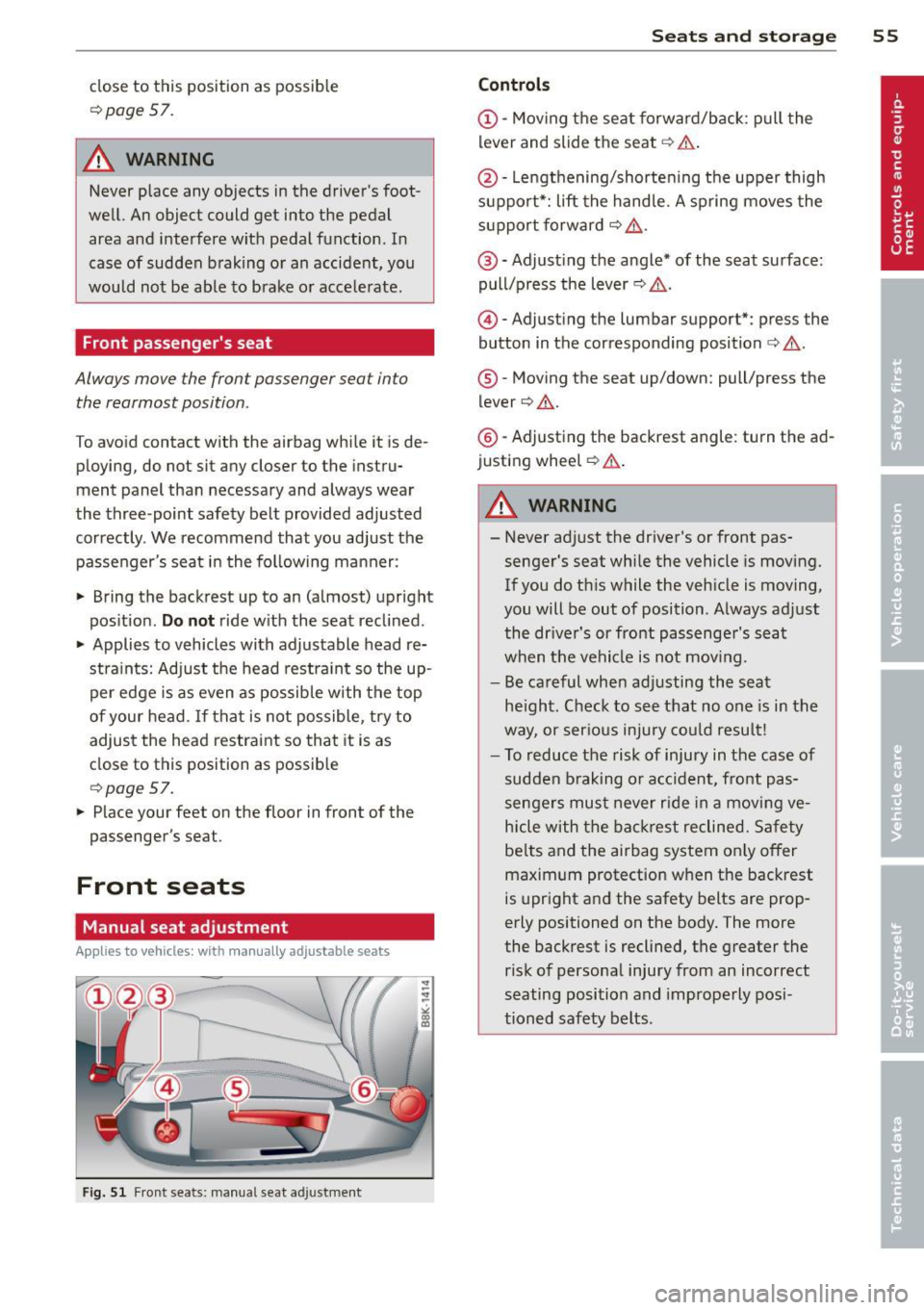
Appl ies to vehicles: with manu ally a djustable seats
Fig. 51 Fr ont seats: manual seat adjustment
Seats and storage 55
Controls
@-Moving the seat forward/back: pull the
lever and slide the seat
c:> A.
@ -Lengthening/shortening the upper thigh
support*: lift the handle. A spring moves the
support forward
c:> ,& .
@ -Adjust ing the angle* of the seat surface:
pull/press the lever
c:> ,& .
@) -Adjusting the lumbar support*: press the
button in the corresponding position
c:> ,& .
®-Moving the seat up/down: pull/press the
lever
c:> .&. .
@ -Adjusting the backrest angle : turn the ad
justing wheel
c:> .&..
A WARNING ,--
-Never adjust the driver's or front pas
senger's seat while the vehicle is moving.
If you do this while the veh icle is moving,
you will be out of position. Always adjust
the dr iver's or front passenger's seat
when the vehicle is not mov ing.
- Be careful when adjusting the seat
he ight. Check to see that no one is in the
way, or ser ious injury could result!
- To reduce the risk of injury in the case of
sudden braking or accident, front pas
sengers must never rid e in a moving ve
hicle with the backrest reclined. Safety
be lts and the airbag system on ly offer
maximum protection when the backrest
is upright and the safety belts are prop
erly positioned on the body. The more
the backrest is reclined, the greater the
risk of personal injury from an incorrect
seating position and improperly posi
tioned safety belts.