Page 135 of 324
134
uuOperating the Switches Around the Steering WheeluFog Lights
Controls
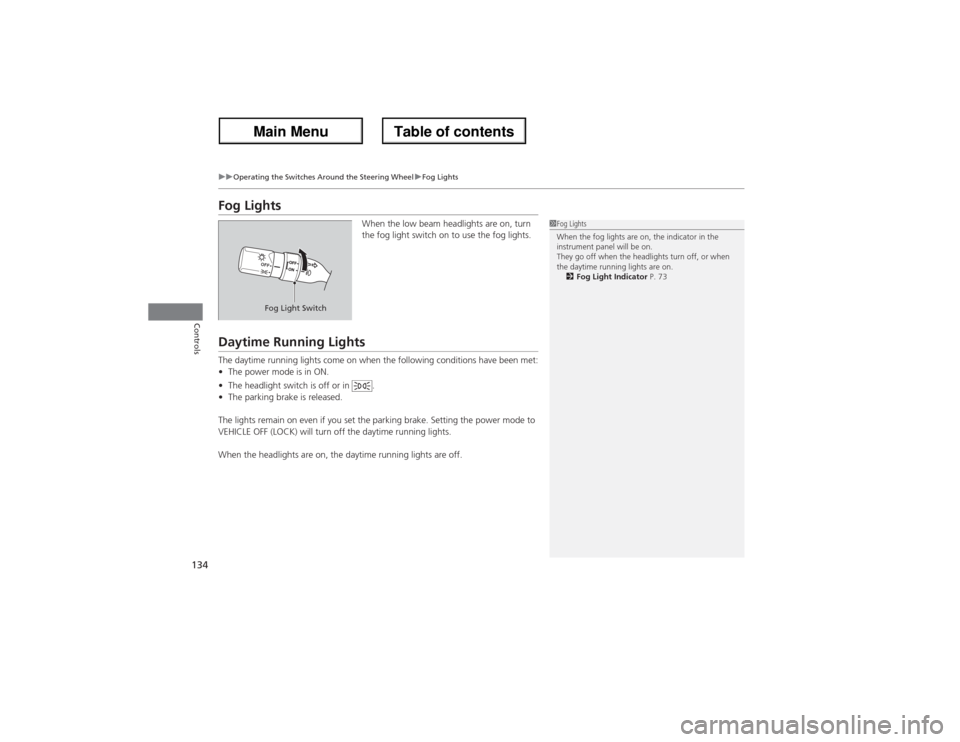
Fog Lights
When the low beam headlights are on, turn
the fog light switch on to use the fog lights.
Daytime Running LightsThe daytime running lights come on when the following conditions have been met:
•The power mode is in ON.
•The headlight switch is off or in .
•The parking brake is released.
The lights remain on even if you set the parking brake. Setting the power mode to
VEHICLE OFF (LOCK) will turn off the daytime running lights.
When the headlights are on, the daytime running lights are off.
1Fog Lights
When the fog lights are on, the indicator in the
instrument panel will be on.
They go off when the headlights turn off, or when
the daytime running lights are on.
2Fog Light Indicator P. 73
Fog Light Switch
Page 137 of 324
uuOperating the Switches Around the Steering WheeluWipers and Washers
136Controls
Turn the headlights on and press the
headlight washer button to operate.
The headlight washers also operate when you
turn the windshield washers for the first time
after the power mode is set to ON.
■Headlight Washers
*
1Headlight Washers
*
The headlight washers use the same fluid reservoir as
the windshield washers.
Headlight
Washer Button
* Not available on all models
Page 138 of 324

137
uuOperating the Switches Around the Steering WheeluBrightness Control
Controls
Brightness Control
When the parking lights are turned on and the
power mode is in ON, you can use the
(+ or
(- button to adjust instrument panel
brightness.
Brighten: Press the
(+ button.
Dim: Press the
(- button.
You will hear a beeper when the brightness
reaches minimum or maximum. The multi-
information display will return to its original
state several seconds after you adjust the
brightness.
■Brightness level indicator
The brightness level is shown on the multi-
information display while you are adjusting it.
1Brightness Control
Instrument panel brightness varies, depending on
whether the exterior lights are on or off. The
instrument panel dims to reduce glare when they are
on.
If you press the
(+ button until the brightness display
is up to max, the beeper sounds. This cancels the
reduced instrument panel brightness when the
parking lights are on.
The brightness can be set differently for when the
exterior lights are on, and when they are off.
You can customize when the glare reduction
function starts.
2Customized Features P. 92
(-Button
(+Button
Page 141 of 324

uuOperating the Switches Around the Steering WheeluDriving Position Memory System
140Controls
1.Adjust the driver’s seat, the steering wheel
and the outside mirrors to the desired
position, and turn the power mode to ON.
2.Press the SET button.
uYou will hear the beeper, and the
memory button indicator light will blink.
3.Press memory button
(1 or
(2 within five
seconds of pressing the SET button.
uOnce the seat, the steering wheel and
the outside mirror positions have been
memorized, the indicator light on the
button you pressed stays on.
1.Move the shift lever to
(P.
2.Press a memory button ((1 or
(2).
uYou will hear the beeper, and the
indicator light will blink.
The seat, the steering wheel and the outside
mirrors will automatically move to the
memorized positions. When it has finished
moving, you will hear the beeper, and the
indicator light stays on.
■Storing a Position in Memory
1Storing a Position in Memory
After you press the SET button, the storing operation
will be canceled when:•You do not press the memory button within five
seconds.•You readjust the seat, the steering wheel or the
outside mirror position before the double-beep.•You set the power mode to any position except
ON.
Set Button Memory Button 1
Memory Button 2■Recalling the Stored Position
1Recalling the Stored Position
The seat will stop moving if you:•Press the SET button, or a memory button (
(1 or
(2).
•Adjust the seat, the steering wheel or the outside
mirror position.•Shift into any position except
(P.
Memory Buttons
Page 143 of 324
142Controls
Adjusting the MirrorsInterior Rearview MirrorAdjust the angle of the rearview mirror when you are sitting in the correct driving
position.
When driving after dark, the automatic
dimming rearview mirror always reduces the
glare from headlights behind you.■Automatic Dimming Rearview Mirror
1Adjusting the Mirrors
Keep the inside and outside mirrors clean and
adjusted for best visibility.
Adjust the mirrors before you start driving.
2Adjusting the Seat Positions P. 1441Automatic Dimming Rearview Mirror
The auto dimming function cancels when the shift
position is in
(R.
Sensor
Page 153 of 324

152Controls
Interior Lights/Interior Convenience ItemsInterior Lights
■ON
The interior lights come on regardless of
whether the doors or the tailgate is open or
closed.■Door activated
The interior lights come on in the following
situations:
•When any of the doors or the tailgate is
opened.
•You unlock the driver’s door.
•When the power mode is set to VEHICLE
OFF (LOCK).
•When any of the doors and the tailgate are
closed, then you press each (map light)
button.■OFF
The interior lights remain off regardless of
whether the doors are open or closed.
■Interior Light Switches
1Interior Light Switches
In the door activated position, the interior lights fade
out and go off about 30 seconds after the doors and
the tailgate are closed.
The lights go off after 30 seconds in the following
situations:•When you unlock the driver’s door but do not open
it.•When you set the power mode to VEHICLE OFF
(LOCK) but do not open a door.
You can change the interior lights dimming time.
2Customized Features P. 92
The interior lights go off immediately in the following
situations:•When you lock the driver’s door.•When you close the driver’s door in ACCESSORY
mode.•When you set the power mode to ON.
If you leave any of the doors or the tailgate open with
the power mode in VEHICLE OFF (LOCK), the interior
lights go off after about 15 minutes.
Door Activated
PositionOff
On
Page 154 of 324
153
uuInterior Lights/Interior Convenience ItemsuInterior Lights
Controls
The map lights can be turned on and off by
pressing the (map light) button.■ON
The light comes on regardless of whether the
tailgate is open or closed.■Door activated
The light comes on when you open the
tailgate, and goes off when closed.■OFF
The light stays off with or without opening the
tailgate.
■Map Lights
1Map Lights
When the interior light switch is in the door activated
position and any door is open, the map light will not
go off when you press the (map light) button.
Front
Rear■Cargo Area LightDoor Activated
Position
OffOn
Page 155 of 324
154
uuInterior Lights/Interior Convenience ItemsuInterior Convenience Items
Controls
Interior Convenience Items
Pull the handle to open the glove box. You
can lock the glove box with the built-in key.
■Glove Box
1Glove Box
3
WARNING
An open glove box can cause serious injury
to your passenger in a crash, even if the
passenger is wearing the seat belt.
Always keep the glove box closed while
driving.