2013.5 PEUGEOT 5008 tow
[x] Cancel search: towPage 285 of 404
283
04
NAV2AB C3DEF5JKL4GHI6MNO8TUV7PQR S9WXYZ0*#
1RADIO MEDIA NA
V TRAFFIC
SETUPADDR
BOOK
2ABC3DEF5JKL4GHI6MNO8TUV7PQR S9WXYZ0*#
1RADIO MEDIA NA
V TRAFFIC
SETUPADDR
BOOK
2ABC3DEF5JKL4GHI6MNO8TUV7PQR S9WXYZ0*#
1RADIO MEDIA NA
V TRAFFIC
SETUPADDR
BOOK
2ABC3DEF5JKL4GHI6MNO8TUV7PQR S9WXYZ0*#
1RADIO MEDIA NA
V TRAFFIC
SETUPADDR
BOOK
2ABC3DEF5JKL4GHI6MNO8TUV7PQR S9WXYZ0*#
1RADIO MEDIA NA
V TRAFFIC
SETUPADDR
BOOK
2ABC3DEF5JKL4GHI6MNO8TUV7PQR S9WXYZ0*#
1RADIO MEDIA NA
V TRAFFIC
SETUPADDR
BOOK2ABC3DEF5JKL4GHI6MNO8TUV7PQR S9WXYZ0*#
1RADIO MEDIA NA
V TRAFFIC
SETUPADDR
BOOK
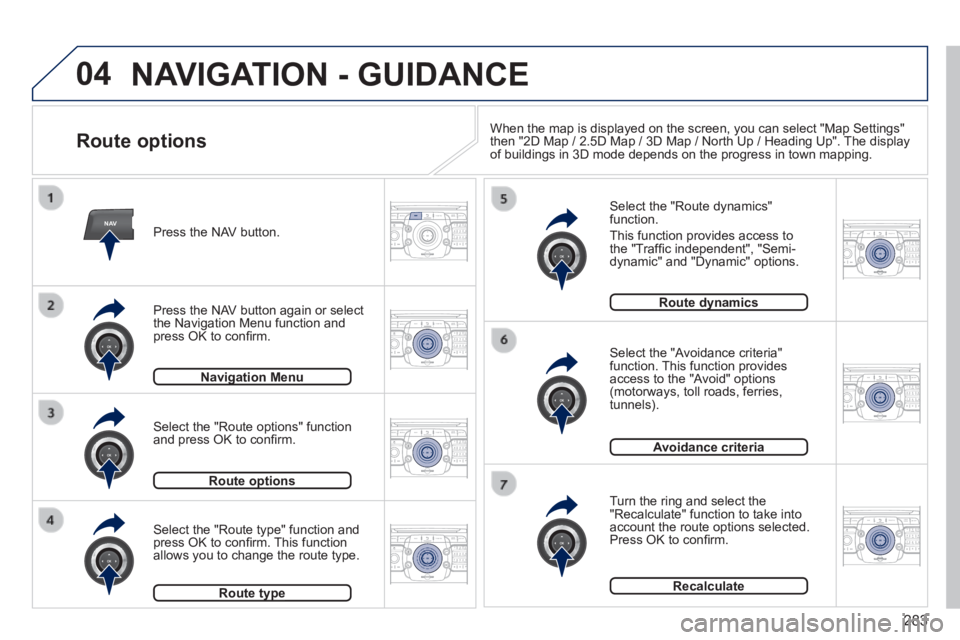
NAVIGATION - GUIDANCE
Route options
Select the "Route dynamics" function.
This function provides access to the "Traffi c independent", "Semi-dynamic" and "Dynamic" options.
Select the "Avoidance criteria" function. This function provides access to the "Avoid" options (motorways, toll roads, ferries, tunnels).
Turn the ring and select the "Recalculate" function to take into account the route options selected. Press OK to confi rm.
Press the NAV button.
Press the NAV button again or select the Navigation Menu function and press OK to confi rm.
Select the "Route type" function and press OK to confi rm. This function allows you to change the route type.
Select the "Route options" function and press OK to confi rm.
Navigation MenuNavigation Menu
Route optionsRoute options
Route typeRoute type
Route dynamicsRoute dynamics
Avoidance criteria
Recalculate
When the map is displayed on the screen, you can select "Map Settings" then "2D Map / 2.5D Map / 3D Map / North Up / Heading Up". The display of buildings in 3D mode depends on the progress in town mapping.
Page 322 of 404
320
04
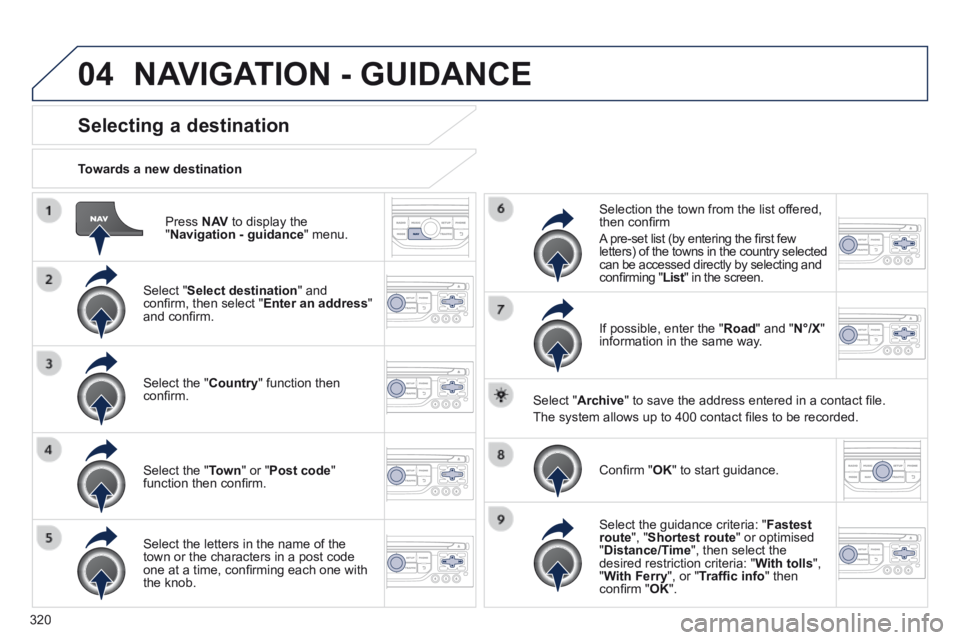
Press N AV to display the " Navigation - guidance " menu.
Towards a new destination
Selecting a destination
Select " Select destination " and confi rm, then select " Enter an address " and confi rm.
Select the " Country " function then confi rm.
Select the " Town " or " Post code " function then confi rm.
Select the letters in the name of the town or the characters in a post code one at a time, confi rming each one with the knob.
Selection the town from the list offered, then confi rm
A pre-set list (by entering the fi rst few letters) of the towns in the country selected can be accessed directly by selecting and confi rming " List " in the screen. List " in the screen. List
If possible, enter the " Road " and " N°/X " information in the same way.
Select " Archive " to save the address entered in a contact fi le.
The system allows up to 400 contact fi les to be recorded.
Confi rm " OK " to start guidance.
Select the guidance criteria: " Fastest route ", " Shortest route " or optimised " Distance/Time ", then select the desired restriction criteria: " With tolls ", " With Ferry ", or " Traffi c info " then confi rm " OK ".
NAVIGATION - GUIDANCE
Page 323 of 404
321
04
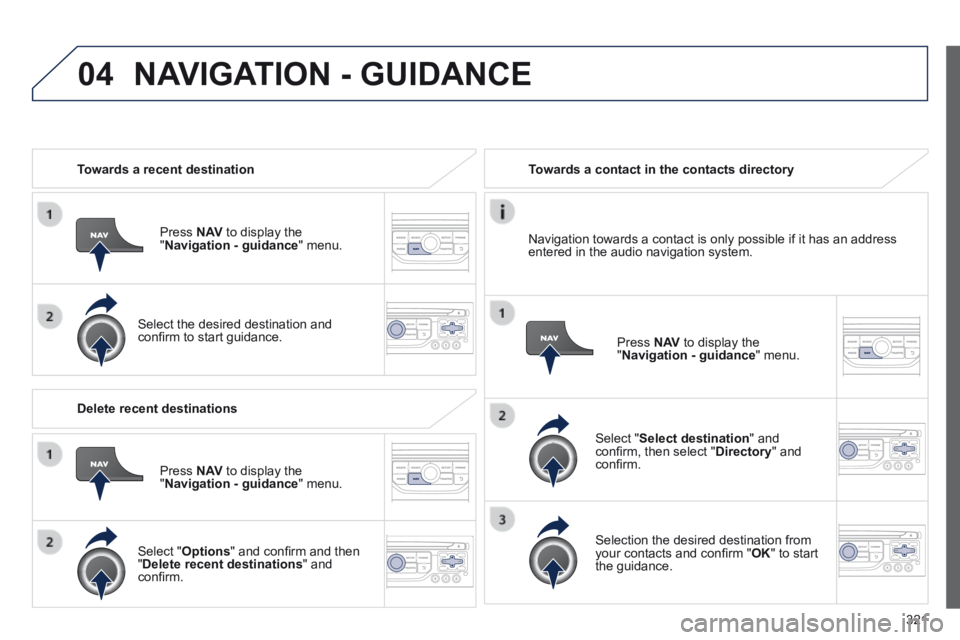
Towards a recent destination
Press N AV to display the " Navigation - guidance " menu.
Select the desired destination and confi rm to start guidance.
Towards a contact in the contacts directory
Select " Select destination " and confi rm, then select " Directory " and confi rm.
Selection the desired destination from your contacts and confi rm " OK " to start the guidance.
Press N AV to display the " Navigation - guidance " menu.
Navigation towards a contact is only possible if it has an address entered in the audio navigation system.
Delete recent destinations
Press N AV to display the " Navigation - guidance " menu.
Select " Options " and confi rm and then " Delete recent destinations " and confi rm.
NAVIGATION - GUIDANCE
Page 324 of 404
322
04
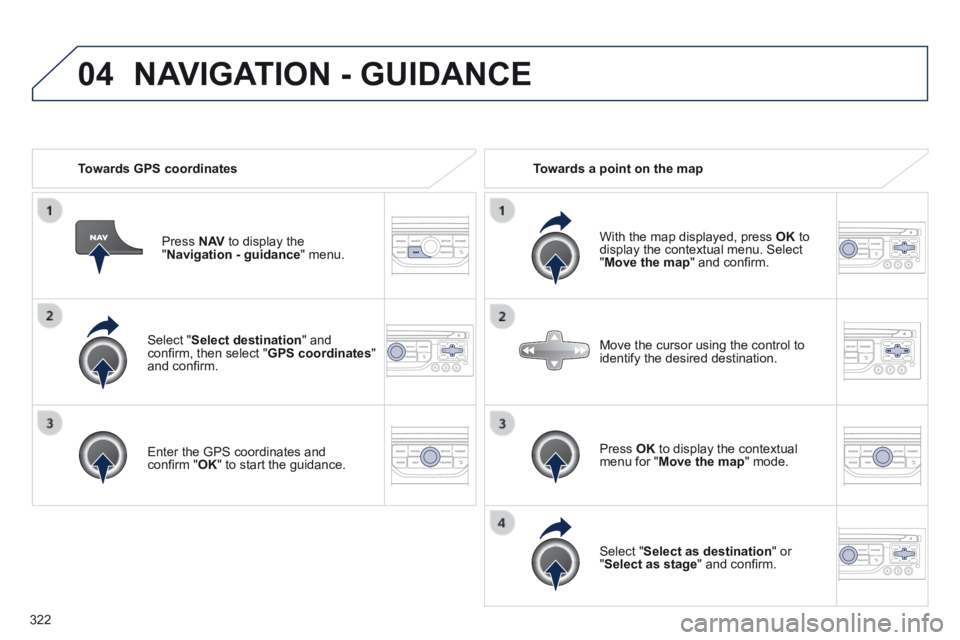
Select " Select destination " and confi rm, then select " GPS coordinates " and confi rm.
Enter the GPS coordinates and confi rm " OK " to start the guidance.
Press N AV to display the " Navigation - guidance " menu.
Towards GPS coordinates Towards a point on the map
With the map displayed, press OK to display the contextual menu. Select " Move the map " and confi rm.
Press OK to display the contextual menu for " Move the map " mode.
Select " Select as destination " or " Select as stage " and confi rm.
Move the cursor using the control to identify the desired destination.
NAVIGATION - GUIDANCE
Page 325 of 404
 The points of interest (POI) indicate all of the service locations in \
the vicinity (hotels, various businesses, airports...).
Select the \" Enter an")
323
04
Towards points of interest (POI) The points of interest (POI) indicate all of the service locations in \
the vicinity (hotels, various businesses, airports...).
Select the " Enter an address " function and confi rm, then select Select destination and confi rm.
To select a POI close to your current location, select " POI " and confi rm, then select " Around the current place " and confi rm.
To select a POI as a stage on the route, select " POI " and confi rm, then select " On the route " and confi rm.
To select a POI as a destination, fi rst enter the country and town (see "Towards a new destination"), select " POI " and confi rm, fi nally select " Near " and confi rm. Near " and confi rm. Near
Search for POIs in the categories suggested in the following pages.
Select " Search by Name " to search for POIs by name and not by proximity.
Select the POI and confi rm " OK " to start the guidance.
Press N AV to display the " Navigation - guidance " menu.
NAVIGATION - GUIDANCE
Page 326 of 404
324
04 NAVIGATION - GUIDANCE
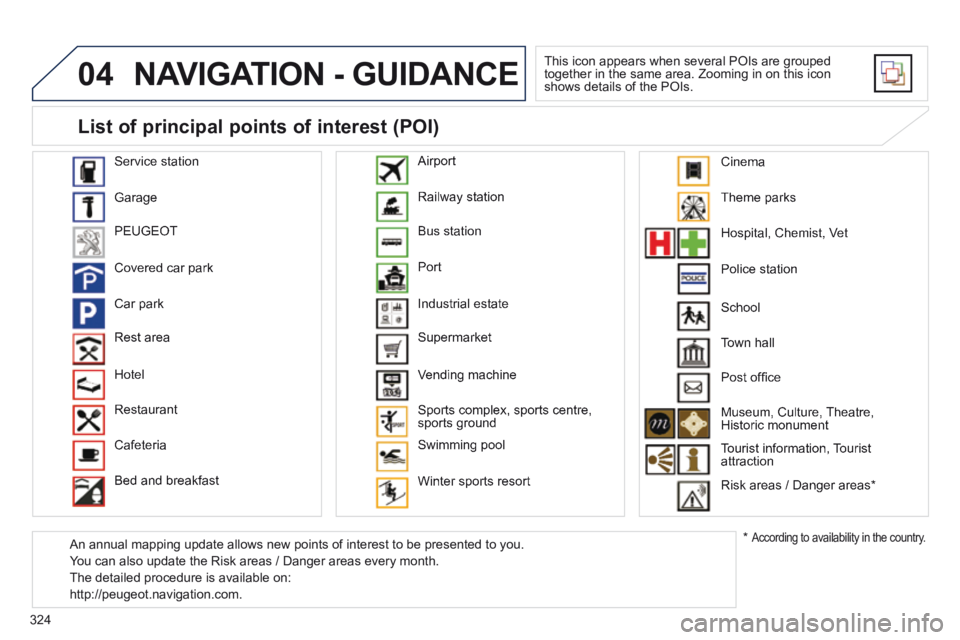
This icon appears when several POIs are grouped together in the same area. Zooming in on this icon shows details of the POIs.
Service station
Garage
PEUGEOT
Covered car park
Car park
Rest area
Hotel
Restaurant
Cafeteria
Bed and breakfast
Railway station
Bus station
Port
Industrial estate
Supermarket
Vending machine
Sports complex, sports centre, sports ground
Swimming pool
Winter sports resort
Airport
Theme parks
Hospital, Chemist, Vet
Police station
Town hall
Post offi ce
Museum, Culture, Theatre, Historic monument
Tourist information, Tourist attraction
Risk areas / Danger areas *
List of principal points of interest (POI)
* According to availability in the country.
School
An annual mapping update allows new points of interest to be presented t\
o you.
You can also update the Risk areas / Danger areas every month.
The detailed procedure is available on:
http://peugeot.navigation.com.
Cinema
Page 394 of 404
Alphabetical index
392
Storage drawer .............................................Storage drawer .............................................Storage drawer121Storage wells ........................................125, 126Stowing rings ........................................125, 126Sun visor ........................................Sun visor ........................................Sun visor117, 118, 131Synchronising the remote control ...................85Synthesiser, voice .........................................330System, navigation................................280, 320
Table of weights ............................257, 259, 262Tables, aircraft ..............................................121Tables of engines .................................256, 258Tables of fuses ..............................................237Ta n k , f u e l .........................................................99Technical data ...............................256 -259, 262Telephone .....................267, 297-299, 336, 340Telephone, hands-free ..........................297-299Temperature control for heated seats ............69Temperature, coolant ......................................39Temporary tyre repair kit...............................213Third brake lamp ..................................235, 236TMC (Traffic info) .................................289, 333To o l s ..............................................213, 223, 225To r c h .....................................116, 125, 126, 131Total distance recorder ...................................Total distance recorder ...................................Total distance recorder43To w b a r ...........................................................To w b a r ...........................................................To w b a r250Towed loads ..................................257, 259, 262Towing another vehicle .........................248, 249Traction control (ASR) ....................................36Traffic information (TA) .........290, 334, 347, 372Traffic information (TMC) .....289, 290, 333, 334Tr a i l e r ............................................................Tr a i l e r ............................................................Tr a i l e r250
Under floor storage .......................................13 0Under-inflation (detection) ............................153Unlocking ........................................................81Unlocking from the inside ...............................92Update risk areas ..................................287, 324Updating POIs ...............................................287USB (PEUGEOT Connect) ...................119, 374
Vehicle configuration .............28, 44, 46, 48, 51Vehicle identification .....................................264Ventilation .................................................58-60Voice commands ..........................................272
U
V
T
Xenon headlamps .........................................231
X
W
Warning lamps ....................................31, 34, 35Washing (advice)...........................................200Wash-wipe, rear ............................................Wash-wipe, rear ............................................Wash-wipe, rear11 0Weights .........................................257, 259, 262Welcome lighting...................................105, 115Window controls .............................................89Wiper control stalk ........................109, 110, 112Wiper, rear.....................................................11 0Wipers ...................................................109, 112
Trip computer .....................................Trip computer .....................................Trip computer54, 55, 57Trip distance recorder .....................................Trip distance recorder .....................................Trip distance recorder43Tyre pressures ..............................................264Ty r e s ................................................................25Tyre under-inflation detection ...............153, 226
Page 395 of 404

.
Visual search393
Exterior
Remote control key 81- 86 - opening / closing - anti-theft protection - starting - battery
Fuel tank 96 -98 Misfuel prevention 99
W i p e r 1 0 9 - 1 1 3 Changing a wiper blade 113, 248 Demisting-defrosting the rear screen 62
B o o t 9 4 - 9 5 - opening / closing - emergency release Temporary puncture repair kit 213 -222 Changing a wheel 223 -229 - tools - removing
Parking sensors 198 -199 Reversing camera 200 Parking space sensors 201-202 Towing 248 -249 T o w b a r 2 5 0 - 2 5 1
Accessories 254-255 Roof bars, finishers 252 Panoramic sunroof 124
Door mirrors 78
Exterior welcome lighting 105 Door mirror spotlamps 115 Exterior lighting (automatic, directional) 106-108 Headlamp height adjustment 107 Changing bulbs 231-233 - front lamps - foglamps - direction indicator repeaters Very cold climate screen 253
D o o r s 9 1 - 9 3 - opening / closing - central locking - emergency control Alarm 87- 88 Electric windows 89 -90
ESC: ABS, EBFD, EBA, ASR, DSC 155 -157 CTI (traction on snow) 155 Tyre under-inflation detection 153 -154 Tyre pressures 153, 218, 264 Snow chains 230
Changing rear bulbs 234-236 - rear lamps - 3rd brake lamp - number plate lamps - foglamps