Page 272 of 336

The following table groups together the answers to the most frequently a\
sked questions concerning your audio system.
FREQUENTLY ASKED QUESTIONS
270
QUESTIONANSWERSOLUTION
Navigation, guidance
The route calculation is not successful. The guidance criteria may confl ict with the current location (exclusion of toll roads on a toll motorway). Check the guidance criteria on the Navigation Menu, "Guidance options"\ "Defi ne calculation criteria".
I am unable to enter my post code. The system only accepts post codes of up to 5 characters.
The POIs do not appear. The POIs have not been selected. Select the POIs in the list of POIs.
The risk areas audible warning does not work. The audible warning is not active. Activate audible warnings in the Guidance options menu, "Navigation - guidance", "Set parameters for risk areas".
The system does not suggest a detour around an incident on the route.
The guidance criteria do not take account of TMC messages. Select the "Traffi c info" function in the list of guidance criteria.
I receive a Risk area alert which is not on my route. Other than guidance, the system announces all Risk areas positioned in a\
cone located in front of the vehicle. It may provide an alert for a Risk\
area located on nearby or parallel roads.
Zoom in on the map to view the exact position of the Risk area. Select "On the route" to no longer receive alerts other than guidance or to reduce the time for the announcement.
Page 280 of 336
01
278
FIRST STEPS
Select the source:
- FM1, FM2, AM, CD, USB, AUX, Streaming.
- accept an incoming call.
Long press:
- open the calls log for the telephone connected.
- or end a call if in progress.
Adjust audio settings:
sound ambience, treble, bass, loudness, distribution, left/right balance, front/rear balance, automatic volume. On / Off and volume adjustment.
Abandon the current operation.
Go up one level (menu or folder). Eject CD.
Select a preset radio station.
Radio: long press: preset a radio station.
Other than radio: see the corresponding sections.
Automatic search for a lower / higher radio frequency.
Select previous / next CD, USB track.
Navigation in a list.
Press and hold: fast forwards or backwards.
Open the main menu. Display the list of stations received, the CD/USB tracks or folders.
Long press: update the list of stations received.
Page 294 of 336
05
292
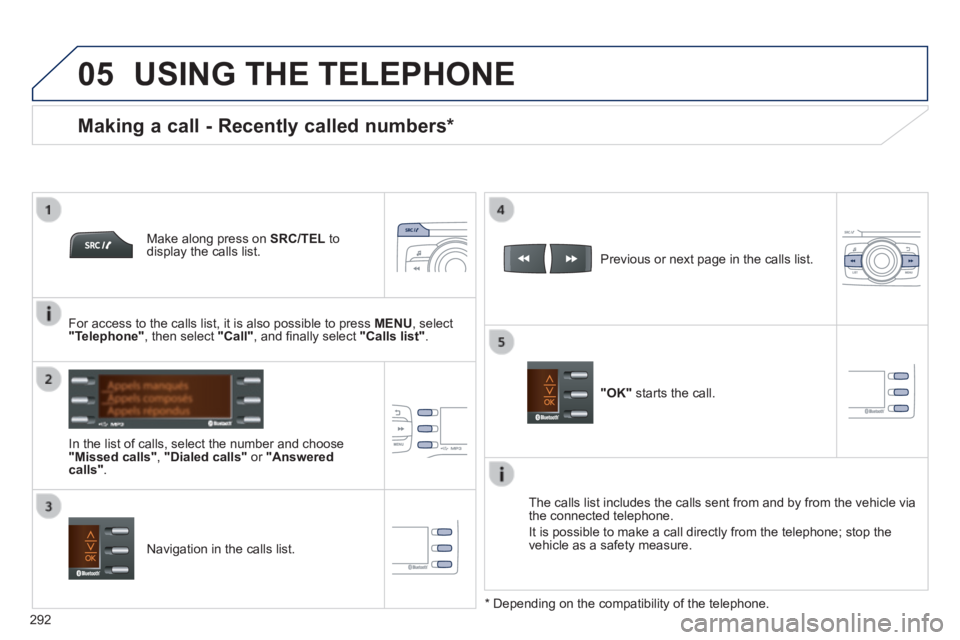
USING THE TELEPHONE
Make along press on SRC/TEL to display the calls list.
In the list of calls, select the number and choose "Missed calls", "Dialed calls" or "Answered calls" .
Previous or next page in the calls list.
"OK" starts the call.
Making a call - Recently called numbers *
Navigation in the calls list.
The calls list includes the calls sent from and by from the vehicle via \
the connected telephone.
It is possible to make a call directly from the telephone; stop the vehicle as a safety measure.
* Depending on the compatibility of the telephone.
For access to the calls list, it is also possible to press MENU , select "Telephone" , then select "Call" , and fi nally select "Calls list".
Page 306 of 336
01 FIRST STEPS
304
Selection of source:
FM1, FM2, AM, CD, AUX.
Adjust audio settings:
sound ambience, treble, bass, loudness, left/right balance, automatic volume.
Abandon the current operation.
Go up one level(menu or folder).
Automatic search for a lower/higher radio frequency.
Select the previous/next CD track.
Navigation in a list.
Press and hold: fast forward or backward. Eject CD.
Manual search step by step for a lower/higher radio frequency.
Select the previous/next MP3 track.
Navigation in a list.
Open the main menu. Select a preset radio station.
Radio: long press: preset a radio station.
Display the list of stations received, the CD/MP3 tracks or MP3 folders.
Long press: update the list of stations received.
On / Off and volume adjustment.