Page 358 of 400
01
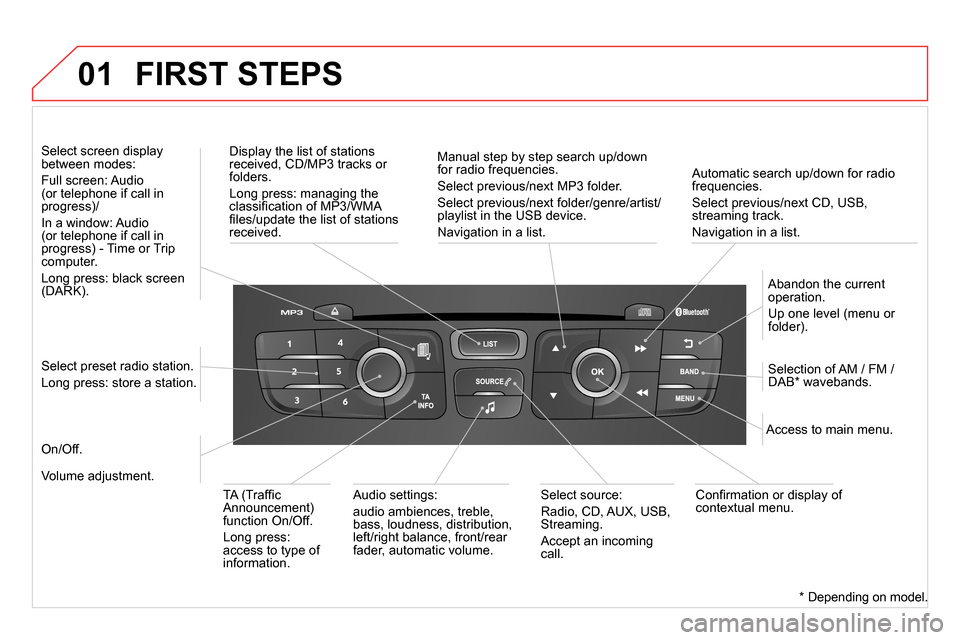
Automatic search up/down for radio
frequencies.
Select previous/next CD, USB,
streaming track.
Navigation in a list.
Display the list of stations
received, CD/MP3 tracks or
folders.
Long press: managing the
classifi cation of MP3/WMA
fi les/update the list of stations
received.
Abandon the current
operation.
Up one level (menu or
folder).
On/Off.
Selection of AM / FM /
DAB * wavebands.
Select preset radio station.
Long press: store a station.
Select screen display
between modes:
Full screen: Audio
(or telephone if call in
progress)/
In a window: Audio
(or telephone if call in
progress) - Time or Trip
computer.
Long press: black screen
(DARK).
Audio settings:
audio ambiences, treble,
bass, loudness, distribution,
left/right balance, front/rear
fader, automatic volume.
Access to main menu.
TA (Traffi c
Announcement)
function On/Off.
Long press:
access to type of
information.
Select source:
Radio, CD, AUX, USB,
Streaming.
Accept an incoming
call.
Confi rmation or display of
contextual menu.
Manual step by step search up/down
for radio frequencies.
Select previous/next MP3 folder.
Select previous/next folder/genre/artist/
playlist in the USB device.
Navigation in a list.
Volume adjustment.
FIRST STEPS
*
Depending on model.
Page 359 of 400
357
02 STEERING MOUNTED CONTROLS
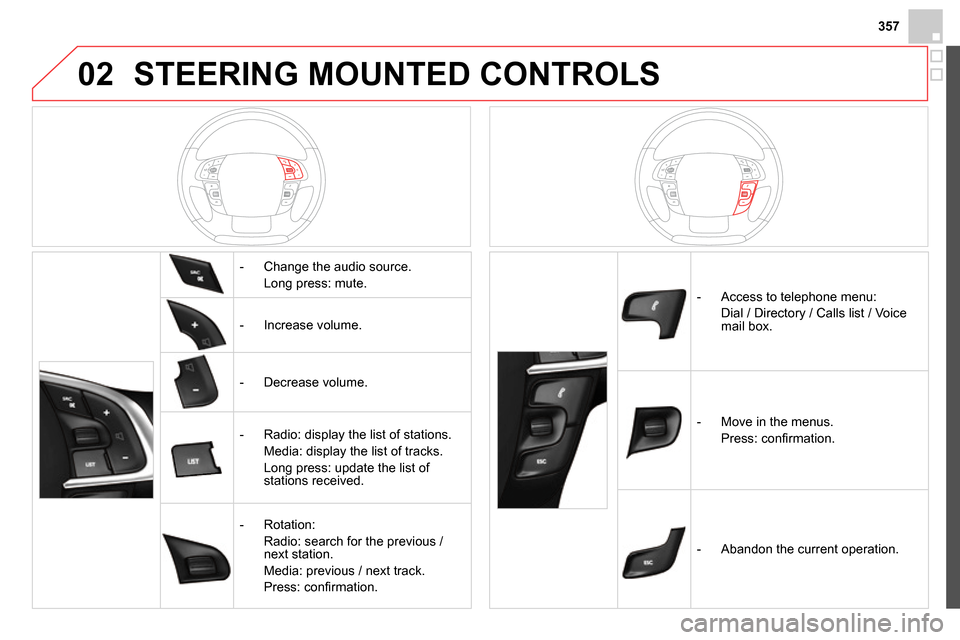
- Change the audio source.
Long press: mute.
- Increase volume.
- Decrease volume.
- Radio: display the list of stations.
Media: display the list of tracks.
Long press: update the list of
stations received.
- Rotation:
Radio: search for the previous /
next station.
Media: previous / next track.
Press: confi rmation.
- Access to telephone menu:
Dial / Directory / Calls list / Voice
mail box.
- Move in the menus.
Press: confi rmation.
- Abandon the current operation.
Page 360 of 400
03
" Multimedia
": Media parameters,
Radio parameters.
" Trip computer
": Warning log.
For a detailed global view of the
menus available, refer to "Screen
menu map" section.
" Bluetooth connection
":
Connections management,
Search for a device.
" Telephone
": Call, Directory
management, Telephone
management, Hang up.
MAIN MENU
" Personalisation-confi guration
": Defi ne
the vehicle parameters, Choice of language,
Display confi guration, Choice of units, Date
and time adjustment.
Screen C
Page 371 of 400
369
04 AUDIO
Streaming - Playing audio files via
Bluetooth
Depending on the compatibility of the phone
Pair/connect the telephone: see the "USING
THE TELEPHONE" section.
Streaming allows music fi les on a telephone to be heard via the
vehicle's speakers.
The telephone must support the appropriate bluetooth profi les
(Profi les A2DP / AVRCP).
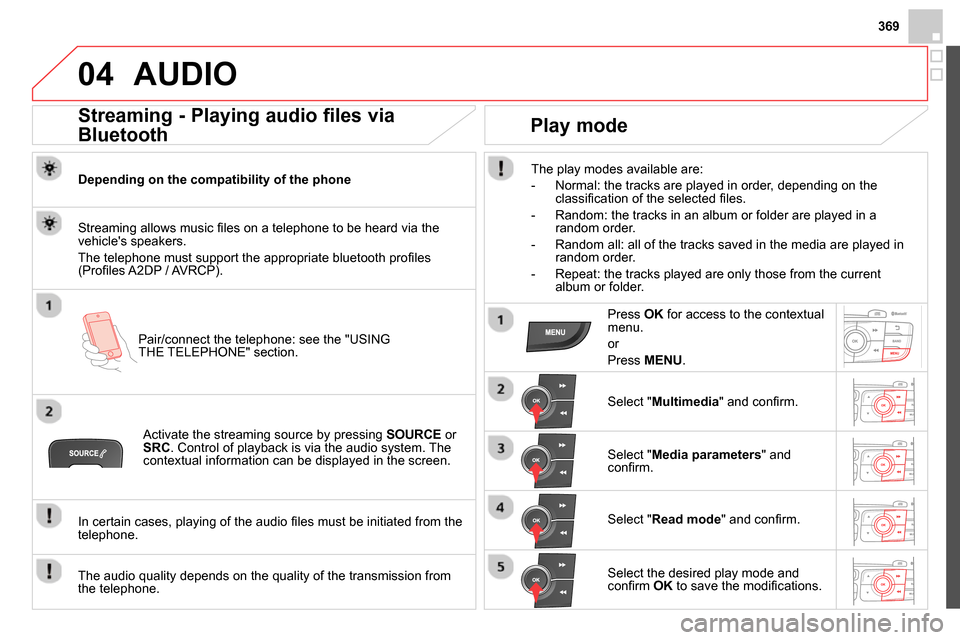
Activate the streaming source by pressing SOURCE
or
SRC
. Control of playback is via the audio system. The
contextual information can be displayed in the screen.
In certain cases, playing of the audio fi les must be initiated from the
telephone.
The audio quality depends on the quality of the transmission from
the telephone.
Play mode
The play modes available are:
- Normal: the tracks are played in order, depending on the
classifi cation of the selected fi les.
- Random: the tracks in an album or folder are played in a
random order.
- Random all: all of the tracks saved in the media are played in
random order.
- Repeat: the tracks played are only those from the current
album or folder.
Press OK
for access to the contextual
menu.
or
Press MENU
.
Select " Multimedia
" and confi rm.
Select " Media parameters
" and
confi rm.
Select " Read mode
" and confi rm.
Select the desired play mode and
confi rm OK
to save the modifi cations.
Page 372 of 400
05 USING THE TELEPHONE
Pairing a telephone
First connection
The services offered depend on the network, the SIM card and the compatibility of the Bluetooth telephone used.
Consult your telephone's manual and your operator to fi nd out which services are available to you.
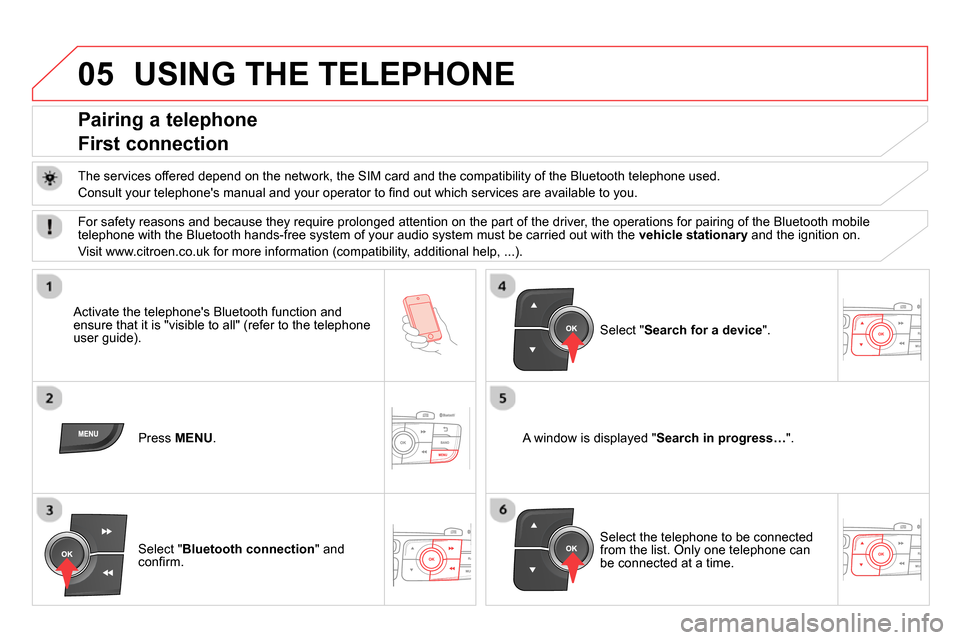
Activate the telephone's Bluetooth function and
ensure that it is "visible to all" (refer to the telephone
user guide).
Press MENU
.
A window is displayed " Search in progress…
".
Select the telephone to be connected
from the list. Only one telephone can
be connected at a time.
Select " Search for a device
".
For safety reasons and because they require prolonged attention on the part of the driver, the operations for pairing of the Bluetooth mobile
telephone with the Bluetooth hands-free system of your audio system must be carried out with the vehicle stationary
and the ignition on.
Visit www.citroen.co.uk for more information (compatibility, additional help, ...).
Select " Bluetooth connection
" and
confi rm.
Page 373 of 400
371
05
Saisir code authentification
01
OK Del23456789 _
USING THE TELEPHONE
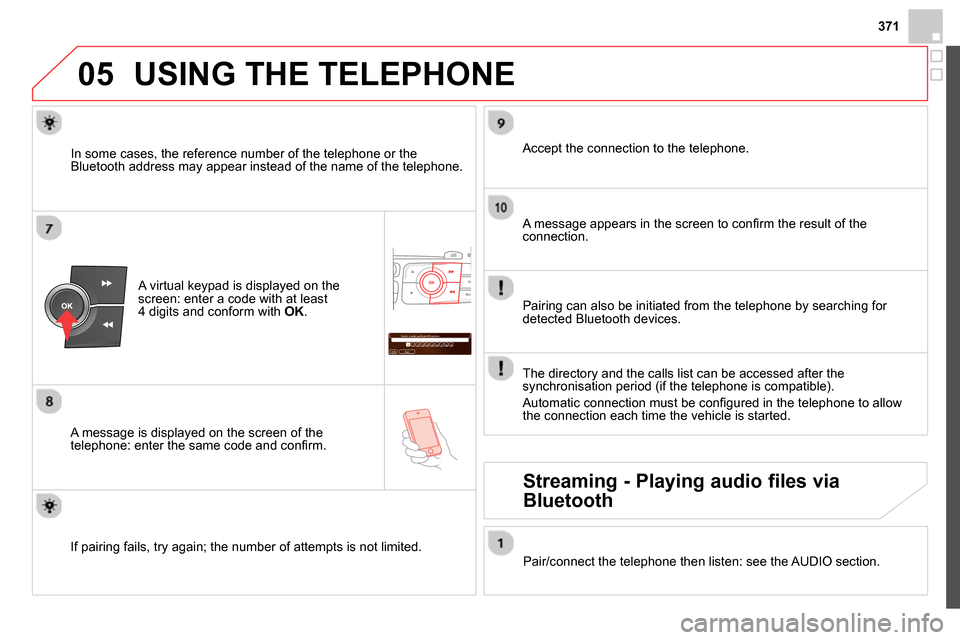
A virtual keypad is displayed on the
screen: enter a code with at least
4 digits and conform with OK
.
A message is displayed on the screen of the
telephone: enter the same code and confi rm.
A message appears in the screen to confi rm the result of the
connection.
Pairing can also be initiated from the telephone by searching for
detected Bluetooth devices.
Accept the connection to the telephone.
If pairing fails, try again; the number of attempts is not limited.
The directory and the calls list can be accessed after the
synchronisation period (if the telephone is compatible).
Automatic connection must be confi gured in the telephone to allow
the connection each time the vehicle is started.
In some cases, the reference number of the telephone or the
Bluetooth address may appear instead of the name of the telephone.
Pair/connect the telephone then listen: see the AUDIO section.
Streaming - Playing audio files via
Bluetooth
Page 374 of 400
05 USING THE TELEPHONE
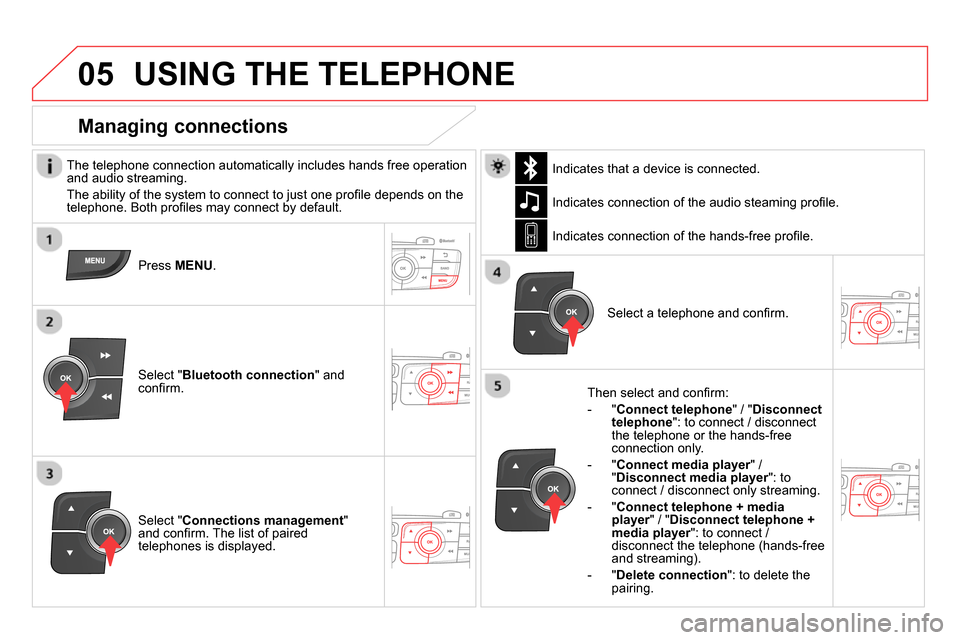
The telephone connection automatically includes hands free operation
and audio streaming.
The ability of the system to connect to just one profi le depends on the
telephone. Both profi les may connect by default.
Press MENU
.
Select " Bluetooth connection
" and
confi rm. Indicates connection of the audio steaming profi le.
Managing connections
Select " Connections management
"
and confi rm. The list of paired
telephones is displayed.
Select a telephone and confi rm. Indicates connection of the hands-free profi le.
Then select and confi rm:
- " Connect telephone
" / " Disconnect
telephone
": to connect / disconnect
the telephone or the hands-free
connection only.
- " Connect media player
" /
" Disconnect media player
": to
connect / disconnect only streaming.
- " Connect telephone + media
player
" / " Disconnect telephone +
media player
": to connect /
disconnect the telephone (hands-free
and streaming).
- " Delete connection
": to delete the
pairing.
Indicates that a device is connected.
Page 375 of 400
373
05 USING THE TELEPHONE
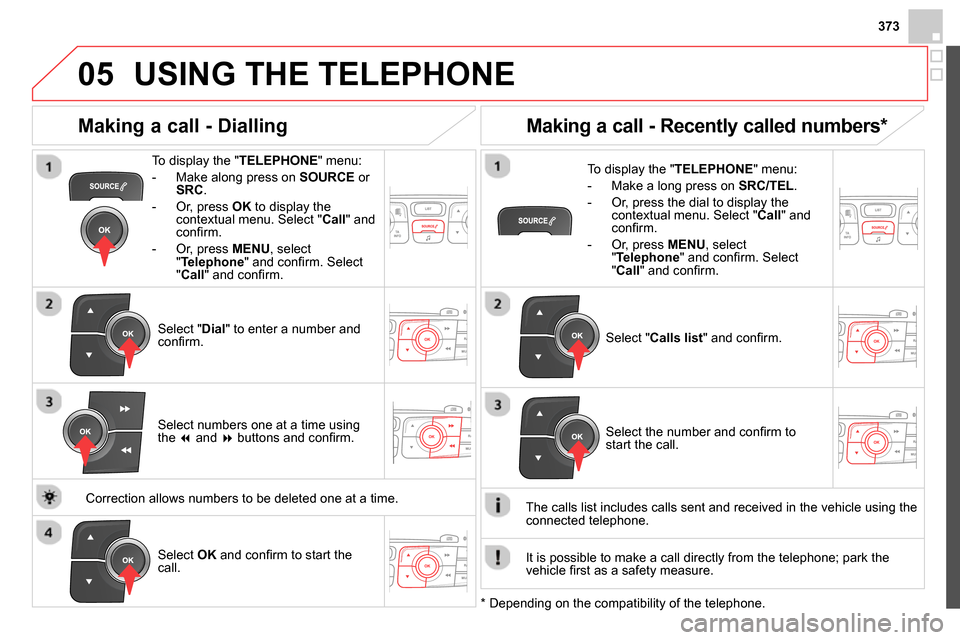
To display the " TELEPHONE
" menu:
- Make along press on SOURCE
or
SRC
.
- Or, press OK
to display the
contextual menu. Select " Call
" and
confi rm.
- Or, press MENU
, select
" Telephone
" and confi rm. Select
" Call
" and confi rm.
Select " Dial
" to enter a number and
confi rm.
To display the " TELEPHONE
" menu:
- Make a long press on SRC/TEL
.
- Or, press the dial to display the
contextual menu. Select " Call
" and
confi rm.
- Or, press MENU
, select
" Telephone
" and confi rm. Select
" Call
" and confi rm.
Select OK
and confi rm to start the
call.
Select " Calls list
" and confi rm.
Making a call - Dialling
Select numbers one at a time using
the
and
buttons and confi rm.
Making a call - Recently called numbers *
Select the number and confi rm to
start the call.
The calls list includes calls sent and received in the vehicle using the
connected telephone.
*
Depending on the compatibility of the telephone.
Correction allows numbers to be deleted one at a time.
It is possible to make a call directly from the telephone; park the
vehicle fi rst as a safety measure.