2012 VOLVO V60 ESP
[x] Cancel search: ESPPage 235 of 400

05 Infotainment system
Radio
05
* Option/accessory, for more information, see Introduction.233
Radio textSome RDS stations transmit information on
programme content, artists, etc. This informa-
tion can be shown on the TV screen.
–
Activate/deactivate in FM mode under FM
menu
Show radio text.
Automatic frequency update – AFThe function selects the strongest transmitter
for the set station. In order to find a strong
transmitter the function may, in exceptional
cases, need to search the entire FM wave-
length.
–
Activate/deactivate in FM mode under FM
menu
Advanced settings
Alternative frequency.
Regional radio programmes – REGThis function causes the radio to continue with
a regional transmitter even if its signal strength
is low. The symbol
REG shows that the func-
tion is active.
–
Activate/deactivate in FM mode under FM
menu
Advanced settingsREG.
Resetting RDS functionsAll radio settings can be reset to the original
factory settings.–The reset is carried out in FM mode under
FM menu
Advanced settings
Reset all FM settings.
Volume control, programme typesThe interrupting programme types, e.g.NEWS or TP, are heard at the volume selected
for each respective programme type. If the vol-
ume level is adjusted during the programme
interruption, the new level is saved until the
next programme interruption.
Radio system - DAB*
GeneralDAB (Digital Audio Broadcasting) is a digital
broadcasting system for radio.
NOTE
This system does not support DAB+.
NOTE
Coverage for DAB is not available in all loca-
tions. If there is no coverage then the mes-
sage
No reception is shown in the display
screen.
Service and Ensemble
•Service - Channel, radio channel (only
audio services are supported by the sys-
tem).
•Ensemble - A collection of radio channels
on the same frequency.
Storing channel groups (Ensemble learn)When the vehicle is moved to a new broad-
casting area, programming of existing channel
groups in the area may be necessary.
Programming of channel groups creates an
updated list of all available channel groups.
The list is not updated automatically.
Programming is carried out in the menu system
in DAB mode under DAB menu
Ensemble
learn. Programming can also take place as fol-
lows:
1.
Turn TUNE one step in either direction.
>
Ensemble learn is shown in the list of
available channel groups.
2.
Press OK/MENU.
> New programming is started.
Programming can be cancelled with EXIT.
If can take up to a minute to program a channel
group if both
Band III and LBand are selected.
For more information on wavelength, see
page 235.
ProCarManuals.com
Page 236 of 400

05 Infotainment system
Radio
05
234
Navigation in channel group list
(Ensemble)
To navigate in and access the channel group
list turn TUNE. The name of the Ensemble is
shown in the upper part of the TV screen. When
scrolling to the new Ensemble the name
changes to the new one. A thick grey line sep-
arates the two channel groups from each other.
•Service - Shows channels irrespective of
the channel group to which they are allo-
cated. The list can also be filtered using the
selection of programme type (
PTY
filtering), see below.
ScanningThe function automatically searches the cur-
rent wavelength for strong stations. When a
station is found, it is played for approx. 8 sec-
onds before scanning is resumed. When a sta-
tion is playing back it is saved as a preset in the
usual way. For more information on presets,
see "Preset" below.
–
Go in DAB mode to DAB menu
Scan to
start scanning.
NOTE
Scanning stops if a station is saved.
Scanning can also be selected in DAB-PTY
mode. In which case only channels of the pre-
selected programme type are played.
Programme type (PTY)Various types of radio programmes can be
selected using the programme type function.
There are a number of different programme
types which also include different programme
categories. After selecting a programme type,
navigation only takes place within the channels
that are broadcasting that type.
Programme type is selected in DAB mode
under DAB menu
PTY filtering. Exit this
mode as follows:
–
Press EXIT.
> An indicator is shown in the TV screen
when PTY is activated.
In certain cases DAB radio will exit PTY mode
when DAB to DAB linking (see below) is imple-
mented.
Preset10 station presets can be stored per wave-
length. DAB has 2 memories for presets:
DAB1 and DAB2. Storing of presets is per-
formed in the usual way, for more information
see page 230. The stored presets are selected
using the preset buttons.A preset contains one channel but no sub-
channels. If a subchannel is being played and
a preset is saved then only the main channel is
registered. This is because subchannels are
temporary. At the next attempt to retrieve the
preset, the channel which contained the sub-
channel will be played. The preset is not
dependent on the channel list.
A list of pre-selected channels can be shown
4
in the TV screen. The function is activated/
deactivated in DAB mode under DAB menu
Show presets.
NOTE
The audio system's DAB system does not
support all functions available in the DAB
standard.
Radio textSome radio stations transmit information on
programme content, artists, etc. This informa-
tion is shown on the TV screen.
The function is deactivated/activated in DAB
mode under DAB menu
Show radio text.
4Only applies to High Performance Multimedia and Premium Sound Multimedia
ProCarManuals.com
Page 246 of 400

05 Infotainment system
Media BluetoothŸŸ*
05
244* Option/accessory, for more information, see Introduction.
NOTE
If the car is equipped with a steering wheel
keypad* and/or remote control* then in
many cases these can be used instead of
the buttons in the centre console. For a
description of the buttons in the steering
wheel, see page 224. For a description of
the remote control, see page 249.
MenusThe menus inMEDIA are controlled from the
centre console and the steering wheel key-
pad*. For general information on menu naviga-
tion and menu structures, see page 263.
Pair and connect external deviceThe connection of an external device takes
place in different ways depending on whether
or not it has been previously paired. A maxi-
mum of 10 external devices can be paired.
Pairing takes place once per external device.
To connect a device for the first time, follow the
instructions below:
1.
Repeatedly press on MEDIA until
Bluetooth is shown, release and wait a
second or press OK/MENU.
2.
Press OK/MENU.
3.
When
Add device is shown, press OK/
MENU.4. Check that the external device is searcha-
ble/visible via Bluetooth
Ÿ, see the manual
for the external device.
5.
Press OK/MENU.
> The infotainment system searches for
external devices in the vicinity. The
search may take a little while. The devi-
ces detected are specified with their
respective Bluetooth
Ÿ name in the cen-
tre console TV screen.
6. Select the external device you want to pair
with and press OK/MENU.
7. Enter the series of numbers that is shown
in the centre console TV screen via the
external device's keypad and press the
external device's button to confirm the
selection.
The external device is paired and connected
automatically to the infotainment system.
Change audio file by pressing
/ on the
centre console or the steering wheel keypad*.
Automatic connection
When the BluetoothŸ function is active and the
last external device connected is in range it is
connected automatically. When the infotain-
ment system searches for the last device con-
nected its name is shown in the TV screen. To
connect to another device, press EXIT. Con-nect a new external device, see "Change to
another external device" below.
Change to another external deviceIt is possible to change a connected device
with another device if there are several devices
in the car. However, the device must first have
been paired, see "Pair and connect external
device" above. To change to another device:
1.
Repeatedly press on MEDIA until
Bluetooth is shown, release and wait a
second or press OK/MENU.
2. Check that the external device is searcha-
ble/visible via Bluetooth
Ÿ, see the manual
for the external device.
3.
Press OK/MENU.
4.
Turn TUNE to
Change device, and con-
firm with OK/MENU.
> After a while, the external device's name
is shown in the TV screen. If several
external devices have been paired then
these are also shown.
5. Select the device to be connected by turn-
ing TUNE and confirm with OK/MENU.
> Connection of the external device takes
place.
Change audio file by pressing
/ on the
centre console or the steering wheel keypad*.
ProCarManuals.com
Page 251 of 400
05 Infotainment system
Remote control*
05
* Option/accessory, for more information, see Introduction.249 Remote control*
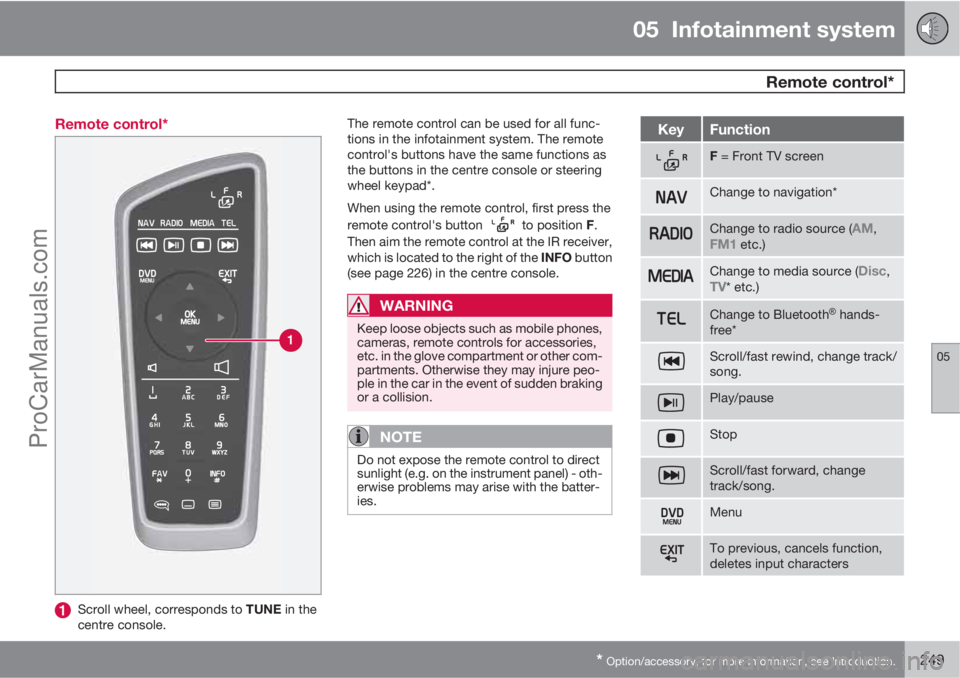
Scroll wheel, corresponds to TUNE in the
centre console.The remote control can be used for all func-
tions in the infotainment system. The remote
control's buttons have the same functions as
the buttons in the centre console or steering
wheel keypad*.
When using the remote control, first press the
remote control's button
to position F.
Then aim the remote control at the IR receiver,
which is located to the right of the INFO button
(see page 226) in the centre console.
WARNING
Keep loose objects such as mobile phones,
cameras, remote controls for accessories,
etc. in the glove compartment or other com-
partments. Otherwise they may injure peo-
ple in the car in the event of sudden braking
or a collision.
NOTE
Do not expose the remote control to direct
sunlight (e.g. on the instrument panel) - oth-
erwise problems may arise with the batter-
ies.
KeyFunction
F = Front TV screen
Change to navigation*
Change to radio source (AM,FM1 etc.)
Change to media source (Disc,TV* etc.)
Change to BluetoothŸ hands-
free*
Scroll/fast rewind, change track/
song.
Play/pause
Stop
Scroll/fast forward, change
track/song.
Menu
To previous, cancels function,
deletes input characters
ProCarManuals.com
Page 253 of 400

05 Infotainment system
BluetoothŸŸ handsfree*
05
* Option/accessory, for more information, see Introduction.251 General
System overview.
Mobile phone
Microphone
Steering wheel keypad
Centre console control panel
BluetoothŸ1
A mobile phone equipped with BluetoothŸ can
be connected wirelessly to the Infotainment
system. The infotainment system then works
handsfree, with the option to control a range of
the mobile phone's functions remotely. The
microphone used is located by the driver's sun
visor (2). The mobile phone can be operated byits own keys irrespective of whether or not it is
connected.
NOTE
Only a selection of mobile phones are fully
compatible with the handsfree function.
Volvo recommends that you seek assis-
tance from an authorised Volvo dealer or
visit www.volvocars.com for information on
compatible phones.
MenusThe menus in TEL are controlled from the cen-
tre console and the steering wheel keypad*.
For general information on menu navigation
and menu structures, see page 263.
Phone functions, controls overview
Centre console control panel.
Number and letter buttons
TEL - Activate/Disconnect
TUNE - Turn in normal view to the right to
access the phone book, and to the left for
the call register for all calls; also used for
navigation among the options on the TV
screen.
Accept incoming calls, confirm your selec-
tion or go to the Phone menu by pressing
OK/MENU.
EXIT - Cancels/rejects phone calls, deletes
input characters, leads up in the menu sys-
tem and cancels the current function.
1Applies to High Performance, High Performance Multimedia and Premium Sound Multimedia.
ProCarManuals.com
Page 254 of 400

05 Infotainment system
BluetoothŸŸ handsfree*
05
252* Option/accessory, for more information, see Introduction.
NOTE
If the car is equipped with a steering wheel
keypad* and/or remote control* then in
many cases these can be used instead of
the buttons in the centre console. For a
description of the buttons in the steering
wheel, see page 224. For a description of
the remote control, see page 249.
Remember
Activate/deactivateA short press on TEL activates the handsfree
function. The
symbol indicates that the
handsfree function is active.
Connect mobile phoneA mobile phone is connected in different ways
depending on whether or not it has been con-
nected previously. To connect a mobile phone
for the first time, follow the instructions below:
There are two options for connecting a mobile
phone, either via the car's menu system or via
the mobile phone's menu system. If one option
does not work then try with the other.
Alternative 1 - via the car's menu system
1. Make the mobile phone detectable/visible
via Bluetooth
Ÿ, see the mobile phone's
manual or www.volvocars.com.2. Activate the vehicle's handsfree function
by pressing TEL. Continue by pressing
OK/MENU.
3.
Select,
Change phone, press OK/
MENU.
>
The menu option
Add phone is shown
on the TV screen. If one or more mobile
phones have already been paired then
these are also shown. Press OK/
MENU.
4. Check that the mobile phone's
Bluetooth
Ÿ function is switched on and
press OK/MENU.
> The audio system searches for mobile
phones in the vicinity. The search takes
approximately 30 seconds. The mobile
phones detected are specified with their
respective Bluetooth
Ÿ name in the TV
screen. The handsfree function's
Bluetooth
Ÿ name is shown in the mobile
phone as My Volvo Car.
5. Choose one of the mobile phones in the
centre console TV screen.
6. Enter the series of numbers that is shown
in the centre console TV screen via the
mobile phone's keypad and press the
mobile phone's button to confirm the
selection.Alternative 2 - via the mobile phone's menu
system
1. Activate the handsfree function by press-
ing TEL in the centre console. If there is a
phone connected, disconnect the con-
nected phone.
2. Make the car detectable/visible via
Bluetooth
Ÿ, press OK/MENU and activate
the Phone settings
Discoverable
option.
3. Search with the mobile phone's
Bluetooth
Ÿ function, see the mobile phone
manual.
4.
Select
My Volvo Car in the list of units
detected in your mobile phone.
5. Enter an optional PIN code on your mobile
phone via the mobile phone's keypad
when prompted to enter the PIN code.
Then key in the same PIN code via the car's
keypad.
6.
Select to connect to
My Volvo Car from
the mobile phone.
The mobile phone is paired (registered) and
connects automatically to the audio system.
For more information about how mobile
phones are paired, see page 254.
When the connection is established the mobile
phone's Bluetooth
Ÿ name is shown in the TV
ProCarManuals.com
Page 257 of 400

05 Infotainment system
BluetoothŸŸ handsfree*
05
* Option/accessory, for more information, see Introduction.255
Version information BluetoothŸ
The car's current BluetoothŸ version can be
seen in phone mode under Phone menu
Phone settingsBluetooth software
version in car.
Phone book
There are two phone books. These are merged
into one in the car and are displayed as a single
phone book in the car.
•The car downloads the mobile phone's
phone book and only displays this phone
book when the mobile phone from which
this phone book was downloaded is con-
nected.
•The car also has a built-in phone book. This
contains all the contacts stored in the car
irrespective of which phone was con-
nected when saving them. These contacts
are visible for all users, regardless of the
mobile phone that is connected to the car.
If a contact is saved in the car then the
symbol
is shown in front of the con-
tact in the phone book.
NOTE
Changes made from the car to a record in
the mobile phone's telephone book will
result in a new record in the car's telephone
book, i.e. changes will not be saved to the
phone. From the car, this will now look like
you have double records, with different
icons. Note also that when a shortcut num-
ber is saved or a change to a contact is
made, this will result in a new record in the
car's phone book.
All use of the phone book requires that the
symbol appears at the top of the TV
screen and that the handsfree function is in
phone mode.
The audio system stores a copy of the phone
book from each paired mobile phone. The
phone book can be copied automatically to the
audio system during each connection.
–Activate/deactivate the function in phone
mode under Phone menu
Phone
settings
Phonebook download.
If the phone book contains a ringing caller's
contact information then this is shown in the TV
screen.
Quick search for contactsIn normal view turn TUNE to the right to obtain
a list of contacts. Turn TUNE to select and
press OK/MENU to call.
Under the name of the contact is the phone
number that is selected by default. If the sym-
bol
appears to the right of the contact then
there are several phone numbers stored for the
contact. Change and dial a different number
than the one that is selected by default by
pressing the button
on the control panel
in the centre console. Then turn TUNE to select
and press OK/MENU to call.
Search in the list of contacts by using the cen-
tre console's keypad to key in the start of the
contact's name (see "Character table keypad
in centre console" for button functions).
The list of contacts can also be accessed from
normal view by pressing and holding the button
on the centre console's keypad with the letter
that the contact searched for starts with. For
example, a long press on the button for 6 gives
instant access to that part of the list where the
contacts with the letter
M are located.
ProCarManuals.com
Page 259 of 400

05 Infotainment system
BluetoothŸŸ handsfree*
05
* Option/accessory, for more information, see Introduction.257
123/ABC
Change between letters and
numbers with OK/MENU.
MoreChange to special characters
with OK/MENU.
Leads to the phone book (3).
Turn TUNE to select a contact,
press OK/MENU to see the
saved numbers and other infor-
mation.
A short press on EXIT deletes an input char-
acter. A long press on EXIT will clear all entered
characters.
By pressing a number key in the centre console
when the text wheel is shown (see illustration
above), a new character list (1) appears in the
TV screen. Continue repeatedly pressing the
number key to the desired letter and then
release. Continue with the next letter and so
on. When a button is depressed the entry is
confirmed when another button is depressed.
To enter a number, hold in the corresponding
number key.
New contact
Entering letters for New contact.
Changing the input mode (see table below)
Input field
New contacts can be added in phone mode
under Phone menu
Phone bookNew
contact.
NOTE
There is no text wheel for High Performance,
so TUNE cannot be used there to input
characters: only the digit and letter buttons
on the control panel in the centre console
can be used for this.
1.
When the Name row is selected, press
OK/MENU to reach the input mode (illus-
tration above).
2.
Turn
4 TUNE to the desired letter, press
OK/MENU to confirm. The number and
letter buttons on the control panel in the
centre console can also be used.
3. Continue with the next letter and so on. The
name entered is shown in the input field (2)
in the TV screen.
4. To change the input mode to numbers,
special characters, change between
uppercase/lowercase letters, etc., turn
TUNE to one of the options (see explana-
tion in the table below) in the list (1) and
then press OK/MENU.
When the name has been fully entered, select
OK in the list on the TV screen (1) and press
OK/MENU. Now continue with the telephone
number in the same way as above.
When the telephone number has been entered,
press OK/MENU and select a telephone num-
ber type (
Mobile, Home, Work or General).
Press OK/MENU to confirm.
When all details have been filled in, select
Save
contact in the menu to save the contact.
4Only applies to High Performance Multimedia and Premium Sound Multimedia.
ProCarManuals.com