2012 VOLVO V60 gearbox
[x] Cancel search: gearboxPage 135 of 400
03 Your driving environment
Parking brake
03
133 General
FunctionA faint electric motor noise can be heard when
the electrical parking brake is being applied.
The noise can also be heard during the auto-
matic function checking of the parking brake.
If the car is stationary when the parking brake
is applied then it only acts on the rear wheels.
If it is applied when the car is moving then the
normal foot brake is used, i.e. the brake acts
on all four wheels. Brake function changes over
to the rear wheels when the car is almost sta-
tionary.
Low battery voltageIf the battery voltage is too low then the parking
brake can neither be released nor applied.
Connect a donor battery if the battery voltage
is too low, see page 116.
Applying the parking brake
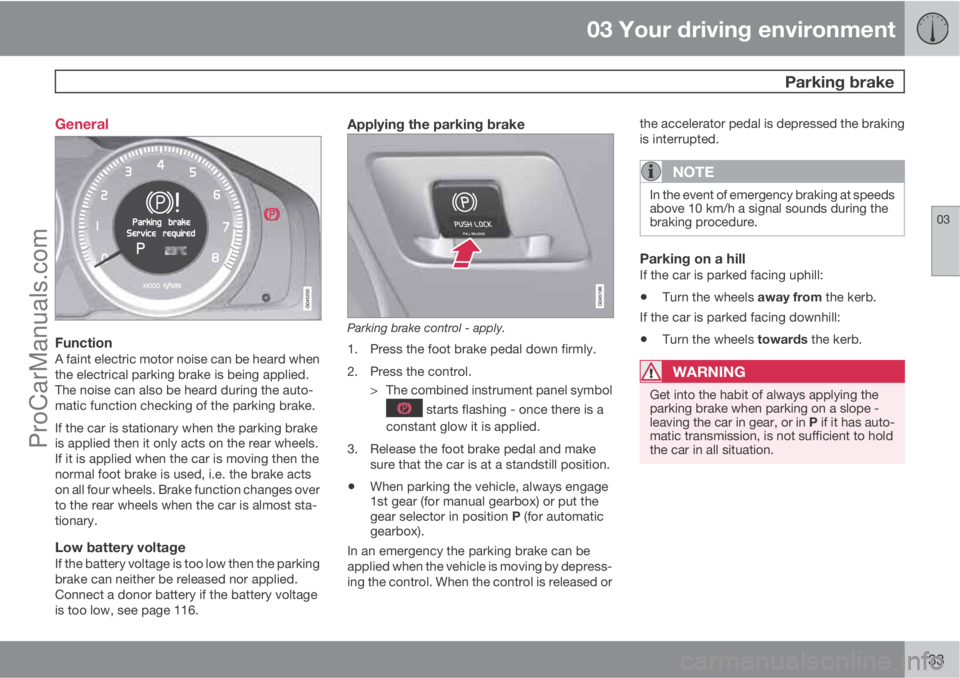
Parking brake control - apply.
1. Press the foot brake pedal down firmly.
2. Press the control.
> The combined instrument panel symbol
starts flashing - once there is a
constant glow it is applied.
3. Release the foot brake pedal and make
sure that the car is at a standstill position.
•When parking the vehicle, always engage
1st gear (for manual gearbox) or put the
gear selector in position P (for automatic
gearbox).
In an emergency the parking brake can be
applied when the vehicle is moving by depress-
ing the control. When the control is released orthe accelerator pedal is depressed the braking
is interrupted.
NOTE
In the event of emergency braking at speeds
above 10 km/h a signal sounds during the
braking procedure.
Parking on a hillIf the car is parked facing uphill:
•Turn the wheels away from the kerb.
If the car is parked facing downhill:
•Turn the wheels towards the kerb.
WARNING
Get into the habit of always applying the
parking brake when parking on a slope -
leaving the car in gear, or in P if it has auto-
matic transmission, is not sufficient to hold
the car in all situation.
ProCarManuals.com
Page 136 of 400

03 Your driving environment
Parking brake
03
134
Disengaging the parking brake
Parking brake control - release.
Cars with manual gearbox
Releasing manually
1. Insert the remote control key in the ignition
switch.1
2. Press the foot brake pedal down firmly.
3. Pull the control.
> The parking brake releases and the
combined instrument panel symbol
goes out.
NOTE
The parking brake can also be released
manually by depressing the clutch pedal
instead of the brake pedal. Volvo recom-
mends the use of the brake pedal.
Releasing automatically1. Start the engine.
2. Engage 1st gear or reverse gear.
3. Ease up the clutch and depress the accel-
erator.
> The parking brake releases and the
combined instrument panel symbol
goes out.
Cars with automatic gearbox
Releasing manually
1. Insert the remote control key in the ignition
switch1.
2. Press the foot brake pedal down firmly.
3. Pull the control.
> The parking brake releases and the
combined instrument panel symbol
goes out.
Releasing automatically1. Put the seatbelt on.
2. Start the engine.
3. Press the foot brake pedal down firmly.
4.
Move the gear selector to position D or R
and depress the accelerator.
> The parking brake releases and the
combined instrument panel symbol
goes out.
NOTE
For safety reasons, the parking brake is only
released automatically if the engine is run-
ning and the driver is wearing a seatbelt. The
parking brake is released immediately on
cars with automatic gearbox when the
accelerator pedal is depressed and the gear
selector is in position D or R.
Heavy load uphillA heavy load, such as a trailer, can cause the
car to roll backward when the parking brake is
released automatically on a steep incline.
Avoid this by depressing the control while driv-
ing off. Release the control when the engine
achieves traction.
1For a car with the Keyless system: Press START/STOP ENGINE.
ProCarManuals.com
Page 138 of 400
03 Your driving environment
Parking brake
03
136
SymbolMessageMeaning/Action
Parking brake not appliedA fault is preventing the parking brake from being applied - Try to release and apply the brake.
If the fault persists after a few attempts: Visit a workshop - an authorised Volvo workshop is recom-
mended.
The message is also illuminated on cars with manual gearbox when the car is driven at low speed
with the door open in order to alert the driver that the parking brake may have been unintentionally
disengaged.
Parking brake Service
requiredA fault has arisen - Try to apply and release the brake.
If the fault persists after a few attempts: Visit a workshop - an authorised Volvo workshop is recom-
mended.
•If the car has to be parked before the fault
has been rectified then the wheels must be
turned as if parking on a hill and 1st gear
engaged (manual gearbox) or the gear
selector must be in position P (automatic
gearbox).
ProCarManuals.com
Page 145 of 400

04 Comfort and driving pleasure
Menus and messages
04
143
NOTE
If a warning message appears while you are
using the trip computer, the message must
be read (press READ) before the previous
activity can be resumed.
MessageSpecification
Stop safelyAStop and switch off the
engine. Serious risk of
damage - consult a
workshop
B.
Stop engineAStop and switch off the
engine. Serious risk of
damage - consult a
workshop
B.
Service urgentAContact a workshopB to
check the car immedi-
ately.
Service
requiredAContact a workshopB to
check the car as soon
as possible.
See manualARead the owner's man-
ual.
Book time for
maintenanceTime to book regular
service - contact a
workshop
B.
MessageSpecification
Time for regular
maintenanceTime for regular service
- contact a workshopB.
The timing is deter-
mined by the number of
kilometres driven, num-
ber of months since the
last service, engine run-
ning time and oil grade.
Maintenance
overdueIf the service intervals
are not followed then
the warranty does not
cover any damaged
parts - contact a work-
shop
B.
Transmission
oil Change nee-
dedContact a workshopB to
check the car as soon
as possible.
Transmission
performance
lowThe gearbox cannot
handle full capacity.
Drive carefully until the
message clears
C.
If shown repeatedly -
contact a workshop
B.
MessageSpecification
Transmission
hot Reduce
speedDrive more smoothly or
stop the car in a safe
manner. Disengage the
gear and run the engine
at idling speed until the
message clears
C.
Transmission
hot Stop safelyCritical fault. Stop the
car immediately in a
safe manner and con-
tact a workshop
B.
Temporarily
OFFAA function has been
temporarily switched
off and is reset auto-
matically while driving
or after starting again.
Low battery
Power save
modeThe audio system is
switched off to save
energy. Charge the bat-
tery.
APart of message, shown together with information on where
the problem has arisen.
BAn authorised Volvo workshop is recommended.CFor more messages concerning automatic transmission, see
page 121.
ProCarManuals.com
Page 173 of 400

04 Comfort and driving pleasure
Cruise control*
04
* Option/accessory, for more information, see Introduction.171 Operation
Steering wheel keypad and display.
Cruise control - On/Off.
Standby mode ceases and the stored
speed is resumed.
Standby mode
Activate and adjust the speed.
Selected speed (in brackets = Standby
mode).
Activating and setting the speedSwitch on the cruise control with one press on
the steering wheel button
- the symbol
is illuminated in the display (5) and the brackets
around (---) km/h show that the cruise control
is set in standby mode.The cruise control is then activated with
or
, after which the current speed is stored in
the memory - the display text
(---) km/hchanges to show the selected speed, e.g. 100
km/h.
NOTE
Cruise control cannot be engaged at
speeds below 30 km/h.
Changing the speedIn active mode the speed is adjusted with long
or short presses on
or - the last press is
stored in the memory.
A temporary increase in speed with the accel-
erator pedal, e.g. during overtaking, does not
affect the cruise control setting - the car returns
to the set speed when the accelerator pedal is
released.
NOTE
If any cruise control button is held
depressed for more than approx. 1 minute
then cruise control is disengaged. The
engine must be switched off in order to reset
cruise control.
Temporary deactivation - standby mode
Press to temporarily disengage the cruise
control and set it in standby mode - set speed
is shown in brackets in the display (5), e.g.
(100) km/h.
Automatic standby modeCruise control is temporarily disengaged and
set in standby mode if:
•wheels lose traction
•the foot brake is used
•speed falls below approx. 30 km/h
•the clutch pedal is depressed
•the gear selector is moved to neutral posi-
tion (automatic gearbox)
•the driver maintains a speed higher than
the set speed for longer than 1 minute.
The driver must then regulate the speed.
Resume set speedCruise control in standby mode is re-activated
with one press on the steering wheel button
- the speed is then set to the last stored
speed.
NOTE
A significant increase in speed may arise
after the speed has been resumed with .
ProCarManuals.com
Page 177 of 400

04 Comfort and driving pleasure
Adaptive cruise control*
04
* Option/accessory, for more information, see Introduction.175 General information on ACC
The adaptive cruise control (ACC – Adaptive
Cruise Control) helps the driver maintain a safe
distance from the vehicle ahead. The cruise
control provides a more relaxing driving expe-
rience on long journeys on motorways and long
straight main roads in smooth traffic flows.
The driver sets the desired speed and time
interval to the car in front. When the radar
detector detects a slower vehicle in front of the
car, the speed is automatically adapted to that.
When the road is clear again the car returns to
the selected speed.
If the adaptive cruise control is switched off or
set to the standby mode and the car comes too
close to a vehicle in front, then the driver is
warned by Distance Warning (see page 185)
about the short distance.WARNING
The driver must always be observant with
regard to the traffic conditions and intervene
when the adaptive cruise control is not
maintaining a suitable speed or suitable dis-
tance.
The adaptive cruise control cannot handle
all traffic, weather and road conditions.
Read the whole of this section for informa-
tion on the limitations of the adaptive cruise
control. The driver must be familiar with this
information before using the adaptive cruise
control.
The driver always bears responsibility for
maintaining the correct distance and speed,
even when the adaptive cruise control is
being used.
IMPORTANT
Maintenance of adaptive cruise control
components must only be performed at a
workshop - an authorised Volvo workshop
is recommended.
Automatic gearboxCars with automatic gearbox have enhanced
functionality with the adaptive cruise control's
Queue Assistant, see page 179.
Function
Function overview1.
Warning lamp, braking by driver required
Steering wheel keypad
Radar sensor
Adaptive cruise control consists of a cruise
control system and a coordinated spacing sys-
tem.
1NOTE: The illustration is schematic - details may vary depending on car model.
ProCarManuals.com
Page 178 of 400

04 Comfort and driving pleasure
Adaptive cruise control*
04
176* Option/accessory, for more information, see Introduction.
WARNING
Adaptive cruise control is not a collision
avoidance system. The driver must inter-
vene if the system does not detect a vehicle
in front.
The adaptive cruise control does not brake
for humans or animals, and not for small
vehicles such as bicycles and motorcycles.
Nor for oncoming, slow or stationary vehi-
cles and objects.
Do not use the adaptive cruise control, for
example, in city traffic, in dense traffic, at
junctions, on slippery surfaces, with a lot of
water or slush on the road, in heavy rain/
snow, in poor visibility, on winding roads or
on slip roads.
The distance to the vehicle ahead is mainly
measured by a radar sensor. Cruise control
regulates the speed with acceleration and
braking. It is normal for the brakes to emit a low
sound when they are being used by cruise con-
trol.
WARNING
The brake pedal moves when the cruise
control brakes. Do not rest your foot under
the brake pedal as it could become trapped.
The adaptive cruise control aims to follow the
vehicle ahead in the same lane at a time interval
set by the driver. If the radar sensor cannot see
any vehicle in front then the car will instead
maintain the cruise control's set speed. This
also happens if the speed of the vehicle in front
exceeds the cruise control's set speed.
The cruise control aims to control the speed in
a smooth way. In situations that demand sud-
den braking the driver must brake himself/her-
self. This applies with large differences in
speed, or if the vehicle in front brakes heavily.
Due to limitations in the radar sensor, braking
may come unexpectedly or not at all, see
page 181.
The adaptive cruise control can be activated to
follow another vehicle at speeds from
30 km/h
2 up to 200 km/h. If the speed falls
below 30 km/h or if the engine speed becomes
too low, the cruise control is set in standby
mode at which automatic braking ceases - the
driver must then take over himself/herself to
maintain a safe distance to the vehicle ahead.
Warning lamp - braking by driver
required
Adaptive cruise control has a braking capacity
that is equivalent to more than 40% of the car's
braking capacity.If the car needs to be braked more heavily than
cruise control capacity and the driver does not
brake, then the cruise control uses the collision
warning system's warning lamp and warning
sound (see page 193) to alert the driver that
immediate intervention is required.
NOTE
The warning lamp may be difficult to notice
in strong sunlight or when sunglasses are
being worn.
WARNING
Cruise control only warns of vehicles
detected by the radar sensor. Consequently
there may be no warning or it may be sub-
ject to a delay. Do not wait for a warning but
brake when it is necessary.
Steep roads and/or heavy loadBear in mind that the adaptive cruise control is
primarily intended for use when driving on level
road surfaces. The cruise control may have dif-
ficultly in keeping the correct distance from the
vehicle ahead when driving on steep roads,
with a heavy load or with a trailer - in which
case, be extra attentive and ready to slow
down.
2Queue Assistant (in cars with automatic gearbox) can operate in the range of 0-200 km/h, see page 179.
ProCarManuals.com
Page 181 of 400

04 Comfort and driving pleasure
Adaptive cruise control*
04
* Option/accessory, for more information, see Introduction.179
•the gear selector is moved to N position
(automatic gearbox)
•the driver maintains a speed higher than
the set speed for longer than 1 minute
The driver must then regulate the speed.
A temporary increase in speed with the accel-
erator pedal, e.g. during overtaking, does not
affect the cruise control setting - the car returns
to the last stored speed when the accelerator
pedal is released.
Automatic standby modeAdaptive cruise control is dependent on other
systems e.g. stability and traction control
(DSTC). If any of these systems stop working
then cruise control is automatically deacti-
vated.
In the event of automatic deactivation a signal
will sound and the message
Cruise control
Cancelled is shown in the display. The driver
must then intervene and adapt the speed and
distance to the vehicle ahead.
An automatic deactivation can be due to:
•engine speed is too low/high
•speed falls below 30 km/h8
•wheels lose traction
•brake temperature is high
•the radar sensor is covered e.g. by wet
snow or heavy rain (radar waves blocked).
Resume set speedCruise control in standby mode is re-activated
with one press on the steering wheel button
- the speed is then set to the last stored
speed.
NOTE
A significant increase in speed may arise
after the speed has been resumed with .
DeactivateThe cruise control is switched off with the
steering wheel button
. The set speed is
cleared and cannot be resumed with the
button.
Keypad without Speed limiterThe cruise control is switched off with a short
press on the steering wheel button
in
standby mode - or with one long press in active
mode. The set speed is cleared and cannot be
resumed with the
button.
Queue Assistant
In cars with automatic gearbox the adaptive
cruise control has the Queue Assistant function
(sometimes also referred to as "Queue
Assist").
Queue Assistant has the following functions:
•Extended speed range
•Change of target
•Automatic braking ceases when stationary
•Automatic activation parking brake.
Note that the lowest programmable speed for
the cruise control is 30 km/h - even though the
cruise control is capable of following another
vehicle down to a standstill, a lower speed
cannot be selected.
Extended speed range
NOTE
In order to activate the cruise control the
driver's door must be closed and the driver
must be wearing the seatbelt.
•With the automatic gearbox the cruise con-
trol can follow another vehicle within the
range of 0-200 km/h - right down to sta-
tionary and up to 200 km/h.
8Does not apply to a car with Queue Assistant - it manages right down to stationary.
ProCarManuals.com